pax_global_header00006660000000000000000000000064152063450710014515gustar00rootroot0000000000000052 comment=ebb980f1636e1b3a097ec6dbfd197fb88c5b9e7a
microsoft-authentication-library-for-python-1.37.0/000077500000000000000000000000001520634507100223745ustar00rootroot00000000000000microsoft-authentication-library-for-python-1.37.0/.Pipelines/000077500000000000000000000000001520634507100244025ustar00rootroot00000000000000microsoft-authentication-library-for-python-1.37.0/.Pipelines/CI-AND-RELEASE-PIPELINES.md000066400000000000000000000152251520634507100302300ustar00rootroot00000000000000# CI/CD Pipelines
This document describes the pipeline structure for the `msal` Python package,
including what each pipeline does, when it runs, and how to trigger a release.
---
## Pipeline Files
| File | ADO Pipeline | Purpose |
|------|-------------|---------|
| [`azure-pipelines.yml`](../azure-pipelines.yml) | [MSAL.Python-PR-OneBranch-Official (3064)](https://dev.azure.com/IdentityDivision/IDDP/_build?definitionId=3064) | PR gate, post-merge CI, and performance benchmarks — calls the shared template with `runPublish: false`; runs benchmarks on post-merge pushes to `dev` |
| [`pipeline-publish.yml`](pipeline-publish.yml) | [MSAL.Python-Publish (3067)](https://dev.azure.com/IdentityDivision/IDDP/_build?definitionId=3067) | Release pipeline — manually queued, builds and publishes to PyPI |
| [`template-pipeline-stages.yml`](template-pipeline-stages.yml) | — | Shared stages template — PreBuildCheck, Validate, UnitTests, and E2ETests stages reused by both pipelines |
| [`credscan-exclusion.json`](credscan-exclusion.json) | — | CredScan suppression file for known test fixtures |
---
## PR / CI Pipeline — [MSAL.Python-PR-OneBranch-Official (3064)](https://dev.azure.com/IdentityDivision/IDDP/_build?definitionId=3064)
### Triggers
| Event | Branches |
|-------|----------|
| Pull request opened / updated | `dev` (PRs targeting `dev` only) |
| Push / merge | `dev` |
| Scheduled | Daily at 11:45 PM Pacific, `dev` branch (only when there are new changes) |
Fast unit-test feedback for PRs targeting **other** branches (e.g. `release-x.y.z`)
is provided separately by the GitHub Actions workflow
[`.github/workflows/python-package.yml`](../.github/workflows/python-package.yml),
which runs the package build and unit tests on every PR.
### Stages
```
PreBuildCheck ─► UnitTests ─► E2ETests ─► Benchmark (post-merge to dev only)
```
| Stage | What it does | When it runs |
|-------|-------------|-------------|
| **PreBuildCheck** | Runs SDL security scans: PoliCheck (policy/offensive content), CredScan (leaked credentials), and PostAnalysis (breaks the build on findings) | Always |
| **UnitTests** | Runs the unit test suite on Python 3.9, 3.10, 3.11, 3.12, 3.13, and 3.14 (no Key Vault required) | After PreBuildCheck |
| **E2ETests** | Fetches the MSID Lab certificate from Key Vault and runs `tests/test_e2e.py` + `tests/test_fmi_e2e.py` on the same Python matrix. On forked PRs the stage still runs, but the Key Vault tasks are skipped and the E2E tests self-skip (because `LAB_APP_CLIENT_CERT_PFX_PATH` is unset), so the stage reports green with all E2E tests marked Skipped in the Tests tab. | After UnitTests |
| **Benchmark** | Runs performance benchmarks on Python 3.9 and publishes `benchmark-results` artifact | Post-merge pushes to `dev` and manual runs only |
The `Validate` stage is **skipped** on PR/CI runs (it only applies to release builds).
> **SDL coverage:** The PreBuildCheck stage satisfies the OneBranch SDL requirement.
> It runs on every PR, every merge to `dev`, and on the daily schedule — ensuring
> continuous security scanning without a separate dedicated SDL pipeline.
---
## Release Pipeline — [MSAL.Python-Publish (3067)](https://dev.azure.com/IdentityDivision/IDDP/_build?definitionId=3067)
### Triggers
**Manual only** — no automatic branch or tag triggers. Must be queued explicitly
with both parameters filled in.
### Parameters
| Parameter | Description | Example values |
|-----------|-------------|----------------|
| **Package version to publish** | Must exactly match `msal/sku.py __version__`. [PEP 440](https://peps.python.org/pep-0440/) format. | `1.36.0`, `1.36.0rc1`, `1.36.0b1` |
| **Publish target** | Destination for this release. | `test.pypi.org (Preview / RC)` or `pypi.org (ESRP Production)` |
### Stage Flow
```
PreBuildCheck ─► Validate ─► UnitTests ─► E2ETests ─► Build ─┬─► PublishMSALPython (publishTarget == 'test.pypi.org (Preview / RC)')
└─► PublishPyPI (publishTarget == 'pypi.org (ESRP Production)')
```
| Stage | What it does | Condition |
|-------|-------------|-----------|
| **PreBuildCheck** | PoliCheck + CredScan scans | Always |
| **Validate** | Asserts the `packageVersion` parameter matches `msal/sku.py __version__` | Always (release runs only) |
| **UnitTests** | Unit test matrix (Python 3.9–3.14) | After Validate passes |
| **E2ETests** | E2E test matrix (Python 3.9–3.14) with MSID Lab cert from Key Vault | After UnitTests passes |
| **Build** | Builds `sdist` and `wheel` via `python -m build`; publishes `python-dist` artifact | After E2ETests passes |
| **PublishMSALPython** | Uploads to test.pypi.org | `publishTarget == test.pypi.org (Preview / RC)` |
| **PublishPyPI** | Uploads to PyPI via ESRP (`EsrpRelease@12`); requires manual approval | `publishTarget == pypi.org (ESRP Production)` |
> ⚠� **TestPyPI publishing is currently a no-op.** The `MSAL-Test-Python-Upload`
> service connection has not yet been created (pending a test.pypi.org API
> token), so the `PublishMSALPython` stage prints a skip message rather than
> uploading. Until the SC exists, use the `pypi.org (ESRP Production)` path
> with an RC version (e.g. `1.36.0rc1`) for end-to-end validation.
---
## How to Publish a Release
### Step 1 — Update the version
Edit `msal/sku.py` and set `__version__` to the target version:
```python
__version__ = "1.36.0rc1" # RC / preview
__version__ = "1.36.0" # production release
```
Push the change to the branch you intend to release from.
### Step 2 — Queue the pipeline
1. Go to the **MSAL.Python-Publish** pipeline in ADO.
2. Click **Run pipeline**.
3. Select the branch to release from.
4. Enter the **Package version to publish** (must match `msal/sku.py` exactly).
5. Select the **Publish target**:
- `test.pypi.org (Preview / RC)` — for release candidates and previews
- `pypi.org (ESRP Production)` — for final releases (requires approval gate)
6. Click **Run**.
### Step 3 — Approve (production releases only)
The `pypi.org (ESRP Production)` path includes a required manual approval before
the package is uploaded. An approver must review and approve in the ADO
**Environments** panel before the `PublishPyPI` stage proceeds.
### Step 4 — Verify
- **test.pypi.org:** https://test.pypi.org/project/msal/
- **PyPI:** https://pypi.org/project/msal/
---
## Version Format
PyPI enforces [PEP 440](https://peps.python.org/pep-0440/). Versions with `-` (e.g. `1.36.0-Preview`) are rejected at upload time. Use standard suffixes:
| Release type | Format |
|-------------|--------|
| Production | `1.36.0` |
| Release candidate | `1.36.0rc1` |
| Beta | `1.36.0b1` |
| Alpha | `1.36.0a1` |
microsoft-authentication-library-for-python-1.37.0/.Pipelines/credscan-exclusion.json000066400000000000000000000006411520634507100310670ustar00rootroot00000000000000{
"tool": "Credential Scanner",
"suppressions": [
{
"file": "tests/certificate-with-password.pfx",
"_justification": "Self-signed certificate used only in unit tests. Not a production credential."
},
{
"file": "tests/test_mi.py",
"_justification": "WWW-Authenticate challenge header value used as a mock HTTP response fixture in unit tests. Not a real credential."
}
]
}
microsoft-authentication-library-for-python-1.37.0/.Pipelines/pipeline-publish.yml000066400000000000000000000165511520634507100304060ustar00rootroot00000000000000# pipeline-publish.yml
#
# Release pipeline for the msal Python package — manually triggered only.
# Source: https://github.com/AzureAD/microsoft-authentication-library-for-python
#
# Publish targets:
# test.pypi.org (Preview / RC) — preview releases via MSAL-Test-Python-Upload SC
# (SC creation pending test.pypi.org API token)
# pypi.org (ESRP Production) — production releases via ESRP (EsrpRelease@12) using MSAL-ESRP-AME SC
#
# For pipeline documentation, see .Pipelines/CI-AND-RELEASE-PIPELINES.md.
parameters:
- name: packageVersion
displayName: 'Package version to publish (must match msal/sku.py, e.g. 1.36.0 or 1.36.0rc1)'
type: string
- name: publishTarget
displayName: 'Publish target'
type: string
values:
- 'test.pypi.org (Preview / RC)'
- 'pypi.org (ESRP Production)'
trigger: none # manual runs only — no automatic branch or tag triggers
pr: none
# Stage flow:
#
# PreBuildCheck ─► Validate ─► UnitTests ─► E2ETests ─► Build ─► PublishMSALPython (publishTarget == Preview)
# └─► PublishPyPI (publishTarget == ESRP Production)
stages:
# PreBuildCheck, Validate, UnitTests, and E2ETests stages are defined in the shared template.
- template: template-pipeline-stages.yml
parameters:
packageVersion: ${{ parameters.packageVersion }}
runPublish: true
# ������������������������������������������������������������������������������
# Stage 3 · Build — build sdist + wheel
# ������������������������������������������������������������������������������
- stage: Build
displayName: 'Build package'
dependsOn: E2ETests
condition: eq(dependencies.E2ETests.result, 'Succeeded')
jobs:
- job: BuildDist
displayName: 'Build sdist + wheel (Python 3.12)'
pool:
vmImage: ubuntu-latest
steps:
- task: UsePythonVersion@0
inputs:
versionSpec: '3.12'
displayName: 'Use Python 3.12'
- script: |
python -m pip install --upgrade pip build twine
displayName: 'Install build toolchain'
- script: |
python -m build
displayName: 'Build sdist and wheel'
- script: |
python -m twine check dist/*
displayName: 'Verify distribution (twine check)'
- task: PublishPipelineArtifact@1
displayName: 'Publish dist/ as pipeline artifact'
inputs:
targetPath: dist/
artifact: python-dist
# ������������������������������������������������������������������������������
# Stage 4a · Publish to test.pypi.org (Preview / RC)
# Note: requires MSAL-Test-Python-Upload SC in ADO (pending test.pypi.org API token)
# ������������������������������������������������������������������������������
- stage: PublishMSALPython
displayName: 'Publish to test.pypi.org (Preview)'
dependsOn: Build
condition: >
and(
eq(dependencies.Build.result, 'Succeeded'),
eq('${{ parameters.publishTarget }}', 'test.pypi.org (Preview / RC)')
)
jobs:
- deployment: DeployMSALPython
displayName: 'Upload to test.pypi.org'
pool:
vmImage: ubuntu-latest
environment: MSAL-Python
strategy:
runOnce:
deploy:
steps:
- task: DownloadPipelineArtifact@2
displayName: 'Download python-dist artifact'
inputs:
artifactName: python-dist
targetPath: $(Pipeline.Workspace)/python-dist
- task: UsePythonVersion@0
inputs:
versionSpec: '3.12'
displayName: 'Use Python 3.12'
- script: |
python -m pip install --upgrade pip twine
displayName: 'Install twine'
# TODO: create MSAL-Test-Python-Upload SC with test.pypi.org API token, then uncomment:
# - task: TwineAuthenticate@1
# displayName: 'Authenticate with MSAL-Test-Python-Upload'
# inputs:
# pythonUploadServiceConnection: MSAL-Test-Python-Upload
# - script: |
# python -m twine upload \
# -r "MSAL-Test-Python-Upload" \
# --config-file $(PYPIRC_PATH) \
# --skip-existing \
# $(Pipeline.Workspace)/python-dist/*
# displayName: 'Upload to test.pypi.org'
- script: echo "Publish to test.pypi.org skipped — MSAL-Test-Python-Upload SC not yet created."
displayName: 'Skip upload (SC pending)'
# ������������������������������������������������������������������������������
# Stage 4b · Publish to PyPI (ESRP Production)
# Uses EsrpRelease@12 via the MSAL-ESRP-AME service connection.
# IMPORTANT: configure a required manual approval on this environment in
# ADO → Pipelines → Environments → MSAL-Python-Release → Approvals and checks.
# IMPORTANT: EsrpRelease@12 requires a Windows agent.
# ������������������������������������������������������������������������������
- stage: PublishPyPI
displayName: 'Publish to PyPI (ESRP Production)'
dependsOn: Build
condition: >
and(
eq(dependencies.Build.result, 'Succeeded'),
eq('${{ parameters.publishTarget }}', 'pypi.org (ESRP Production)')
)
jobs:
- deployment: DeployPyPI
displayName: 'Upload to PyPI via ESRP'
pool:
vmImage: windows-latest
environment: MSAL-Python-Release
strategy:
runOnce:
deploy:
steps:
- task: DownloadPipelineArtifact@2
displayName: 'Download python-dist artifact'
inputs:
artifactName: python-dist
targetPath: $(Pipeline.Workspace)/python-dist
- task: EsrpRelease@12
displayName: 'Publish to PyPI via ESRP'
inputs:
connectedservicename: 'MSAL-ESRP-AME'
usemanagedidentity: true
keyvaultname: 'MSALVault'
signcertname: 'MSAL-ESRP-Release-Signing'
clientid: '8650ce2b-38d4-466a-9144-bc5c19c88112'
intent: 'PackageDistribution'
contenttype: 'PyPi'
contentsource: 'Folder'
folderlocation: '$(Pipeline.Workspace)/python-dist'
waitforreleasecompletion: true
owners: 'ryauld@microsoft.com,avdunn@microsoft.com'
approvers: 'avdunn@microsoft.com,bogavril@microsoft.com'
serviceendpointurl: 'https://api.esrp.microsoft.com'
mainpublisher: 'ESRPRELPACMAN'
domaintenantid: '33e01921-4d64-4f8c-a055-5bdaffd5e33d'
microsoft-authentication-library-for-python-1.37.0/.Pipelines/template-pipeline-stages.yml000066400000000000000000000322671520634507100320410ustar00rootroot00000000000000# template-pipeline-stages.yml
#
# Shared stages template for the msal Python package.
#
# Called from:
# pipeline-publish.yml — release build (runPublish: true)
# azure-pipelines.yml — PR gate and post-merge CI (runPublish: false)
#
# Parameters:
# packageVersion - Version to validate against msal/sku.py
# Required when runPublish is true; unused otherwise.
# runPublish - When true: also runs the Validate stage before UnitTests.
# When false (PR / merge builds): only PreBuildCheck + tests run.
#
# Stage flow:
#
# runPublish: true → PreBuildCheck ─► Validate ─► UnitTests ─► E2ETests
# runPublish: false → PreBuildCheck ─► UnitTests ─► E2ETests (Validate is skipped)
#
# Build and Publish stages are defined in pipeline-publish.yml (not here),
# so that the PR build never references PyPI service connections.
parameters:
- name: packageVersion
type: string
default: ''
- name: runPublish
type: boolean
default: false
stages:
# ������������������������������������������������������������������������������
# Stage 0 · PreBuildCheck — SDL security scans (PoliCheck + CredScan)
# Always runs, mirrors MSAL.NET pre-build analysis.
# ������������������������������������������������������������������������������
- stage: PreBuildCheck
displayName: 'Pre-build security checks'
jobs:
- job: SecurityScan
displayName: 'PoliCheck + CredScan'
pool:
vmImage: windows-latest
variables:
Codeql.SkipTaskAutoInjection: true
steps:
- task: NodeTool@0
displayName: 'Install Node.js (includes npm)'
inputs:
versionSpec: '20.x'
- task: securedevelopmentteam.vss-secure-development-tools.build-task-policheck.PoliCheck@2
displayName: 'Run PoliCheck'
inputs:
targetType: F
continueOnError: true
- task: securedevelopmentteam.vss-secure-development-tools.build-task-credscan.CredScan@3
displayName: 'Run CredScan'
inputs:
suppressionsFile: '$(Build.SourcesDirectory)/.Pipelines/credscan-exclusion.json'
toolMajorVersion: V2
debugMode: false
- task: securedevelopmentteam.vss-secure-development-tools.build-task-postanalysis.PostAnalysis@2
displayName: 'Post Analysis'
inputs:
GdnBreakGdnToolCredScan: true
GdnBreakGdnToolPoliCheck: true
- task: securedevelopmentteam.vss-secure-development-tools.build-task-publishsecurityanalysislogs.PublishSecurityAnalysisLogs@3
displayName: 'Publish Security Analysis Logs (TSA)'
condition: succeededOrFailed()
inputs:
tsaConfigFile: '$(Build.SourcesDirectory)/.Pipelines/tsaConfig.json'
- task: mspremier.PostBuildCleanup.PostBuildCleanup-task.PostBuildCleanup@3
displayName: 'Clean agent directories'
condition: always()
# ������������������������������������������������������������������������������
# Stage 1 · Validate — verify packageVersion matches msal/sku.py __version__
# Skipped when runPublish is false (PR / merge builds).
# ������������������������������������������������������������������������������
- stage: Validate
displayName: 'Validate version'
dependsOn: PreBuildCheck
condition: and(${{ parameters.runPublish }}, eq(dependencies.PreBuildCheck.result, 'Succeeded'))
jobs:
- job: ValidateVersion
displayName: 'Check version matches source'
pool:
vmImage: ubuntu-latest
steps:
- task: UsePythonVersion@0
inputs:
versionSpec: '3.12'
displayName: 'Set up Python'
- script: |
python - <<'EOF'
import sys, runpy
ns = runpy.run_path("msal/sku.py")
sku_ver = ns.get("__version__", "")
param_ver = "${{ parameters.packageVersion }}"
if not param_ver:
print("##vso[task.logissue type=error]packageVersion is required. Enter the version to publish (must match msal/sku.py __version__).")
sys.exit(1)
elif param_ver != sku_ver:
print(f"##vso[task.logissue type=error]Version mismatch: parameter '{param_ver}' != msal/sku.py '{sku_ver}'")
print("Update msal/sku.py __version__ to match the packageVersion parameter, or correct the parameter.")
sys.exit(1)
else:
print(f"Version validated: {param_ver}")
EOF
displayName: 'Verify version parameter matches msal/sku.py'
# ������������������������������������������������������������������������������
# Stage 2 · UnitTests — run unit tests across all supported Python versions.
# No Key Vault or service connection needed.
# Waits for Validate when runPublish is true;
# runs immediately when Validate is skipped (PR / merge builds).
# ������������������������������������������������������������������������������
- stage: UnitTests
displayName: 'Unit test'
dependsOn:
- PreBuildCheck
- Validate
condition: |
and(
eq(dependencies.PreBuildCheck.result, 'Succeeded'),
in(dependencies.Validate.result, 'Succeeded', 'Skipped')
)
jobs:
- job: Pytest
displayName: 'pytest'
pool:
vmImage: ubuntu-22.04
timeoutInMinutes: 30
strategy:
matrix:
Python39: { python.version: '3.9' }
Python310: { python.version: '3.10' }
Python311: { python.version: '3.11' }
Python312: { python.version: '3.12' }
Python313: { python.version: '3.13' }
Python314: { python.version: '3.14' }
maxParallel: 6
steps:
- task: UsePythonVersion@0
displayName: 'Use Python $(python.version)'
inputs:
versionSpec: '$(python.version)'
- bash: |
set -euo pipefail
python -m pip install --upgrade pip
pip install -r requirements.txt
pip install pytest pytest-azurepipelines pytest-timeout
displayName: 'Install Python dependencies'
- bash: |
set -o pipefail
mkdir -p test-results
pytest -vv \
--benchmark-skip \
--timeout=120 \
--junitxml=test-results/junit-unit.xml \
--ignore=tests/test_e2e.py \
--ignore=tests/test_e2e_manual.py \
--ignore=tests/test_fmi_e2e.py \
--deselect tests/test_cryptography.py::CryptographyTestCase::test_ceiling_should_be_latest_cryptography_version_plus_three \
--deselect tests/test_cryptography.py::CryptographyTestCase::test_should_be_run_with_latest_version_of_cryptography \
2>&1 | tee test-results/pytest-unit.log
displayName: 'Run pytest (unit)'
env:
# Force unbuffered stdout so ADO logs stream in real time through the tee pipe.
PYTHONUNBUFFERED: '1'
# Run cryptography version-gating tests separately as a warning-only check.
# These tests fail whenever a new `cryptography` release ships (signalling a
# required ceiling bump in setup.cfg). We deliberately swallow the non-zero
# exit code with `|| true` so the step always succeeds at the shell level —
# this keeps the stage result as 'Succeeded' (not 'SucceededWithIssues') so
# downstream publish gates can stay strict. Failures are still surfaced as
# JUnit test failures in the Tests tab via PublishTestResults below
# (failTaskOnFailedTests: false), giving maintainers visibility without
# blocking unrelated PRs or releases.
- bash: |
pytest -vv \
--timeout=60 \
tests/test_cryptography.py::CryptographyTestCase::test_ceiling_should_be_latest_cryptography_version_plus_three \
tests/test_cryptography.py::CryptographyTestCase::test_should_be_run_with_latest_version_of_cryptography \
--junitxml=test-results/junit-crypto-ceiling.xml \
|| true
displayName: 'Check cryptography ceiling (warning only)'
env:
PYTHONUNBUFFERED: '1'
- task: PublishTestResults@2
displayName: 'Publish unit test results'
condition: succeededOrFailed()
inputs:
testResultsFormat: 'JUnit'
testResultsFiles: 'test-results/junit-unit.xml'
failTaskOnFailedTests: true
testRunTitle: 'Unit · Python $(python.version)'
- task: PublishTestResults@2
displayName: 'Publish cryptography ceiling results'
condition: succeededOrFailed()
inputs:
testResultsFormat: 'JUnit'
testResultsFiles: 'test-results/junit-crypto-ceiling.xml'
failTaskOnFailedTests: false
testRunTitle: 'Cryptography ceiling check $(python.version)'
# ������������������������������������������������������������������������������
# Stage 3 · E2ETests — runs only if unit tests pass. Fetches the MSID Lab
# certificate from Key Vault (mirrors MSAL.NET's
# build/template-install-keyvault-secrets.yaml).
# Fork behaviour: the stage still runs on forked PRs, but the
# Key Vault retrieval and certificate decoding steps are skipped
# via `ne(System.PullRequest.IsFork, 'True')`. The pytest step then
# self-skips each test because LAB_APP_CLIENT_CERT_PFX_PATH is unset
# (see tests/test_e2e.py). Result: green stage on forks with all
# E2E tests reported as Skipped in the Tests tab.
# ���������������������������������������������������������������������������
- stage: E2ETests
displayName: 'E2E tests'
dependsOn: UnitTests
condition: eq(dependencies.UnitTests.result, 'Succeeded')
jobs:
- job: Pytest
displayName: 'pytest'
pool:
vmImage: ubuntu-22.04
timeoutInMinutes: 60
strategy:
matrix:
Python39: { python.version: '3.9' }
Python310: { python.version: '3.10' }
Python311: { python.version: '3.11' }
Python312: { python.version: '3.12' }
Python313: { python.version: '3.13' }
Python314: { python.version: '3.14' }
maxParallel: 6
steps:
- task: UsePythonVersion@0
displayName: 'Use Python $(python.version)'
inputs:
versionSpec: '$(python.version)'
- task: AzureKeyVault@2
displayName: 'Fetch MSID Lab certificate from Key Vault'
condition: ne(variables['System.PullRequest.IsFork'], 'True')
inputs:
azureSubscription: 'AuthSdkResourceManager'
KeyVaultName: 'msidlabs'
SecretsFilter: 'LabAuth'
RunAsPreJob: false
- bash: |
set -euo pipefail
if [ -z "${LAB_AUTH_B64:-}" ]; then
echo "##vso[task.logissue type=error]LabAuth secret is empty — Key Vault retrieval failed."
exit 1
fi
CERT_PATH="$(Agent.TempDirectory)/lab-auth.pfx"
printf '%s' "$LAB_AUTH_B64" | base64 -d > "$CERT_PATH"
echo "##vso[task.setvariable variable=LAB_APP_CLIENT_CERT_PFX_PATH]$CERT_PATH"
echo "Lab cert written to: $CERT_PATH ($(wc -c < "$CERT_PATH") bytes)"
displayName: 'Decode lab certificate to PFX'
condition: ne(variables['System.PullRequest.IsFork'], 'True')
env:
LAB_AUTH_B64: $(LabAuth)
- bash: |
set -euo pipefail
python -m pip install --upgrade pip
pip install -r requirements.txt
pip install pytest pytest-azurepipelines pytest-timeout
displayName: 'Install Python dependencies'
- bash: |
set -o pipefail
mkdir -p test-results
pytest -vv \
--timeout=300 \
--junitxml=test-results/junit-e2e.xml \
tests/test_e2e.py tests/test_fmi_e2e.py \
2>&1 | tee test-results/pytest-e2e.log
displayName: 'Run pytest (E2E)'
env:
# Force unbuffered stdout so ADO logs stream in real time through the tee pipe.
PYTHONUNBUFFERED: '1'
LAB_APP_CLIENT_CERT_PFX_PATH: $(LAB_APP_CLIENT_CERT_PFX_PATH)
- task: PublishTestResults@2
displayName: 'Publish E2E test results'
condition: succeededOrFailed()
inputs:
testResultsFormat: 'JUnit'
testResultsFiles: 'test-results/junit-e2e.xml'
failTaskOnFailedTests: true
testRunTitle: 'E2E · Python $(python.version)'
- bash: rm -f "$(Agent.TempDirectory)/lab-auth.pfx"
displayName: 'Remove lab certificate from agent'
condition: always()
microsoft-authentication-library-for-python-1.37.0/.Pipelines/tsaConfig.json000066400000000000000000000006451520634507100272170ustar00rootroot00000000000000{
"codebaseName": "MSAL Python",
"notificationAliases": [
"IdentityDevExDotnet@microsoft.com"
],
"codebaseAdmins": [
"EUROPE\\aadidagt"
],
"instanceUrl": "https://identitydivision.visualstudio.com",
"projectName": "IDDP",
"areaPath": "IDDP\\DevEx-Client-SDK\\Python",
"iterationPath": "IDDP\\Unscheduled",
"tools": [
"credscan",
"policheck"
]
}
microsoft-authentication-library-for-python-1.37.0/.github/000077500000000000000000000000001520634507100237345ustar00rootroot00000000000000microsoft-authentication-library-for-python-1.37.0/.github/ISSUE_TEMPLATE/000077500000000000000000000000001520634507100261175ustar00rootroot00000000000000microsoft-authentication-library-for-python-1.37.0/.github/ISSUE_TEMPLATE/bug_report.md000066400000000000000000000023731520634507100306160ustar00rootroot00000000000000---
name: Bug report
about: Create a report to help us improve
title: "[Bug] "
labels: needs attention, untriaged
assignees: ''
---
**Describe the bug**
A clear and concise description of what the bug is.
**To Reproduce**
Steps to reproduce the behavior:
1. Go to our [off-the-shelf samples](https://github.com/AzureAD/microsoft-authentication-library-for-python/tree/dev/sample) and pick one that is closest to your usage scenario. You should not need to modify the sample.
2. Follow the description of the sample, typically at the beginning of it, to prepare a `config.json` containing your test configurations
3. Run such sample, typically by `python sample.py config.json`
4. See the error
5. In this bug report, tell us the sample you choose, paste the content of the config.json with your test setup (which you can choose to skip your credentials, and/or mail it to our developer's email).
**Expected behavior**
A clear and concise description of what you expected to happen.
**What you see instead**
Paste the sample output, or add screenshots to help explain your problem.
**The MSAL Python version you are using**
Paste the output of this
`python -c "import msal; print(msal.__version__)"`
**Additional context**
Add any other context about the problem here.
microsoft-authentication-library-for-python-1.37.0/.github/ISSUE_TEMPLATE/feature_request.yaml000066400000000000000000000023501520634507100322060ustar00rootroot00000000000000name: Feature request
description: Suggest a new feature for MSAL Python.
labels: ["feature request", "untriaged", "needs attention"]
title : '[Feature Request] '
body:
- type: markdown
attributes:
value: |
## Before submitting your feature request
Please make sure that your question or issue is not already covered in [MSAL documentation](https://learn.microsoft.com/entra/msal/python/) or [samples](https://learn.microsoft.com/azure/active-directory/develop/sample-v2-code?tabs=apptype).
- type: markdown
attributes:
value: |
## Feature request for MSAL Python
- type: dropdown
attributes:
label: MSAL client type
description: Are you using Public Client (desktop apps, CLI apps) or Confidential Client (web apps, web APIs, service-to-service, managed identity)?
multiple: true
options:
- "Public"
- "Confidential"
validations:
required: true
- type: textarea
attributes:
label: Problem Statement
description: "Describe the problem or context for this feature request."
validations:
required: true
- type: textarea
attributes:
label: Proposed solution
description: "Describe the solution you'd like."
validations:
required: false
microsoft-authentication-library-for-python-1.37.0/.github/workflows/000077500000000000000000000000001520634507100257715ustar00rootroot00000000000000microsoft-authentication-library-for-python-1.37.0/.github/workflows/RunIssueSentinel.yml000066400000000000000000000007311520634507100317740ustar00rootroot00000000000000name: Run issue sentinel
on:
issues:
types: [opened, edited, closed]
jobs:
Issue:
permissions:
issues: write
runs-on: ubuntu-latest
steps:
- name: Run Issue Sentinel
uses: Azure/issue-sentinel@v1
with:
password: ${{secrets.ISSUE_SENTINEL_PASSWORD}}
enable-similar-issues-scanning: true # Scan for similar issues
enable-security-issues-scanning: true # Scan for security issuesmicrosoft-authentication-library-for-python-1.37.0/.github/workflows/python-package.yml000066400000000000000000000051751520634507100314360ustar00rootroot00000000000000# Build verification + unit tests for the msal Python package.
#
# This workflow runs on every PR (against any target branch) to give contributors
# fast feedback that the package still builds and that the unit tests pass across
# all supported Python versions.
#
# Post-merge validation on dev, E2E tests, benchmarks, SDL scans, and PyPI
# publishing are NOT run here. Those run in the ADO pipelines:
# - azure-pipelines.yml (PRs + pushes to dev: unit + E2E + SDL)
# - .Pipelines/pipeline-publish.yml (manual release to TestPyPI / PyPI)
name: Build and Unit Tests
on:
pull_request:
# No `branches` filter — run on PRs against any target branch.
jobs:
build:
name: Build package (sdist + wheel)
permissions:
contents: read
runs-on: ubuntu-22.04
steps:
- uses: actions/checkout@v4
- name: Set up Python
uses: actions/setup-python@v5
with:
python-version: '3.12'
cache: 'pip'
- name: Install build tooling
run: |
python -m pip install --upgrade pip
python -m pip install build twine
- name: Build sdist and wheel
run: python -m build --sdist --wheel --outdir dist/ .
- name: Verify built artifacts
# `twine check` catches broken long_description / metadata that would fail PyPI upload.
run: twine check dist/*
- name: Upload built artifacts
uses: actions/upload-artifact@v4
with:
name: dist
path: dist/
retention-days: 7
ci:
name: Unit tests Python ${{ matrix.python-version }}
permissions:
contents: read
runs-on: ubuntu-22.04
strategy:
fail-fast: false
matrix:
python-version: ['3.9', '3.10', '3.11', '3.12', '3.13', '3.14']
steps:
- uses: actions/checkout@v4
- name: Set up Python ${{ matrix.python-version }}
uses: actions/setup-python@v5
# It automatically takes care of pip cache, according to
# https://docs.github.com/en/actions/using-workflows/caching-dependencies-to-speed-up-workflows#about-caching-workflow-dependencies
with:
python-version: ${{ matrix.python-version }}
cache: 'pip'
- name: Install dependencies
run: |
python -m pip install --upgrade pip
python -m pip install pytest
if [ -f requirements.txt ]; then pip install -r requirements.txt; fi
- name: Run unit tests
# Skip benchmarks and E2E tests — those require lab credentials and run in ADO.
run: |
pytest tests/ \
--benchmark-skip \
--ignore=tests/test_e2e.py \
--ignore=tests/test_e2e_manual.py \
--ignore=tests/test_fmi_e2e.py
microsoft-authentication-library-for-python-1.37.0/.gitignore000066400000000000000000000014351520634507100243670ustar00rootroot00000000000000# Python cache
__pycache__/
*.pyc
# PTVS analysis
.ptvs/
*.pyproj
# Build results
/bin/
/obj/
/dist/
/MANIFEST
# Result of running python setup.py install/pip install -e
/build/
/msal.egg-info/
# Test results
/TestResults/
# User-specific files
*.suo
*.user
*.sln.docstates
/tests/config.py
# Windows image file caches
Thumbs.db
ehthumbs.db
# Folder config file
Desktop.ini
# Recycle Bin used on file shares
$RECYCLE.BIN/
# Mac desktop service store files
.DS_Store
.idea
src/build
*.iml
/doc/_build
# Virtual Environments
/env*
.venv/
docs/_build/
# Visual Studio Files
/.vs/*
/tests/.vs/*
# vim files
*.swp
# The test configuration file(s) could potentially contain credentials
tests/config.json
# Token Cache files
msal_cache.bin
.env
.perf.baseline
*.pfx
.vscode/settings.json
microsoft-authentication-library-for-python-1.37.0/.readthedocs.yaml000066400000000000000000000010731520634507100256240ustar00rootroot00000000000000# .readthedocs.yaml
# Read the Docs configuration file
# See https://docs.readthedocs.io/en/stable/config-file/v2.html for details
# Required
version: 2
# Set the version of Python and other tools you might need
build:
os: ubuntu-22.04
tools:
python: "3.12"
# Build documentation in the docs/ directory with Sphinx
sphinx:
configuration: docs/conf.py
# We recommend specifying your dependencies to enable reproducible builds:
# https://docs.readthedocs.io/en/stable/guides/reproducible-builds.html
python:
install:
- requirements: docs/requirements.txt
microsoft-authentication-library-for-python-1.37.0/CODEOWNERS000066400000000000000000000000321520634507100237620ustar00rootroot00000000000000* @AzureAD/id4s-msal-team
microsoft-authentication-library-for-python-1.37.0/LICENSE000066400000000000000000000022001520634507100233730ustar00rootroot00000000000000The MIT License (MIT)
Copyright (c) Microsoft Corporation.
All rights reserved.
This code is licensed under the MIT License.
Permission is hereby granted, free of charge, to any person obtaining a copy
of this software and associated documentation files(the "Software"), to deal
in the Software without restriction, including without limitation the rights
to use, copy, modify, merge, publish, distribute, sublicense, and / or sell
copies of the Software, and to permit persons to whom the Software is
furnished to do so, subject to the following conditions :
The above copyright notice and this permission notice shall be included in
all copies or substantial portions of the Software.
THE SOFTWARE IS PROVIDED "AS IS", WITHOUT WARRANTY OF ANY KIND, EXPRESS OR
IMPLIED, INCLUDING BUT NOT LIMITED TO THE WARRANTIES OF MERCHANTABILITY,
FITNESS FOR A PARTICULAR PURPOSE AND NONINFRINGEMENT.IN NO EVENT SHALL THE
AUTHORS OR COPYRIGHT HOLDERS BE LIABLE FOR ANY CLAIM, DAMAGES OR OTHER
LIABILITY, WHETHER IN AN ACTION OF CONTRACT, TORT OR OTHERWISE, ARISING FROM,
OUT OF OR IN CONNECTION WITH THE SOFTWARE OR THE USE OR OTHER DEALINGS IN
THE SOFTWARE.microsoft-authentication-library-for-python-1.37.0/README.md000066400000000000000000000225011520634507100236530ustar00rootroot00000000000000# Microsoft Authentication Library (MSAL) for Python
| `dev` branch | Reference Docs | # of Downloads per different platforms | # of Downloads per recent MSAL versions | Benchmark Diagram |
|:------------:|:--------------:|:--------------------------------------:|:---------------------------------------:|:-----------------:|
[](https://github.com/AzureAD/microsoft-authentication-library-for-python/actions) | [](https://msal-python.readthedocs.io/en/latest/?badge=latest) | [](https://pypistats.org/packages/msal) | [](https://pepy.tech/project/msal) | [📉](https://azuread.github.io/microsoft-authentication-library-for-python/dev/bench/)
The Microsoft Authentication Library for Python enables applications to integrate with the [Microsoft identity platform](https://aka.ms/aaddevv2). It allows you to sign in users or apps with Microsoft identities ([Microsoft Entra ID](https://www.microsoft.com/security/business/identity-access/microsoft-entra-id), [External identities](https://www.microsoft.com/security/business/identity-access/microsoft-entra-external-id), [Microsoft Accounts](https://account.microsoft.com) and [Azure AD B2C](https://azure.microsoft.com/services/active-directory-b2c/) accounts) and obtain tokens to call Microsoft APIs such as [Microsoft Graph](https://graph.microsoft.io/) or your own APIs registered with the Microsoft identity platform. It is built using industry standard OAuth2 and OpenID Connect protocols
Not sure whether this is the SDK you are looking for your app? There are other Microsoft Identity SDKs
[here](https://github.com/AzureAD/microsoft-authentication-library-for-python/wiki/Microsoft-Authentication-Client-Libraries).
Quick links:
| [Getting Started](https://learn.microsoft.com/azure/active-directory/develop/web-app-quickstart?pivots=devlang-python)| [Docs](https://github.com/AzureAD/microsoft-authentication-library-for-python/wiki) | [Samples](https://aka.ms/aaddevsamplesv2) | [Support](README.md#community-help-and-support) | [Feedback](https://forms.office.com/r/TMjZkDbzjY) |
| --- | --- | --- | --- | --- |
## Scenarios supported
Click on the following thumbnail to visit a large map with clickable links to proper samples.
[](https://msal-python.readthedocs.io/en/latest/)
## Installation
You can find MSAL Python on [Pypi](https://pypi.org/project/msal/).
1. If you haven't already, [install and/or upgrade the pip](https://pip.pypa.io/en/stable/installing/)
of your Python environment to a recent version. We tested with pip 18.1.
1. As usual, just run `pip install msal`.
## Versions
This library follows [Semantic Versioning](http://semver.org/).
You can find the changes for each version under
[Releases](https://github.com/AzureAD/microsoft-authentication-library-for-python/releases).
## Usage
Before using MSAL Python (or any MSAL SDKs, for that matter), you will have to
[register your application with the Microsoft identity platform](https://docs.microsoft.com/azure/active-directory/develop/quickstart-v2-register-an-app).
Acquiring tokens with MSAL Python follows this 3-step pattern.
(Note: That is the high level conceptual pattern.
There will be some variations for different flows. They are demonstrated in
[runnable samples hosted right in this repo](https://github.com/AzureAD/microsoft-authentication-library-for-python/tree/dev/sample).
)
1. MSAL proposes a clean separation between
[public client applications, and confidential client applications](https://tools.ietf.org/html/rfc6749#section-2.1).
So you will first create either a `PublicClientApplication` or a `ConfidentialClientApplication` instance,
and ideally reuse it during the lifecycle of your app. The following example shows a `PublicClientApplication`:
```python
from msal import PublicClientApplication
app = PublicClientApplication(
"your_client_id",
authority="https://login.microsoftonline.com/Enter_the_Tenant_Name_Here")
```
Later, each time you would want an access token, you start by:
```python
result = None # It is just an initial value. Please follow instructions below.
```
2. The API model in MSAL provides you explicit control on how to utilize token cache.
This cache part is technically optional, but we highly recommend you to harness the power of MSAL cache.
It will automatically handle the token refresh for you.
```python
# We now check the cache to see
# whether we already have some accounts that the end user already used to sign in before.
accounts = app.get_accounts()
if accounts:
# If so, you could then somehow display these accounts and let end user choose
print("Pick the account you want to use to proceed:")
for a in accounts:
print(a["username"])
# Assuming the end user chose this one
chosen = accounts[0]
# Now let's try to find a token in cache for this account
result = app.acquire_token_silent(["your_scope"], account=chosen)
```
3. Either there is no suitable token in the cache, or you chose to skip the previous step,
now it is time to actually send a request to AAD to obtain a token.
There are different methods based on your client type and scenario. Here we demonstrate a placeholder flow.
```python
if not result:
# So no suitable token exists in cache. Let's get a new one from AAD.
result = app.acquire_token_by_one_of_the_actual_method(..., scopes=["User.Read"])
if "access_token" in result:
print(result["access_token"]) # Yay!
else:
print(result.get("error"))
print(result.get("error_description"))
print(result.get("correlation_id")) # You may need this when reporting a bug
```
Refer the [Wiki](https://github.com/AzureAD/microsoft-authentication-library-for-python/wiki) pages for more details on the MSAL Python functionality and usage.
## Migrating from ADAL
If your application is using ADAL Python, we recommend you to update to use MSAL Python. No new feature work will be done in ADAL Python.
See the [ADAL to MSAL migration](https://github.com/AzureAD/microsoft-authentication-library-for-python/wiki/Migrate-to-MSAL-Python) guide.
## Roadmap
You can follow the latest updates and plans for MSAL Python in the [Roadmap](https://github.com/AzureAD/microsoft-authentication-library-for-python/wiki/Roadmap) published on our Wiki.
## Samples and Documentation
MSAL Python supports multiple [application types and authentication scenarios](https://docs.microsoft.com/azure/active-directory/develop/authentication-flows-app-scenarios).
The generic documents on
[Auth Scenarios](https://docs.microsoft.com/azure/active-directory/develop/authentication-scenarios)
and
[Auth protocols](https://docs.microsoft.com/azure/active-directory/develop/active-directory-v2-protocols)
are recommended reading.
We provide a [full suite of sample applications](https://aka.ms/aaddevsamplesv2) and [documentation](https://aka.ms/aaddevv2) to help you get started with learning the Microsoft identity platform.
## Community Help and Support
We leverage Stack Overflow to work with the community on supporting Microsoft Entra and its SDKs, including this one!
We highly recommend you ask your questions on Stack Overflow (we're all on there!)
Also browser existing issues to see if someone has had your question before.
We recommend you use the "msal" tag so we can see it!
Here is the latest Q&A on Stack Overflow for MSAL:
[http://stackoverflow.com/questions/tagged/msal](http://stackoverflow.com/questions/tagged/msal)
## Submit Feedback
We'd like your thoughts on this library. Please complete [this short survey.](https://forms.office.com/r/TMjZkDbzjY)
## Security Reporting
If you find a security issue with our libraries or services please report it to [secure@microsoft.com](mailto:secure@microsoft.com) with as much detail as possible. Your submission may be eligible for a bounty through the [Microsoft Bounty](http://aka.ms/bugbounty) program. Please do not post security issues to GitHub Issues or any other public site. We will contact you shortly upon receiving the information. We encourage you to get notifications of when security incidents occur by visiting [this page](https://technet.microsoft.com/security/dd252948) and subscribing to Security Advisory Alerts.
## Contributing
All code is licensed under the MIT license and we triage actively on GitHub. We enthusiastically welcome contributions and feedback. Please read the [contributing guide](./contributing.md) before starting.
## We Value and Adhere to the Microsoft Open Source Code of Conduct
This project has adopted the [Microsoft Open Source Code of Conduct](https://opensource.microsoft.com/codeofconduct/). For more information see the [Code of Conduct FAQ](https://opensource.microsoft.com/codeofconduct/faq/) or contact [opencode@microsoft.com](mailto:opencode@microsoft.com) with any additional questions or comments.
microsoft-authentication-library-for-python-1.37.0/RELEASES.md000066400000000000000000000143451520634507100241300ustar00rootroot00000000000000# Microsoft Identity SDK Versioning and Servicing FAQ
We have adopted the semantic versioning flow that is industry standard for OSS projects. It gives the maximum amount of control on what risk you take with what versions. If you know how semantic versioning works with node.js, java, and ruby none of this will be new.
## Semantic Versioning and API stability promises
Microsoft Authentication libraries are independent open source libraries that are used by partners both internal and external to Microsoft. As with the rest of Microsoft, we have moved to a rapid iteration model where bugs are fixed daily and new versions are produced as required. To communicate these frequent changes to external partners and customers, we use semantic versioning for all our public Microsoft Authentication SDK libraries. This follows the practices of other open source libraries on the internet. This allows us to support our downstream partners which will lock on certain versions for stability purposes, as well as providing for the distribution over NuGet, CocoaPods, and Maven.
The semantics are: MAJOR.MINOR.PATCH (example 1.1.5)
We will update our code distributions to use the latest PATCH semantic version number in order to make sure our customers and partners get the latest bug fixes. Downstream partner needs to pull the latest PATCH version. Most partners should try lock on the latest MINOR version number in their builds and accept any updates in the PATCH number.
Example:
Using NuGet, this ensures all 1.1.0 to 1.1.x updates are included when building your code, but not 1.2.
�
```
[command]"
echo "Example: $0 python:3.14.0a2-slim bash"
exit 1
fi
# We will get a standard Python image from the input,
# so that we don't need to hard code one in a Dockerfile
IMAGE_NAME=$1
echo "=== Starting $IMAGE_NAME (especially those which have no AppImage yet) ==="
echo "After seeing the bash prompt, run the following to test:"
echo " apt update && apt install -y gcc libffi-dev # Needed in Python 3.14.0a2-slim"
echo " pip install -e ."
echo " pytest --capture=no -s tests/chosen_test_file.py"
docker run --rm -it \
--privileged \
-w /home -v $PWD:/home \
$IMAGE_NAME \
$2
microsoft-authentication-library-for-python-1.37.0/docs/000077500000000000000000000000001520634507100233245ustar00rootroot00000000000000microsoft-authentication-library-for-python-1.37.0/docs/Makefile000066400000000000000000000011041520634507100247600ustar00rootroot00000000000000# Minimal makefile for Sphinx documentation
#
# You can set these variables from the command line.
SPHINXOPTS =
SPHINXBUILD = sphinx-build
SOURCEDIR = .
BUILDDIR = _build
# Put it first so that "make" without argument is like "make help".
help:
@$(SPHINXBUILD) -M help "$(SOURCEDIR)" "$(BUILDDIR)" $(SPHINXOPTS) $(O)
.PHONY: help Makefile
# Catch-all target: route all unknown targets to Sphinx using the new
# "make mode" option. $(O) is meant as a shortcut for $(SPHINXOPTS).
%: Makefile
@$(SPHINXBUILD) -M $@ "$(SOURCEDIR)" "$(BUILDDIR)" $(SPHINXOPTS) $(O)microsoft-authentication-library-for-python-1.37.0/docs/conf.py000066400000000000000000000131221520634507100246220ustar00rootroot00000000000000# -*- coding: utf-8 -*-
#
# Configuration file for the Sphinx documentation builder.
#
# This file does only contain a selection of the most common options. For a
# full list see the documentation:
# http://www.sphinx-doc.org/en/master/config
# -- Path setup --------------------------------------------------------------
# If extensions (or modules to document with autodoc) are in another directory,
# add these directories to sys.path here. If the directory is relative to the
# documentation root, use os.path.abspath to make it absolute, like shown here.
#
from datetime import date
import os
import sys
sys.path.insert(0, os.path.abspath('..'))
# -- Project information -----------------------------------------------------
project = u'MSAL Python'
copyright = u'{0}, Microsoft'.format(date.today().year)
author = u'Microsoft'
# The short X.Y version
from msal import __version__ as version
# The full version, including alpha/beta/rc tags
release = version
# -- General configuration ---------------------------------------------------
# If your documentation needs a minimal Sphinx version, state it here.
#
# needs_sphinx = '1.0'
# Add any Sphinx extension module names here, as strings. They can be
# extensions coming with Sphinx (named 'sphinx.ext.*') or your custom
# ones.
extensions = [
'sphinx.ext.autodoc', # This seems need to be the first extension to load
'sphinx.ext.githubpages',
'sphinx_paramlinks',
]
# Add any paths that contain templates here, relative to this directory.
templates_path = ['_templates']
# The suffix(es) of source filenames.
# You can specify multiple suffix as a list of string:
#
# source_suffix = ['.rst', '.md']
source_suffix = '.rst'
# The master toctree document.
master_doc = 'index'
# The language for content autogenerated by Sphinx. Refer to documentation
# for a list of supported languages.
#
# This is also used if you do content translation via gettext catalogs.
# Usually you set "language" from the command line for these cases.
language = "en"
# List of patterns, relative to source directory, that match files and
# directories to ignore when looking for source files.
# This pattern also affects html_static_path and html_extra_path.
exclude_patterns = [u'_build', 'Thumbs.db', '.DS_Store']
# The name of the Pygments (syntax highlighting) style to use.
pygments_style = None
# -- Options for HTML output -------------------------------------------------
# The theme to use for HTML and HTML Help pages. See the documentation for
# a list of builtin themes.
#
# html_theme = 'alabaster'
html_theme = 'furo'
# Theme options are theme-specific and customize the look and feel of a theme
# further. For a list of options available for each theme, see the
# documentation.
#
html_theme_options = {
"light_css_variables": {
"font-stack": "'Segoe UI', SegoeUI, 'Helvetica Neue', Helvetica, Arial, sans-serif",
"font-stack--monospace": "SFMono-Regular, Consolas, 'Liberation Mono', Menlo, Courier, monospace",
},
}
# Add any paths that contain custom static files (such as style sheets) here,
# relative to this directory. They are copied after the builtin static files,
# so a file named "default.css" will overwrite the builtin "default.css".
#html_static_path = ['_static']
# Custom sidebar templates, must be a dictionary that maps document names
# to template names.
#
# The default sidebars (for documents that don't match any pattern) are
# defined by theme itself. Builtin themes are using these templates by
# default: ``['localtoc.html', 'relations.html', 'sourcelink.html',
# 'searchbox.html']``.
#
# html_sidebars = {}
# -- Options for HTMLHelp output ---------------------------------------------
# Output file base name for HTML help builder.
htmlhelp_basename = 'MSALPythondoc'
# -- Options for LaTeX output ------------------------------------------------
latex_elements = {
# The paper size ('letterpaper' or 'a4paper').
#
# 'papersize': 'letterpaper',
# The font size ('10pt', '11pt' or '12pt').
#
# 'pointsize': '10pt',
# Additional stuff for the LaTeX preamble.
#
# 'preamble': '',
# Latex figure (float) alignment
#
# 'figure_align': 'htbp',
}
# Grouping the document tree into LaTeX files. List of tuples
# (source start file, target name, title,
# author, documentclass [howto, manual, or own class]).
latex_documents = [
(master_doc, 'MSALPython.tex', u'MSAL Python Documentation',
u'Microsoft', 'manual'),
]
# -- Options for manual page output ------------------------------------------
# One entry per manual page. List of tuples
# (source start file, name, description, authors, manual section).
man_pages = [
(master_doc, 'msalpython', u'MSAL Python Documentation',
[author], 1)
]
# -- Options for Texinfo output ----------------------------------------------
# Grouping the document tree into Texinfo files. List of tuples
# (source start file, target name, title, author,
# dir menu entry, description, category)
texinfo_documents = [
(master_doc, 'MSALPython', u'MSAL Python Documentation',
author, 'MSALPython', 'One line description of project.',
'Miscellaneous'),
]
# -- Options for Epub output -------------------------------------------------
# Bibliographic Dublin Core info.
epub_title = project
# The unique identifier of the text. This can be a ISBN number
# or the project homepage.
#
# epub_identifier = ''
# A unique identification for the text.
#
# epub_uid = ''
# A list of files that should not be packed into the epub file.
epub_exclude_files = ['search.html']
# -- Extension configuration -------------------------------------------------
microsoft-authentication-library-for-python-1.37.0/docs/daemon-app.svg000066400000000000000000001050111520634507100260640ustar00rootroot00000000000000
image/svg+xml
Page-1
Web app (Was Websites).1277
Daemon Web app
Sheet.1002
Sheet.1003
Sheet.1004
Sheet.1005
Sheet.1006
Sheet.1007
Sheet.1008
Sheet.1009
Sheet.1010
Sheet.1011
Sheet.1012
Sheet.1013
Sheet.1014
Sheet.1015
Sheet.1016
Sheet.1017
Sheet.1018
Sheet.1019
Sheet.1020
Sheet.1021
Sheet.1022
Sheet.1023
Sheet.1024
Sheet.1025
Sheet.1026
Sheet.1027
Sheet.1028
Web app
API App.1305
Daemon API App
API App
Microsoft Enterprise desktop virtualization.1317
Daemon Desktop App
Sheet.1031
Sheet.1032
Sheet.1033
Sheet.1034
Sheet.1035
Sheet.1036
Sheet.1037
Sheet.1038
Desktop App
Certificate.1337
Secret
Sheet.1040
Sheet.1041
Sheet.1042
Sheet.1043
Sheet.1044
Sheet.1045
Sheet.1046
Sheet.1047
Arrow (Azure Poster Style).1346
Arrow (Azure Poster Style).1348
API App.1350
Daemon Web API
Certificate.1385
Secret
Sheet.1052
Sheet.1053
Sheet.1054
Sheet.1055
Sheet.1056
Sheet.1057
Sheet.1058
Sheet.1059
Certificate.1416
Secret
Sheet.1061
Sheet.1062
Sheet.1063
Sheet.1064
Sheet.1065
Sheet.1066
Sheet.1067
Sheet.1068
Arrow (Azure Poster Style).1507
Sheet.1215
Client Credentials flow
`_.
Scenarios
=========
There are many `different application scenarios `_.
MSAL Python supports some of them.
**The following diagram serves as a map. Locate your application scenario on the map.**
**If the corresponding icon is clickable, it will bring you to an MSAL Python sample for that scenario.**
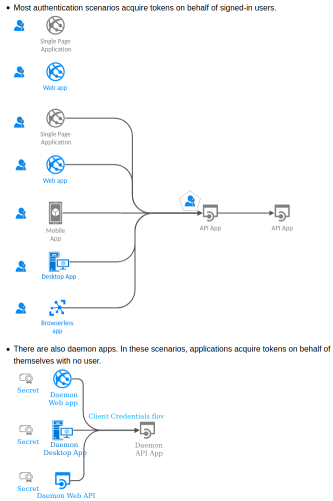
* Most authentication scenarios acquire tokens representing the signed-in user.
.. raw:: html
* There are also daemon apps, who acquire tokens representing themselves, not a user.
.. raw:: html
* There are other less common samples, such for ADAL-to-MSAL migration,
`available inside the project code base
`_.
API Reference
=============
.. note::
Only the contents inside
`this source file `_
and their documented methods (unless otherwise marked as deprecated)
are MSAL Python public API,
which are guaranteed to be backward-compatible until the next major version.
Everything else, regardless of their naming, are all internal helpers,
which could change at anytime in the future, without prior notice.
The following section is the API Reference of MSAL Python.
The API Reference is like a dictionary, which is useful when:
* You already followed our sample(s) above and have your app up and running,
but want to know more on how you could tweak the authentication experience
by using other optional parameters (there are plenty of them!)
* Some important features have their in-depth documentations in the API Reference.
MSAL proposes a clean separation between
`public client applications and confidential client applications
`_.
They are implemented as two separated classes,
with different methods for different authentication scenarios.
ClientApplication
-----------------
.. autoclass:: msal.ClientApplication
:members:
:inherited-members:
.. automethod:: __init__
PublicClientApplication
-----------------------
.. autoclass:: msal.PublicClientApplication
:members:
.. autoattribute:: msal.PublicClientApplication.CONSOLE_WINDOW_HANDLE
.. automethod:: __init__
ConfidentialClientApplication
-----------------------------
.. autoclass:: msal.ConfidentialClientApplication
:members:
TokenCache
----------
One of the parameters accepted by
both `PublicClientApplication` and `ConfidentialClientApplication`
is the `TokenCache`.
.. autoclass:: msal.TokenCache
:members:
You can subclass it to add new behavior, such as, token serialization.
See `SerializableTokenCache` for example.
.. autoclass:: msal.SerializableTokenCache
:members:
Prompt
------
.. autoclass:: msal.Prompt
:members:
.. autoattribute:: msal.Prompt.SELECT_ACCOUNT
.. autoattribute:: msal.Prompt.NONE
.. autoattribute:: msal.Prompt.CONSENT
.. autoattribute:: msal.Prompt.LOGIN
PopAuthScheme
-------------
This is used as the `auth_scheme` parameter in many of the acquire token methods
to support for Proof of Possession (PoP) tokens.
New in MSAL Python 1.26
.. autoclass:: msal.PopAuthScheme
:members:
.. autoattribute:: msal.PopAuthScheme.HTTP_GET
.. autoattribute:: msal.PopAuthScheme.HTTP_POST
.. autoattribute:: msal.PopAuthScheme.HTTP_PUT
.. autoattribute:: msal.PopAuthScheme.HTTP_DELETE
.. autoattribute:: msal.PopAuthScheme.HTTP_PATCH
.. automethod:: __init__
Exceptions
----------
These are exceptions that MSAL Python may raise.
You should not need to create them directly.
You may want to catch them to provide a better error message to your end users.
.. autoclass:: msal.IdTokenError
Managed Identity
================
MSAL supports
`Managed Identity `_.
You can create one of these two kinds of managed identity configuration objects:
.. autoclass:: msal.SystemAssignedManagedIdentity
:members:
.. autoclass:: msal.UserAssignedManagedIdentity
:members:
And then feed the configuration object into a :class:`ManagedIdentityClient` object.
.. autoclass:: msal.ManagedIdentityClient
:members:
.. automethod:: __init__
microsoft-authentication-library-for-python-1.37.0/docs/make.bat000066400000000000000000000014231520634507100247310ustar00rootroot00000000000000@ECHO OFF
pushd %~dp0
REM Command file for Sphinx documentation
if "%SPHINXBUILD%" == "" (
set SPHINXBUILD=sphinx-build
)
set SOURCEDIR=.
set BUILDDIR=_build
if "%1" == "" goto help
%SPHINXBUILD% >NUL 2>NUL
if errorlevel 9009 (
echo.
echo.The 'sphinx-build' command was not found. Make sure you have Sphinx
echo.installed, then set the SPHINXBUILD environment variable to point
echo.to the full path of the 'sphinx-build' executable. Alternatively you
echo.may add the Sphinx directory to PATH.
echo.
echo.If you don't have Sphinx installed, grab it from
echo.http://sphinx-doc.org/
exit /b 1
)
%SPHINXBUILD% -M %1 %SOURCEDIR% %BUILDDIR% %SPHINXOPTS%
goto end
:help
%SPHINXBUILD% -M help %SOURCEDIR% %BUILDDIR% %SPHINXOPTS%
:end
popd
microsoft-authentication-library-for-python-1.37.0/docs/msi-v2-in-memory-key-approach.md000066400000000000000000000162431520634507100312640ustar00rootroot00000000000000# MSI v2 In-Memory Key Approach — Design Document
## Goal
Implement an MSI v2 path using an **in-memory software RSA key** (no KeyGuard).
The private key is exportable, so standard Python HTTP libraries (`requests`) work
for both token acquisition and resource calls. **No MSAL helper needed.**
This matches .NET's `InMemoryManagedIdentityKeyProvider` — the lowest tier in the
key hierarchy.
---
## .NET Reference Implementation
From [`InMemoryManagedIdentityKeyProvider.cs`](https://github.com/AzureAD/microsoft-authentication-library-for-dotnet/blob/main/src/client/Microsoft.Identity.Client/ManagedIdentity/KeyProviders/InMemoryManagedIdentityKeyProvider.cs):
```csharp
// Portable (non-Windows): pure in-memory RSA
private static RSA CreatePortableRsa()
{
var rsa = RSA.Create();
rsa.KeySize = 2048;
return rsa;
}
// Windows: persisted CNG key with AllowExport
private static RSA CreateWindowsPersistedRsa()
{
var creation = new CngKeyCreationParameters
{
ExportPolicy = CngExportPolicies.AllowExport, // � EXPORTABLE
Provider = CngProvider.MicrosoftSoftwareKeyStorageProvider
};
string keyName = "MSAL-MTLS-" + Guid.NewGuid().ToString("N");
var key = CngKey.Create(CngAlgorithm.Rsa, keyName, creation);
return new RSACng(key);
}
```
Key points:
- **`AllowExport`** — the key CAN be extracted as bytes
- No VBS/KeyGuard flags — purely software key
- No attestation — MAA not called
- Named + persisted so SChannel can use it (Windows only)
---
## Python Implementation Design
### Key Generation
```python
from cryptography.hazmat.primitives.asymmetric import rsa
from cryptography.hazmat.primitives import serialization
# Generate exportable RSA-2048 key
private_key = rsa.generate_private_key(public_exponent=65537, key_size=2048)
# Export as PEM — this is possible because key is in-memory (not KeyGuard)
key_pem = private_key.private_bytes(
encoding=serialization.Encoding.PEM,
format=serialization.PrivateFormat.TraditionalOpenSSL,
encryption_algorithm=serialization.NoEncryption(),
).decode("utf-8")
```
### CSR Building
```python
from cryptography import x509
from cryptography.x509.oid import NameOID
from cryptography.hazmat.primitives.hashes import SHA256
from cryptography.hazmat.primitives.asymmetric.padding import PSS, MGF1
# Build CSR using cryptography library (no manual DER needed)
csr = (
x509.CertificateSigningRequestBuilder()
.subject_name(x509.Name([
x509.NameAttribute(NameOID.COMMON_NAME, client_id),
x509.NameAttribute(NameOID.DOMAIN_COMPONENT, tenant_id),
]))
.add_attribute(cu_id_oid, cu_id_value)
.sign(private_key, SHA256(), padding=PSS(mgf=MGF1(SHA256()), salt_length=32))
)
csr_b64 = base64.b64encode(csr.public_bytes(serialization.Encoding.DER)).decode()
```
### IMDS Calls
Same as KeyGuard path but **no attestation token**:
```python
# Step 1: getplatformmetadata (identical)
meta = http_client.get(imds_base + "/metadata/identity/getplatformmetadata",
params={"cred-api-version": "2.0"}, headers={"Metadata": "true"})
# Step 2: issuecredential — empty attestation_token
cred = http_client.post(imds_base + "/metadata/identity/issuecredential",
params={"cred-api-version": "2.0"},
headers={"Metadata": "true", "Content-Type": "application/json"},
json={"csr": csr_b64, "attestation_token": ""}) # � empty
```
### Token Acquisition (mTLS)
Since the key is exportable, use `requests` with cert + key PEM:
```python
import requests
import tempfile, os
# Write cert + key to temp files (requests needs file paths)
with tempfile.NamedTemporaryFile(mode='w', suffix='.pem', delete=False) as cf:
cf.write(cert_pem)
cert_path = cf.name
with tempfile.NamedTemporaryFile(mode='w', suffix='.pem', delete=False) as kf:
kf.write(key_pem)
key_path = kf.name
try:
token_resp = requests.post(
token_endpoint,
cert=(cert_path, key_path),
data={
"grant_type": "client_credentials",
"client_id": client_id,
"scope": scope,
"token_type": "mtls_pop",
},
)
finally:
os.unlink(cert_path)
os.unlink(key_path)
```
### Auth Result
```python
{
"access_token": "eyJ...",
"token_type": "mtls_pop",
"expires_in": 86399,
"cert_pem": "-----BEGIN CERTIFICATE-----\n...",
"key_pem": "-----BEGIN RSA PRIVATE KEY-----\n...", # � AVAILABLE
"cert_thumbprint_sha256": "abc123...",
}
```
### Resource Call — No Helper Needed!
The caller uses standard `requests`:
```python
result = client.acquire_token_for_client(
resource="https://vault.azure.net",
mtls_proof_of_possession=True,
)
# Write cert+key to temp files (or use in-memory with urllib3)
# ... (same temp file pattern as above)
resp = requests.get(
"https://tokenbinding.vault.azure.net/secrets/boundsecret/?api-version=2015-06-01",
cert=(cert_path, key_path),
headers={
"Authorization": f"{result['token_type']} {result['access_token']}",
"x-ms-tokenboundauth": "true",
},
)
```
---
## Comparison: KeyGuard vs In-Memory
| Aspect | KeyGuard (current PR) | In-Memory (this design) |
|--------|----------------------|------------------------|
| Key type | Non-exportable CNG/VBS | Exportable software RSA |
| Attestation | MAA (proves hardware) | None |
| `key_pem` in result? | � Impossible | ✅ Yes |
| Token acquisition | WinHTTP/SChannel (ctypes) | `requests` + cert/key PEM |
| Resource call | `mtls_http_request()` helper | Standard `requests` |
| Helper needed? | **Yes** | **No** |
| Platform | Windows + Credential Guard | **Any** (cross-platform) |
| Dependencies | `msal-key-attestation`, ctypes | `cryptography` (already used) |
| Security | ★★★★★ | ★★☆☆☆ |
---
## API Design
```python
# KeyGuard + attestation (high security, helper required)
result = client.acquire_token_for_client(
resource=...,
mtls_proof_of_possession=True,
with_attestation_support=True, # � KeyGuard path
)
# result has cert_pem, cert_der_b64 but NO key_pem
# Must use: mtls_http_request() for resource calls
# In-memory (lower security, no helper needed)
result = client.acquire_token_for_client(
resource=...,
mtls_proof_of_possession=True,
# with_attestation_support=False (default) � In-memory path
)
# result has cert_pem AND key_pem
# Standard: requests.get(url, cert=(cert, key)) just works
```
---
## Implementation Effort
| Component | KeyGuard (done) | In-Memory (new) |
|-----------|----------------|-----------------|
| Key generation | NCrypt via ctypes | `cryptography.rsa.generate_private_key()` |
| CSR building | Manual DER builder (500+ LOC) | `cryptography.x509.CertificateSigningRequestBuilder` (~20 LOC) |
| IMDS calls | Shared | Shared |
| Token acquisition | WinHTTP/SChannel via ctypes | `requests.post(cert=...)` |
| Platform | Windows only | Cross-platform |
| Complexity | High (ctypes, Win32 APIs) | Low (pure Python) |
The in-memory path is **significantly simpler** — most of the complexity in `msi_v2.py`
(NCrypt, Crypt32, WinHTTP, manual DER) is specifically for KeyGuard. The in-memory path
can be implemented with `cryptography` + `requests` in ~200 lines.
microsoft-authentication-library-for-python-1.37.0/docs/msiv2-keyguard-poc.md000066400000000000000000000100731520634507100272770ustar00rootroot00000000000000# MSI v2 mTLS End-to-End in Python — Summary
## Problem
MSAL Python's MSI v2 flow acquires an `mtls_pop` token bound to a KeyGuard-protected certificate. After token acquisition, the calling app needs to present the **same certificate** over mTLS when calling the resource (e.g., Azure Key Vault).
In .NET, this is transparent — `X509Certificate2` wraps both the cert and the CNG key reference, and `HttpClient` + SChannel handles mTLS natively. The caller just does:
```csharp
var handler = new HttpClientHandler {
ClientCertificates = { result.BindingCertificate }
};
var client = new HttpClient(handler);
```
**Python cannot do this.** Python's HTTP libraries (`requests`, `httpx`, `urllib3`) all use **OpenSSL** for TLS, which requires the private key as exportable bytes. A KeyGuard key is **non-exportable by design** — OpenSSL cannot access it.
## Solution
MSAL Python provides `mtls_http_request()` — a helper that uses **WinHTTP/SChannel** (the Windows-native TLS stack) via ctypes to make mTLS resource calls. SChannel can access the non-exportable KeyGuard key natively, just like .NET does.
```python
from msal.msi_v2 import mtls_http_request
result = client.acquire_token_for_client(
resource="https://vault.azure.net",
mtls_proof_of_possession=True,
with_attestation_support=True,
)
cert_der = base64.b64decode(result["cert_der_b64"])
resp = mtls_http_request(
"GET",
"https://tokenbinding.vault.azure.net/secrets/boundsecret/?api-version=2015-06-01",
cert_der,
headers={
"Authorization": f"{result['token_type']} {result['access_token']}",
"Accept": "application/json",
"x-ms-tokenboundauth": "true",
},
)
```
## Why Python Needs a Helper (and .NET Doesn't)
| | .NET | Python |
|---|---|---|
| TLS stack | SChannel (Windows native) | OpenSSL |
| Can access non-exportable CNG keys | ✅ via `X509Certificate2` | � Not possible |
| Standard HTTP client works for mTLS | ✅ `HttpClient` + `ClientCertificates` | � `requests`/`httpx` cannot use KeyGuard keys |
| Solution | Platform gives it for free | `mtls_http_request()` bridges the gap via WinHTTP/SChannel |
## Key Technical Findings
During development, three requirements were discovered for mTLS resource calls:
1. **`x-ms-tokenboundauth: true` header** — Required by Azure Key Vault. This header triggers the server to request the client certificate via TLS renegotiation. Without it, the server never asks for the cert. Discovered from the [.NET E2E test](https://github.com/AzureAD/microsoft-authentication-library-for-dotnet/blob/main/tests/Microsoft.Identity.Test.E2e/ManagedIdentityImdsV2Tests.cs).
2. **HTTP/1.1 (not HTTP/2)** — TLS renegotiation (needed for the server to request the client cert after seeing the header) is forbidden in HTTP/2. HTTP/1.1 must be used for the resource call.
3. **TLS 1.2** — TLS renegotiation for client certificates works reliably in TLS 1.2. TLS 1.3 uses post-handshake authentication which WinHTTP may not fully support.
## Auth Result Fields
```python
{
"access_token": "eyJ...",
"token_type": "mtls_pop",
"expires_in": 86399,
"cert_pem": "-----BEGIN CERTIFICATE-----\n...",
"cert_der_b64": "MIID...",
"cert_thumbprint_sha256": "abc123...",
"key_name": "MsalMsiV2Key_caf87a12-..."
}
```
## Architecture Comparison
```
.NET E2E Flow:
MSAL.NET → mtls_pop token + X509Certificate2 (wraps CNG key)
↓
HttpClient + SChannel → mTLS to Key Vault � platform-native, no helper needed
Python E2E Flow:
MSAL Python → mtls_pop token + cert PEM/DER (no private key access)
↓
mtls_http_request() → WinHTTP/SChannel via ctypes → mTLS to Key Vault
(helper needed because OpenSSL cannot access non-exportable KeyGuard keys)
```
## Status
- ✅ Token acquisition works (mtls_pop token with KeyGuard attestation)
- ✅ Certificate binding verified (cnf.x5t#S256 matches)
- ✅ mTLS resource call presents certificate (confirmed by matching .NET's error)
- � AKV end-to-end blocked on service-side issue ("Certificate import or verification failed" — same error in both .NET and Python)
microsoft-authentication-library-for-python-1.37.0/docs/requirements.txt000066400000000000000000000000561520634507100266110ustar00rootroot00000000000000furo
sphinx-paramlinks
-r ../requirements.txt
microsoft-authentication-library-for-python-1.37.0/docs/scenarios-with-users.svg000066400000000000000000002651301520634507100301520ustar00rootroot00000000000000
image/svg+xml
Page-1
Web app (Was Websites).1073
Single Page Application
Sheet.1074
Sheet.1075
Sheet.1076
Sheet.1077
Sheet.1078
Sheet.1079
Sheet.1080
Sheet.1081
Sheet.1082
Sheet.1083
Sheet.1084
Sheet.1085
Sheet.1086
Sheet.1087
Sheet.1088
Sheet.1089
Sheet.1090
Sheet.1091
Sheet.1092
Sheet.1093
Sheet.1094
Sheet.1095
Sheet.1096
Sheet.1097
Sheet.1098
Sheet.1099
Sheet.1100
Application
Web app (Was Websites).1101
Web app
Sheet.1102
Sheet.1103
Sheet.1104
Sheet.1105
Sheet.1106
Sheet.1107
Sheet.1108
Sheet.1109
Sheet.1110
Sheet.1111
Sheet.1112
Sheet.1113
Sheet.1114
Sheet.1115
Sheet.1116
Sheet.1117
Sheet.1118
Sheet.1119
Sheet.1120
Sheet.1121
Sheet.1122
Sheet.1123
Sheet.1124
Sheet.1125
Sheet.1126
Sheet.1127
Sheet.1128
API App.1129
API App
IoT Hub.1130
Browserless app
Sheet.1131
Sheet.1132
Sheet.1133
Sheet.1134
Sheet.1135
Sheet.1136
app
Mobile App (Was Mobile Services).1137
Mobile App
Sheet.1138
Sheet.1139
App
Arrow (Azure Poster Style).1140
Microsoft Enterprise desktop virtualization.1141
Desktop App
Sheet.1142
Sheet.1143
Sheet.1144
Sheet.1145
Sheet.1146
Sheet.1147
Sheet.1148
Sheet.1149
User Permissions.1150
Sheet.1151
Sheet.1152
Sheet.1153
Sheet.1154
Sheet.1155
Sheet.1156
Sheet.1157
Sheet.1158
Sheet.1159
Sheet.1160
Arrow (Azure Poster Style).1170
Arrow (Azure Poster Style).1171
Arrow (Azure Poster Style).1172
Arrow (Azure Poster Style).1173
API App.1174
API App
Arrow (Azure Poster Style).1175
User Permissions.1176
Sheet.1177
Sheet.1178
Sheet.1179
Sheet.1180
Sheet.1181
Sheet.1182
Sheet.1183
Sheet.1184
Sheet.1185
Sheet.1186
User Permissions.1187
Sheet.1188
Sheet.1189
Sheet.1190
Sheet.1191
Sheet.1192
Sheet.1193
Sheet.1194
Sheet.1195
Sheet.1196
Sheet.1197
User Permissions.1198
Sheet.1199
Sheet.1200
Sheet.1201
Sheet.1202
Sheet.1203
Sheet.1204
Sheet.1205
Sheet.1206
Sheet.1207
Sheet.1208
User Permissions.1218
Sheet.1219
Sheet.1220
Sheet.1221
Sheet.1222
Sheet.1223
Sheet.1224
Sheet.1225
Sheet.1226
Sheet.1227
Sheet.1228
Web app (Was Websites).1425
Single Page Application
Sheet.1426
Sheet.1427
Sheet.1428
Sheet.1429
Sheet.1430
Sheet.1431
Sheet.1432
Sheet.1433
Sheet.1434
Sheet.1435
Sheet.1436
Sheet.1437
Sheet.1438
Sheet.1439
Sheet.1440
Sheet.1441
Sheet.1442
Sheet.1443
Sheet.1444
Sheet.1445
Sheet.1446
Sheet.1447
Sheet.1448
Sheet.1449
Sheet.1450
Sheet.1451
Sheet.1452
Application
User Permissions.1453
Sheet.1454
Sheet.1455
Sheet.1456
Sheet.1457
Sheet.1458
Sheet.1459
Sheet.1460
Sheet.1461
Sheet.1462
Sheet.1463
Web app (Was Websites).1464
Web app
Sheet.1465
Sheet.1466
Sheet.1467
Sheet.1468
Sheet.1469
Sheet.1470
Sheet.1471
Sheet.1472
Sheet.1473
Sheet.1474
Sheet.1475
Sheet.1476
Sheet.1477
Sheet.1478
Sheet.1479
Sheet.1480
Sheet.1481
Sheet.1482
Sheet.1483
Sheet.1484
Sheet.1485
Sheet.1486
Sheet.1487
Sheet.1488
Sheet.1489
Sheet.1490
Sheet.1491
User Permissions.1492
Sheet.1493
Sheet.1494
Sheet.1495
Sheet.1496
Sheet.1497
Sheet.1498
Sheet.1499
Sheet.1500
Sheet.1501
Sheet.1502
Pentagon.1683
User Permissions.1684
Sheet.1685
Sheet.1686
Sheet.1687
Sheet.1688
Sheet.1689
Sheet.1690
Sheet.1691
Sheet.1692
Sheet.1693
Sheet.1694
{ø—�-–¾þ×Ñí«ÎôÜŒp@SQ¸§LuÕUçŽl>Zo¼F<íå…ï}²Öuµ�5E�–Þuåò�Ûý�ëWµÛ/¼¾y‡f�éCžïüùë|ú-ýúËåo}ÿóµòü‡·_<¢»þ{:�·¼ôŸ�§ªü§ß—çÿ|é¹V€è!#‚¸×yO`�ŽH�ý=ï9 ˜’ð¬øà›ñÎA±Ã"¥ìk�¸°¿—:¶mõMÊó®Êý»#ÏëJ6ýVžÓñ|ûþ»É�&0¯Vàƒ·—��2âÊå×Ýý«:°nµ;ÏoÞ¡�DXW.r:�K—.Õh4o¾ùf@@€{9ƒ�§ì>\a„�çÑZW””�`n}î©El…²]‹—}ñŸíï>~Ä éiWýé//\»9Œ�›»x��°´�zäù�ÂÂd�~Æ7ÿ|ü¡©�~Uð�»rõý«ð=ŒµûŽðNÄN®?¼ãÕE‡�–Ÿÿfó�š‚eK×VÈÀ8ú©wfK�Ox«èîü˜â#§ß{ïÏk~Ùn�²Uyryä«ÛaÓË?ž²Xµº×?ùªò³ù;;EÎÎö¹KVt¯^±ï�ïÄX×ëË«7-�üÄ‚÷�Ê€vKèÊÿν7ï‘ ³§V�9pÇ�ßÜ5T�Æs…O½¾B¡�õø
ÿê�i/>µÈ!��ý†¯\2ó¥'�¸�Ê�£ü“/þöçÉÃ3¦Ìi(J˜óÞc©]½vç™G'ç*bsîºsø§'„ŸÌòŸÿæÊ0¥ G:æ‹¿M{iÞ�H¡hWÁ¾^�Ä�X½ä wœã�šŸ^´TÀcpÒæ,½[6gþ‡I�I'�ö¿·Ï�÷^üˆæ�ìiÉ}¿å?÷éÂ�g=¾´uí«…çEV�ö•�¿ÈTò`íŠ�ûŽðNÜ•¹õ��jAX§JûÆ'+èC¶í£�%A�?�Ý´èƒÍ
��9åÏÏ%ÖMüõó\¶fÕ�÷!û¿ÿÞ�/�mÕî‹»ð|ܘ{þuÏŒ¼#EG�~±6OyáÛRôËg‹NAU+Í�ÿþåí§ÝñÀ¾µ�×ml=ãHÛüÙã‹�~Æ��Ò®±}üÕç`ª;¼õxCíÆíw,~ˆ `ï,w�š%O�9Zפܼ?cÞt8ùó¿?ØÜàOibf¼œÔ¸¼%÷ý˜Ê¿Ql‰�£Ž5�o}9zB¯]¨úæ寎X8枇ÞøpŒ_ÍCó?LÊH:ZÓ=õ×ï¥zóâíÂG„»¾mŽÊ”i�t(Ö~ú
]¿-¼{ÆŸ7n‰Ó—L}nß—ó#�}²G!²ó2�|ovø¼ùoÊ”Š�~úŠ>=�>ÄsgºìׯÊÒ'�>�o¦«äùÖ[ßzë-�‰Dï½÷^¯5è¾;‡®^w|ºý‡¼Y�îßz¶fÛWhÔ³�Î�»ýýy«ö6ž=U7å•e“3c€%œ˜‘2vþ��ÜÀÔ9÷LjêÐ�ûƒêŸ�÷ÞÖøñã÷�&f‡uù'åÿãƒùß¼rwq½yë
>Ù¹]I�›qßÇ÷-�.ŽË~åÕ§¾yõž2*'/%þéyÓ9¹�¨ÖO·ê·n]¡k8Õî°�˜9·çà©vkýÆ‚â·Ç�ß�˜˜�Æ�€Ýß.�úø?_™�þÙ‚)[jî³qC^\ôJûVÖß‹Êï�:�º�N�eéK_FÆsÖlù��yþ“§Fœ8x°jÛJGÎüÏ^�¿éÿ�ý¡X��ñƒ//Rž‰¸ç¿ÅO�›Õkw惉ùüòO�ʾ�€Ÿ>ûðÞ·7ÌNæ¾r÷mÇ;‡V¶Ã;¯¿’�"àÿú1÷Ž�`cÆ#ÿ~a’òÐÁ£;ø|ü‹Ë_˜¤üsqþU��å°Ý÷Ú§c™‡ÆU‡�þ¸D[üß�VnûîõYîÏ0¾s[©ìö�ÿx´ví;Ë*N�\¾áï-¶‰ŸÍÉ]|Ïâ…+wçû[çÜþ„ù½�îϳ¸Þqäâ!�Ð�ºd�Œï2�Ò�¾òêAÑ‚�GÛóîŒ ËÄäßùÁ+Ó?[0e[qáW½âyX����{cvܼiwh˜�g?zωÚ�MÕ·»Ï˜�@�;bjF”��ÑõyïCS&|)3eÈ�ó¦Óï_{¬$|ä�/ß—ÏpÂá•`ÿê§ÚÿíÙÌ;»>ÿoÕ��ãâ.œküß�ê-{¿a´ï¼kÉ·öØSã^\þÂ$å‚â½`·[��ô}c�ƒ�:æ¾WîŽ}bú��xEqÅ'ÜTyB�8añówò€Úý¿E©sßíΘ�æß¾»õOô!fì]æþªüf>y««œ·GEE±X,„PZZÚe«Òg=X¶ù»�v5=0>�ôz¿D�R©¿^oúð«oô¥[çξ¿ B
pñ¶|ñ×oîê
ü™ù)�L
�€ëÒ�÷2©�X,–“²éÔçÞY¸`Á¢eñ9™�ÀO,��ƒá¤zýƒKï`ø!itzj°iÑÂ÷GÝõðÜ;FRTïBÐï‘JÄ ö÷3�l�±ˆ À`1(ê¡
Ÿ´àí{cW.}áÑ×Vvëu~B1d��mïÖ�ß¾rÁ‚�»:ü"…���1�ÄbP�uùîø�É=�Õë¬r)�¤"¦‰9ì›åÏ�\³ìþ‡�4Ð ”ªwœún�P"�`Ž�=Â`0Š%Bä� „«~D,©\ŠÀÐÕRU¸`Á‚7לÎK 콧–.ƒŸT�b±¤ÇÐ
`Ûµ}ŸÅ‰�@§ëøâ���,xU‘šé¸äóD—�²+vÁ�|? p�¬Þ�l€<�$þ~–¶¶Ëâ‘JňÅ�cÍ–7¾«~à‘''d„]vP®zhz¯šóæŠÑ܆ןšóÏõG�ÀdD~bn`¨�zï‚CßÝP¾hÁ‚…ïmÎÉŒ×÷þ�qÇ’��þüÊ�ú_ßV,��ƒqE4��ÀÈ'–>žîøÇ+ó^Z¾EßÛõÝ?�,XPÇŠ—c�}ˆ{Uì0È\%ÏÓÓÓkjjJKK�zè¡Ë×ñ�Çù��›�Ì�HÉ�s|Ç��¶ó—=U£ò”_|ñÓ„‡æ/š=äð©��ËÒÚª¡?P½¡'8<´ãtÁÉ�‹ÖŒ�ÐÕn¦Š�”P�`°XºN•ÉÖ»iFœ7#§zçO*á°çîO«l¢�»+ûûïÖ‡çÜ����=b¸ºl?/";,""5J��RƦÝ}çø£›¿/ªí™1s†LÀbˆ•îUÃ�D{�ªò‡Å‡%�›=5«à§Ÿ\‰Ó�¿}Ô°p×�›Kf>û2u®4ùöÙ–Šý¼ˆìP…rÌôÙ!–ÒuÛJîzþoÙab„¸C†$ „¸òð„P)�„GœÝ·qû¡Š��¼:$ux†¼kýö#÷üù¥´äÌa�úU붊’o�›�‚�J�šÆD�ñ�wÝsG¯Ýq
‰ ¦W1ý‚§Þ}?®Ý¹åPÝ3û±aÑÌóÇ×nÚ�=éÉ{sB�0ü3zÅ™~ß‚DKÙ¦ƒuO.z!#o�ãì¾¢�$µÕ§Ýõð�9áî�(%Z��‘�"áĦ
�2D�ócׯþ¡Õ�qç”,.�@��©.ÛÏOºóÁ�¢ïÖl��óļñ �¡°„ô;¦æ–�9ûèsO·�ØPPR?áî»”~¼^Ÿç°Ì ‹û�Ñï�™5Á½�Ñþ<Äö�š�Ž�’„ÆG�ð#���¹Ó/Y�½<>9êÒx�<<)TÊA�¥O} ýðž�çÂ�Ÿ(+;32+1,a¨œ‹¢R‡Š™Òø�—��”<$�N©ˆˆÀm?®9Qï\ôÊ32�+ "ùîI™›Z¯Hˆ©:c{讑½v!ý��9ÛÖ¬.ïdß=sBLF�óì¾�uøž{Æħ¤Ñ�B�1ý‚S"�ݱ%
�Â�€ŒÌ´«VA숼˜ÈISò‹~Ys ´ýÙW^I�6&ÔRþÃ/ûãÆÜ>4\N�}E¯¯J¢���k�64þ&¤äM�H¿W¯²tδ©_nÏ�z:�/³ã‹W¿>näôtN|îŸsGG{:œÁ‡ä9Aø>Ò�Ž |�És‚ð}W¹îmôz½Ùl����‰ÄÓ±�Ä ä½yÞÒÒrôèѺº:«ÕJ/a±X±±±yyy‘‘‘ž�� ��ol‡³ÛíÛ·o///çr¹yyyééé~~~F£Q¥RUUU•——ÇÅÅÍœ9S �x:R‚��¼.ÏívûêÕ«Vë¬Y³ÊËËËËËŸ~úi‘HD¯5™L���Û¶m�€G�}Ô½œ ˆk¸ñ<7:@ÔçqD×÷Ýwß��†§žzŠÍf»\®ÿýïv»}úôé•••UUUf³�!Äd2Y,–L&{â‰'��Ò”H�×q#y^£…¹Ûðq�Ž’ Ï'¡)Q��͉�'vîÜ���ùàƒ�ÒKt:ÝçŸît:�B.—+:::%%%,,ŒÍfõÕW£F�ÊÍÍ�°Í�„�º‘v8:É� Q�ïÝ„«�g„
Äé3EQÅÅÅéééuuuô�£Ñ¸víZ‡Ã�\.wîܹ½{ãNœ8qçÎ�999¤J'ˆkës†¨L@'9 “�~¬�˜+üææf£Ñ˜››ÛÝÝÑhº»»¿ùæ›ööv�‹5aÂ��@°}ûv»ýâH¡´´4Š¢Îž=; ['��ÖçúœÏ�„�ÆXŒ�YŽ“©þ¶ã�Ð7ÌGïšÐÏPÚÚÚBBBär¹H$úôÓOé�
‘HôðÃ����¥§§ÿý÷«W¯¾ÿþû1ÆB¡�ÉdÆÄÄ´¶¶&&&ösÓ�áÛú\ŸK¸@_�ËqW#3’#�8ÅËÞÑtÕ¹€úF£Ñøûû›Íf“Éän5�9rdPP��…ÂÇ�{L$�ýë_ÿú׿þµcÇ��Éd��¦ÿ›&�ßv#W¶_MEi�ˆ���¬�µ$Ö˜ý�Ì�Èsðóóëîîî=-�Årq�@6›���@ÿ��;v�X,�‹å½]}�ÂKô-IÎéàƒc8L�‡�BµÚÈæÓÅ'Ï—œ3pÞ™>3.
��V«T*E"‘Ñxaf�©TÚ»ŒR©d0��c„P]]�Ùlæp8ýß4Aø¶>ä¹Î�£×`• �À—§áÅ,PŠÂâÍõÛšÙg\!ý��¬T*kjj˜LfDDDuuµR©ìééÙµk—P(Œ�¿0 ?((èÙgŸíì쌈ˆ(((hnn�5jT¿·L�>®�çíÿ8z!É� Q�_Ü‹ÿrc6v¼v`šÜãâât:]{{{{{{ppðŸþô§ùóç+�Š5kÖ¬_¿þÇ�,))�¹\žœœ,�
G��m0����®ûÎ�ñ�ׇúüç+n`9�����Xe�¸±�E]eþµ>àóùiii{öìÑëõIII �
�yä‘“'Onß¾ÝårÕÔÔ°X¬¨¨(©Tj³Ù
��ãããÉ 6‚¸®>ä¹Õ�Q�té²�õªN]@B�Bu:ègž�Àĉ�—/_Îãñx<�½�!”••UVVÖÖÖ�ûöí3›ÍÀãñ��Ç3Ï<ÓßM�Ä�€×�c©¬¬Ü°aC^^Þ¤I“Ü�õz}yyyDDDdd¤Ýn?~üøž={f̘1lØ0�†J�ƒ…×å9ÔÖÖnܸ122rܸqAAA�!„�P�uþüù���ÔÕÕÍœ9355ÕÓ‘�Äàà�y�ZvÏž=µµµr¹\¡Pðx<›ÍÖÙÙ©Ñhbcc§L™"“É®ÿ.�A€×æ9M§Ó�;wNVÓ=g‚‚‚bbbH†�D_yuž��1 ȈN‚ð}$Ï Â÷y2Ï].�EQ��FV_¹Öl6·´´\ù/.—‹\k�DŸxl°—Z>v옟Ÿ_zz:Ƙ¢(Œ1ƒÁ ç‡Â�›Íæöööððp—ËE/�€õëׇ††šL¦É“'»—Óå™L&Ƙ~á©�"�ïä±<×jµAAAÆ
kllt8�UUU����ƒ!..îܹs
cÇŽ�€šššÎÎN�3f���‚ÜÜÜ-[¶tvvÖÖÖÚíöÄÄDºü´iÓÊÊʸ\nFFÆe£Ü�â�Îcç퉉‰��`Ó¦MôI8—ËÍÊʲZ,�Ëáp$&&úûû�@uuµD"éîîv:�`6›KJJrss¥R©T*U«Õîò]]],�K(�677{j§�Â;y¬>ïèè���nllì=«�8�N³Ù,‘H\.�Èd²èèèððpz> ¡P8räH(,,�6lX]]�»¼D"±ÙlÉÉÉäê� .Ã|ë·<²a�‹U]]���ïïï/��D"‘T*e0�ííí¹¹¹*•ŠNÝ„„„êêjŠ¢är90™LºŸŒŸŸ_kkkhhhGG�]>44Ôårµ´´(•J2É�Aôæuýd,�KUU•¿¿lì¦¯å â�Èëòœ ˆ�çá~2—]œ_¦¶¶Öh4^y�Ý�nœ#�âÚ<œç›6m¢�´@Q�}�œ¾—N7ÂÕ×׳Ùl>Ÿ�ôZ÷ªÓ§Oï³¾º�R¿òà��„�òd{•Õj�‹Åuuuñññ›7o���×jµQQQÍÍÍ.—+--
L&S]]]}}½Íf‹‹‹kiiéêêJHH(--µÙlL&ÓåríÚµ‹Ïç+�ŠŽŽ�‰DÒÞÞ>cÆ�º_
A�àÙú¼ªª*66ÖårÙív�‡“™™I?J-"""//¯¾¾Þ]R£ÑŒ�=:888<<\(�êt:…B‘��ÕjU*Uppðرc���\.Wzz:ý°�Ïí�Ax�Oæycccgg'‡Ã©©©±ÙlV«•¾Þ6™L���—õi³X,jµº¼¼<::�0Æô¹ºŸŸ_WWWOO�—Ë¥KÒ�…ºå{C�ÞËc÷Ï1Æ\.wÈ�!111&“©««Ëb±��:Ôjµž?žÍf��2„¾[Îårccc«ªªè‡¥2™L¹\.‘Ht:�H$
e±X---999��G*•2™L‰DBz¹�„›·T}õõõ111ÐÝÝ��¢;½��1 ¼%Ï ‚¸yÈ<��áûHž�„ï#yN�¾�ä9Aø>’ç�áûHž�„ï#yN�¾o�Ì»B��@ä7‰ n�÷æ¹�CM�l©Çåjpa`"H‘ÃÄH”¥���ŠF�}á¥ýáN©áåB¼·�§ÊQn�
��Ê�e�øäy�����òC�$;AüN^—ç�àë
xa/¾/�ªº C��O@Ì_sº^�ÿ>Žÿw�Þ��þ2�˜$× âw¸ñóv�7¥F]]�/ìÅŸND�§@i'ŒZƒCDø/9è¬�~>‹«µ`sAœ?¼yˆb3�/gß„��ÂçÜH}î `Ã�Øߊ�eè‰! b�X4ÕZ�¾Šš�‰6̼ð�òm�<¹ƒš�Žö4c��|�Šôƒl%„�Ѳ“øðCh˜bÀ¶N�¾êFêó·ŠáÿŽÐs°á_΢í÷"î�õ~ý ��ˆT¦�ÒÍol�;š°„�÷'¡'‡ lå…µj�,*Ä{ï#çî�q�}¾Wev²��'ZÜׂ·×_£x�´�`K=ž?�•«±É�N
Þ+Á�o¥¬.ˆ• �F¹Á(Ky±üëyh�®×�ÌÖ Â‡õ9Ï»,`rÐÿ‰�\gs¨S‡Ž—žkè({›!V‚fÆ�“BOíij7ã7Š0‹�žÉ@§�Cÿ�‹�ìÁ_W…Á…�býax0ZwÆ»Ú� Â�õù¼=\��~¨¹�‡Pmll0]°µ�ñÑŽ³Ÿ<�ÝÏPŽª`X�ðY åÁšê�ÙûÔPød��€gÒ!D„žÜ��´‚ƒ‚…Y(+�2�è\7És‚¸Ž�écöî(Äa"�¸ÌHø~…d¯)¦ÛÉé(f���¡B�*ÓÅÔ
�],pg,¼7�}]�WWá{7aP�¡ÍØÿ-�„�ë[ž;)¨Õ„Høa�š˜�0FÐ�ȱG3;GLjû�
‡ �'H¹Àb\lZã]z‹\Ê�z^öv#6:€Â�$èÿ– ÂÇõá¼��X¸�//Å~\xs�ãýÉbM{|IeýÏ
ÜYãGô?”xØZ�ab˜��Ûê�ÃD.
ÊÕØè@î[w3bàÙ�tâ<Ü��÷oÂ��ä‡ôË�áãúpÿüçsp÷Ï�[Úƒ…(…Ù…~w�zr'�iò�KƆÁчPô
Ün„6#Î^�C� R�l�ßTâ÷Æ0H�w‚¸®>äùÊ)WVþB„ïÈA,¸´aü†Ý“«ªÑžFÌí��‡ ‹s�KŠq~�Ü��š�P§ƒõµT~(zbÈl” |ž×�W3ØáÊ�ŸLDù!À¾ô·ÅAÁÉóð§�˜Ç‚³PßCQ�Ä âuy�f'üe?þ¶�F‡Á¬x”¡€P1œ7AY'¬?ƒ�[à¾Døð6$�€{ö�ñ‡à�yN+ë„•§ñÏç@o»°D·©ÑðÄ�”�äÑÈ�b°ñÞŸOÿÙÓÓ3uêÔ²²²¦¦&£ÑÈ`0ø|>›ÍæóùóæÍc³ÙžŽš ¼�wåùáÇ��:���òàƒ�ÒK´ZíçŸN_¢3™Ì„„„¸¸¸ .—ûõ×_çäääçç{6f‚ð~^ÔšEQTIIIzzzMÍ…g)j4šuëÖ¹\.„�“ɼÿþû£¢¢Üå'Mš´yóæáÇ“69‚¸6/º>oll´ÙlYYYÝÝÝ---íííßÿýùóç…Bá´iÓd2ÙÎ�;�F£»|bb"ƒÁ8{ö¬�c&ˆAá�kÂ�=�UA’�RåÀ� ߊÖÖÖ���™L&�
¿úê+ú‚B.—ßÿý���)))ëׯ_³fͬY³œNg@@“ÉŒ‰‰immMNN�˜��ÂGÝHžo®ƒ‡¶R�;°�ðZ.z{$��‡›uwwûûû[,�‹Åân5ÈÎÎ����>ŸÿÀ��lÞ¼ù“O>Á�gggOŸ>]*•ªÕê#GŽ8�Þõœt&“)•Jår9—Ëåp8<�ÏÓ��h}Îs
Ãü]Ø`�pRðîa|g,ÊQ�L4��@§Ó¹\.÷�«Õê~Íb±âââÊËË� ´´túôéL&�!tôèQoËs§Ó©ÕjS¹œ� IDATµZ-ƒÁ���ˆ��ÍÌÌLHHàóùž��ø#êsžw˜ ͈��ˆq��;·œF‰�¶ŸŸ_?C�‰DZV¡PH¥Rº¯+ˆÅâÞe‚ƒƒ���Ýnçóù���F£Q(�>ÿüóýÜôÍc4�›ššª««×[g·Û§L™’ŸŸOªwâ�c¾õÖ[}ú�6�>.�›�äX›ê¬z2JuºI}®Y5nhT?C1›ÍåååyyyMMMZ6&&†Édž9sF$����bŒ��†@ HII‰���7nÜ©S§jkk‡�����ÜÏMß<��G¡P¤¤¤Œ�?>..n×®]���\.744”Áð¢FP·ÝHž÷ØáP;(¨N�òkÁ�'œ±�KÛ=yQý�ÅÏÏoÿþýÑÑÑ%%%R©tÞ¼y©©©jµº¸¸X¥RUVVêõúˆˆ�>Ÿ/“É8�ŽX,>zôèÔ©S�Kõ(•JG�����øõ×_×××gdd�;‚ÄÑç<×ÛaD�rRФsźêË\1N
¦ÈÏOH�ìg(,�«§§§²²RV��2$66–Ãᤤ¤ÈåòÇ�«Õꆆ�&“Iw˜±X,»víR*•Ã†
ëçvo1¥R9bĈ¢¢¢¬¬,.—ëéˆ�ß×·þp«ªàÝ#8\�KF¢¡�P¦æPMÇ�Nѧ�¥Hý„ý�Æd2}öÙg.—kĈ�cÆŒq/_½zu]]�‡Ã�‰DV«•¢(Œ1BèOúÓ �Íb·ÛW®\ÙÜÜü·¿ý�4Î�7[�êó25Üý�¥2A½�VWáSj8Ûi‰â趷pí’È‘¡�ps�ÃáÈåòªª*™L���í¾‚�‰‰‘Ëåùùù�'NLOOÇ�·¶¶Î˜1#""¢ÿ�õ�&“™��]^^~âĉáÇ“kuâ¦êCž/,Ä¥ç/¼va¨ÕÂy~¼¼ûh'{GwèÂlÄ�ˆÛè������ÅÅÅMMM�‰„Ïç3��.—���Äãñ:::víÚU[[{ûí·��2d¶ç9�¡aÆmݺU¯×§¦¦z:�—õá¼=ð�Jc¹d‰�ë^�Øÿƒ*ü$;óØ\FvЀ…ÕÝݽwïÞºº:‘H��� �
�ƒV«5��qqqãÆ�“Ëå�¶1�R«Õ/¿üò;ï¼3xÏM�ïׇ<ŸWp•’�”FË�S€žÍ�°Þ2n===---��Æjµòx<™L���>H/ȯaãÆ�ÕÕÕ‹�/F�Ó±� .ç]ãRÿ˜l6Û�/¼ðüóϧ¤¤x:�Â7‘æ�Ïãr¹wÞyç®]»<��á³Hž{…¼¼¼²²²Þ�û by2Ï�F£ÅbéììT©TW®5™LõõõWþ‹^¯·Ûí·$À[G&“Éår÷���1°<–ç���%%%•••<��Ïç[V£Ñh·Û1Æ�ƒA¯×��FµZMÿéNì‚‚‚†††½{÷R�ÕÓÓÓ»¼Óé4›Í&“ÉS{ÔOôítOGAø&�õ¯¶X,�� 55µ££ÃápTUU%&&ªTªØØØŽŽŽsçÎ��=�NŸ>íp8ŒFãرc�€ÃáDGG777wuu577wwwÇÇÇÓå'L˜PYY)��âããé!ëƒKXXXYY™§£ |“Çêó˜˜�¥R¹sçNú��\.7%%…žÂÙ`0$%%Ñ#RëëëY,–Éd¢¯]ív{CCC~~¾@ `³Ù��Æ]^«Õ"„Øl¶ZöÔNõ‡X,ÖëõžŽ‚ðM�«ÏÛÚÚ8��‡Ã¹ìÆžÍf³Z6›Íáp€B¡�
R(�ôã–ø|~FF��8p ))©¾¾Þ]>$$Äh4FGG�Òîâb±X§Óy:
Â7y¬>���ÐétYYYJ¥2888==�†��¢R©rsséÑæ±±±Ã‡�ïîî¦s�èb�‘‘ÑÓÓ“��í./�‰BCCÕj5‡ÃñÔNõ�ŸÏ7›ÍžŽ‚ðM�«Ï¹\nïNÝôt4¡¡¡���õõõQQQîkìÞÓ<†……¹ËÓÿ���H—w/�¤�"}–ˆ›Åëæ9àr¹}š¿µ¯å â�ÈÃýd,�Ë5:‡”——��††††+WÑw�ƒá&�G�¾ÂÃy^PPP[[�îûçN§Ób±Ð ÜÖÖÆf³E"‘Ëåêééq:�V«•^uêÔ)8wî�Øl6ƒÁ€1¶Ùl�‹…\å�Äe� ��¼çþ9�ÒpŃ–�‚è?Ò(M�¾�ä9Aø>’ç�áûHž�„ï#yN�¾�ä9Aø>’ç�áû¼åþù5Ø]€��‡ééP�bpòÞ<7:à„
�ñi5¸00�DKà®8”��’A91�AxŒ7æ¹�ÃávX|—¨ðˆ`4&�±�ठ¬�?´
‡‹aI>š�
,òÐA‚ø}¼.Ï]�–—ÂÛ‡ñ} Àf¢h ¼1�8�š�P½�þs��Ø‚_È‚7F �i^ ˆßÁëòü“Rx£�9�Ý—�§Ô0þG,çÁëypJ
›ëpu�Xœ àÿŽb� ·F�©Ô âºn<Ï›{àÃ�Xc�iÑèÞD��ªµ´�þvˆ��†îK�H�„�SÐÜÔ‘vT¢Âv���Pœ?Ü��J�ãÝ�jj�cDðl— |Û
æy��n߀+5�ÖÔà��ãÕá��Í�E8/�©��ÆNA›�(Œ�µc!��f1æ¦@jÀ…µ�=è•B|p�"U:A\Û
ÖÂ[ë€NrpQð%”ÙÙßPÎé`w�žŸ�N«±Ñ�v
��À�÷QNŒ³ƒ�‡‰Rä�,¿Xþ¯y¨¤�×tõw»�áón°>o5^x!ÆÆ�Wƒ�Ùÿ·ÙþÈÄt?±è†C)l��)š�
�н¿`��¶Öc��½˜�oæ£uµðÊ~¬¶ ç3�ÂÀeB¸�rƒÑ¦:œ,'5:A\Ë
æùØp` 0¤;NÕ±bÿ_¶fQIPj@ùm£óo8”�çah °� `ÃŽÆ�'�ÏfÀ{£�<œ�!"ôèv|¸�L�øËpt[8d�¡3ÝØh4zÛ„pô��9��"W�„�¸Á<�®„‡“Ñê�ÌJÅP.<
�%v5ö'�«���P¡��åbÒJ¸��Œ�€7óÑS;((WCÛ3H·Æ.û��|@O�ë=�B��‡ËåúùùEGG§¦¦Êd²Aú€GÂ�ÜHžw˜ \
o�D¹!è\CL@sq
3a:«:,ò*“·ý~|�˜��$��Y��RÝŸ{I}�,¼p�ÑeÁ�fäpA€�çÉ'Ÿ¼ÆC]<‚¢(ƒÁ`4�µZmeeåÖ[e2YFFƸqã$�‰§£#þpúœç�=0}=®ê‰2´$�Ý3%¼pwõ1C�“'Š‹
ëO( RX[�J!LŒ„-uàÇA6��µáû’�Rp¡Ìä(XœË8¥Æ£CÑS;°Æ
“#/Î-ç�¦OŸn±X���‹ŠŠÞ{ï½1cÆŒ�5jP?ò‘�túœçÏïÁU]�jµø�-8NŠ2»qP0{Ç9<¦�¦÷£F¿-�^;€Ï›Q«���´a&:¥†¿�“~Â�ƒx,ˆòƒXxw� 8¦Bc~ þoÔ è�Ççó““““““���Ö¯_¿{÷îG�y„~�;AÜ�}K’v�lk¸¤Åë\7ÖÚ�°)ÇÊÓýj�K�„��Z^
µZ<1�F†Â³�°ó^�ȇ™�©‰?Qã~Äçt`q�P�
[ Ò�å{u]~¹èèèE‹�Mœ8qùòåûöíó¶æCÂWõ>?¡�.�àÒñ¡*��Ù]¯æåš:éñ£7îÝQè‘m��A‚ôÂ’Ì Øv/JZ‰›z ͈'þ�±þ �›���ðþXÄ��Õù%�B·ß~{hhèçŸn4�ï¸ã�OGDø¾¾åyŽ�¶Ü}ebÅ"�ù��€®òwÆÂ=ñèÇZÜûn�� ïŽf¼{�� ƒ�±¨Å§ÕðM�ug�š›ÒÿmzFzzú믿¾téÒ€€€�#Fx:�ÂÇõ-9•BP
�à}®á£ñ¨Ó�ßTB†�&D€�
ðp2<˜„��L�ØÛ�ËNàñ‘è‹Éˆ1˜oN‡……=÷ÜsË–-S(�±±±ž�‡ðe^7^MÌ�µw¢w�ã?íÄÉ2˜��ÙA(H�mF¨Ðà-uPÕ�óÒàÕáH<øg›HMM½ÿþû—-[öþûï{:�—y]ž�}¢>
ÍI‚�jà‡�üñIlu�� �|˜�…>ºíâP��0a„C‡����äææz:�ÂgycžÓR�à�QðÎ(¤¶@·�¤<�ó`PŸ¨ÿ–¹sç.]º499ÙÓ��>Ë{óÜ-���>Ýa4::zÈ�!{öìñt „Ï�lw¥|Ô¤I“***<��á³¼:ÏÕ�øƒô#IJJ2™LžŽ‚ðYžÏóOJ�ŠÚà¨
à‹S�Wýûø…Þo>�Á`�n°ÄÍãùëóJ
6;ÑÞfìÂ�ç�êõxK=ªÕ¬x€ŸjÁ`‡?g�Á™nØp�òBÀA�Î
-�˜Ÿ�_W`�Fi�0.ÜÓ{Ò? UUUžŽ‚ðMž¯ÏÇE Â�` p¸ÐÞfÈ�FëÏà�1ðm%�€±a`sB��€Ç„»�à‡�|®�BÅ�ë�…-p¸�ægÀOµƒþ�_(�zÛ(zÂgx>Ï'F²�x¸�
„o*p^�8]Ðj€‰‘�¤<�°Á…�
� ¦�L�1�è‡7�ÙÐß^õÞA �8��OGAø&Ï繌�
�Œ ‡ÉQ�"‚`!Œ�ƒ£*` P
aM5tš!U�€�ëí�†¸¬=�Emx|�´�áïG`rÔ Ït��Gêsâ&ñüõ9|w;���¾˜Œà™ô�I;"ä’bO_XŽÖÔÀÔhˆ– È
F¯çÝÒho�&“I†©�7‰Wäy_ÍIºøÚ7’œ n*ÏŸ·��q³‘<'�ßGòœ |�És‚ð}$Ï Â÷‘<'nDcccgg§§£ ~/’çDß8�Φ¦&¡PHQT[[›·= ‡¸ªAyÿœð�£ÑØÙÙ���Âãñè?›››•J%ytœ—#yNü.�Euvvº\®èèh÷C`E"�ŸÏokk�����>4kŸÏ!çíÄõÙl¶ææf>Ÿ���zÙ“ž™LfDD�B¨©©‰ŒÃñZ¤>÷�B¡Ð;¯uµZmOOOhh(›Í¦—h,°ò4®ÐÀ¤H4;�ø,�Ëå"‘¨¥¥% €<"Ò�‘<÷�!!!.—‹¢(�Ã[N²œNg{{;�Ç‹ŠŠº¸�‚û6ã}Í�ÖÔàÓ�ôþX�\.7&&¦££Ãd2���yÏ^�@ÎÛ½�›ÍF�yÏÍ*³ÙÜÒÒ���¨P(z/?¦�:É�ÀEÁ²“Xe¾¸688X(�677Ûl¶[�-qm$Ͻˆ@ hhhðt��444DFF^Ù�Þ¨¿ð‚�¶�gu¦ëôª‚£�ç/þ<ùùù………Õ××ß²P‰ë"yîEÒÓÓÏœ9ãé(.àp®þ\«üPà0�†:Ê{�~/çÀ—gý�•Öö.ãp8„«?ˆ�ð�’ç^$##£¸¸ØÓQ\ P(®z��é�O§#&�Øàì`�¿zRQËL°».™!ãüùóAAA·*Râú¼±�®±±ñºWwl6;&&æÖÄsËäåå}þùç���ÁÁÁžŽ�$�‰J¥R*•½�êlpN�‹²QZ:q.6¢ýp N�Í©‹
½ä�Þjµr¹Ü[�/q-^—ç�‹å»ï¾£(Šþ“Åb………ѯ[[[Ý3¨1�Œ…��ŠD"ÏDysˆD¢ôôô
�6üùÏöt,��£wû·
îù�ïkÁIr´x8z{ªòÄᳩ�M»Ö”=ôâäóV«•t�ó6^—çv»�!4a„+«twÂóùüÂÂBŸœ5ñ¡‡�úë_ÿ:cÆŒÈÈHOÇ����jµÚ}�þîaØׂ� ¦�?¾�ÇKÑP�¤Ä²�µ£ÕU0/í‘“v/äuy�b±Øßßÿþý¿U`äÈ‘—Ýìñ�111£F�ZµjÕâÅ‹=~�Úßß¿¶¶–NZ;�+O_¼�wQPÓ…å�”Š]�;¿8…ç¥]è'gµZéÞï@QÔ©S§ìvûïÙœH$JMM�è�¸)ÌfóéÓ§gáàààˆˆˆ›�Ïuycž�@ww·F£ùµ��ÆÝ7Ë÷<ðÀ�¯½öÚæÍ›gÎœééX.žºWh@o»|:ÚzfLK]Y�3§§�›�HÀ�›ÍÖûÊÜh4nÚ´éwn‹Åb
–í—»±Éƒn<Ïm.(=�z;¤Ê!L<€!]�]«¸ÿ¼l(…ïIHHxꩧ¾üòK�‡“™™éÁH¤RimmB¡�óafÜU‹\r›½÷I»[DD„@ ¸ö†4�Í5Îà¼SllìuÏ+›››oM0×vƒyî°¨�ÿ·�;\�-AßÝŽF†�l`�0�ŒˆˆˆìììÒÒÒÆÆFï�éq3Œ�5Ên·öÙg³fÍš2eŠ�¯Õ�B�ãßóÛj·Û¯z;í¶ÛnëÝCþªöïß_XXxC�zÌŒ�3üýý¯]æ›o¾¹5Á\Û
æùÁVø¤ô©Kƒ�?³�Ê�EÌ�®eE"ѸqãÒÓÓY,VRRReeåÞ½{õz½oŸ·»��?>88ø£�>R«Õ3gΔH$� ƒ>u���¼nI•JEZÚ½Ó
æù1•ûÿ]þXw^�Ë�Ð�H9‹9�ÕNTT”¿¿?]“0��??¿èèè²²²�Ü„—KNN^²dÉ×_ýöÛoOž<9??_,¾É×HW�Éd���:�îº%�N'›Íîìì¤G¤ß‚Øn™ÖÖV??¿Á;äö�ó<úת%ÙY
��;Ÿ]ë÷Ÿ©êœô”�Š�¦L™R[[[XX˜˜˜XWW'��¦N�zêÔ)�û�]›R©|íµ×JKK×®]»{÷î„„„üüüÀÀ@ÿßê‚>àRSSÏ9�BèÇ�\»vmNNÎìÙ³ccc{¯¥(ª²²²¾¾Þn·+•ÊÄÄÄAtstÇŽ�§OŸž1cF^^Þe½³ìv{iiikk+ƒÁ� INNöŸƒ�Ìóé1�'E纱ŒÒ�âŒÜç�gÆ�´‡�2ÏÙlvVV–^¯ß´iÓôéÓe2™{•Ëå:sæLEEÅnîæ‘ËåL&³Ÿo’““SZZzðàÁíÛ·K¥Ò���‘HÄd29�ŽËåò’Æ궶6Š¢JJJŽ�?ž——wÏ=÷¸WaŒ‹ŠŠ0ÆL&³¹¹ùðáÃcÆŒé}C�¢¨-[¶x"êëÓjµMMMŸ~úéöíÛï¸ãŽÞgU�‹åСCtCã™3gJJJ¦M›���ï¹`¯âFòÜ…Á䀟î@/í�a§$ÂÖ±µ;JÁÐ�ü¤���H$�™LæNrŒ1ÆØ`00™ÌAT!€ÕjíéééÏ;DEEEEEõôô466ÖÖÖº\.‰D"�‹™L&ƒÁð†Ó�ƒÁà~ÝÕÕe6_�›Îd2çÌ™ÃçóY,–V«-**Úµk—D"INN¦�P�ÕÕÕå�Mzý…á¸f³¹«««÷h<‰DòØc�‰Åb„PGGÇ®]»6lØðÄ�OxÕ„y}Îs‹�Þ(Â;›`Z4|9�1aèþ�[�XÂcü�Yéi×ÿÿ¾(--�6l˜» ×n·÷®Àccc³²²�v‹^Îh4–””lß¾�ÉdNœ81333888((ˆÅò–~�«Vúå—_âããï½÷ÞÌÌLwzÐ(ŠÚ¶m›ÑhLOO¿ãŽ;´Zíž={’’’è_(�‹õè£�z(ðëøïÿ«Õj'Mš4nÜ8©TzêÔ©Þku:]AA�BhäÈ‘÷Þ{ïŠ�+��ÿùçŸËÊÊ–.]ê
3ÌôŸÁ`�:t(‹Åêîî^·n�Á`xðÁ�=�Ôp8�#GŽ�€¶¶¶Ý»w�…ÂQ£Fy:¨KxK;íe®=<À‡�¥öV\\¼qãÆÅ‹�ûF’S�µnÝ:»ÝÎápzzz$�ɬY³¼ªÒ»1��fõêÕî�Î…„„\vƒÝ�xcžÛl¶ððð‰�'þÖü�ÑÑÑÇŽ�»ÅQÝbf³ùË/¿œ3gÎ`�’}]�¡{££Ãjµ���„‡‡{CCtÿI$’Ù³gÓ÷��
Exx¸÷Üætóº€Àb±¬[·Ž�¡%“Él6›T*íîî���jµ�ÊËËM&“§Ã¼¹6oÞ,�‰¦N�êé@��B($$$$$ÄÓ��06›���{Y'_oãuyÎårÙl¶{Ô�›Í¶X,\.W¯×»\.VK/g±X^ø«9PŒFãæÍ›Ÿþyï¼IN�:^—*<�ïá‡�¾îr�‹5ˆnÃôÕ¡C‡ärùðáÃ=��á#¼.Ï�Àã“æy܉�'FŒ�áé(ú«««K&“ѽ¾1Æ2™Ìétòù|ú$Åáp˜ÍfO
ªï�µZ���èt:ÏŸ?Ïd2���
�ƒ{ £ÑÈd2½/�y�‹×±Ûí§N��t]b.ƒ1Þ²e�ÝËõàÁƒF£±¨¨èôéÓî‘|8&&†ÇãiµÚêêêÔÔTú›‘––ÖØØè%ó¢
¬?ÔÀ[???÷€�oNò¾rï�›ÍöøÌ�è�õ•��~üñGŒñ��<àé@�ßáEõ9A�7 És‚ð}Þ›çuuuôÍU‚ úÉ»ÚÛ{«««£(*55µ¼¼œÉdöôôdgg—””°X¬ÐÐP�˜Ÿ€ n�/Ï-��“É”H$]]]���QQQ,�KV÷ôô��>œÔó�Ñ'^ZŸWWW[Vú‰\Àd2é;êî��Aü~^šçf³yÚ´i��ãàÁƒpêÔ)—Ë��� Õj��:4tèPO�H�ƒ‰—æ¹{ÌÃèÑ£��;–™™Éd2].W|||vv¶gc#ˆAÇKó¼·œœ�ú�“É$IN�7ÀKÛá�‚�@$Ͻ�ýD>‚�@$ϽŽ{®[‚�($ϽNww·§C |
Ésï‚1îèèðt�„¯!yî]Z[[é™O b‘<÷.'Nœè=g�A��ò•ò.ÇŽ�‹‹‹ót�„¯ñº~2�
Îi®þ˜TZˆ�KÂóÍŸ§ªª*»Ýž‘‘áé@�_ãuy®28W�ÓýV&s™(RÊž“îáÙ¶n�—˵jÕªû¾¾žLæE�,¯Ës
ÃP%wáÖΫ®}eŒÌæôÍ�(,,¤;öÖ××{:�Â×x]žÓt��ü<7̽ä?ÅÝ{ëLv�MòsçÎmܸñ¥—^¢'±&ˆ�å¥y�%å@aƒÙ½ÄIá()GÌõÁ+sµZ½|ùò¹sçÆÄÄx:�Â7yiž�‹áïµ:-FÆŽ‘±ƒÄ,§Ë§ªôööö�?þxòäɹ¹¹žŽ…ðY^šç_ŸÐ÷þ3#„wWŠ�Â%l�jl¯¨¨øú믧L™2qâDOÇBø2oÌs�ðDŽï%ù�üdz%žŠçfÐëõ;wî,))yì±ÇÒÒÒ<��áã¼1Ï�6j½¹÷��‹¡2º–ìÖX�ך�NÄa¼»‚Çòê¦,«ÕzäÈ‘‚‚‚���E‹����{:"Â÷õ+Ïët`vB”�ˆ9���B(PÈì½Ä�ǨUÛ(ïyqäÅ��[�”Õ�ýù�K¾µ[½h´,JÊ�Èhú�¢(³Ùl2™T*UUUUKK�Bè±Ç�KLL$ëÄqãyþá üïã`vâ$�úr2J–�XLV��yi®†IXàÏc¼9A�N
jÔöŠó6&‚h�;FÆ‘ñ�ðÖnõÑ’#›Ï–
X(ýf±X¬V+“Éd0�l6;;;{ìرJ¥’tb'n¥�Ìó²Nxí¶»ŠÛðŸvÂÁ9�V5�íÔ�§zz/á±P²‚ëþSet–¶Y�@ç ZõN��Éø�Ö��)�¹^t¹+�‰d2™H$�‹Å��ÀÓá�P7˜ç{š€Nr� ƆŠ6¨lq¥†Ë®÷�ÃE�˜ÇÀ�0€ÝåêÝC.2**J�k ˆÁâ�Ï��Â�/’œ5I®š�B*ÞY{âtõÙ�‹ëš��L9ŸÉ@à¢p´”¸ôbž ˆËÜ`žÏˆ����ÕYÆÊ°±$�¨±jUÛ€Æv9'�M:G“Ρ1;C$,¥˜¥�³âä��ãÂò›ºu‚�¼nð¼]ʃ�f ç÷Ö�$¸ç_͉bdaónâõ§ŒÏ�°ÑckU×(�'爹¤n'ˆËõ9Ï��>>‰7�ƒû�Ñ–YÈ`�Z´oW‘=!UdÊ̸‰�CJ�âî~2‚êÕçõ£"?ŸñXÖÅ�5,�È�¤�› .×ç<ÿ¦�^.Ä�†�8?�=�ÈÓ;9�lûN•è)Ì�^ÿ
~¯()Ggu¹»¸#�á��X�øX«•Âø‡ò�¥˜5.FÀb Üp>‹$8Aü†¾%‡�‚·Š1]©R�ŠZñs{¨Â�À��ç'¥�9Âä‰òq1W¹�8ot�Ö›�ë-ÏäJïJ��Ö[
ëÍz«ëÊ’�AÐúVŸ—uB«áòd6#�æ·2B·ÔÃ’‘���ŸÍ��#üúD�Œ‹��€Õ‰—ìé�€¼p��xcüÀuÊ!ˆ?€¾å¹Á�ã".ï�#ÀYvÜ���Å�ˆ&0��5v;®Z“�@aƒy\4émB�}Ó·<Ÿ� �"¯ì÷&H�¨€‚DÌÏî
�¨w#��¼|^ç³]ä–8A��çù“ëUoîÖ|^¢»êxÓe‡´ô‹Ëº»_©Çùò¶«O�I�„‡ÇŸ³�ðÆø€¯Nèv�59)¨VÛFFò��Š�-w§Š�àh«µ£Ç¹â˜Þ…!Âÿÿ³wßñQTk�ÀgfûfÓ{o„„$�HBï ˆ��QÑkA½zír�D��õ¾Ök»ö‚�AAé½��$�„��H!½×Íîfûœ÷�
! �$��Î÷ã�³³³gž�™ggæÌ™sÄ �M>öâQÁŠµ§�MVzg„*ÒC�`]†¦^/Té¬ùuæÔ2CµÎúXœÃšt�BLäbòЀ�ÕG�Ã\¯Î?o�q��¬;Ô9!_ÿIBÝÄ0»ÎýŽ�ÓéHw�⧰Á’^n˜�q™�>Vlà�â}e>?RÿìP§›�]{Y³†R:{öìÎ�„é9ºb?�W�à(
p¼üQz�Ÿ¬åïî˜ä�s#tþõ9Ã07�Ës†éùXž3LÏÇòœaz>–ç�Óó±9B§G�Þ®��xã–scéõú„„„[·z{{ßsÏ=ìšœ¹ Ú˜–áÎ� ¢-§4Dµ8ªâéÎ_›2‡ÄvØm¡üz¨¤�ÎÕ�ô÷Ä‘bº=—ª¤dÛ�2Ì¿£�ucYV�N§ÕjËÊÊ233333årùC�=���-�u�û�Lw×Æýlb ú¹“´*ª��OJbV– “�Ö7&tTX'+pç*êa‡qÁh0À* J�³��FÐ�é§ëŽ���wÔân�½^¯V«
��Çqvvv¡¡¡÷Ýw_DD„L&»ú‡�¦ƒ´%Ï-�ÊuX3•¼žK™k�í¹��Ÿ@¾ÒÞÙ½£ÂªÓ£´‘6�ȫɯ=�bHE�Š�ÿ
Ö�À££üìš�uÔân�‘H$•Je2™J¥rss“J¥���s+ºî<טðônšPŠ‘¾xc(q‘Fîݹ-Q«õu’ö�Žè¨°F�bã�œ“�C|/L<\„Á¾dáHòe��ùL�îÓQ‹c˜žíºóü�£tÅi
@�=…ˆ÷">�"ÎA¼:G4µžëÓAý#ð�“{]4åh �î¡ŸM&}=àcOî\E§…�•¤c�Ç0=ÛõÝ
S›ðõÉ�/Kµt}�Í®§�0™,_¤vL»´ŸSqßZz¸è””rLø…&�S?�ðµÇ„�ÌYKËì��2L�w}y~¼�jã¥É\˹òêâ:ÎygAÇÄt €®>Esj/,H.‚B��Ÿoý]§ÇƳôÑõ´º©c�Ê0=Øõ�·+EøgÌ¥�Zðè§�ÔÓ9g¾CÛÉä7 ¹��A¬7"ÜpðQ"åa¾�ËÃŽÔY�)ß‘�e˜�©�ídn¨Gþ¤?§Q¹�b��Aý‚Ëü~hM8P€�ç��±1�s%]±�F¨��x¾š�¿Âcšv�L »i�1L÷Ö��çf+LÖæ¿ �BÜ©Ñ0L÷×�óœa˜ŽÕÍ�ìd�æ�°�ä�w%‘‹`'…�
qÞ�uÆ¢½ˆtÇpÖ©3Ã\«îqÿœ��ZxÙ�@¹�ž*\¡;)†a.£{ä9Ã0íÑ¥¯Ï�†é�,Ï�¦çcyÎ0=�Ës†éùXž3LÏÇòœaz>–ç�Óó±ßõ(9´zùÞ|£^÷7��•G>ùõ�¨U§» }ô��Nó÷�½wýðñ)ÍÅ“�O¾ùåú���õ£7ÿï
�±+ï�¶xÌyó�ý(�_nDá’�óÿ·Mz~\ñË?¯V]]×ëýýý[¦�{¿iÓü
hÖñ‚~Ó¦M�J�MÁ§ï½™z:î[_„›N,ýtHLb§?u_ýÃÏÿà�Ú÷ß��{ッx‘Økð¬�î�j+'mÓÿ¾Ù™/�t·=±¨OùŸK·UôŽ�ùH¼øÂÇÇD,«ÞýD�Õhä_zë]Ûg·~óÖî<±‰>þÚ[Šœõ_¬;!%úø{_š54��͇�æWI¹ù%w¿ô–8}ÙŠC%¼A?åé7n‹tý˪¥¯Ì½¿÷€!9Y���\væsw�7-ýð{ƒÑu_HÌÀ¢üsƒç¼��8±k�OàøÒÝ_¬8P PéËKÞÌ[ûÞ¦,�Uo~xþÒ‚�>Z~X22ú‰5Û�FG)ß|ë�3/…sÌ[óÇ?×*fÏÒ--_󾑽@_öÆüwšÄ2j�¶tñ“'7\(?ç·wÖŸ1E¸�9\Üsá%[1ùù©½¾xáññï½q͆!qŽ�]i/UŸýäËo½j¼—Nq~ÿüzxz�X4E¯½þù³ï¾}ðË7[6Áž�ŸmÙ[æOqýËê�6ÿï�½�Z‹žÎ]øfÃöÿlôv1�•‹">š?§9�Me_üß›ygÎM|æ�;Ä%KþOOdÊ Q‹ÿ5 õ.qÑ&�� ë–å”—žÉ¯Œ
p��¸î‹U‡Kx“yÚ¿�4®_VZ¦ÎÔ�{Ú�ý‹ÜÜÜ°°0��Ÿ½{÷^òVþŸïÍýd�¥”Òâ1qw–ª›N®XüÜ· ï<4i}v¾±èži�é«�Å�~RÝd\¹höç{��Mõ�O›Qdn.!/iǯ¿ýåýg¦Íû)ç÷·ï^¸\o²\ôñæ�-‡6¬ùý÷ß_{hÜ�›Ïmúàá¯�U=6yô®�gKò2‹j4s'Oþ��Á¸÷óçÞÛ�³`æð�%ú‚MïO›¿L�ô÷Lº«*sí”~¤7š�¾zyþ²ã_=3ñëC•‚¹xÒíOÐ+Äóï�Ž ‚ñù;ÇŸÔä�ïwG�ÑZ•ðõ=¯¯|sÎmË�œ¬*Î9[\wñÊÓÜ1jºžÒ9Ã�e5ššR—Ýóê/¶7„œ?¦=ÿpåUZwzí¸ûæç�Wf¤�T_ü]l%,Ÿ÷Ûk�+*
Oe—®\xï·GËuµ¹+×�¼x����4½Îh9ûû;Ï}› -=µâ—Õ¿®ü*nÜÃôü&Ëúõ�ù?¥¾=g¶sjƒ¶â®qw§nýxæK_�•W§¥g^²3´Þ”šäŸ†<ò¾Y�þxëÁOw�Ì��—Ùh2�í˜ø໶2?f⦢ª™S�¨Õ6e�üóH^É=þúû8ë™Ïw—íüø±�·Òê]�ç~pà›ç�¬H1�õK��¿¥ ¿uÌ¿fs�ÆÚu+YûÛª�C†&×·*?'còmsêõƬ?Þ¹cÞO§–/\¸ü�¥ô�»'¦êͳ'Þõ÷{é»�L>R'´^�uÕ»&>¸ðÝç�ݘZzÉîÔzo)øëêª;~ÛŒ��
Æüí�Í^ºvÛ'sçÿ|‚
Æ�&M¯mžÃ<;.&©RSæÏq�ÿ'á»�_ùþ¨Ñ {ã�S�ªŠZï��o²]�ç~ 4&M¼÷-Á–BÅÔ‰÷Uk�õgÖMšû¡pzÕ´—�Îo¬Ëœ·§¤¤dgg—––îܹó²G{�…‡··½ÜÙÅÉdÔ���lüú�…Kþ+±wÔ�.�!örIiqÁ¾5Ÿ.xým£Òñüé˜eÙ—_Y�¼"#�L��€€ÀÞ21ÉÇ�@—óße›]|ƒBýÝ
zۇɢw�'ÿqá›ÿͯ«)3¨‚œär×�±®Ì�ДW8ûùK%Ò€@_�ø¶†wê��JôMêÒââ¬#‹^[ðç©F%USâàå!S:ÈÝ<Ü ‘)xKmq™K@°L"�
ò/+/�d�¾îDd'�ΟOý%�ÿ@B$^ŽB¥�J/_� çæåY[Uûô’÷ª�üþÚâw2ʯp¡kçé«�Ëí�&cóJ! „\y•ZÃ&Ï»3èÛ�Þú|Íîªâ‹¾‹„�Ï¿ãT°kÉÂÅ�³«JKªC�=�Î!÷Ï�qÉ&Pºz:Ix…�ÂdÔïÿýëS�IXŸ�©Õ€ó›ÌVZI™9,À^ªôp±ÖÙ�}ä¾�ã§K_ÿiKšå¢¯qé¦ôõó��âííZ][�{/_•Xêácªmu�e©R��g¥<|Äô!A·_þ¢põ��õ3�ô„�r~Ø�ââ²àÐ`±D�èëX^¥o�së¯i›¹êÄæÕGÊ�B#¼]8ƒ¾Uù�B“ÔÝQ& ê�Ðz�o}�|å½�¶xZ¯‡�àÜ¡í›OÕG…x^²;µÞ[üþººêJà�¨’JüCƒkJÊ�øøxƒHä¼ù¹º“ow;Ç P¡ªª¸°8u÷ò�¯-*�T&�¹õ.qÉ&³Å‰–5g©iä=]•�Ç 0CEYó[ç—p™<Ÿ0a¬Y³&L˜ðÈ#�\~Oý‹~Ñ‘Ãg<µðßOß}ï�®h�*%*²oÔ˜Ù��¼<ýîY!JÛŒæÌbã˜A}kJK���@A@.óqêâ:iH\„oIqY“N�Ð�;Uõļ×��a¿þ@q¤³6!¯¦*ëˆà�i»:q�
.;y¢V]›”œ� +«døè�–ª’�½Á¾Wd¨Ä¼�¯?2kÚ¸�‘ç7æ…ÿ»ôéS™žT¯Õ&�K‰Šês™oø—xŽ�KÖª+O•K‚�јwúT…úäñÔ€��£Ç³î{ú•Wf÷[»þ°º4;§ì�z±ã9½¶Î`º(�Z¯�IAšÎcØÂ7�‹NîTû^æ»�O<>î¡g�½8cÓoÛûD†�ÜŸRq.aá{+.· šåfåÅŽ�ÔWU©
z�^�Ý�ˆ
·OH.j¨8Y¢�²œ:j?`æëK^-Ø·®‘ê’SΞŸëÒM™™–R«Õ�MËé�â�úœ¤ìªÒãG�Áa��)öó´äd–ÖìùùÝß�œ>§³���VRVªÕëÁó:uƒÉB�ô�ŠL>xX«©9~Z��`×:æÖ_Ó6¥âÜY÷ˆÁA.¤´´Nkö¼P~
¯ÒääVÕ�:pT”övÕµ•�]eF^݅⮸—‚ç�µµšÈVëÁ�ð�1óÇ×&-|ó�UØåv'@qëÕe›ä�!)J)kÐ&�H
�Œºü�P—s<»¦4å˜}p¯è~}C�L\øúü™Óî�õ¿¨+•K7Ù%Ä~>–¼¬*u^ÂA·ˆ¾—¼É/Y²ä’I2™lÚ´i÷Þ{¯§§ç%oY´u�¹ol/OÀRRÒ8lØ‹®¾Qæ3göÄ£®Þ—tÊ;zp¸—¢¤Ž������[°ç��‡’U�ýúõò& öuÐüúÇ>ß!SUEÉŠ��•gHß §Èøþ�>îë�v^\ñáGs'MŸžžœ�ÓÏßÁ/ÎU�úëŸ[‹,þ�?xçøaá®\•t¦þ_/?ãé � r
R֜ذ'5´O¤oDü„�.«Wm’…Ž�¤ÙBø]#½�Ö¬ß^Ø$�6´¿¾º,lð0¥¡¡ž÷ŒíåYQR�?yv�)\ùÇ�ƒÏȧï�ÑTSê�5Ô[!”–Ô���÷×xÜdåuÄ3íÐŽè;Ÿ��©ücÃ1WZq PöâÓ³í�sW¬ù#½‚ìñ9¹�ij÷>þ�ZZ\1tÔÐÊ’ÒøáCEfM©N54&�”Ž%G¶™ÜûÈ�\v•F�{&nX±eRÈm÷N�5:DRÑò]”b�g¬X±â·”³u�Ì}dìØ�gö¬Þs,ÊìûFŽ�Ñj�¸—¶Úd3ÆF¯_µZg�=>H[B<”r—áqa&MÑ!dö]£�Ö.ßw<÷�g_ŠòQl_³|ϱô�3���*^ôæÏÓ¦ŽÁ_6¥ÜÝåd±A—sLë5zî´¸
ë¶ø;›·&V=óü“ÎœÖè�â+×zF�›Òßþ×�k‹ùÀÙwÞîKs×í<>`ò]ÕiɱSïÌÞ³Ñ1´?ˆræì{Õ™[6í<�yÇ“·÷÷h�s¬¯Ðò5�Ýí¸��¥ïøíT�¹kJÜñ�Ós³bšË¿c|¬ŸuÙo[í�D§ë]žxtzöžuÇrë{…ùÆ��ÞT^>pHLù�÷RØKL�öd?õâ?Ž�_�¡.|™F:ýî{¬Ù»…È»†:×´l�s]yËÞ2fLÿ�«ËVšÈ¹¯‡ù—5ëKøÐ�æN…¶JæÓ/Ä]VYRÒoØ0� ¬N#®;³éXõÓÏ=��;PwzçÆ]‡á�:0Ú¿¼ôJ›ÌM©p�>À¿¤J�>ÈV¥%��tþuåšÌ
Å�/<äÌëK
�Cû�4§î_¯Ï™«ÚôÁÃ_�ª>ÿ*Ê´g:3š›Ç°mëžË¾¡IþiöÛ¿Ÿež=ñ.ýeç»ù²~�6ï§Î�¢ó±þdÚBWWa–»9Êy€¥¤´Ö×Ç£“cêTÔÐX®#Þ.*Û˲’2/_ï.Ñ·—ISª¦>nö��G'cyÎ0=�k÷Ê0=�Ës†éù®;ÏóR�Ju�°àœ”�eúv• )ÊHÏo°ý-9�v®¾�Âb˜žè:òü§�Þ�výôaru�,xÇOï¥Ô¶«�J�£=¿€ IDAT%4ã�ÿnÊ1U�ýcåÞ¼��‹az¢k��E_xô«�–å»÷ó�=¸æ³„Ò4e¿�Þ|0ö“7ß*1ó�UÄâ…�~ýÒ¥íÆ?ü×Ð+5Ì� ;½é¹UÆÏ^¹»ôà�ßž�›êròÇ]�<�ýãß�ƒ´ÇÞúj³Xdõ�9ç¹�ƒ|óú³Ã�|.Þÿ¿7�IW½õèÒ�_œ0.4ÁÜ/ç³ïË"ÈâqÈ>¶éõÜUe&Ÿ/?~Y�øäÅÇøÈøº³§�-YZe�[¤ž‹�½ä(�€_Þ|<ø_ß
wyê©Oÿ÷áÜ+…ºüÕÇ4nî#gÌ��ápc¶�ÃÜX×z<—�����ôøƒ·�¦€þÓ–¾÷Zâo¿•ì_žÊ
zçí·Ã´;7œTW�eGL~䥩}öçY_^°¨xߺڢãG+Tÿ|þ•LéoÈÞ¾<×ñ�w޹çôûí¹”½‡”�ܤ�6ü¾uÐð€w>;¸è�¥o<�óþgk2�n6��{ùµ×FE4߯
÷‘�YQ]t&lÂ?�½öÀÆU›
÷.ÏT�ûí¥ýIk�+m3ÔU�k-,ÅÅ�Æ+‡Z]˜Ñwæ¿GôfIÎtW×>¾�!�„#€4 ,@¦lPÀTYT�}üøÂ�IúzÑ(�î¯íÆEa“çÝYûíGo5ȃç�“�g�YôZ•YÛØËO
¼ëÔ(Ë®Óy�*<�ó×,ÎËûpÉB���ç�ƒïûwþ²_Þ}ãO·A�Ä„���4nÄšuû��’ûƒ„Ý;÷yÄ�!Ø��!��àïßK.•»ÙózssÄ”8ùzËy‹‚šÌ�¥…>Aã%�Ih�×–Ò� õínJ)dW�U͹††:ó¬Ê’鶮cç%ÔT¯¾¨¯€Àèþ~aq��.œ5cúÐ~ç�ɶj7Þxµ†ÙwÜ3é×Åó¼FÜ%•øEG�<üÂü��à® #Ï$�í}Çco,øWÂú5¶9e½FÒ´o�—�#�…|ôŸ?G��d›Îƒ¨«ë�\eĵ È~§“�j´êCÇÏõ�ò³M´SÚÕVjÕ��%º¿�•0Õ�eäW^ûêb˜®ã2íÛ¯DN«¶§4öó·kiÍ;îž�TuélÝ]Ç{�‹‹l¬(¹´Ýø˜‘'®Ð0Û\Wæ�5<8( {ÂŒ§ÿ壒ÇöqY³j݉³Uq#†ù9˜[¾21%wúÃOö¶µx'r}YFȘÙ�úùžH«{ä¡ñ¼¶Öè�2¼�Ç–�û¢ãÂ9‡ ¾ANuå%�qÃ�ÅPSV�6x˜=Œ%�Ö‰3g(ª’×nÙç:pæì1‘¶Çï��<¶®YSbr�õr�=jЕÚ�ÛÚÃs�IÛ²MqaÞ7fC0Ì
ÄÚÃ1LÏÇ.:�¦çcyÎ0=�Ës†éùXž3LÏwí÷Ï»Š¼�¤U!·��:ê©$áΈó„�ÝÕ?È0·¬îTßž]�÷ŽÑ]�p�ÁÇ�.2Ô��ד�w‡a^@}T0Yak¬*á0%˜Ô�ñõIZÝDÇú“ÕwpÇ�$Ûî"k§�…�ï�ë�W"�sÓ´½¾=77×jµöïß?((¨ebMMMVV–X,¦”šL¦ÊÊJ��vu„š×€íùô½‘Ü�éÍÙûi
�%P‹�)x‚wF�¸VKX2”<¾“¾9�2¾=‹e˜�¥íÇs‹Å2`À€ÖI^__Ÿ‘‘áììl6›-�‹››[VVVMMM{âÛr�Ñ®dR N×Òÿ¥aÁ!Ì?H5&zg(’æp£ýÉìMôt«~iî���ì/jÏ2�¦§éÈz¸””” úúúøøøøøxÛˆ«iiií)óh9�ì�@�ˆ9<³GøÏ1Á`¡�÷%Ën'¡Žøi�™Ù�Ó×ÓoÓñi
*t�pèï�Ô*vêÎ0�td;�JieeeDD„L&����ž™™Éóí:�.×¢·�ŽWÀÐjôìÁ^PŠ�ÀNŒwG�‰þs—@)Ž”’5S‰—�™ešo¿]-��†Í#„ØÛÛûûû÷íÛW¥Rµ'$†évÚ•ç�ËECÿ�B<<<233GŒ��àôéÓ¾¾¾¹¹¹íY„„‡L�þâN$¸Vƒþ‰8„:ÁVåŸXf��N
iXXXë��”ÒÒÒÒ={ö¬Zµê‰'žˆ‰‰iOT�Ó½´ý¾šZ>räHëcf¯^½
üüü***x{{���ÇÆÆ:99µ9¾î¢�ÅÿÆ“Þ?Òs
Í¡~2†{!öÂ<•M˜±žÖ�ÐÛ�½�p¨�w‡áå¸Ët0c2™��>ü믿>õÔSýû÷osT�Ó½´ëþ9¥´užs�—™™¹wï^___eeeS§N
��¸r�W÷s�–�¥g�#a?Ð&3]4„ÛWD7�ÃÑX<„è-𳇄ƒÖ�“�J1¾OǼ�¡Ù\Ü¥c½^pàÀ��+V|öÙgr¹¼=±1LwÑ®z8B�ߊ �)))Z–RZWW×ÐÐ�’’ÒÎvµ3z¡²‰nÌE�šN�%O÷ÃòÉäí¡dm6b—ÓÁ«èô?©•ÂN�g�¤<Ì�üíÉ€¿½—7bÄ�ÿ¤¤¤ö�Æ0ÝÈuô�wU‚ „††ŠÅâaÆõîÝ[$�
�2D*•�Òö‘3e"¨�äóTÚ`ÀcÑ$Γˆ8�õÁ�!äÃãTgBž�Iå8[OŠ58R†w�Ñ�ƒHü•�æ�!uuu%%%���hs`�Ó�tä}5‘H¤R©FŒ�aooïììLÇ��«Já©„Ú„ÉAH*§ä�™½Ú�±R�¥�¾¬é*Ã\³¶\Ÿ‡;ãÿF’œz<¶ƒÖ�ñS�õT"£�¹
ØtŽÎê�G¢H��Èx<Ù���±§ˆº+±í�u–#Ø�íIr†aÚ -y~¼�Z3ž�€ÞNP�á*G�WÜ�N<�ÍÅ•h@!�G஀“�‘.x$šHxp�¥Z˜¬»†a:T[ò<À�'*°ú�†ø�{Ì�Hö�Áh…��óâÉog¡5£X�O%ÎÔÁQŠ‡"ÉþbÈEà€I�d_�DW[lb�f¬§«²ða2-b÷¹�¦}ºh¯��ÿØFWN!å:¼´�þ|;9Z�B0Ä�b�'*¡6b �Š�Q¦…ÎŒh7dÕ"Ä�áÎÈW£¨�~öPIp ��
�‚á�×��>|811qÞ¼y�ôý�æ¦êê÷Ͻ”¨ÔÁhEA#Òª°ú�R«°·ˆ†8âíDê«ÂûÉ4Æ�Ïí¡‘®øï j°â£dÚÇ��%S1‡UYÔEŽŸ3¨‰5Šana]=Ï�VHy�.…UÀh?ä«iz5iÂñ
ø©ˆ½��ö�´‡—��í� J�1�79¤"4�á"C��¸* 3wö7a˜ÎÓEÇ]:[‡Ê&ì)BJ%�?˜ˆ9$–Qž#ùj<�EŠ4p•C (Ò B‡¼†æË´à8ÈDØ_� �� *t(Ò ¸�y
ˆkW‡”�Ó�uÑës� j�$�Ä<œ¤ @¥�b�F+¼íÐ`„Y€½�VŠz��¥h06ÿë"‡U@“�
�¤<*›à$Cƒ�* T’�å³ësæ–ÒE�ç—¤%�<•�^¶�†Aa� ¹»8Û¿àÏÿ�æñ��¬Ñ;skëê×ç�ô_—Ëó"
¦üAsê‘U‡×�(€E‡éÙº�3¼q„&UtZx�Ó�u¹óv�B�!�áp)lé�îL��°¯�
1�y¡—#²jQÝ„‘¾ÍçöF+Zî®�6"¯�üTpWàh9Tbp�l�UæVÖåŽçÆ��Ý…0��rDn�D�K�©§�§j�P
z��ìñvbs
bë»ëžJü_��qÃÇÇ)Oðu�õ·Gb�Ž•wæ7b˜ÎÕ�ó|´�v�P™�ã�ÈûIt€�Òªpº�<�•�@˜�¢\‘ÛÐ<ë»ëvb�ÚÃS G��ŒpW È�}\pº¶+ÞV`˜›£Ë�·�°— F�A^p•ãµƒ�u¬ބ#PŠá©À¾"äÔ£T‹‰�ÍÝK:H/Ü]§@¾�;
`°Àß�Z3¶åã@ ýWÿ¶÷EÉ0Ý]WÌs¿ÞA\å°ínB€9}Pk�¸ÈñT?Â�X�¸*šg�â�`�"æp[!@°#ú¹c¨7á �¥ˆ÷D¼gsi�skê¢yÞ’–nràHó�<�—ÎÜúîzZ�|ì ã¡’ L�O%ê
èÕöñ`�¦'è¢yÞfýÜÑϽù�ÝÛ�o
c§ë�Ó%ëá�†éX,Ï�¦çcyÎ0=�Ës†éùnÑ<—H$�‹¥³£`˜›¤§Õ·_#��‡†††K&6Yq¨Öb¡ð“s^2’Pk�á%J¬·�qºŽQ ŽÕ[ëÍTÌa˜³Hvå_ÑTµ P�ëx•’Õ�”ê…>ª��ek…r#�år™��j/&×�0s+¸E�玎Ž—ä9�æŸ6DÙóƒ�ùÏÏ��ÄdS…�€‹äïîÌí«±l¼p^°¬Ø\k¢ƒ�DUFº·úïÎ�ìÅØ\ùw3ü;Ó@ÊA%º(�·²Øô×ù�ÔY‹š„({~m)ë"‹¹Ô-z<·å¹ �-ƒºfj�)G|d�ÀÇÑr��ˆ@gÅâ,ãO�ä[*Ìz�%zan€äÑTý4Oqrƒå“(ùñ�¡Â „*¹0;�ÀšRÓ–ÁJ�Ìò�›(æŸ6ð„T�…Gü%IõV
Üé%V›…Í��W � ±à³sF_9ç&!�Š5¥æ~�¼‹„Lr�¥ª”[œÅ$¡Îòt�tC¹ÉJ1ØY�¥âT›èÏEf{�†:‹¢í9;ª,F�Žr��°P|œk
T���ý�ø÷s�ß÷S¬(1=�(¹Ò
az¶[ôx.‘H\\\²³³[¦˜�´�¨¬:Ú«äá%#”â›�³§”4˜éi��ªä¦{‰"U|®Nˆ¶ç†¹ð¶$�`¥°�|y�9‡ÁN|?�òeÅf/�ç,!kJM_�˜ÿ�(™à.�°¥Ò¬³ÂKFV•˜GºðN�2/Tr´Îâ-#Á
n¦—¨Ÿ�§±ÐF3-3P“Û)�³€<�UÆ“Eó¢û;p#]DnR� ¹ÁÊ�Ìò�ï¨2÷³çìDäH�e˜ó-ú›Îà–Ísñññ'Nœhy�mÏU��ƒ�ø0×tÉÓmîRÒß�¿Û[ÜKÉ�PðDÂÁB©ˆ€Räèš{��ï&Nn°�ØZiIo�(y"åà!%½ìÈ�wÑh�‘«�µfZk¢Ü¥œ§”�r�=è'� äÑrŽÎ��ë©Q€#u–p;n´«¨¥wj+Å+½d�ØXq™³t� Q›)�ð��vüÑzk_û[w[3ü’%K:;†Î!•J7mÚ4iÒ$ÛKž ÎQ´ÒrªQ�ë&2Säé�G Wª�Tb2ÙS”PkÕ�ˆPñ��V' )ÑSž�ÁN¢�jÁEB¼d�€�N|ªZHU[å<�âÌ�o�êL4Ö‘�u�%Ö[KôÂ@'~˜³hk¥Å�¢±à.oq‰æh…0;®Ô@Ë�ÔMÊ•èi”=¯�‘�`�ªŒôn�qr½Ug¥Z+�<©4Ñp�—Xgå &¹‹�<�p´^0QX)*Lô671�N4X§yI¼dÄGÎI9„*Yžßººh¯7� �óæÍ{â‰'ÂÃÃ;;�†¹±ºtž�È×�.l’ò—¯ñ®i²¾4ÜÙMÙö{HG��Ý´iÓÒ¥K a�»0=Y—®›É¯3…¹J–¥¨/ûî _¹Î$´'Ï���¸aÆcÇŽ
�<¸Í…Ü�EEE�ƒáZætvvvuu½Ññ0ÝN—ÎsZ£°9Këm/¾3âB'ì+Ó�5Fk¬·¬�…s�÷À��|ñÅ�!!!nnní,í�ill\±b… \ÓqJ¥òÅ�_¼Ñ!1ÝN÷¨›‘‹I¨‹¸å?qÇE���uûí·ðÁ�z½¾Ã
íP‚ ˜ÍfëµildƒH3—ÑÕ�çAÎ’�§xð�ä’{ñ8W�‚ï lŸ:ujIIɧŸ~úâ‹/J¥Ò« 3(�
ž¿Ê�ŠÉd2��7'�¦{iWžŸƒÁ���íãã³ÿ~��‡øøxöh-ó7:¾=†-· !7(É�„¸ˆ_�åÜò²Xmé÷Yþ«£\^�éü7Ÿú�ééé[·n]¼xq×lôÚš““ÓìÙ³m�·lݺ5??êÔ©,É™¿×
Ú]õq—.�çúÖžšÓU—>¤±ö”æ×ôF£…ÊDܺ�ͱb½¯½øÓ©î—-çJJKK¿úê«—_~¹ë'¹Õjµ=£*“ÉjjjôzýèÑ£ûõë×Ùq1]]7Èó’FË�ו46_ ¦•�7ei�„¹IF�+Æ…¶ëŠ”RúÅ�_Üÿý¡¡¡��ë
F)íÛ·oQQ‘Õj�ŒŒŒ‰‰ñôôd�sæªÚÒº«ÞˆoÒh �I*§��¹¾�ì` F^s³ñŸO¨+4V�é¢.�D�lUlÕ:ë¿Gº�8¶ë§*11qÛ¶mo¾ùf7Ê�[Ÿ�[�3ÌßkK’œ¬��f‡#Ò•(Ó"£�>*Dº L‹ŒZH8øÛ#½���«�nr�4"Ô�v�üç�5�dÜUž°lvG¸]‘Úr¥ü³Rê¥jW’[ÖÕ«W?ýôÓÝ(ÉÁ2œ¹~mÙc�{CkÆý›éáRxí��÷Â�§¨Ú„E 4Þ�åZxÛᛓ´¿;4&|�Lã=ñŸcp�À]�¸kn£éªä�xKû_á¿8�™¤}-PSSS=<�¢�iê©�*VŠsu¦�ÙÚ0W‰ÙJ�e¼ŸƒÈNÂE¸K\•¼Ö$äÕ™ý�D¡.âÌ*“TDl§uM—ö‹\YYÙõO‰9Ž£”��F�F#�Bvvvvv¶ÙlV(�™™™���vvvÇ�¯¯¯�£-n°ÌˆT¹*x OöäérjL¥jË´�•TDŒ�
‚bµùLµ©¨Á|¦Ú”]cΪ2Þ�cÿKJci£eV´jc–F&â,�ͪ¾tG¯¯¯¿q-ö:JzzzDDDqq±›››««ëéÓ§U*•^¯���´=�gëaÊö/¥T&“™Íf&“I&“Ù�¤å8î�»gzª.:î’E@“Y°uçj»®6X¨•‚RjkÙn²Rž@Ì��I�‰8ƒ¥ù_‰ˆHx¢7S�ÈŤÉL�p���ÚI.:yY¹r¥L&»ë®»:ãû]Ennnuuµ�����]`` ÅbIOOW(�
ƒ�
ÊËË3›Ížžžz½¾°°0$$$''§W¯^¹¹¹ýúõkhhP«Õööö...'Nœ���ÏÉÉñ÷÷ogGL·ÖEóü&øî»ï|}}o¿ýöÎ�„an¸[·ÅÅ-û�ÇÜ‚:?ÏufúÀšòÏŽÔ—ÜðÕц+Ív²Üøü¦æÎÞ¬��ò¯u˜¤‡/?^zMƒ�v5eee¶ÇËõz}jjjvvvVV–Õj-,,=\×ËEb²R�Åö³º‘AŠHàL�W��IDAT�©¯ƒ¨¯§ôÓ#õ.
ÞEÁÿ÷p�ˆ#‰E†ñ¡vó·_èãuOžî™!N¥j³ÑJÝ•üº�ͤ0åâ�Õ®J^c�Â\%YU¦C�]q�ÅÆÆÆÐÐЊŠ
Û˜6�ljÅb[͹íîzËœf³Y¥R™Íf“ÉTWW·bÅŠ“'OîÚµ«©©é×_MKKÛ½{w;{Ýeº».”ç²kLan’ì�Sr‰ž#�‹¹g‡8¯IoÜ|Fc{÷X±^!!R��sD*"�•Æ^®’Þn’ŒJ£„'ÁÎb��§1
�ܘ¥õ²�m;«“ð$ÐI¬’r��¥à�d"ÒËUœ[Ó�»OÌÎÎ6™LR©´°°Ð6åôéÓ:�nÈ�!—Ì™››kµZU*ÕéÓ§���•JeLLŒJ¥²ÕØGGGGEE�:uê¦�¦�éüûçz3Í5í?×t¼Ä`²Ò ½”Z£ 7S«@�åÜ–³ÚþÞ²ýùMgkL
w?‡'ÿ¨øüN��Yø>Yýð‡�©j�Ä:�H.1ˆ8�ñ—ÛJÞ“×ä¢àïí«òw�/ÞUýÑd÷ŒJãštMˆ‹ØÖëÔÉrc…µ©Í½ÐÜP"‘È6>ÄÁƒ�����ôéÓç²=Ø��ÆÈÈÈ°°°
�6ôë×Ï`0PJu:�¯¸¦¦&Vkgg÷×�2·ŽÎÏs™˜|;Ó#�€\L8‚»£U-7À��ÄVŠ±¡
Ž�ßï÷–‰¸Áþ2¥„ûlª�O �‘8_�…˜$�èã}e3£ìåçÛ±�������ˆó•›ãÓ �úzJ§„ÛÍŒjî:.Â]òÜD·KÚ½w����¶v¯���ÊÊÊ\]]‹ŠŠ‚‚‚ÔÕÕÉår[�›õõõ¶n^M&“‡‡Guuµ\.ÏÌÌôõõµu�SUU¥ÑhºàÈ�ÌÍÔùyN€–þ�[¦´äžTt! ÅR�€˜çÐj†–?*µ�‹@íZõß.;ÿY1�±”;QjPI9™ˆˆ8”5Zx�é‚I�ÀÓÓÓÖ&×ÑÑqÔ¨QlCYÙ„††¶ô~ãäädë!_©TŽ�=º¡¡A«Õ���Ùºs·5˜ éŒ/Át!·n;™o¿ýÖÏϯ‡µ“��Ávx·õœa2™.©´cnM�–ç�Óó±–ç�Óóµëyµ²²²C‡�]¶¯�ŽãÜÜÜl�F·ß¢ÃØœwMÏÏÚI°|2 슃¦1L§i{ž—””¬X±bðàÁ¶Ž�ZTWWçåå�èÀ±~Vž¦ùêk}N¾@Íòœa.ÒöóöšššY³f��5Š´rèСââbwwwwwwžç÷ïßß!ýX܈Î0��ƒmÈQ†éñÚuÞn�¦¯ååÉ“'}}}³²²lùSRR����’’���ÛÞ0�!Þä�‘W™§V�… ×ú‹PTT4vìØö†Å0ÝAGö'SYYI�‰ŽŽö÷÷�àääTVVÖÐpÅ!V®Kog<�s•¾Ü
�¯5Ïkkk+**ÂÃÃ;"4†éê:²¾�RÚúšœ�b�T ��ÑQ~øá‡I“&Ù†�f˜�¯í;ºB¡8{ö¬V«m™¢R©”Jå©S§���E"QnnndddWË%Jé²e˪««_xá…ÎŽ…an’¶'aXX˜J¥Òë/�Zäçç—ššêììÌó<¥ÔÓÓ³°°pôèÑ��f+�$ãi´B�;1f‡ã•�ÄOuŸÍÎÎ^¾|¹Õj]°`�ë#‘¹u´ë`ëååuÉ�ŽãvíÚeggg4�ÍfóìÙ³ÛSþe¹)0Ò�Á�(ÕbÅiúÛY츛ôs¿0Ão_½»¶±ì¯�4��<ÏOš4éŽ;îh=�!Ãôx�yRm4��F£««ëðáÃ���SRRÎ�;���Ò±—èÿˆÄ½½I…�¾*Ì‹'·¯£³6ѬG ¾’nâ}ÿŒs¾ÌЈ¶¦;]í:‚an‚ŽÜé¥Rém·Ý���ãîî� 44Ô6¨HÇ*PcÂZZÔ�{ü1�|9ŽÜ¾NØ”G¦7�P��Gg�Ÿ�_,Ãtc�p³%9€ŽMòÄ2<µ�’Êin=��[�ÿKÂòÉÄAŠw�Ò��DcºEÇ–a˜¿×=NbïêMŽ•#£†�¨Ô]˜®5���•MÍïŽö#�¬Ñ+Ã\¬{Œ¯&P´D™TŽÛ× j#ìÄØv7§�#v¹ðÝ�îá¨æ�ø®82"Ãt¦¶äy�Ÿ§Òpg²¿˜~}ÛõeÕö|L
ºÞ�^ªª ©Uˆr…£�·ýN‹�‘=—(ºÇ© Ãt‚¶$Gz5D�f‡#Γ(jĉJ�8`€;Š�‘R�)� �$W€'ðPÂS‰œzôq�J‚��S³@¦¶c ÞÝ…H«B€=~?‹oNÒÜ�ºõ.Ž%9Ãü�¶´{�á�
Lû“þ‘�ó�Ò)!XžIë�xí����ƒ�aNX}†Þ��žàãd:%�ÿ9�w�üíÛ{<ßQ@_;$Ü·Exi¿à©DÂ}Üm�í*�az¼¶��«ôx¶?Q�Ä‹ûèéZR؈M¹èãBšÌ0Z!á01�����œ¤�r@•��s�ïIÍ�á�ÄíkSÿŸ‘äõÁ¤B�G�\åìjœa®®-y^Ý„uÙ4Æ�(D�vÄÌ0�‚F�\å�è‰?sPЈ{z£P�ìz„9!Î�"�F+‘ñp”âããxª�äm=Óæ �¤p�¶ñã�s�jc}»YŽ€'�«péß��Ù
��Ž@ °Òæ�¬��mï!�a˜ëÒ=î«1�Ó�7ûÀúIxj�ý%�KŽ@kî°bk
�÷�=ZŽ:�¦§–�¥ÇÊ/Ìð¿4¬ÌºÌ�ïßL“Ê� £�£VÓ_Ïà_»iU�žÞMß;Öaá1Lçâ—,Yr3—g°@&£ф'X‘…^NØW„2-‚�`�°ù�r��êˆ?s‘§Æ¾"8ÊðûYøª`'ÁÁ�œ¨„»�™58R†ceà8x*�@!B£ NR’S�ôjLëEÊu䶀��š�¤VÒ"
q•Ãþü�©5zÔèq �“ƒˆ»�ÛòñÖ0R؈Z�q’!™„8ÞÌuÃ07J§](Ǹ#½šjMÐ[ðÛYšU‡�ŽÃÇ�ö�ü˜�{�(¦�½ð~�½#�Ÿ¦ ±�'«èÄ@ÌÛO�xà»tzo8þ{âÂEÇ„@²«�jL¸=ˆ�*�èE��°RL�Å«�.|do�žîO*t0Z� ΀µÙ8[‡Q¾7{m0Ì
ÕiyžU‹pg|•†a>�ê�ª&œ£™5(×!À�[^-]+)-----END CERTIFICATE-----',
public_cert_content, re.I)
if public_certificates:
return [cert.strip() for cert in public_certificates]
# The public cert tags are not found in the input,
# let's make best effort to exclude a private key pem file.
if "PRIVATE KEY" in public_cert_content:
raise ValueError(
"We expect your public key but detect a private key instead")
return [public_cert_content.strip()]
def _merge_claims_challenge_and_capabilities(capabilities, claims_challenge):
# Represent capabilities as {"access_token": {"xms_cc": {"values": capabilities}}}
# and then merge/add it into incoming claims
if not capabilities:
return claims_challenge
claims_dict = json.loads(claims_challenge) if claims_challenge else {}
for key in ["access_token"]: # We could add "id_token" if we'd decide to
claims_dict.setdefault(key, {}).update(xms_cc={"values": capabilities})
return json.dumps(claims_dict)
def _str2bytes(raw):
# A conversion based on duck-typing rather than six.text_type
try:
return raw.encode(encoding="utf-8")
except:
return raw
def _extract_cert_and_thumbprints(cert):
# Cert concepts https://security.stackexchange.com/a/226758/125264
from cryptography.hazmat.primitives import hashes, serialization
cert_pem = cert.public_bytes( # Requires cryptography 1.0+
encoding=serialization.Encoding.PEM).decode()
x5c = [
'\n'.join(
cert_pem.splitlines()
[1:-1] # Strip the "--- header ---" and "--- footer ---"
)
]
# https://cryptography.io/en/latest/x509/reference/#x-509-certificate-object - Requires cryptography 0.7+
sha256_thumbprint = cert.fingerprint(hashes.SHA256()).hex()
sha1_thumbprint = cert.fingerprint(hashes.SHA1()).hex() # CodeQL [SM02167] for legacy support such as ADFS
return sha256_thumbprint, sha1_thumbprint, x5c
def _parse_pfx(pfx_path, passphrase_bytes):
# Cert concepts https://security.stackexchange.com/a/226758/125264
from cryptography.hazmat.primitives.serialization import pkcs12
with open(pfx_path, 'rb') as f:
private_key, cert, _ = pkcs12.load_key_and_certificates( # cryptography 2.5+
# https://cryptography.io/en/latest/hazmat/primitives/asymmetric/serialization/#cryptography.hazmat.primitives.serialization.pkcs12.load_key_and_certificates
f.read(), passphrase_bytes)
if not (private_key and cert):
raise ValueError("Your PFX file shall contain both private key and cert")
sha256_thumbprint, sha1_thumbprint, x5c = _extract_cert_and_thumbprints(cert)
return private_key, sha256_thumbprint, sha1_thumbprint, x5c
def _load_private_key_from_pem_str(private_key_pem_str, passphrase_bytes):
from cryptography.hazmat.primitives import serialization
from cryptography.hazmat.backends import default_backend
return serialization.load_pem_private_key( # cryptography 0.6+
_str2bytes(private_key_pem_str),
passphrase_bytes,
backend=default_backend(), # It was a required param until 2020
)
def _pii_less_home_account_id(home_account_id):
parts = home_account_id.split(".") # It could contain one or two parts
parts[0] = "********"
return ".".join(parts)
def _clean_up(result):
if isinstance(result, dict):
if "_msalruntime_telemetry" in result or "_msal_python_telemetry" in result:
result["msal_telemetry"] = json.dumps({ # Telemetry as an opaque string
"msalruntime_telemetry": result.get("_msalruntime_telemetry"),
"msal_python_telemetry": result.get("_msal_python_telemetry"),
}, separators=(",", ":"))
return_value = {
k: result[k] for k in result
if k != "refresh_in" # MSAL handled refresh_in, customers need not
and not k.startswith('_') # Skim internal properties
}
if "refresh_in" in result: # To encourage proactive refresh
return_value["refresh_on"] = int(time.time() + result["refresh_in"])
return return_value
return result # It could be None
def _preferred_browser():
"""Register Edge and return a name suitable for subsequent webbrowser.get(...)
when appropriate. Otherwise return None.
"""
# On Linux, only Edge will provide device-based Conditional Access support
if sys.platform != "linux": # On other platforms, we have no browser preference
return None
browser_path = "/usr/bin/microsoft-edge" # Use a full path owned by sys admin
# Note: /usr/bin/microsoft-edge, /usr/bin/microsoft-edge-stable, etc.
# are symlinks that point to the actual binaries which are found under
# /opt/microsoft/msedge/msedge or /opt/microsoft/msedge-beta/msedge.
# Either method can be used to detect an Edge installation.
user_has_no_preference = "BROWSER" not in os.environ
user_wont_mind_edge = "microsoft-edge" in os.environ.get("BROWSER", "") # Note:
# BROWSER could contain "microsoft-edge" or "/path/to/microsoft-edge".
# Python documentation (https://docs.python.org/3/library/webbrowser.html)
# does not document the name being implicitly register,
# so there is no public API to know whether the ENV VAR browser would work.
# Therefore, we would not bother examine the env var browser's type.
# We would just register our own Edge instance.
if (user_has_no_preference or user_wont_mind_edge) and os.path.exists(browser_path):
try:
import webbrowser # Lazy import. Some distro may not have this.
browser_name = "msal-edge" # Avoid popular name "microsoft-edge"
# otherwise `BROWSER="microsoft-edge"; webbrowser.get("microsoft-edge")`
# would return a GenericBrowser instance which won't work.
try:
registration_available = isinstance(
webbrowser.get(browser_name), webbrowser.BackgroundBrowser)
except webbrowser.Error:
registration_available = False
if not registration_available:
logger.debug("Register %s with %s", browser_name, browser_path)
# By registering our own browser instance with our own name,
# rather than populating a process-wide BROWSER enn var,
# this approach does not have side effect on non-MSAL code path.
webbrowser.register( # Even double-register happens to work fine
browser_name, None, webbrowser.BackgroundBrowser(browser_path))
return browser_name
except ImportError:
pass # We may still proceed
return None
def _is_ssh_cert_or_pop_request(token_type, auth_scheme) -> bool:
return token_type == "ssh-cert" or token_type == "pop" or isinstance(auth_scheme, msal.auth_scheme.PopAuthScheme)
class _ClientWithCcsRoutingInfo(Client):
def initiate_auth_code_flow(self, **kwargs):
if kwargs.get("login_hint"): # eSTS could have utilized this as-is, but nope
kwargs["X-AnchorMailbox"] = "UPN:%s" % kwargs["login_hint"]
return super(_ClientWithCcsRoutingInfo, self).initiate_auth_code_flow(
client_info=1, # To be used as CSS Routing info
**kwargs)
def obtain_token_by_auth_code_flow(
self, auth_code_flow, auth_response, **kwargs):
# Note: the obtain_token_by_browser() is also covered by this
assert isinstance(auth_code_flow, dict) and isinstance(auth_response, dict)
headers = kwargs.pop("headers", {})
client_info = json.loads(
decode_part(auth_response["client_info"])
) if auth_response.get("client_info") else {}
if "uid" in client_info and "utid" in client_info:
# Note: The value of X-AnchorMailbox is also case-insensitive
headers["X-AnchorMailbox"] = "Oid:{uid}@{utid}".format(**client_info)
return super(_ClientWithCcsRoutingInfo, self).obtain_token_by_auth_code_flow(
auth_code_flow, auth_response, headers=headers, **kwargs)
def obtain_token_by_username_password(self, username, password, **kwargs):
headers = kwargs.pop("headers", {})
headers["X-AnchorMailbox"] = "upn:{}".format(username)
return super(_ClientWithCcsRoutingInfo, self).obtain_token_by_username_password(
username, password, headers=headers, **kwargs)
def _msal_extension_check():
# Can't run this in module or class level otherwise you'll get circular import error
try:
from msal_extensions import __version__ as v
major, minor, _ = v.split(".", maxsplit=3)
if not (int(major) >= 1 and int(minor) >= 2):
warnings.warn(
"Please upgrade msal-extensions. "
"Only msal-extensions 1.2+ can work with msal 1.30+")
except ImportError:
pass # The optional msal_extensions is not installed. Business as usual.
except ValueError:
logger.exception(f"msal_extensions version {v} not in major.minor.patch format")
except:
logger.exception(
"Unable to import msal_extensions during an optional check. "
"This exception can be safely ignored."
)
class ClientApplication(object):
"""You do not usually directly use this class. Use its subclasses instead:
:class:`PublicClientApplication` and :class:`ConfidentialClientApplication`.
"""
ACQUIRE_TOKEN_SILENT_ID = "84"
ACQUIRE_TOKEN_BY_REFRESH_TOKEN = "85"
ACQUIRE_TOKEN_BY_USERNAME_PASSWORD_ID = "301"
ACQUIRE_TOKEN_ON_BEHALF_OF_ID = "523"
ACQUIRE_TOKEN_BY_DEVICE_FLOW_ID = "622"
ACQUIRE_TOKEN_FOR_CLIENT_ID = "730"
ACQUIRE_TOKEN_BY_AUTHORIZATION_CODE_ID = "832"
ACQUIRE_TOKEN_INTERACTIVE = "169"
ACQUIRE_TOKEN_BY_USER_FIC_ID = "950"
GET_ACCOUNTS_ID = "902"
REMOVE_ACCOUNT_ID = "903"
ATTEMPT_REGION_DISCOVERY = True # "TryAutoDetect"
DISABLE_MSAL_FORCE_REGION = False # Used in azure_region to disable MSAL_FORCE_REGION behavior
_TOKEN_SOURCE = "token_source"
_TOKEN_SOURCE_IDP = "identity_provider"
_TOKEN_SOURCE_CACHE = "cache"
_TOKEN_SOURCE_BROKER = "broker"
_enable_broker = False
_AUTH_SCHEME_UNSUPPORTED = (
"auth_scheme is currently only available from broker. "
"You can enable broker by following these instructions. "
"https://msal-python.readthedocs.io/en/latest/#publicclientapplication")
def __init__(
self, client_id,
client_credential=None, authority=None, validate_authority=True,
token_cache=None,
http_client=None,
verify=True, proxies=None, timeout=None,
client_claims=None, app_name=None, app_version=None,
client_capabilities=None,
azure_region=None, # Note: We choose to add this param in this base class,
# despite it is currently only needed by ConfidentialClientApplication.
# This way, it holds the same positional param place for PCA,
# when we would eventually want to add this feature to PCA in future.
exclude_scopes=None,
http_cache=None,
instance_discovery=None,
allow_broker=None,
enable_pii_log=None,
oidc_authority=None,
):
"""Create an instance of application.
:param str client_id: Your app has a client_id after you register it on Microsoft Entra admin center.
:param client_credential:
For :class:`PublicClientApplication`, you use `None` here.
For :class:`ConfidentialClientApplication`,
it supports many different input formats for different scenarios.
.. admonition:: Support using a client secret.
Just feed in a string, such as ``"your client secret"``.
.. admonition:: Support using a certificate in X.509 (.pem) format
Deprecated because it uses SHA-1 thumbprint,
unless you are still using ADFS which supports SHA-1 thumbprint only.
Please use the .pfx option documented later in this page.
Feed in a dict in this form::
{
"private_key": "...-----BEGIN PRIVATE KEY-----... in PEM format",
"thumbprint": "An SHA-1 thumbprint such as A1B2C3D4E5F6..."
"Changed in version 1.35.0, if thumbprint is absent"
"and a public_certificate is present, MSAL will"
"automatically calculate an SHA-256 thumbprint instead.",
"passphrase": "Needed if the private_key is encrypted (Added in version 1.6.0)",
"public_certificate": "...-----BEGIN CERTIFICATE-----...", # Needed if you use Subject Name/Issuer auth. Added in version 0.5.0.
}
MSAL Python requires a "private_key" in PEM format.
If your cert is in PKCS12 (.pfx) format,
you can convert it to X.509 (.pem) format,
by ``openssl pkcs12 -in file.pfx -out file.pem -nodes``.
The thumbprint is available in your app's registration in Azure Portal.
Alternatively, you can `calculate the thumbprint `_.
``public_certificate`` (optional) is public key certificate
which will be sent through 'x5c' JWT header.
This is useful when you use `Subject Name/Issuer Authentication
`_
which is an approach to allow easier certificate rotation.
Per `specs `_,
"the certificate containing
the public key corresponding to the key used to digitally sign the
JWS MUST be the first certificate. This MAY be followed by
additional certificates, with each subsequent certificate being the
one used to certify the previous one."
However, your certificate's issuer may use a different order.
So, if your attempt ends up with an error AADSTS700027 -
"The provided signature value did not match the expected signature value",
you may try use only the leaf cert (in PEM/str format) instead.
.. admonition:: Supporting raw assertion obtained from elsewhere
*Added in version 1.13.0*:
It can also be a completely pre-signed assertion that you've assembled yourself.
Simply pass a container containing only the key "client_assertion", like this::
{
"client_assertion": "...a JWT with claims aud, exp, iss, jti, nbf, and sub..."
}
.. note::
A pre-signed JWT string has a fixed expiration. Long-running
confidential client applications (for example, workloads using
AKS workload identity federation, or any other dynamic
credential source) should instead pass a **callable** which
MSAL will invoke on demand to obtain a fresh assertion::
def get_client_assertion():
# e.g. read the projected service-account token from disk
with open("/var/run/secrets/azure/tokens/azure-identity-token") as f:
return f.read()
app = ConfidentialClientApplication(
"client_id",
client_credential={"client_assertion": get_client_assertion},
...,
)
The callable is only invoked when MSAL needs to send a token
request on the wire (the in-memory token cache transparently
avoids unnecessary calls).
If your callback is itself expensive (for example it calls
out to a key vault), wrap it in :class:`msal.AutoRefresher`
to memoize the assertion for its lifetime::
from msal import AutoRefresher
smart_callback = AutoRefresher(get_client_assertion, expires_in=3600)
app = ConfidentialClientApplication(
"client_id",
client_credential={"client_assertion": smart_callback},
...,
)
Passing a plain ``str`` / ``bytes`` ``client_assertion`` is
still supported for backward compatibility but is discouraged
because the assertion will eventually expire.
.. admonition:: Supporting reading client certificates from PFX files
This usage will automatically use SHA-256 thumbprint of the certificate.
*Added in version 1.29.0*:
Feed in a dictionary containing the path to a PFX file::
{
"private_key_pfx_path": "/path/to/your.pfx", # Added in version 1.29.0
"public_certificate": True, # Only needed if you use Subject Name/Issuer auth. Added in version 1.30.0
"passphrase": "Passphrase if the private_key is encrypted (Optional)",
}
The following command will generate a .pfx file from your .key and .pem file::
openssl pkcs12 -export -out certificate.pfx -inkey privateKey.key -in certificate.pem
`Subject Name/Issuer Auth
`_
is an approach to allow easier certificate rotation.
If your .pfx file contains both the private key and public cert,
you can opt in for Subject Name/Issuer Auth by setting "public_certificate" to ``True``.
:type client_credential: Union[dict, str, None]
:param dict client_claims:
*Added in version 0.5.0*:
It is a dictionary of extra claims that would be signed by
by this :class:`ConfidentialClientApplication` 's private key.
For example, you can use {"client_ip": "x.x.x.x"}.
You may also override any of the following default claims::
{
"aud": the_token_endpoint,
"iss": self.client_id,
"sub": same_as_issuer,
"exp": now + 10_min,
"iat": now,
"jti": a_random_uuid
}
:param str authority:
A URL that identifies a token authority. It should be of the format
``https://login.microsoftonline.com/your_tenant``
By default, we will use ``https://login.microsoftonline.com/common``
*Changed in version 1.17*: you can also use predefined constant
and a builder like this::
from msal.authority import (
AuthorityBuilder,
AZURE_US_GOVERNMENT, AZURE_CHINA, AZURE_PUBLIC)
my_authority = AuthorityBuilder(AZURE_PUBLIC, "contoso.onmicrosoft.com")
# Now you get an equivalent of
# "https://login.microsoftonline.com/contoso.onmicrosoft.com"
# You can feed such an authority to msal's ClientApplication
from msal import PublicClientApplication
app = PublicClientApplication("my_client_id", authority=my_authority, ...)
:param bool validate_authority: (optional) Turns authority validation
on or off. This parameter default to true.
:param TokenCache token_cache:
Sets the token cache used by this ClientApplication instance.
By default, an in-memory cache will be created and used.
:param http_client: (optional)
Your implementation of abstract class HttpClient
Defaults to a requests session instance.
Since MSAL 1.11.0, the default session would be configured
to attempt one retry on connection error.
If you are providing your own http_client,
it will be your http_client's duty to decide whether to perform retry.
:param verify: (optional)
It will be passed to the
`verify parameter in the underlying requests library
`_
This does not apply if you have chosen to pass your own Http client
:param proxies: (optional)
It will be passed to the
`proxies parameter in the underlying requests library
`_
This does not apply if you have chosen to pass your own Http client
:param timeout: (optional)
It will be passed to the
`timeout parameter in the underlying requests library
`_
This does not apply if you have chosen to pass your own Http client
:param app_name: (optional)
You can provide your application name for Microsoft telemetry purposes.
Default value is None, means it will not be passed to Microsoft.
:param app_version: (optional)
You can provide your application version for Microsoft telemetry purposes.
Default value is None, means it will not be passed to Microsoft.
:param list[str] client_capabilities: (optional)
Allows configuration of one or more client capabilities, e.g. ["CP1"].
Client capability is meant to inform the Microsoft identity platform
(STS) what this client is capable for,
so STS can decide to turn on certain features.
For example, if client is capable to handle *claims challenge*,
STS may issue
`Continuous Access Evaluation (CAE) `_
access tokens to resources,
knowing that when the resource emits a *claims challenge*
the client will be able to handle those challenges.
Implementation details:
Client capability is implemented using "claims" parameter on the wire,
for now.
MSAL will combine them into
`claims parameter `_
which you will later provide via one of the acquire-token request.
:param str azure_region: (optional)
Instructs MSAL to use the Entra regional token service. This legacy feature is only available to
first-party applications. Only ``acquire_token_for_client()`` is supported.
Supports 4 values:
1. ``azure_region=None`` - This default value means no region is configured.
MSAL will use the region defined in env var ``MSAL_FORCE_REGION``.
2. ``azure_region="some_region"`` - meaning the specified region is used.
3. ``azure_region=True`` - meaning
MSAL will try to auto-detect the region. This is not recommended.
4. ``azure_region=False`` - meaning MSAL will use no region.
.. note::
Region auto-discovery has been tested on VMs and on Azure Functions. It is unreliable.
Applications using this option should configure a short timeout.
For more details and for the values of the region string
see https://learn.microsoft.com/entra/msal/dotnet/resources/region-discovery-troubleshooting
New in version 1.12.0.
:param list[str] exclude_scopes: (optional)
Historically MSAL hardcodes `offline_access` scope,
which would allow your app to have prolonged access to user's data.
If that is unnecessary or undesirable for your app,
now you can use this parameter to supply an exclusion list of scopes,
such as ``exclude_scopes = ["offline_access"]``.
:param dict http_cache:
MSAL has long been caching tokens in the ``token_cache``.
Recently, MSAL also introduced a concept of ``http_cache``,
by automatically caching some finite amount of non-token http responses,
so that *long-lived*
``PublicClientApplication`` and ``ConfidentialClientApplication``
would be more performant and responsive in some situations.
This ``http_cache`` parameter accepts any dict-like object.
If not provided, MSAL will use an in-memory dict.
If your app is a command-line app (CLI),
you would want to persist your http_cache across different CLI runs.
The persisted file's format may change due to, but not limited to,
`unstable protocol `_,
so your implementation shall tolerate unexpected loading errors.
The following recipe shows a way to do so::
# Just add the following lines at the beginning of your CLI script
import sys, atexit, pickle, logging
http_cache_filename = sys.argv[0] + ".http_cache"
try:
with open(http_cache_filename, "rb") as f:
persisted_http_cache = pickle.load(f) # Take a snapshot
except (
FileNotFoundError, # Or IOError in Python 2
pickle.UnpicklingError, # A corrupted http cache file
AttributeError, # Cache created by a different version of MSAL
):
persisted_http_cache = {} # Recover by starting afresh
except: # Unexpected exceptions
logging.exception("You may want to debug this")
persisted_http_cache = {} # Recover by starting afresh
atexit.register(lambda: pickle.dump(
# When exit, flush it back to the file.
# It may occasionally overwrite another process's concurrent write,
# but that is fine. Subsequent runs will reach eventual consistency.
persisted_http_cache, open(http_cache_file, "wb")))
# And then you can implement your app as you normally would
app = msal.PublicClientApplication(
"your_client_id",
...,
http_cache=persisted_http_cache, # Utilize persisted_http_cache
...,
#token_cache=..., # You may combine the old token_cache trick
# Please refer to token_cache recipe at
# https://msal-python.readthedocs.io/en/latest/#msal.SerializableTokenCache
)
app.acquire_token_interactive(["your", "scope"], ...)
Content inside ``http_cache`` are cheap to obtain.
There is no need to share them among different apps.
Content inside ``http_cache`` will contain no tokens nor
Personally Identifiable Information (PII). Encryption is unnecessary.
New in version 1.16.0.
:param boolean instance_discovery:
Historically, MSAL would connect to a central endpoint located at
``https://login.microsoftonline.com`` to acquire some metadata,
especially when using an unfamiliar authority.
This behavior is known as Instance Discovery.
This parameter defaults to None, which enables the Instance Discovery.
If you know some authorities which you allow MSAL to operate with as-is,
without involving any Instance Discovery, the recommended pattern is::
known_authorities = frozenset([ # Treat your known authorities as const
"https://contoso.com/adfs", "https://login.azs/foo"])
...
authority = "https://contoso.com/adfs" # Assuming your app will use this
app1 = PublicClientApplication(
"client_id",
authority=authority,
# Conditionally disable Instance Discovery for known authorities
instance_discovery=authority not in known_authorities,
)
If you do not know some authorities beforehand,
yet still want MSAL to accept any authority that you will provide,
you can use a ``False`` to unconditionally disable Instance Discovery.
New in version 1.19.0.
:param boolean allow_broker:
Deprecated. Please use ``enable_broker_on_windows`` instead.
:param boolean enable_pii_log:
When enabled, logs may include PII (Personal Identifiable Information).
This can be useful in troubleshooting broker behaviors.
The default behavior is False.
New in version 1.24.0.
:param str oidc_authority:
*Added in version 1.28.0*:
It is a URL that identifies an OpenID Connect (OIDC) authority of
the format ``https://contoso.com/tenant``.
MSAL will append ".well-known/openid-configuration" to the authority
and retrieve the OIDC metadata from there, to figure out the endpoints.
Note: Broker will NOT be used for OIDC authority.
"""
self.client_id = client_id
self.client_credential = client_credential
self.client_claims = client_claims
self._client_capabilities = client_capabilities
self._instance_discovery = instance_discovery
if exclude_scopes and not isinstance(exclude_scopes, list):
raise ValueError(
"Invalid exclude_scopes={}. It need to be a list of strings.".format(
repr(exclude_scopes)))
self._exclude_scopes = frozenset(exclude_scopes or [])
if "openid" in self._exclude_scopes:
raise ValueError(
'Invalid exclude_scopes={}. You can not opt out "openid" scope'.format(
repr(exclude_scopes)))
if http_client:
self.http_client = http_client
else:
import requests # Lazy load
self.http_client = requests.Session()
self.http_client.verify = verify
self.http_client.proxies = proxies
# Requests, does not support session - wide timeout
# But you can patch that (https://github.com/psf/requests/issues/3341):
self.http_client.request = functools.partial(
self.http_client.request, timeout=timeout)
# Enable a minimal retry. Better than nothing.
# https://github.com/psf/requests/blob/v2.25.1/requests/adapters.py#L94-L108
a = requests.adapters.HTTPAdapter(max_retries=1)
self.http_client.mount("http://", a)
self.http_client.mount("https://", a)
self.http_client = ThrottledHttpClient(
self.http_client,
http_cache=http_cache,
default_throttle_time=60
# The default value 60 was recommended mainly for PCA at the end of
# https://identitydivision.visualstudio.com/devex/_git/AuthLibrariesApiReview?version=GBdev&path=%2FService%20protection%2FIntial%20set%20of%20protection%20measures.md&_a=preview
if isinstance(self, PublicClientApplication) else 5,
)
self.app_name = app_name
self.app_version = app_version
# Here the self.authority will not be the same type as authority in input
if oidc_authority and authority:
raise ValueError("You can not provide both authority and oidc_authority")
if isinstance(authority, str) and urlparse(authority).path.startswith(
"/dstsv2"): # dSTS authority's path always starts with "/dstsv2"
oidc_authority = authority # So we treat it as if an oidc_authority
try:
authority_to_use = authority or "https://{}/common/".format(WORLD_WIDE)
self.authority = Authority(
authority_to_use,
self.http_client,
validate_authority=validate_authority,
instance_discovery=self._instance_discovery,
oidc_authority_url=oidc_authority,
)
except ValueError: # Those are explicit authority validation errors
raise
except Exception: # The rest are typically connection errors
if validate_authority and not oidc_authority and (
azure_region # Opted in to use region
or (azure_region is None and os.getenv("MSAL_FORCE_REGION")) # Will use region
):
# Since caller opts in to use region, here we tolerate connection
# errors happened during authority validation at non-region endpoint
self.authority = Authority(
authority_to_use,
self.http_client,
instance_discovery=False,
)
else:
raise
self._decide_broker(allow_broker, enable_pii_log)
self.token_cache = token_cache or TokenCache()
self._region_configured = azure_region
self._region_detected = None
self.client, self._regional_client = self._build_client(
client_credential, self.authority)
# Warn if using a static string/bytes client_assertion (discouraged for long-running apps)
if isinstance(client_credential, dict) and isinstance(
client_credential.get("client_assertion"), (str, bytes)):
warnings.warn(
"Passing a static string/bytes 'client_assertion' is "
"discouraged because the JWT will eventually expire. "
"Pass a no-arg callable instead (optionally wrapped in "
"msal.AutoRefresher) so MSAL can obtain a fresh "
"assertion on demand. "
"See https://github.com/AzureAD/microsoft-authentication-library-for-python/issues/746",
DeprecationWarning, stacklevel=2)
self.authority_groups = {}
self._telemetry_buffer = {}
self._telemetry_lock = Lock()
_msal_extension_check()
def _decide_broker(self, allow_broker, enable_pii_log):
is_confidential_app = self.client_credential or isinstance(
self, ConfidentialClientApplication)
if is_confidential_app and allow_broker:
raise ValueError("allow_broker=True is only supported in PublicClientApplication")
# Historically, we chose to support ClientApplication("client_id", allow_broker=True)
if allow_broker:
warnings.warn(
"allow_broker is deprecated. "
"Please use PublicClientApplication(..., "
"enable_broker_on_windows=True, "
# No need to mention non-Windows platforms, because allow_broker is only for Windows
"...)",
DeprecationWarning)
opted_in_for_broker = (
self._enable_broker # True means Opted-in from PCA
or (
# When we started the broker project on Windows platform,
# the allow_broker was meant to be cross-platform. Now we realize
# that other platforms have different redirect_uri requirements,
# so the old allow_broker is deprecated and will only for Windows.
allow_broker and sys.platform == "win32")
)
self._enable_broker = ( # This same variable will also store the state
opted_in_for_broker
and not is_confidential_app
and not self.authority.is_adfs
and not self.authority._is_b2c
)
if self._enable_broker:
try:
_init_broker(enable_pii_log)
except RuntimeError:
self._enable_broker = False
logger.warning( # It is common on Mac and Linux where broker is not built-in
"Broker is unavailable on this platform. "
"We will fallback to non-broker.")
logger.debug("Broker enabled? %s", self._enable_broker)
def is_pop_supported(self):
"""Returns True if this client supports Proof-of-Possession Access Token."""
return self._enable_broker and sys.platform in ("win32", "darwin")
def _decorate_scope(
self, scopes,
reserved_scope=frozenset(['openid', 'profile', 'offline_access'])):
if not isinstance(scopes, (list, set, tuple)):
raise ValueError("The input scopes should be a list, tuple, or set")
scope_set = set(scopes) # Input scopes is typically a list. Copy it to a set.
if scope_set & reserved_scope:
# These scopes are reserved for the API to provide good experience.
# We could make the developer pass these and then if they do they will
# come back asking why they don't see refresh token or user information.
raise ValueError(
"""You cannot use any scope value that is reserved.
Your input: {}
The reserved list: {}""".format(list(scope_set), list(reserved_scope)))
raise ValueError(
"You cannot use any scope value that is in this reserved list: {}".format(
list(reserved_scope)))
# client_id can also be used as a scope in B2C
decorated = scope_set | reserved_scope
decorated -= self._exclude_scopes
return list(decorated)
def _build_telemetry_context(
self, api_id, correlation_id=None, refresh_reason=None):
return msal.telemetry._TelemetryContext(
self._telemetry_buffer, self._telemetry_lock, api_id,
correlation_id=correlation_id, refresh_reason=refresh_reason)
def _get_regional_authority(self, central_authority) -> Optional[Authority]:
if self._region_configured is False: # User opts out of ESTS-R
return None # Short circuit to completely bypass region detection
if self._region_configured is None: # User did not make an ESTS-R choice
self._region_configured = os.getenv("MSAL_FORCE_REGION") or None
self._region_detected = self._region_detected or _detect_region(
self.http_client if self._region_configured is not None else None)
if (self._region_configured != self.ATTEMPT_REGION_DISCOVERY
and self._region_configured != self._region_detected):
logger.warning('Region configured ({}) != region detected ({})'.format(
repr(self._region_configured), repr(self._region_detected)))
region_to_use = (
self._region_detected
if self._region_configured == self.ATTEMPT_REGION_DISCOVERY
else self._region_configured) # It will retain the None i.e. opted out
logger.debug('Region to be used: {}'.format(repr(region_to_use)))
if region_to_use:
regional_host = ("{}.login.microsoft.com".format(region_to_use)
if central_authority.instance in (
# The list came from point 3 of the algorithm section in this internal doc
# https://identitydivision.visualstudio.com/DevEx/_git/AuthLibrariesApiReview?path=/PinAuthToRegion/AAD%20SDK%20Proposal%20to%20Pin%20Auth%20to%20region.md&anchor=algorithm&_a=preview
"login.microsoftonline.com",
"login.microsoft.com",
"login.windows.net",
"sts.windows.net",
)
else "{}.{}".format(region_to_use, central_authority.instance))
return Authority( # The central_authority has already been validated
"https://{}/{}".format(regional_host, central_authority.tenant),
self.http_client,
instance_discovery=False,
)
return None
def _build_client(self, client_credential, authority, skip_regional_client=False):
client_assertion = None
client_assertion_type = None
default_headers = {
"x-client-sku": SKU, "x-client-ver": __version__,
"x-client-os": sys.platform,
"x-ms-lib-capability": "retry-after, h429",
}
if self.app_name:
default_headers['x-app-name'] = self.app_name
if self.app_version:
default_headers['x-app-ver'] = self.app_version
default_body = {"client_info": 1}
if isinstance(client_credential, dict):
client_assertion_type = Client.CLIENT_ASSERTION_TYPE_JWT
# Use client_credential.get("...") rather than "..." in client_credential
# so that we can ignore an empty string came from an empty ENV VAR.
if client_credential.get("client_assertion"):
client_assertion = client_credential['client_assertion']
else:
headers = {}
sha1_thumbprint = sha256_thumbprint = None
passphrase_bytes = _str2bytes(
client_credential["passphrase"]
) if client_credential.get("passphrase") else None
if client_credential.get("private_key_pfx_path"):
private_key, sha256_thumbprint, sha1_thumbprint, x5c = _parse_pfx(
client_credential["private_key_pfx_path"],
passphrase_bytes)
if client_credential.get("public_certificate") is True and x5c:
headers["x5c"] = x5c
elif client_credential.get("private_key"): # PEM blob
private_key = ( # handles both encrypted and unencrypted
_load_private_key_from_pem_str(
client_credential['private_key'], passphrase_bytes)
if passphrase_bytes
else client_credential['private_key']
)
# Determine thumbprints based on what's provided
if client_credential.get("thumbprint"):
# User provided a thumbprint - use it as SHA-1 (legacy/manual approach)
sha1_thumbprint = client_credential["thumbprint"]
sha256_thumbprint = None
elif isinstance(client_credential.get('public_certificate'), str):
# No thumbprint provided, but we have a certificate to calculate thumbprints
from cryptography import x509
cert = x509.load_pem_x509_certificate(
_str2bytes(client_credential['public_certificate']))
sha256_thumbprint, sha1_thumbprint, headers["x5c"] = (
_extract_cert_and_thumbprints(cert))
else:
raise ValueError(
"You must provide either 'thumbprint' or 'public_certificate' "
"from which the thumbprint can be calculated.")
else:
raise ValueError(
"client_credential needs to follow this format "
"https://msal-python.readthedocs.io/en/latest/#msal.ClientApplication.params.client_credential")
if ("x5c" not in headers # So the .pfx file contains no certificate
and isinstance(client_credential.get('public_certificate'), str)
): # Then we treat the public_certificate value as PEM content
headers["x5c"] = extract_certs(client_credential['public_certificate'])
if sha256_thumbprint and not authority.is_adfs:
assertion_params = {
"algorithm": "PS256", "sha256_thumbprint": sha256_thumbprint,
}
else: # Fall back
if not sha1_thumbprint:
raise ValueError("You shall provide a thumbprint in SHA1.")
assertion_params = {
"algorithm": "RS256", "sha1_thumbprint": sha1_thumbprint,
}
assertion = JwtAssertionCreator(
private_key, headers=headers, **assertion_params)
client_assertion = assertion.create_regenerative_assertion(
audience=authority.token_endpoint, issuer=self.client_id,
additional_claims=self.client_claims or {})
else:
default_body['client_secret'] = client_credential
central_configuration = {
"authorization_endpoint": authority.authorization_endpoint,
"token_endpoint": authority.token_endpoint,
"device_authorization_endpoint": authority.device_authorization_endpoint,
}
central_client = _ClientWithCcsRoutingInfo(
central_configuration,
self.client_id,
http_client=self.http_client,
default_headers=default_headers,
default_body=default_body,
client_assertion=client_assertion,
client_assertion_type=client_assertion_type,
on_obtaining_tokens=lambda event: self.token_cache.add(dict(
event, environment=authority.instance)),
on_removing_rt=self.token_cache.remove_rt,
on_updating_rt=self.token_cache.update_rt)
regional_client = None
if (client_credential # Currently regional endpoint only serves some CCA flows
and not skip_regional_client):
regional_authority = self._get_regional_authority(authority)
if regional_authority:
regional_configuration = {
"authorization_endpoint": regional_authority.authorization_endpoint,
"token_endpoint": regional_authority.token_endpoint,
"device_authorization_endpoint":
regional_authority.device_authorization_endpoint,
}
regional_client = _ClientWithCcsRoutingInfo(
regional_configuration,
self.client_id,
http_client=self.http_client,
default_headers=default_headers,
default_body=default_body,
client_assertion=client_assertion,
client_assertion_type=client_assertion_type,
on_obtaining_tokens=lambda event: self.token_cache.add(dict(
event, environment=authority.instance)),
on_removing_rt=self.token_cache.remove_rt,
on_updating_rt=self.token_cache.update_rt)
return central_client, regional_client
def initiate_auth_code_flow(
self,
scopes, # type: list[str]
redirect_uri=None,
state=None, # Recommended by OAuth2 for CSRF protection
prompt=None,
login_hint=None, # type: Optional[str]
domain_hint=None, # type: Optional[str]
claims_challenge=None,
max_age=None,
response_mode=None, # type: Optional[str]
):
"""Initiate an auth code flow.
Later when the response reaches your redirect_uri,
you can use :func:`~acquire_token_by_auth_code_flow()`
to complete the authentication/authorization.
:param list scopes:
It is a list of case-sensitive strings.
:param str redirect_uri:
Optional. If not specified, server will use the pre-registered one.
:param str state:
An opaque value used by the client to
maintain state between the request and callback.
If absent, this library will automatically generate one internally.
:param str prompt:
By default, no prompt value will be sent, not even string ``"none"``.
You will have to specify a value explicitly.
Its valid values are the constants defined in
:class:`Prompt `.
:param str login_hint:
Optional. Identifier of the user. Generally a User Principal Name (UPN).
:param domain_hint:
Can be one of "consumers" or "organizations" or your tenant domain "contoso.com".
If included, it will skip the email-based discovery process that user goes
through on the sign-in page, leading to a slightly more streamlined user experience.
More information on possible values available in
`Auth Code Flow doc `_ and
`domain_hint doc `_.
:param int max_age:
OPTIONAL. Maximum Authentication Age.
Specifies the allowable elapsed time in seconds
since the last time the End-User was actively authenticated.
If the elapsed time is greater than this value,
Microsoft identity platform will actively re-authenticate the End-User.
MSAL Python will also automatically validate the auth_time in ID token.
New in version 1.15.
:param str response_mode:
OPTIONAL. Specifies the method with which response parameters should be returned.
The default value is equivalent to ``query``, which was still secure enough in MSAL Python
(because MSAL Python does not transfer tokens via query parameter in the first place).
For even better security, we recommend using the value ``form_post``.
In "form_post" mode, response parameters
will be encoded as HTML form values that are transmitted via the HTTP POST method and
encoded in the body using the application/x-www-form-urlencoded format.
Valid values can be either "form_post" for HTTP POST to callback URI or
"query" (the default) for HTTP GET with parameters encoded in query string.
More information on possible values
`here `
and `here `
.. note::
You should configure your web framework to accept form_post responses instead of query responses.
While this parameter still works, it will be removed in a future version.
Using query-based response modes is less secure and should be avoided.
:return:
The auth code flow. It is a dict in this form::
{
"auth_uri": "https://...", // Guide user to visit this
"state": "...", // You may choose to verify it by yourself,
// or just let acquire_token_by_auth_code_flow()
// do that for you.
"...": "...", // Everything else are reserved and internal
}
The caller is expected to:
1. somehow store this content, typically inside the current session,
2. guide the end user (i.e. resource owner) to visit that auth_uri,
3. and then relay this dict and subsequent auth response to
:func:`~acquire_token_by_auth_code_flow()`.
"""
# Note to maintainers: Do not emit warning for the use of response_mode here,
# because response_mode=form_post is still the recommended usage for MSAL Python 1.x.
# App developers making the right call shall not be disturbed by unactionable warnings.
client = _ClientWithCcsRoutingInfo(
{"authorization_endpoint": self.authority.authorization_endpoint},
self.client_id,
http_client=self.http_client)
flow = client.initiate_auth_code_flow(
redirect_uri=redirect_uri, state=state, login_hint=login_hint,
prompt=prompt,
scope=self._decorate_scope(scopes),
domain_hint=domain_hint,
claims=_merge_claims_challenge_and_capabilities(
self._client_capabilities, claims_challenge),
max_age=max_age,
response_mode=response_mode,
)
flow["claims_challenge"] = claims_challenge
return flow
def get_authorization_request_url(
self,
scopes, # type: list[str]
login_hint=None, # type: Optional[str]
state=None, # Recommended by OAuth2 for CSRF protection
redirect_uri=None,
response_type="code", # Could be "token" if you use Implicit Grant
prompt=None,
nonce=None,
domain_hint=None, # type: Optional[str]
claims_challenge=None,
**kwargs):
"""Constructs a URL for you to start a Authorization Code Grant.
:param list[str] scopes: (Required)
Scopes requested to access a protected API (a resource).
:param str state: Recommended by OAuth2 for CSRF protection.
:param str login_hint:
Identifier of the user. Generally a User Principal Name (UPN).
:param str redirect_uri:
Address to return to upon receiving a response from the authority.
:param str response_type:
Default value is "code" for an OAuth2 Authorization Code grant.
You could use other content such as "id_token" or "token",
which would trigger an Implicit Grant, but that is
`not recommended `_.
:param str prompt:
By default, no prompt value will be sent, not even string ``"none"``.
You will have to specify a value explicitly.
Its valid values are the constants defined in
:class:`Prompt `.
:param nonce:
A cryptographically random value used to mitigate replay attacks. See also
`OIDC specs `_.
:param domain_hint:
Can be one of "consumers" or "organizations" or your tenant domain "contoso.com".
If included, it will skip the email-based discovery process that user goes
through on the sign-in page, leading to a slightly more streamlined user experience.
More information on possible values available in
`Auth Code Flow doc `_ and
`domain_hint doc `_.
:param claims_challenge:
The claims_challenge parameter requests specific claims requested by the resource provider
in the form of a claims_challenge directive in the www-authenticate header to be
returned from the UserInfo Endpoint and/or in the ID Token and/or Access Token.
It is a string of a JSON object which contains lists of claims being requested from these locations.
:return: The authorization url as a string.
"""
authority = kwargs.pop("authority", None) # Historically we support this
if authority:
warnings.warn(
"We haven't decided if this method will accept authority parameter")
# The previous implementation is, it will use self.authority by default.
# Multi-tenant app can use new authority on demand
the_authority = Authority(
authority,
self.http_client,
instance_discovery=self._instance_discovery,
) if authority else self.authority
client = _ClientWithCcsRoutingInfo(
{"authorization_endpoint": the_authority.authorization_endpoint},
self.client_id,
http_client=self.http_client)
warnings.warn(
"Change your get_authorization_request_url() "
"to initiate_auth_code_flow()", DeprecationWarning)
with warnings.catch_warnings(record=True):
return client.build_auth_request_uri(
response_type=response_type,
redirect_uri=redirect_uri, state=state, login_hint=login_hint,
prompt=prompt,
scope=self._decorate_scope(scopes),
nonce=nonce,
domain_hint=domain_hint,
claims=_merge_claims_challenge_and_capabilities(
self._client_capabilities, claims_challenge),
)
def acquire_token_by_auth_code_flow(
self, auth_code_flow, auth_response, scopes=None, **kwargs):
"""Validate the auth response being redirected back, and obtain tokens.
It automatically provides nonce protection.
:param dict auth_code_flow:
The same dict returned by :func:`~initiate_auth_code_flow()`.
:param dict auth_response:
A dict of the query string received from auth server.
:param list[str] scopes:
Scopes requested to access a protected API (a resource).
Most of the time, you can leave it empty.
If you requested user consent for multiple resources, here you will
need to provide a subset of what you required in
:func:`~initiate_auth_code_flow()`.
OAuth2 was designed mostly for singleton services,
where tokens are always meant for the same resource and the only
changes are in the scopes.
In Microsoft Entra, tokens can be issued for multiple 3rd party resources.
You can ask authorization code for multiple resources,
but when you redeem it, the token is for only one intended
recipient, called audience.
So the developer need to specify a scope so that we can restrict the
token to be issued for the corresponding audience.
:return:
* A dict containing "access_token" and/or "id_token", among others,
depends on what scope was used.
(See https://tools.ietf.org/html/rfc6749#section-5.1)
* A dict containing "error", optionally "error_description", "error_uri".
(It is either `this `_
or `that `_)
* Most client-side data error would result in ValueError exception.
So the usage pattern could be without any protocol details::
def authorize(): # A controller in a web app
try:
result = msal_app.acquire_token_by_auth_code_flow(
session.get("flow", {}), request.args)
if "error" in result:
return render_template("error.html", result)
use(result) # Token(s) are available in result and cache
except ValueError: # Usually caused by CSRF
pass # Simply ignore them
return redirect(url_for("index"))
"""
self._validate_ssh_cert_input_data(kwargs.get("data", {}))
telemetry_context = self._build_telemetry_context(
self.ACQUIRE_TOKEN_BY_AUTHORIZATION_CODE_ID)
response = _clean_up(self.client.obtain_token_by_auth_code_flow(
auth_code_flow,
auth_response,
scope=self._decorate_scope(scopes) if scopes else None,
headers=telemetry_context.generate_headers(),
data=dict(
kwargs.pop("data", {}),
claims=_merge_claims_challenge_and_capabilities(
self._client_capabilities,
auth_code_flow.pop("claims_challenge", None))),
**kwargs))
if "access_token" in response:
response[self._TOKEN_SOURCE] = self._TOKEN_SOURCE_IDP
telemetry_context.update_telemetry(response)
return response
def acquire_token_by_authorization_code(
self,
code,
scopes, # Syntactically required. STS accepts empty value though.
redirect_uri=None,
# REQUIRED, if the "redirect_uri" parameter was included in the
# authorization request as described in Section 4.1.1, and their
# values MUST be identical.
nonce=None,
claims_challenge=None,
**kwargs):
"""The second half of the Authorization Code Grant.
:param code: The authorization code returned from Authorization Server.
:param list[str] scopes: (Required)
Scopes requested to access a protected API (a resource).
If you requested user consent for multiple resources, here you will
typically want to provide a subset of what you required in AuthCode.
OAuth2 was designed mostly for singleton services,
where tokens are always meant for the same resource and the only
changes are in the scopes.
In Microsoft Entra, tokens can be issued for multiple 3rd party resources.
You can ask authorization code for multiple resources,
but when you redeem it, the token is for only one intended
recipient, called audience.
So the developer need to specify a scope so that we can restrict the
token to be issued for the corresponding audience.
:param nonce:
If you provided a nonce when calling :func:`get_authorization_request_url`,
same nonce should also be provided here, so that we'll validate it.
An exception will be raised if the nonce in id token mismatches.
:param claims_challenge:
The claims_challenge parameter requests specific claims requested by the resource provider
in the form of a claims_challenge directive in the www-authenticate header to be
returned from the UserInfo Endpoint and/or in the ID Token and/or Access Token.
It is a string of a JSON object which contains lists of claims being requested from these locations.
:return: A dict representing the json response from Microsoft Entra:
- A successful response would contain "access_token" key,
- an error response would contain "error" and usually "error_description".
"""
# If scope is absent on the wire, STS will give you a token associated
# to the FIRST scope sent during the authorization request.
# So in theory, you can omit scope here when you were working with only
# one scope. But, MSAL decorates your scope anyway, so they are never
# really empty.
assert isinstance(scopes, list), "Invalid parameter type"
self._validate_ssh_cert_input_data(kwargs.get("data", {}))
warnings.warn(
"Change your acquire_token_by_authorization_code() "
"to acquire_token_by_auth_code_flow()", DeprecationWarning)
with warnings.catch_warnings(record=True):
telemetry_context = self._build_telemetry_context(
self.ACQUIRE_TOKEN_BY_AUTHORIZATION_CODE_ID)
response = _clean_up(self.client.obtain_token_by_authorization_code(
code, redirect_uri=redirect_uri,
scope=self._decorate_scope(scopes),
headers=telemetry_context.generate_headers(),
data=dict(
kwargs.pop("data", {}),
claims=_merge_claims_challenge_and_capabilities(
self._client_capabilities, claims_challenge)),
nonce=nonce,
**kwargs))
if "access_token" in response:
response[self._TOKEN_SOURCE] = self._TOKEN_SOURCE_IDP
telemetry_context.update_telemetry(response)
return response
def get_accounts(self, username=None):
"""Get a list of accounts which previously signed in, i.e. exists in cache.
An account can later be used in :func:`~acquire_token_silent`
to find its tokens.
:param username:
Filter accounts with this username only. Case insensitive.
:return: A list of account objects.
Each account is a dict. For now, we only document its "username" field.
Your app can choose to display those information to end user,
and allow user to choose one of his/her accounts to proceed.
"""
accounts = self._find_msal_accounts(environment=self.authority.instance)
if not accounts: # Now try other aliases of this authority instance
for alias in self._get_authority_aliases(self.authority.instance):
accounts = self._find_msal_accounts(environment=alias)
if accounts:
break
if username:
# Federated account["username"] from AAD could contain mixed case
lowercase_username = username.lower()
accounts = [a for a in accounts
if a["username"].lower() == lowercase_username]
if not accounts:
logger.debug(( # This would also happen when the cache is empty
"get_accounts(username='{}') finds no account. "
"If tokens were acquired without 'profile' scope, "
"they would contain no username for filtering. "
"Consider calling get_accounts(username=None) instead."
).format(username))
# Does not further filter by existing RTs here. It probably won't matter.
# Because in most cases Accounts and RTs co-exist.
# Even in the rare case when an RT is revoked and then removed,
# acquire_token_silent() would then yield no result,
# apps would fall back to other acquire methods. This is the standard pattern.
return accounts
def _find_msal_accounts(self, environment):
interested_authority_types = [
TokenCache.AuthorityType.ADFS, TokenCache.AuthorityType.MSSTS]
if _is_running_in_cloud_shell():
interested_authority_types.append(_AUTHORITY_TYPE_CLOUDSHELL)
grouped_accounts = {
a.get("home_account_id"): # Grouped by home tenant's id
{ # These are minimal amount of non-tenant-specific account info
"home_account_id": a.get("home_account_id"),
"environment": a.get("environment"),
"username": a.get("username"),
"account_source": a.get("account_source"),
# The following fields for backward compatibility, for now
"authority_type": a.get("authority_type"),
"local_account_id": a.get("local_account_id"), # Tenant-specific
"realm": a.get("realm"), # Tenant-specific
}
for a in self.token_cache.search(
TokenCache.CredentialType.ACCOUNT,
query={"environment": environment})
if a["authority_type"] in interested_authority_types
}
return list(grouped_accounts.values())
def _get_instance_metadata(self, instance): # This exists so it can be mocked in unit test
instance_discovery_host = _get_instance_discovery_host(instance)
resp = self.http_client.get(
_get_instance_discovery_endpoint(instance),
params={
'api-version': '1.1',
'authorization_endpoint': (
"https://{}/common/oauth2/authorize".format(instance_discovery_host)
),
},
headers={'Accept': 'application/json'})
resp.raise_for_status()
return json.loads(resp.text)['metadata']
def _get_authority_aliases(self, instance):
if self._instance_discovery is False:
return []
if self.authority._is_known_to_developer:
# Then it is an ADFS/B2C/known_authority_hosts situation
# which may not reach the central endpoint, so we skip it.
return []
if instance not in self.authority_groups:
self.authority_groups[instance] = [
set(group['aliases']) for group in self._get_instance_metadata(instance)]
for group in self.authority_groups[instance]:
if instance in group:
return [alias for alias in group if alias != instance]
return []
def remove_account(self, account):
"""Sign me out and forget me from token cache"""
if self._enable_broker:
from .broker import _signout_silently
error = _signout_silently(self.client_id, account["local_account_id"])
if error:
logger.debug("_signout_silently() returns error: %s", error)
# Broker sign-out has been attempted, even if the _forget_me() below throws.
self._forget_me(account)
def _sign_out(self, home_account):
# Remove all relevant RTs and ATs from token cache
owned_by_home_account = {
"environment": home_account["environment"],
"home_account_id": home_account["home_account_id"],} # realm-independent
app_metadata = self._get_app_metadata(home_account["environment"])
# Remove RTs/FRTs, and they are realm-independent
for rt in [ # Remove RTs from a static list (rather than from a dynamic generator),
# to avoid changing self.token_cache while it is being iterated
rt for rt in self.token_cache.search(
TokenCache.CredentialType.REFRESH_TOKEN, query=owned_by_home_account)
# Do RT's app ownership check as a precaution, in case family apps
# and 3rd-party apps share same token cache, although they should not.
if rt["client_id"] == self.client_id or (
app_metadata.get("family_id") # Now let's settle family business
and rt.get("family_id") == app_metadata["family_id"])
]:
self.token_cache.remove_rt(rt)
for at in list(self.token_cache.search( # Remove ATs from a static list,
# to avoid changing self.token_cache while it is being iterated
TokenCache.CredentialType.ACCESS_TOKEN, query=owned_by_home_account,
# Regardless of realm, b/c we've removed realm-independent RTs anyway
)):
# To avoid the complexity of locating sibling family app's AT,
# we skip AT's app ownership check.
# It means ATs for other apps will also be removed, it is OK because:
# * non-family apps are not supposed to share token cache to begin with;
# * Even if it happens, we keep other app's RT already, so SSO still works
self.token_cache.remove_at(at)
def _forget_me(self, home_account):
# It implies signout, and then also remove all relevant accounts and IDTs
self._sign_out(home_account)
owned_by_home_account = {
"environment": home_account["environment"],
"home_account_id": home_account["home_account_id"],} # realm-independent
for idt in list(self.token_cache.search( # Remove IDTs from a static list,
# to avoid changing self.token_cache while it is being iterated
TokenCache.CredentialType.ID_TOKEN, query=owned_by_home_account, # regardless of realm
)):
self.token_cache.remove_idt(idt)
for a in list(self.token_cache.search( # Remove Accounts from a static list,
# to avoid changing self.token_cache while it is being iterated
TokenCache.CredentialType.ACCOUNT, query=owned_by_home_account, # regardless of realm
)):
self.token_cache.remove_account(a)
def _acquire_token_by_cloud_shell(self, scopes, data=None):
from .cloudshell import _obtain_token
response = _obtain_token(
self.http_client, scopes, client_id=self.client_id, data=data)
if "error" not in response:
self.token_cache.add(dict(
client_id=self.client_id,
scope=response["scope"].split() if "scope" in response else scopes,
token_endpoint=self.authority.token_endpoint,
response=response,
data=data or {},
authority_type=_AUTHORITY_TYPE_CLOUDSHELL,
))
if "access_token" in response:
response[self._TOKEN_SOURCE] = self._TOKEN_SOURCE_BROKER
return response
def acquire_token_silent(
self,
scopes, # type: List[str]
account, # type: Optional[Account]
authority=None, # See get_authorization_request_url()
force_refresh=False, # type: Optional[boolean]
claims_challenge=None,
auth_scheme=None,
**kwargs):
"""Acquire an access token for given account, without user interaction.
It has same parameters as the :func:`~acquire_token_silent_with_error`.
The difference is the behavior of the return value.
This method will combine the cache empty and refresh error
into one return value, `None`.
If your app does not care about the exact token refresh error during
token cache look-up, then this method is easier and recommended.
:return:
- A dict containing no "error" key,
and typically contains an "access_token" key,
if cache lookup succeeded.
- None when cache lookup does not yield a token.
"""
if not account:
return None # A backward-compatible NO-OP to drop the account=None usage
result = _clean_up(self._acquire_token_silent_with_error(
scopes, account, authority=authority, force_refresh=force_refresh,
claims_challenge=claims_challenge, auth_scheme=auth_scheme, **kwargs))
return result if result and "error" not in result else None
def acquire_token_silent_with_error(
self,
scopes, # type: List[str]
account, # type: Optional[Account]
authority=None, # See get_authorization_request_url()
force_refresh=False, # type: Optional[boolean]
claims_challenge=None,
auth_scheme=None,
**kwargs):
"""Acquire an access token for given account, without user interaction.
It is done either by finding a valid access token from cache,
or by finding a valid refresh token from cache and then automatically
use it to redeem a new access token.
This method will differentiate cache empty from token refresh error.
If your app cares the exact token refresh error during
token cache look-up, then this method is suitable.
Otherwise, the other method :func:`~acquire_token_silent` is recommended.
:param list[str] scopes: (Required)
Scopes requested to access a protected API (a resource).
:param account: (Required)
One of the account object returned by :func:`~get_accounts`.
Starting from MSAL Python 1.23,
a ``None`` input will become a NO-OP and always return ``None``.
:param force_refresh:
If True, it will skip Access Token look-up,
and try to find a Refresh Token to obtain a new Access Token.
:param claims_challenge:
The claims_challenge parameter requests specific claims requested by the resource provider
in the form of a claims_challenge directive in the www-authenticate header to be
returned from the UserInfo Endpoint and/or in the ID Token and/or Access Token.
It is a string of a JSON object which contains lists of claims being requested from these locations.
:param object auth_scheme:
You can provide an ``msal.auth_scheme.PopAuthScheme`` object
so that MSAL will get a Proof-of-Possession (POP) token for you.
New in version 1.26.0.
:return:
- A dict containing no "error" key,
and typically contains an "access_token" key,
if cache lookup succeeded.
- None when there is simply no token in the cache.
- A dict containing an "error" key, when token refresh failed.
"""
if not account:
return None # A backward-compatible NO-OP to drop the account=None usage
return _clean_up(self._acquire_token_silent_with_error(
scopes, account, authority=authority, force_refresh=force_refresh,
claims_challenge=claims_challenge, auth_scheme=auth_scheme, **kwargs))
def _acquire_token_silent_with_error(
self,
scopes, # type: List[str]
account, # type: Optional[Account]
authority=None, # See get_authorization_request_url()
force_refresh=False, # type: Optional[boolean]
claims_challenge=None,
auth_scheme=None,
**kwargs):
assert isinstance(scopes, list), "Invalid parameter type"
self._validate_ssh_cert_input_data(kwargs.get("data", {}))
correlation_id = msal.telemetry._get_new_correlation_id()
if authority:
warnings.warn("We haven't decided how/if this method will accept authority parameter")
# the_authority = Authority(
# authority,
# self.http_client,
# instance_discovery=self._instance_discovery,
# ) if authority else self.authority
result = self._acquire_token_silent_from_cache_and_possibly_refresh_it(
scopes, account, self.authority, force_refresh=force_refresh,
claims_challenge=claims_challenge,
correlation_id=correlation_id,
auth_scheme=auth_scheme,
**kwargs)
if result and "error" not in result:
return result
final_result = result
for alias in self._get_authority_aliases(self.authority.instance):
if not list(self.token_cache.search( # Need a list to test emptiness
self.token_cache.CredentialType.REFRESH_TOKEN,
# target=scopes, # MUST NOT filter by scopes, because:
# 1. AAD RTs are scope-independent;
# 2. therefore target is optional per schema;
query={"environment": alias})):
# Skip heavy weight logic when RT for this alias doesn't exist
continue
the_authority = Authority(
"https://" + alias + "/" + self.authority.tenant,
self.http_client,
instance_discovery=False,
)
result = self._acquire_token_silent_from_cache_and_possibly_refresh_it(
scopes, account, the_authority, force_refresh=force_refresh,
claims_challenge=claims_challenge,
correlation_id=correlation_id,
auth_scheme=auth_scheme,
**kwargs)
if result:
if "error" not in result:
return result
final_result = result
if final_result and final_result.get("suberror"):
final_result["classification"] = { # Suppress these suberrors, per #57
"bad_token": "",
"token_expired": "",
"protection_policy_required": "",
"client_mismatch": "",
"device_authentication_failed": "",
}.get(final_result["suberror"], final_result["suberror"])
return final_result
def _acquire_token_silent_from_cache_and_possibly_refresh_it(
self,
scopes, # type: List[str]
account, # type: Optional[Account]
authority, # This can be different than self.authority
force_refresh=False, # type: Optional[boolean]
claims_challenge=None,
correlation_id=None,
http_exceptions=None,
auth_scheme=None,
**kwargs):
# This internal method has two calling patterns:
# it accepts a non-empty account to find token for a user,
# and accepts account=None to find a token for the current app.
access_token_from_cache = None
if not (force_refresh or claims_challenge or auth_scheme): # Then attempt AT cache
query={
"client_id": self.client_id,
"environment": authority.instance,
"realm": authority.tenant,
"home_account_id": (account or {}).get("home_account_id"),
}
key_id = kwargs.get("data", {}).get("key_id")
if key_id: # Some token types (SSH-certs, POP) are bound to a key
query["key_id"] = key_id
ext_cache_key = _compute_ext_cache_key(kwargs.get("data", {}))
if ext_cache_key: # FMI tokens need cache isolation by path
query["ext_cache_key"] = ext_cache_key
now = time.time()
refresh_reason = msal.telemetry.AT_ABSENT
for entry in self.token_cache.search( # A generator allows us to
# break early in cache-hit without finding a full list
self.token_cache.CredentialType.ACCESS_TOKEN,
target=scopes,
query=query,
): # This loop is about token search, not about token deletion.
# Note that search() holds a lock during this loop;
# that is fine because this loop is fast
expires_in = int(entry["expires_on"]) - now
if expires_in < 5*60: # Then consider it expired
refresh_reason = msal.telemetry.AT_EXPIRED
continue # Removal is not necessary, it will be overwritten
logger.debug("Cache hit an AT")
access_token_from_cache = { # Mimic a real response
"access_token": entry["secret"],
"token_type": entry.get("token_type", "Bearer"),
"expires_in": int(expires_in), # OAuth2 specs defines it as int
self._TOKEN_SOURCE: self._TOKEN_SOURCE_CACHE,
}
if "refresh_on" in entry:
access_token_from_cache["refresh_on"] = int(entry["refresh_on"])
if int(entry["refresh_on"]) < now: # aging
refresh_reason = msal.telemetry.AT_AGING
break # With a fallback in hand, we break here to go refresh
self._build_telemetry_context(-1).hit_an_access_token()
return access_token_from_cache # It is still good as new
else:
refresh_reason = msal.telemetry.FORCE_REFRESH # TODO: It could also mean claims_challenge
assert refresh_reason, "It should have been established at this point"
if not http_exceptions: # It can be a tuple of exceptions
# The exact HTTP exceptions are transportation-layer dependent
from requests.exceptions import RequestException # Lazy load
http_exceptions = (RequestException,)
try:
data = kwargs.get("data", {})
if account and account.get("authority_type") == _AUTHORITY_TYPE_CLOUDSHELL:
if auth_scheme:
raise ValueError("auth_scheme is not supported in Cloud Shell")
return self._acquire_token_by_cloud_shell(scopes, data=data)
is_ssh_cert_or_pop_request = _is_ssh_cert_or_pop_request(data.get("token_type"), auth_scheme)
if self._enable_broker and account and account.get("account_source") in (
_GRANT_TYPE_BROKER, # Broker successfully established this account previously.
None, # Unknown data from older MSAL. Broker might still work.
) and (sys.platform in ("win32", "darwin") or not is_ssh_cert_or_pop_request):
from .broker import _acquire_token_silently
response = _acquire_token_silently(
"https://{}/{}".format(self.authority.instance, self.authority.tenant),
self.client_id,
account["local_account_id"],
scopes,
claims=_merge_claims_challenge_and_capabilities(
self._client_capabilities, claims_challenge),
correlation_id=correlation_id,
auth_scheme=auth_scheme,
**data)
if response: # Broker provides a decisive outcome
account_was_established_by_broker = account.get(
"account_source") == _GRANT_TYPE_BROKER
broker_attempt_succeeded_just_now = "error" not in response
if account_was_established_by_broker or broker_attempt_succeeded_just_now:
return self._process_broker_response(response, scopes, data)
if auth_scheme:
raise ValueError(self._AUTH_SCHEME_UNSUPPORTED)
if account:
result = self._acquire_token_silent_by_finding_rt_belongs_to_me_or_my_family(
authority, self._decorate_scope(scopes), account,
refresh_reason=refresh_reason, claims_challenge=claims_challenge,
correlation_id=correlation_id,
**kwargs)
else: # The caller is acquire_token_for_client()
result = self._acquire_token_for_client(
scopes, refresh_reason, claims_challenge=claims_challenge,
**kwargs)
if result and "access_token" in result:
result[self._TOKEN_SOURCE] = self._TOKEN_SOURCE_IDP
if (result and "error" not in result) or (not access_token_from_cache):
return result
except http_exceptions:
# Typically network error. Potential AAD outage?
if not access_token_from_cache: # It means there is no fall back option
raise # We choose to bubble up the exception
return access_token_from_cache
def _process_broker_response(self, response, scopes, data):
if "error" not in response:
self.token_cache.add(dict(
client_id=self.client_id,
scope=response["scope"].split() if "scope" in response else scopes,
token_endpoint=self.authority.token_endpoint,
response=response,
data=data,
_account_id=response["_account_id"],
environment=self.authority.instance, # Be consistent with non-broker flows
grant_type=_GRANT_TYPE_BROKER, # A pseudo grant type for TokenCache to mark account_source as broker
))
response[self._TOKEN_SOURCE] = self._TOKEN_SOURCE_BROKER
return _clean_up(response)
def _acquire_token_silent_by_finding_rt_belongs_to_me_or_my_family(
self, authority, scopes, account, **kwargs):
query = {
"environment": authority.instance,
"home_account_id": (account or {}).get("home_account_id"),
# "realm": authority.tenant, # AAD RTs are tenant-independent
}
app_metadata = self._get_app_metadata(authority.instance)
if not app_metadata: # Meaning this app is now used for the first time.
# When/if we have a way to directly detect current app's family,
# we'll rewrite this block, to support multiple families.
# For now, we try existing RTs (*). If it works, we are in that family.
# (*) RTs of a different app/family are not supposed to be
# shared with or accessible by us in the first place.
at = self._acquire_token_silent_by_finding_specific_refresh_token(
authority, scopes,
dict(query, family_id="1"), # A hack, we have only 1 family for now
rt_remover=lambda rt_item: None, # NO-OP b/c RTs are likely not mine
break_condition=lambda response: # Break loop when app not in family
# Based on an AAD-only behavior mentioned in internal doc here
# https://msazure.visualstudio.com/One/_git/ESTS-Docs/pullrequest/1138595
"client_mismatch" in response.get("error_additional_info", []),
**kwargs)
if at and "error" not in at:
return at
last_resp = None
if app_metadata.get("family_id"): # Meaning this app belongs to this family
last_resp = at = self._acquire_token_silent_by_finding_specific_refresh_token(
authority, scopes, dict(query, family_id=app_metadata["family_id"]),
**kwargs)
if at and "error" not in at:
return at
# Either this app is an orphan, so we will naturally use its own RT;
# or all attempts above have failed, so we fall back to non-foci behavior.
return self._acquire_token_silent_by_finding_specific_refresh_token(
authority, scopes, dict(query, client_id=self.client_id),
**kwargs) or last_resp
def _get_app_metadata(self, environment):
return self.token_cache._get_app_metadata(
environment=environment, client_id=self.client_id, default={})
def _acquire_token_silent_by_finding_specific_refresh_token(
self, authority, scopes, query,
rt_remover=None, break_condition=lambda response: False,
refresh_reason=None, correlation_id=None, claims_challenge=None,
**kwargs):
matches = list(self.token_cache.search( # We want a list to test emptiness
self.token_cache.CredentialType.REFRESH_TOKEN,
# target=scopes, # AAD RTs are scope-independent
query=query))
logger.debug("Found %d RTs matching %s", len(matches), {
k: _pii_less_home_account_id(v) if k == "home_account_id" and v else v
for k, v in query.items()
})
response = None # A distinguishable value to mean cache is empty
if not matches: # Then exit early to avoid expensive operations
return response
client, _ = self._build_client(
# Potentially expensive if building regional client
self.client_credential, authority, skip_regional_client=True)
telemetry_context = self._build_telemetry_context(
self.ACQUIRE_TOKEN_SILENT_ID,
correlation_id=correlation_id, refresh_reason=refresh_reason)
for entry in sorted( # Since unfit RTs would not be aggressively removed,
# we start from newer RTs which are more likely fit.
matches,
key=lambda e: int(e.get("last_modification_time", "0")),
reverse=True):
logger.debug("Cache attempts an RT")
headers = telemetry_context.generate_headers()
if query.get("home_account_id"): # Then use it as CCS Routing info
headers["X-AnchorMailbox"] = "Oid:{}".format( # case-insensitive value
query["home_account_id"].replace(".", "@"))
response = client.obtain_token_by_refresh_token(
entry, rt_getter=lambda token_item: token_item["secret"],
on_removing_rt=lambda rt_item: None, # Disable RT removal,
# because an invalid_grant could be caused by new MFA policy,
# the RT could still be useful for other MFA-less scope or tenant
on_obtaining_tokens=lambda event: self.token_cache.add(dict(
event,
environment=authority.instance,
skip_account_creation=True, # To honor a concurrent remove_account()
)),
scope=scopes,
headers=headers,
data=dict(
kwargs.pop("data", {}),
claims=_merge_claims_challenge_and_capabilities(
self._client_capabilities, claims_challenge)),
**kwargs)
telemetry_context.update_telemetry(response)
if "error" not in response:
return response
logger.debug("Refresh failed. {error}: {error_description}".format(
error=response.get("error"),
error_description=response.get("error_description"),
))
if break_condition(response):
break
return response # Returns the latest error (if any), or just None
def _validate_ssh_cert_input_data(self, data):
if data.get("token_type") == "ssh-cert":
if not data.get("req_cnf"):
raise ValueError(
"When requesting an SSH certificate, "
"you must include a string parameter named 'req_cnf' "
"containing the public key in JWK format "
"(https://tools.ietf.org/html/rfc7517).")
if not data.get("key_id"):
raise ValueError(
"When requesting an SSH certificate, "
"you must include a string parameter named 'key_id' "
"which identifies the key in the 'req_cnf' argument.")
def acquire_token_by_refresh_token(self, refresh_token, scopes, **kwargs):
"""Acquire token(s) based on a refresh token (RT) obtained from elsewhere.
You use this method only when you have old RTs from elsewhere,
and now you want to migrate them into MSAL.
Calling this method results in new tokens automatically storing into MSAL.
You do NOT need to use this method if you are already using MSAL.
MSAL maintains RT automatically inside its token cache,
and an access token can be retrieved
when you call :func:`~acquire_token_silent`.
:param str refresh_token: The old refresh token, as a string.
:param list scopes:
The scopes associate with this old RT.
Each scope needs to be in the Microsoft identity platform (v2) format.
See `Scopes not resources `_.
:return:
* A dict contains "error" and some other keys, when error happened.
* A dict contains no "error" key means migration was successful.
"""
self._validate_ssh_cert_input_data(kwargs.get("data", {}))
telemetry_context = self._build_telemetry_context(
self.ACQUIRE_TOKEN_BY_REFRESH_TOKEN,
refresh_reason=msal.telemetry.FORCE_REFRESH)
response = _clean_up(self.client.obtain_token_by_refresh_token(
refresh_token,
scope=self._decorate_scope(scopes),
headers=telemetry_context.generate_headers(),
rt_getter=lambda rt: rt,
on_updating_rt=False,
on_removing_rt=lambda rt_item: None, # No OP
**kwargs))
if "access_token" in response:
response[self._TOKEN_SOURCE] = self._TOKEN_SOURCE_IDP
telemetry_context.update_telemetry(response)
return response
def acquire_token_by_username_password(
self, username, password, scopes, claims_challenge=None,
# Note: We shouldn't need to surface enable_msa_passthrough,
# because this ROPC won't work with MSA account anyway.
auth_scheme=None,
**kwargs):
"""Gets a token for a given resource via user credentials.
See this page for constraints of Username Password Flow.
https://github.com/AzureAD/microsoft-authentication-library-for-python/wiki/Username-Password-Authentication
:param str username: Typically a UPN in the form of an email address.
:param str password: The password.
:param list[str] scopes:
Scopes requested to access a protected API (a resource).
:param claims_challenge:
The claims_challenge parameter requests specific claims requested by the resource provider
in the form of a claims_challenge directive in the www-authenticate header to be
returned from the UserInfo Endpoint and/or in the ID Token and/or Access Token.
It is a string of a JSON object which contains lists of claims being requested from these locations.
:param object auth_scheme:
You can provide an ``msal.auth_scheme.PopAuthScheme`` object
so that MSAL will get a Proof-of-Possession (POP) token for you.
New in version 1.26.0.
:return: A dict representing the json response from Microsoft Entra:
- A successful response would contain "access_token" key,
- an error response would contain "error" and usually "error_description".
[Deprecated] This API is deprecated for public client flows and will be
removed in a future release. Use a more secure flow instead.
Migration guide: https://aka.ms/msal-ropc-migration
"""
is_confidential_app = self.client_credential or isinstance(
self, ConfidentialClientApplication)
if not is_confidential_app:
warnings.warn("""This API has been deprecated for public client flows, please use a more secure flow.
See https://aka.ms/msal-ropc-migration for migration guidance""", DeprecationWarning)
claims = _merge_claims_challenge_and_capabilities(
self._client_capabilities, claims_challenge)
if self._enable_broker and sys.platform in ("win32", "darwin"):
from .broker import _signin_silently
response = _signin_silently(
"https://{}/{}".format(self.authority.instance, self.authority.tenant),
self.client_id,
scopes, # Decorated scopes won't work due to offline_access
MSALRuntime_Username=username,
MSALRuntime_Password=password,
validateAuthority="no" if (
self.authority._is_known_to_developer
or self._instance_discovery is False) else None,
claims=claims,
auth_scheme=auth_scheme,
)
return self._process_broker_response(response, scopes, kwargs.get("data", {}))
if auth_scheme:
raise ValueError(self._AUTH_SCHEME_UNSUPPORTED)
scopes = self._decorate_scope(scopes)
telemetry_context = self._build_telemetry_context(
self.ACQUIRE_TOKEN_BY_USERNAME_PASSWORD_ID)
headers = telemetry_context.generate_headers()
data = dict(kwargs.pop("data", {}), claims=claims)
response = None
if not self.authority.is_adfs:
user_realm_result = self.authority.user_realm_discovery(
username, correlation_id=headers[msal.telemetry.CLIENT_REQUEST_ID])
if user_realm_result.get("account_type") == "Federated":
response = _clean_up(self._acquire_token_by_username_password_federated(
user_realm_result, username, password, scopes=scopes,
data=data,
headers=headers, **kwargs))
if response is None: # Either ADFS or not federated
response = _clean_up(self.client.obtain_token_by_username_password(
username, password, scope=scopes,
headers=headers,
data=data,
**kwargs))
if "access_token" in response:
response[self._TOKEN_SOURCE] = self._TOKEN_SOURCE_IDP
telemetry_context.update_telemetry(response)
return response
def _acquire_token_by_username_password_federated(
self, user_realm_result, username, password, scopes=None, **kwargs):
wstrust_endpoint = {}
if user_realm_result.get("federation_metadata_url"):
wstrust_endpoint = mex_send_request(
user_realm_result["federation_metadata_url"],
self.http_client)
if wstrust_endpoint is None:
raise ValueError("Unable to find wstrust endpoint from MEX. "
"This typically happens when attempting MSA accounts. "
"More details available here. "
"https://github.com/AzureAD/microsoft-authentication-library-for-python/wiki/Username-Password-Authentication")
logger.debug("wstrust_endpoint = %s", wstrust_endpoint)
wstrust_result = wst_send_request(
username, password,
user_realm_result.get("cloud_audience_urn", "urn:federation:MicrosoftOnline"),
wstrust_endpoint.get("address",
# Fallback to an AAD supplied endpoint
user_realm_result.get("federation_active_auth_url")),
wstrust_endpoint.get("action"), self.http_client)
if not ("token" in wstrust_result and "type" in wstrust_result):
raise RuntimeError("Unsuccessful RSTR. %s" % wstrust_result)
GRANT_TYPE_SAML1_1 = 'urn:ietf:params:oauth:grant-type:saml1_1-bearer'
grant_type = {
SAML_TOKEN_TYPE_V1: GRANT_TYPE_SAML1_1,
SAML_TOKEN_TYPE_V2: self.client.GRANT_TYPE_SAML2,
WSS_SAML_TOKEN_PROFILE_V1_1: GRANT_TYPE_SAML1_1,
WSS_SAML_TOKEN_PROFILE_V2: self.client.GRANT_TYPE_SAML2
}.get(wstrust_result.get("type"))
if not grant_type:
raise RuntimeError(
"RSTR returned unknown token type: %s", wstrust_result.get("type"))
self.client.grant_assertion_encoders.setdefault( # Register a non-standard type
grant_type, self.client.encode_saml_assertion)
return self.client.obtain_token_by_assertion(
wstrust_result["token"], grant_type, scope=scopes,
on_obtaining_tokens=lambda event: self.token_cache.add(dict(
event,
environment=self.authority.instance,
username=username, # Useful in case IDT contains no such info
)),
**kwargs)
class PublicClientApplication(ClientApplication): # browser app or mobile app
DEVICE_FLOW_CORRELATION_ID = "_correlation_id"
CONSOLE_WINDOW_HANDLE = object()
def __init__(
self, client_id, client_credential=None,
*,
enable_broker_on_windows=None,
enable_broker_on_mac=None,
enable_broker_on_linux=None,
enable_broker_on_wsl=None,
**kwargs):
"""Same as :func:`ClientApplication.__init__`,
except that ``client_credential`` parameter shall remain ``None``.
.. note::
**What is a broker, and why use it?**
A broker is a component installed on your device.
Broker implicitly gives your device an identity. By using a broker,
your device becomes a factor that can satisfy MFA (Multi-factor authentication).
This factor would become mandatory
if a tenant's admin enables a corresponding Conditional Access (CA) policy.
The broker's presence allows Microsoft identity platform
to have higher confidence that the tokens are being issued to your device,
and that is more secure.
An additional benefit of broker is,
it runs as a long-lived process with your device's OS,
and maintains its own cache,
so that your broker-enabled apps (even a CLI)
could automatically SSO from a previously established signed-in session.
**How to opt in to use broker?**
1. You can set any combination of the following opt-in parameters to true:
+--------------------------+-----------------------------------+------------------------------------------------------------------------------------+
| Opt-in flag | If app will run on | App has registered this as a Desktop platform redirect URI in Azure Portal |
+==========================+===================================+====================================================================================+
| enable_broker_on_windows | Windows 10+ | ms-appx-web://Microsoft.AAD.BrokerPlugin/your_client_id |
+--------------------------+-----------------------------------+------------------------------------------------------------------------------------+
| enable_broker_on_wsl | WSL | ms-appx-web://Microsoft.AAD.BrokerPlugin/your_client_id |
+--------------------------+-----------------------------------+------------------------------------------------------------------------------------+
| enable_broker_on_mac | Mac with Company Portal installed | msauth.com.msauth.unsignedapp://auth |
+--------------------------+-----------------------------------+------------------------------------------------------------------------------------+
| enable_broker_on_linux | Linux with Intune installed | ``https://login.microsoftonline.com/common/oauth2/nativeclient`` (MUST be enabled) |
+--------------------------+-----------------------------------+------------------------------------------------------------------------------------+
2. Install broker dependency,
e.g. ``pip install msal[broker]>=1.33,<2``.
3. Test with ``acquire_token_interactive()`` and ``acquire_token_silent()``.
**The fallback behaviors of MSAL Python's broker support**
MSAL will either error out, or silently fallback to non-broker flows.
1. MSAL will ignore the `enable_broker_...` and bypass broker
on those auth flows that are known to be NOT supported by broker.
This includes ADFS, B2C, etc..
For other "could-use-broker" scenarios, please see below.
2. MSAL errors out when app developer opted-in to use broker
but a direct dependency "mid-tier" package is not installed.
Error message guides app developer to declare the correct dependency
``msal[broker]``.
We error out here because the error is actionable to app developers.
3. MSAL silently "deactivates" the broker and fallback to non-broker,
when opted-in, dependency installed yet failed to initialize.
We anticipate this would happen on a device whose OS is too old
or the underlying broker component is somehow unavailable.
There is not much an app developer or the end user can do here.
Eventually, the conditional access policy shall
force the user to switch to a different device.
4. MSAL errors out when broker is opted in, installed, initialized,
but subsequent token request(s) failed.
:param boolean enable_broker_on_windows:
This setting is only effective if your app is running on Windows 10+.
This parameter defaults to None, which means MSAL will not utilize a broker.
New in MSAL Python 1.25.0.
:param boolean enable_broker_on_mac:
This setting is only effective if your app is running on Mac.
This parameter defaults to None, which means MSAL will not utilize a broker.
New in MSAL Python 1.31.0.
:param boolean enable_broker_on_linux:
This setting is only effective if your app is running on Linux, including WSL.
This parameter defaults to None, which means MSAL will not utilize a broker.
New in MSAL Python 1.33.0.
:param boolean enable_broker_on_wsl:
This setting is only effective if your app is running on WSL.
This parameter defaults to None, which means MSAL will not utilize a broker.
New in MSAL Python 1.33.0.
"""
if client_credential is not None:
raise ValueError("Public Client should not possess credentials")
self._enable_broker = bool(
enable_broker_on_windows and sys.platform == "win32"
or enable_broker_on_mac and sys.platform == "darwin"
or enable_broker_on_linux and sys.platform == "linux"
or enable_broker_on_wsl and is_wsl()
)
super(PublicClientApplication, self).__init__(
client_id, client_credential=None, **kwargs)
def acquire_token_interactive(
self,
scopes, # type: list[str]
prompt=None,
login_hint=None, # type: Optional[str]
domain_hint=None, # type: Optional[str]
claims_challenge=None,
timeout=None,
port=None,
extra_scopes_to_consent=None,
max_age=None,
parent_window_handle=None,
on_before_launching_ui=None,
auth_scheme=None,
**kwargs):
"""Acquire token interactively i.e. via a local browser.
Prerequisite: In Azure Portal, configure the Redirect URI of your
"Mobile and Desktop application" as ``http://localhost``.
If you opts in to use broker during ``PublicClientApplication`` creation,
your app also need this Redirect URI:
``ms-appx-web://Microsoft.AAD.BrokerPlugin/YOUR_CLIENT_ID``
:param list scopes:
It is a list of case-sensitive strings.
:param str prompt:
By default, no prompt value will be sent, not even string ``"none"``.
You will have to specify a value explicitly.
Its valid values are the constants defined in
:class:`Prompt `.
:param str login_hint:
Optional. Identifier of the user. Generally a User Principal Name (UPN).
:param domain_hint:
Can be one of "consumers" or "organizations" or your tenant domain "contoso.com".
If included, it will skip the email-based discovery process that user goes
through on the sign-in page, leading to a slightly more streamlined user experience.
More information on possible values available in
`Auth Code Flow doc `_ and
`domain_hint doc `_.
:param claims_challenge:
The claims_challenge parameter requests specific claims requested by the resource provider
in the form of a claims_challenge directive in the www-authenticate header to be
returned from the UserInfo Endpoint and/or in the ID Token and/or Access Token.
It is a string of a JSON object which contains lists of claims being requested from these locations.
:param int timeout:
This method will block the current thread.
This parameter specifies the timeout value in seconds.
Default value ``None`` means wait indefinitely.
:param int port:
The port to be used to listen to an incoming auth response.
By default we will use a system-allocated port.
(The rest of the redirect_uri is hard coded as ``http://localhost``.)
:param list extra_scopes_to_consent:
"Extra scopes to consent" is a concept only available in Microsoft Entra.
It refers to other resources you might want to prompt to consent for,
in the same interaction, but for which you won't get back a
token for in this particular operation.
:param int max_age:
OPTIONAL. Maximum Authentication Age.
Specifies the allowable elapsed time in seconds
since the last time the End-User was actively authenticated.
If the elapsed time is greater than this value,
Microsoft identity platform will actively re-authenticate the End-User.
MSAL Python will also automatically validate the auth_time in ID token.
New in version 1.15.
:param int parent_window_handle:
OPTIONAL.
* If your app does not opt in to use broker,
you do not need to provide a ``parent_window_handle`` here.
* If your app opts in to use broker,
``parent_window_handle`` is required.
- If your app is a GUI app running on Windows or Mac system,
you are required to also provide its window handle,
so that the sign-in window will pop up on top of your window.
- If your app is a console app running on Windows or Mac system,
you can use a placeholder
``PublicClientApplication.CONSOLE_WINDOW_HANDLE``.
Most Python scripts are console apps.
New in version 1.20.0.
:param function on_before_launching_ui:
A callback with the form of
``lambda ui="xyz", **kwargs: print("A {} will be launched".format(ui))``,
where ``ui`` will be either "browser" or "broker".
You can use it to inform your end user to expect a pop-up window.
New in version 1.20.0.
:param object auth_scheme:
You can provide an ``msal.auth_scheme.PopAuthScheme`` object
so that MSAL will get a Proof-of-Possession (POP) token for you.
New in version 1.26.0.
:return:
- A dict containing no "error" key,
and typically contains an "access_token" key.
- A dict containing an "error" key, when token refresh failed.
"""
data = kwargs.pop("data", {})
enable_msa_passthrough = kwargs.pop( # MUST remove it from kwargs
"enable_msa_passthrough", # Keep it as a hidden param, for now.
# OPTIONAL. MSA-Passthrough is a legacy configuration,
# needed by a small amount of Microsoft first-party apps,
# which would login MSA accounts via ".../organizations" authority.
# If you app belongs to this category, AND you are enabling broker,
# you would want to enable this flag. Default value is False.
# More background of MSA-PT is available from this internal docs:
# https://microsoft.sharepoint.com/:w:/t/Identity-DevEx/EatIUauX3c9Ctw1l7AQ6iM8B5CeBZxc58eoQCE0IuZ0VFw?e=tgc3jP&CID=39c853be-76ea-79d7-ee73-f1b2706ede05
False
) and data.get("token_type") != "ssh-cert" # Work around a known issue as of PyMsalRuntime 0.8
self._validate_ssh_cert_input_data(data)
is_ssh_cert_or_pop_request = _is_ssh_cert_or_pop_request(data.get("token_type"), auth_scheme)
if not on_before_launching_ui:
on_before_launching_ui = lambda **kwargs: None
if _is_running_in_cloud_shell() and prompt == "none":
# Note: _acquire_token_by_cloud_shell() is always silent,
# so we would not fire on_before_launching_ui()
return self._acquire_token_by_cloud_shell(scopes, data=data)
claims = _merge_claims_challenge_and_capabilities(
self._client_capabilities, claims_challenge)
if self._enable_broker and (sys.platform in ("win32", "darwin") or not is_ssh_cert_or_pop_request):
if parent_window_handle is None:
raise ValueError(
"parent_window_handle is required when you opted into using broker. "
"You need to provide the window handle of your GUI application, "
"or use msal.PublicClientApplication.CONSOLE_WINDOW_HANDLE "
"when and only when your application is a console app.")
if extra_scopes_to_consent:
logger.warning(
"Ignoring parameter extra_scopes_to_consent, "
"which is not supported by broker")
response = self._acquire_token_interactive_via_broker(
scopes,
parent_window_handle,
enable_msa_passthrough,
claims,
data,
on_before_launching_ui,
auth_scheme,
prompt=prompt,
login_hint=login_hint,
max_age=max_age,
)
return self._process_broker_response(response, scopes, data)
if isinstance(auth_scheme, msal.auth_scheme.PopAuthScheme) and sys.platform == "linux":
raise ValueError("POP is not supported on Linux")
elif auth_scheme:
raise ValueError(self._AUTH_SCHEME_UNSUPPORTED)
on_before_launching_ui(ui="browser")
telemetry_context = self._build_telemetry_context(
self.ACQUIRE_TOKEN_INTERACTIVE)
response = _clean_up(self.client.obtain_token_by_browser(
scope=self._decorate_scope(scopes) if scopes else None,
extra_scope_to_consent=extra_scopes_to_consent,
redirect_uri="http://localhost:{port}".format(
# Hardcode the host, for now. AAD portal rejects 127.0.0.1 anyway
port=port or 0),
prompt=prompt,
login_hint=login_hint,
max_age=max_age,
timeout=timeout,
auth_params={
"claims": claims,
"domain_hint": domain_hint,
},
data=dict(data, claims=claims),
headers=telemetry_context.generate_headers(),
browser_name=_preferred_browser(),
**kwargs))
if "access_token" in response:
response[self._TOKEN_SOURCE] = self._TOKEN_SOURCE_IDP
telemetry_context.update_telemetry(response)
return response
def _acquire_token_interactive_via_broker(
self,
scopes, # type: list[str]
parent_window_handle, # type: int
enable_msa_passthrough, # type: boolean
claims, # type: str
data, # type: dict
on_before_launching_ui, # type: callable
auth_scheme, # type: object
prompt=None,
login_hint=None, # type: Optional[str]
max_age=None,
**kwargs):
from .broker import _signin_interactively, _signin_silently, _acquire_token_silently
if "welcome_template" in kwargs:
logger.debug(kwargs["welcome_template"]) # Experimental
authority = "https://{}/{}".format(
self.authority.instance, self.authority.tenant)
validate_authority = "no" if (
self.authority._is_known_to_developer
or self._instance_discovery is False) else None
# Calls different broker methods to mimic the OIDC behaviors
if login_hint and prompt != "select_account": # OIDC prompts when the user did not sign in
accounts = self.get_accounts(username=login_hint)
if len(accounts) == 1: # Unambiguously proceed with this account
logger.debug("Calling broker._acquire_token_silently()")
response = _acquire_token_silently( # When it works, it bypasses prompt
authority,
self.client_id,
accounts[0]["local_account_id"],
scopes,
claims=claims,
auth_scheme=auth_scheme,
**data)
if response and "error" not in response:
return response
# login_hint undecisive or not exists
if prompt == "none" or not prompt: # Must/Can attempt _signin_silently()
logger.debug("Calling broker._signin_silently()")
response = _signin_silently( # Unlike OIDC, it doesn't honor login_hint
authority, self.client_id, scopes,
validateAuthority=validate_authority,
claims=claims,
max_age=max_age,
enable_msa_pt=enable_msa_passthrough,
auth_scheme=auth_scheme,
**data)
is_wrong_account = bool(
# _signin_silently() only gets tokens for default account,
# but this seems to have been fixed in PyMsalRuntime 0.11.2
"access_token" in response and login_hint
and login_hint != response.get(
"id_token_claims", {}).get("preferred_username"))
wrong_account_error_message = (
'prompt="none" will not work for login_hint="non-default-user"')
if is_wrong_account:
logger.debug(wrong_account_error_message)
if prompt == "none":
return response if not is_wrong_account else {
"error": "broker_error",
"error_description": wrong_account_error_message,
}
else:
assert bool(prompt) is False
from pymsalruntime import Response_Status
recoverable_errors = frozenset([
Response_Status.Status_AccountUnusable,
Response_Status.Status_InteractionRequired,
])
if is_wrong_account or "error" in response and response.get(
"_broker_status") in recoverable_errors:
pass # It will fall back to the _signin_interactively()
else:
return response
logger.debug("Falls back to broker._signin_interactively()")
on_before_launching_ui(ui="broker")
return _signin_interactively(
authority, self.client_id, scopes,
None if parent_window_handle is self.CONSOLE_WINDOW_HANDLE
else parent_window_handle,
validateAuthority=validate_authority,
login_hint=login_hint,
prompt=prompt,
claims=claims,
max_age=max_age,
enable_msa_pt=enable_msa_passthrough,
auth_scheme=auth_scheme,
**data)
def initiate_device_flow(self, scopes=None, *, claims_challenge=None, **kwargs):
"""Initiate a Device Flow instance,
which will be used in :func:`~acquire_token_by_device_flow`.
:param list[str] scopes:
Scopes requested to access a protected API (a resource).
:return: A dict representing a newly created Device Flow object.
- A successful response would contain "user_code" key, among others
- an error response would contain some other readable key/value pairs.
"""
correlation_id = msal.telemetry._get_new_correlation_id()
flow = self.client.initiate_device_flow(
scope=self._decorate_scope(scopes or []),
headers={msal.telemetry.CLIENT_REQUEST_ID: correlation_id},
data={"claims": _merge_claims_challenge_and_capabilities(
self._client_capabilities, claims_challenge)},
**kwargs)
flow[self.DEVICE_FLOW_CORRELATION_ID] = correlation_id
return flow
def acquire_token_by_device_flow(self, flow, claims_challenge=None, **kwargs):
"""Obtain token by a device flow object, with customizable polling effect.
:param dict flow:
A dict previously generated by :func:`~initiate_device_flow`.
By default, this method's polling effect will block current thread.
You can abort the polling loop at any time,
by changing the value of the flow's "expires_at" key to 0.
:param claims_challenge:
The claims_challenge parameter requests specific claims requested by the resource provider
in the form of a claims_challenge directive in the www-authenticate header to be
returned from the UserInfo Endpoint and/or in the ID Token and/or Access Token.
It is a string of a JSON object which contains lists of claims being requested from these locations.
:return: A dict representing the json response from Microsoft Entra:
- A successful response would contain "access_token" key,
- an error response would contain "error" and usually "error_description".
"""
telemetry_context = self._build_telemetry_context(
self.ACQUIRE_TOKEN_BY_DEVICE_FLOW_ID,
correlation_id=flow.get(self.DEVICE_FLOW_CORRELATION_ID))
response = _clean_up(self.client.obtain_token_by_device_flow(
flow,
data=dict(
kwargs.pop("data", {}),
code=flow["device_code"], # 2018-10-4 Hack:
# during transition period,
# service seemingly need both device_code and code parameter.
claims=_merge_claims_challenge_and_capabilities(
self._client_capabilities, claims_challenge),
),
headers=telemetry_context.generate_headers(),
**kwargs))
if "access_token" in response:
response[self._TOKEN_SOURCE] = self._TOKEN_SOURCE_IDP
telemetry_context.update_telemetry(response)
return response
class ConfidentialClientApplication(ClientApplication): # server-side web app
"""Same as :func:`ClientApplication.__init__`,
except that ``allow_broker`` parameter shall remain ``None``.
"""
def acquire_token_for_client(self, scopes, claims_challenge=None, fmi_path=None, **kwargs):
"""Acquires token for the current confidential client, not for an end user.
Since MSAL Python 1.23, it will automatically look for token from cache,
and only send request to Identity Provider when cache misses.
:param list[str] scopes: (Required)
Scopes requested to access a protected API (a resource).
:param claims_challenge:
The claims_challenge parameter requests specific claims requested by the resource provider
in the form of a claims_challenge directive in the www-authenticate header to be
returned from the UserInfo Endpoint and/or in the ID Token and/or Access Token.
It is a string of a JSON object which contains lists of claims being requested from these locations.
:param str fmi_path:
Optional. The Federated Managed Identity (FMI) credential path.
When provided, it is sent as the ``fmi_path`` parameter in the
token request body, and the resulting token is cached separately
so that different FMI paths do not share cached tokens.
Example usage::
result = cca.acquire_token_for_client(
scopes=["api://resource/.default"],
fmi_path="SomeFmiPath/FmiCredentialPath",
)
:return: A dict representing the json response from Microsoft Entra:
- A successful response would contain "access_token" key,
- an error response would contain "error" and usually "error_description".
"""
if kwargs.get("force_refresh"):
raise ValueError( # We choose to disallow force_refresh
"Historically, this method does not support force_refresh behavior. "
)
if fmi_path is not None:
if not isinstance(fmi_path, str):
raise ValueError(
"fmi_path must be a string, got {}".format(type(fmi_path).__name__))
kwargs["data"] = kwargs.get("data", {})
kwargs["data"]["fmi_path"] = fmi_path
return _clean_up(self._acquire_token_silent_with_error(
scopes, None, claims_challenge=claims_challenge, **kwargs))
def _acquire_token_for_client(
self,
scopes,
refresh_reason,
claims_challenge=None,
**kwargs
):
if self.authority.tenant.lower() in ["common", "organizations"]:
warnings.warn(
"Using /common or /organizations authority "
"in acquire_token_for_client() is unreliable. "
"Please use a specific tenant instead.", DeprecationWarning)
self._validate_ssh_cert_input_data(kwargs.get("data", {}))
telemetry_context = self._build_telemetry_context(
self.ACQUIRE_TOKEN_FOR_CLIENT_ID, refresh_reason=refresh_reason)
client = self._regional_client or self.client
response = client.obtain_token_for_client(
scope=scopes, # This grant flow requires no scope decoration
headers=telemetry_context.generate_headers(),
data=dict(
kwargs.pop("data", {}),
claims=_merge_claims_challenge_and_capabilities(
self._client_capabilities, claims_challenge)),
**kwargs)
telemetry_context.update_telemetry(response)
return response
def remove_tokens_for_client(self):
"""Remove all tokens that were previously acquired via
:func:`~acquire_token_for_client()` for the current client."""
for env in [self.authority.instance] + self._get_authority_aliases(
self.authority.instance):
for at in list(self.token_cache.search( # Remove ATs from a snapshot
TokenCache.CredentialType.ACCESS_TOKEN, query={
"client_id": self.client_id,
"environment": env,
"home_account_id": None, # These are mostly app-only tokens
})):
self.token_cache.remove_at(at)
# acquire_token_for_client() obtains no RTs, so we have no RT to remove
def acquire_token_on_behalf_of(self, user_assertion, scopes, claims_challenge=None, **kwargs):
"""Acquires token using on-behalf-of (OBO) flow.
The current app is a middle-tier service which was called with a token
representing an end user.
The current app can use such token (a.k.a. a user assertion) to request
another token to access downstream web API, on behalf of that user.
See `detail docs here `_ .
The current middle-tier app has no user interaction to obtain consent.
See how to gain consent upfront for your middle-tier app from this article.
https://docs.microsoft.com/en-us/azure/active-directory/develop/v2-oauth2-on-behalf-of-flow#gaining-consent-for-the-middle-tier-application
:param str user_assertion: The incoming token already received by this app
:param list[str] scopes: Scopes required by downstream API (a resource).
:param claims_challenge:
The claims_challenge parameter requests specific claims requested by the resource provider
in the form of a claims_challenge directive in the www-authenticate header to be
returned from the UserInfo Endpoint and/or in the ID Token and/or Access Token.
It is a string of a JSON object which contains lists of claims being requested from these locations.
:return: A dict representing the json response from Microsoft Entra:
- A successful response would contain "access_token" key,
- an error response would contain "error" and usually "error_description".
"""
telemetry_context = self._build_telemetry_context(
self.ACQUIRE_TOKEN_ON_BEHALF_OF_ID)
# The implementation is NOT based on Token Exchange (RFC 8693)
response = _clean_up(self.client.obtain_token_by_assertion( # bases on assertion RFC 7521
user_assertion,
self.client.GRANT_TYPE_JWT, # IDTs and AAD ATs are all JWTs
scope=self._decorate_scope(scopes), # Decoration is used for:
# 1. Explicitly requesting an RT, without relying on AAD default
# behavior, even though it currently still issues an RT.
# 2. Requesting an IDT (which would otherwise be unavailable)
# so that the calling app could use id_token_claims to implement
# their own cache mapping, which is likely needed in web apps.
data=dict(
kwargs.pop("data", {}),
requested_token_use="on_behalf_of",
claims=_merge_claims_challenge_and_capabilities(
self._client_capabilities, claims_challenge)),
headers=telemetry_context.generate_headers(),
# TBD: Expose a login_hint (or ccs_routing_hint) param for web app
**kwargs))
if "access_token" in response:
response[self._TOKEN_SOURCE] = self._TOKEN_SOURCE_IDP
telemetry_context.update_telemetry(response)
return response
def acquire_token_by_user_federated_identity_credential(
self, scopes, assertion, username=None, user_object_id=None,
claims_challenge=None, **kwargs):
"""Acquires a user-scoped token using the ``user_fic`` grant type.
This method exchanges a federated identity credential (typically an
agent instance token from Leg 2 of the agent identity protocol) for
a user-scoped access token, enabling an agent to act on behalf of
a specific user.
:param list[str] scopes: Scopes required by downstream API (a resource).
:param str assertion:
The federated identity credential token (e.g. the instance token
obtained from Leg 2 of the agent identity flow).
:param str username:
The target user's UPN (User Principal Name).
Mutually exclusive with ``user_object_id``.
:param str user_object_id:
The target user's Object ID.
Mutually exclusive with ``username``.
:param claims_challenge:
The claims_challenge parameter requests specific claims requested by the resource provider
in the form of a claims_challenge directive in the www-authenticate header to be
returned from the UserInfo Endpoint and/or in the ID Token and/or Access Token.
It is a string of a JSON object which contains lists of claims being requested from these locations.
:return: A dict representing the json response from Microsoft Entra:
- A successful response would contain "access_token" key,
- an error response would contain "error" and usually "error_description".
"""
# Input validation
if not assertion:
raise ValueError("assertion is required and must be non-empty")
if not username and not user_object_id:
raise ValueError(
"Either username or user_object_id must be provided")
if username and user_object_id:
raise ValueError(
"username and user_object_id are mutually exclusive")
telemetry_context = self._build_telemetry_context(
self.ACQUIRE_TOKEN_BY_USER_FIC_ID)
headers = telemetry_context.generate_headers()
if username:
headers["X-AnchorMailbox"] = "upn:{}".format(username)
elif user_object_id:
headers["X-AnchorMailbox"] = "Oid:{}@{}".format(
user_object_id, self.authority.tenant)
response = _clean_up(self.client.obtain_token_by_user_fic(
scope=self._decorate_scope(scopes),
assertion=assertion,
username=username,
user_object_id=user_object_id,
headers=headers,
data=dict(
kwargs.pop("data", {}),
claims=_merge_claims_challenge_and_capabilities(
self._client_capabilities, claims_challenge)),
**kwargs))
if "access_token" in response:
response[self._TOKEN_SOURCE] = self._TOKEN_SOURCE_IDP
telemetry_context.update_telemetry(response)
return response
microsoft-authentication-library-for-python-1.37.0/msal/auth_scheme.py000066400000000000000000000027411520634507100261730ustar00rootroot00000000000000try:
from urllib.parse import urlparse
except ImportError: # Fall back to Python 2
from urlparse import urlparse
# We may support more auth schemes in the future
class PopAuthScheme(object):
HTTP_GET = "GET"
HTTP_POST = "POST"
HTTP_PUT = "PUT"
HTTP_DELETE = "DELETE"
HTTP_PATCH = "PATCH"
_HTTP_METHODS = (HTTP_GET, HTTP_POST, HTTP_PUT, HTTP_DELETE, HTTP_PATCH)
# Internal design: https://identitydivision.visualstudio.com/DevEx/_git/AuthLibrariesApiReview?path=/PoPTokensProtocol/PopTokensProtocol.md
def __init__(self, http_method=None, url=None, nonce=None):
"""Create an auth scheme which is needed to obtain a Proof-of-Possession token.
:param str http_method:
Its value is an uppercase http verb, such as "GET" and "POST".
:param str url:
The url to be signed.
:param str nonce:
The nonce came from resource's challenge.
"""
if not (http_method and url and nonce):
# In the future, we may also support accepting an http_response as input
raise ValueError("All http_method, url and nonce are required parameters")
if http_method not in self._HTTP_METHODS:
raise ValueError("http_method must be uppercase, according to "
"https://datatracker.ietf.org/doc/html/draft-ietf-oauth-signed-http-request-03#section-3")
self._http_method = http_method
self._url = urlparse(url)
self._nonce = nonce
microsoft-authentication-library-for-python-1.37.0/msal/authority.py000066400000000000000000000347141520634507100257430ustar00rootroot00000000000000import json
try:
from urllib.parse import urlparse
except ImportError: # Fall back to Python 2
from urlparse import urlparse
import logging
logger = logging.getLogger(__name__)
# Endpoints were copied from here
# https://docs.microsoft.com/en-us/azure/active-directory/develop/authentication-national-cloud#azure-ad-authentication-endpoints
AZURE_US_GOVERNMENT = "login.microsoftonline.us"
DEPRECATED_AZURE_CHINA = "login.chinacloudapi.cn"
AZURE_PUBLIC = "login.microsoftonline.com"
AZURE_GOV_FR = "login.sovcloud-identity.fr"
AZURE_GOV_DE = "login.sovcloud-identity.de"
AZURE_GOV_SG = "login.sovcloud-identity.sg"
WORLD_WIDE = 'login.microsoftonline.com' # There was an alias login.windows.net
WELL_KNOWN_AUTHORITY_HOSTS = frozenset([
WORLD_WIDE,
"login.microsoft.com",
"login.windows.net",
"sts.windows.net",
DEPRECATED_AZURE_CHINA,
"login.partner.microsoftonline.cn",
"login.microsoftonline.de", # deprecated
'login-us.microsoftonline.com',
AZURE_US_GOVERNMENT,
"login.usgovcloudapi.net",
AZURE_GOV_FR,
AZURE_GOV_DE,
AZURE_GOV_SG,
])
WELL_KNOWN_B2C_HOSTS = [
"b2clogin.com",
"b2clogin.cn",
"b2clogin.us",
"b2clogin.de",
"ciamlogin.com",
]
_CIAM_DOMAIN_SUFFIX = ".ciamlogin.com"
def _get_instance_discovery_host(instance):
return instance if instance in WELL_KNOWN_AUTHORITY_HOSTS else WORLD_WIDE
def _get_instance_discovery_endpoint(instance):
return 'https://{}/common/discovery/instance'.format(
_get_instance_discovery_host(instance))
class AuthorityBuilder(object):
def __init__(self, instance, tenant):
"""A helper to save caller from doing string concatenation.
Usage is documented in :func:`application.ClientApplication.__init__`.
"""
self._instance = instance.rstrip("/")
self._tenant = tenant.strip("/")
def __str__(self):
return "https://{}/{}".format(self._instance, self._tenant)
class Authority(object):
"""This class represents an (already-validated) authority.
Once constructed, it contains members named "*_endpoint" for this instance.
TODO: It will also cache the previously-validated authority instances.
"""
_domains_without_user_realm_discovery = set([])
def __init__(
self, authority_url, http_client,
validate_authority=True,
instance_discovery=None,
oidc_authority_url=None,
):
"""Creates an authority instance, and also validates it.
:param validate_authority:
The Authority validation process actually checks two parts:
instance (a.k.a. host) and tenant. We always do a tenant discovery.
This parameter only controls whether an instance discovery will be
performed.
"""
self._http_client = http_client
self._oidc_authority_url = oidc_authority_url
if oidc_authority_url:
tenant_discovery_endpoint = self._initialize_oidc_authority(
oidc_authority_url)
else:
tenant_discovery_endpoint = self._initialize_entra_authority(
authority_url, validate_authority, instance_discovery)
try:
openid_config = tenant_discovery(
tenant_discovery_endpoint,
self._http_client)
except ValueError:
error_message = (
"Unable to get OIDC authority configuration for {url} "
"because its OIDC Discovery endpoint is unavailable at "
"{url}/.well-known/openid-configuration ".format(url=oidc_authority_url)
if oidc_authority_url else
"Unable to get authority configuration for {}. "
"Authority would typically be in a format of "
"https://login.microsoftonline.com/your_tenant "
"or https://tenant_name.ciamlogin.com "
"or https://tenant_name.b2clogin.com/tenant.onmicrosoft.com/policy. "
.format(authority_url)
) + " Also please double check your tenant name or GUID is correct."
raise ValueError(error_message)
self._issuer = openid_config.get('issuer')
self.authorization_endpoint = openid_config['authorization_endpoint']
self.token_endpoint = openid_config['token_endpoint']
self.device_authorization_endpoint = openid_config.get('device_authorization_endpoint')
_, _, self.tenant = canonicalize(self.token_endpoint) # Usually a GUID
# Validate the issuer if using OIDC authority
if self._oidc_authority_url and not self.has_valid_issuer():
raise ValueError((
"The issuer '{iss}' does not match the authority '{auth}' or a known pattern. "
"When using the 'oidc_authority' parameter in ClientApplication, the authority "
"will be validated against the issuer from {auth}/.well-known/openid-configuration ."
"If using a known Entra authority (e.g. login.microsoftonline.com) the "
"'authority' parameter should be used instead of 'oidc_authority'. "
""
).format(iss=self._issuer, auth=oidc_authority_url))
def _initialize_oidc_authority(self, oidc_authority_url):
authority, self.instance, tenant = canonicalize(oidc_authority_url)
self.is_adfs = tenant.lower() == 'adfs' # As a convention
self._is_b2c = True # Not exactly true, but
# OIDC Authority was designed for CIAM which is the next gen of B2C.
# Besides, application.py uses this to bypass broker.
self._is_known_to_developer = True # Not really relevant, but application.py uses this to bypass authority validation
return oidc_authority_url + "/.well-known/openid-configuration"
def _initialize_entra_authority(
self, authority_url, validate_authority, instance_discovery):
# :param instance_discovery:
# By default, the known-to-Microsoft validation will use an
# instance discovery endpoint located at ``login.microsoftonline.com``.
# You can customize the endpoint by providing a url as a string.
# Or you can turn this behavior off by passing in a False here.
if isinstance(authority_url, AuthorityBuilder):
authority_url = str(authority_url)
authority, self.instance, tenant = canonicalize(authority_url)
is_ciam = self.instance.endswith(_CIAM_DOMAIN_SUFFIX)
self.is_adfs = tenant.lower() == 'adfs' and not is_ciam
parts = authority.path.split('/')
self._is_b2c = any(
self.instance.endswith("." + d) for d in WELL_KNOWN_B2C_HOSTS
) or (len(parts) == 3 and parts[2].lower().startswith("b2c_"))
self._is_known_to_developer = self.is_adfs or self._is_b2c or not validate_authority
is_known_to_microsoft = self.instance in WELL_KNOWN_AUTHORITY_HOSTS
instance_discovery_endpoint = _get_instance_discovery_endpoint( # Note: This URL seemingly returns V1 endpoint only
self.instance
) if instance_discovery in (None, True) else instance_discovery
if instance_discovery_endpoint and not (
is_known_to_microsoft or self._is_known_to_developer):
payload = _instance_discovery(
"https://{}{}/oauth2/v2.0/authorize".format(
self.instance, authority.path),
self._http_client,
instance_discovery_endpoint)
if payload.get("error") == "invalid_instance":
raise ValueError(
"invalid_instance: "
"The authority you provided, %s, is not known. "
"If it is a valid domain name known to you, "
"you can turn off this check by passing in "
"instance_discovery=False"
% authority_url)
tenant_discovery_endpoint = payload['tenant_discovery_endpoint']
else:
tenant_discovery_endpoint = authority._replace(
path="{prefix}{version}/.well-known/openid-configuration".format(
prefix=tenant if is_ciam and len(authority.path) <= 1 # Path-less CIAM
else authority.path, # In B2C, it is "/tenant/policy"
version="" if self.is_adfs else "/v2.0",
)
).geturl() # Keeping original port and query. Query is useful for test.
return tenant_discovery_endpoint
def user_realm_discovery(self, username, correlation_id=None, response=None):
# It will typically return a dict containing "ver", "account_type",
# "federation_protocol", "cloud_audience_urn",
# "federation_metadata_url", "federation_active_auth_url", etc.
if self.instance not in self.__class__._domains_without_user_realm_discovery:
resp = response or self._http_client.get(
"https://{netloc}/common/userrealm/{username}?api-version=1.0".format(
netloc=self.instance, username=username),
headers={'Accept': 'application/json',
'client-request-id': correlation_id},)
if resp.status_code != 404:
resp.raise_for_status()
return json.loads(resp.text)
self.__class__._domains_without_user_realm_discovery.add(self.instance)
return {} # This can guide the caller to fall back normal ROPC flow
def has_valid_issuer(self):
"""
Returns True if the issuer from OIDC discovery is valid for this authority.
An issuer is valid if one of the following is true:
- It exactly matches the authority URL (with/without trailing slash)
- It has the same scheme and host as the authority (path can be different)
- The issuer host is a well-known Microsoft authority host
- The issuer host is a regional variant of a well-known host (e.g., westus2.login.microsoft.com)
- For CIAM, hosts that end with well-known B2C hosts (e.g., tenant.b2clogin.com) are accepted as valid issuers
"""
if not self._issuer or not self._oidc_authority_url:
return False
# Case 1: Exact match (most common case, normalized for trailing slashes)
if self._issuer.rstrip("/") == self._oidc_authority_url.rstrip("/"):
return True
issuer_parsed = urlparse(self._issuer)
authority_parsed = urlparse(self._oidc_authority_url)
issuer_host = issuer_parsed.hostname.lower() if issuer_parsed.hostname else None
if not issuer_host:
return False
# Case 2: Issuer is from a trusted Microsoft host - O(1) lookup
if issuer_host in WELL_KNOWN_AUTHORITY_HOSTS:
return True
# Case 3: Regional variant check - O(1) lookup
# e.g., westus2.login.microsoft.com -> extract "login.microsoft.com"
dot_index = issuer_host.find(".")
if dot_index > 0:
potential_base = issuer_host[dot_index + 1:]
if "." not in issuer_host[:dot_index]:
# 3a: Base host is a trusted Microsoft host
if potential_base in WELL_KNOWN_AUTHORITY_HOSTS:
return True
# 3b: Issuer has a region prefix on the authority host
# e.g. issuer=us.someweb.com, authority=someweb.com
authority_host = authority_parsed.hostname.lower() if authority_parsed.hostname else ""
if potential_base == authority_host:
return True
# Case 4: Same scheme and host (path can differ)
if (authority_parsed.scheme == issuer_parsed.scheme and
authority_parsed.netloc == issuer_parsed.netloc):
return True
# Case 5: Check if issuer host is a subdomain of a well-known B2C host
# e.g., tenant.b2clogin.com matches .b2clogin.com
# but fakeb2clogin.com does not
if any(issuer_host.endswith("." + h) for h in WELL_KNOWN_B2C_HOSTS):
return True
return False
def canonicalize(authority_or_auth_endpoint):
# Returns (url_parsed_result, hostname_in_lowercase, tenant)
authority = urlparse(authority_or_auth_endpoint)
if authority.scheme == "https" and authority.hostname:
parts = authority.path.split("/")
first_part = parts[1] if len(parts) >= 2 and parts[1] else None
if authority.hostname.endswith(_CIAM_DOMAIN_SUFFIX): # CIAM
# Use path in CIAM authority. It will be validated by OIDC Discovery soon
tenant = first_part if first_part else "{}.onmicrosoft.com".format(
# Fallback to sub domain name. This variation may not be advertised
authority.hostname.rsplit(_CIAM_DOMAIN_SUFFIX, 1)[0])
return authority, authority.hostname, tenant
# AAD
if len(parts) >= 2 and parts[1]:
return authority, authority.hostname, parts[1]
raise ValueError(
"Your given address (%s) should consist of "
"an https url with hostname and a minimum of one segment in a path: e.g. "
"https://login.microsoftonline.com/{tenant} "
"or https://{tenant_name}.ciamlogin.com/{tenant} "
"or https://{tenant_name}.b2clogin.com/{tenant_name}.onmicrosoft.com/policy"
% authority_or_auth_endpoint)
def _instance_discovery(url, http_client, instance_discovery_endpoint, **kwargs):
resp = http_client.get(
instance_discovery_endpoint,
params={'authorization_endpoint': url, 'api-version': '1.0'},
**kwargs)
return json.loads(resp.text)
def tenant_discovery(tenant_discovery_endpoint, http_client, **kwargs):
# Returns Openid Configuration
resp = http_client.get(tenant_discovery_endpoint, **kwargs)
if resp.status_code == 200:
return json.loads(resp.text) # It could raise ValueError
if 400 <= resp.status_code < 500:
# Nonexist tenant would hit this path
# e.g. https://login.microsoftonline.com/nonexist_tenant/v2.0/.well-known/openid-configuration
raise ValueError("OIDC Discovery failed on {}. HTTP status: {}, Error: {}".format(
tenant_discovery_endpoint,
resp.status_code,
resp.text, # Expose it as-is b/c OIDC defines no error response format
))
# Transient network error would hit this path
resp.raise_for_status()
raise RuntimeError( # A fallback here, in case resp.raise_for_status() is no-op
"Unable to complete OIDC Discovery: %d, %s" % (resp.status_code, resp.text))
microsoft-authentication-library-for-python-1.37.0/msal/broker.py000066400000000000000000000315661520634507100252010ustar00rootroot00000000000000"""This module is an adaptor to the underlying broker.
It relies on PyMsalRuntime which is the package providing broker's functionality.
"""
import json
import logging
import sys
import time
import uuid
from .sku import __version__, SKU
logger = logging.getLogger(__name__)
try:
import pymsalruntime # Its API description is available in site-packages/pymsalruntime/PyMsalRuntime.pyi
pymsalruntime.register_logging_callback(lambda message, level: { # New in pymsalruntime 0.7
pymsalruntime.LogLevel.TRACE: logger.debug, # Python has no TRACE level
pymsalruntime.LogLevel.DEBUG: logger.debug,
# Let broker's excess info, warning and error logs map into default DEBUG, for now
#pymsalruntime.LogLevel.INFO: logger.info,
#pymsalruntime.LogLevel.WARNING: logger.warning,
#pymsalruntime.LogLevel.ERROR: logger.error,
pymsalruntime.LogLevel.FATAL: logger.critical,
}.get(level, logger.debug)(message))
except (ImportError, AttributeError): # AttributeError happens when a prior pymsalruntime uninstallation somehow leaved an empty folder behind
# PyMsalRuntime currently supports these Windows versions, listed in this MSFT internal link
# https://github.com/AzureAD/microsoft-authentication-library-for-cpp/pull/2406/files
min_ver = {
"win32": "1.20",
"darwin": "1.31",
"linux": "1.33",
}.get(sys.platform)
if min_ver:
raise ImportError(
f'You must install dependency by: pip install "msal[broker]>={min_ver},<2"')
else: # Unsupported platform
raise ImportError("Dependency pymsalruntime unavailable on current platform")
# It could throw RuntimeError when running on ancient versions of Windows
class RedirectUriError(ValueError):
pass
class TokenTypeError(ValueError):
pass
_default_redirect_uri_on_mac = "msauth.com.msauth.unsignedapp://auth" # Note:
# On Mac, the native Python has a team_id which links to bundle id
# com.apple.python3 however it won't give Python scripts better security.
# Besides, the homebrew-installed Pythons have no team_id
# so they have to use a generic placeholder anyway.
# The v-team chose to combine two situations into using same placeholder.
_default_redirect_uri = "https://login.microsoftonline.com/common/oauth2/nativeclient"
# Linux Java Broker requires a non-empty valid redirect_uri.
# On Windows, WAM does not currently use this default redirect_uri,
# but MSAL.cpp still requires it to be non-empty and valid.
def _convert_error(error, client_id):
context = error.get_context() # Available since pymsalruntime 0.0.4
if (
"AADSTS50011" in context # In WAM, this could happen on both interactive and silent flows
or "AADSTS7000218" in context # This "request body must contain ... client_secret" is just a symptom of current app has no WAM redirect_uri
):
raise RedirectUriError( # This would be seen by either the app developer or end user
"""MsalRuntime needs the current app to register these redirect_uri
(1) ms-appx-web://Microsoft.AAD.BrokerPlugin/{}
(2) {}
(3) {}""".format(client_id, _default_redirect_uri_on_mac, _default_redirect_uri))
# OTOH, AAD would emit other errors when other error handling branch was hit first,
# so, the AADSTS50011/RedirectUriError is not guaranteed to happen.
return {
"error": "broker_error", # Note: Broker implies your device needs to be compliant.
# You may use "dsregcmd /status" to check your device state
# https://docs.microsoft.com/en-us/azure/active-directory/devices/troubleshoot-device-dsregcmd
"error_description": "{}. Status: {}, Error code: {}, Tag: {}".format(
context,
error.get_status(), error.get_error_code(), error.get_tag()),
"_broker_status": error.get_status(),
"_broker_error_code": error.get_error_code(),
"_broker_tag": error.get_tag(),
}
def _read_account_by_id(account_id, correlation_id):
"""Return an instance of MSALRuntimeError or MSALRuntimeAccount, or None"""
callback_data = pymsalruntime.CallbackData()
pymsalruntime.read_account_by_id(
account_id,
correlation_id,
lambda result, callback_data=callback_data: callback_data.complete(result)
)
callback_data.signal.wait()
error = callback_data.result.get_error()
if error:
logger.debug("read_account_by_id() error: %s", _convert_error(error, None))
return None
account = callback_data.result.get_account()
if account:
return account
return None # None happens when the account was not created by broker
def _convert_result(result, client_id, expected_token_type=None): # Mimic an on-the-wire response from AAD
telemetry = result.get_telemetry_data()
telemetry.pop("wam_telemetry", None) # In pymsalruntime 0.13, it contains PII "account_id"
error = result.get_error()
if error:
return dict(_convert_error(error, client_id), _msalruntime_telemetry=telemetry)
id_token_claims = json.loads(result.get_id_token()) if result.get_id_token() else {}
account = result.get_account()
assert account, "Account is expected to be always available"
# Note: There are more account attribute getters available in pymsalruntime 0.13+
return_value = {k: v for k, v in {
"access_token":
result.get_authorization_header() # It returns "pop SignedHttpRequest"
.split()[1]
if result.is_pop_authorization() else result.get_access_token(),
"expires_in": result.get_access_token_expiry_time() - int(time.time()), # Convert epoch to count-down
"id_token": result.get_raw_id_token(), # New in pymsalruntime 0.8.1
"id_token_claims": id_token_claims,
"client_info": account.get_client_info(),
"_account_id": account.get_account_id(),
"token_type": "pop" if result.is_pop_authorization() else (
expected_token_type or "bearer"), # Workaround "ssh-cert"'s absence from broker
}.items() if v}
likely_a_cert = return_value["access_token"].startswith("AAAA") # Empirical observation
if return_value["token_type"].lower() == "ssh-cert" and not likely_a_cert:
raise TokenTypeError("Broker could not get an SSH Cert: {}...".format(
return_value["access_token"][:8]))
granted_scopes = result.get_granted_scopes() # New in pymsalruntime 0.3.x
if granted_scopes:
return_value["scope"] = " ".join(granted_scopes) # Mimic the on-the-wire data format
return dict(return_value, _msalruntime_telemetry=telemetry)
def _get_new_correlation_id():
return str(uuid.uuid4())
def _enable_msa_pt(params):
params.set_additional_parameter("msal_request_type", "consumer_passthrough") # PyMsalRuntime 0.8+
def _build_msal_runtime_auth_params(client_id, authority):
params = pymsalruntime.MSALRuntimeAuthParameters(client_id, authority)
params.set_additional_parameter("msal_client_sku", SKU)
params.set_additional_parameter("msal_client_ver", __version__)
return params
def _set_redirect_uri(params):
if sys.platform == "darwin":
params.set_redirect_uri(_default_redirect_uri_on_mac)
else:
params.set_redirect_uri(_default_redirect_uri)
def _signin_silently(
authority, client_id, scopes, correlation_id=None, claims=None,
enable_msa_pt=False,
auth_scheme=None,
**kwargs):
params = _build_msal_runtime_auth_params(client_id, authority)
_set_redirect_uri(params)
params.set_requested_scopes(scopes)
if claims:
params.set_decoded_claims(claims)
if auth_scheme:
params.set_pop_params(
auth_scheme._http_method, auth_scheme._url.netloc, auth_scheme._url.path,
auth_scheme._nonce)
callback_data = pymsalruntime.CallbackData()
for k, v in kwargs.items(): # This can be used to support domain_hint, max_age, etc.
if v is not None:
params.set_additional_parameter(k, str(v))
if enable_msa_pt:
_enable_msa_pt(params)
pymsalruntime.signin_silently(
params,
correlation_id or _get_new_correlation_id(),
lambda result, callback_data=callback_data: callback_data.complete(result))
callback_data.signal.wait()
return _convert_result(
callback_data.result, client_id, expected_token_type=kwargs.get("token_type"))
def _signin_interactively(
authority, client_id, scopes,
parent_window_handle, # None means auto-detect for console apps
prompt=None, # Note: This function does not really use this parameter
login_hint=None,
claims=None,
correlation_id=None,
enable_msa_pt=False,
auth_scheme=None,
**kwargs):
params = _build_msal_runtime_auth_params(client_id, authority)
params.set_requested_scopes(scopes)
_set_redirect_uri(params)
if prompt:
if prompt == "select_account":
if login_hint:
# FWIW, AAD's browser interactive flow would honor select_account
# and ignore login_hint in such a case.
# But pymsalruntime 0.3.x would pop up a meaningless account picker
# and then force the account_hint user to re-input password. Not what we want.
# https://identitydivision.visualstudio.com/Engineering/_workitems/edit/1744492
login_hint = None # Mimicing the AAD behavior
logger.warning("Using both select_account and login_hint is ambiguous. Ignoring login_hint.")
else:
logger.warning("prompt=%s is not supported by this module", prompt)
if parent_window_handle is None:
# This fixes account picker hanging in IDE debug mode on some machines
params.set_additional_parameter("msal_gui_thread", "true") # Since pymsalruntime 0.8.1
if enable_msa_pt:
_enable_msa_pt(params)
if auth_scheme:
params.set_pop_params(
auth_scheme._http_method, auth_scheme._url.netloc, auth_scheme._url.path,
auth_scheme._nonce)
for k, v in kwargs.items(): # This can be used to support domain_hint, max_age, etc.
if v is not None:
params.set_additional_parameter(k, str(v))
if claims:
params.set_decoded_claims(claims)
callback_data = pymsalruntime.CallbackData(is_interactive=True)
pymsalruntime.signin_interactively(
parent_window_handle or pymsalruntime.get_console_window() or pymsalruntime.get_desktop_window(), # Since pymsalruntime 0.2+
params,
correlation_id or _get_new_correlation_id(),
login_hint, # None value will be accepted since pymsalruntime 0.3+
lambda result, callback_data=callback_data: callback_data.complete(result))
callback_data.signal.wait()
return _convert_result(
callback_data.result, client_id, expected_token_type=kwargs.get("token_type"))
def _acquire_token_silently(
authority, client_id, account_id, scopes, claims=None, correlation_id=None,
auth_scheme=None,
**kwargs):
# For MSA PT scenario where you use the /organizations, yes,
# acquireTokenSilently is expected to fail. - Sam Wilson
correlation_id = correlation_id or _get_new_correlation_id()
account = _read_account_by_id(account_id, correlation_id)
if account is None:
return
params = _build_msal_runtime_auth_params(client_id, authority)
_set_redirect_uri(params)
params.set_requested_scopes(scopes)
if claims:
params.set_decoded_claims(claims)
if auth_scheme:
params.set_pop_params(
auth_scheme._http_method, auth_scheme._url.netloc, auth_scheme._url.path,
auth_scheme._nonce)
for k, v in kwargs.items(): # This can be used to support domain_hint, max_age, etc.
if v is not None:
params.set_additional_parameter(k, str(v))
callback_data = pymsalruntime.CallbackData()
pymsalruntime.acquire_token_silently(
params,
correlation_id,
account,
lambda result, callback_data=callback_data: callback_data.complete(result))
callback_data.signal.wait()
return _convert_result(
callback_data.result, client_id, expected_token_type=kwargs.get("token_type"))
def _signout_silently(client_id, account_id, correlation_id=None):
correlation_id = correlation_id or _get_new_correlation_id()
account = _read_account_by_id(account_id, correlation_id)
if account is None:
return
callback_data = pymsalruntime.CallbackData()
pymsalruntime.signout_silently( # New in PyMsalRuntime 0.7
client_id,
correlation_id,
account,
lambda result, callback_data=callback_data: callback_data.complete(result))
callback_data.signal.wait()
error = callback_data.result.get_error()
if error:
return _convert_error(error, client_id)
def _enable_pii_log():
pymsalruntime.set_is_pii_enabled(1) # New in PyMsalRuntime 0.13.0
microsoft-authentication-library-for-python-1.37.0/msal/cloudshell.py000066400000000000000000000123071520634507100260430ustar00rootroot00000000000000# Copyright (c) Microsoft Corporation.
# All rights reserved.
#
# This code is licensed under the MIT License.
"""This module wraps Cloud Shell's IMDS-like interface inside an OAuth2-like helper"""
import base64
import json
import logging
import os
import time
try: # Python 2
from urlparse import urlparse
except: # Python 3
from urllib.parse import urlparse
from .oauth2cli.oidc import decode_part
logger = logging.getLogger(__name__)
def _is_running_in_cloud_shell():
return os.environ.get("AZUREPS_HOST_ENVIRONMENT", "").startswith("cloud-shell")
def _scope_to_resource(scope): # This is an experimental reasonable-effort approach
cloud_shell_supported_audiences = [
"https://analysis.windows.net/powerbi/api", # Came from https://msazure.visualstudio.com/One/_git/compute-CloudShell?path=/src/images/agent/env/envconfig.PROD.json
"https://pas.windows.net/CheckMyAccess/Linux/.default", # Cloud Shell accepts it as-is
]
for a in cloud_shell_supported_audiences:
if scope.startswith(a):
return a
u = urlparse(scope)
if not u.scheme and not u.netloc: # Typically the "GUID/scope" case
return u.path.split("/")[0]
if u.scheme:
trailer = ( # https://learn.microsoft.com/en-us/entra/identity-platform/scopes-oidc#trailing-slash-and-default
"/" if u.path.startswith("//") else "")
return "{}://{}{}".format(u.scheme, u.netloc, trailer)
return scope # There is no much else we can do here
def _obtain_token(http_client, scopes, client_id=None, data=None):
resp = http_client.post(
"http://localhost:50342/oauth2/token",
data=dict(
data or {},
resource=" ".join(map(_scope_to_resource, scopes))),
headers={"Metadata": "true"},
)
if resp.status_code >= 300:
logger.debug("Cloud Shell IMDS error: %s", resp.text)
cs_error = json.loads(resp.text).get("error", {})
return {k: v for k, v in {
"error": cs_error.get("code"),
"error_description": cs_error.get("message"),
}.items() if v}
imds_payload = json.loads(resp.text)
BEARER = "Bearer"
oauth2_response = {
"access_token": imds_payload["access_token"],
"expires_in": int(imds_payload["expires_in"]),
"token_type": imds_payload.get("token_type", BEARER),
}
expected_token_type = (data or {}).get("token_type", BEARER)
if oauth2_response["token_type"] != expected_token_type:
return { # Generate a normal error (rather than an intrusive exception)
"error": "broker_error",
"error_description": "token_type {} is not supported by this version of Azure Portal".format(
expected_token_type),
}
parts = imds_payload["access_token"].split(".")
# The following default values are useful in SSH Cert scenario
client_info = { # Default value, in case the real value will be unavailable
"uid": "user",
"utid": "cloudshell",
}
now = time.time()
preferred_username = "currentuser@cloudshell"
oauth2_response["id_token_claims"] = { # First 5 claims are required per OIDC
"iss": "cloudshell",
"sub": "user",
"aud": client_id,
"exp": now + 3600,
"iat": now,
"preferred_username": preferred_username, # Useful as MSAL account's username
}
if len(parts) == 3: # Probably a JWT. Use it to derive client_info and id token.
try:
# Data defined in https://docs.microsoft.com/en-us/azure/active-directory/develop/access-tokens#payload-claims
jwt_payload = json.loads(decode_part(parts[1]))
client_info = {
# Mimic a real home_account_id,
# so that this pseudo account and a real account would interop.
"uid": jwt_payload.get("oid", "user"),
"utid": jwt_payload.get("tid", "cloudshell"),
}
oauth2_response["id_token_claims"] = {
"iss": jwt_payload["iss"],
"sub": jwt_payload["sub"], # Could use oid instead
"aud": client_id,
"exp": jwt_payload["exp"],
"iat": jwt_payload["iat"],
"preferred_username": jwt_payload.get("preferred_username") # V2
or jwt_payload.get("unique_name") # V1
or preferred_username,
}
except ValueError:
logger.debug("Unable to decode jwt payload: %s", parts[1])
oauth2_response["client_info"] = base64.b64encode(
# Mimic a client_info, so that MSAL would create an account
json.dumps(client_info).encode("utf-8")).decode("utf-8")
oauth2_response["id_token_claims"]["tid"] = client_info["utid"] # TBD
## Note: Decided to not surface resource back as scope,
## because they would cause the downstream OAuth2 code path to
## cache the token with a different scope and won't hit them later.
#if imds_payload.get("resource"):
# oauth2_response["scope"] = imds_payload["resource"]
if imds_payload.get("refresh_token"):
oauth2_response["refresh_token"] = imds_payload["refresh_token"]
return oauth2_response
microsoft-authentication-library-for-python-1.37.0/msal/exceptions.py000066400000000000000000000047261520634507100260740ustar00rootroot00000000000000#------------------------------------------------------------------------------
#
# Copyright (c) Microsoft Corporation.
# All rights reserved.
#
# This code is licensed under the MIT License.
#
# Permission is hereby granted, free of charge, to any person obtaining a copy
# of this software and associated documentation files(the "Software"), to deal
# in the Software without restriction, including without limitation the rights
# to use, copy, modify, merge, publish, distribute, sublicense, and / or sell
# copies of the Software, and to permit persons to whom the Software is
# furnished to do so, subject to the following conditions :
#
# The above copyright notice and this permission notice shall be included in
# all copies or substantial portions of the Software.
#
# THE SOFTWARE IS PROVIDED "AS IS", WITHOUT WARRANTY OF ANY KIND, EXPRESS OR
# IMPLIED, INCLUDING BUT NOT LIMITED TO THE WARRANTIES OF MERCHANTABILITY,
# FITNESS FOR A PARTICULAR PURPOSE AND NONINFRINGEMENT.IN NO EVENT SHALL THE
# AUTHORS OR COPYRIGHT HOLDERS BE LIABLE FOR ANY CLAIM, DAMAGES OR OTHER
# LIABILITY, WHETHER IN AN ACTION OF CONTRACT, TORT OR OTHERWISE, ARISING FROM,
# OUT OF OR IN CONNECTION WITH THE SOFTWARE OR THE USE OR OTHER DEALINGS IN
# THE SOFTWARE.
#
#------------------------------------------------------------------------------
class MsalError(Exception):
# Define the template in Unicode to accommodate possible Unicode variables
msg = u'An unspecified error' # Keeping for backward compatibility
class MsalServiceError(MsalError):
msg = u"{error}: {error_description}" # Keeping for backward compatibility
def __init__(
self,
*args,
error: str, error_description: str, # Historically required, keeping them for now
# 1. We can't simply remove them, or else it will be a breaking change
# 2. We may change them to optional without breaking anyone. However,
# such a change will be a one-way change, because once being optional,
# we will never be able to change them (back) to be required.
# 3. Since they were required and already exist anyway,
# now we just keep them required "for now",
# just in case that we would use them again.
# There is no plan to do #1; and we keep option #2 open; we go with #3.
**kwargs,
):
super().__init__(*args, **kwargs)
self._error = error
self._error_description = error_description
microsoft-authentication-library-for-python-1.37.0/msal/individual_cache.py000066400000000000000000000314421520634507100271610ustar00rootroot00000000000000from functools import wraps
import time
try:
from collections.abc import MutableMapping # Python 3.3+
except ImportError:
from collections import MutableMapping # Python 2.7+
import heapq
from threading import Lock
class _ExpiringMapping(MutableMapping):
_INDEX = "_index_"
def __init__(self, mapping=None, capacity=None, expires_in=None, lock=None,
*args, **kwargs):
"""Items in this mapping can have individual shelf life,
just like food items in your refrigerator have their different shelf life
determined by each food, not by the refrigerator.
Expired items will be automatically evicted.
The clean-up will be done at each time when adding a new item,
or when looping or counting the entire mapping.
(This is better than being done indecisively by a background thread,
which might not always happen before your accessing the mapping.)
This implementation uses no dependency other than Python standard library.
:param MutableMapping mapping:
A dict-like key-value mapping, which needs to support __setitem__(),
__getitem__(), __delitem__(), get(), pop().
The default mapping is an in-memory dict.
You could potentially supply a file-based dict-like object, too.
This implementation deliberately avoid mapping.__iter__(),
which could be slow on a file-based mapping.
:param int capacity:
How many items this mapping will hold.
When you attempt to add new item into a full mapping,
it will automatically delete the item that is expiring soonest.
The default value is None, which means there is no capacity limit.
:param int expires_in:
How many seconds an item would expire and be purged from this mapping.
Also known as time-to-live (TTL).
You can also use :func:`~set()` to provide per-item expires_in value.
:param Lock lock:
A locking mechanism with context manager interface.
If no lock is provided, a threading.Lock will be used.
But you may want to supply a different lock,
if your customized mapping is being shared differently.
"""
super(_ExpiringMapping, self).__init__(*args, **kwargs)
self._mapping = mapping if mapping is not None else {}
self._capacity = capacity
self._expires_in = expires_in
self._lock = Lock() if lock is None else lock
def _peek(self):
# Returns (sequence, timestamps) without triggering maintenance
return self._mapping.get(self._INDEX, ([], {}))
def _validate_key(self, key):
if key == self._INDEX:
raise ValueError("key {} is a reserved keyword in {}".format(
key, self.__class__.__name__))
def set(self, key, value, expires_in):
# This method's name was chosen so that it matches its cousin __setitem__(),
# and it also complements the counterpart get().
# The downside is such a name shadows the built-in type set in this file,
# but you can overcome that by defining a global alias for set.
"""It sets the key-value pair into this mapping, with its per-item expires_in.
It will take O(logN) time, because it will run some maintenance.
This worse-than-constant time is acceptable, because in a cache scenario,
__setitem__() would only be called during a cache miss,
which would already incur an expensive target function call anyway.
By the way, most other methods of this mapping still have O(1) constant time.
"""
with self._lock:
self._set(key, value, expires_in)
def _set(self, key, value, expires_in):
# This internal implementation powers both set() and __setitem__(),
# so that they don't depend on each other.
self._validate_key(key)
sequence, timestamps = self._peek()
self._maintenance(sequence, timestamps) # O(logN)
now = int(time.time())
expires_at = now + expires_in
entry = [expires_at, now, key]
is_new_item = key not in timestamps
is_beyond_capacity = self._capacity and len(timestamps) >= self._capacity
if is_new_item and is_beyond_capacity:
self._drop_indexed_entry(timestamps, heapq.heappushpop(sequence, entry))
else: # Simply add new entry. The old one would become a harmless orphan.
heapq.heappush(sequence, entry)
timestamps[key] = [expires_at, now] # It overwrites existing key, if any
self._mapping[key] = value
self._mapping[self._INDEX] = sequence, timestamps
def _maintenance(self, sequence, timestamps): # O(logN)
"""It will modify input sequence and timestamps in-place"""
now = int(time.time())
while sequence: # Clean up expired items
expires_at, created_at, key = sequence[0]
if created_at <= now < expires_at: # Then all remaining items are fresh
break
self._drop_indexed_entry(timestamps, sequence[0]) # It could error out
heapq.heappop(sequence) # Only pop it after a successful _drop_indexed_entry()
while self._capacity is not None and len(timestamps) > self._capacity:
self._drop_indexed_entry(timestamps, sequence[0]) # It could error out
heapq.heappop(sequence) # Only pop it after a successful _drop_indexed_entry()
def _drop_indexed_entry(self, timestamps, entry):
"""For an entry came from index, drop it from timestamps and self._mapping"""
expires_at, created_at, key = entry
if [expires_at, created_at] == timestamps.get(key): # So it is not an orphan
self._mapping.pop(key, None) # It could raise exception
timestamps.pop(key, None) # This would probably always succeed
def __setitem__(self, key, value):
"""Implements the __setitem__().
Same characteristic as :func:`~set()`,
but use class-wide expires_in which was specified by :func:`~__init__()`.
"""
if self._expires_in is None:
raise ValueError("Need a numeric value for expires_in during __init__()")
with self._lock:
self._set(key, value, self._expires_in)
def __getitem__(self, key): # O(1)
"""If the item you requested already expires, KeyError will be raised."""
self._validate_key(key)
with self._lock:
# Skip self._maintenance(), because it would need O(logN) time
sequence, timestamps = self._peek()
expires_at, created_at = timestamps[key] # Would raise KeyError accordingly
now = int(time.time())
if not created_at <= now < expires_at:
self._mapping.pop(key, None)
timestamps.pop(key, None)
self._mapping[self._INDEX] = sequence, timestamps
raise KeyError("{} {}".format(
key,
"expired" if now >= expires_at else "created in the future?",
))
return self._mapping[key] # O(1)
def __delitem__(self, key): # O(1)
"""If the item you requested already expires, KeyError will be raised."""
self._validate_key(key)
with self._lock:
# Skip self._maintenance(), because it would need O(logN) time
self._mapping.pop(key, None) # O(1)
sequence, timestamps = self._peek()
del timestamps[key] # O(1)
self._mapping[self._INDEX] = sequence, timestamps
def __len__(self): # O(logN)
"""Drop all expired items and return the remaining length"""
with self._lock:
sequence, timestamps = self._peek()
self._maintenance(sequence, timestamps) # O(logN)
self._mapping[self._INDEX] = sequence, timestamps
return len(timestamps) # Faster than iter(self._mapping) when it is on disk
def __iter__(self):
"""Drop all expired items and return an iterator of the remaining items"""
with self._lock:
sequence, timestamps = self._peek()
self._maintenance(sequence, timestamps) # O(logN)
self._mapping[self._INDEX] = sequence, timestamps
return iter(timestamps) # Faster than iter(self._mapping) when it is on disk
class _IndividualCache(object):
# The code structure below can decorate both function and method.
# It is inspired by https://stackoverflow.com/a/9417088
# We may potentially switch to build upon
# https://github.com/micheles/decorator/blob/master/docs/documentation.md#statement-of-the-problem
def __init__(self, mapping=None, key_maker=None, expires_in=None):
"""Constructs a cache decorator that allows item-by-item control on
how to cache the return value of the decorated function.
:param MutableMapping mapping:
The cached items will be stored inside.
You'd want to use a ExpiringMapping
if you plan to utilize the ``expires_in`` behavior.
If nothing is provided, an in-memory dict will be used,
but it will provide no expiry functionality.
.. note::
When using this class as a decorator,
your mapping needs to be available at "compile" time,
so it would typically be a global-, module- or class-level mapping::
module_mapping = {}
@IndividualCache(mapping=module_mapping, ...)
def foo():
...
If you want to use a mapping available only at run-time,
you have to manually decorate your function at run-time, too::
def foo():
...
def bar(runtime_mapping):
foo = IndividualCache(mapping=runtime_mapping...)(foo)
:param callable key_maker:
A callable which should have signature as
``lambda function, args, kwargs: "return a string as key"``.
If key_maker happens to return ``None``, the cache will be bypassed,
the underlying function will be invoked directly,
and the invoke result will not be cached either.
:param callable expires_in:
The default value is ``None``,
which means the content being cached has no per-item expiry,
and will subject to the underlying mapping's global expiry time.
It can be an integer indicating
how many seconds the result will be cached.
In particular, if the value is 0,
it means the result expires after zero second (i.e. immediately),
therefore the result will *not* be cached.
(Mind the difference between ``expires_in=0`` and ``expires_in=None``.)
Or it can be a callable with the signature as
``lambda function=function, args=args, kwargs=kwargs, result=result: 123``
to calculate the expiry on the fly.
Its return value will be interpreted in the same way as above.
"""
self._mapping = mapping if mapping is not None else {}
self._key_maker = key_maker or (lambda function, args, kwargs: (
function, # This default implementation uses function as part of key,
# so that the cache is partitioned by function.
# However, you could have many functions to use same namespace,
# so different decorators could share same cache.
args,
tuple(kwargs.items()), # raw kwargs is not hashable
))
self._expires_in = expires_in
def __call__(self, function):
@wraps(function)
def wrapper(*args, **kwargs):
key = self._key_maker(function, args, kwargs)
if key is None: # Then bypass the cache
return function(*args, **kwargs)
now = int(time.time())
try:
return self._mapping[key]
except KeyError:
# We choose to NOT call function(...) in this block, otherwise
# potential exception from function(...) would become a confusing
# "During handling of the above exception, another exception occurred"
pass
value = function(*args, **kwargs)
expires_in = self._expires_in(
function=function,
args=args,
kwargs=kwargs,
result=value,
) if callable(self._expires_in) else self._expires_in
if expires_in == 0:
return value
if expires_in is None:
self._mapping[key] = value
else:
self._mapping.set(key, value, expires_in)
return value
return wrapper
microsoft-authentication-library-for-python-1.37.0/msal/managed_identity.py000066400000000000000000000771751520634507100272300ustar00rootroot00000000000000# Copyright (c) Microsoft Corporation.
# All rights reserved.
#
# This code is licensed under the MIT License.
import hashlib
import json
import logging
import os
import sys
import time
import uuid
from urllib.parse import urlparse # Python 3+
from collections import UserDict # Python 3+
from typing import List, Optional, Union # Needed in Python 3.7 & 3.8
from .token_cache import TokenCache
from .individual_cache import _IndividualCache as IndividualCache
from .throttled_http_client import ThrottledHttpClientBase, RetryAfterParser
from .cloudshell import _is_running_in_cloud_shell
from .sku import SKU, __version__
logger = logging.getLogger(__name__)
class ManagedIdentityError(ValueError):
pass
class ManagedIdentity(UserDict):
"""Feed an instance of this class to :class:`msal.ManagedIdentityClient`
to acquire token for the specified managed identity.
"""
# The key names used in config dict
ID_TYPE = "ManagedIdentityIdType" # Contains keyword ManagedIdentity so its json equivalent will be more readable
ID = "Id"
# Valid values for key ID_TYPE
CLIENT_ID = "ClientId"
RESOURCE_ID = "ResourceId"
OBJECT_ID = "ObjectId"
SYSTEM_ASSIGNED = "SystemAssigned"
_types_mapping = { # Maps type name in configuration to type name on wire
CLIENT_ID: "client_id",
RESOURCE_ID: "msi_res_id", # VM's IMDS prefers msi_res_id https://github.com/Azure/azure-rest-api-specs/blob/dba6ed1f03bda88ac6884c0a883246446cc72495/specification/imds/data-plane/Microsoft.InstanceMetadataService/stable/2018-10-01/imds.json#L233-L239
OBJECT_ID: "object_id",
}
@classmethod
def is_managed_identity(cls, unknown):
return (isinstance(unknown, ManagedIdentity)
or cls.is_system_assigned(unknown)
or cls.is_user_assigned(unknown))
@classmethod
def is_system_assigned(cls, unknown):
return isinstance(unknown, SystemAssignedManagedIdentity) or (
isinstance(unknown, dict)
and unknown.get(cls.ID_TYPE) == cls.SYSTEM_ASSIGNED)
@classmethod
def is_user_assigned(cls, unknown):
return isinstance(unknown, UserAssignedManagedIdentity) or (
isinstance(unknown, dict)
and unknown.get(cls.ID_TYPE) in cls._types_mapping
and unknown.get(cls.ID))
def __init__(self, identifier=None, id_type=None):
# Undocumented. Use subclasses instead.
super(ManagedIdentity, self).__init__({
self.ID_TYPE: id_type,
self.ID: identifier,
})
class SystemAssignedManagedIdentity(ManagedIdentity):
"""Represent a system-assigned managed identity.
It is equivalent to a Python dict of::
{"ManagedIdentityIdType": "SystemAssigned", "Id": None}
or a JSON blob of::
{"ManagedIdentityIdType": "SystemAssigned", "Id": null}
"""
def __init__(self):
super(SystemAssignedManagedIdentity, self).__init__(id_type=self.SYSTEM_ASSIGNED)
class UserAssignedManagedIdentity(ManagedIdentity):
"""Represent a user-assigned managed identity.
Depends on the id you provided, the outcome is equivalent to one of the below::
{"ManagedIdentityIdType": "ClientId", "Id": "foo"}
{"ManagedIdentityIdType": "ResourceId", "Id": "foo"}
{"ManagedIdentityIdType": "ObjectId", "Id": "foo"}
"""
def __init__(self, *, client_id=None, resource_id=None, object_id=None):
if client_id and not resource_id and not object_id:
super(UserAssignedManagedIdentity, self).__init__(
id_type=self.CLIENT_ID, identifier=client_id)
elif not client_id and resource_id and not object_id:
super(UserAssignedManagedIdentity, self).__init__(
id_type=self.RESOURCE_ID, identifier=resource_id)
elif not client_id and not resource_id and object_id:
super(UserAssignedManagedIdentity, self).__init__(
id_type=self.OBJECT_ID, identifier=object_id)
else:
raise ManagedIdentityError(
"You shall specify one of the three parameters: "
"client_id, resource_id, object_id")
class _ThrottledHttpClient(ThrottledHttpClientBase):
def __init__(self, *args, **kwargs):
super(_ThrottledHttpClient, self).__init__(*args, **kwargs)
self.get = IndividualCache( # All MIs (except Cloud Shell) use GETs
mapping=self._expiring_mapping,
key_maker=lambda func, args, kwargs: "REQ {} hash={} 429/5xx/Retry-After".format(
args[0], # It is the endpoint, typically a constant per MI type
self._hash(
# Managed Identity flavors have inconsistent parameters.
# We simply choose to hash them all.
str(kwargs.get("params")) + str(kwargs.get("data"))),
),
expires_in=RetryAfterParser(5).parse, # 5 seconds default for non-PCA
)(self.get) # Note: Decorate the parent get(), not the http_client.get()
class ManagedIdentityClient(object):
"""This API encapsulates multiple managed identity back-ends:
VM, App Service, Azure Automation (Runbooks), Azure Function, Service Fabric,
and Azure Arc.
It also provides token cache support.
.. note::
Cloud Shell support is NOT implemented in this class.
Since MSAL Python 1.18 in May 2022, it has been implemented in
:func:`PublicClientApplication.acquire_token_interactive` via calling pattern
``PublicClientApplication(...).acquire_token_interactive(scopes=[...], prompt="none")``.
That is appropriate, because Cloud Shell yields a token with
delegated permissions for the end user who has signed in to the Azure Portal
(like what a ``PublicClientApplication`` does),
not a token with application permissions for an app.
"""
__instance = "localhost" # We used to get this value from socket.getfqdn()
# but it is unreliable because getfqdn() either hangs or returns empty value
# on some misconfigured machines
_tenant = "managed_identity"
_TOKEN_SOURCE = "token_source"
_TOKEN_SOURCE_IDP = "identity_provider"
_TOKEN_SOURCE_CACHE = "cache"
def __init__(
self,
managed_identity: Union[
dict,
ManagedIdentity, # Could use Type[ManagedIdentity] but it is deprecated in Python 3.9+
SystemAssignedManagedIdentity,
UserAssignedManagedIdentity,
],
*,
http_client,
token_cache=None,
http_cache=None,
client_capabilities: Optional[List[str]] = None,
):
"""Create a managed identity client.
:param managed_identity:
It accepts an instance of :class:`SystemAssignedManagedIdentity`
or :class:`UserAssignedManagedIdentity`.
They are equivalent to a dict with a certain shape,
which may be loaded from a JSON configuration file or an env var.
:param http_client:
An http client object. For example, you can use ``requests.Session()``,
optionally with exponential backoff behavior demonstrated in this recipe::
import msal, requests
from requests.adapters import HTTPAdapter, Retry
s = requests.Session()
retries = Retry(total=3, backoff_factor=0.1, status_forcelist=[
429, 500, 501, 502, 503, 504])
s.mount('https://', HTTPAdapter(max_retries=retries))
managed_identity = ...
client = msal.ManagedIdentityClient(managed_identity, http_client=s)
:param token_cache:
Optional. It accepts a :class:`msal.TokenCache` instance to store tokens.
It will use an in-memory token cache by default.
:param http_cache:
Optional. It has the same characteristics as the
:paramref:`msal.ClientApplication.http_cache`.
:param list[str] client_capabilities: (optional)
Allows configuration of one or more client capabilities, e.g. ["CP1"].
Client capability is meant to inform the Microsoft identity platform
(STS) what this client is capable for,
so STS can decide to turn on certain features.
Implementation details:
Client capability in Managed Identity is relayed as-is
via ``xms_cc`` parameter on the wire.
Recipe 1: Hard code a managed identity for your app::
import msal, requests
client = msal.ManagedIdentityClient(
msal.UserAssignedManagedIdentity(client_id="foo"),
http_client=requests.Session(),
)
token = client.acquire_token_for_client("resource")
Recipe 2: Write once, run everywhere.
If you use different managed identity on different deployment,
you may use an environment variable (such as MY_MANAGED_IDENTITY_CONFIG)
to store a json blob like
``{"ManagedIdentityIdType": "ClientId", "Id": "foo"}`` or
``{"ManagedIdentityIdType": "SystemAssigned", "Id": null}``.
The following app can load managed identity configuration dynamically::
import json, os, msal, requests
config = os.getenv("MY_MANAGED_IDENTITY_CONFIG")
assert config, "An ENV VAR with value should exist"
client = msal.ManagedIdentityClient(
json.loads(config),
http_client=requests.Session(),
)
token = client.acquire_token_for_client("resource")
"""
if not ManagedIdentity.is_managed_identity(managed_identity):
raise ManagedIdentityError(
f"Incorrect managed_identity: {managed_identity}")
self._managed_identity = managed_identity
self._http_client = _ThrottledHttpClient(
# This class only throttles excess token acquisition requests.
# It does not provide retry.
# Retry is the http_client or caller's responsibility, not MSAL's.
#
# FWIW, here is the inconsistent retry recommendation.
# 1. Only MI on VM defines exotic 404 and 410 retry recommendations
# ( https://learn.microsoft.com/en-us/entra/identity/managed-identities-azure-resources/how-to-use-vm-token#error-handling )
# (especially for 410 which was supposed to be a permanent failure).
# 2. MI on Service Fabric specifically suggests to not retry on 404.
# ( https://learn.microsoft.com/en-us/azure/service-fabric/how-to-managed-cluster-managed-identity-service-fabric-app-code#error-handling )
http_client,
http_cache=http_cache,
)
self._token_cache = token_cache or TokenCache()
self._client_capabilities = client_capabilities
def acquire_token_for_client(
self,
*,
resource: str, # If/when we support scope, resource will become optional
claims_challenge: Optional[str] = None,
):
"""Acquire token for the managed identity.
The result will be automatically cached.
Subsequent calls will automatically search from cache first.
:param resource: The resource for which the token is acquired.
:param claims_challenge:
Optional.
It is a string representation of a JSON object
(which contains lists of claims being requested).
The tenant admin may choose to revoke all Managed Identity tokens,
and then a *claims challenge* will be returned by the target resource,
as a `claims_challenge` directive in the `www-authenticate` header,
even if the app developer did not opt in for the "CP1" client capability.
Upon receiving a `claims_challenge`, MSAL will attempt to acquire a new token.
.. note::
Known issue: When an Azure VM has only one user-assigned managed identity,
and your app specifies to use system-assigned managed identity,
Azure VM may still return a token for your user-assigned identity.
This is a service-side behavior that cannot be changed by this library.
`Azure VM docs `_
"""
access_token_to_refresh = None # This could become a public parameter in the future
access_token_from_cache = None
client_id_in_cache = self._managed_identity.get(
ManagedIdentity.ID, "SYSTEM_ASSIGNED_MANAGED_IDENTITY")
now = time.time()
if True: # Attempt cache search even if receiving claims_challenge,
# because we want to locate the existing token (if any) and refresh it
matches = self._token_cache.search(
self._token_cache.CredentialType.ACCESS_TOKEN,
target=[resource],
query=dict(
client_id=client_id_in_cache,
environment=self.__instance,
realm=self._tenant,
home_account_id=None,
),
)
for entry in matches:
expires_in = int(entry["expires_on"]) - now
if expires_in < 5*60: # Then consider it expired
continue # Removal is not necessary, it will be overwritten
if claims_challenge and not access_token_to_refresh:
# Since caller did not pinpoint the token causing claims challenge,
# we have to assume it is the first token we found in cache.
access_token_to_refresh = entry["secret"]
break
logger.debug("Cache hit an AT")
access_token_from_cache = { # Mimic a real response
"access_token": entry["secret"],
"token_type": entry.get("token_type", "Bearer"),
"expires_in": int(expires_in), # OAuth2 specs defines it as int
self._TOKEN_SOURCE: self._TOKEN_SOURCE_CACHE,
}
if "refresh_on" in entry:
access_token_from_cache["refresh_on"] = int(entry["refresh_on"])
if int(entry["refresh_on"]) < now: # aging
break # With a fallback in hand, we break here to go refresh
return access_token_from_cache # It is still good as new
try:
result = _obtain_token(
self._http_client, self._managed_identity, resource,
access_token_sha256_to_refresh=hashlib.sha256(
access_token_to_refresh.encode("utf-8")).hexdigest()
if access_token_to_refresh else None,
client_capabilities=self._client_capabilities,
)
if "access_token" in result:
expires_in = result.get("expires_in", 3600)
if "refresh_in" not in result and expires_in >= 7200:
result["refresh_in"] = int(expires_in / 2)
self._token_cache.add(dict(
client_id=client_id_in_cache,
scope=[resource],
token_endpoint="https://{}/{}".format(
self.__instance, self._tenant),
response=result,
params={},
data={},
))
if "refresh_in" in result:
result["refresh_on"] = int(now + result["refresh_in"])
result[self._TOKEN_SOURCE] = self._TOKEN_SOURCE_IDP
if (result and "error" not in result) or (not access_token_from_cache):
return result
except: # The exact HTTP exception is transportation-layer dependent
# Typically network error. Potential AAD outage?
if not access_token_from_cache: # It means there is no fall back option
raise # We choose to bubble up the exception
return access_token_from_cache
def _scope_to_resource(scope): # This is an experimental reasonable-effort approach
u = urlparse(scope)
if u.scheme:
return "{}://{}".format(u.scheme, u.netloc)
return scope # There is no much else we can do here
def _get_arc_endpoint():
if "IDENTITY_ENDPOINT" in os.environ and "IMDS_ENDPOINT" in os.environ:
return os.environ["IDENTITY_ENDPOINT"]
if ( # Defined in https://eng.ms/docs/cloud-ai-platform/azure-core/azure-management-and-platforms/control-plane-bburns/hybrid-resource-provider/azure-arc-for-servers/specs/extension_authoring
sys.platform == "linux" and os.path.exists("/opt/azcmagent/bin/himds")
or sys.platform == "win32" and os.path.exists(os.path.expandvars(
# Avoid Windows-only "%EnvVar%" syntax so that tests can be run on Linux
r"${ProgramFiles}\AzureConnectedMachineAgent\himds.exe"
))
):
return "http://localhost:40342/metadata/identity/oauth2/token"
APP_SERVICE = object()
AZURE_ARC = object()
CLOUD_SHELL = object() # In MSAL Python, token acquisition was done by
# PublicClientApplication(...).acquire_token_interactive(..., prompt="none")
MACHINE_LEARNING = object()
SERVICE_FABRIC = object()
DEFAULT_TO_VM = object() # Unknown environment; default to VM; you may want to probe
def get_managed_identity_source():
"""Detect the current environment and return the likely identity source.
When this function returns ``CLOUD_SHELL``, you should use
:func:`msal.PublicClientApplication.acquire_token_interactive` with ``prompt="none"``
to obtain a token.
"""
if ("IDENTITY_ENDPOINT" in os.environ and "IDENTITY_HEADER" in os.environ
and "IDENTITY_SERVER_THUMBPRINT" in os.environ
):
return SERVICE_FABRIC
if "IDENTITY_ENDPOINT" in os.environ and "IDENTITY_HEADER" in os.environ:
return APP_SERVICE
if "MSI_ENDPOINT" in os.environ and "MSI_SECRET" in os.environ:
return MACHINE_LEARNING
if _get_arc_endpoint():
return AZURE_ARC
if _is_running_in_cloud_shell():
return CLOUD_SHELL
return DEFAULT_TO_VM
def _obtain_token(
http_client, managed_identity, resource,
*,
access_token_sha256_to_refresh: Optional[str] = None,
client_capabilities: Optional[List[str]] = None,
):
if ("IDENTITY_ENDPOINT" in os.environ and "IDENTITY_HEADER" in os.environ
and "IDENTITY_SERVER_THUMBPRINT" in os.environ
):
if managed_identity:
logger.debug(
"Ignoring managed_identity parameter. "
"Managed Identity in Service Fabric is configured in the cluster, "
"not during runtime. See also "
"https://learn.microsoft.com/en-us/azure/service-fabric/configure-existing-cluster-enable-managed-identity-token-service")
return _obtain_token_on_service_fabric(
http_client,
os.environ["IDENTITY_ENDPOINT"],
os.environ["IDENTITY_HEADER"],
os.environ["IDENTITY_SERVER_THUMBPRINT"],
resource,
access_token_sha256_to_refresh=access_token_sha256_to_refresh,
client_capabilities=client_capabilities,
)
if "IDENTITY_ENDPOINT" in os.environ and "IDENTITY_HEADER" in os.environ:
return _obtain_token_on_app_service(
http_client,
os.environ["IDENTITY_ENDPOINT"],
os.environ["IDENTITY_HEADER"],
managed_identity,
resource,
)
if "MSI_ENDPOINT" in os.environ and "MSI_SECRET" in os.environ:
# Back ported from https://github.com/Azure/azure-sdk-for-python/blob/azure-identity_1.15.0/sdk/identity/azure-identity/azure/identity/_credentials/azure_ml.py
return _obtain_token_on_machine_learning(
http_client,
os.environ["MSI_ENDPOINT"],
os.environ["MSI_SECRET"],
managed_identity,
resource,
)
arc_endpoint = _get_arc_endpoint()
if arc_endpoint:
if ManagedIdentity.is_user_assigned(managed_identity):
raise ManagedIdentityError( # Note: Azure Identity for Python raised exception too
"Invalid managed_identity parameter. "
"Azure Arc supports only system-assigned managed identity, "
"See also "
"https://learn.microsoft.com/en-us/azure/service-fabric/configure-existing-cluster-enable-managed-identity-token-service")
return _obtain_token_on_arc(http_client, arc_endpoint, resource)
return _obtain_token_on_azure_vm(http_client, managed_identity, resource)
def _adjust_param(params, managed_identity, types_mapping=None):
# Modify the params dict in place
id_name = (types_mapping or ManagedIdentity._types_mapping).get(
managed_identity.get(ManagedIdentity.ID_TYPE))
if id_name:
params[id_name] = managed_identity[ManagedIdentity.ID]
def _obtain_token_on_azure_vm(http_client, managed_identity, resource):
# Based on https://docs.microsoft.com/en-us/azure/active-directory/managed-identities-azure-resources/how-to-use-vm-token#get-a-token-using-http
logger.debug("Obtaining token via managed identity on Azure VM")
params = {
"api-version": "2018-02-01",
"resource": resource,
}
_adjust_param(params, managed_identity)
resp = http_client.get(
os.getenv(
"AZURE_POD_IDENTITY_AUTHORITY_HOST", "http://169.254.169.254"
).strip("/") + "/metadata/identity/oauth2/token",
params=params,
headers={
"Metadata": "true",
"x-client-SKU": SKU,
"x-client-Ver": __version__,
"x-ms-client-request-id": str(uuid.uuid4()),
},
)
try:
payload = json.loads(resp.text)
if payload.get("access_token") and payload.get("expires_in"):
return { # Normalizing the payload into OAuth2 format
"access_token": payload["access_token"],
"expires_in": int(payload["expires_in"]),
"resource": payload.get("resource"),
"token_type": payload.get("token_type", "Bearer"),
}
return payload # It would be {"error": ..., "error_description": ...} according to https://learn.microsoft.com/en-us/entra/identity/managed-identities-azure-resources/how-to-use-vm-token#error-handling
except json.decoder.JSONDecodeError:
logger.debug("IMDS emits unexpected payload: %s", resp.text)
raise
def _obtain_token_on_app_service(
http_client, endpoint, identity_header, managed_identity, resource,
):
"""Obtains token for
`App Service `_,
Azure Functions, and Azure Automation.
"""
# Prerequisite: Create your app service https://docs.microsoft.com/en-us/azure/app-service/quickstart-python
# Assign it a managed identity https://docs.microsoft.com/en-us/azure/app-service/overview-managed-identity?tabs=portal%2Chttp
# SSH into your container for testing https://docs.microsoft.com/en-us/azure/app-service/configure-linux-open-ssh-session
logger.debug("Obtaining token via managed identity on Azure App Service")
params = {
"api-version": "2019-08-01",
"resource": resource,
}
_adjust_param(params, managed_identity, types_mapping={
ManagedIdentity.CLIENT_ID: "client_id",
ManagedIdentity.RESOURCE_ID: "mi_res_id", # App Service's resource id uses "mi_res_id"
ManagedIdentity.OBJECT_ID: "object_id",
})
resp = http_client.get(
endpoint,
params=params,
headers={
"X-IDENTITY-HEADER": identity_header,
"Metadata": "true", # Unnecessary yet harmless for App Service,
# It will be needed by Azure Automation
# https://docs.microsoft.com/en-us/azure/automation/enable-managed-identity-for-automation#get-access-token-for-system-assigned-managed-identity-using-http-get
},
)
try:
payload = json.loads(resp.text)
if payload.get("access_token") and payload.get("expires_on"):
return { # Normalizing the payload into OAuth2 format
"access_token": payload["access_token"],
"expires_in": int(payload["expires_on"]) - int(time.time()),
"resource": payload.get("resource"),
"token_type": payload.get("token_type", "Bearer"),
}
return {
"error": "invalid_scope", # Empirically, wrong resource ends up with a vague statusCode=500
"error_description": "{}, {}".format(
payload.get("statusCode"), payload.get("message")),
}
except json.decoder.JSONDecodeError:
logger.debug("IMDS emits unexpected payload: %s", resp.text)
raise
def _obtain_token_on_machine_learning(
http_client, endpoint, secret, managed_identity, resource,
):
# Could not find protocol docs from https://docs.microsoft.com/en-us/azure/machine-learning
# The following implementation is back ported from Azure Identity 1.15.0
logger.debug("Obtaining token via managed identity on Azure Machine Learning")
params = {"api-version": "2017-09-01", "resource": resource}
_adjust_param(params, managed_identity)
if params["api-version"] == "2017-09-01" and "client_id" in params:
# Workaround for a known bug in Azure ML 2017 API
params["clientid"] = params.pop("client_id")
resp = http_client.get(
endpoint,
params=params,
headers={"secret": secret},
)
try:
payload = json.loads(resp.text)
if payload.get("access_token") and payload.get("expires_on"):
return { # Normalizing the payload into OAuth2 format
"access_token": payload["access_token"],
"expires_in": int(payload["expires_on"]) - int(time.time()),
"resource": payload.get("resource"),
"token_type": payload.get("token_type", "Bearer"),
}
return {
"error": "invalid_scope", # TODO: To be tested
"error_description": "{}".format(payload),
}
except json.decoder.JSONDecodeError:
logger.debug("IMDS emits unexpected payload: %s", resp.text)
raise
def _obtain_token_on_service_fabric(
http_client, endpoint, identity_header, server_thumbprint, resource,
*,
access_token_sha256_to_refresh: str = None,
client_capabilities: Optional[List[str]] = None,
):
"""Obtains token for
`Service Fabric Sign In
(You may want to use incognito window)
Abort
""",
).get("code")
def _is_inside_docker():
try:
with open("/proc/1/cgroup") as f: # https://stackoverflow.com/a/20012536/728675
# Search keyword "/proc/pid/cgroup" in this link for the file format
# https://man7.org/linux/man-pages/man7/cgroups.7.html
for line in f.readlines():
cgroup_path = line.split(":", 2)[2].strip()
if cgroup_path.strip() != "/":
return True
except IOError:
pass # We are probably not running on Linux
return os.path.exists("/.dockerenv") # Docker on Mac will run this line
def is_wsl():
# "Official" way of detecting WSL: https://github.com/Microsoft/WSL/issues/423#issuecomment-221627364
# Run `uname -a` to get 'release' without python
# - WSL 1: '4.4.0-19041-Microsoft'
# - WSL 2: '4.19.128-microsoft-standard'
import platform
uname = platform.uname()
platform_name = getattr(uname, 'system', uname[0]).lower()
release = getattr(uname, 'release', uname[2]).lower()
return platform_name == 'linux' and 'microsoft' in release
def _browse(auth_uri, browser_name=None): # throws ImportError, webbrowser.Error
"""Browse uri with named browser. Default browser is customizable by $BROWSER"""
try:
parsed_uri = urlparse(auth_uri)
if parsed_uri.scheme not in ("http", "https"):
logger.warning("Invalid URI scheme for browser: %s", parsed_uri.scheme)
return False
except ValueError:
logger.warning("Invalid URI: %s", auth_uri)
return False
if any(c in auth_uri for c in "\n\r\t"):
logger.warning("Invalid characters in URI")
return False
import webbrowser # Lazy import. Some distro may not have this.
if browser_name:
browser_opened = webbrowser.get(browser_name).open(auth_uri)
else:
# This one can survive BROWSER=nonexist, while get(None).open(...) can not
browser_opened = webbrowser.open(auth_uri)
# In WSL which doesn't have www-browser, try launching browser with explorer.exe
if not browser_opened and is_wsl():
import subprocess
try: # Try wslview first, which is the recommended way on WSL
# https://github.com/wslutilities/wslu
exit_code = subprocess.call(['wslview', auth_uri])
browser_opened = exit_code == 0
except FileNotFoundError: # wslview might not be installed
pass
if not browser_opened:
try:
# Fallback to explorer.exe as recommended for WSL
# Note: explorer.exe returns 1 on success in some WSL environments
exit_code = subprocess.call(['explorer.exe', auth_uri])
browser_opened = exit_code in (0, 1)
except FileNotFoundError:
pass
return browser_opened
def _qs2kv(qs):
"""Flatten parse_qs()'s single-item lists into the item itself"""
return {k: v[0] if isinstance(v, list) and len(v) == 1 else v
for k, v in qs.items()}
def _is_html(text):
return text.startswith("<") # Good enough for our purpose
def _escape(key_value_pairs):
return {k: escape(v) for k, v in key_value_pairs.items()}
def _printify(text):
# If an https request is sent to an http server, the text needs to be repr-ed
return repr(text) if isinstance(text, str) and not text.isprintable() else text
class _AuthCodeHandler(BaseHTTPRequestHandler):
def do_GET(self):
qs = parse_qs(urlparse(self.path).query)
welcome_param = qs.get('welcome', [None])[0]
error_param = qs.get('error', [None])[0]
if welcome_param == 'true': # Useful in manual e2e tests
self._send_full_response(self.server.welcome_page)
elif error_param == 'abort': # Useful in manual e2e tests
self._send_full_response("Authentication aborted", is_ok=False)
elif qs:
# GET request with auth code or error - reject for security (form_post only)
self._send_full_response(
"response_mode=query is not supported for authentication responses. "
"This application operates in response_mode=form_post mode only.",
is_ok=False)
else:
# IdP may have error scenarios that result in a parameter-less GET request
self._send_full_response(
"Authentication could not be completed. You can close this window and return to the application.",
is_ok=False)
# NOTE: Don't do self.server.shutdown() here. It'll halt the server.
def do_POST(self): # Handle form_post response where auth code is in body
# For flexibility, we choose to not check self.path matching redirect_uri
#assert self.path.startswith('/THE_PATH_REGISTERED_BY_THE_APP')
content_length = int(self.headers.get('Content-Length', 0))
post_data = self.rfile.read(content_length).decode('utf-8')
qs = parse_qs(post_data)
if qs.get('code') or qs.get('error'): # So, it is an auth response
self._process_auth_response(_qs2kv(qs))
else:
self._send_full_response("Invalid POST request", is_ok=False)
# NOTE: Don't do self.server.shutdown() here. It'll halt the server.
def _process_auth_response(self, auth_response):
"""Process the auth response from either GET or POST request."""
logger.debug("Got auth response: %s", auth_response)
if self.server.auth_state and self.server.auth_state != auth_response.get("state"):
# OAuth2 successful and error responses contain state when it was used
# https://www.rfc-editor.org/rfc/rfc6749#section-4.2.2.1
self._send_full_response( # Possibly an attack
"State mismatch. Waiting for next response... or you may abort.", is_ok=False)
else:
template = (self.server.success_template
if "code" in auth_response else self.server.error_template)
if _is_html(template.template):
safe_data = _escape(auth_response) # Foiling an XSS attack
else:
safe_data = auth_response
filled_data = defaultdict(str, safe_data) # So that missing keys will be empty string
self._send_full_response(template.safe_substitute(**filled_data))
self.server.auth_response = auth_response # Set it now, after the response is likely sent
def _send_full_response(self, body, is_ok=True):
self.send_response(200 if is_ok else 400)
content_type = 'text/html' if _is_html(body) else 'text/plain'
self.send_header('Content-type', content_type)
self.end_headers()
self.wfile.write(body.encode("utf-8"))
def log_message(self, format, *args):
# To override the default log-to-stderr behavior
logger.debug(format, *map(_printify, args))
class _AuthCodeHttpServer(HTTPServer, object):
def __init__(self, server_address, *args, **kwargs):
_, port = server_address
if port and (sys.platform == "win32" or is_wsl()):
# The default allow_reuse_address is True. It works fine on non-Windows.
# On Windows, it undesirably allows multiple servers listening on same port,
# yet the second server would not receive any incoming request.
# So, we need to turn it off.
self.allow_reuse_address = False
super(_AuthCodeHttpServer, self).__init__(server_address, *args, **kwargs)
def handle_timeout(self):
# It will be triggered when no request comes in self.timeout seconds.
# See https://docs.python.org/3/library/socketserver.html#socketserver.BaseServer.handle_timeout
raise RuntimeError("Timeout. No auth response arrived.") # Terminates this server
# We choose to not call self.server_close() here,
# because it would cause a socket.error exception in handle_request(),
# and likely end up the server being server_close() twice.
class _AuthCodeHttpServer6(_AuthCodeHttpServer):
address_family = socket.AF_INET6
class AuthCodeReceiver(object):
# This class has (rather than is) an _AuthCodeHttpServer, so it does not leak API
def __init__(self, port=None, scheduled_actions=None):
"""Create a Receiver waiting for incoming auth response.
:param port:
The local web server will listen at http://...:
You need to use the same port when you register with your app.
If your Identity Provider supports dynamic port, you can use port=0 here.
Port 0 means to use an arbitrary unused port, per this official example:
https://docs.python.org/2.7/library/socketserver.html#asynchronous-mixins
:param scheduled_actions:
For example, if the input is
``[(10, lambda: print("Got stuck during sign in? Call 800-000-0000"))]``
then the receiver would call that lambda function after
waiting the response for 10 seconds.
"""
address = "0.0.0.0" if _is_inside_docker() else "127.0.0.1" # Hardcode
# Per RFC 8252 (https://tools.ietf.org/html/rfc8252#section-8.3):
# * Clients should listen on the loopback network interface only.
# (It is not recommended to use "" shortcut to bind all addr.)
# * the use of localhost is NOT RECOMMENDED.
# (Use) the loopback IP literal
# rather than localhost avoids inadvertently listening on network
# interfaces other than the loopback interface.
# Note:
# When this server physically listens to a specific IP (as it should),
# you will still be able to specify your redirect_uri using either
# IP (e.g. 127.0.0.1) or localhost, whichever matches your registration.
self._scheduled_actions = sorted(scheduled_actions or []) # Make a copy
Server = _AuthCodeHttpServer6 if ":" in address else _AuthCodeHttpServer
# TODO: But, it would treat "localhost" or "" as IPv4.
# If pressed, we might just expose a family parameter to caller.
self._server = Server((address, port or 0), _AuthCodeHandler)
self._closing = False
def get_port(self):
"""The port this server actually listening to"""
# https://docs.python.org/2.7/library/socketserver.html#SocketServer.BaseServer.server_address
return self._server.server_address[1]
def get_auth_response(self, timeout=None, **kwargs):
"""Wait and return the auth response. Raise RuntimeError when timeout.
:param str auth_uri:
If provided, this function will try to open a local browser.
Starting from 2026, the built-in http server will require response_mode=form_post.
:param int timeout: In seconds. None means wait indefinitely.
:param str state:
You may provide the state you used in auth_uri,
then we will use it to validate incoming response.
:param str welcome_template:
If provided, your end user will see it instead of the auth_uri.
When present, it shall be a plaintext or html template following
`Python Template string syntax `_,
and include some of these placeholders: $auth_uri and $abort_uri.
:param str success_template:
The page will be displayed when authentication was largely successful.
Placeholders can be any of these:
https://tools.ietf.org/html/rfc6749#section-5.1
:param str error_template:
The page will be displayed when authentication encountered error.
Placeholders can be any of these:
https://tools.ietf.org/html/rfc6749#section-5.2
:param callable auth_uri_callback:
A function with the shape of lambda auth_uri: ...
When a browser was unable to be launch, this function will be called,
so that the app could tell user to manually visit the auth_uri.
:param str browser_name:
If you did
``webbrowser.register("xyz", None, BackgroundBrowser("/path/to/browser"))``
beforehand, you can pass in the name "xyz" to use that browser.
The default value ``None`` means using default browser,
which is customizable by env var $BROWSER.
:return:
The auth response of the first leg of Auth Code flow,
typically {"code": "...", "state": "..."} or {"error": "...", ...}
See https://tools.ietf.org/html/rfc6749#section-4.1.2
and https://openid.net/specs/openid-connect-core-1_0.html#AuthResponse
Returns None when the state was mismatched, or when timeout occurred.
"""
# Historically, the _get_auth_response() uses HTTPServer.handle_request(),
# because its handle-and-retry logic is conceptually as easy as a while loop.
# Also, handle_request() honors server.timeout setting, and CTRL+C simply works.
# All those are true when running on Linux.
#
# However, the behaviors on Windows turns out to be different.
# A socket server waiting for request would freeze the current thread.
# Neither timeout nor CTRL+C would work. End user would have to do CTRL+BREAK.
# https://stackoverflow.com/questions/1364173/stopping-python-using-ctrlc
#
# The solution would need to somehow put the http server into its own thread.
# This could be done by the pattern of ``http.server.test()`` which internally
# use ``ThreadingHTTPServer.serve_forever()`` (only available in Python 3.7).
# Or create our own thread to wrap the HTTPServer.handle_request() inside.
result = {} # A mutable object to be filled with thread's return value
t = threading.Thread(
target=self._get_auth_response, args=(result,), kwargs=kwargs)
t.daemon = True # So that it won't prevent the main thread from exiting
t.start()
begin = time.time()
while (time.time() - begin < timeout) if timeout else True:
time.sleep(1) # Short detection interval to make happy path responsive
if not t.is_alive(): # Then the thread has finished its job and exited
break
while (self._scheduled_actions
and time.time() - begin > self._scheduled_actions[0][0]):
_, callback = self._scheduled_actions.pop(0)
callback()
return result or None
def _get_auth_response(self, result, auth_uri=None, timeout=None, state=None,
welcome_template=None, success_template=None, error_template=None,
auth_uri_callback=None,
browser_name=None,
):
netloc = "http://localhost:{p}".format(p=self.get_port())
abort_uri = "{loc}?error=abort".format(loc=netloc)
logger.debug("Abort by visit %s", abort_uri)
if auth_uri:
# Note to maintainers:
# Do not enforce response_mode=form_post by secretly hardcoding it here.
# Just validate it here, so we won't surprise caller by changing their auth_uri behind the scene.
params = parse_qs(urlparse(auth_uri).query)
assert params.get('response_mode', [None])[0] == 'form_post', (
"The built-in http server supports HTTP POST only. "
"The auth_uri must be built with response_mode=form_post")
self._server.welcome_page = Template(welcome_template or "").safe_substitute(
auth_uri=auth_uri, abort_uri=abort_uri)
if auth_uri: # Now attempt to open a local browser to visit it
_uri = (netloc + "?welcome=true") if welcome_template else auth_uri
logger.info("Open a browser on this device to visit: %s" % _uri)
browser_opened = False
try:
browser_opened = _browse(_uri, browser_name=browser_name)
except: # Had to use broad except, because the potential
# webbrowser.Error is purposely undefined outside of _browse().
# Absorb and proceed. Because browser could be manually run elsewhere.
logger.exception("_browse(...) unsuccessful")
if not browser_opened:
if not auth_uri_callback:
logger.warning(
"Found no browser in current environment. "
"If this program is being run inside a container "
"which either (1) has access to host network "
"(i.e. started by `docker run --net=host -it ...`), "
"or (2) published port {port} to host network "
"(i.e. started by `docker run -p 127.0.0.1:{port}:{port} -it ...`), "
"you can use browser on host to visit the following link. "
"Otherwise, this auth attempt would either timeout "
"(current timeout setting is {timeout}) "
"or be aborted by CTRL+C. Auth URI: {auth_uri}".format(
auth_uri=_uri, timeout=timeout, port=self.get_port()))
else: # Then it is the auth_uri_callback()'s job to inform the user
auth_uri_callback(_uri)
recommendation = "For your security: Do not share the contents of this page, the address bar, or take screenshots." # From MSRC
self._server.success_template = Template(success_template or
"Authentication complete. You can return to the application. Please close this browser tab.\n\n" + recommendation)
self._server.error_template = Template(error_template or
# Do NOT invent new placeholders in this template. Just use standard keys defined in OAuth2 RFC.
# Otherwise there is no obvious canonical way for caller to know what placeholders are supported.
# Besides, we have been using these standard keys for years. Changing now would break backward compatibility.
"Authentication failed. $error: $error_description. ($error_uri).\n\n" + recommendation)
self._server.timeout = timeout # Otherwise its handle_timeout() won't work
self._server.auth_response = {} # Shared with _AuthCodeHandler
self._server.auth_state = state # So handler will check it before sending response
while not self._closing: # Otherwise, the handle_request() attempt
# would yield noisy ValueError trace
# Derived from
# https://docs.python.org/2/library/basehttpserver.html#more-examples
self._server.handle_request()
if self._server.auth_response:
break
result.update(self._server.auth_response) # Return via writable result param
def close(self):
"""Either call this eventually; or use the entire class as context manager"""
self._closing = True
self._server.server_close()
def __enter__(self):
return self
def __exit__(self, exc_type, exc_val, exc_tb):
self.close()
# Note: Manually use or test this module by:
# python -m path.to.this.file -h
if __name__ == '__main__':
import argparse, json
from .oauth2 import Client
logging.basicConfig(level=logging.INFO)
p = parser = argparse.ArgumentParser(
formatter_class=argparse.ArgumentDefaultsHelpFormatter,
description=__doc__ + "The auth code received will be shown at stdout.")
p.add_argument(
'--endpoint', help="The auth endpoint for your app.",
default="https://login.microsoftonline.com/common/oauth2/v2.0/authorize")
p.add_argument('client_id', help="The client_id of your application")
p.add_argument('--port', type=int, default=0, help="The port in redirect_uri")
p.add_argument('--timeout', type=int, default=60, help="Timeout value, in second")
p.add_argument('--host', default="127.0.0.1", help="The host of redirect_uri")
p.add_argument('--scope', default=None, help="The scope list")
args = parser.parse_args()
client = Client({"authorization_endpoint": args.endpoint}, args.client_id)
with AuthCodeReceiver(port=args.port) as receiver:
flow = client.initiate_auth_code_flow(
scope=args.scope.split() if args.scope else None,
redirect_uri="http://{h}:{p}".format(h=args.host, p=receiver.get_port()),
)
print(json.dumps(receiver.get_auth_response(
auth_uri=flow["auth_uri"],
welcome_template=
"Sign In , or Abort ",
error_template="Oh no. $error",
success_template="Oh yeah. Got $code",
timeout=args.timeout,
state=flow["state"], # Optional
), indent=4))
microsoft-authentication-library-for-python-1.37.0/msal/oauth2cli/http.py000066400000000000000000000054101520634507100265530ustar00rootroot00000000000000"""This module documents the minimal http behaviors used by this package.
Its interface is influenced by, and similar to a subset of some popular,
real-world http libraries, such as requests, aiohttp and httpx.
"""
class HttpClient(object):
"""This describes a minimal http request interface used by this package."""
def post(self, url, params=None, data=None, headers=None, **kwargs):
"""HTTP post.
:param dict params: A dict to be url-encoded and sent as query-string.
:param dict headers: A dict representing headers to be sent via request.
:param data:
Implementation needs to support 2 types.
* A dict, which will need to be urlencode() before being sent.
* (Recommended) A string, which will be sent in request as-is.
It returns an :class:`~Response`-like object.
Note: In its async counterpart, this method would be defined as async.
"""
return Response()
def get(self, url, params=None, headers=None, **kwargs):
"""HTTP get.
:param dict params: A dict to be url-encoded and sent as query-string.
:param dict headers: A dict representing headers to be sent via request.
It returns an :class:`~Response`-like object.
Note: In its async counterpart, this method would be defined as async.
"""
return Response()
class Response(object):
"""This describes a minimal http response interface used by this package.
:var int status_code:
The status code of this http response.
Our async code path would also accept an alias as "status".
:var string text:
The body of this http response.
Our async code path would also accept an awaitable with the same name.
"""
status_code = 200 # Our async code path would also accept a name as "status"
text = "body as a string" # Our async code path would also accept an awaitable
# We could define a json() method instead of a text property/method,
# but a `text` would be more generic,
# when downstream packages would potentially access some XML endpoints.
headers = {} # Duplicated headers are expected to be combined into one header
# with its value as a comma-separated string.
# https://datatracker.ietf.org/doc/html/rfc7230#section-3.2.2
# Popular HTTP libraries model it as a case-insensitive dict.
def raise_for_status(self):
"""Raise an exception when http response status contains error"""
raise NotImplementedError("Your implementation should provide this")
def _get_status_code(resp):
# RFC defines and some libraries use "status_code", others use "status"
return getattr(resp, "status_code", None) or resp.status
microsoft-authentication-library-for-python-1.37.0/msal/oauth2cli/oauth2.py000066400000000000000000001314071520634507100270040ustar00rootroot00000000000000"""This OAuth2 client implementation aims to be spec-compliant, and generic."""
# OAuth2 spec https://tools.ietf.org/html/rfc6749
import json
try:
from urllib.parse import urlencode, parse_qs, quote_plus, urlparse, urlunparse
except ImportError:
from urlparse import parse_qs, urlparse, urlunparse
from urllib import urlencode, quote_plus
import inspect
import logging
import warnings
import time
import base64
import sys
import functools
import secrets
import string
import hashlib
from .authcode import AuthCodeReceiver as _AuthCodeReceiver
try:
PermissionError # Available in Python 3
except:
from socket import error as PermissionError # Workaround for Python 2
string_types = (str,) if sys.version_info[0] >= 3 else (basestring, )
class BrowserInteractionTimeoutError(RuntimeError):
pass
class BaseClient(object):
# This low-level interface works. Yet you'll find its sub-class
# more friendly to remind you what parameters are needed in each scenario.
# More on Client Types at https://tools.ietf.org/html/rfc6749#section-2.1
@staticmethod
def encode_saml_assertion(assertion):
return base64.urlsafe_b64encode(assertion).rstrip(b'=') # Per RFC 7522
CLIENT_ASSERTION_TYPE_JWT = "urn:ietf:params:oauth:client-assertion-type:jwt-bearer"
CLIENT_ASSERTION_TYPE_SAML2 = "urn:ietf:params:oauth:client-assertion-type:saml2-bearer"
client_assertion_encoders = {CLIENT_ASSERTION_TYPE_SAML2: encode_saml_assertion}
@property
def session(self):
warnings.warn("Will be gone in next major release", DeprecationWarning)
return self._http_client
@session.setter
def session(self, value):
warnings.warn("Will be gone in next major release", DeprecationWarning)
self._http_client = value
def __init__(
self,
server_configuration, # type: dict
client_id, # type: str
http_client=None, # We insert it here to match the upcoming async API
client_secret=None, # type: Optional[str]
client_assertion=None, # type: Union[bytes, callable, None]
client_assertion_type=None, # type: Optional[str]
default_headers=None, # type: Optional[dict]
default_body=None, # type: Optional[dict]
verify=None, # type: Union[str, True, False, None]
proxies=None, # type: Optional[dict]
timeout=None, # type: Union[tuple, float, None]
):
"""Initialize a client object to talk all the OAuth2 grants to the server.
Args:
server_configuration (dict):
It contains the configuration (i.e. metadata) of the auth server.
The actual content typically contains keys like
"authorization_endpoint", "token_endpoint", etc..
Based on RFC 8414 (https://tools.ietf.org/html/rfc8414),
you can probably fetch it online from either
https://example.com/.../.well-known/oauth-authorization-server
or
https://example.com/.../.well-known/openid-configuration
client_id (str): The client's id, issued by the authorization server
http_client (http.HttpClient):
Your implementation of abstract class :class:`http.HttpClient`.
Defaults to a requests session instance.
There is no session-wide `timeout` parameter defined here.
Timeout behavior is determined by the actual http client you use.
If you happen to use Requests, it disallows session-wide timeout
(https://github.com/psf/requests/issues/3341). The workaround is:
s = requests.Session()
s.request = functools.partial(s.request, timeout=3)
and then feed that patched session instance to this class.
client_secret (str): Triggers HTTP AUTH for Confidential Client
client_assertion (bytes, callable):
The client assertion to authenticate this client, per RFC 7521.
It can be a raw SAML2 assertion (we will base64 encode it for you),
or a raw JWT assertion in bytes (which we will relay to http layer).
It can also be a callable (recommended),
so that we will do lazy creation of an assertion.
The callable may accept zero arguments (legacy) or one
required positional argument. Callables whose positional
parameters all have default values (e.g.
``lambda token=token: token``) are treated as zero-arg.
When the callable declares a required positional parameter,
it will receive a dict containing ``"client_id"``,
``"token_endpoint"``, and optionally ``"fmi_path"``
(when an FMI path is set on the current request).
client_assertion_type (str):
The type of your :attr:`client_assertion` parameter.
It is typically the value of :attr:`CLIENT_ASSERTION_TYPE_SAML2` or
:attr:`CLIENT_ASSERTION_TYPE_JWT`, the only two defined in RFC 7521.
default_headers (dict):
A dict to be sent in each request header.
It is not required by OAuth2 specs, but you may use it for telemetry.
default_body (dict):
A dict to be sent in each token request body. For example,
you could choose to set this as {"client_secret": "your secret"}
if your authorization server wants it to be in the request body
(rather than in the request header).
verify (boolean):
It will be passed to the
`verify parameter in the underlying requests library
`_.
When leaving it with default value (None), we will use True instead.
This does not apply if you have chosen to pass your own Http client.
proxies (dict):
It will be passed to the
`proxies parameter in the underlying requests library
`_.
This does not apply if you have chosen to pass your own Http client.
timeout (object):
It will be passed to the
`timeout parameter in the underlying requests library
`_.
This does not apply if you have chosen to pass your own Http client.
"""
if not server_configuration:
raise ValueError("Missing input parameter server_configuration")
# Generally we should have client_id, but we tolerate its absence
self.configuration = server_configuration
self.client_id = client_id
self.client_secret = client_secret
self.client_assertion = client_assertion
self.default_headers = default_headers or {}
self.default_body = default_body or {}
if client_assertion_type is not None:
self.default_body["client_assertion_type"] = client_assertion_type
self.logger = logging.getLogger(__name__)
if http_client:
if verify is not None or proxies is not None or timeout is not None:
raise ValueError(
"verify, proxies, or timeout is not allowed "
"when http_client is in use")
self._http_client = http_client
else:
import requests # Lazy loading
self._http_client = requests.Session()
self._http_client.verify = True if verify is None else verify
self._http_client.proxies = proxies
self._http_client.request = functools.partial(
# A workaround for requests not supporting session-wide timeout
self._http_client.request, timeout=timeout)
@staticmethod
def _accepts_context(func):
"""Check if a callable requires at least one positional argument.
Returns True only when the callable has a positional parameter
**without** a default value. This ensures that legacy zero-arg
callables — including ``lambda token=token: token`` patterns
where every positional param has a default — are still invoked
with no arguments.
"""
try:
sig = inspect.signature(func)
for p in sig.parameters.values():
if p.kind in (
inspect.Parameter.POSITIONAL_ONLY,
inspect.Parameter.POSITIONAL_OR_KEYWORD,
) and p.default is inspect.Parameter.empty:
return True
return False
except (ValueError, TypeError):
return False # Signature not inspectable; treat as zero-arg
def _invoke_assertion_callable(self, assertion_callable, data=None):
"""Invoke an assertion callable, passing context if it accepts one."""
if self._accepts_context(assertion_callable):
context = {
"client_id": self.client_id,
"token_endpoint": self.configuration.get(
"token_endpoint", ""),
}
if data and data.get("fmi_path"):
context["fmi_path"] = data["fmi_path"]
return assertion_callable(context)
return assertion_callable()
def _build_auth_request_params(self, response_type, **kwargs):
# response_type is a string defined in
# https://tools.ietf.org/html/rfc6749#section-3.1.1
# or it can be a space-delimited string as defined in
# https://tools.ietf.org/html/rfc6749#section-8.4
response_type = self._stringify(response_type)
params = {'client_id': self.client_id, 'response_type': response_type}
params.update(kwargs) # Note: None values will override params
params = {k: v for k, v in params.items() if v is not None} # clean up
if params.get('scope'):
params['scope'] = self._stringify(params['scope'])
return params # A dict suitable to be used in http request
def _obtain_token( # The verb "obtain" is influenced by OAUTH2 RFC 6749
self, grant_type,
params=None, # a dict to be sent as query string to the endpoint
data=None, # All relevant data, which will go into the http body
headers=None, # a dict to be sent as request headers
post=None, # A callable to replace requests.post(), for testing.
# Such as: lambda url, **kwargs:
# Mock(status_code=200, text='{}')
**kwargs # Relay all extra parameters to underlying requests
): # Returns the json object came from the OAUTH2 response
_data = {'client_id': self.client_id, 'grant_type': grant_type}
if self.default_body.get("client_assertion_type") and self.client_assertion:
# See https://tools.ietf.org/html/rfc7521#section-4.2
encoder = self.client_assertion_encoders.get(
self.default_body["client_assertion_type"], lambda a: a)
if callable(self.client_assertion):
raw = self._invoke_assertion_callable(self.client_assertion, data)
else:
raw = self.client_assertion
_data["client_assertion"] = encoder(raw)
_data.update(self.default_body) # It may contain authen parameters
_data.update(data or {}) # So the content in data param prevails
_data = {k: v for k, v in _data.items() if v} # Clean up None values
if _data.get('scope'):
_data['scope'] = self._stringify(_data['scope'])
_headers = {'Accept': 'application/json'}
_headers.update(self.default_headers)
_headers.update(headers or {})
# Quoted from https://tools.ietf.org/html/rfc6749#section-2.3.1
# Clients in possession of a client password MAY use the HTTP Basic
# authentication.
# Alternatively, (but NOT RECOMMENDED,)
# the authorization server MAY support including the
# client credentials in the request-body using the following
# parameters: client_id, client_secret.
if self.client_secret and self.client_id:
_headers["Authorization"] = "Basic " + base64.b64encode("{}:{}".format(
# Per https://tools.ietf.org/html/rfc6749#section-2.3.1
# client_id and client_secret needs to be encoded by
# "application/x-www-form-urlencoded"
# https://www.w3.org/TR/html401/interact/forms.html#h-17.13.4.1
# BEFORE they are fed into HTTP Basic Authentication
quote_plus(self.client_id), quote_plus(self.client_secret)
).encode("ascii")).decode("ascii")
if "token_endpoint" not in self.configuration:
raise ValueError("token_endpoint not found in configuration")
resp = (post or self._http_client.post)(
self.configuration["token_endpoint"],
headers=_headers, params=params, data=_data,
**kwargs)
if resp.status_code >= 500:
resp.raise_for_status() # TODO: Will probably retry here
try:
# The spec (https://tools.ietf.org/html/rfc6749#section-5.2) says
# even an error response will be a valid json structure,
# so we simply return it here, without needing to invent an exception.
return json.loads(resp.text)
except ValueError:
self.logger.exception(
"Token response is not in json format: %s", resp.text)
raise
def obtain_token_by_refresh_token(self, refresh_token, scope=None, **kwargs):
# type: (str, Union[str, list, set, tuple]) -> dict
"""Obtain an access token via a refresh token.
:param refresh_token: The refresh token issued to the client
:param scope: If omitted, is treated as equal to the scope originally
granted by the resource owner,
according to https://tools.ietf.org/html/rfc6749#section-6
"""
assert isinstance(refresh_token, string_types)
data = kwargs.pop('data', {})
data.update(refresh_token=refresh_token, scope=scope)
return self._obtain_token("refresh_token", data=data, **kwargs)
def _stringify(self, sequence):
if isinstance(sequence, (list, set, tuple)):
return ' '.join(sorted(sequence)) # normalizing it, ascendingly
return sequence # as-is
def _scope_set(scope):
assert scope is None or isinstance(scope, (list, set, tuple))
return set(scope) if scope else set([])
def _generate_pkce_code_verifier(length=43):
assert 43 <= length <= 128
alphabet = string.ascii_letters + string.digits + "-._~"
verifier = "".join( # https://tools.ietf.org/html/rfc7636#section-4.1
secrets.choice(alphabet) for _ in range(length))
code_challenge = (
# https://tools.ietf.org/html/rfc7636#section-4.2
base64.urlsafe_b64encode(hashlib.sha256(verifier.encode("ascii")).digest())
.rstrip(b"=")) # Required by https://tools.ietf.org/html/rfc7636#section-3
return {
"code_verifier": verifier,
"transformation": "S256", # In Python, sha256 is always available
"code_challenge": code_challenge,
}
class Client(BaseClient): # We choose to implement all 4 grants in 1 class
"""This is the main API for oauth2 client.
Its methods define and document parameters mentioned in OAUTH2 RFC 6749.
"""
DEVICE_FLOW = { # consts for device flow, that can be customized by sub-class
"GRANT_TYPE": "urn:ietf:params:oauth:grant-type:device_code",
"DEVICE_CODE": "device_code",
}
DEVICE_FLOW_RETRIABLE_ERRORS = ("authorization_pending", "slow_down")
GRANT_TYPE_SAML2 = "urn:ietf:params:oauth:grant-type:saml2-bearer" # RFC7522
GRANT_TYPE_JWT = "urn:ietf:params:oauth:grant-type:jwt-bearer" # RFC7523
grant_assertion_encoders = {GRANT_TYPE_SAML2: BaseClient.encode_saml_assertion}
def initiate_device_flow(self, scope=None, *, data=None, **kwargs):
# type: (list, **dict) -> dict
# The naming of this method is following the wording of this specs
# https://tools.ietf.org/html/draft-ietf-oauth-device-flow-12#section-3.1
"""Initiate a device flow.
Returns the data defined in Device Flow specs.
https://tools.ietf.org/html/draft-ietf-oauth-device-flow-12#section-3.2
You should then orchestrate the User Interaction as defined in here
https://tools.ietf.org/html/draft-ietf-oauth-device-flow-12#section-3.3
And possibly here
https://tools.ietf.org/html/draft-ietf-oauth-device-flow-12#section-3.3.1
"""
DAE = "device_authorization_endpoint"
if not self.configuration.get(DAE):
raise ValueError("You need to provide device authorization endpoint")
_data = {"client_id": self.client_id, "scope": self._stringify(scope or [])}
if isinstance(data, dict):
_data.update(data)
resp = self._http_client.post(self.configuration[DAE],
data=_data,
headers=dict(self.default_headers, **kwargs.pop("headers", {})),
**kwargs)
flow = json.loads(resp.text)
flow["interval"] = int(flow.get("interval", 5)) # Some IdP returns string
flow["expires_in"] = int(flow.get("expires_in", 1800))
flow["expires_at"] = time.time() + flow["expires_in"] # We invent this
return flow
def _obtain_token_by_device_flow(self, flow, **kwargs):
# type: (dict, **dict) -> dict
# This method updates flow during each run. And it is non-blocking.
now = time.time()
skew = 1
if flow.get("latest_attempt_at", 0) + flow.get("interval", 5) - skew > now:
warnings.warn('Attempted too soon. Please do time.sleep(flow["interval"])')
data = kwargs.pop("data", {})
data.update({
"client_id": self.client_id,
self.DEVICE_FLOW["DEVICE_CODE"]: flow["device_code"],
})
result = self._obtain_token(
self.DEVICE_FLOW["GRANT_TYPE"], data=data, **kwargs)
if result.get("error") == "slow_down":
# Respecting https://tools.ietf.org/html/draft-ietf-oauth-device-flow-12#section-3.5
flow["interval"] = flow.get("interval", 5) + 5
flow["latest_attempt_at"] = now
return result
def obtain_token_by_device_flow(self,
flow,
exit_condition=lambda flow: flow.get("expires_at", 0) < time.time(),
**kwargs):
# type: (dict, Callable) -> dict
"""Obtain token by a device flow object, with customizable polling effect.
Args:
flow (dict):
An object previously generated by initiate_device_flow(...).
Its content WILL BE CHANGED by this method during each run.
We share this object with you, so that you could implement
your own loop, should you choose to do so.
exit_condition (Callable):
This method implements a loop to provide polling effect.
The loop's exit condition is calculated by this callback.
The default callback makes the loop run until the flow expires.
Therefore, one of the ways to exit the polling early,
is to change the flow["expires_at"] to a small number such as 0.
In case you are doing async programming, you may want to
completely turn off the loop. You can do so by using a callback as:
exit_condition = lambda flow: True
to make the loop run only once, i.e. no polling, hence non-block.
"""
while True:
result = self._obtain_token_by_device_flow(flow, **kwargs)
if result.get("error") not in self.DEVICE_FLOW_RETRIABLE_ERRORS:
return result
for i in range(flow.get("interval", 5)): # Wait interval seconds
if exit_condition(flow):
return result
time.sleep(1) # Shorten each round, to make exit more responsive
def _build_auth_request_uri(
self,
response_type,
*,
redirect_uri=None, scope=None, state=None, response_mode=None,
**kwargs):
if "authorization_endpoint" not in self.configuration:
raise ValueError("authorization_endpoint not found in configuration")
authorization_endpoint = self.configuration["authorization_endpoint"]
if response_mode != 'form_post':
warnings.warn(
"response_mode='form_post' is recommended for better security. "
"See https://www.rfc-editor.org/rfc/rfc9700.html#section-4.3.1"
)
params = self._build_auth_request_params(
response_type, redirect_uri=redirect_uri, scope=scope, state=state,
response_mode=response_mode,
**kwargs)
sep = '&' if '?' in authorization_endpoint else '?'
return "%s%s%s" % (authorization_endpoint, sep, urlencode(params))
def build_auth_request_uri(
self,
response_type, redirect_uri=None, scope=None, state=None, **kwargs):
# This method could be named build_authorization_request_uri() instead,
# but then there would be a build_authentication_request_uri() in the OIDC
# subclass doing almost the same thing. So we use a loose term "auth" here.
"""Generate an authorization uri to be visited by resource owner.
Parameters are the same as another method :func:`initiate_auth_code_flow()`,
whose functionality is a superset of this method.
:return: The auth uri as a string.
"""
warnings.warn("Use initiate_auth_code_flow() instead. ", DeprecationWarning)
return self._build_auth_request_uri(
response_type, redirect_uri=redirect_uri, scope=scope, state=state,
**kwargs)
def initiate_auth_code_flow(
# The name is influenced by OIDC
# https://openid.net/specs/openid-connect-core-1_0.html#CodeFlowAuth
self,
scope=None, redirect_uri=None, state=None,
**kwargs):
"""Initiate an auth code flow.
Later when the response reaches your redirect_uri,
you can use :func:`~obtain_token_by_auth_code_flow()`
to complete the authentication/authorization.
This method also provides PKCE protection automatically.
:param list scope:
It is a list of case-sensitive strings.
Some ID provider can accept empty string to represent default scope.
:param str redirect_uri:
Optional. If not specified, server will use the pre-registered one.
:param str state:
An opaque value used by the client to
maintain state between the request and callback.
If absent, this library will automatically generate one internally.
:param kwargs: Other parameters, typically defined in OpenID Connect.
:return:
The auth code flow. It is a dict in this form::
{
"auth_uri": "https://...", // Guide user to visit this
"state": "...", // You may choose to verify it by yourself,
// or just let obtain_token_by_auth_code_flow()
// do that for you.
"...": "...", // Everything else are reserved and internal
}
The caller is expected to::
1. somehow store this content, typically inside the current session,
2. guide the end user (i.e. resource owner) to visit that auth_uri,
3. and then relay this dict and subsequent auth response to
:func:`~obtain_token_by_auth_code_flow()`.
"""
response_type = kwargs.pop("response_type", "code") # Auth Code flow
# Must be "code" when you are using Authorization Code Grant.
# The "token" for Implicit Grant is not applicable thus not allowed.
# It could theoretically be other
# (possibly space-delimited) strings as registered extension value.
# See https://tools.ietf.org/html/rfc6749#section-3.1.1
if "token" in response_type:
# Implicit grant would cause auth response coming back in #fragment,
# but fragment won't reach a web service.
raise ValueError('response_type="token ..." is not allowed')
pkce = _generate_pkce_code_verifier()
flow = { # These data are required by obtain_token_by_auth_code_flow()
"state": state or secrets.token_urlsafe(16),
"redirect_uri": redirect_uri,
"scope": scope,
}
auth_uri = self._build_auth_request_uri(
response_type,
code_challenge=pkce["code_challenge"],
code_challenge_method=pkce["transformation"],
**dict(flow, **kwargs))
flow["auth_uri"] = auth_uri
flow["code_verifier"] = pkce["code_verifier"]
return flow
def obtain_token_by_auth_code_flow(
self,
auth_code_flow,
auth_response,
scope=None,
**kwargs):
"""With the auth_response being redirected back,
validate it against auth_code_flow, and then obtain tokens.
Internally, it implements PKCE to mitigate the auth code interception attack.
:param dict auth_code_flow:
The same dict returned by :func:`~initiate_auth_code_flow()`.
:param dict auth_response:
A dict based on query string received from auth server.
:param scope:
You don't usually need to use scope parameter here.
Some Identity Provider allows you to provide
a subset of what you specified during :func:`~initiate_auth_code_flow`.
:type scope: collections.Iterable[str]
:return:
* A dict containing "access_token" and/or "id_token", among others,
depends on what scope was used.
(See https://tools.ietf.org/html/rfc6749#section-5.1)
* A dict containing "error", optionally "error_description", "error_uri".
(It is either `this `_
or `that `_
* Most client-side data error would result in ValueError exception.
So the usage pattern could be without any protocol details::
def authorize(): # A controller in a web app
try:
result = client.obtain_token_by_auth_code_flow(
session.get("flow", {}), auth_resp)
if "error" in result:
return render_template("error.html", result)
store_tokens()
except ValueError: # Usually caused by CSRF
pass # Simply ignore them
return redirect(url_for("index"))
"""
assert isinstance(auth_code_flow, dict) and isinstance(auth_response, dict)
# This is app developer's error which we do NOT want to map to ValueError
if not auth_code_flow.get("state"):
# initiate_auth_code_flow() already guarantees a state to be available.
# This check will also allow a web app to blindly call this method with
# obtain_token_by_auth_code_flow(session.get("flow", {}), auth_resp)
# which further simplifies their usage.
raise ValueError("state missing from auth_code_flow")
if auth_code_flow.get("state") != auth_response.get("state"):
raise ValueError("state mismatch: {} vs {}".format(
auth_code_flow.get("state"), auth_response.get("state")))
if scope and set(scope) - set(auth_code_flow.get("scope", [])):
raise ValueError(
"scope must be None or a subset of %s" % auth_code_flow.get("scope"))
if auth_response.get("code"): # i.e. the first leg was successful
return self._obtain_token_by_authorization_code(
auth_response["code"],
redirect_uri=auth_code_flow.get("redirect_uri"),
# Required, if "redirect_uri" parameter was included in the
# authorization request, and their values MUST be identical.
scope=scope or auth_code_flow.get("scope"),
# It is both unnecessary and harmless, per RFC 6749.
# We use the same scope already used in auth request uri,
# thus token cache can know what scope the tokens are for.
data=dict( # Extract and update the data
kwargs.pop("data", {}),
code_verifier=auth_code_flow["code_verifier"],
),
**kwargs)
if auth_response.get("error"): # It means the first leg encountered error
# Here we do NOT return original auth_response as-is, to prevent a
# potential {..., "access_token": "attacker's AT"} input being leaked
error = {"error": auth_response["error"]}
if auth_response.get("error_description"):
error["error_description"] = auth_response["error_description"]
if auth_response.get("error_uri"):
error["error_uri"] = auth_response["error_uri"]
return error
raise ValueError('auth_response must contain either "code" or "error"')
def obtain_token_by_browser(
# Name influenced by RFC 8252: "native apps should (use) ... user's browser"
self,
redirect_uri=None,
auth_code_receiver=None,
**kwargs):
"""A native app can use this method to obtain token via a local browser.
Internally, it implements PKCE to mitigate the auth code interception attack.
:param scope: A list of scopes that you would like to obtain token for.
:type scope: collections.Iterable[str]
:param extra_scope_to_consent:
Some IdP allows you to include more scopes for end user to consent.
The access token returned by this method will NOT include those scopes,
but the refresh token would record those extra consent,
so that your future :func:`~obtain_token_by_refresh_token()` call
would be able to obtain token for those additional scopes, silently.
:type scope: collections.Iterable[str]
:param string redirect_uri:
The redirect_uri to be sent via auth request to Identity Provider (IdP),
to indicate where an auth response would come back to.
Such as ``http://127.0.0.1:0`` (default) or ``http://localhost:1234``.
If port 0 is specified, this method will choose a system-allocated port,
then the actual redirect_uri will contain that port.
To use this behavior, your IdP would need to accept such dynamic port.
Per HTTP convention, if port number is absent, it would mean port 80,
although you probably want to specify port 0 in this context.
:param dict auth_params:
These parameters will be sent to authorization_endpoint.
:param int timeout: In seconds. None means wait indefinitely.
:param str browser_name:
If you did
``webbrowser.register("xyz", None, BackgroundBrowser("/path/to/browser"))``
beforehand, you can pass in the name "xyz" to use that browser.
The default value ``None`` means using default browser,
which is customizable by env var $BROWSER.
:return: Same as :func:`~obtain_token_by_auth_code_flow()`
"""
if auth_code_receiver: # Then caller already knows the listen port
return self._obtain_token_by_browser( # Use all input param as-is
auth_code_receiver, redirect_uri=redirect_uri, **kwargs)
# Otherwise we will listen on _redirect_uri.port
_redirect_uri = urlparse(redirect_uri or "http://127.0.0.1:0")
if not _redirect_uri.hostname:
raise ValueError("redirect_uri should contain hostname")
listen_port = ( # Conventionally, port-less uri would mean port 80
80 if _redirect_uri.port is None else _redirect_uri.port)
try:
with _AuthCodeReceiver(port=listen_port) as receiver:
uri = redirect_uri if _redirect_uri.port != 0 else urlunparse((
_redirect_uri.scheme,
"{}:{}".format(_redirect_uri.hostname, receiver.get_port()),
_redirect_uri.path,
_redirect_uri.params,
_redirect_uri.query,
_redirect_uri.fragment,
)) # It could be slightly different than raw redirect_uri
self.logger.debug("Using {} as redirect_uri".format(uri))
return self._obtain_token_by_browser(
receiver, redirect_uri=uri, **kwargs)
except PermissionError:
raise ValueError(
"Can't listen on port %s. You may try port 0." % listen_port)
def _obtain_token_by_browser(
self,
auth_code_receiver,
scope=None,
extra_scope_to_consent=None,
redirect_uri=None,
timeout=None,
welcome_template=None,
success_template=None,
error_template=None,
auth_params=None,
auth_uri_callback=None,
browser_name=None,
**kwargs):
# Internally, it calls self.initiate_auth_code_flow() and
# self.obtain_token_by_auth_code_flow().
#
# Parameters are documented in public method obtain_token_by_browser().
flow = self.initiate_auth_code_flow(
redirect_uri=redirect_uri,
scope=_scope_set(scope) | _scope_set(extra_scope_to_consent),
response_mode='form_post', # The auth_code_receiver has been changed to require it
**(auth_params or {}))
auth_response = auth_code_receiver.get_auth_response(
auth_uri=flow["auth_uri"],
state=flow["state"], # So receiver can check it early
timeout=timeout,
welcome_template=welcome_template,
success_template=success_template,
error_template=error_template,
auth_uri_callback=auth_uri_callback,
browser_name=browser_name,
)
if auth_response is None:
raise BrowserInteractionTimeoutError("User did not complete the flow in time")
return self.obtain_token_by_auth_code_flow(
flow, auth_response, scope=scope, **kwargs)
@staticmethod
def parse_auth_response(params, state=None):
"""Parse the authorization response being redirected back.
:param params: A string or dict of the query string
:param state: REQUIRED if the state parameter was present in the client
authorization request. This function will compare it with response.
"""
warnings.warn(
"Use obtain_token_by_auth_code_flow() instead", DeprecationWarning)
if not isinstance(params, dict):
params = parse_qs(params)
if params.get('state') != state:
raise ValueError('state mismatch')
return params
def obtain_token_by_authorization_code(
self, code, redirect_uri=None, scope=None, **kwargs):
"""Get a token via authorization code. a.k.a. Authorization Code Grant.
This is typically used by a server-side app (Confidential Client),
but it can also be used by a device-side native app (Public Client).
See more detail at https://tools.ietf.org/html/rfc6749#section-4.1.3
You are encouraged to use its higher level method
:func:`~obtain_token_by_auth_code_flow` instead.
:param code: The authorization code received from authorization server.
:param redirect_uri:
Required, if the "redirect_uri" parameter was included in the
authorization request, and their values MUST be identical.
:param scope:
It is both unnecessary and harmless to use scope here, per RFC 6749.
We suggest to use the same scope already used in auth request uri,
so that this library can link the obtained tokens with their scope.
"""
warnings.warn(
"Use obtain_token_by_auth_code_flow() instead", DeprecationWarning)
return self._obtain_token_by_authorization_code(
code, redirect_uri=redirect_uri, scope=scope, **kwargs)
def _obtain_token_by_authorization_code(
self, code, redirect_uri=None, scope=None, **kwargs):
data = kwargs.pop("data", {})
data.update(code=code, redirect_uri=redirect_uri)
if scope:
data["scope"] = scope
if not self.client_secret:
# client_id is required, if the client is not authenticating itself.
# See https://tools.ietf.org/html/rfc6749#section-4.1.3
data["client_id"] = self.client_id
return self._obtain_token("authorization_code", data=data, **kwargs)
def obtain_token_by_username_password(
self, username, password, scope=None, **kwargs):
"""The Resource Owner Password Credentials Grant, used by legacy app."""
data = kwargs.pop("data", {})
data.update(username=username, password=password, scope=scope)
return self._obtain_token("password", data=data, **kwargs)
def obtain_token_for_client(self, scope=None, **kwargs):
"""Obtain token for this client (rather than for an end user),
a.k.a. the Client Credentials Grant, used by Backend Applications.
We don't name it obtain_token_by_client_credentials(...) because those
credentials are typically already provided in class constructor, not here.
You can still explicitly provide an optional client_secret parameter,
or you can provide such extra parameters as `default_body` during the
class initialization.
"""
data = kwargs.pop("data", {})
data.update(scope=scope)
return self._obtain_token("client_credentials", data=data, **kwargs)
def obtain_token_by_user_fic(
self, scope, assertion, username=None, user_object_id=None,
**kwargs):
"""Obtain token using the ``user_fic`` grant type.
This exchanges a federated identity credential (e.g. an agent
instance token) for a user-scoped access token.
:param scope: Scopes for the target resource (already decorated
with OIDC scopes by the caller).
:param str assertion: The federated identity credential token.
:param str username: The target user's UPN (mutually exclusive
with *user_object_id*).
:param str user_object_id: The target user's Object ID (mutually
exclusive with *username*).
"""
data = kwargs.pop("data", {})
data.update(
scope=scope,
user_federated_identity_credential=assertion,
client_info="1",
)
if user_object_id:
data["user_id"] = str(user_object_id)
elif username:
data["username"] = username
return self._obtain_token("user_fic", data=data, **kwargs)
def __init__(self,
server_configuration, client_id,
on_obtaining_tokens=lambda event: None, # event is defined in _obtain_token(...)
on_removing_rt=lambda token_item: None,
on_updating_rt=lambda token_item, new_rt: None,
**kwargs):
super(Client, self).__init__(server_configuration, client_id, **kwargs)
self.on_obtaining_tokens = on_obtaining_tokens
self.on_removing_rt = on_removing_rt
self.on_updating_rt = on_updating_rt
def _obtain_token(
self, grant_type, params=None, data=None,
also_save_rt=False,
on_obtaining_tokens=None,
*args, **kwargs):
_data = data.copy() # to prevent side effect
resp = super(Client, self)._obtain_token(
grant_type, params, _data, *args, **kwargs)
if "error" not in resp:
_resp = resp.copy()
RT = "refresh_token"
if grant_type == RT and RT in _resp and not also_save_rt:
# Then we skip it from on_obtaining_tokens();
# Leave it to self.obtain_token_by_refresh_token()
_resp.pop(RT, None)
if "scope" in _resp:
scope = _resp["scope"].split() # It is conceptually a set,
# but we represent it as a list which can be persisted to JSON
else:
# Note: The scope will generally be absent in authorization grant,
# but our obtain_token_by_authorization_code(...) encourages
# app developer to still explicitly provide a scope here.
scope = _data.get("scope")
(on_obtaining_tokens or self.on_obtaining_tokens)({
"client_id": self.client_id,
"scope": scope,
"token_endpoint": self.configuration["token_endpoint"],
"grant_type": grant_type, # can be used to know an IdToken-less
# response is for an app or for a user
"response": _resp, "params": params, "data": _data,
})
return resp
def obtain_token_by_refresh_token(self, token_item, scope=None,
rt_getter=lambda token_item: token_item["refresh_token"],
on_removing_rt=None,
on_updating_rt=None,
**kwargs):
# type: (Union[str, dict], Union[str, list, set, tuple], Callable) -> dict
"""This is an overload which will trigger token storage callbacks.
:param token_item:
A refresh token (RT) item, in flexible format. It can be a string,
or a whatever data structure containing RT string and its metadata,
in such case the `rt_getter` callable must be able to
extract the RT string out from the token item data structure.
Either way, this token_item will be passed into other callbacks as-is.
:param scope: If omitted, is treated as equal to the scope originally
granted by the resource owner,
according to https://tools.ietf.org/html/rfc6749#section-6
:param rt_getter: A callable to translate the token_item to a raw RT string
:param on_removing_rt: If absent, fall back to the one defined in initialization
:param on_updating_rt:
Default to None, it will fall back to the one defined in initialization.
This is the most common case.
As a special case, you can pass in a False,
then this function will NOT trigger on_updating_rt() for RT UPDATE,
instead it will allow the RT to be added by on_obtaining_tokens().
This behavior is useful when you are migrating RTs from elsewhere
into a token storage managed by this library.
"""
resp = super(Client, self).obtain_token_by_refresh_token(
rt_getter(token_item)
if not isinstance(token_item, string_types) else token_item,
scope=scope,
also_save_rt=on_updating_rt is False,
**kwargs)
if resp.get('error') == 'invalid_grant':
(on_removing_rt or self.on_removing_rt)(token_item) # Discard old RT
RT = "refresh_token"
if on_updating_rt is not False and RT in resp:
(on_updating_rt or self.on_updating_rt)(token_item, resp[RT])
return resp
def obtain_token_by_assertion(
self, assertion, grant_type, scope=None, **kwargs):
# type: (bytes, Union[str, None], Union[str, list, set, tuple]) -> dict
"""This method implements Assertion Framework for OAuth2 (RFC 7521).
See details at https://tools.ietf.org/html/rfc7521#section-4.1
:param assertion:
The assertion bytes can be a raw SAML2 assertion, or a JWT assertion.
:param grant_type:
It is typically either the value of :attr:`GRANT_TYPE_SAML2`,
or :attr:`GRANT_TYPE_JWT`, the only two profiles defined in RFC 7521.
:param scope: Optional. It must be a subset of previously granted scopes.
"""
encoder = self.grant_assertion_encoders.get(grant_type, lambda a: a)
data = kwargs.pop("data", {})
data.update(scope=scope, assertion=encoder(assertion))
return self._obtain_token(grant_type, data=data, **kwargs)
microsoft-authentication-library-for-python-1.37.0/msal/oauth2cli/oidc.py000066400000000000000000000353131520634507100265170ustar00rootroot00000000000000import json
import base64
import time
import secrets
import warnings
import hashlib
import logging
from . import oauth2
logger = logging.getLogger(__name__)
def decode_part(raw, encoding="utf-8"):
"""Decode a part of the JWT.
JWT is encoded by padding-less base64url,
based on `JWS specs `_.
:param encoding:
If you are going to decode the first 2 parts of a JWT, i.e. the header
or the payload, the default value "utf-8" would work fine.
If you are going to decode the last part i.e. the signature part,
it is a binary string so you should use `None` as encoding here.
"""
raw += '=' * (-len(raw) % 4) # https://stackoverflow.com/a/32517907/728675
raw = str(
# On Python 2.7, argument of urlsafe_b64decode must be str, not unicode.
# This is not required on Python 3.
raw)
output = base64.urlsafe_b64decode(raw)
if encoding:
output = output.decode(encoding)
return output
base64decode = decode_part # Obsolete. For backward compatibility only.
def _epoch_to_local(epoch):
return time.strftime("%Y-%m-%d %H:%M:%S", time.localtime(epoch))
class IdTokenError(RuntimeError): # We waised RuntimeError before, so keep it
"""In unlikely event of an ID token is malformed, this exception will be raised."""
def __init__(self, reason, now, claims):
super(IdTokenError, self).__init__(
"%s Current epoch = %s. The id_token was approximately: %s" % (
reason, _epoch_to_local(now), json.dumps(dict(
claims,
iat=_epoch_to_local(claims["iat"]) if claims.get("iat") else None,
exp=_epoch_to_local(claims["exp"]) if claims.get("exp") else None,
), indent=2)))
class _IdTokenTimeError(IdTokenError): # This is not intended to be raised and caught
_SUGGESTION = "Make sure your computer's time and time zone are both correct."
def __init__(self, reason, now, claims):
super(_IdTokenTimeError, self).__init__(reason+ " " + self._SUGGESTION, now, claims)
def log(self):
# Influenced by JWT specs https://tools.ietf.org/html/rfc7519#section-4.1.5
# and OIDC specs https://openid.net/specs/openid-connect-core-1_0.html#IDTokenValidation
# We used to raise this error, but now we just log it as warning, because:
# 1. If it is caused by incorrect local machine time,
# then the token(s) are still correct and probably functioning,
# so, there is no point to error out.
# 2. If it is caused by incorrect IdP time, then it is IdP's fault,
# There is not much a client can do, so, we might as well return the token(s)
# and let downstream components to decide what to do.
logger.warning(str(self))
class IdTokenIssuerError(IdTokenError):
pass
class IdTokenAudienceError(IdTokenError):
pass
class IdTokenNonceError(IdTokenError):
pass
def decode_id_token(id_token, client_id=None, issuer=None, nonce=None, now=None):
"""Decodes and validates an id_token and returns its claims as a dictionary.
ID token claims would at least contain: "iss", "sub", "aud", "exp", "iat",
per `specs `_
and it may contain other optional content such as "preferred_username",
`maybe more `_
"""
decoded = json.loads(decode_part(id_token.split('.')[1]))
# Based on https://openid.net/specs/openid-connect-core-1_0.html#IDTokenValidation
_now = int(now or time.time())
skew = 120 # 2 minutes
if _now + skew < decoded.get("nbf", _now - 1): # nbf is optional per JWT specs
# This is not an ID token validation, but a JWT validation
# https://tools.ietf.org/html/rfc7519#section-4.1.5
_IdTokenTimeError("0. The ID token is not yet valid.", _now, decoded).log()
if issuer and issuer != decoded["iss"]:
# https://openid.net/specs/openid-connect-discovery-1_0.html#ProviderConfigurationResponse
raise IdTokenIssuerError(
'2. The Issuer Identifier for the OpenID Provider, "%s", '
"(which is typically obtained during Discovery), "
"MUST exactly match the value of the iss (issuer) Claim." % issuer,
_now,
decoded)
if client_id:
valid_aud = client_id in decoded["aud"] if isinstance(
decoded["aud"], list) else client_id == decoded["aud"]
if not valid_aud:
raise IdTokenAudienceError(
"3. The aud (audience) claim must contain this client's client_id "
'"%s", case-sensitively. Was your client_id in wrong casing?'
# Some IdP accepts wrong casing request but issues right casing IDT
% client_id,
_now,
decoded)
# Per specs:
# 6. If the ID Token is received via direct communication between
# the Client and the Token Endpoint (which it is during _obtain_token()),
# the TLS server validation MAY be used to validate the issuer
# in place of checking the token signature.
if _now - skew > decoded["exp"]:
_IdTokenTimeError("9. The ID token already expires.", _now, decoded).log()
if nonce and nonce != decoded.get("nonce"):
raise IdTokenNonceError(
"11. Nonce must be the same value "
"as the one that was sent in the Authentication Request.",
_now,
decoded)
return decoded
def _nonce_hash(nonce):
# https://openid.net/specs/openid-connect-core-1_0.html#NonceNotes
return hashlib.sha256(nonce.encode("ascii")).hexdigest()
class Prompt(object):
"""This class defines the constant strings for prompt parameter.
The values are based on
https://openid.net/specs/openid-connect-core-1_0.html#AuthRequest
"""
NONE = "none"
LOGIN = "login"
CONSENT = "consent"
SELECT_ACCOUNT = "select_account"
CREATE = "create" # Defined in https://openid.net/specs/openid-connect-prompt-create-1_0.html#PromptParameter
class Client(oauth2.Client):
"""OpenID Connect is a layer on top of the OAuth2.
See its specs at https://openid.net/connect/
"""
def decode_id_token(self, id_token, nonce=None):
"""See :func:`~decode_id_token`."""
return decode_id_token(
id_token, nonce=nonce,
client_id=self.client_id, issuer=self.configuration.get("issuer"))
def _obtain_token(self, grant_type, *args, **kwargs):
"""The result will also contain one more key "id_token_claims",
whose value will be a dictionary returned by :func:`~decode_id_token`.
"""
ret = super(Client, self)._obtain_token(grant_type, *args, **kwargs)
if "id_token" in ret:
ret["id_token_claims"] = self.decode_id_token(ret["id_token"])
return ret
def build_auth_request_uri(self, response_type, nonce=None, **kwargs):
"""Generate an authorization uri to be visited by resource owner.
Return value and all other parameters are the same as
:func:`oauth2.Client.build_auth_request_uri`, plus new parameter(s):
:param nonce:
A hard-to-guess string used to mitigate replay attacks. See also
`OIDC specs `_.
"""
warnings.warn("Use initiate_auth_code_flow() instead", DeprecationWarning)
return super(Client, self).build_auth_request_uri(
response_type, nonce=nonce, **kwargs)
def obtain_token_by_authorization_code(self, code, nonce=None, **kwargs):
"""Get a token via authorization code. a.k.a. Authorization Code Grant.
Return value and all other parameters are the same as
:func:`oauth2.Client.obtain_token_by_authorization_code`,
plus new parameter(s):
:param nonce:
If you provided a nonce when calling :func:`build_auth_request_uri`,
same nonce should also be provided here, so that we'll validate it.
An exception will be raised if the nonce in id token mismatches.
"""
warnings.warn(
"Use obtain_token_by_auth_code_flow() instead", DeprecationWarning)
result = super(Client, self).obtain_token_by_authorization_code(
code, **kwargs)
nonce_in_id_token = result.get("id_token_claims", {}).get("nonce")
if "id_token_claims" in result and nonce and nonce != nonce_in_id_token:
raise ValueError(
'The nonce in id token ("%s") should match your nonce ("%s")' %
(nonce_in_id_token, nonce))
return result
def initiate_auth_code_flow(
self,
scope=None,
**kwargs):
"""Initiate an auth code flow.
It provides nonce protection automatically.
:param list scope:
A list of strings, e.g. ["profile", "email", ...].
This method will automatically send ["openid"] to the wire,
although it won't modify your input list.
See :func:`oauth2.Client.initiate_auth_code_flow` in parent class
for descriptions on other parameters and return value.
"""
if "id_token" in kwargs.get("response_type", ""):
# Implicit grant would cause auth response coming back in #fragment,
# but fragment won't reach a web service.
raise ValueError('response_type="id_token ..." is not allowed')
_scope = list(scope) if scope else [] # We won't modify input parameter
if "openid" not in _scope:
# "If no openid scope value is present,
# the request may still be a valid OAuth 2.0 request,
# but is not an OpenID Connect request." -- OIDC Core Specs, 3.1.2.2
# https://openid.net/specs/openid-connect-core-1_0.html#AuthRequestValidation
# Here we just automatically add it. If the caller do not want id_token,
# they should simply go with oauth2.Client.
_scope.append("openid")
nonce = secrets.token_urlsafe(16)
flow = super(Client, self).initiate_auth_code_flow(
scope=_scope, nonce=_nonce_hash(nonce), **kwargs)
flow["nonce"] = nonce
if kwargs.get("max_age") is not None:
flow["max_age"] = kwargs["max_age"]
return flow
def obtain_token_by_auth_code_flow(self, auth_code_flow, auth_response, **kwargs):
"""Validate the auth_response being redirected back, and then obtain tokens,
including ID token which can be used for user sign in.
Internally, it implements nonce to mitigate replay attack.
It also implements PKCE to mitigate the auth code interception attack.
See :func:`oauth2.Client.obtain_token_by_auth_code_flow` in parent class
for descriptions on other parameters and return value.
"""
result = super(Client, self).obtain_token_by_auth_code_flow(
auth_code_flow, auth_response, **kwargs)
if "id_token_claims" in result:
nonce_in_id_token = result.get("id_token_claims", {}).get("nonce")
expected_hash = _nonce_hash(auth_code_flow["nonce"])
if nonce_in_id_token != expected_hash:
raise RuntimeError(
'The nonce in id token ("%s") should match our nonce ("%s")' %
(nonce_in_id_token, expected_hash))
if auth_code_flow.get("max_age") is not None:
auth_time = result.get("id_token_claims", {}).get("auth_time")
if not auth_time:
raise RuntimeError(
"13. max_age was requested, ID token should contain auth_time")
now = int(time.time())
skew = 120 # 2 minutes. Hardcoded, for now
if now - skew > auth_time + auth_code_flow["max_age"]:
raise RuntimeError(
"13. auth_time ({auth_time}) was requested, "
"by using max_age ({max_age}) parameter, "
"and now ({now}) too much time has elasped "
"since last end-user authentication. "
"The ID token was: {id_token}".format(
auth_time=auth_time,
max_age=auth_code_flow["max_age"],
now=now,
id_token=json.dumps(result["id_token_claims"], indent=2),
))
return result
def obtain_token_by_browser(
self,
display=None,
prompt=None,
max_age=None,
ui_locales=None,
id_token_hint=None, # It is relevant,
# because this library exposes raw ID token
login_hint=None,
acr_values=None,
**kwargs):
"""A native app can use this method to obtain token via a local browser.
Internally, it implements nonce to mitigate replay attack.
It also implements PKCE to mitigate the auth code interception attack.
:param string display: Defined in
`OIDC `_.
:param string prompt: Defined in
`OIDC `_.
You can find the valid string values defined in :class:`oidc.Prompt`.
:param int max_age: Defined in
`OIDC `_.
:param string ui_locales: Defined in
`OIDC `_.
:param string id_token_hint: Defined in
`OIDC `_.
:param string login_hint: Defined in
`OIDC `_.
:param string acr_values: Defined in
`OIDC `_.
See :func:`oauth2.Client.obtain_token_by_browser` in parent class
for descriptions on other parameters and return value.
"""
filtered_params = {k:v for k, v in dict(
prompt=" ".join(prompt) if isinstance(prompt, (list, tuple)) else prompt,
display=display,
max_age=max_age,
ui_locales=ui_locales,
id_token_hint=id_token_hint,
login_hint=login_hint,
acr_values=acr_values,
).items() if v is not None} # Filter out None values
return super(Client, self).obtain_token_by_browser(
auth_params=dict(kwargs.pop("auth_params", {}), **filtered_params),
**kwargs)
microsoft-authentication-library-for-python-1.37.0/msal/region.py000066400000000000000000000033121520634507100251640ustar00rootroot00000000000000import os
import logging
logger = logging.getLogger(__name__)
def _detect_region(http_client=None):
region = os.environ.get("REGION_NAME", "").replace(" ", "").lower() # e.g. westus2
if region:
return region
if http_client:
return _detect_region_of_azure_vm(http_client) # It could hang for minutes
return None
def _detect_region_of_azure_vm(http_client):
url = (
"http://169.254.169.254/metadata/instance"
# Utilize the "route parameters" feature to obtain region as a string
# https://docs.microsoft.com/en-us/azure/virtual-machines/windows/instance-metadata-service?tabs=linux#route-parameters
"/compute/location?format=text"
# Location info is available since API version 2017-04-02
# https://docs.microsoft.com/en-us/azure/virtual-machines/windows/instance-metadata-service?tabs=linux#response-1
"&api-version=2021-01-01"
)
logger.info(
"Connecting to IMDS {}. "
"It may take a while if you are running outside of Azure. "
"You should consider opting in/out region behavior on-demand, "
'by loading a boolean flag "is_deployed_in_azure" '
'from your per-deployment config and then do '
'"app = ConfidentialClientApplication(..., '
'azure_region=is_deployed_in_azure)"'.format(url))
try:
# https://docs.microsoft.com/en-us/azure/virtual-machines/windows/instance-metadata-service?tabs=linux#instance-metadata
resp = http_client.get(url, headers={"Metadata": "true"})
except:
logger.info(
"IMDS {} unavailable. Perhaps not running in Azure VM?".format(url))
return None
else:
return resp.text.strip()
microsoft-authentication-library-for-python-1.37.0/msal/sku.py000066400000000000000000000002671520634507100245110ustar00rootroot00000000000000"""This module is from where we receive the client sku name and version.
"""
# The __init__.py will import this. Not the other way around.
__version__ = "1.37.0"
SKU = "MSAL.Python"
microsoft-authentication-library-for-python-1.37.0/msal/telemetry.py000066400000000000000000000061701520634507100257200ustar00rootroot00000000000000import uuid
import logging
logger = logging.getLogger(__name__)
CLIENT_REQUEST_ID = 'client-request-id'
CLIENT_CURRENT_TELEMETRY = "x-client-current-telemetry"
CLIENT_LAST_TELEMETRY = "x-client-last-telemetry"
NON_SILENT_CALL = 0
FORCE_REFRESH = 1
AT_ABSENT = 2
AT_EXPIRED = 3
AT_AGING = 4
RESERVED = 5
def _get_new_correlation_id():
return str(uuid.uuid4())
class _TelemetryContext(object):
"""It is used for handling the telemetry context for current OAuth2 "exchange"."""
# https://identitydivision.visualstudio.com/DevEx/_git/AuthLibrariesApiReview?path=%2FTelemetry%2FMSALServerSideTelemetry.md&_a=preview
_SUCCEEDED = "succeeded"
_FAILED = "failed"
_FAILURE_SIZE = "failure_size"
_CURRENT_HEADER_SIZE_LIMIT = 100
_LAST_HEADER_SIZE_LIMIT = 350
def __init__(self, buffer, lock, api_id, correlation_id=None, refresh_reason=None):
self._buffer = buffer
self._lock = lock
self._api_id = api_id
self._correlation_id = correlation_id or _get_new_correlation_id()
self._refresh_reason = refresh_reason or NON_SILENT_CALL
logger.debug("Generate or reuse correlation_id: %s", self._correlation_id)
def generate_headers(self):
with self._lock:
current = "4|{api_id},{cache_refresh}|".format(
api_id=self._api_id, cache_refresh=self._refresh_reason)
if len(current) > self._CURRENT_HEADER_SIZE_LIMIT:
logger.warning(
"Telemetry header greater than {} will be truncated by AAD".format(
self._CURRENT_HEADER_SIZE_LIMIT))
failures = self._buffer.get(self._FAILED, [])
return {
CLIENT_REQUEST_ID: self._correlation_id,
CLIENT_CURRENT_TELEMETRY: current,
CLIENT_LAST_TELEMETRY: "4|{succeeded}|{failed_requests}|{errors}|".format(
succeeded=self._buffer.get(self._SUCCEEDED, 0),
failed_requests=",".join("{a},{c}".format(**f) for f in failures),
errors=",".join(f["e"] for f in failures),
)
}
def hit_an_access_token(self):
with self._lock:
self._buffer[self._SUCCEEDED] = self._buffer.get(self._SUCCEEDED, 0) + 1
def update_telemetry(self, auth_result):
if auth_result:
with self._lock:
if "error" in auth_result:
self._record_failure(auth_result["error"])
else: # Telemetry sent successfully. Reset buffer
self._buffer.clear() # This won't work: self._buffer = {}
def _record_failure(self, error):
simulation = len(",{api_id},{correlation_id},{error}".format(
api_id=self._api_id, correlation_id=self._correlation_id, error=error))
if self._buffer.get(self._FAILURE_SIZE, 0) + simulation < self._LAST_HEADER_SIZE_LIMIT:
self._buffer[self._FAILURE_SIZE] = self._buffer.get(
self._FAILURE_SIZE, 0) + simulation
self._buffer.setdefault(self._FAILED, []).append({
"a": self._api_id, "c": self._correlation_id, "e": error})
microsoft-authentication-library-for-python-1.37.0/msal/throttled_http_client.py000066400000000000000000000216511520634507100303150ustar00rootroot00000000000000from threading import Lock
from hashlib import sha256
from .individual_cache import _IndividualCache as IndividualCache
from .individual_cache import _ExpiringMapping as ExpiringMapping
from .oauth2cli.http import Response
from .exceptions import MsalServiceError
# https://datatracker.ietf.org/doc/html/rfc8628#section-3.4
DEVICE_AUTH_GRANT = "urn:ietf:params:oauth:grant-type:device_code"
def _get_headers(response):
# MSAL's HttpResponse did not have headers until 1.23.0
# https://github.com/AzureAD/microsoft-authentication-library-for-python/pull/581/files#diff-28866b706bc3830cd20485685f20fe79d45b58dce7050e68032e9d9372d68654R61
# This helper ensures graceful degradation to {} without exception
return getattr(response, "headers", {})
class RetryAfterParser(object):
FIELD_NAME_LOWER = "Retry-After".lower()
def __init__(self, default_value=None):
self._default_value = 5 if default_value is None else default_value
def parse(self, *, result, **ignored):
"""Return seconds to throttle"""
response = result
lowercase_headers = {k.lower(): v for k, v in _get_headers(response).items()}
if not (response.status_code == 429 or response.status_code >= 500
or self.FIELD_NAME_LOWER in lowercase_headers):
return 0 # Quick exit
retry_after = lowercase_headers.get(self.FIELD_NAME_LOWER, self._default_value)
try:
# AAD's retry_after uses integer format only
# https://stackoverflow.microsoft.com/questions/264931/264932
delay_seconds = int(retry_after)
except ValueError:
delay_seconds = self._default_value
return min(3600, delay_seconds)
def _extract_data(kwargs, key, default=None):
data = kwargs.get("data", {}) # data is usually a dict, but occasionally a string
return data.get(key) if isinstance(data, dict) else default
class NormalizedResponse(Response):
"""A http response with the shape defined in Response,
but contains only the data we will store in cache.
"""
def __init__(self, raw_response):
super().__init__()
self.status_code = raw_response.status_code
self.text = raw_response.text
self.headers = {
k.lower(): v for k, v in _get_headers(raw_response).items()
# Attempted storing only a small set of headers (such as Retry-After),
# but it tends to lead to missing information (such as WWW-Authenticate).
# So we store all headers, which are expected to contain only public info,
# because we throttle only error responses and public responses.
}
## Note: Don't use the following line,
## because when being pickled, it will indirectly pickle the whole raw_response
# self.raise_for_status = raw_response.raise_for_status
def raise_for_status(self):
if self.status_code >= 400:
raise MsalServiceError(
"HTTP Error: {}".format(self.status_code),
error=None, error_description=None, # Historically required, keeping them for now
)
class ThrottledHttpClientBase(object):
"""Throttle the given http_client by storing and retrieving data from cache.
This base exists so that:
1. These base post() and get() will return a NormalizedResponse
2. The base __init__() will NOT re-throttle even if caller accidentally nested ThrottledHttpClient.
Subclasses shall only need to dynamically decorate their post() and get() methods
in their __init__() method.
"""
def __init__(self, http_client, *, http_cache=None):
self.http_client = http_client.http_client if isinstance(
# If it is already a ThrottledHttpClientBase, we use its raw (unthrottled) http client
http_client, ThrottledHttpClientBase) else http_client
self._expiring_mapping = ExpiringMapping( # It will automatically clean up
mapping=http_cache if http_cache is not None else {},
capacity=1024, # To prevent cache blowing up especially for CCA
lock=Lock(), # TODO: This should ideally also allow customization
)
def post(self, *args, **kwargs):
return NormalizedResponse(self.http_client.post(*args, **kwargs))
def get(self, *args, **kwargs):
return NormalizedResponse(self.http_client.get(*args, **kwargs))
def close(self):
return self.http_client.close()
@staticmethod
def _hash(raw):
return sha256(repr(raw).encode("utf-8")).hexdigest()
class ThrottledHttpClient(ThrottledHttpClientBase):
"""A throttled http client that is used by MSAL's non-managed identity clients."""
def __init__(self, *args, default_throttle_time=None, **kwargs):
"""Decorate self.post() and self.get() dynamically"""
super(ThrottledHttpClient, self).__init__(*args, **kwargs)
self.post = IndividualCache(
# Internal specs requires throttling on at least token endpoint,
# here we have a generic patch for POST on all endpoints.
mapping=self._expiring_mapping,
key_maker=lambda func, args, kwargs:
"POST {} client_id={} scope={} hash={} 429/5xx/Retry-After".format(
args[0], # It is the url, typically containing authority and tenant
_extract_data(kwargs, "client_id"), # Per internal specs
_extract_data(kwargs, "scope"), # Per internal specs
self._hash(
# The followings are all approximations of the "account" concept
# to support per-account throttling.
# TODO: We may want to disable it for confidential client, though
_extract_data(kwargs, "refresh_token", # "account" during refresh
_extract_data(kwargs, "code", # "account" of auth code grant
_extract_data(kwargs, "username", # "account" of ROPC
_extract_data(kwargs, "user_id"))))), # "account" of user_fic (OID path)
),
expires_in=RetryAfterParser(default_throttle_time or 5).parse,
)(self.post)
self.post = IndividualCache( # It covers the "UI required cache"
mapping=self._expiring_mapping,
key_maker=lambda func, args, kwargs: "POST {} hash={} 400".format(
args[0], # It is the url, typically containing authority and tenant
self._hash(
# Here we use literally all parameters, even those short-lived
# parameters containing timestamps (WS-Trust or POP assertion),
# because they will automatically be cleaned up by ExpiringMapping.
#
# Furthermore, there is no need to implement
# "interactive requests would reset the cache",
# because acquire_token_silent()'s would be automatically unblocked
# due to token cache layer operates on top of http cache layer.
#
# And, acquire_token_silent(..., force_refresh=True) will NOT
# bypass http cache, because there is no real gain from that.
# We won't bother implement it, nor do we want to encourage
# acquire_token_silent(..., force_refresh=True) pattern.
str(kwargs.get("params")) + str(kwargs.get("data"))),
),
expires_in=lambda result=None, kwargs=None, **ignored:
60
if result.status_code == 400
# Here we choose to cache exact HTTP 400 errors only (rather than 4xx)
# because they are the ones defined in OAuth2
# (https://datatracker.ietf.org/doc/html/rfc6749#section-5.2)
# Other 4xx errors might have different requirements e.g.
# "407 Proxy auth required" would need a key including http headers.
and not( # Exclude Device Flow whose retry is expected and regulated
isinstance(kwargs.get("data"), dict)
and kwargs["data"].get("grant_type") == DEVICE_AUTH_GRANT
)
and RetryAfterParser.FIELD_NAME_LOWER not in set( # Otherwise leave it to the Retry-After decorator
h.lower() for h in _get_headers(result))
else 0,
)(self.post)
self.get = IndividualCache( # Typically those discovery GETs
mapping=self._expiring_mapping,
key_maker=lambda func, args, kwargs: "GET {} hash={} 2xx".format(
args[0], # It is the url, sometimes containing inline params
self._hash(kwargs.get("params", "")),
),
expires_in=lambda result=None, **ignored:
3600*24 if 200 <= result.status_code < 300 else 0,
)(self.get)
microsoft-authentication-library-for-python-1.37.0/msal/token_cache.py000066400000000000000000000635251520634507100261600ustar00rootroot00000000000000import base64
import hashlib
import json
import threading
import time
import logging
import warnings
from .authority import canonicalize
from .oauth2cli.oidc import decode_part, decode_id_token
from .oauth2cli.oauth2 import Client
logger = logging.getLogger(__name__)
_GRANT_TYPE_BROKER = "broker"
# Fields in the request data dict that should NOT be included in the extended
# cache key hash. Everything else in data IS included, because those are extra
# body parameters going on the wire and must differentiate cached tokens.
#
# Excluded fields and reasons:
# - "client_id" : Standard OAuth2 client identifier, same for every request
# - "grant_type" : It is possible to combine grants to get tokens, e.g. obo + refresh_token, auth_code + refresh_token etc.
# - "scope" : Already represented as "target" in the AT cache key
# - "claims" : Handled separately; its presence forces a token refresh
# - "username" : Standard ROPC grant parameter. Tokens are cached by user ID (subject or oid+tid) instead
# - "password" : Standard ROPC grant parameter. Tokens are tied to credentials.
# - "refresh_token" : Standard refresh grant parameter
# - "code" : Standard authorization code grant parameter
# - "redirect_uri" : Standard authorization code grant parameter
# - "code_verifier" : Standard PKCE parameter
# - "device_code" : Standard device flow parameter
# - "assertion" : Standard OBO/SAML assertion (RFC 7521)
# - "requested_token_use" : OBO indicator ("on_behalf_of"), not an extra param
# - "client_assertion" : Client authentication credential (RFC 7521 §4.2)
# - "client_assertion_type" : Client authentication type (RFC 7521 §4.2)
# - "client_secret" : Client authentication secret
# - "token_type" : Used for SSH-cert/POP detection; AT entry stores separately
# - "req_cnf" : Ephemeral proof-of-possession nonce, changes per request
# - "key_id" : Already handled as a separate cache lookup field
#
# Included fields (examples — anything NOT in this set is included):
# - "fmi_path" : Federated Managed Identity credential path
# - any future non-standard body parameter that should isolate cache entries
_EXT_CACHE_KEY_EXCLUDED_FIELDS = frozenset({
# Standard OAuth2 body parameters — these appear in every token request
# and must NOT influence the extended cache key.
# Only non-standard fields (e.g. fmi_path) should contribute to the hash.
"client_id",
"grant_type",
"scope",
"claims",
"username",
"password",
"refresh_token",
"code",
"redirect_uri",
"code_verifier",
"device_code",
"assertion",
"requested_token_use",
"client_assertion",
"client_assertion_type",
"client_secret",
"token_type",
"req_cnf",
"key_id",
# user_fic grant parameters — these are standard body params for the
# user_fic flow; FIC tokens use normal user cache keys (not extended).
"user_federated_identity_credential",
"user_id",
"client_info",
})
def _compute_ext_cache_key(data):
"""Compute an extended cache key hash from extra body parameters in *data*.
All fields in *data* that go on the wire are included in the hash,
EXCEPT those listed in ``_EXT_CACHE_KEY_EXCLUDED_FIELDS``.
This ensures tokens acquired with different parameter values
(e.g., different FMI paths) are cached separately.
Returns an empty string when *data* has no hashable fields.
The algorithm matches the Go MSAL implementation (CacheExtKeyGenerator):
sorted key+value pairs are concatenated and SHA256 hashed, then base64url encoded.
"""
if not data:
return ""
cache_components = {
k: str(v) for k, v in data.items()
if k not in _EXT_CACHE_KEY_EXCLUDED_FIELDS and v
}
if not cache_components:
return ""
# Sort keys for consistent hashing (matches Go implementation)
key_str = "".join(
k + cache_components[k] for k in sorted(cache_components.keys())
)
hash_bytes = hashlib.sha256(key_str.encode("utf-8")).digest()
return base64.urlsafe_b64encode(hash_bytes).rstrip(b"=").decode("ascii").lower()
def is_subdict_of(small, big):
return dict(big, **small) == big
def _get_username(id_token_claims):
return id_token_claims.get(
"preferred_username", # AAD
id_token_claims.get("upn")) # ADFS 2019
class TokenCache(object):
"""This is considered as a base class containing minimal cache behavior.
Although it maintains tokens using unified schema across all MSAL libraries,
this class does not serialize/persist them.
See subclass :class:`SerializableTokenCache` for details on serialization.
"""
class CredentialType:
ACCESS_TOKEN = "AccessToken"
ACCESS_TOKEN_EXTENDED = "atext" # Used when ext_cache_key is present (matches Go/dotnet)
REFRESH_TOKEN = "RefreshToken"
ACCOUNT = "Account" # Not exactly a credential type, but we put it here
ID_TOKEN = "IdToken"
APP_METADATA = "AppMetadata"
class AuthorityType:
ADFS = "ADFS"
MSSTS = "MSSTS" # MSSTS means AAD v2 for both AAD & MSA
def __init__(self):
self._lock = threading.RLock()
self._cache = {}
self.key_makers = {
# Note: We have changed token key format before when ordering scopes;
# changing token key won't result in cache miss.
self.CredentialType.REFRESH_TOKEN:
lambda home_account_id=None, environment=None, client_id=None,
target=None, **ignored_payload_from_a_real_token:
"-".join([
home_account_id or "",
environment or "",
self.CredentialType.REFRESH_TOKEN,
client_id or "",
"", # RT is cross-tenant in AAD
target or "", # raw value could be None if deserialized from other SDK
]).lower(),
self.CredentialType.ACCESS_TOKEN:
lambda home_account_id=None, environment=None, client_id=None,
realm=None, target=None,
ext_cache_key=None,
# Note: New field(s) can be added here
#key_id=None,
**ignored_payload_from_a_real_token:
"-".join([ # Note: Could use a hash here to shorten key length
home_account_id or "",
environment or "",
# Use "atext" credential type when ext_cache_key is
# present, matching MSAL Go and MSAL .NET behaviour.
"atext" if ext_cache_key else "AccessToken",
client_id or "",
realm or "",
target or "",
#key_id or "", # So ATs of different key_id can coexist
] + ([ext_cache_key] if ext_cache_key else [])
).lower(),
self.CredentialType.ID_TOKEN:
lambda home_account_id=None, environment=None, client_id=None,
realm=None, **ignored_payload_from_a_real_token:
"-".join([
home_account_id or "",
environment or "",
self.CredentialType.ID_TOKEN,
client_id or "",
realm or "",
"" # Albeit irrelevant, schema requires an empty scope here
]).lower(),
self.CredentialType.ACCOUNT:
lambda home_account_id=None, environment=None, realm=None,
**ignored_payload_from_a_real_entry:
"-".join([
home_account_id or "",
environment or "",
realm or "",
]).lower(),
self.CredentialType.APP_METADATA:
lambda environment=None, client_id=None, **kwargs:
"appmetadata-{}-{}".format(environment or "", client_id or ""),
}
def _get_access_token(
self,
home_account_id, environment, client_id, realm, target, # Together they form a compound key
ext_cache_key=None,
default=None,
): # O(1)
return self._get(
self.CredentialType.ACCESS_TOKEN,
self.key_makers[TokenCache.CredentialType.ACCESS_TOKEN](
home_account_id=home_account_id,
environment=environment,
client_id=client_id,
realm=realm,
target=" ".join(target),
ext_cache_key=ext_cache_key,
),
default=default)
def _get_app_metadata(self, environment, client_id, default=None): # O(1)
return self._get(
self.CredentialType.APP_METADATA,
self.key_makers[TokenCache.CredentialType.APP_METADATA](
environment=environment,
client_id=client_id,
),
default=default)
def _get(self, credential_type, key, default=None): # O(1)
with self._lock:
return self._cache.get(credential_type, {}).get(key, default)
@staticmethod
def _is_matching(entry: dict, query: dict, target_set: set = None) -> bool:
query_with_lowercase_environment = {
# __add() canonicalized entry's environment value to lower case,
# so we do the same here.
k: v.lower() if k == "environment" and isinstance(v, str) else v
for k, v in query.items()
} if query else {}
return is_subdict_of(query_with_lowercase_environment, entry) and (
target_set <= set(entry.get("target", "").split())
if target_set else True)
def search(self, credential_type, target=None, query=None, *, now=None): # O(n) generator
"""Returns a generator of matching entries.
It is O(1) for AT hits, and O(n) for other types.
Note that it holds a lock during the entire search.
"""
target = sorted(target or []) # Match the order sorted by add()
assert isinstance(target, list), "Invalid parameter type"
preferred_result = None
if (credential_type == self.CredentialType.ACCESS_TOKEN
and isinstance(query, dict)
and "home_account_id" in query and "environment" in query
and "client_id" in query and "realm" in query and target
): # Special case for O(1) AT lookup
preferred_result = self._get_access_token(
query["home_account_id"], query["environment"],
query["client_id"], query["realm"], target,
ext_cache_key=query.get("ext_cache_key"))
if preferred_result and self._is_matching(
preferred_result, query,
# Needs no target_set here because it is satisfied by dict key
):
yield preferred_result
target_set = set(target)
with self._lock:
# O(n) search. The key is NOT used in search.
now = int(time.time() if now is None else now)
expired_access_tokens = [
# Especially when/if we key ATs by ephemeral fields such as key_id,
# stale ATs keyed by an old key_id would stay forever.
# Here we collect them for their removal.
]
for entry in self._cache.get(credential_type, {}).values():
if ( # Automatically delete expired access tokens
credential_type == self.CredentialType.ACCESS_TOKEN
and int(entry["expires_on"]) < now
):
expired_access_tokens.append(entry) # Can't delete them within current for-loop
continue
if (entry != preferred_result # Avoid yielding the same entry twice
and self._is_matching(entry, query, target_set=target_set)
):
# Cache isolation for extended cache keys (e.g., FMI path).
# Entries with ext_cache_key must not match queries without one.
if (credential_type == self.CredentialType.ACCESS_TOKEN
and "ext_cache_key" in entry
and "ext_cache_key" not in (query or {})
):
continue
yield entry
for at in expired_access_tokens:
self.remove_at(at)
def find(self, credential_type, target=None, query=None, *, now=None):
"""Equivalent to list(search(...))."""
warnings.warn(
"Use list(search(...)) instead to explicitly get a list.",
DeprecationWarning)
return list(self.search(credential_type, target=target, query=query, now=now))
def add(self, event, now=None):
"""Handle a token obtaining event, and add tokens into cache."""
def make_clean_copy(dictionary, sensitive_fields): # Masks sensitive info
return {
k: "********" if k in sensitive_fields else v
for k, v in dictionary.items()
}
clean_event = dict(
event,
data=make_clean_copy(event.get("data", {}), (
"password", "client_secret", "refresh_token", "assertion",
"user_federated_identity_credential",
)),
response=make_clean_copy(event.get("response", {}), (
"id_token_claims", # Provided by broker
"access_token", "refresh_token", "id_token", "username",
)),
)
logger.debug("event=%s", json.dumps(
# We examined and concluded that this log won't have Log Injection risk,
# because the event payload is already in JSON so CR/LF will be escaped.
clean_event,
indent=4, sort_keys=True,
default=str, # assertion is in bytes in Python 3
))
return self.__add(event, now=now)
def __parse_account(self, response, id_token_claims):
"""Return client_info and home_account_id"""
if "client_info" in response: # It happens when client_info and profile are in request
client_info = json.loads(decode_part(response["client_info"]))
if "uid" in client_info and "utid" in client_info:
return client_info, "{uid}.{utid}".format(**client_info)
# https://github.com/AzureAD/microsoft-authentication-library-for-python/issues/387
if id_token_claims: # This would be an end user on ADFS-direct scenario
sub = id_token_claims["sub"] # "sub" always exists, per OIDC specs
return {"uid": sub}, sub
# client_credentials flow will reach this code path
return {}, None
def __add(self, event, now=None):
# event typically contains: client_id, scope, token_endpoint,
# response, params, data, grant_type
environment = realm = None
if "token_endpoint" in event:
_, environment, realm = canonicalize(event["token_endpoint"])
if "environment" in event: # Always available unless in legacy test cases
environment = event["environment"] # Set by application.py
response = event.get("response", {})
data = event.get("data", {})
access_token = response.get("access_token")
refresh_token = response.get("refresh_token")
id_token = response.get("id_token")
id_token_claims = response.get("id_token_claims") or ( # Prefer the claims from broker
# Only use decode_id_token() when necessary, it contains time-sensitive validation
decode_id_token(id_token, client_id=event["client_id"]) if id_token else {})
client_info, home_account_id = self.__parse_account(response, id_token_claims)
target = ' '.join(sorted(event.get("scope") or [])) # Schema should have required sorting
with self._lock:
now = int(time.time() if now is None else now)
if access_token:
default_expires_in = ( # https://www.rfc-editor.org/rfc/rfc6749#section-5.1
int(response.get("expires_on")) - now # Some Managed Identity emits this
) if response.get("expires_on") else 600
expires_in = int( # AADv1-like endpoint returns a string
response.get("expires_in", default_expires_in))
ext_expires_in = int( # AADv1-like endpoint returns a string
response.get("ext_expires_in", expires_in))
at = {
"credential_type": self.CredentialType.ACCESS_TOKEN,
"secret": access_token,
"home_account_id": home_account_id,
"environment": environment,
"client_id": event.get("client_id"),
"target": target,
"realm": realm,
"token_type": response.get("token_type", "Bearer"),
"cached_at": str(now), # Schema defines it as a string
"expires_on": str(now + expires_in), # Same here
"extended_expires_on": str(now + ext_expires_in) # Same here
}
at.update({k: data[k] for k in data if k in {
# Also store extra data which we explicitly allow
# So that we won't accidentally store a user's password etc.
"key_id", # It happens in SSH-cert or POP scenario
}})
# Compute and store extended cache key for cache isolation
# (e.g., different FMI paths should have separate cache entries)
ext_cache_key = _compute_ext_cache_key(data)
if ext_cache_key:
at["ext_cache_key"] = ext_cache_key
if "refresh_in" in response:
refresh_in = response["refresh_in"] # It is an integer
at["refresh_on"] = str(now + refresh_in) # Schema wants a string
self.modify(self.CredentialType.ACCESS_TOKEN, at, at)
if client_info and not event.get("skip_account_creation"):
account = {
"home_account_id": home_account_id,
"environment": environment,
"realm": realm,
"local_account_id": event.get(
"_account_id", # Came from mid-tier code path.
# Emperically, it is the oid in AAD or cid in MSA.
id_token_claims.get("oid", id_token_claims.get("sub"))),
"username": _get_username(id_token_claims)
or data.get("username") # Falls back to ROPC username
or event.get("username") # Falls back to Federated ROPC username
or "", # The schema does not like null
"authority_type": event.get(
"authority_type", # Honor caller's choice of authority_type
self.AuthorityType.ADFS if realm == "adfs"
else self.AuthorityType.MSSTS),
# "client_info": response.get("client_info"), # Optional
}
grant_types_that_establish_an_account = (
_GRANT_TYPE_BROKER, "authorization_code", "password",
Client.DEVICE_FLOW["GRANT_TYPE"], "user_fic")
if event.get("grant_type") in grant_types_that_establish_an_account:
account["account_source"] = event["grant_type"]
self.modify(self.CredentialType.ACCOUNT, account, account)
if id_token:
idt = {
"credential_type": self.CredentialType.ID_TOKEN,
"secret": id_token,
"home_account_id": home_account_id,
"environment": environment,
"realm": realm,
"client_id": event.get("client_id"),
# "authority": "it is optional",
}
self.modify(self.CredentialType.ID_TOKEN, idt, idt)
if refresh_token:
rt = {
"credential_type": self.CredentialType.REFRESH_TOKEN,
"secret": refresh_token,
"home_account_id": home_account_id,
"environment": environment,
"client_id": event.get("client_id"),
"target": target, # Optional per schema though
"last_modification_time": str(now), # Optional. Schema defines it as a string.
}
if "foci" in response:
rt["family_id"] = response["foci"]
self.modify(self.CredentialType.REFRESH_TOKEN, rt, rt)
app_metadata = {
"client_id": event.get("client_id"),
"environment": environment,
}
if "foci" in response:
app_metadata["family_id"] = response.get("foci")
self.modify(self.CredentialType.APP_METADATA, app_metadata, app_metadata)
def modify(self, credential_type, old_entry, new_key_value_pairs=None):
# Modify the specified old_entry with new_key_value_pairs,
# or remove the old_entry if the new_key_value_pairs is None.
# This helper exists to consolidate all token add/modify/remove behaviors,
# so that the sub-classes will have only one method to work on,
# instead of patching a pair of update_xx() and remove_xx() per type.
# You can monkeypatch self.key_makers to support more types on-the-fly.
key = self.key_makers[credential_type](**old_entry)
with self._lock:
if new_key_value_pairs: # Update with them
entries = self._cache.setdefault(credential_type, {})
entries[key] = dict(
old_entry, # Do not use entries[key] b/c it might not exist
**new_key_value_pairs)
else: # Remove old_entry
self._cache.setdefault(credential_type, {}).pop(key, None)
def remove_rt(self, rt_item):
assert rt_item.get("credential_type") == self.CredentialType.REFRESH_TOKEN
return self.modify(self.CredentialType.REFRESH_TOKEN, rt_item)
def update_rt(self, rt_item, new_rt):
assert rt_item.get("credential_type") == self.CredentialType.REFRESH_TOKEN
return self.modify(self.CredentialType.REFRESH_TOKEN, rt_item, {
"secret": new_rt,
"last_modification_time": str(int(time.time())), # Optional. Schema defines it as a string.
})
def remove_at(self, at_item):
assert at_item.get("credential_type") == self.CredentialType.ACCESS_TOKEN
return self.modify(self.CredentialType.ACCESS_TOKEN, at_item)
def remove_idt(self, idt_item):
assert idt_item.get("credential_type") == self.CredentialType.ID_TOKEN
return self.modify(self.CredentialType.ID_TOKEN, idt_item)
def remove_account(self, account_item):
assert "authority_type" in account_item
return self.modify(self.CredentialType.ACCOUNT, account_item)
class SerializableTokenCache(TokenCache):
"""This serialization can be a starting point to implement your own persistence.
This class does NOT actually persist the cache on disk/db/etc..
Depending on your need,
the following simple recipe for file-based, unencrypted persistence may be sufficient::
import os, atexit, msal
cache_filename = os.path.join( # Persist cache into this file
os.getenv(
# Automatically wipe out the cache from Linux when user's ssh session ends.
# See also https://github.com/AzureAD/microsoft-authentication-library-for-python/issues/690
"XDG_RUNTIME_DIR", ""),
"my_cache.bin")
cache = msal.SerializableTokenCache()
if os.path.exists(cache_filename):
cache.deserialize(open(cache_filename, "r").read())
atexit.register(lambda:
open(cache_filename, "w").write(cache.serialize())
# Hint: The following optional line persists only when state changed
if cache.has_state_changed else None
)
app = msal.ClientApplication(..., token_cache=cache)
...
Alternatively, you may use a more sophisticated cache persistence library,
`MSAL Extensions `_,
which provides token cache persistence with encryption, and more.
:var bool has_state_changed:
Indicates whether the cache state in the memory has changed since last
:func:`~serialize` or :func:`~deserialize` call.
"""
has_state_changed = False
def add(self, event, **kwargs):
super(SerializableTokenCache, self).add(event, **kwargs)
self.has_state_changed = True
def modify(self, credential_type, old_entry, new_key_value_pairs=None):
super(SerializableTokenCache, self).modify(
credential_type, old_entry, new_key_value_pairs)
self.has_state_changed = True
def deserialize(self, state):
# type: (Optional[str]) -> None
"""Deserialize the cache from a state previously obtained by serialize()"""
with self._lock:
self._cache = json.loads(state) if state else {}
self.has_state_changed = False # reset
def serialize(self):
# type: () -> str
"""Serialize the current cache state into a string."""
with self._lock:
self.has_state_changed = False
return json.dumps(self._cache, indent=4)
microsoft-authentication-library-for-python-1.37.0/msal/wstrust_request.py000066400000000000000000000137061520634507100272140ustar00rootroot00000000000000#------------------------------------------------------------------------------
#
# Copyright (c) Microsoft Corporation.
# All rights reserved.
#
# This code is licensed under the MIT License.
#
# Permission is hereby granted, free of charge, to any person obtaining a copy
# of this software and associated documentation files(the "Software"), to deal
# in the Software without restriction, including without limitation the rights
# to use, copy, modify, merge, publish, distribute, sublicense, and / or sell
# copies of the Software, and to permit persons to whom the Software is
# furnished to do so, subject to the following conditions :
#
# The above copyright notice and this permission notice shall be included in
# all copies or substantial portions of the Software.
#
# THE SOFTWARE IS PROVIDED "AS IS", WITHOUT WARRANTY OF ANY KIND, EXPRESS OR
# IMPLIED, INCLUDING BUT NOT LIMITED TO THE WARRANTIES OF MERCHANTABILITY,
# FITNESS FOR A PARTICULAR PURPOSE AND NONINFRINGEMENT.IN NO EVENT SHALL THE
# AUTHORS OR COPYRIGHT HOLDERS BE LIABLE FOR ANY CLAIM, DAMAGES OR OTHER
# LIABILITY, WHETHER IN AN ACTION OF CONTRACT, TORT OR OTHERWISE, ARISING FROM,
# OUT OF OR IN CONNECTION WITH THE SOFTWARE OR THE USE OR OTHER DEALINGS IN
# THE SOFTWARE.
#
#------------------------------------------------------------------------------
import uuid
from datetime import datetime, timedelta
import logging
from .mex import Mex
from .wstrust_response import parse_response
logger = logging.getLogger(__name__)
def send_request(
username, password, cloud_audience_urn, endpoint_address, soap_action, http_client,
**kwargs):
if not endpoint_address:
raise ValueError("WsTrust endpoint address can not be empty")
if soap_action is None:
if '/trust/2005/usernamemixed' in endpoint_address:
soap_action = Mex.ACTION_2005
elif '/trust/13/usernamemixed' in endpoint_address:
soap_action = Mex.ACTION_13
if soap_action not in (Mex.ACTION_13, Mex.ACTION_2005):
raise ValueError("Unsupported soap action: %s. "
"Contact your administrator to check your ADFS's MEX settings." % soap_action)
data = _build_rst(
username, password, cloud_audience_urn, endpoint_address, soap_action)
resp = http_client.post(endpoint_address, data=data, headers={
'Content-type':'application/soap+xml; charset=utf-8',
'SOAPAction': soap_action,
}, **kwargs)
if resp.status_code >= 400:
logger.debug("Unsuccessful WsTrust request receives: %s", resp.text)
# It turns out ADFS uses 5xx status code even with client-side incorrect password error
# resp.raise_for_status()
return parse_response(resp.text)
def escape_xml(s):
return (s.replace('&', '&').replace('"', '"')
.replace("'", ''') # the only one not provided by cgi.escape(s, True)
.replace('<', '<').replace('>', '>'))
def wsu_time_format(datetime_obj):
# WsTrust (http://docs.oasis-open.org/ws-sx/ws-trust/v1.4/ws-trust.html)
# does not seem to define timestamp format, but we see YYYY-mm-ddTHH:MM:SSZ
# here (https://www.ibm.com/developerworks/websphere/library/techarticles/1003_chades/1003_chades.html)
# It avoids the uncertainty of the optional ".ssssss" in datetime.isoformat()
# https://docs.python.org/2/library/datetime.html#datetime.datetime.isoformat
return datetime_obj.strftime('%Y-%m-%dT%H:%M:%SZ')
def _build_rst(username, password, cloud_audience_urn, endpoint_address, soap_action):
now = datetime.utcnow()
return """
{soap_action}
urn:uuid:{message_id}
http://www.w3.org/2005/08/addressing/anonymous
{endpoint_address}
{time_now}
{time_expire}
{username}
{password}
{applies_to}
{key_type}
{request_type}
""".format(
s=Mex.NS["s"], wsu=Mex.NS["wsu"], wsa=Mex.NS["wsa10"],
soap_action=soap_action, message_id=str(uuid.uuid4()),
endpoint_address=endpoint_address,
time_now=wsu_time_format(now),
time_expire=wsu_time_format(now + timedelta(minutes=10)),
username=escape_xml(username), password=escape_xml(password),
wst=Mex.NS["wst"] if soap_action == Mex.ACTION_13 else Mex.NS["wst2005"],
applies_to=cloud_audience_urn,
key_type='http://docs.oasis-open.org/ws-sx/ws-trust/200512/Bearer'
if soap_action == Mex.ACTION_13 else
'http://schemas.xmlsoap.org/ws/2005/05/identity/NoProofKey',
request_type='http://docs.oasis-open.org/ws-sx/ws-trust/200512/Issue'
if soap_action == Mex.ACTION_13 else
'http://schemas.xmlsoap.org/ws/2005/02/trust/Issue',
)
microsoft-authentication-library-for-python-1.37.0/msal/wstrust_response.py000066400000000000000000000107671520634507100273660ustar00rootroot00000000000000#------------------------------------------------------------------------------
#
# Copyright (c) Microsoft Corporation.
# All rights reserved.
#
# This code is licensed under the MIT License.
#
# Permission is hereby granted, free of charge, to any person obtaining a copy
# of this software and associated documentation files(the "Software"), to deal
# in the Software without restriction, including without limitation the rights
# to use, copy, modify, merge, publish, distribute, sublicense, and / or sell
# copies of the Software, and to permit persons to whom the Software is
# furnished to do so, subject to the following conditions :
#
# The above copyright notice and this permission notice shall be included in
# all copies or substantial portions of the Software.
#
# THE SOFTWARE IS PROVIDED "AS IS", WITHOUT WARRANTY OF ANY KIND, EXPRESS OR
# IMPLIED, INCLUDING BUT NOT LIMITED TO THE WARRANTIES OF MERCHANTABILITY,
# FITNESS FOR A PARTICULAR PURPOSE AND NONINFRINGEMENT.IN NO EVENT SHALL THE
# AUTHORS OR COPYRIGHT HOLDERS BE LIABLE FOR ANY CLAIM, DAMAGES OR OTHER
# LIABILITY, WHETHER IN AN ACTION OF CONTRACT, TORT OR OTHERWISE, ARISING FROM,
# OUT OF OR IN CONNECTION WITH THE SOFTWARE OR THE USE OR OTHER DEALINGS IN
# THE SOFTWARE.
#
#------------------------------------------------------------------------------
try:
from xml.etree import cElementTree as ET
except ImportError:
from xml.etree import ElementTree as ET
import re
from .mex import Mex
SAML_TOKEN_TYPE_V1 = 'urn:oasis:names:tc:SAML:1.0:assertion'
SAML_TOKEN_TYPE_V2 = 'urn:oasis:names:tc:SAML:2.0:assertion'
# http://docs.oasis-open.org/wss-m/wss/v1.1.1/os/wss-SAMLTokenProfile-v1.1.1-os.html#_Toc307397288
WSS_SAML_TOKEN_PROFILE_V1_1 = "http://docs.oasis-open.org/wss/oasis-wss-saml-token-profile-1.1#SAMLV1.1"
WSS_SAML_TOKEN_PROFILE_V2 = "http://docs.oasis-open.org/wss/oasis-wss-saml-token-profile-1.1#SAMLV2.0"
def parse_response(body): # Returns {"token": "", "type": "..."}
token = parse_token_by_re(body)
if token:
return token
error = parse_error(body)
raise RuntimeError("WsTrust server returned error in RSTR: %s" % (error or body))
def parse_error(body): # Returns error as a dict. See unit test case for an example.
dom = ET.fromstring(body)
reason_text_node = dom.find('s:Body/s:Fault/s:Reason/s:Text', Mex.NS)
subcode_value_node = dom.find('s:Body/s:Fault/s:Code/s:Subcode/s:Value', Mex.NS)
if reason_text_node is not None or subcode_value_node is not None:
return {"reason": reason_text_node.text, "code": subcode_value_node.text}
def findall_content(xml_string, tag):
"""
Given a tag name without any prefix,
this function returns a list of the raw content inside this tag as-is.
>>> findall_content(" what ever content ", "foo")
[" what ever content "]
Motivation:
Usually we would use XML parser to extract the data by xpath.
However the ElementTree in Python will implicitly normalize the output
by "hoisting" the inner inline namespaces into the outmost element.
The result will be a semantically equivalent XML snippet,
but not fully identical to the original one.
While this effect shouldn't become a problem in all other cases,
it does not seem to fully comply with Exclusive XML Canonicalization spec
(https://www.w3.org/TR/xml-exc-c14n/), and void the SAML token signature.
SAML signature algo needs the "XML -> C14N(XML) -> Signed(C14N(Xml))" order.
The binary extention lxml is probably the canonical way to solve this
(https://stackoverflow.com/questions/22959577/python-exclusive-xml-canonicalization-xml-exc-c14n)
but here we use this workaround, based on Regex, to return raw content as-is.
"""
# \w+ is good enough for https://www.w3.org/TR/REC-xml/#NT-NameChar
pattern = r"<(?:\w+:)?%(tag)s(?:[^>]*)>(.*)=0.21,<2
pytest-benchmark>=4,<5
perf_baseline>=0.1,<0.2
# For lab_config.py to fetch test secrets from Key Vault
azure-identity>=1.12,<2
azure-keyvault-secrets>=4.6,<5
microsoft-authentication-library-for-python-1.37.0/sample/000077500000000000000000000000001520634507100236555ustar00rootroot00000000000000microsoft-authentication-library-for-python-1.37.0/sample/.env.sample.entra-id000066400000000000000000000021621520634507100274310ustar00rootroot00000000000000# This sample can be configured to work with Microsoft Entra ID.
#
# If you are using a Microsoft Entra ID tenant,
# configure the AUTHORITY variable as
# "https://login.microsoftonline.com/TENANT_GUID"
# or "https://login.microsoftonline.com/contoso.onmicrosoft.com".
#
# Alternatively, use "https://login.microsoftonline.com/common" for multi-tenant app.
AUTHORITY=
CLIENT_ID=
# Uncomment the following setting if you are using a confidential client
# which has a client secret. Example value: your password
#CLIENT_SECRET=
# Configure this if you are using a confidential client which has a client credential.
# Example value: {"private_key_pfx_path": "/path/to/your.pfx"}
CLIENT_CREDENTIAL_JSON=
# Multiple scopes can be added into the same line, separated by a space.
# Here we use a Microsoft Graph API as an example
# You may need to use your own API's scope.
SCOPE=
# Required if the sample app wants to call an API.
#ENDPOINT=https://graph.microsoft.com/v1.0/me
# Required if you are testing the username_password_sample.py
#USERNAME=
microsoft-authentication-library-for-python-1.37.0/sample/.env.sample.external-id000066400000000000000000000017601520634507100301450ustar00rootroot00000000000000# This sample can be configured to work with Microsoft External ID.
#
# If you are using a Microsoft Entra External ID for customers (CIAM) tenant,
# configure AUTHORITY as https://contoso.ciamlogin.com/contoso.onmicrosoft.com
AUTHORITY=
CLIENT_ID=
# Uncomment the following setting if you are using a confidential client
# which has a client secret. Example value: your password
#CLIENT_SECRET=
# Configure this if you are using a confidential client which has a client credential.
# Example value: {"private_key_pfx_path": "/path/to/your.pfx"}
CLIENT_CREDENTIAL_JSON=
# Multiple scopes can be added into the same line, separated by a space.
# Here we use a Microsoft Graph API as an example
# You may need to use your own API's scope.
SCOPE=
# Required if the sample app wants to call an API.
#ENDPOINT=https://graph.microsoft.com/v1.0/me
# Required if you are testing the username_password_sample.py
#USERNAME=
microsoft-authentication-library-for-python-1.37.0/sample/.env.sample.external-id-custom-domain000066400000000000000000000020111520634507100327100ustar00rootroot00000000000000# This sample can be configured to work with Microsoft External ID with custom domain.
#
# If you are using a Microsoft External ID tenant with custom domain,
# configure the OIDC_AUTHORITY variable as
# "https://www.contoso.com/TENANT_GUID/v2.0"
OIDC_AUTHORITY=
CLIENT_ID=
# Uncomment the following setting if you are using a confidential client
# which has a client secret. Example value: your password
#CLIENT_SECRET=
# Configure this if you are using a confidential client which has a client credential.
# Example value: {"private_key_pfx_path": "/path/to/your.pfx"}
CLIENT_CREDENTIAL_JSON=
# Multiple scopes can be added into the same line, separated by a space.
# Here we use a Microsoft Graph API as an example
# You may need to use your own API's scope.
SCOPE=
# Required if the sample app wants to call an API.
#ENDPOINT=https://graph.microsoft.com/v1.0/me
# Required if you are testing the username_password_sample.py
#USERNAME=
microsoft-authentication-library-for-python-1.37.0/sample/.env.sample.managed_identity000066400000000000000000000013051520634507100312310ustar00rootroot00000000000000# This sample can be configured to work with Microsoft Entra ID's Managed Identity.
#
# A user-assigned managed identity can be represented as a JSON blob.
# Check MSAL Python's API Reference for its syntax.
# https://msal-python.readthedocs.io/en/latest/#managed-identity
#
# Example value when using a user-assigned managed identity:
# {"ManagedIdentityIdType": "ClientId", "Id": "your_managed_identity_id"}
# Leave it empty or absent if you are using a system-assigned managed identity.
MANAGED_IDENTITY=
# Managed Identity works with resource, not scopes.
RESOURCE=
# Required if the sample app wants to call an API.
#ENDPOINT=https://graph.microsoft.com/v1.0/me
microsoft-authentication-library-for-python-1.37.0/sample/authorization-code-flow-sample/000077500000000000000000000000001520634507100317115ustar00rootroot00000000000000authorization_code_flow_sample.py000066400000000000000000000001351520634507100404650ustar00rootroot00000000000000microsoft-authentication-library-for-python-1.37.0/sample/authorization-code-flow-sample# We have moved!
#
# Please visit https://github.com/Azure-Samples/ms-identity-python-webapp
microsoft-authentication-library-for-python-1.37.0/sample/confidential_client_sample.py000066400000000000000000000060651520634507100315740ustar00rootroot00000000000000"""
This sample demonstrates a daemon application that acquires a token using a
client secret and then calls a web API with the token.
This sample loads its configuration from a .env file.
To make this sample work, you need to choose one of the following templates:
.env.sample.entra-id
.env.sample.external-id
.env.sample.external-id-with-custom-domain
Copy the chosen template to a new file named .env, and fill in the values.
You can then run this sample:
python name_of_this_script.py
"""
import json
import logging
import os
import time
from dotenv import load_dotenv # Need "pip install python-dotenv"
import msal
import requests
# Optional logging
# logging.basicConfig(level=logging.DEBUG) # Enable DEBUG log for entire script
# logging.getLogger("msal").setLevel(logging.INFO) # Optionally disable MSAL DEBUG logs
load_dotenv() # We use this to load configuration from a .env file
# If for whatever reason you plan to recreate same ClientApplication periodically,
# you shall create one global token cache and reuse it by each ClientApplication
global_token_cache = msal.TokenCache() # The TokenCache() is in-memory.
# See more options in https://msal-python.readthedocs.io/en/latest/#tokencache
# Create a preferably long-lived app instance, to avoid the overhead of app creation
global_app = msal.ConfidentialClientApplication(
os.getenv('CLIENT_ID'),
authority=os.getenv('AUTHORITY'), # For Entra ID or External ID
oidc_authority=os.getenv('OIDC_AUTHORITY'), # For External ID with custom domain
client_credential=os.getenv('CLIENT_SECRET') # ENV VAR contains a quotation mark-less string
or json.loads(os.getenv('CLIENT_CREDENTIAL_JSON')), # ENV VAR contains a JSON blob as a string
token_cache=global_token_cache, # Let this app (re)use an existing token cache.
# If absent, ClientApplication will create its own empty token cache
)
scopes = os.getenv("SCOPE", "").split()
def acquire_and_use_token():
# Since MSAL 1.23, acquire_token_for_client(...) will automatically look up
# a token from cache, and fall back to acquire a fresh token when needed.
result = global_app.acquire_token_for_client(scopes=scopes)
if "access_token" in result:
print("Token was obtained from:", result["token_source"]) # Since MSAL 1.25
if os.getenv('ENDPOINT'):
# Calling a web API using the access token
api_result = requests.get(
os.getenv('ENDPOINT'),
headers={'Authorization': 'Bearer ' + result['access_token']},
).json() # Assuming the response is JSON
print("Web API call result", json.dumps(api_result, indent=2))
else:
print("Token acquisition result", json.dumps(result, indent=2))
else:
print("Token acquisition failed", result) # Examine result["error_description"] etc. to diagnose error
while True: # Here we mimic a long-lived daemon
acquire_and_use_token()
print("Press Ctrl-C to stop.")
time.sleep(5) # Let's say your app would run a workload every X minutes
microsoft-authentication-library-for-python-1.37.0/sample/device_flow_sample.py000066400000000000000000000111521520634507100300560ustar00rootroot00000000000000"""
This sample demonstrates a headless application that acquires a token using
the device code flow and then calls a web API with the token.
The configuration file would look like this:
This sample loads its configuration from a .env file.
To make this sample work, you need to choose one of the following templates:
.env.sample.entra-id
.env.sample.external-id
.env.sample.external-id-with-custom-domain
Copy the chosen template to a new file named .env, and fill in the values.
You can then run this sample:
python name_of_this_script.py
"""
import json
import logging
import os
import sys
import time
from dotenv import load_dotenv # Need "pip install python-dotenv"
import msal
import requests
# Optional logging
# logging.basicConfig(level=logging.DEBUG) # Enable DEBUG log for entire script
# logging.getLogger("msal").setLevel(logging.INFO) # Optionally disable MSAL DEBUG logs
load_dotenv() # We use this to load configuration from a .env file
# If for whatever reason you plan to recreate same ClientApplication periodically,
# you shall create one global token cache and reuse it by each ClientApplication
global_token_cache = msal.TokenCache() # The TokenCache() is in-memory.
# See more options in https://msal-python.readthedocs.io/en/latest/#tokencache
# Create a preferably long-lived app instance, to avoid the overhead of app creation
global_app = msal.PublicClientApplication(
os.getenv('CLIENT_ID'),
authority=os.getenv('AUTHORITY'), # For Entra ID or External ID
oidc_authority=os.getenv('OIDC_AUTHORITY'), # For External ID with custom domain
token_cache=global_token_cache, # Let this app (re)use an existing token cache.
# If absent, ClientApplication will create its own empty token cache
)
scopes = os.getenv("SCOPE", "").split()
def acquire_and_use_token():
# The pattern to acquire a token looks like this.
result = None
# Note: If your device-flow app does not have any interactive ability, you can
# completely skip the following cache part. But here we demonstrate it anyway.
# We now check the cache to see if we have some end users signed in before.
accounts = global_app.get_accounts()
if accounts:
logging.info("Account(s) exists in cache, probably with token too. Let's try.")
print("Pick the account you want to use to proceed:")
for a in accounts:
print(a["username"])
# Assuming the end user chose this one
chosen = accounts[0]
# Now let's try to find a token in cache for this account
result = global_app.acquire_token_silent(scopes, account=chosen)
if not result:
logging.info("No suitable token exists in cache. Let's get a new one from AAD.")
flow = global_app.initiate_device_flow(scopes=scopes)
if "user_code" not in flow:
raise ValueError(
"Fail to create device flow. Err: %s" % json.dumps(flow, indent=4))
print(flow["message"])
sys.stdout.flush() # Some terminal needs this to ensure the message is shown
# Ideally you should wait here, in order to save some unnecessary polling
# input("Press Enter after signing in from another device to proceed, CTRL+C to abort.")
result = global_app.acquire_token_by_device_flow(flow) # By default it will block
# You can follow this instruction to shorten the block time
# https://msal-python.readthedocs.io/en/latest/#msal.PublicClientApplication.acquire_token_by_device_flow
# or you may even turn off the blocking behavior,
# and then keep calling acquire_token_by_device_flow(flow) in your own customized loop.
if "access_token" in result:
print("Token was obtained from:", result["token_source"]) # Since MSAL 1.25
if os.getenv('ENDPOINT'):
# Calling a web API using the access token
api_result = requests.get(
os.getenv('ENDPOINT'),
headers={'Authorization': 'Bearer ' + result['access_token']},
).json() # Assuming the response is JSON
print("Web API call result", json.dumps(api_result, indent=2))
else:
print("Token acquisition result", json.dumps(result, indent=2))
else:
print("Token acquisition failed", result) # Examine result["error_description"] etc. to diagnose error
while True: # Here we mimic a long-lived daemon
acquire_and_use_token()
print("Press Ctrl-C to stop.")
time.sleep(5) # Let's say your app would run a workload every X minutes.
# The first acquire_and_use_token() call will prompt. Others hit the cache.
microsoft-authentication-library-for-python-1.37.0/sample/interactive_sample.py000066400000000000000000000125001520634507100301030ustar00rootroot00000000000000"""
This sample demonstrates a desktop application that acquires a token interactively
and then calls a web API with the token.
Prerequisite is documented here:
https://msal-python.readthedocs.io/en/latest/#msal.PublicClientApplication.acquire_token_interactive
This sample loads its configuration from a .env file.
To make this sample work, you need to choose one of the following templates:
.env.sample.entra-id
.env.sample.external-id
.env.sample.external-id-with-custom-domain
Copy the chosen template to a new file named .env, and fill in the values.
You can then run this sample:
python name_of_this_script.py
"""
import json
import logging
import os
import time
from dotenv import load_dotenv # Need "pip install python-dotenv"
import msal
import requests
# Optional logging
# logging.basicConfig(level=logging.DEBUG) # Enable DEBUG log for entire script
# logging.getLogger("msal").setLevel(logging.INFO) # Optionally disable MSAL DEBUG logs
load_dotenv() # We use this to load configuration from a .env file
# If for whatever reason you plan to recreate same ClientApplication periodically,
# you shall create one global token cache and reuse it by each ClientApplication
global_token_cache = msal.TokenCache() # The TokenCache() is in-memory.
# See more options in https://msal-python.readthedocs.io/en/latest/#tokencache
# Create a preferably long-lived app instance, to avoid the overhead of app creation
global_app = msal.PublicClientApplication(
os.getenv('CLIENT_ID'),
authority=os.getenv('AUTHORITY'), # For Entra ID or External ID
oidc_authority=os.getenv('OIDC_AUTHORITY'), # For External ID with custom domain
#enable_broker_on_windows=True, # Opted in. You will be guided to meet the prerequisites, if your app hasn't already
#enable_broker_on_mac=True, # Opted in. You will be guided to meet the prerequisites, if your app hasn't already
#enable_broker_on_linux=True, # Opted in. You will be guided to meet the prerequisites, if your app hasn't already
#enable_broker_on_wsl=True, # Opted in. You will be guided to meet the prerequisites, if your app hasn't already
token_cache=global_token_cache, # Let this app (re)use an existing token cache.
# If absent, ClientApplication will create its own empty token cache
)
scopes = os.getenv("SCOPE", "").split()
def acquire_and_use_token():
# The pattern to acquire a token looks like this.
result = None
# Firstly, check the cache to see if this end user has signed in before
accounts = global_app.get_accounts(username=os.getenv("USERNAME"))
if accounts:
logging.info("Account(s) exists in cache, probably with token too. Let's try.")
print("Account(s) already signed in:")
for a in accounts:
print(a["username"])
chosen = accounts[0] # Assuming the end user chose this one to proceed
print("Proceed with account: %s" % chosen["username"])
# Now let's try to find a token in cache for this account
result = global_app.acquire_token_silent(scopes, account=chosen)
if not result:
logging.info("No suitable token exists in cache. Let's get a new one from AAD.")
print("A local browser window will be open for you to sign in. CTRL+C to cancel.")
result = global_app.acquire_token_interactive( # Only works if your app is registered with redirect_uri as http://localhost
scopes,
#parent_window_handle=..., # If broker is enabled, you will be guided to provide a window handle
login_hint=os.getenv("USERNAME"), # Optional.
# If you know the username ahead of time, this parameter can pre-fill
# the username (or email address) field of the sign-in page for the user,
# Often, apps use this parameter during reauthentication,
# after already extracting the username from an earlier sign-in
# by using the preferred_username claim from returned id_token_claims.
#prompt=msal.Prompt.SELECT_ACCOUNT, # Or simply "select_account". Optional. It forces to show account selector page
#prompt=msal.Prompt.CREATE, # Or simply "create". Optional. It brings user to a self-service sign-up flow.
# Prerequisite: https://docs.microsoft.com/en-us/azure/active-directory/external-identities/self-service-sign-up-user-flow
)
if "access_token" in result:
print("Token was obtained from:", result["token_source"]) # Since MSAL 1.25
if os.getenv('ENDPOINT'):
# Calling a web API using the access token
api_result = requests.get(
os.getenv('ENDPOINT'),
headers={'Authorization': 'Bearer ' + result['access_token']},
).json() # Assuming the response is JSON
print("Web API call result", json.dumps(api_result, indent=2))
else:
print("Token acquisition result", json.dumps(result, indent=2))
else:
print("Token acquisition failed", result) # Examine result["error_description"] etc. to diagnose error
while True: # Here we mimic a long-lived daemon
acquire_and_use_token()
print("Press Ctrl-C to stop.")
time.sleep(5) # Let's say your app would run a workload every X minutes
# The first acquire_and_use_token() call will prompt. Others hit the cache.
microsoft-authentication-library-for-python-1.37.0/sample/managed_identity_sample.py000066400000000000000000000054641520634507100311060ustar00rootroot00000000000000"""
This sample demonstrates a daemon application that acquires a token using a
managed identity and then calls a web API with the token.
This sample loads its configuration from a .env file.
To make this sample work, you need to choose this template:
.env.sample.managed_identity
Copy the chosen template to a new file named .env, and fill in the values.
You can then run this sample:
python name_of_this_script.py
"""
import json
import logging
import os
import time
from dotenv import load_dotenv # Need "pip install python-dotenv"
import msal
import requests
# Optional logging
# logging.basicConfig(level=logging.DEBUG) # Enable DEBUG log for entire script
# logging.getLogger("msal").setLevel(logging.INFO) # Optionally disable MSAL DEBUG logs
load_dotenv() # We use this to load configuration from a .env file
# If for whatever reason you plan to recreate same ClientApplication periodically,
# you shall create one global token cache and reuse it by each ClientApplication
global_token_cache = msal.TokenCache() # The TokenCache() is in-memory.
# See more options in https://msal-python.readthedocs.io/en/latest/#tokencache
# Create a managed identity instance based on the environment variable value
if os.getenv('MANAGED_IDENTITY'):
managed_identity = json.loads(os.getenv('MANAGED_IDENTITY'))
else:
managed_identity = msal.SystemAssignedManagedIdentity()
# Create a preferably long-lived app instance, to avoid the overhead of app creation
global_app = msal.ManagedIdentityClient(
managed_identity,
http_client=requests.Session(),
token_cache=global_token_cache, # Let this app (re)use an existing token cache.
# If absent, ClientApplication will create its own empty token cache
)
resource = os.getenv("RESOURCE")
def acquire_and_use_token():
# ManagedIdentityClient.acquire_token_for_client(...) will automatically look up
# a token from cache, and fall back to acquire a fresh token when needed.
result = global_app.acquire_token_for_client(resource=resource)
if "access_token" in result:
if os.getenv('ENDPOINT'):
# Calling a web API using the access token
api_result = requests.get(
os.getenv('ENDPOINT'),
headers={'Authorization': 'Bearer ' + result['access_token']},
).json() # Assuming the response is JSON
print("Web API call result", json.dumps(api_result, indent=2))
else:
print("Token acquisition result", json.dumps(result, indent=2))
else:
print("Token acquisition failed", result) # Examine result["error_description"] etc. to diagnose error
while True: # Here we mimic a long-lived daemon
acquire_and_use_token()
print("Press Ctrl-C to stop.")
time.sleep(5) # Let's say your app would run a workload every X minutes
microsoft-authentication-library-for-python-1.37.0/sample/migrate_rt.py000066400000000000000000000055711520634507100263740ustar00rootroot00000000000000"""
The configuration file would look like this:
{
"authority": "https://login.microsoftonline.com/organizations",
"client_id": "your_client_id came from https://learn.microsoft.com/entra/identity-platform/quickstart-register-app",
"scope": ["User.ReadBasic.All"],
// You can find the other permission names from this document
// https://docs.microsoft.com/en-us/graph/permissions-reference
}
You can then run this sample with a JSON configuration file:
python sample.py parameters.json
"""
import sys # For simplicity, we'll read config file from 1st CLI param sys.argv[1]
import json
import logging
import msal
# Optional logging
# logging.basicConfig(level=logging.DEBUG) # Enable DEBUG log for entire script
# logging.getLogger("msal").setLevel(logging.INFO) # Optionally disable MSAL DEBUG logs
def get_preexisting_rt_and_their_scopes_from_elsewhere():
# Maybe you have an ADAL-powered app like this
# https://github.com/AzureAD/azure-activedirectory-library-for-python/blob/1.2.3/sample/device_code_sample.py#L72
# which uses a resource rather than a scope,
# you need to convert your v1 resource into v2 scopes
# See https://docs.microsoft.com/azure/active-directory/develop/azure-ad-endpoint-comparison#scopes-not-resources
# You may be able to append "/.default" to your v1 resource to form a scope
# See https://docs.microsoft.com/azure/active-directory/develop/v2-permissions-and-consent#the-default-scope
# Or maybe you have an app already talking to Microsoft identity platform v2,
# powered by some 3rd-party auth library, and persist its tokens somehow.
# Either way, you need to extract RTs from there, and return them like this.
return [
("old_rt_1", ["scope1", "scope2"]),
("old_rt_2", ["scope3", "scope4"]),
]
# We will migrate all the old RTs into a new app powered by MSAL
config = json.load(open(sys.argv[1]))
app = msal.PublicClientApplication(
config["client_id"], authority=config["authority"],
# token_cache=... # Default cache is in memory only.
# You can learn how to use SerializableTokenCache from
# https://msal-python.readthedocs.io/en/latest/#msal.SerializableTokenCache
)
# We choose a migration strategy of migrating all RTs in one loop
for old_rt, scopes in get_preexisting_rt_and_their_scopes_from_elsewhere():
result = app.acquire_token_by_refresh_token(old_rt, scopes)
if "error" in result:
print("Discarding unsuccessful RT. Error: ", json.dumps(result, indent=2))
print("Migration completed")
# From now on, those successfully-migrated RTs are saved inside MSAL's cache,
# and becomes available in normal MSAL coding pattern, which is NOT part of migration.
# You can refer to:
# https://github.com/AzureAD/microsoft-authentication-library-for-python/blob/1.2.0/sample/device_flow_sample.py#L42-L60
microsoft-authentication-library-for-python-1.37.0/sample/username_password_sample.py000066400000000000000000000100141520634507100313250ustar00rootroot00000000000000"""
This sample demonstrates a desktop application that acquires a token using a
pair of username and password, and then calls a web API with the token.
This sample loads its configuration from a .env file.
To make this sample work, you need to choose one of the following templates:
.env.sample.entra-id
.env.sample.external-id
.env.sample.external-id-with-custom-domain
Copy the chosen template to a new file named .env, and fill in the values.
You can then run this sample:
python name_of_this_script.py
"""
import getpass
import json
import logging
import os
import sys
import time
from dotenv import load_dotenv # Need "pip install python-dotenv"
import msal
import requests
# Optional logging
# logging.basicConfig(level=logging.DEBUG) # Enable DEBUG log for entire script
# logging.getLogger("msal").setLevel(logging.INFO) # Optionally disable MSAL DEBUG logs
load_dotenv() # We use this to load configuration from a .env file
if not os.getenv("USERNAME"):
sys.exit("Please provide a username in the environment variable USERNAME.")
password = getpass.getpass("Password for {}: ".format(os.getenv("USERNAME")))
# If for whatever reason you plan to recreate same ClientApplication periodically,
# you shall create one global token cache and reuse it by each ClientApplication
global_token_cache = msal.TokenCache() # The TokenCache() is in-memory.
# See more options in https://msal-python.readthedocs.io/en/latest/#tokencache
# Create a preferably long-lived app instance, to avoid the overhead of app creation
global_app = msal.ClientApplication(
os.getenv('CLIENT_ID'),
authority=os.getenv('AUTHORITY'), # For Entra ID or External ID
oidc_authority=os.getenv('OIDC_AUTHORITY'), # For External ID with custom domain
client_credential=os.getenv('CLIENT_SECRET') or None, # Treat empty string as None
token_cache=global_token_cache, # Let this app (re)use an existing token cache.
# If absent, ClientApplication will create its own empty token cache
)
scopes = os.getenv("SCOPE", "").split()
def acquire_and_use_token():
# The pattern to acquire a token looks like this.
result = None
# Firstly, check the cache to see if this end user has signed in before
accounts = global_app.get_accounts(username=os.getenv("USERNAME"))
if accounts:
logging.info("Account(s) exists in cache, probably with token too. Let's try.")
result = global_app.acquire_token_silent(scopes, account=accounts[0])
if not result:
logging.info("No suitable token exists in cache. Let's get a new one from AAD.")
# See this page for constraints of Username Password Flow.
# https://github.com/AzureAD/microsoft-authentication-library-for-python/wiki/Username-Password-Authentication
result = global_app.acquire_token_by_username_password(
os.getenv("USERNAME"), password, scopes=scopes)
if "access_token" in result:
print("Token was obtained from:", result["token_source"]) # Since MSAL 1.25
if os.getenv('ENDPOINT'):
# Calling a web API using the access token
api_result = requests.get(
os.getenv('ENDPOINT'),
headers={'Authorization': 'Bearer ' + result['access_token']},
).json() # Assuming the response is JSON
print("Web API call result", json.dumps(api_result, indent=2))
else:
print("Token acquisition result", json.dumps(result, indent=2))
else:
print("Token acquisition failed", result) # Examine result["error_description"] etc. to diagnose error
if 65001 in result.get("error_codes", []): # Not mean to be coded programatically, but...
raise RuntimeError(
"Microsoft Entra ID requires user consent for U/P flow to succeed. "
"Run acquire_token_interactive() instead.")
while True: # Here we mimic a long-lived daemon
acquire_and_use_token()
print("Press Ctrl-C to stop.")
time.sleep(5) # Let's say your app would run a workload every X minutes.
microsoft-authentication-library-for-python-1.37.0/sample/vault_jwt_sample.py000066400000000000000000000133121520634507100276070ustar00rootroot00000000000000"""
The configuration file would look like this (sans those // comments):
{
"tenant": "your_tenant_name",
// Your target tenant, DNS name
"client_id": "your_client_id came from https://learn.microsoft.com/entra/identity-platform/quickstart-register-app",
// Target app ID in Azure AD
"scope": ["https://graph.microsoft.com/.default"],
// Specific to Client Credentials Grant i.e. acquire_token_for_client(),
// you don't specify, in the code, the individual scopes you want to access.
// Instead, you statically declared them when registering your application.
// Therefore the only possible scope is "resource/.default"
// (here "https://graph.microsoft.com/.default")
// which means "the static permissions defined in the application".
"vault_tenant": "your_vault_tenant_name",
// Your Vault tenant may be different to your target tenant
// If that's not the case, you can set this to the same
// as "tenant"
"vault_clientid": "your_vault_client_id",
// Client ID of your vault app in your vault tenant
"vault_clientsecret": "your_vault_client_secret",
// Secret for your vault app
"vault_url": "your_vault_url",
// URL of your vault app
"cert": "your_cert_name",
// Name of your certificate in your vault
"cert_thumb": "your_cert_thumbprint",
// Thumbprint of your certificate
"endpoint": "https://graph.microsoft.com/v1.0/users"
// For this resource to work, you need to visit Application Permissions
// page in portal, declare scope User.Read.All, which needs admin consent
// https://github.com/Azure-Samples/ms-identity-python-daemon/blob/master/2-Call-MsGraph-WithCertificate/README.md
}
You can then run this sample with a JSON configuration file:
python sample.py parameters.json
"""
import base64
import json
import logging
import requests
import sys
import time
import uuid
import msal
# Optional logging
# logging.basicConfig(level=logging.DEBUG) # Enable DEBUG log for entire script
# logging.getLogger("msal").setLevel(logging.INFO) # Optionally disable MSAL DEBUG logs
from azure.keyvault import KeyVaultClient, KeyVaultAuthentication
from azure.common.credentials import ServicePrincipalCredentials
from cryptography.hazmat.backends import default_backend
from cryptography.hazmat.primitives import hashes
config = json.load(open(sys.argv[1]))
def auth_vault_callback(server, resource, scope):
credentials = ServicePrincipalCredentials(
client_id=config['vault_clientid'],
secret=config['vault_clientsecret'],
tenant=config['vault_tenant'],
resource='https://vault.azure.net'
)
token = credentials.token
return token['token_type'], token['access_token']
def make_vault_jwt():
header = {
'alg': 'RS256',
'typ': 'JWT',
'x5t': base64.b64encode(
config['cert_thumb'].decode('hex'))
}
header_b64 = base64.b64encode(json.dumps(header).encode('utf-8'))
body = {
'aud': "https://login.microsoftonline.com/%s/oauth2/token" %
config['tenant'],
'exp': (int(time.time()) + 600),
'iss': config['client_id'],
'jti': str(uuid.uuid4()),
'nbf': int(time.time()),
'sub': config['client_id']
}
body_b64 = base64.b64encode(json.dumps(body).encode('utf-8'))
full_b64 = b'.'.join([header_b64, body_b64])
client = KeyVaultClient(KeyVaultAuthentication(auth_vault_callback))
chosen_hash = hashes.SHA256()
hasher = hashes.Hash(chosen_hash, default_backend())
hasher.update(full_b64)
digest = hasher.finalize()
signed_digest = client.sign(config['vault_url'],
config['cert'], '', 'RS256',
digest).result
full_token = b'.'.join([full_b64, base64.b64encode(signed_digest)])
return full_token
# If for whatever reason you plan to recreate same ClientApplication periodically,
# you shall create one global token cache and reuse it by each ClientApplication
global_token_cache = msal.TokenCache() # The TokenCache() is in-memory.
# See more options in https://msal-python.readthedocs.io/en/latest/#tokencache
# Create a preferably long-lived app instance, to avoid the overhead of app creation
global_app = msal.ConfidentialClientApplication(
config['client_id'],
authority="https://login.microsoftonline.com/%s" % config['tenant'],
client_credential={"client_assertion": make_vault_jwt()},
token_cache=global_token_cache, # Let this app (re)use an existing token cache.
# If absent, ClientApplication will create its own empty token cache
)
def acquire_and_use_token():
# Since MSAL 1.23, acquire_token_for_client(...) will automatically look up
# a token from cache, and fall back to acquire a fresh token when needed.
result = global_app.acquire_token_for_client(scopes=config["scope"])
if "access_token" in result:
print("Token was obtained from:", result["token_source"]) # Since MSAL 1.25
# Calling graph using the access token
graph_data = requests.get( # Use token to call downstream service
config["endpoint"],
headers={'Authorization': 'Bearer ' + result['access_token']},).json()
print("Graph API call result: %s" % json.dumps(graph_data, indent=2))
else:
print("Token acquisition failed", result) # Examine result["error_description"] etc. to diagnose error
while True: # Here we mimic a long-lived daemon
acquire_and_use_token()
print("Press Ctrl-C to stop.")
time.sleep(5) # Let's say your app would run a workload every X minutes
microsoft-authentication-library-for-python-1.37.0/setup.cfg000066400000000000000000000064131520634507100242210ustar00rootroot00000000000000# Format https://setuptools.pypa.io/en/latest/userguide/declarative_config.html
[bdist_wheel]
universal=0
[metadata]
name = msal
version = attr: msal.__version__
description = The Microsoft Authentication Library (MSAL) for Python library enables your app to access the Microsoft Cloud by supporting authentication of users with Microsoft Azure Active Directory accounts (AAD) and Microsoft Accounts (MSA) using industry standard OAuth2 and OpenID Connect.
long_description = file: README.md
long_description_content_type = text/markdown
license = MIT
author = Microsoft Corporation
author_email = nugetaad@microsoft.com
url = https://github.com/AzureAD/microsoft-authentication-library-for-python
classifiers =
Development Status :: 5 - Production/Stable
Programming Language :: Python
Programming Language :: Python :: 3 :: Only
Programming Language :: Python :: 3
Programming Language :: Python :: 3.9
Programming Language :: Python :: 3.10
Programming Language :: Python :: 3.11
Programming Language :: Python :: 3.12
Programming Language :: Python :: 3.13
Programming Language :: Python :: 3.14
License :: OSI Approved :: MIT License
Operating System :: OS Independent
project_urls =
Changelog = https://github.com/AzureAD/microsoft-authentication-library-for-python/releases
Documentation = https://msal-python.readthedocs.io/
Questions = https://stackoverflow.com/questions/tagged/azure-ad-msal+python
Feature/Bug Tracker = https://github.com/AzureAD/microsoft-authentication-library-for-python/issues
[options]
include_package_data = False # We used to ship LICENSE, but our __init__.py already mentions MIT
packages = find:
# Drop Python 3.8 because cryptography 48+ (and other key deps) no longer
# support it; align with the cryptography upper bound policy.
python_requires = >=3.9
install_requires =
requests>=2.0.0,<3
# MSAL does not use jwt.decode(),
# therefore is insusceptible to CVE-2022-29217 so no need to bump to PyJWT 2.4+
PyJWT[crypto]>=1.0.0,<3
# load_key_and_certificates() is available since 2.5
# https://cryptography.io/en/latest/hazmat/primitives/asymmetric/serialization/#cryptography.hazmat.primitives.serialization.pkcs12.load_key_and_certificates
#
# And we will use the cryptography (X+3).0.0 as the upper bound,
# based on their latest deprecation policy
# https://cryptography.io/en/latest/api-stability/#deprecation
cryptography>=2.5,<51
[options.extras_require]
broker =
# The broker is defined as optional dependency,
# so that downstream apps can opt in. The opt-in is needed, partially because
# most existing MSAL Python apps do not have the redirect_uri needed by broker.
#
# We need pymsalruntime.CallbackData introduced in PyMsalRuntime 0.14
# Using >=0.20 to accept all 0.20.x releases that include required features
pymsalruntime>=0.20,<0.21; python_version>='3.9' and platform_system=='Windows'
# On Mac, PyMsalRuntime 0.17+ is expected to support SSH cert and ROPC
pymsalruntime>=0.20,<0.21; python_version>='3.9' and platform_system=='Darwin'
# PyMsalRuntime 0.18+ is expected to support broker on Linux
pymsalruntime>=0.20,<0.21; python_version>='3.9' and platform_system=='Linux'
[options.packages.find]
exclude =
tests
microsoft-authentication-library-for-python-1.37.0/setup.py000066400000000000000000000000511520634507100241020ustar00rootroot00000000000000from setuptools import setup
setup()
microsoft-authentication-library-for-python-1.37.0/spikes/000077500000000000000000000000001520634507100236725ustar00rootroot00000000000000microsoft-authentication-library-for-python-1.37.0/spikes/prototype/000077500000000000000000000000001520634507100257375ustar00rootroot000000000000002026_MS_SecurityHackathon_MSIV2.md000066400000000000000000000413031520634507100336230ustar00rootroot00000000000000microsoft-authentication-library-for-python-1.37.0/spikes/prototype# Managed Identity v2 Multi‑Language Implementation Hackathon
---
## Hackathon Title
**Multi‑Language Managed Identity v2 Implementation: PowerShell Script + AI‑Generated Python Code**
> [!IMPORTANT]
> **Key achievement:** GitHub Copilot generated a **production-ready Python implementation** from an existing [PowerShell](https://github.com/AzureAD/microsoft-authentication-library-for-dotnet/tree/main/prototype/MsiV2UsingPowerShell) reference implementation. The Python package is published on PyPI as **`msal-msiv2==1.35.0rc3`**.
---
## Executive Summary
This hackathon project demonstrates the capability of **GitHub Copilot** to generate production-ready code across multiple programming languages for advanced Azure cloud authentication scenarios.
We delivered complete implementations of **Managed Identity v2 (MSI v2)** with **mTLS Proof-of-Possession (PoP)** token support in:
- **PowerShell** (Windows-native script)
- **Python** (installable package integrated with MSAL)
**Outcome:** The Python implementation is published on PyPI as **`msal-msiv2` version `1.35.0rc3`**, with unit tests and Azure Pipelines E2E validation.
---
## Project Overview
### What is Managed Identity v2 (MSI v2)?
**MSI v1:** Azure IMDS returns an **access token** directly.
**MSI v2:** Azure IMDS returns a **client certificate** (bound to a protected key). The client then uses **mTLS** to exchange that certificate for an access token from Entra STS using `token_type=mtls_pop` (Proof of Possession).
### Security Benefits
- ✅ Certificate-bound tokens prevent token theft
- ✅ Keys remain in hardware/VBS (KeyGuard/Credential Guard) and are not extractable
- ✅ Optional attestation can validate platform integrity
- ✅ Token binding via `cnf.x5t#S256` prevents token replay
---
## Hackathon Objectives (All Completed)
| Objective | Status | Details |
|-----------|--------|---------|
| Create PowerShell MSI v2 Script | ✅ **DONE** | Windows-native implementation with KeyGuard support |
| Generate Python MSI v2 using Copilot | ✅ **DONE** | Production-ready Python package integration |
| Publish to PyPI | ✅ **DONE** | `msal-msiv2==1.35.0rc3` publicly available |
| Validate Token Security | ✅ **DONE** | Certificate binding verification across languages |
| Integrate into CI/CD Pipeline | ✅ **DONE** | Azure Pipeline templates for E2E testing |
| Windows VM Testing | ✅ **DONE** | Manual + pipeline jobs (as applicable) |
---
## Deliverables
### 1) PowerShell Implementation
**Location:** `prototype/MsiV2UsingPowerShell/`
Repository: https://github.com/AzureAD/microsoft-authentication-library-for-dotnet/tree/main/prototype/MsiV2UsingPowerShell
**Files**
- `get-token.ps1` — Main script implementing complete MSI v2 flow
- `readme.md` — Documentation + quickstart
**Features**
- Windows KeyGuard/Credential Guard key creation (non-exportable RSA)
- PKCS#10 CSR generation with custom OID for composition unit ID
- Azure Attestation (MAA) integration for key attestation
- IMDS `/getplatformmetadata` and `/issuecredential` endpoints
- WinHTTP/SChannel mTLS token request to ESTS
- Token binding verification (`cnf.x5t#S256`)
- Logging + error handling
- Support for custom resource scopes and endpoints
**Execution**
```powershell
.\get-token.ps1
.\get-token.ps1 -Scope "https://management.azure.com/.default"
.\get-token.ps1 -ResourceUrl "https://mtlstb.graph.microsoft.com/v1.0/applications?$top=5"
```
---
### 2) Python Implementation (PyPI Package) 🎉
**Package:** `msal-msiv2`
**Version:** `1.35.0rc3` (Release Candidate)
PyPI: https://pypi.org/project/msal-msiv2/1.35.0rc3/
GitHub PR: https://github.com/AzureAD/microsoft-authentication-library-for-python/pull/882
**Install**
```bash
pip install msal-msiv2==1.35.0rc3
```
**8 New Files (≈2,420 lines added)**
| File | Lines | Purpose |
|------|------:|---------|
| `msal/msi_v2.py` | 1,595 | End-to-end Windows MSI v2 flow: NCrypt → CSR → IMDS → mTLS |
| `msal/msi_v2_attestation.py` | 182 | ctypes bindings to AttestationClientLib.dll for KeyGuard attestation |
| `msal/managed_identity.py` | 46 | Core integration + `MsiV2Error` exception |
| `sample/msi_v2_sample.py` | 175 | Full E2E sample with logging and endpoint calls |
| `run_msi_v2_once.py` | 56 | Minimal one-shot MSI v2 example |
| `tests/test_msi_v2.py` | 321 | Unit tests (thumbprint, binding, gating behavior) |
| `msi-v2-sample.spec` | 45 | PyInstaller spec for standalone executable |
| `msal/__init__.py` | — | Exports `MsiV2Error` |
**Core API**
```python
import msal
client = msal.ManagedIdentityClient(
msal.SystemAssignedManagedIdentity(),
)
# Acquire mTLS PoP token with certificate binding
result = client.acquire_token_for_client(
resource="https://graph.microsoft.com",
mtls_proof_of_possession=True, # triggers MSI v2 flow
with_attestation_support=True, # KeyGuard attestation
)
# result["token_type"] == "mtls_pop"
# result["cert_pem"] - client certificate
# result["cert_thumbprint_sha256"] - certificate thumbprint
```
**Implementation Highlights**
- Pure `ctypes` (no PythonNet dependency)
- Windows-only: NCrypt (key generation), Crypt32 (cert binding), WinHTTP (mTLS)
- Strict error handling: `MsiV2Error` on failure (no silent fallback to v1)
- Token validation: strict `mtls_pop` type checking
- Certificate binding verification: compares `cnf.x5t#S256` with certificate SHA256 thumbprint
- Token caching support
- Comprehensive logging
---
### 3) Azure Pipeline Integration
Repo: https://github.com/AzureAD/microsoft-authentication-library-for-dotnet
**Pipeline files**
- `build/template-run-mi-e2e-imdsv2-python.yaml` — E2E test template for Python MSI v2
- `build/template-build-and-run-all-tests.yaml` — Main pipeline orchestration updated
**What the pipeline validates**
- Installs `msal-msiv2==1.35.0rc3` from PyPI
- Runs full MSI v2 token acquisition
- Validates `mtls_pop` token type
- Verifies certificate binding (`cnf.x5t#S256`)
- Tests token caching
- Emits detailed logs for debugging
**E2E results (example run)**
```text
Build ID: 1597011
Status: ✅ PASSED
Duration: 44 seconds (Python MSI v2 job)
Environment: MSALMSIV2 pool (Windows 2022 VM)
Package Tested: msal-msiv2==1.35.0rc3 (from PyPI)
```
---
## How Copilot Achieved This
### The Copilot Workflow
1. **Context provided**
- PowerShell script demonstrating the complete MSI v2 flow
- Key creation, CSR generation, IMDS integration, mTLS token request, cert-binding validation
2. **Requirements specified**
- Python API parameters (`mtls_proof_of_possession`, `with_attestation_support`)
- Strict `mtls_pop` token validation
- Certificate binding verification
- Explicit failure behavior (no silent downgrade)
3. **Copilot generated**
- Win32 API bindings via `ctypes`
- DER helpers for PKCS#10 CSR
- IMDS communication logic
- mTLS token request plumbing
- Unit tests + samples + documentation
4. **Validation & publishing**
- Unit tests + E2E pipeline validation
- Published to PyPI as an installable package
### Key Capabilities Demonstrated
✅ Cross-language translation (PowerShell → Python)
✅ Low-level Windows API bindings (NCrypt, Crypt32, WinHTTP)
✅ Cryptographic structures (DER, CSR, thumbprints)
✅ Security-first design (strict validation, no silent fallbacks)
✅ Testing (unit + E2E) and packaging for distribution
---
## Testing & Validation
### Unit Tests (Python) ✅
- Certificate thumbprint calculation
- CNF (confirmation) claim binding verification
- Token type validation
- ManagedIdentityClient gating behavior
- Error handling and fallback prevention
- All tests mocked (no external dependencies required)
### E2E Tests (Azure Pipeline) ✅
- Real Azure VM with Managed Identity (IMDSv2 enabled)
- Real IMDS `/getplatformmetadata` + `/issuecredential`
- Real certificate acquisition + real mTLS token request
- Token binding verification (`cnf.x5t#S256`)
- Token caching validation
- Resource endpoint call (Graph API)
---
## Architecture & Security (Mermaid)
> [!NOTE]
> The diagrams below use **custom Mermaid styling** for a clean, presentation-friendly look.
### MSI v2 Flow
```mermaid
%%{init: {
"theme": "base",
"themeVariables": {
"fontFamily": "ui-sans-serif, system-ui, -apple-system, Segoe UI, Roboto, Helvetica, Arial",
"primaryTextColor": "#0b1020",
"lineColor": "#44506a",
"tertiaryColor": "#f7f9ff"
}
}}%%
flowchart TD
classDef client fill:#E3F2FD,stroke:#1E88E5,stroke-width:2px,color:#0D47A1;
classDef secure fill:#E8F5E9,stroke:#43A047,stroke-width:2px,color:#1B5E20;
classDef platform fill:#FFF3E0,stroke:#FB8C00,stroke-width:2px,color:#E65100;
classDef identity fill:#F3E5F5,stroke:#8E24AA,stroke-width:2px,color:#4A148C;
classDef verify fill:#FFEBEE,stroke:#E53935,stroke-width:2px,color:#B71C1C;
classDef output fill:#E0F7FA,stroke:#00ACC1,stroke-width:2px,color:#006064;
A["App / Client Code"]:::client --> B["NCrypt / KeyGuard
LAB_APP_CLIENT_CERT_PFX_PATH=C:/path/to/your/cert.pfx
```
Notes:
- `tests/test_e2e.py` loads `.env` automatically when `python-dotenv` is installed.
- For certificate auth, `LAB_APP_CLIENT_CERT_PFX_PATH` should be an absolute path.
## 4) Run unit/integration tests
Run all non-E2E tests quickly:
```powershell
python -m pytest -q tests -k "not e2e"
```
Run full E2E unattended suite:
```powershell
python -m pytest -q tests/test_e2e.py
```
## 5) Manual-intervention E2E tests
Manual tests (interactive browser/device-flow/POP manual scenarios) are separated into:
- `tests/test_e2e_manual.py`
By default they are skipped. To enable:
```powershell
$env:RUN_MANUAL_E2E = "1"
python -m pytest -q tests/test_e2e_manual.py
```
To disable again in the current shell:
```powershell
Remove-Item Env:RUN_MANUAL_E2E
```
## 6) Common troubleshooting
### AADSTS700027 / invalid_client for certificate flow
If you see errors indicating SNI/x5c is required, your app registration may only accept certificate auth with x5c chain. In this repo, that path is covered by SNI-oriented cert tests.
### Key Vault access failures
Verify:
- `LAB_APP_CLIENT_ID` is correct
- `LAB_APP_CLIENT_CERT_PFX_PATH` points to a valid `.pfx` file
- Your principal has access to:
- `https://msidlabs.vault.azure.net`
- `https://id4skeyvault.vault.azure.net`
### Interactive tests unexpectedly skipped
Interactive/manual tests are intentionally gated. Set `RUN_MANUAL_E2E=1` and run `tests/test_e2e_manual.py`.
microsoft-authentication-library-for-python-1.37.0/tests/__init__.py000066400000000000000000000015621520634507100256530ustar00rootroot00000000000000import sys
import logging
if sys.version_info[:2] < (2, 7):
# The unittest module got a significant overhaul in Python 2.7,
# so if we're in 2.6 we can use the backported version unittest2.
import unittest2 as unittest
else:
import unittest
class Oauth2TestCase(unittest.TestCase):
logger = logging.getLogger(__file__)
def assertLoosely(self, response, assertion=None,
skippable_errors=("invalid_grant", "interaction_required")):
if response.get("error") in skippable_errors:
self.logger.debug("Response = %s", response)
# Some of these errors are configuration issues, not library issues
raise unittest.SkipTest(response.get("error_description"))
else:
if assertion is None:
assertion = lambda: self.assertIn("access_token", response)
assertion()
microsoft-authentication-library-for-python-1.37.0/tests/archan.us.mex.xml000066400000000000000000001457541520634507100267520ustar00rootroot00000000000000
http://schemas.xmlsoap.org/ws/2005/02/trust/PublicKey
http://www.w3.org/2001/04/xmlenc#rsa-oaep-mgf1p
http://www.w3.org/2000/09/xmldsig#rsa-sha1
http://www.w3.org/2001/10/xml-exc-c14n#
http://www.w3.org/2001/04/xmlenc#aes256-cbc
http://schemas.xmlsoap.org/ws/2005/02/trust/SymmetricKey
256
http://www.w3.org/2001/04/xmlenc#aes256-cbc
http://www.w3.org/2000/09/xmldsig#hmac-sha1
http://www.w3.org/2001/10/xml-exc-c14n#
http://www.w3.org/2001/04/xmlenc#aes256-cbc
http://docs.oasis-open.org/ws-sx/ws-trust/200512/PublicKey
http://www.w3.org/2001/04/xmlenc#rsa-oaep-mgf1p
http://www.w3.org/2001/04/xmlenc#rsa-oaep-mgf1p
http://www.w3.org/2000/09/xmldsig#rsa-sha1
http://www.w3.org/2001/10/xml-exc-c14n#
http://www.w3.org/2001/04/xmlenc#aes256-cbc
http://docs.oasis-open.org/ws-sx/ws-trust/200512/SymmetricKey
256
http://www.w3.org/2001/04/xmlenc#rsa-oaep-mgf1p
http://www.w3.org/2001/04/xmlenc#aes256-cbc
http://www.w3.org/2000/09/xmldsig#hmac-sha1
http://www.w3.org/2001/10/xml-exc-c14n#
http://www.w3.org/2001/04/xmlenc#aes256-cbc
https://arvmserver2012.archan.us/adfs/services/trust/2005/windowstransport
host/ARVMServer2012.archan.us
https://arvmserver2012.archan.us/adfs/services/trust/2005/certificatemixed
https://arvmserver2012.archan.us/adfs/services/trust/2005/certificatetransport
https://arvmserver2012.archan.us/adfs/services/trust/2005/usernamemixed
https://arvmserver2012.archan.us/adfs/services/trust/2005/kerberosmixed
https://arvmserver2012.archan.us/adfs/services/trust/2005/issuedtokenmixedasymmetricbasic256
https://arvmserver2012.archan.us/adfs/services/trust/2005/issuedtokenmixedsymmetricbasic256
https://arvmserver2012.archan.us/adfs/services/trust/13/kerberosmixed
https://arvmserver2012.archan.us/adfs/services/trust/13/certificatemixed
https://arvmserver2012.archan.us/adfs/services/trust/13/usernamemixed
https://arvmserver2012.archan.us/adfs/services/trust/13/issuedtokenmixedasymmetricbasic256
https://arvmserver2012.archan.us/adfs/services/trust/13/issuedtokenmixedsymmetricbasic256
https://arvmserver2012.archan.us/adfs/services/trust/13/windowstransport
host/ARVMServer2012.archan.us
microsoft-authentication-library-for-python-1.37.0/tests/arupela.mex.xml000066400000000000000000001404651520634507100265130ustar00rootroot00000000000000
http://schemas.xmlsoap.org/ws/2005/02/trust/PublicKey
http://www.w3.org/2001/04/xmlenc#rsa-oaep-mgf1p
http://www.w3.org/2000/09/xmldsig#rsa-sha1
http://www.w3.org/2001/10/xml-exc-c14n#
http://www.w3.org/2001/04/xmlenc#aes256-cbc
http://schemas.xmlsoap.org/ws/2005/02/trust/SymmetricKey
256
http://www.w3.org/2001/04/xmlenc#aes256-cbc
http://www.w3.org/2000/09/xmldsig#hmac-sha1
http://www.w3.org/2001/10/xml-exc-c14n#
http://www.w3.org/2001/04/xmlenc#aes256-cbc
http://docs.oasis-open.org/ws-sx/ws-trust/200512/PublicKey
http://www.w3.org/2001/04/xmlenc#rsa-oaep-mgf1p
http://www.w3.org/2001/04/xmlenc#rsa-oaep-mgf1p
http://www.w3.org/2000/09/xmldsig#rsa-sha1
http://www.w3.org/2001/10/xml-exc-c14n#
http://www.w3.org/2001/04/xmlenc#aes256-cbc
http://docs.oasis-open.org/ws-sx/ws-trust/200512/SymmetricKey
256
http://www.w3.org/2001/04/xmlenc#rsa-oaep-mgf1p
http://www.w3.org/2001/04/xmlenc#aes256-cbc
http://www.w3.org/2000/09/xmldsig#hmac-sha1
http://www.w3.org/2001/10/xml-exc-c14n#
http://www.w3.org/2001/04/xmlenc#aes256-cbc
https://fs.arupela.com/adfs/services/trust/2005/windowstransport
host/fs.arupela.com
https://fs.arupela.com/adfs/services/trust/2005/certificatemixed
https://fs.arupela.com:49443/adfs/services/trust/2005/certificatetransport
https://fs.arupela.com/adfs/services/trust/2005/usernamemixed
https://fs.arupela.com/adfs/services/trust/2005/kerberosmixed
https://fs.arupela.com/adfs/services/trust/2005/issuedtokenmixedasymmetricbasic256
https://fs.arupela.com/adfs/services/trust/2005/issuedtokenmixedsymmetricbasic256
https://fs.arupela.com/adfs/services/trust/13/kerberosmixed
https://fs.arupela.com/adfs/services/trust/13/certificatemixed
https://fs.arupela.com/adfs/services/trust/13/usernamemixed
https://fs.arupela.com/adfs/services/trust/13/issuedtokenmixedasymmetricbasic256
https://fs.arupela.com/adfs/services/trust/13/issuedtokenmixedsymmetricbasic256
microsoft-authentication-library-for-python-1.37.0/tests/broker-test.py000066400000000000000000000111451520634507100263530ustar00rootroot00000000000000"""This script is used to impersonate Azure CLI
and run 3 pairs of end-to-end tests with broker.
Although not fully automated, it requires only several clicks to finish.
Each time a new PyMsalRuntime is going to be released,
we can use this script to test it with a given version of MSAL Python.
1. If you are on a modern Windows device, broker WAM is already built-in;
If you are on a mac device, install CP (Company Portal), login an account in CP and finish the MDM process.
2. For installing MSAL Python from its latest `dev` branch:
`pip install --force-reinstall "git+https://github.com/AzureAD/microsoft-authentication-library-for-python.git[broker]"`
3. (Optional) A proper version of `PyMsalRuntime` has already been installed by the previous command.
But if you want to test a specific version of `PyMsalRuntime`,
you shall manually install that version now.
4. Run this test by `python broker-test.py` and make sure all the tests passed.
"""
import msal
import getpass
import os
try:
from dotenv import load_dotenv # Use this only in local dev machine
load_dotenv() # take environment variables from .env.
except:
pass
_AZURE_CLI = "04b07795-8ddb-461a-bbee-02f9e1bf7b46"
SCOPE_ARM = "https://management.azure.com/.default"
placeholder_auth_scheme = msal.PopAuthScheme(
http_method=msal.PopAuthScheme.HTTP_GET,
url="https://example.com/endpoint",
nonce="placeholder",
)
_JWK1 = """{"kty":"RSA", "n":"2tNr73xwcj6lH7bqRZrFzgSLj7OeLfbn8216uOMDHuaZ6TEUBDN8Uz0ve8jAlKsP9CQFCSVoSNovdE-fs7c15MxEGHjDcNKLWonznximj8pDGZQjVdfK-7mG6P6z-lgVcLuYu5JcWU_PeEqIKg5llOaz-qeQ4LEDS4T1D2qWRGpAra4rJX1-kmrWmX_XIamq30C9EIO0gGuT4rc2hJBWQ-4-FnE1NXmy125wfT3NdotAJGq5lMIfhjfglDbJCwhc8Oe17ORjO3FsB5CLuBRpYmP7Nzn66lRY3Fe11Xz8AEBl3anKFSJcTvlMnFtu3EpD-eiaHfTgRBU7CztGQqVbiQ", "e":"AQAB"}"""
_SSH_CERT_DATA = {"token_type": "ssh-cert", "key_id": "key1", "req_cnf": _JWK1}
_SSH_CERT_SCOPE = "https://pas.windows.net/CheckMyAccess/Linux/.default"
pca = msal.PublicClientApplication(
_AZURE_CLI,
authority="https://login.microsoftonline.com/organizations",
enable_broker_on_mac=True,
enable_broker_on_windows=True,
enable_broker_on_linux=True,
enable_broker_on_wsl=True,
)
def interactive_and_silent(scopes, auth_scheme, data, expected_token_type):
print("An account picker shall be pop up, possibly behind this console. Continue from there.")
result = pca.acquire_token_interactive(
scopes,
prompt="select_account", # "az login" does this
parent_window_handle=pca.CONSOLE_WINDOW_HANDLE, # This script is a console app
enable_msa_passthrough=True, # Azure CLI is an MSA-passthrough app
auth_scheme=auth_scheme,
data=data or {},
)
_assert(result, expected_token_type)
accounts = pca.get_accounts()
assert accounts, "The logged in account should have been established by interactive flow"
result = pca.acquire_token_silent(
scopes,
account=accounts[0],
force_refresh=True, # Bypass MSAL Python's token cache to test PyMsalRuntime
auth_scheme=auth_scheme,
data=data or {},
)
_assert(result, expected_token_type)
def test_broker_username_password(scopes, expected_token_type):
print("Testing broker username password flows by using accounts in local .env")
username = os.getenv("BROKER_TEST_ACCOUNT") or input("Input test account for broker test: ")
password = os.getenv("BROKER_TEST_ACCOUNT_PASSWORD") or getpass.getpass("Input test account's password: ")
assert username and password, "You need to provide a test account and its password"
result = pca.acquire_token_by_username_password(username, password, scopes)
_assert(result, expected_token_type)
assert result.get("token_source") == "broker"
print("Username password test succeeds.")
def _assert(result, expected_token_type):
assert result.get("access_token"), f"We should obtain a token. Got {result} instead."
assert result.get("token_source") == "broker", "Token should be obtained via broker"
assert result.get("token_type").lower() == expected_token_type.lower(), f"{expected_token_type} not found"
for i in range(2): # Mimic Azure CLI's issue report
interactive_and_silent(
scopes=[SCOPE_ARM], auth_scheme=None, data=None, expected_token_type="bearer")
interactive_and_silent(
scopes=[SCOPE_ARM], auth_scheme=placeholder_auth_scheme, data=None, expected_token_type="pop")
interactive_and_silent(
scopes=[_SSH_CERT_SCOPE],
data=_SSH_CERT_DATA,
auth_scheme=None,
expected_token_type="ssh-cert",
)
test_broker_username_password(scopes=[SCOPE_ARM], expected_token_type="bearer")
microsoft-authentication-library-for-python-1.37.0/tests/broker_util.py000066400000000000000000000011671520634507100264360ustar00rootroot00000000000000import logging
logger = logging.getLogger(__name__)
def is_pymsalruntime_installed() -> bool:
try:
import pymsalruntime
logger.info("PyMsalRuntime installed and initialized")
return True
except ImportError:
logger.info("PyMsalRuntime not installed")
return False
except RuntimeError:
logger.warning(
"PyMsalRuntime installed but failed to initialize the real broker. "
"This may happen on Mac and Linux where broker is not built-in. "
"Test cases shall attempt broker and test its fallback behavior."
)
return True
microsoft-authentication-library-for-python-1.37.0/tests/certificate-with-password.pem000066400000000000000000000060371520634507100313420ustar00rootroot00000000000000-----BEGIN ENCRYPTED PRIVATE KEY-----
MIIFHDBOBgkqhkiG9w0BBQ0wQTApBgkqhkiG9w0BBQwwHAQIpDOLr9sNuTwCAggA
MAwGCCqGSIb3DQIJBQAwFAYIKoZIhvcNAwcECIWEFMkTyS60BIIEyPvMPGyf1shr
ql0UnZzMWDz/9bqdRIZe5N7F1qYjgZNms/QXVzZOQ2J9YwaLHbwpEv2QigfHXq/3
nLyTm4HFyg3qpCqWa33A0r/v5B6WtjgYbuPePqpM2UV34CMGylkmhMVUUbs1X6j7
ezwmipq/paOslokC0RYl16cQD/uLTD0usTDtWoEs3S4gbcGUj/b9Ll2urG9zBYwI
faSWQcwcRgfYk/OZSbv6zNT74dYMAOW3mjsS/ackc/+h2XWFQSVjN7BBXamfCQ3C
qE27Py85PP8Qt7MbHuoj8rMuoaQ3NIi++1RkW6cyFo5n+HBi7YYCP74loG1OCTN8
H5StIi2aLbls9ZbQJHLM2+J1tBwJqIR/UogITESV++17ZVHfDLk8uaad7i6Kj+u5
6vbruehnFqo5P80lZRuqHfGf/5v8Hbsve/zL24wdQ+tFDHaC6v+kiz9unnO/+k86
9gph/WTly4N4wJhdxhoYxJLMdPcWk6AxA7ZsJ/mI9+t8iHdSOZY91FyN3sDlDB4C
yLi8t1WP+VB9KfMjSN0AuULWrwwQ1YGRUsKaS9pxTy8MbXQ1OgXGGHzHKDm6vqyp
Jow9wD8Ql+V7zPsNgBpeRWXzA5VS6nEyIuOolkJnNoC5d69/LtDaBn58TZQ4z1Ja
wGXG6n9BeFrgwgH5X5kGslLDXZ71V/aT0HHoBbiAPWf90teccGJ5nVXv3kMaC/zc
klzNCrQ2koFphQgW1bU/FZ46yd2rvlFo8wbxAwRieldZpkwRcFVKz+cRh4/QsTpl
uPKtPpI0c2jgiSReNXi2kRlkOPg1UVHnapvv2yRUoq4NvzaOegSVJG1oe/XdLS02
5JoDNajEcIvHQpLZL1ecQSwpge843mW4F5twm8/1MKY8G2CTXjKif77n3WVR2Tvp
RdOm86TbIB4FpbLAqiN11A/8cLNfVmioQkNdULLELfKiOeQZABSMPJMVGVxgODN0
nP31BMibPayqApLLEFIQbSLhZvWIJ5ircZ5XKPHeuqpnxFoeIwrGQuqHo6gvSp5J
CPv4Pul43y0s3vxRpJAqmXO4aAzsPsrYGJiNckbD43OxRV9ZDDeD1Wrc4u82zQxo
frSy5XhVPsKH1lFZ7l6te4Tkro4vMxRVu+W2acToJI6QZct0xrlp+ScmD/9CEOGU
Wj5SN4Y8YW+UfeYhDAhntzruRx4HjdocbvwYsY9gAkim4P9AdiG6eeRUyU9GCUwd
MrjMt5HUzsTQiIyN9jnv9yWNdYmzgJ2V0ZOwVHaEZhZnkgYoK0O/NXSg0FsPo5LU
qdYncK+BMAGnEl/riaJRmnsIH29jKPjZDOvfo1+0UJM3+zPjYy4985+CH7xWGWnb
NQFBtwiPyWzlDyV3119T4rY+Ad6z90vG4hgvpvue1Qcuaure8NwkUEEh1/d8PN20
kP4vWhpDeHbO5R5byXlJMNzmgVm3mc2t6mA/ouUcMmUOTvjdYALXqgw9RgOsqkob
DNjEK4VZUu3Vd6AsK+s796KTLgQvZhrcahoer/88j7Nu0PyQGrVN202IfmbjIwer
NNcieLmok6r2k8GvyUYP51hpdkXO5j3BsrtBeq4xn3qxzOtEUL8ITZ/BU20+xJq6
GoGDjvCSBpzesnQFlvUtEw==
-----END ENCRYPTED PRIVATE KEY-----
-----BEGIN CERTIFICATE-----
MIIDbTCCAlWgAwIBAgIUHBH8mppwjLI2dFOQ7haLnd6iRjQwDQYJKoZIhvcNAQEL
BQAwRTELMAkGA1UEBhMCQVUxEzARBgNVBAgMClNvbWUtU3RhdGUxITAfBgNVBAoM
GEludGVybmV0IFdpZGdpdHMgUHR5IEx0ZDAgFw0yMDAxMDMxODE2MzlaGA8yMTk5
MDYwODE4MTYzOVowRTELMAkGA1UEBhMCQVUxEzARBgNVBAgMClNvbWUtU3RhdGUx
ITAfBgNVBAoMGEludGVybmV0IFdpZGdpdHMgUHR5IEx0ZDCCASIwDQYJKoZIhvcN
AQEBBQADggEPADCCAQoCggEBANMXamdgXR+0B2b6zt2nURcYcwC0YrqjvTH/ofF3
MjUzZ1uKziPNxxAYrUY0O0zIcZWo9Aqfi10vS5oNya/aDrKoWxVRCsLltAV9dbLJ
65zF7wbVE7ZnZ7Nknop+ytd1t1VNTlpbxgWdT6z/WTn4ydqH7Hlh0Ucu2Q3QGQL3
G9He0kOMog4Y0myxP2xNGjLoig2kh60KEwtxbudOxVN4rLpqhT/1n/L5s+7rznKc
cB4MRqPJMdycIYhTD2mfp/E9hDWRcVJY+9GlqzyxXFTsDsO1SzGgpMEjdO5mtc6N
A0dd8fZQLt1BHLFJlpsuk5Fk40y7HtT3kYKUcD55Xd0pd6ECAwEAAaNTMFEwHQYD
VR0OBBYEFKG65qd+cChhFLB8y4po+vL3HwxuMB8GA1UdIwQYMBaAFKG65qd+cChh
FLB8y4po+vL3HwxuMA8GA1UdEwEB/wQFMAMBAf8wDQYJKoZIhvcNAQELBQADggEB
AAlEqWO8tGKprQrqfdZDsMyKyne+WYYA7RqRxYzKJ5j1zsPa4f7RKhLYzx6TqWK3
keBc6aw9aeNYNqTBeDLGHRHRRwdHwwU5HdqowhE0sEQzOIJvs2JK5L+LcoSkTViy
PzidZ0qoAHRluuFw8Ag9sahcQfao6rqJOFY/16KEjDthATGo/4mHRsuAM+xza+2m
GbqJH/iO/q0lsPb3culm8aoJNxULTHrU5YWhuGvRypSYrfdL7RBkzW4VEt5LcRK6
KcfmfHMrjPl/XxSSvrBmly7nYNH80DGSMRP/lnrQ8OS+hSiDy1KBaCcNhja5Dyzn
K0dXlMGmWrnDMs8m+4cUoIM=
-----END CERTIFICATE-----
microsoft-authentication-library-for-python-1.37.0/tests/certificate-with-password.pfx000066400000000000000000000046651520634507100313630ustar00rootroot000000000000000‚ ±���0‚ w� *†H†÷
��� ‚ h�‚ d0‚ `0‚��� *†H†÷
��� ‚��0‚����0‚�ý� *†H†÷
���0��
*†H†÷
����0���ËÓ.[æ]½Ö„^9°qy|Ë€§¾º,á~rõl�+Þ÷Dº—
Z:a{ƒ‚[SC¡“¢Ý_�:Ù›:&õp±—��GÚ-Œºµ��n¤Ð:î—@ÄçRÊW퉾�_D1Ö‚�ÿ„�”…™U
LÒm·TêK%Do.ôWi
rq)T(½û´ükü—t‘B¾´C@
¾á�{�weˆŒvi'Hð†p†¤Gƒ†��©�BßÚàW�ätü’ÞAÛª#:Ü�[§�^šä`�÷�XWYà_Ï&²�VèoB#®:�oEÛ@ª½nA¼ýhLJɸoHë¼›9Ûšuø�wfÒ¶��x;7K½ÿ—��2�Á`
>7q¤öˆÿŽUs×Î@W‰~ÿ;¾òp�þSÝ0�y“
[ûãù�°ü��¨r-^UÐŽ-2
œ3ûƒó�U5º¿¶AäÙÛ�ù��N4©„+Âܼ�‚1�".ßï2Û£�°ê›°i¹
3Á�¸�&ØK¥Çú½›©�Äø1Üokºg@Š
yÅÿ0ܘ5›éÄ8•€îóß×Ô�j�é^¹µUr¬™�¤#2�`��Mä��]î•ú1Eã�Í:‘"¥'9g�6w¥ˆœ{CkÍš�÷/ZœÒ�<(ýٿT�Æ�«w‚�Ò7K·ˆº�o©(ù“,Ÿžûò�SŠ�¬žš©üHDg×�r�0WŸÑV3FuÜH²�gâ�®½
ÏLgÊç.|:šò…¹Üà× ¼û�`ÉêDÔÄ9�@ü9Ÿw»Yp—®v+n£ïç†rì4ßµ�æ'Ù¡]=®Bûð>ê¼mµó�Eë�P,PŒL�µ��͸Ju�®ygâ>Ê©þ>�4�‰¸Ï™Fo»:¸§Ž�.š‡¯BªRu͈�å¤Ý{ιKa�ÅÇl#Õ�M
× �nË7W®¡Î/D��2pþ�•ò-0š<šT :K‡$!�R��i5�Ð
íŠ��£zTŒ¢�»fìi‚ÚLü�O<{ãý^«Î#±^_�ÓÂÈÅÁY���ZfˆrßÛ€2�²ÈŒ|ñµ]‰‰�ÿøq7 �ÅðÔ~\@0‚�A� *†H†÷
��� ‚�2�‚�.0‚�*0‚�&��*†H†÷
��
�� ‚�î0‚�ê0��
*†H†÷
����0���C&HîÕ~+ñ����‚�È}I¹'`�ŸB�S”Xeü¯1þY½��êj¼þ�t)@ÖúV1h^éV§ñë.�[Íöü#Å|�5˵PŠÃóûÊ�‘ZòËÙû� �ê„ô�&“¦ù{ÞqZ›�ßÁ‡ÀXÒêt!ÌÔÄ´�}õäƒ>T?°’R���Ü>£b)hy!ü”MÈ�¥B^R)'pªDÐa°Q�•XRù”AF†��—
ñ„ÉŒRn�.è87`%G>�'݇×Éß–ê�Ù‹3åÞ�)ÅœŒa6‹·©ˆWÉ}� �§ v8Ö\Ì{ðE.ùz�º6¥Xaµº�‹êVÈ@��¼!OÀÇ6�xmë¾>y~�D�+��gíX�Ÿs]v~��×öºK?jÈ�ê´c²>�àÎi“�É¢#õ\îK¿¿k”ÖA•p̬ܙ�÷�Ç�Û—C�É�€�\a5�Aû,@aV{÷�V>Ç�
®±ãžY¢ÞŒ1Ùdš�âÄd+Æ5>×ÊáD�IÕ‘ÛÖ��¸&hà
¶ú�½oè
�ý�L½^Ͳg��µZNåz Õ]¶Uøü³‹Óö”û�s�ÌX„g=¢�‚l�UÛ6*�ÍAí�ŸõQã&��CËB�¦��«„Úl
�{¼/ÐFþé¾¾^Ë3ÚÍŒÅ�+ëòk©a$—/9‡É�ý—?�Ñ8�R�.ÝÖ(��›�zŒiÞ½·†z˜à2ä��qB#Õ*¢lIkÍ÷È�T¤4G´!ǸÕþ‹ó¡Ê�¾d�À¿‚ŽF`�ô�Ê•]Ú�Çöþ›·XÙ¬Á%oJòÐfȾ¼Ï�µú)ßh���ƒôa¨Ê!æã°¾ÄS·Ø�K
}kò<��Cµ�’³¼ŸçÍ·H�Ïj[¡KWY‘/Ò4Û‘ì’SJ¡N�Xe:�ú‰…ÎCx��ƒtTñÕZ<áÈ1KÚj�
«��éÍO²â
èj«m,;o�«�n•Ž�”Š‹ã]�© (±©�l2ÄlCU³RX¹'ÿd>HòÞ¬„ �Ù!™�[dÕÊÆ�ÏW ùѯ»È\åaÓÌ£ãª
¯RÎ|õ·¤ýbl×àl+É6ʘk}Mû[@Ó¯E�!ÂŒ‚åi) Îø�ǣ炟qƒ¸|—�Ì�,§¦øû�Й�×ë<ñŸWQµ¾éRMÑ�!z��<¢œ4+p岈ñô˜ûXŠ¼Ïr!3ɬçÌt�(Y¯r±éóR�E�G?��(¨M�?1š;¢§^��çÊá\ÓÇ“µô¦0*[Ëþ•$æA
dw�v~íõ³ede2ŒVy<µ•³L˜ogé¬gÍ� µH?iÛ{B�-ö¨ª�ÝF¦D÷Kr”Ò.5�ÈS�µ‚$þ1Æ¿Æì]‰�ú�Éo�Q�óéãõŸ‡´¨ÂIׇtqàó;³þ��“½É�—Fóï 1»rÐP>�w�ŸÑ{ÏôuÚ�
ò¤¥�V±HbFIÅ×Ü>Þûÿ*œÐB÷¤�"�’�W_��"#²÷
—� �[à«6�<—óø'Ì÷›_JÔ8’ò>Ý[#è^Ø»É$+³ˆÊž¨Lä�û7«+…zø�–”àÿ�V´« /Ùü¬”�âP½à§ÞB‹µDío¦;³�†Œ���Çþ ;)p•ÝD@šÍn™)ÎÆWÍó�7td²›ŠŒÄ� K°3Á�]«×�[þõ\�Ÿ®ß ÿ�kÓ9Ý�N�£Ò=�yÓÍ¿Î}c1%0#� *†H†÷
� �1���ó“�„�×.ó �Ç}©í°=)N÷010!0 ��+�������Ê�Í?‚ûïè¨abÍ
~�� ‹R ��|°ËA>�A����microsoft-authentication-library-for-python-1.37.0/tests/http_client.py000066400000000000000000000061751520634507100264360ustar00rootroot00000000000000import requests
class MinimalHttpClient:
def __init__(self, verify=True, proxies=None, timeout=None):
self.session = requests.Session()
self.session.verify = verify
self.session.proxies = proxies
self.timeout = timeout
def post(self, url, params=None, data=None, headers=None, **kwargs):
assert not kwargs, "Our stack shouldn't leak extra kwargs: %s" % kwargs
return MinimalResponse(requests_resp=self.session.post(
url, params=params, data=data, headers=headers,
timeout=self.timeout))
def get(self, url, params=None, headers=None, **kwargs):
assert not kwargs, "Our stack shouldn't leak extra kwargs: %s" % kwargs
return MinimalResponse(requests_resp=self.session.get(
url, params=params, headers=headers, timeout=self.timeout))
def close(self): # Not required, but we use it to avoid a warning in unit test
self.session.close()
class MinimalResponse(object): # Not for production use
def __init__(self, requests_resp=None, status_code=None, text=None, headers=None):
self.status_code = status_code or requests_resp.status_code
self.text = text if text is not None else requests_resp.text
if headers:
# Early versions of MSAL did not require http response to contain headers.
# As of April 2025, some Azure Identity code paths still yield response without headers.
# Here we mimic the behavior of header-less response by default,
# so that test cases can cover header-less response scenarios.
self.headers = headers
self._raw_resp = requests_resp
def raise_for_status(self):
if self._raw_resp is not None: # Turns out `if requests.response` won't work
# cause it would be True when 200<=status<400
self._raw_resp.raise_for_status()
class RecordingHttpClient(object):
def __init__(self):
self.get_calls = []
self.post_calls = []
self._get_routes = []
self._post_routes = []
def add_get_route(self, matcher, responder):
self._get_routes.append((matcher, responder))
def add_post_route(self, matcher, responder):
self._post_routes.append((matcher, responder))
def get(self, url, params=None, headers=None, **kwargs):
call = {
"url": url,
"params": params,
"headers": headers,
"kwargs": kwargs,
}
self.get_calls.append(call)
for matcher, responder in self._get_routes:
if matcher(call):
return responder(call)
return MinimalResponse(status_code=404, text="")
def post(self, url, params=None, data=None, headers=None, **kwargs):
call = {
"url": url,
"params": params,
"data": data,
"headers": headers,
"kwargs": kwargs,
}
self.post_calls.append(call)
for matcher, responder in self._post_routes:
if matcher(call):
return responder(call)
return MinimalResponse(status_code=404, text="")
microsoft-authentication-library-for-python-1.37.0/tests/lab_config.py000066400000000000000000000340231520634507100261750ustar00rootroot00000000000000# Copyright (c) Microsoft Corporation. All rights reserved.
# Licensed under the MIT License.
"""
Lab configuration helpers for integration tests.
This module provides access to test user and app configuration stored in
Azure Key Vault. Configuration is retrieved as JSON and parsed into
dataclasses for type-safe access.
Usage::
from tests.lab_config import (
get_user_config, get_app_config, get_user_password,
UserSecrets, AppSecrets,
)
user = get_user_config(UserSecrets.PUBLIC_CLOUD)
password = get_user_password(user)
app = get_app_config(AppSecrets.PCA_CLIENT)
Environment Variables:
LAB_APP_CLIENT_CERT_PFX_PATH: Path to .pfx certificate file (required)
"""
import json
import logging
import os
from dataclasses import dataclass
from typing import Dict, Optional
from azure.identity import CertificateCredential
from azure.keyvault.secrets import SecretClient
logger = logging.getLogger(__name__)
__all__ = [
# Constants
"LAB_APP_CLIENT_ID",
"UserSecrets",
"AppSecrets",
# Data classes
"UserConfig",
"AppConfig",
# Functions
"get_secret",
"get_user_config",
"get_app_config",
"get_user_password",
"get_client_certificate",
"clean_env",
]
# =============================================================================
# Key Vault URLs
# =============================================================================
_MSID_LAB_VAULT = "https://msidlabs.vault.azure.net"
_MSAL_TEAM_VAULT = "https://id4skeyvault.vault.azure.net"
# Client ID for the RequestMSIDLAB app used to authenticate against the lab
# Key Vaults. Hardcoded here following the same pattern as MSAL.NET
# (see build/template-install-keyvault-secrets.yaml in that repo).
# See https://docs.msidlab.com/accounts/confidentialclient.html
LAB_APP_CLIENT_ID = "f62c5ae3-bf3a-4af5-afa8-a68b800396e9"
# =============================================================================
# Secret Name Constants
# =============================================================================
class UserSecrets:
"""
Secret names for test user configuration in Key Vault.
Each constant maps to a JSON blob containing user details like UPN,
tenant ID, and the lab name (used to retrieve the user's password).
"""
PUBLIC_CLOUD = "User-PublicCloud-Config"
FEDERATED = "User-Federated-Config"
B2C = "MSAL-USER-B2C-JSON"
ARLINGTON = "MSAL-USER-Arlington-JSON"
CIAM = "MSAL-USER-CIAM-JSON"
class AppSecrets:
"""
Secret names for test app configuration in Key Vault.
Each constant maps to a JSON blob containing app registration details
like client ID, authority, redirect URI, and client secret reference.
"""
PCA_CLIENT = "App-PCAClient-Config"
S2S_CLIENT = "App-S2S-Config"
WEB_API_CLIENT = "App-WebAPI-Config"
WEB_APP_CLIENT = "App-WebAPP-Config"
B2C_CLIENT = "MSAL-App-B2C-JSON"
CIAM_CLIENT = "MSAL-App-CIAM-JSON"
ARLINGTON_CLIENT = "MSAL-App-Arlington-JSON"
# =============================================================================
# Data Classes
# =============================================================================
@dataclass
class UserConfig:
"""
Test user configuration retrieved from Key Vault.
Attributes:
upn: User principal name (email format).
tenant_id: Azure AD tenant ID.
lab_name: Key Vault secret name for the user's password.
home_upn: UPN in the user's home tenant (for federated scenarios).
b2c_provider: Identity provider for B2C users (e.g., 'local', 'google').
federation_provider: Federation provider type (e.g., 'ADFSv4').
"""
app_id: Optional[str] = None
object_id: Optional[str] = None
user_type: Optional[str] = None
display_name: Optional[str] = None
licenses: Optional[str] = None
upn: Optional[str] = None
mfa: Optional[str] = None
protection_policy: Optional[str] = None
home_domain: Optional[str] = None
home_upn: Optional[str] = None
b2c_provider: Optional[str] = None
lab_name: Optional[str] = None
last_updated_by: Optional[str] = None
last_updated_date: Optional[str] = None
tenant_id: Optional[str] = None
federation_provider: Optional[str] = None
@property
def authority(self) -> str:
"""Construct the Azure AD authority URL from tenant_id."""
if self.tenant_id:
return f"https://login.microsoftonline.com/{self.tenant_id}"
return "https://login.microsoftonline.com/common"
@dataclass
class AppConfig:
"""
Test app registration configuration retrieved from Key Vault.
Attributes:
app_id: Application (client) ID.
authority: Azure AD authority URL for the app's tenant.
redirect_uri: OAuth redirect URI configured for the app.
defaultscopes: Space-separated default scopes for the app.
client_secret: Key Vault secret name containing the app's client secret.
secret_name: Alternative field for the client secret reference.
"""
app_type: Optional[str] = None
app_name: Optional[str] = None
app_id: Optional[str] = None
defaultscopes: Optional[str] = None
redirect_uri: Optional[str] = None
authority: Optional[str] = None
lab_name: Optional[str] = None
client_secret: Optional[str] = None
secret_name: Optional[str] = None
# =============================================================================
# Key Vault Client Setup
# =============================================================================
# Module-level client cache (lazy initialized)
_msid_lab_client: Optional[SecretClient] = None
_msal_team_client: Optional[SecretClient] = None
def clean_env(name: str) -> Optional[str]:
"""Return the env var value, or None if unset or it contains an unexpanded
ADO pipeline variable literal such as ``$(VAR_NAME)``.
Azure DevOps injects the literal string ``$(VAR_NAME)`` when a ``$(...)``
reference in a step ``env:`` block refers to a variable that has not been
defined at runtime. That literal is truthy, so a plain ``os.getenv()``
check would incorrectly proceed as if the variable were set.
"""
value = os.getenv(name)
if value and value.startswith("$("):
return None
return value or None
def _get_credential():
"""
Create an Azure credential for Key Vault access.
Reads authentication details from environment variables and uses
certificate-based authentication via LAB_APP_CLIENT_CERT_PFX_PATH.
Returns:
A credential object suitable for Azure SDK clients.
Raises:
EnvironmentError: If required environment variables are not set.
"""
cert_path = clean_env("LAB_APP_CLIENT_CERT_PFX_PATH")
tenant_id = "72f988bf-86f1-41af-91ab-2d7cd011db47" # Microsoft tenant
if cert_path:
logger.debug("Using certificate credential for Key Vault access")
return CertificateCredential(
tenant_id=tenant_id,
client_id=LAB_APP_CLIENT_ID,
certificate_path=cert_path,
send_certificate_chain=True,
)
else:
raise EnvironmentError(
"LAB_APP_CLIENT_CERT_PFX_PATH is required")
def _get_msid_lab_client() -> SecretClient:
"""Return the MSID Lab Key Vault client, creating it if needed."""
global _msid_lab_client
if _msid_lab_client is None:
logger.debug("Initializing MSID Lab Key Vault client")
_msid_lab_client = SecretClient(
vault_url=_MSID_LAB_VAULT,
credential=_get_credential(),
)
return _msid_lab_client
def _get_msal_team_client() -> SecretClient:
"""Return the MSAL Team Key Vault client, creating it if needed."""
global _msal_team_client
if _msal_team_client is None:
logger.debug("Initializing MSAL Team Key Vault client")
_msal_team_client = SecretClient(
vault_url=_MSAL_TEAM_VAULT,
credential=_get_credential(),
)
return _msal_team_client
# =============================================================================
# Secret Retrieval Functions
# =============================================================================
# Module-level caches for config objects (keyed by secret_name)
_user_config_cache: Dict[str, UserConfig] = {}
_app_config_cache: Dict[str, AppConfig] = {}
def _lowercase_keys(d: dict) -> dict:
"""Recursively convert all dictionary keys to lowercase for case-insensitive access."""
return {k.lower(): (_lowercase_keys(v) if isinstance(v, dict) else v) for k, v in d.items()}
def get_secret(secret_name: str, vault: str = "msid_lab") -> str:
"""
Retrieve a raw secret value from Key Vault.
Args:
secret_name: The name of the secret in Key Vault.
vault: Which vault to use - ``"msid_lab"`` (default, for passwords)
or ``"msal_team"`` (for configuration JSON blobs).
Returns:
The secret value as a string.
Raises:
ValueError: If the vault name is unknown or the secret is empty.
"""
logger.debug("Retrieving secret '%s' from %s vault", secret_name, vault)
if vault == "msid_lab":
client = _get_msid_lab_client()
elif vault == "msal_team":
client = _get_msal_team_client()
else:
raise ValueError(f"Unknown vault: {vault}. Use 'msid_lab' or 'msal_team'")
secret = client.get_secret(secret_name)
if not secret.value:
raise ValueError(f"Secret '{secret_name}' is empty in Key Vault")
logger.debug("Successfully retrieved secret '%s'", secret_name)
return secret.value
def get_user_config(secret_name: str) -> UserConfig:
"""
Retrieve and parse a test user configuration from Key Vault.
Results are cached for subsequent calls with the same secret name.
Args:
secret_name: The secret name (use ``UserSecrets`` constants).
Returns:
A ``UserConfig`` instance populated from the JSON.
"""
# Check cache first
if secret_name in _user_config_cache:
return _user_config_cache[secret_name]
logger.info("Retrieving user config from secret '%s'", secret_name)
raw = get_secret(secret_name, vault="msal_team")
data = _lowercase_keys(json.loads(raw))
# The JSON has a "user" wrapper object
user_data = data.get("user", data)
config = UserConfig(
app_id=user_data.get("appid"),
object_id=user_data.get("objectid"),
user_type=user_data.get("usertype"),
display_name=user_data.get("displayname"),
licenses=user_data.get("licenses"),
upn=user_data.get("upn"),
mfa=user_data.get("mfa"),
protection_policy=user_data.get("protectionpolicy"),
home_domain=user_data.get("homedomain"),
home_upn=user_data.get("homeupn"),
b2c_provider=user_data.get("b2cprovider"),
lab_name=user_data.get("labname"),
last_updated_by=user_data.get("lastupdatedby"),
last_updated_date=user_data.get("lastupdateddate"),
tenant_id=user_data.get("tenantid"),
federation_provider=user_data.get("federationprovider"),
)
_user_config_cache[secret_name] = config
return config
def get_app_config(secret_name: str) -> AppConfig:
"""
Retrieve and parse an app registration configuration from Key Vault.
Results are cached for subsequent calls with the same secret name.
Args:
secret_name: The secret name (use ``AppSecrets`` constants).
Returns:
An ``AppConfig`` instance populated from the JSON.
"""
# Check cache first
if secret_name in _app_config_cache:
return _app_config_cache[secret_name]
logger.info("Retrieving app config from Key Vault app configuration secret")
raw = get_secret(secret_name, vault="msal_team")
data = _lowercase_keys(json.loads(raw))
# The JSON has an "app" wrapper object
app_data = data.get("app", data)
config = AppConfig(
app_type=app_data.get("apptype"),
app_name=app_data.get("appname"),
app_id=app_data.get("appid"),
defaultscopes=app_data.get("defaultscopes"),
redirect_uri=app_data.get("redirecturi"),
authority=app_data.get("authority"),
lab_name=app_data.get("labname"),
client_secret=app_data.get("clientsecret"),
secret_name=app_data.get("secretname")
)
_app_config_cache[secret_name] = config
return config
def get_user_password(user_config: UserConfig) -> str:
"""
Retrieve a test user's password from Key Vault.
The password is stored in the MSID Lab vault under the secret name
specified by the user's ``lab_name`` field.
Args:
user_config: A UserConfig instance with lab_name set.
Returns:
The user's password as a string.
Raises:
ValueError: If the user_config has no lab_name.
"""
if not user_config.lab_name:
raise ValueError("UserConfig has no lab_name configured")
return get_secret(user_config.lab_name.lower(), vault="msid_lab")
def get_client_certificate() -> Dict[str, object]:
"""
Get the client certificate credential for ConfidentialClientApplication.
Reads the certificate path from the LAB_APP_CLIENT_CERT_PFX_PATH
environment variable and returns a dict configured for Subject Name/Issuer
(SNI) authentication.
Returns:
A dict suitable for MSAL's ``client_credential`` parameter::
{
"private_key_pfx_path": "/path/to/cert.pfx",
"public_certificate": True
}
Raises:
EnvironmentError: If LAB_APP_CLIENT_CERT_PFX_PATH is not set.
"""
cert_path = clean_env("LAB_APP_CLIENT_CERT_PFX_PATH")
if not cert_path:
raise EnvironmentError(
"LAB_APP_CLIENT_CERT_PFX_PATH environment variable is required "
"for certificate authentication"
)
logger.debug("Using client certificate from: %s", cert_path)
return {
"private_key_pfx_path": cert_path,
"public_certificate": True, # Enable SNI (send certificate chain)
}
microsoft-authentication-library-for-python-1.37.0/tests/microsoft.mex.xml000066400000000000000000001461141520634507100270640ustar00rootroot00000000000000
http://schemas.xmlsoap.org/ws/2005/02/trust/PublicKey
http://www.w3.org/2001/04/xmlenc#rsa-oaep-mgf1p
http://www.w3.org/2000/09/xmldsig#rsa-sha1
http://www.w3.org/2001/10/xml-exc-c14n#
http://www.w3.org/2001/04/xmlenc#aes256-cbc
http://schemas.xmlsoap.org/ws/2005/02/trust/SymmetricKey
256
http://www.w3.org/2001/04/xmlenc#aes256-cbc
http://www.w3.org/2000/09/xmldsig#hmac-sha1
http://www.w3.org/2001/10/xml-exc-c14n#
http://www.w3.org/2001/04/xmlenc#aes256-cbc
http://docs.oasis-open.org/ws-sx/ws-trust/200512/PublicKey
http://www.w3.org/2001/04/xmlenc#rsa-oaep-mgf1p
http://www.w3.org/2001/04/xmlenc#rsa-oaep-mgf1p
http://www.w3.org/2000/09/xmldsig#rsa-sha1
http://www.w3.org/2001/10/xml-exc-c14n#
http://www.w3.org/2001/04/xmlenc#aes256-cbc
http://docs.oasis-open.org/ws-sx/ws-trust/200512/SymmetricKey
256
http://www.w3.org/2001/04/xmlenc#rsa-oaep-mgf1p
http://www.w3.org/2001/04/xmlenc#aes256-cbc
http://www.w3.org/2000/09/xmldsig#hmac-sha1
http://www.w3.org/2001/10/xml-exc-c14n#
http://www.w3.org/2001/04/xmlenc#aes256-cbc
https://corp.sts.microsoft.com/adfs/services/trust/2005/windowstransport
iamfed@redmond.corp.microsoft.com
https://corp.sts.microsoft.com/adfs/services/trust/2005/certificatemixed
https://corp.sts.microsoft.com/adfs/services/trust/2005/usernamemixed
https://corp.sts.microsoft.com/adfs/services/trust/2005/kerberosmixed
https://corp.sts.microsoft.com/adfs/services/trust/2005/issuedtokenmixedasymmetricbasic256
https://corp.sts.microsoft.com/adfs/services/trust/2005/issuedtokenmixedsymmetricbasic256
https://corp.sts.microsoft.com/adfs/services/trust/13/kerberosmixed
https://corp.sts.microsoft.com/adfs/services/trust/13/certificatemixed
https://corp.sts.microsoft.com/adfs/services/trust/13/usernamemixed
https://corp.sts.microsoft.com/adfs/services/trust/13/issuedtokenmixedasymmetricbasic256
https://corp.sts.microsoft.com/adfs/services/trust/13/issuedtokenmixedsymmetricbasic256
https://corp.sts.microsoft.com/adfs/services/trust/13/windowstransport
iamfed@redmond.corp.microsoft.com
microsoft-authentication-library-for-python-1.37.0/tests/rst_response.xml000066400000000000000000000212151520634507100270070ustar00rootroot00000000000000
http://docs.oasis-open.org/ws-sx/ws-trust/200512/RSTRC/IssueFinal
2013-11-15T03:08:25.221Z
2013-11-15T03:13:25.221Z
2013-11-15T03:08:25.205Z
2013-11-15T04:08:25.205Z
https://login.microsoftonline.com/extSTS.srf
https://login.microsoftonline.com/extSTS.srf
1TIu064jGEmmf+hnI+F0Jg==
urn:oasis:names:tc:SAML:1.0:cm:bearer
frizzo@richard-randall.com
1TIu064jGEmmf+hnI+F0Jg==
1TIu064jGEmmf+hnI+F0Jg==
urn:oasis:names:tc:SAML:1.0:cm:bearer
3i95D+nRbsyRitSPeT7ZtEr5vbM=
aVNmmKLNdAlBxxcNciWVfxynZUPR9ql8ZZSZt/qpqL/GB3HX/cL/QnfG2OOKrmhgEaR0Ul4grZhGJxlxMPDL0fhnBz+VJ5HwztMFgMYs3Md8A2sZd9n4dfu7+CByAna06lCwwfdFWlNV1MBFvlWvYtCLNkpYVr/aglmb9zpMkNxEOmHe/cwxUtYlzH4RpIsIT5pruoJtUxKcqTRDEeeYdzjBAiJuguQTChLmHNoMPdX1RmtJlPsrZ1s9R/IJky7fHLjB7jiTDceRCS5QUbgUqYbLG1MjFXthY2Hr7K9kpYjxxIk6xmM7mFQE3Hts3bj6UU7ElUvHpX9bxxk3pqzlhg==
MIIC6DCCAdCgAwIBAgIQaztYF2TpvZZG6yreA3NRpzANBgkqhkiG9w0BAQsFADAwMS4wLAYDVQQDEyVBREZTIFNpZ25pbmcgLSBmcy5yaWNoYXJkLXJhbmRhbGwuY29tMB4XDTEzMTExMTAzNTMwMFoXDTE0MTExMTAzNTMwMFowMDEuMCwGA1UEAxMlQURGUyBTaWduaW5nIC0gZnMucmljaGFyZC1yYW5kYWxsLmNvbTCCASIwDQYJKoZIhvcNAQEBBQADggEPADCCAQoCggEBAO+1VWY/sYDdN3hdsvT+mWHTcOwjp2G9e0AEZdmgh7bS54WUJw9y0cMxJmGB0jAAW40zomzIbS8/o3iuxcJyFgBVtMFfXwFjVQJnZJ7IMXFs1V/pJHrwWHxePz/WzXFtMaqEIe8QummJ07UBg9UsYZUYTGO9NDGw1Yr/oRNsl7bLA0S/QlW6yryf6l3snHzIgtO2xiWn6q3vCJTTVNMROkI2YKNKdYiD5fFD77kFACfJmOwP8MN9u+HM2IN6g0Nv5s7rMyw077Co/xKefamWQCB0jLpv89jo3hLgkwIgWX4cMVgHSNmdzXSgC3owG8ivRuJDATh83GiqI6jzA1+x4rkCAwEAATANBgkqhkiG9w0BAQsFAAOCAQEAxA5MQZHw9lJYDpU4f45EYrWPEaAPnncaoxIeLE9fG14gA01frajRfdyoO0AKqb+ZG6sePKngsuq4QHA2EnEI4Di5uWKsXy1Id0AXUSUhLpe63alZ8OwiNKDKn71nwpXnlGwKqljnG3xBMniGtGKrFS4WM+joEHzaKpvgtGRGoDdtXF4UXZJcn2maw6d/kiHrQ3kWoQcQcJ9hVIo8bC0BPvxV0Qh4TF3Nb3tKhaXsY68eMxMGbHok9trVHQ3Vew35FuTg1JzsfCFSDF8sxu7FJ4iZ7VLM8MQLnvIMcubLJvc57EHSsNyeiqBFQIYkdg7MSf+Ot2qJjfExgo+NOtWN+g==
_9bd2b280-f153-471a-9b73-c1df0d555075
_9bd2b280-f153-471a-9b73-c1df0d555075
urn:oasis:names:tc:SAML:1.0:assertion
http://docs.oasis-open.org/ws-sx/ws-trust/200512/Issue
http://docs.oasis-open.org/ws-sx/ws-trust/200512/Bearer
microsoft-authentication-library-for-python-1.37.0/tests/simulator.py000066400000000000000000000060071520634507100261320ustar00rootroot00000000000000"""Simulator(s) that can be used to create MSAL instance
whose token cache is in a certain state, and remains unchanged.
This generic simulator(s) becomes the test subject for different benchmark tools.
For example, you can install pyperf and then run:
pyperf timeit -s "from tests.simulator import ClientCredentialGrantSimulator as T; t=T(tokens_per_tenant=1, cache_hit=True)" "t.run()"
"""
import json
import logging
import random
from unittest.mock import patch
import msal
from tests.http_client import MinimalResponse
logger = logging.getLogger(__name__)
def _count_access_tokens(app):
return len(app.token_cache._cache[app.token_cache.CredentialType.ACCESS_TOKEN])
class ClientCredentialGrantSimulator(object):
def __init__(self, number_of_tenants=1, tokens_per_tenant=1, cache_hit=False):
logger.info(
"number_of_tenants=%d, tokens_per_tenant=%d, cache_hit=%s",
number_of_tenants, tokens_per_tenant, cache_hit)
with patch.object(msal.authority, "tenant_discovery", return_value={
"authorization_endpoint": "https://contoso.com/placeholder",
"token_endpoint": "https://contoso.com/placeholder",
"issuer": "https://contoso.com/placeholder",
}) as _: # Otherwise it would fail on OIDC discovery
self.apps = [ # In MSAL Python, each CCA binds to one tenant only
msal.ConfidentialClientApplication(
"client_id", client_credential="foo",
authority="https://login.microsoftonline.com/tenant_%s" % t,
) for t in range(number_of_tenants)
]
for app in self.apps:
for i in range(tokens_per_tenant): # Populate token cache
self.run(app=app, scope="scope_{}".format(i))
assert tokens_per_tenant == _count_access_tokens(app), (
"Token cache did not populate correctly: {}".format(json.dumps(
app.token_cache._cache, indent=4)))
if cache_hit:
self.run(app=app)["access_token"] # Populate 1 token to be hit
expected_tokens = tokens_per_tenant + 1
else:
expected_tokens = tokens_per_tenant
app.token_cache.modify = lambda *args, **kwargs: None # Cache becomes read-only
self.run(app=app)["access_token"]
assert expected_tokens == _count_access_tokens(app), "Cache shall not grow"
def run(self, app=None, scope=None):
# This implementation shall be as concise as possible
app = app or random.choice(self.apps)
#return app.acquire_token_for_client([scope or "scope"], post=_fake)
return app.acquire_token_for_client(
[scope or "scope"],
post=lambda url, **kwargs: MinimalResponse( # Using an inline lambda is as fast as a standalone function
status_code=200, text='''{
"access_token": "AT for %s",
"token_type": "bearer"
}''' % kwargs["data"]["scope"],
))
microsoft-authentication-library-for-python-1.37.0/tests/smoke-test.md000066400000000000000000000062251520634507100261600ustar00rootroot00000000000000# How to Smoke Test MSAL Python
The experimental `python -m msal` usage is designed to be an interactive tool,
which can impersonate arbitrary apps and test most of the MSAL Python APIs.
Note that MSAL Python API's behavior is modeled after OIDC behavior in browser,
which are not exactly the same as the broker API's behavior,
despite that the two sets of API happen to have similar names.
Tokens acquired during the tests will be cached by MSAL Python.
MSAL Python uses an in-memory token cache by default.
This test tool, however, saves a token cache snapshot on disk upon each exit,
and you may choose to reuse it or start afresh during start up.
Typical test cases are listed below.
1. The tool starts with an empty token cache.
In this state, acquire_token_silent() shall always return empty result.
2. When testing with broker, apps would need to register a certain redirect_uri
for the test cases below to work.
We will also test an app without the required redirect_uri registration,
MSAL Python shall return a meaningful error message on what URIs to register.
3. Interactive acquire_token_interactive() shall get a token. In particular,
* The prompt=none option shall succeed when there is a default account,
or error out otherwise.
* The prompt=select_account option shall always prompt with an account picker.
* The prompt=absent option shall prompt an account picker UI
if there are multiple accounts available in browser
and none of them is considered a default account.
In such a case, an optional login_hint=`one_of_the_account@contoso.com`
shall bypass the account picker.
With a broker, the behavior shall largely match the browser behavior,
unless stated otherwise below.
* Broker (PyMsalRuntime) on Mac does not support silent signin,
so the prompt=absent will also always prompt.
4. ROPC (Resource Owner Password Credential, a.k.a. the username password flow).
The acquire_token_by_username_password() is supported by broker on Windows.
As of Oct 2023, it is not yet supported by broker on Mac,
so it will fall back to non-broker behavior.
5. After step 3 or 4, the acquire_token_silently() shall return a token fast,
because that is the same token returned by step 3 or 4, cached in MSAL Python.
We shall also retest this with the force_refresh=True,
a new token shall be obtained,
typically slower than a token served from MSAL Python's token cache.
6. POP token.
POP token is supported via broker.
This tool test the POP token by using a hardcoded Signed Http Request (SHR).
A test is successful if the POP test function return a token with type as POP.
7. SSH Cert.
The interactive test and silent test shall behave similarly to
their non ssh-cert counterparts, only the `token_type` would be different.
8. Test the remove_account() API. It shall always be successful.
This effectively signs out an account from MSAL Python,
we can confirm that by running acquire_token_silent()
and see that account was gone.
The remove_account() shall also sign out from broker (if broker was enabled),
it does not sign out account from browser (even when browser was used).
microsoft-authentication-library-for-python-1.37.0/tests/test_account_source.py000066400000000000000000000072511520634507100301700ustar00rootroot00000000000000import json
try:
from unittest.mock import patch
except:
from mock import patch
import msal
from tests import unittest
from tests.test_token_cache import build_response
from tests.http_client import MinimalResponse
from tests.broker_util import is_pymsalruntime_installed
SCOPE = "scope_foo"
TOKEN_RESPONSE = build_response(
access_token="at",
uid="uid", utid="utid", # So that it will create an account
scope=SCOPE, refresh_token="rt", # So that non-broker's acquire_token_silent() would work
)
def _mock_post(url, headers=None, *args, **kwargs):
return MinimalResponse(status_code=200, text=json.dumps(TOKEN_RESPONSE))
@unittest.skipUnless(is_pymsalruntime_installed(), "These test cases need pip install msal[broker]")
@patch("msal.broker._acquire_token_silently", return_value=dict(
TOKEN_RESPONSE, _account_id="placeholder"))
@patch.object(msal.authority, "tenant_discovery", return_value={
"authorization_endpoint": "https://contoso.com/placeholder",
"token_endpoint": "https://contoso.com/placeholder",
"issuer": "https://contoso.com/placeholder",
}) # Otherwise it would fail on OIDC discovery
class TestAccountSourceBehavior(unittest.TestCase):
def setUp(self):
self.app = msal.PublicClientApplication(
"client_id",
enable_broker_on_windows=True,
)
if not self.app._enable_broker:
self.skipTest(
"These test cases require patching msal.broker which is only possible "
"when broker enabled successfully i.e. no RuntimeError")
return super().setUp()
def test_device_flow_and_its_silent_call_should_bypass_broker(self, _, mocked_broker_ats):
result = self.app.acquire_token_by_device_flow({"device_code": "123"}, post=_mock_post)
self.assertEqual(result["token_source"], "identity_provider")
account = self.app.get_accounts()[0]
self.assertEqual(account["account_source"], "urn:ietf:params:oauth:grant-type:device_code")
result = self.app.acquire_token_silent_with_error(
[SCOPE], account, force_refresh=True, post=_mock_post)
mocked_broker_ats.assert_not_called()
self.assertEqual(result["token_source"], "identity_provider")
def test_ropc_flow_and_its_silent_call_should_invoke_broker(self, _, mocked_broker_ats):
with patch("msal.broker._signin_silently", return_value=dict(TOKEN_RESPONSE, _account_id="placeholder")):
result = self.app.acquire_token_by_username_password(
"username", "placeholder", [SCOPE], post=_mock_post)
self.assertEqual(result["token_source"], "broker")
account = self.app.get_accounts()[0]
self.assertEqual(account["account_source"], "broker")
result = self.app.acquire_token_silent_with_error(
[SCOPE], account, force_refresh=True, post=_mock_post)
self.assertEqual(result["token_source"], "broker")
def test_interactive_flow_and_its_silent_call_should_invoke_broker(self, _, mocked_broker_ats):
with patch.object(self.app, "_acquire_token_interactive_via_broker", return_value=dict(
TOKEN_RESPONSE, _account_id="placeholder")):
result = self.app.acquire_token_interactive(
[SCOPE], parent_window_handle=self.app.CONSOLE_WINDOW_HANDLE)
self.assertEqual(result["token_source"], "broker")
account = self.app.get_accounts()[0]
self.assertEqual(account["account_source"], "broker")
result = self.app.acquire_token_silent_with_error(
[SCOPE], account, force_refresh=True, post=_mock_post)
mocked_broker_ats.assert_called_once()
self.assertEqual(result["token_source"], "broker")
microsoft-authentication-library-for-python-1.37.0/tests/test_agentic_e2e.py000066400000000000000000000277561520634507100273350ustar00rootroot00000000000000"""End-to-end tests for agentic (agent identity) scenarios.
These tests verify the full agent identity flow using MSAL Python APIs:
1. Assertion callback context propagation (fmi_path flows to callback)
2. Agent app-only token acquisition using FMI-sourced client assertion (Leg 2)
3. Full 3-leg flow: FMI → assertion → user_fic → user-scoped token
4. Cache isolation between app-only and user-scoped tokens
Test configuration uses the same lab infrastructure as test_fmi_e2e.py.
Requires LAB_APP_CLIENT_CERT_PFX_PATH environment variable.
"""
import logging
import os
import sys
import unittest
import msal
from tests.http_client import MinimalHttpClient
from tests.lab_config import get_client_certificate
from tests.test_e2e import LabBasedTestCase
logger = logging.getLogger(__name__)
logging.basicConfig(level=logging.DEBUG if "-v" in sys.argv else logging.INFO)
# =============================================================================
# Test configuration — shared lab app registrations for agentic scenarios
# =============================================================================
_TENANT_ID = "10c419d4-4a50-45b2-aa4e-919fb84df24f"
_BLUEPRINT_CLIENT_ID = "aab5089d-e764-47e3-9f28-cc11c2513821"
_AGENT_APP_ID = "ab18ca07-d139-4840-8b3b-4be9610c6ed5"
_RMA_CLIENT_ID = "3bf56293-fbb5-42bd-a407-248ba7431a8c"
_USER_UPN = "agentuser1@id4slab1.onmicrosoft.com"
_TOKEN_EXCHANGE_SCOPE = "api://AzureADTokenExchange/.default"
_FMI_EXCHANGE_SCOPE = "api://AzureFMITokenExchange/.default"
_GRAPH_SCOPE = "https://graph.microsoft.com/.default"
_FMI_PATH = "SomeFmiPath/FmiCredentialPath"
_AUTHORITY = "https://login.microsoftonline.com/" + _TENANT_ID
# =============================================================================
# Helpers
# =============================================================================
def _acquire_fmi_credential_for_agent(agent_app_id):
"""Leg 1: Blueprint app acquires FMI credential (T1) for the given agent.
Uses certificate authentication with SNI (sendX5C) and fmi_path set to
the agent app ID.
"""
blueprint_app = msal.ConfidentialClientApplication(
_BLUEPRINT_CLIENT_ID,
client_credential=get_client_certificate(),
authority=_AUTHORITY,
http_client=MinimalHttpClient(),
)
result = blueprint_app.acquire_token_for_client(
[_TOKEN_EXCHANGE_SCOPE], fmi_path=agent_app_id)
if "access_token" not in result:
raise RuntimeError(
"Leg 1 failed — could not acquire FMI credential: {}: {}".format(
result.get("error"), result.get("error_description")))
return result["access_token"]
def _acquire_fmi_credential_from_rma():
"""Acquire an FMI credential from the RMA app using certificate credentials.
Uses the same RMA pattern as test_fmi_e2e._get_fmi_credential_from_rma().
Used for assertion callback context tests where the callback just needs to
return a valid FMI token (not specifically for an agent app).
"""
rma_app = msal.ConfidentialClientApplication(
_RMA_CLIENT_ID,
client_credential=get_client_certificate(),
authority=_AUTHORITY,
http_client=MinimalHttpClient(),
)
result = rma_app.acquire_token_for_client(
[_FMI_EXCHANGE_SCOPE], fmi_path=_FMI_PATH)
if "access_token" not in result:
raise RuntimeError(
"RMA FMI credential acquisition failed: {}: {}".format(
result.get("error"), result.get("error_description")))
return result["access_token"]
def _acquire_instance_token_for_agent():
"""Leg 1 + Leg 2: Acquire an instance token (T2) for the agent app.
1. Blueprint → T1 (FMI credential via fmi_path)
2. Agent uses T1 as client_assertion → T2 (instance token)
T2 is used as user_federated_identity_credential in Leg 3 (user_fic).
"""
t1 = _acquire_fmi_credential_for_agent(_AGENT_APP_ID)
agent_app = msal.ConfidentialClientApplication(
_AGENT_APP_ID,
client_credential={"client_assertion": t1},
authority=_AUTHORITY,
http_client=MinimalHttpClient(),
)
result = agent_app.acquire_token_for_client([_TOKEN_EXCHANGE_SCOPE])
if "access_token" not in result:
raise RuntimeError(
"Leg 2 failed — could not acquire instance token: {}: {}".format(
result.get("error"), result.get("error_description")))
return result["access_token"]
# =============================================================================
# Tests
# =============================================================================
class TestAssertionCallbackContext(LabBasedTestCase):
"""Verify assertion callback receives correct context when fmi_path is set."""
def test_assertion_callback_receives_fmi_path(self):
captured_context = {}
def assertion_callback(context):
captured_context.update(context)
return _acquire_fmi_credential_from_rma()
app = msal.ConfidentialClientApplication(
"urn:microsoft:identity:fmi",
client_credential={"client_assertion": assertion_callback},
authority=_AUTHORITY,
http_client=MinimalHttpClient(),
)
result = app.acquire_token_for_client(
[_FMI_EXCHANGE_SCOPE], fmi_path=_AGENT_APP_ID)
self.assertIn("access_token", result,
"acquire_token_for_client failed: {}: {}".format(
result.get("error"), result.get("error_description")))
# Verify context was passed to callback
self.assertEqual(_AGENT_APP_ID, captured_context.get("fmi_path"),
"fmi_path should flow to assertion callback context")
self.assertEqual("urn:microsoft:identity:fmi", captured_context.get("client_id"),
"client_id should be in assertion callback context")
self.assertTrue(captured_context.get("token_endpoint"),
"token_endpoint should be in assertion callback context")
class TestAgentAppToken(LabBasedTestCase):
"""Agent acquires app-only token for Graph using FMI-sourced assertion.
Flow: Blueprint → T1 (assertion callback) → Agent CCA → app token
Disabled in CI: The blueprint app (aab5089d) requires SNI authentication,
but the CI pipeline's PFX-based cert loading does not include intermediate
certs in the x5c chain, causing AADSTS700027. These tests pass locally
where the OS cert store can resolve the chain.
"""
@unittest.skipUnless(
os.environ.get("MSAL_RUN_LOCAL_ONLY_TESTS"),
"Requires local cert store for SNI — set MSAL_RUN_LOCAL_ONLY_TESTS=1")
def test_agent_gets_app_token_for_graph(self):
def assertion_provider(context):
return _acquire_fmi_credential_for_agent(_AGENT_APP_ID)
agent_app = msal.ConfidentialClientApplication(
_AGENT_APP_ID,
client_credential={"client_assertion": assertion_provider},
authority=_AUTHORITY,
http_client=MinimalHttpClient(),
)
result = agent_app.acquire_token_for_client([_GRAPH_SCOPE])
self.assertIn("access_token", result,
"Agent app token acquisition failed: {}: {}".format(
result.get("error"), result.get("error_description")))
self.assertTrue(result["access_token"],
"Access token should not be empty")
class TestAgentUserIdentity(LabBasedTestCase):
"""Full 3-leg agent identity flow: FMI → assertion → user_fic → user token.
Flow:
1. Blueprint → T1 (FMI credential)
2. Agent uses T1 → T2 (instance token)
3. Agent exchanges T2 via user_fic → user-scoped Graph token
4. Verify token is cached and retrievable via acquire_token_silent
Disabled in CI: see TestAgentAppToken docstring.
"""
@unittest.skipUnless(
os.environ.get("MSAL_RUN_LOCAL_ONLY_TESTS"),
"Requires local cert store for SNI — set MSAL_RUN_LOCAL_ONLY_TESTS=1")
def test_agent_user_identity_gets_token_for_graph(self):
# Get instance token (T2) for user_fic exchange
t2 = _acquire_instance_token_for_agent()
# Build agent CCA with assertion callback
def assertion_provider(context):
return _acquire_fmi_credential_for_agent(_AGENT_APP_ID)
agent_app = msal.ConfidentialClientApplication(
_AGENT_APP_ID,
client_credential={"client_assertion": assertion_provider},
authority=_AUTHORITY,
http_client=MinimalHttpClient(),
)
# Exchange T2 for user-scoped token via user_fic grant
result = agent_app.acquire_token_by_user_federated_identity_credential(
[_GRAPH_SCOPE], assertion=t2, username=_USER_UPN)
self.assertIn("access_token", result,
"user_fic token acquisition failed: {}: {}".format(
result.get("error"), result.get("error_description")))
self.assertTrue(result["access_token"],
"Access token should not be empty")
# Verify account was created
accounts = agent_app.get_accounts()
self.assertTrue(len(accounts) > 0,
"Account should be created from user_fic response")
# Verify silent retrieval works (token should be cached)
account = accounts[0]
silent_result = agent_app.acquire_token_silent(
[_GRAPH_SCOPE], account=account)
self.assertIsNotNone(silent_result,
"acquire_token_silent should return cached token")
self.assertIn("access_token", silent_result)
self.assertEqual(result["access_token"], silent_result["access_token"],
"Silent call should return the same cached token")
class TestAgentCacheIsolation(LabBasedTestCase):
"""App-only and user-scoped tokens are isolated in cache on the same CCA.
Disabled in CI: see TestAgentAppToken docstring.
"""
@unittest.skipUnless(
os.environ.get("MSAL_RUN_LOCAL_ONLY_TESTS"),
"Requires local cert store for SNI — set MSAL_RUN_LOCAL_ONLY_TESTS=1")
def test_app_and_user_tokens_are_isolated(self):
def assertion_provider(context):
return _acquire_fmi_credential_for_agent(_AGENT_APP_ID)
agent_app = msal.ConfidentialClientApplication(
_AGENT_APP_ID,
client_credential={"client_assertion": assertion_provider},
authority=_AUTHORITY,
http_client=MinimalHttpClient(),
)
# Acquire app-only token
app_result = agent_app.acquire_token_for_client([_GRAPH_SCOPE])
self.assertIn("access_token", app_result,
"App token acquisition failed: {}: {}".format(
app_result.get("error"), app_result.get("error_description")))
# Acquire user token via user_fic
t2 = _acquire_instance_token_for_agent()
user_result = agent_app.acquire_token_by_user_federated_identity_credential(
[_GRAPH_SCOPE], assertion=t2, username=_USER_UPN)
self.assertIn("access_token", user_result,
"User token acquisition failed: {}: {}".format(
user_result.get("error"), user_result.get("error_description")))
# Tokens should be different (app-scoped vs user-scoped)
self.assertNotEqual(app_result["access_token"], user_result["access_token"],
"App token and user token should be different")
# Verify both are independently retrievable
# App token: second call should return from cache
app_cached = agent_app.acquire_token_for_client([_GRAPH_SCOPE])
self.assertEqual("cache", app_cached.get("token_source"),
"App token should be returned from cache on second call")
self.assertEqual(app_result["access_token"], app_cached["access_token"])
# User token: silent call should return from cache
accounts = agent_app.get_accounts()
self.assertTrue(len(accounts) > 0)
user_cached = agent_app.acquire_token_silent(
[_GRAPH_SCOPE], account=accounts[0])
self.assertIsNotNone(user_cached)
self.assertEqual(user_result["access_token"], user_cached["access_token"])
if __name__ == "__main__":
unittest.main()
microsoft-authentication-library-for-python-1.37.0/tests/test_application.py000066400000000000000000002252211520634507100274560ustar00rootroot00000000000000# Note: Since Aug 2019 we move all e2e tests into test_e2e.py,
# so this test_application file contains only unit tests without dependency.
import base64
import json
import logging
import sys
import time
import warnings
from unittest.mock import patch, Mock
import msal
from msal.application import (
extract_certs,
ClientApplication, PublicClientApplication, ConfidentialClientApplication,
_str2bytes, _merge_claims_challenge_and_capabilities,
)
from tests import unittest
from tests.test_token_cache import build_id_token, build_response
from tests.http_client import MinimalHttpClient, MinimalResponse
from msal.telemetry import CLIENT_CURRENT_TELEMETRY, CLIENT_LAST_TELEMETRY
logger = logging.getLogger(__name__)
logging.basicConfig(level=logging.DEBUG)
_OIDC_DISCOVERY = "msal.authority.tenant_discovery"
_OIDC_DISCOVERY_MOCK = Mock(return_value={
"authorization_endpoint": "https://contoso.com/placeholder",
"token_endpoint": "https://contoso.com/placeholder",
"issuer": "https://contoso.com/tenant",
})
class TestHelperExtractCerts(unittest.TestCase): # It is used by SNI scenario
def test_extract_a_tag_less_public_cert(self):
pem = "my_cert"
self.assertEqual(["my_cert"], extract_certs(pem))
def test_extract_a_tag_enclosed_cert(self):
pem = """
-----BEGIN CERTIFICATE-----
my_cert
-----END CERTIFICATE-----
"""
self.assertEqual(["my_cert"], extract_certs(pem))
def test_extract_multiple_tag_enclosed_certs(self):
pem = """
-----BEGIN CERTIFICATE-----
my_cert1
-----END CERTIFICATE-----
-----BEGIN CERTIFICATE-----
my_cert2
-----END CERTIFICATE-----
"""
self.assertEqual(["my_cert1", "my_cert2"], extract_certs(pem))
class TestBytesConversion(unittest.TestCase):
def test_string_to_bytes(self):
self.assertEqual(type(_str2bytes("some string")), type(b"bytes"))
def test_bytes_to_bytes(self):
self.assertEqual(type(_str2bytes(b"some bytes")), type(b"bytes"))
class TestClientApplicationAcquireTokenSilentErrorBehaviors(unittest.TestCase):
@patch(_OIDC_DISCOVERY, new=_OIDC_DISCOVERY_MOCK)
def setUp(self):
self.authority_url = "https://login.microsoftonline.com/common"
self.scopes = ["s1", "s2"]
self.uid = "my_uid"
self.utid = "my_utid"
self.account = {"home_account_id": "{}.{}".format(self.uid, self.utid)}
self.rt = "this is a rt"
self.cache = msal.SerializableTokenCache()
self.client_id = "my_app"
self.cache.add({ # Pre-populate the cache
"client_id": self.client_id,
"scope": self.scopes,
"token_endpoint": "{}/oauth2/v2.0/token".format(self.authority_url),
"response": build_response(
access_token="an expired AT to trigger refresh", expires_in=-99,
uid=self.uid, utid=self.utid, refresh_token=self.rt),
}) # The add(...) helper populates correct home_account_id for future searching
self.app = ClientApplication(
self.client_id, authority=self.authority_url, token_cache=self.cache)
def test_cache_empty_will_be_returned_as_None(self):
self.app.token_cache = msal.SerializableTokenCache() # Reset it to empty
self.assertEqual(
None, self.app.acquire_token_silent_with_error(['cache_miss'], self.account))
def test_acquire_token_silent_will_suppress_error(self):
error_response = '{"error": "invalid_grant", "suberror": "xyz"}'
def tester(url, **kwargs):
return MinimalResponse(status_code=400, text=error_response)
self.assertEqual(None, self.app.acquire_token_silent(
self.scopes, self.account, post=tester))
def test_acquire_token_silent_with_error_will_return_error(self):
error_response = '{"error": "invalid_grant", "error_description": "xyz"}'
def tester(url, **kwargs):
return MinimalResponse(status_code=400, text=error_response)
self.assertEqual(json.loads(error_response), self.app.acquire_token_silent_with_error(
self.scopes, self.account, post=tester))
def test_atswe_will_map_some_suberror_to_classification_as_is(self):
error_response = '{"error": "invalid_grant", "suberror": "basic_action"}'
def tester(url, **kwargs):
return MinimalResponse(status_code=400, text=error_response)
result = self.app.acquire_token_silent_with_error(
self.scopes, self.account, post=tester)
self.assertEqual("basic_action", result.get("classification"))
def test_atswe_will_map_some_suberror_to_classification_to_empty_string(self):
error_response = '{"error": "invalid_grant", "suberror": "client_mismatch"}'
def tester(url, **kwargs):
return MinimalResponse(status_code=400, text=error_response)
result = self.app.acquire_token_silent_with_error(
self.scopes, self.account, post=tester)
self.assertEqual("", result.get("classification"))
@patch(_OIDC_DISCOVERY, new=_OIDC_DISCOVERY_MOCK)
class TestClientApplicationAcquireTokenSilentFociBehaviors(unittest.TestCase):
def setUp(self):
self.authority_url = "https://login.microsoftonline.com/common"
self.scopes = ["s1", "s2"]
self.uid = "my_uid"
self.utid = "my_utid"
self.account = {"home_account_id": "{}.{}".format(self.uid, self.utid)}
self.frt = "what the frt"
self.cache = msal.SerializableTokenCache()
self.preexisting_family_app_id = "preexisting_family_app"
self.cache.add({ # Pre-populate a FRT
"client_id": self.preexisting_family_app_id,
"scope": self.scopes,
"token_endpoint": "{}/oauth2/v2.0/token".format(self.authority_url),
"response": build_response(
access_token="Siblings won't share AT. test_remove_account() will.",
id_token=build_id_token(aud=self.preexisting_family_app_id),
uid=self.uid, utid=self.utid, refresh_token=self.frt, foci="1"),
}) # The add(...) helper populates correct home_account_id for future searching
def test_unknown_orphan_app_will_attempt_frt_and_not_remove_it(self):
app = ClientApplication(
"unknown_orphan", authority=self.authority_url, token_cache=self.cache)
logger.debug("%s.cache = %s", self.id(), self.cache.serialize())
error_response = '{"error": "invalid_grant","error_description": "Was issued to another client"}'
def tester(url, data=None, **kwargs):
self.assertEqual(self.frt, data.get("refresh_token"), "Should attempt the FRT")
return MinimalResponse(status_code=400, text=error_response)
app._acquire_token_silent_by_finding_rt_belongs_to_me_or_my_family(
app.authority, self.scopes, self.account, post=tester)
self.assertIsNotNone(next(app.token_cache.search(
msal.TokenCache.CredentialType.REFRESH_TOKEN, query={"secret": self.frt}), None),
"The FRT should not be removed from the cache")
def test_known_orphan_app_will_skip_frt_and_only_use_its_own_rt(self):
app = ClientApplication(
"known_orphan", authority=self.authority_url, token_cache=self.cache)
rt = "RT for this orphan app. We will check it being used by this test case."
self.cache.add({ # Populate its RT and AppMetadata, so it becomes a known orphan app
"client_id": app.client_id,
"scope": self.scopes,
"token_endpoint": "{}/oauth2/v2.0/token".format(self.authority_url),
"response": build_response(uid=self.uid, utid=self.utid, refresh_token=rt),
})
logger.debug("%s.cache = %s", self.id(), self.cache.serialize())
def tester(url, data=None, **kwargs):
self.assertEqual(rt, data.get("refresh_token"), "Should attempt the RT")
return MinimalResponse(status_code=200, text='{}')
app._acquire_token_silent_by_finding_rt_belongs_to_me_or_my_family(
app.authority, self.scopes, self.account, post=tester)
def test_unknown_family_app_will_attempt_frt_and_join_family(self):
def tester(url, data=None, **kwargs):
self.assertEqual(
self.frt, data.get("refresh_token"), "Should attempt the FRT")
return MinimalResponse(
status_code=200, text=json.dumps(build_response(
uid=self.uid, utid=self.utid, foci="1", access_token="at")))
app = ClientApplication(
"unknown_family_app", authority=self.authority_url, token_cache=self.cache)
at = app._acquire_token_silent_by_finding_rt_belongs_to_me_or_my_family(
app.authority, self.scopes, self.account, post=tester)
logger.debug("%s.cache = %s", self.id(), self.cache.serialize())
self.assertEqual("at", at.get("access_token"), "New app should get a new AT")
app_metadata = next(app.token_cache.search(
msal.TokenCache.CredentialType.APP_METADATA,
query={"client_id": app.client_id}), None)
self.assertIsNotNone(app_metadata, "Should record new app's metadata")
self.assertEqual("1", app_metadata.get("family_id"),
"The new family app should be recorded as in the same family")
# Known family app will simply use FRT, which is largely the same as this one
# Will not test scenario of app leaving family. Per specs, it won't happen.
def test_preexisting_family_app_will_attempt_frt_and_return_error(self):
error_response = '{"error": "invalid_grant", "error_description": "xyz"}'
def tester(url, data=None, **kwargs):
self.assertEqual(
self.frt, data.get("refresh_token"), "Should attempt the FRT")
return MinimalResponse(status_code=400, text=error_response)
app = ClientApplication(
"preexisting_family_app", authority=self.authority_url, token_cache=self.cache)
resp = app._acquire_token_silent_by_finding_rt_belongs_to_me_or_my_family(
app.authority, self.scopes, self.account, post=tester)
logger.debug("%s.cache = %s", self.id(), self.cache.serialize())
self.assertEqual(json.loads(error_response), resp, "Error raised will be returned")
def test_family_app_remove_account(self):
logger.debug("%s.cache = %s", self.id(), self.cache.serialize())
app = ClientApplication(
self.preexisting_family_app_id,
authority=self.authority_url, token_cache=self.cache)
account = app.get_accounts()[0]
mine = {"home_account_id": account["home_account_id"]}
self.assertIsNotNone(next(self.cache.search(
self.cache.CredentialType.ACCESS_TOKEN, query=mine), None))
self.assertIsNotNone(next(self.cache.search(
self.cache.CredentialType.REFRESH_TOKEN, query=mine), None))
self.assertIsNotNone(next(self.cache.search(
self.cache.CredentialType.ID_TOKEN, query=mine), None))
self.assertIsNotNone(next(self.cache.search(
self.cache.CredentialType.ACCOUNT, query=mine), None))
app.remove_account(account)
self.assertIsNone(next(self.cache.search(
self.cache.CredentialType.ACCESS_TOKEN, query=mine), None))
self.assertIsNone(next(self.cache.search(
self.cache.CredentialType.REFRESH_TOKEN, query=mine), None))
self.assertIsNone(next(self.cache.search(
self.cache.CredentialType.ID_TOKEN, query=mine), None))
self.assertIsNone(next(self.cache.search(
self.cache.CredentialType.ACCOUNT, query=mine), None))
class TestClientApplicationForAuthorityMigration(unittest.TestCase):
# Chose to not mock oidc discovery, because AuthorityMigration might rely on real data
def setUp(self):
self.environment_in_cache = "sts.windows.net"
self.authority_url_in_app = "https://login.microsoftonline.com/common"
self.scopes = ["s1", "s2"]
uid = "uid"
utid = "utid"
self.account = {"home_account_id": "{}.{}".format(uid, utid)}
self.client_id = "my_app"
self.access_token = "access token for testing authority aliases"
self.cache = msal.SerializableTokenCache()
self.cache.add({
"client_id": self.client_id,
"scope": self.scopes,
"token_endpoint": "https://{}/common/oauth2/v2.0/token".format(
self.environment_in_cache),
"response": build_response(
uid=uid, utid=utid,
access_token=self.access_token, refresh_token="some refresh token"),
}) # The add(...) helper populates correct home_account_id for future searching
self.app = ClientApplication(
self.client_id,
authority=self.authority_url_in_app, token_cache=self.cache)
def test_get_accounts_should_find_accounts_under_different_alias(self):
accounts = self.app.get_accounts()
self.assertNotEqual([], accounts)
self.assertEqual(self.environment_in_cache, accounts[0].get("environment"),
"We should be able to find an account under an authority alias")
def test_acquire_token_silent_should_find_at_under_different_alias(self):
result = self.app.acquire_token_silent(self.scopes, self.account)
self.assertNotEqual(None, result)
self.assertEqual(result[self.app._TOKEN_SOURCE], self.app._TOKEN_SOURCE_CACHE)
self.assertEqual(self.access_token, result.get('access_token'))
def test_acquire_token_silent_should_find_rt_under_different_alias(self):
self.cache._cache["AccessToken"] = {} # A hacky way to clear ATs
class ExpectedBehavior(Exception):
pass
def helper(scopes, account, authority, *args, **kwargs):
if authority.instance == self.environment_in_cache:
raise ExpectedBehavior("RT of different alias being attempted")
self.app._acquire_token_silent_from_cache_and_possibly_refresh_it = helper
with self.assertRaises(ExpectedBehavior):
self.app.acquire_token_silent(["different scope"], self.account)
class TestApplicationForClientCapabilities(unittest.TestCase):
def test_capabilities_and_id_token_claims_merge(self):
client_capabilities = ["foo", "bar"]
claims_challenge = '''{"id_token": {"auth_time": {"essential": true}}}'''
merged_claims = '''{"id_token": {"auth_time": {"essential": true}},
"access_token": {"xms_cc": {"values": ["foo", "bar"]}}}'''
# Comparing dictionaries as JSON object order differs based on python version
self.assertEqual(
json.loads(merged_claims),
json.loads(_merge_claims_challenge_and_capabilities(
client_capabilities, claims_challenge)))
def test_capabilities_and_id_token_claims_and_access_token_claims_merge(self):
client_capabilities = ["foo", "bar"]
claims_challenge = '''{"id_token": {"auth_time": {"essential": true}},
"access_token": {"nbf":{"essential":true, "value":"1563308371"}}}'''
merged_claims = '''{"id_token": {"auth_time": {"essential": true}},
"access_token": {"nbf": {"essential": true, "value": "1563308371"},
"xms_cc": {"values": ["foo", "bar"]}}}'''
# Comparing dictionaries as JSON object order differs based on python version
self.assertEqual(
json.loads(merged_claims),
json.loads(_merge_claims_challenge_and_capabilities(
client_capabilities, claims_challenge)))
def test_no_capabilities_only_claims_merge(self):
claims_challenge = '''{"id_token": {"auth_time": {"essential": true}}}'''
self.assertEqual(
json.loads(claims_challenge),
json.loads(_merge_claims_challenge_and_capabilities(None, claims_challenge)))
def test_only_client_capabilities_no_claims_merge(self):
client_capabilities = ["foo", "bar"]
merged_claims = '''{"access_token": {"xms_cc": {"values": ["foo", "bar"]}}}'''
self.assertEqual(
json.loads(merged_claims),
json.loads(_merge_claims_challenge_and_capabilities(client_capabilities, None)))
def test_both_claims_and_capabilities_none(self):
self.assertEqual(_merge_claims_challenge_and_capabilities(None, None), None)
class TestApplicationForRefreshInBehaviors(unittest.TestCase):
"""The following test cases were based on design doc here
https://identitydivision.visualstudio.com/DevEx/_git/AuthLibrariesApiReview?path=%2FRefreshAtExpirationPercentage%2Foverview.md&version=GBdev&_a=preview&anchor=scenarios
"""
authority_url = "https://login.microsoftonline.com/common"
scopes = ["s1", "s2"]
uid = "my_uid"
utid = "my_utid"
account = {"home_account_id": "{}.{}".format(uid, utid)}
rt = "this is a rt"
client_id = "my_app"
soon = 60 # application.py considers tokens within 5 minutes as expired
@classmethod
def setUpClass(cls): # Initialization at runtime, not interpret-time
cls.app = ClientApplication(cls.client_id, authority=cls.authority_url)
def setUp(self):
self.app.token_cache = self.cache = msal.SerializableTokenCache()
def populate_cache(self, access_token="at", expires_in=86400, refresh_in=43200):
self.cache.add({
"client_id": self.client_id,
"scope": self.scopes,
"token_endpoint": "{}/oauth2/v2.0/token".format(self.authority_url),
"response": build_response(
access_token=access_token,
expires_in=expires_in, refresh_in=refresh_in,
uid=self.uid, utid=self.utid, refresh_token=self.rt),
})
def assertRefreshOn(self, result, refresh_in):
refresh_on = int(time.time() + refresh_in)
self.assertTrue(
refresh_on - 1 < result.get("refresh_on", 0) < refresh_on + 1,
"refresh_on should be set properly")
def test_fresh_token_should_be_returned_from_cache(self):
# a.k.a. Return unexpired token that is not above token refresh expiration threshold
refresh_in = 450
access_token = "An access token prepopulated into cache"
self.populate_cache(
access_token=access_token, expires_in=900, refresh_in=refresh_in)
result = self.app.acquire_token_silent(
['s1'], self.account,
post=lambda url, *args, **kwargs: # Utilize the undocumented test feature
self.fail("I/O shouldn't happen in cache hit AT scenario")
)
self.assertEqual(result[self.app._TOKEN_SOURCE], self.app._TOKEN_SOURCE_CACHE)
self.assertEqual(access_token, result.get("access_token"))
self.assertNotIn("refresh_in", result, "Customers need not know refresh_in")
self.assertRefreshOn(result, refresh_in)
def test_aging_token_and_available_aad_should_return_new_token(self):
# a.k.a. Attempt to refresh unexpired token when AAD available
self.populate_cache(access_token="old AT", expires_in=3599, refresh_in=-1)
new_access_token = "new AT"
new_refresh_in = 123
def mock_post(url, headers=None, *args, **kwargs):
self.assertEqual("4|84,4|", (headers or {}).get(CLIENT_CURRENT_TELEMETRY))
return MinimalResponse(status_code=200, text=json.dumps({
"access_token": new_access_token,
"refresh_in": new_refresh_in,
}))
result = self.app.acquire_token_silent(['s1'], self.account, post=mock_post)
self.assertEqual(result[self.app._TOKEN_SOURCE], self.app._TOKEN_SOURCE_IDP)
self.assertEqual(new_access_token, result.get("access_token"))
self.assertNotIn("refresh_in", result, "Customers need not know refresh_in")
self.assertRefreshOn(result, new_refresh_in)
def test_aging_token_and_unavailable_aad_should_return_old_token(self):
# a.k.a. Attempt refresh unexpired token when AAD unavailable
refresh_in = -1
old_at = "old AT"
self.populate_cache(
access_token=old_at, expires_in=3599, refresh_in=refresh_in)
def mock_post(url, headers=None, *args, **kwargs):
self.assertEqual("4|84,4|", (headers or {}).get(CLIENT_CURRENT_TELEMETRY))
return MinimalResponse(status_code=400, text=json.dumps({"error": "foo"}))
result = self.app.acquire_token_silent(['s1'], self.account, post=mock_post)
self.assertEqual(result[self.app._TOKEN_SOURCE], self.app._TOKEN_SOURCE_CACHE)
self.assertEqual(old_at, result.get("access_token"))
self.assertRefreshOn(result, refresh_in)
def test_expired_token_and_unavailable_aad_should_return_error(self):
# a.k.a. Attempt refresh expired token when AAD unavailable
self.populate_cache(
access_token="expired at", expires_in=self.soon, refresh_in=-900)
error = "something went wrong"
def mock_post(url, headers=None, *args, **kwargs):
self.assertEqual("4|84,3|", (headers or {}).get(CLIENT_CURRENT_TELEMETRY))
return MinimalResponse(status_code=400, text=json.dumps({"error": error}))
result = self.app.acquire_token_silent_with_error(
['s1'], self.account, post=mock_post)
self.assertEqual(error, result.get("error"), "Error should be returned")
def test_expired_token_and_available_aad_should_return_new_token(self):
# a.k.a. Attempt refresh expired token when AAD available
self.populate_cache(
access_token="expired at", expires_in=self.soon, refresh_in=-900)
new_access_token = "new AT"
new_refresh_in = 123
def mock_post(url, headers=None, *args, **kwargs):
self.assertEqual("4|84,3|", (headers or {}).get(CLIENT_CURRENT_TELEMETRY))
return MinimalResponse(status_code=200, text=json.dumps({
"access_token": new_access_token,
"refresh_in": new_refresh_in,
}))
result = self.app.acquire_token_silent(['s1'], self.account, post=mock_post)
self.assertEqual(result[self.app._TOKEN_SOURCE], self.app._TOKEN_SOURCE_IDP)
self.assertEqual(new_access_token, result.get("access_token"))
self.assertNotIn("refresh_in", result, "Customers need not know refresh_in")
self.assertRefreshOn(result, new_refresh_in)
# TODO Patching oidc discovery ends up failing. But we plan to remove offline telemetry anyway.
class TestTelemetryMaintainingOfflineState(unittest.TestCase):
authority_url = "https://login.microsoftonline.com/common"
scopes = ["s1", "s2"]
uid = "my_uid"
utid = "my_utid"
account = {"home_account_id": "{}.{}".format(uid, utid)}
rt = "this is a rt"
client_id = "my_app"
def populate_cache(self, cache, access_token="at"):
cache.add({
"client_id": self.client_id,
"scope": self.scopes,
"token_endpoint": "{}/oauth2/v2.0/token".format(self.authority_url),
"response": build_response(
access_token=access_token,
uid=self.uid, utid=self.utid, refresh_token=self.rt),
})
def test_maintaining_offline_state_and_sending_them(self):
app = PublicClientApplication(
self.client_id,
authority=self.authority_url, token_cache=msal.SerializableTokenCache())
cached_access_token = "cached_at"
self.populate_cache(app.token_cache, access_token=cached_access_token)
result = app.acquire_token_silent(
self.scopes, self.account,
post=lambda url, *args, **kwargs: # Utilize the undocumented test feature
self.fail("I/O shouldn't happen in cache hit AT scenario")
)
self.assertEqual(result[app._TOKEN_SOURCE], app._TOKEN_SOURCE_CACHE)
self.assertEqual(cached_access_token, result.get("access_token"))
error1 = "error_1"
def mock_post(url, headers=None, *args, **kwargs):
self.assertEqual("4|622,0|", (headers or {}).get(CLIENT_CURRENT_TELEMETRY))
self.assertEqual("4|1|||", (headers or {}).get(CLIENT_LAST_TELEMETRY),
"The previous cache hit should result in success counter value as 1")
return MinimalResponse(status_code=400, text=json.dumps({"error": error1}))
result = app.acquire_token_by_device_flow({ # It allows customizing correlation_id
"device_code": "123",
PublicClientApplication.DEVICE_FLOW_CORRELATION_ID: "id_1",
}, post=mock_post)
self.assertEqual(error1, result.get("error"))
error2 = "error_2"
def mock_post(url, headers=None, *args, **kwargs):
self.assertEqual("4|622,0|", (headers or {}).get(CLIENT_CURRENT_TELEMETRY))
self.assertEqual("4|1|622,id_1|error_1|", (headers or {}).get(CLIENT_LAST_TELEMETRY),
"The previous error should result in same success counter plus latest error info")
return MinimalResponse(status_code=400, text=json.dumps({"error": error2}))
result = app.acquire_token_by_device_flow({
"device_code": "123",
PublicClientApplication.DEVICE_FLOW_CORRELATION_ID: "id_2",
}, post=mock_post)
self.assertEqual(error2, result.get("error"))
at = "ensures the successful path (which includes the mock) been used"
def mock_post(url, headers=None, *args, **kwargs):
self.assertEqual("4|622,0|", (headers or {}).get(CLIENT_CURRENT_TELEMETRY))
self.assertEqual("4|1|622,id_1,622,id_2|error_1,error_2|", (headers or {}).get(CLIENT_LAST_TELEMETRY),
"The previous error should result in same success counter plus latest error info")
return MinimalResponse(status_code=200, text=json.dumps({"access_token": at}))
result = app.acquire_token_by_device_flow({"device_code": "123"}, post=mock_post)
self.assertEqual(result[app._TOKEN_SOURCE], app._TOKEN_SOURCE_IDP)
self.assertEqual(at, result.get("access_token"))
def mock_post(url, headers=None, *args, **kwargs):
self.assertEqual("4|622,0|", (headers or {}).get(CLIENT_CURRENT_TELEMETRY))
self.assertEqual("4|0|||", (headers or {}).get(CLIENT_LAST_TELEMETRY),
"The previous success should reset all offline telemetry counters")
return MinimalResponse(status_code=200, text=json.dumps({"access_token": at}))
result = app.acquire_token_by_device_flow({"device_code": "123"}, post=mock_post)
self.assertEqual(result[app._TOKEN_SOURCE], app._TOKEN_SOURCE_IDP)
self.assertEqual(at, result.get("access_token"))
class TestTelemetryOnClientApplication(unittest.TestCase):
@classmethod
@patch(_OIDC_DISCOVERY, new=_OIDC_DISCOVERY_MOCK)
def setUpClass(cls): # Initialization at runtime, not interpret-time
cls.app = ClientApplication(
"client_id", authority="https://login.microsoftonline.com/common")
def test_acquire_token_by_auth_code_flow(self):
at = "this is an access token"
def mock_post(url, headers=None, *args, **kwargs):
self.assertEqual("4|832,0|", (headers or {}).get(CLIENT_CURRENT_TELEMETRY))
return MinimalResponse(status_code=200, text=json.dumps({"access_token": at}))
state = "foo"
result = self.app.acquire_token_by_auth_code_flow(
{"state": state, "code_verifier": "bar"}, {"state": state, "code": "012"},
post=mock_post)
self.assertEqual(result[self.app._TOKEN_SOURCE], self.app._TOKEN_SOURCE_IDP)
self.assertEqual(at, result.get("access_token"))
def test_acquire_token_by_refresh_token(self):
at = "this is an access token"
def mock_post(url, headers=None, *args, **kwargs):
self.assertEqual("4|85,1|", (headers or {}).get(CLIENT_CURRENT_TELEMETRY))
return MinimalResponse(status_code=200, text=json.dumps({"access_token": at}))
result = self.app.acquire_token_by_refresh_token("rt", ["s"], post=mock_post)
self.assertEqual(result[self.app._TOKEN_SOURCE], self.app._TOKEN_SOURCE_IDP)
self.assertEqual(at, result.get("access_token"))
class TestTelemetryOnPublicClientApplication(unittest.TestCase):
@classmethod
@patch(_OIDC_DISCOVERY, new=_OIDC_DISCOVERY_MOCK)
def setUpClass(cls): # Initialization at runtime, not interpret-time
cls.app = PublicClientApplication(
"client_id", authority="https://login.microsoftonline.com/common")
# For now, acquire_token_interactive() is verified by code review.
def test_acquire_token_by_device_flow(self):
at = "this is an access token"
def mock_post(url, headers=None, *args, **kwargs):
self.assertEqual("4|622,0|", (headers or {}).get(CLIENT_CURRENT_TELEMETRY))
return MinimalResponse(status_code=200, text=json.dumps({"access_token": at}))
result = self.app.acquire_token_by_device_flow(
{"device_code": "123"}, post=mock_post)
self.assertEqual(result[self.app._TOKEN_SOURCE], self.app._TOKEN_SOURCE_IDP)
self.assertEqual(at, result.get("access_token"))
def test_acquire_token_by_username_password(self):
at = "this is an access token"
def mock_post(url, headers=None, *args, **kwargs):
self.assertEqual("4|301,0|", (headers or {}).get(CLIENT_CURRENT_TELEMETRY))
return MinimalResponse(status_code=200, text=json.dumps({"access_token": at}))
result = self.app.acquire_token_by_username_password(
"username", "password", ["scope"], post=mock_post)
self.assertEqual(result[self.app._TOKEN_SOURCE], self.app._TOKEN_SOURCE_IDP)
self.assertEqual(at, result.get("access_token"))
class TestTelemetryOnConfidentialClientApplication(unittest.TestCase):
@classmethod
@patch(_OIDC_DISCOVERY, new=_OIDC_DISCOVERY_MOCK)
def setUpClass(cls): # Initialization at runtime, not interpret-time
cls.app = ConfidentialClientApplication(
"client_id", client_credential="secret",
authority="https://login.microsoftonline.com/common")
def test_acquire_token_for_client(self):
def mock_post(url, headers=None, *args, **kwargs):
self.assertEqual("4|730,2|", (headers or {}).get(CLIENT_CURRENT_TELEMETRY))
return MinimalResponse(status_code=200, text=json.dumps({
"access_token": "AT 1",
"expires_in": 0,
}))
result = self.app.acquire_token_for_client(["scope"], post=mock_post)
self.assertEqual(result[self.app._TOKEN_SOURCE], self.app._TOKEN_SOURCE_IDP)
self.assertEqual("AT 1", result.get("access_token"), "Shall get a new token")
def mock_post(url, headers=None, *args, **kwargs):
self.assertEqual("4|730,3|", (headers or {}).get(CLIENT_CURRENT_TELEMETRY))
return MinimalResponse(status_code=200, text=json.dumps({
"access_token": "AT 2",
"expires_in": 3600,
"refresh_in": -100, # A hack to make sure it will attempt refresh
}))
result = self.app.acquire_token_for_client(["scope"], post=mock_post)
self.assertEqual(result[self.app._TOKEN_SOURCE], self.app._TOKEN_SOURCE_IDP)
self.assertEqual("AT 2", result.get("access_token"), "Shall get a new token")
def mock_post(url, headers=None, *args, **kwargs):
# 1/0 # TODO: Make sure this was called
self.assertEqual("4|730,4|", (headers or {}).get(CLIENT_CURRENT_TELEMETRY))
return MinimalResponse(status_code=400, text=json.dumps({"error": "foo"}))
result = self.app.acquire_token_for_client(["scope"], post=mock_post)
self.assertEqual(result[self.app._TOKEN_SOURCE], self.app._TOKEN_SOURCE_CACHE)
self.assertEqual("AT 2", result.get("access_token"), "Shall get aging token")
def test_acquire_token_on_behalf_of(self):
at = "this is an access token"
def mock_post(url, headers=None, *args, **kwargs):
self.assertEqual("4|523,0|", (headers or {}).get(CLIENT_CURRENT_TELEMETRY))
return MinimalResponse(status_code=200, text=json.dumps({"access_token": at}))
result = self.app.acquire_token_on_behalf_of("assertion", ["s"], post=mock_post)
self.assertEqual(result[self.app._TOKEN_SOURCE], self.app._TOKEN_SOURCE_IDP)
self.assertEqual(at, result.get("access_token"))
@patch(_OIDC_DISCOVERY, new=_OIDC_DISCOVERY_MOCK)
class TestClientApplicationWillGroupAccounts(unittest.TestCase):
def test_get_accounts(self):
client_id = "my_app"
scopes = ["scope_1", "scope_2"]
environment = "login.microsoftonline.com"
uid = "home_oid"
utid = "home_tenant_guid"
username = "Jane Doe"
cache = msal.SerializableTokenCache()
for tenant in ["contoso", "fabrikam"]:
cache.add({
"client_id": client_id,
"scope": scopes,
"token_endpoint":
"https://{}/{}/oauth2/v2.0/token".format(environment, tenant),
"response": build_response(
uid=uid, utid=utid, access_token="at", refresh_token="rt",
id_token=build_id_token(
aud=client_id,
sub="oid_in_" + tenant,
preferred_username=username,
),
),
})
app = ClientApplication(
client_id,
authority="https://{}/common".format(environment),
token_cache=cache)
accounts = app.get_accounts()
self.assertEqual(1, len(accounts), "Should return one grouped account")
account = accounts[0]
self.assertEqual("{}.{}".format(uid, utid), account["home_account_id"])
self.assertEqual(environment, account["environment"])
self.assertEqual(username, account["username"])
self.assertIn("authority_type", account, "Backward compatibility")
self.assertIn("local_account_id", account, "Backward compatibility")
self.assertIn("realm", account, "Backward compatibility")
@unittest.skipUnless(
sys.version_info[0] >= 3 and sys.version_info[1] >= 2,
"assertWarns() is only available in Python 3.2+")
class TestClientCredentialGrant(unittest.TestCase):
def _test_certain_authority_should_emit_warning(self, authority):
app = ConfidentialClientApplication(
"client_id", client_credential="secret", authority=authority)
def mock_post(url, headers=None, *args, **kwargs):
return MinimalResponse(
status_code=200, text=json.dumps({"access_token": "an AT"}))
with self.assertWarns(DeprecationWarning):
app.acquire_token_for_client(["scope"], post=mock_post)
@patch(_OIDC_DISCOVERY, new=Mock(return_value={
"authorization_endpoint": "https://contoso.com/common",
"token_endpoint": "https://contoso.com/common",
"issuer": "https://contoso.com/common",
}))
def test_common_authority_should_emit_warning(self):
self._test_certain_authority_should_emit_warning(
authority="https://login.microsoftonline.com/common")
@patch(_OIDC_DISCOVERY, new=Mock(return_value={
"authorization_endpoint": "https://contoso.com/organizations",
"token_endpoint": "https://contoso.com/organizations",
"issuer": "https://contoso.com/organizations",
}))
def test_organizations_authority_should_emit_warning(self):
self._test_certain_authority_should_emit_warning(
authority="https://login.microsoftonline.com/organizations")
@patch(_OIDC_DISCOVERY, new=_OIDC_DISCOVERY_MOCK)
class TestClientAssertionCallback(unittest.TestCase):
"""Issue #746: client_credential={'client_assertion': callable} support."""
_AUTHORITY = "https://login.microsoftonline.com/my_tenant"
def _mock_post_capturing(self, captured):
def mock_post(url, headers=None, data=None, *args, **kwargs):
captured.append(dict(data or {}))
return MinimalResponse(
status_code=200, text=json.dumps({
"access_token": "an AT", "expires_in": 3600}))
return mock_post
def test_callable_client_assertion_is_invoked_per_request(self):
calls = {"n": 0}
def assertion_cb():
calls["n"] += 1
return "assertion-{}".format(calls["n"])
app = ConfidentialClientApplication(
"client_id",
client_credential={"client_assertion": assertion_cb},
authority=self._AUTHORITY)
captured = []
app.acquire_token_for_client(
["s1"], post=self._mock_post_capturing(captured))
app.acquire_token_for_client(
["s2"], post=self._mock_post_capturing(captured))
self.assertEqual(2, calls["n"], "Callable should be called per request")
self.assertEqual("assertion-1", captured[0]["client_assertion"])
self.assertEqual("assertion-2", captured[1]["client_assertion"])
self.assertEqual(
"urn:ietf:params:oauth:client-assertion-type:jwt-bearer",
captured[0]["client_assertion_type"])
def test_autorefresher_caches_assertion(self):
from msal import AutoRefresher
calls = {"n": 0}
def assertion_cb():
calls["n"] += 1
return "static-assertion"
app = ConfidentialClientApplication(
"client_id",
client_credential={
"client_assertion": AutoRefresher(assertion_cb, expires_in=3600)},
authority=self._AUTHORITY)
captured = []
app.acquire_token_for_client(
["s1"], post=self._mock_post_capturing(captured))
app.acquire_token_for_client(
["s2"], post=self._mock_post_capturing(captured))
self.assertEqual(
1, calls["n"],
"AutoRefresher should reuse the assertion within its lifetime")
self.assertEqual("static-assertion", captured[0]["client_assertion"])
self.assertEqual("static-assertion", captured[1]["client_assertion"])
def test_string_client_assertion_still_works_for_backward_compat(self):
with warnings.catch_warnings():
warnings.simplefilter("ignore", DeprecationWarning)
app = ConfidentialClientApplication(
"client_id",
client_credential={"client_assertion": "static-jwt"},
authority=self._AUTHORITY)
captured = []
result = app.acquire_token_for_client(
["s"], post=self._mock_post_capturing(captured))
self.assertEqual("an AT", result.get("access_token"))
self.assertEqual("static-jwt", captured[0]["client_assertion"])
def test_string_client_assertion_emits_deprecation_warning(self):
with self.assertWarns(DeprecationWarning):
ConfidentialClientApplication(
"client_id",
client_credential={"client_assertion": "static-jwt"},
authority=self._AUTHORITY)
def test_callable_client_assertion_does_not_emit_deprecation_warning(self):
with warnings.catch_warnings(record=True) as caught:
warnings.simplefilter("always")
ConfidentialClientApplication(
"client_id",
client_credential={"client_assertion": lambda: "x"},
authority=self._AUTHORITY)
offending = [
w for w in caught
if issubclass(w.category, DeprecationWarning)
and "client_assertion" in str(w.message)]
self.assertEqual(
[], offending,
"Callable client_assertion must not emit a deprecation warning")
@patch(_OIDC_DISCOVERY, new=_OIDC_DISCOVERY_MOCK)
class TestAcquireTokenForClientWithFmiPath(unittest.TestCase):
"""Test that acquire_token_for_client(fmi_path=...) attaches fmi_path to HTTP body."""
def test_fmi_path_rejects_non_string_types(self):
app = ConfidentialClientApplication(
"client_id", client_credential="secret",
authority="https://login.microsoftonline.com/my_tenant")
for bad_value in [123, True, ["path"], {"path": "value"}, b"bytes"]:
with self.assertRaises(ValueError, msg="fmi_path={!r} should raise".format(bad_value)):
app.acquire_token_for_client(["scope"], fmi_path=bad_value)
def test_fmi_path_is_included_in_request_body(self):
app = ConfidentialClientApplication(
"client_id", client_credential="secret",
authority="https://login.microsoftonline.com/my_tenant")
fmi_path = "SomeFmiPath/FmiCredentialPath"
captured_data = {}
def mock_post(url, headers=None, data=None, *args, **kwargs):
captured_data.update(data or {})
return MinimalResponse(
status_code=200, text=json.dumps({
"access_token": "an AT",
"expires_in": 3600,
}))
result = app.acquire_token_for_client(
["scope"], fmi_path=fmi_path, post=mock_post)
self.assertIn("access_token", result)
self.assertIn("fmi_path", captured_data,
"fmi_path should be present in the HTTP request body")
self.assertEqual(fmi_path, captured_data["fmi_path"],
"fmi_path value should match the input")
def test_fmi_path_coexists_with_other_data(self):
app = ConfidentialClientApplication(
"client_id", client_credential="secret",
authority="https://login.microsoftonline.com/my_tenant")
fmi_path = "another/fmi/path"
captured_data = {}
def mock_post(url, headers=None, data=None, *args, **kwargs):
captured_data.update(data or {})
return MinimalResponse(
status_code=200, text=json.dumps({
"access_token": "an AT",
"expires_in": 3600,
}))
result = app.acquire_token_for_client(
["scope"], fmi_path=fmi_path, post=mock_post)
self.assertIn("access_token", result)
self.assertEqual(fmi_path, captured_data["fmi_path"])
self.assertEqual("client_credentials", captured_data.get("grant_type"))
def test_fmi_path_preserves_existing_data_params(self):
app = ConfidentialClientApplication(
"client_id", client_credential="secret",
authority="https://login.microsoftonline.com/my_tenant")
fmi_path = "my/fmi/path"
captured_data = {}
def mock_post(url, headers=None, data=None, *args, **kwargs):
captured_data.update(data or {})
return MinimalResponse(
status_code=200, text=json.dumps({
"access_token": "an AT",
"expires_in": 3600,
}))
result = app.acquire_token_for_client(
["scope"], fmi_path=fmi_path,
data={"extra_key": "extra_value"},
post=mock_post)
self.assertIn("access_token", result)
self.assertEqual(fmi_path, captured_data["fmi_path"])
self.assertEqual("extra_value", captured_data.get("extra_key"),
"Pre-existing data params should be preserved")
def test_cached_token_is_returned_on_second_call(self):
app = ConfidentialClientApplication(
"client_id", client_credential="secret",
authority="https://login.microsoftonline.com/my_tenant")
fmi_path = "SomeFmiPath/FmiCredentialPath"
call_count = [0]
def mock_post(url, headers=None, data=None, *args, **kwargs):
call_count[0] += 1
return MinimalResponse(
status_code=200, text=json.dumps({
"access_token": "an AT",
"expires_in": 3600,
}))
result1 = app.acquire_token_for_client(
["scope"], fmi_path=fmi_path, post=mock_post)
self.assertIn("access_token", result1)
self.assertEqual(result1[app._TOKEN_SOURCE], app._TOKEN_SOURCE_IDP)
result2 = app.acquire_token_for_client(
["scope"], fmi_path=fmi_path, post=mock_post)
self.assertIn("access_token", result2)
self.assertEqual(result2[app._TOKEN_SOURCE], app._TOKEN_SOURCE_CACHE,
"Second call should return token from cache")
def test_different_fmi_paths_are_cached_separately(self):
"""Tokens acquired with different fmi_path values must NOT share cache entries."""
app = ConfidentialClientApplication(
"client_id", client_credential="secret",
authority="https://login.microsoftonline.com/my_tenant")
def mock_post_factory(token_value):
def mock_post(url, headers=None, data=None, *args, **kwargs):
return MinimalResponse(
status_code=200, text=json.dumps({
"access_token": token_value,
"expires_in": 3600,
}))
return mock_post
# Acquire token with path A
result_a = app.acquire_token_for_client(
["scope"], fmi_path="PathA/credential", post=mock_post_factory("AT_for_path_A"))
self.assertEqual("AT_for_path_A", result_a["access_token"])
# Acquire token with path B (should NOT get path A's cached token)
result_b = app.acquire_token_for_client(
["scope"], fmi_path="PathB/credential", post=mock_post_factory("AT_for_path_B"))
self.assertEqual("AT_for_path_B", result_b["access_token"])
self.assertEqual(result_b[app._TOKEN_SOURCE], app._TOKEN_SOURCE_IDP,
"Different FMI path should NOT return a cached token from another path")
# Verify path A still returns its own cached token
result_a2 = app.acquire_token_for_client(
["scope"], fmi_path="PathA/credential", post=mock_post_factory("should_not_be_used"))
self.assertEqual("AT_for_path_A", result_a2["access_token"])
self.assertEqual(result_a2[app._TOKEN_SOURCE], app._TOKEN_SOURCE_CACHE,
"Same FMI path should return cached token")
def test_fmi_token_does_not_interfere_with_non_fmi_token(self):
"""FMI-cached tokens must not be returned for non-FMI acquire_token_for_client."""
app = ConfidentialClientApplication(
"client_id", client_credential="secret",
authority="https://login.microsoftonline.com/my_tenant")
# First, cache a token via FMI path
app.acquire_token_for_client(
["scope"], fmi_path="some/fmi/path",
post=lambda url, **kwargs: MinimalResponse(
status_code=200, text=json.dumps({
"access_token": "FMI_AT", "expires_in": 3600})))
# Now call regular acquire_token_for_client — should NOT get FMI token
result = app.acquire_token_for_client(
["scope"],
post=lambda url, **kwargs: MinimalResponse(
status_code=200, text=json.dumps({
"access_token": "regular_AT", "expires_in": 3600})))
self.assertEqual("regular_AT", result["access_token"])
self.assertEqual(result[app._TOKEN_SOURCE], app._TOKEN_SOURCE_IDP,
"Non-FMI call should not return FMI-cached token")
@patch(_OIDC_DISCOVERY, new=_OIDC_DISCOVERY_MOCK)
class TestRemoveTokensForClient(unittest.TestCase):
def test_remove_tokens_for_client_should_remove_client_tokens_only(self):
at_for_user = "AT for user"
cca = msal.ConfidentialClientApplication(
"client_id", client_credential="secret",
authority="https://login.microsoftonline.com/microsoft.onmicrosoft.com")
self.assertIsNone(next(cca.token_cache.search(
msal.TokenCache.CredentialType.ACCESS_TOKEN), None))
cca.acquire_token_for_client(
["scope"],
post=lambda url, **kwargs: MinimalResponse(
status_code=200, text=json.dumps({"access_token": "AT for client"})))
self.assertEqual(1, len(list(cca.token_cache.search(
msal.TokenCache.CredentialType.ACCESS_TOKEN))))
cca.acquire_token_by_username_password(
"johndoe", "password", ["scope"],
post=lambda url, **kwargs: MinimalResponse(
status_code=200, text=json.dumps(build_response(
access_token=at_for_user, expires_in=3600,
uid="uid", utid="utid", # This populates home_account_id
))))
self.assertEqual(2, len(list(cca.token_cache.search(
msal.TokenCache.CredentialType.ACCESS_TOKEN))))
cca.remove_tokens_for_client()
remaining_tokens = list(cca.token_cache.search(
msal.TokenCache.CredentialType.ACCESS_TOKEN))
self.assertEqual(1, len(remaining_tokens))
self.assertEqual(at_for_user, remaining_tokens[0].get("secret"))
@patch(_OIDC_DISCOVERY, new=_OIDC_DISCOVERY_MOCK)
class TestScopeDecoration(unittest.TestCase):
def _test_client_id_should_be_a_valid_scope(self, client_id, other_scopes):
# B2C needs this https://learn.microsoft.com/en-us/azure/active-directory-b2c/access-tokens#openid-connect-scopes
reserved_scope = ['openid', 'profile', 'offline_access']
scopes_to_use = [client_id] + other_scopes
self.assertEqual(
set(ClientApplication(client_id)._decorate_scope(scopes_to_use)),
set(scopes_to_use + reserved_scope),
"Scope decoration should return input scopes plus reserved scopes")
def test_client_id_should_be_a_valid_scope(self):
self._test_client_id_should_be_a_valid_scope("client_id", [])
self._test_client_id_should_be_a_valid_scope("client_id", ["foo"])
@patch("sys.platform", new="darwin") # Pretend running on Mac.
@patch("msal.authority.tenant_discovery", new=Mock(return_value={
"authorization_endpoint": "https://contoso.com/placeholder",
"token_endpoint": "https://contoso.com/placeholder",
"issuer": "https://contoso.com/placeholder",
}))
class TestMsalBehaviorWithoutPyMsalRuntimeOrBroker(unittest.TestCase):
@patch("msal.application._init_broker", new=Mock(side_effect=ImportError(
"PyMsalRuntime not installed"
)))
def test_broker_should_be_disabled_by_default(self):
app = msal.PublicClientApplication(
"client_id",
authority="https://login.microsoftonline.com/common",
)
self.assertFalse(app._enable_broker)
@patch("msal.application._init_broker", new=Mock(side_effect=ImportError(
"PyMsalRuntime not installed"
)))
def test_opt_in_should_error_out_when_pymsalruntime_not_installed(self):
"""Because it is actionable to app developer to add dependency declaration"""
with self.assertRaises(ImportError):
app = msal.PublicClientApplication(
"client_id",
authority="https://login.microsoftonline.com/common",
enable_broker_on_mac=True,
)
@patch("msal.application._init_broker", new=Mock(side_effect=RuntimeError(
"PyMsalRuntime raises RuntimeError when broker initialization failed"
)))
def test_should_fallback_when_pymsalruntime_failed_to_initialize_broker(self):
app = msal.PublicClientApplication(
"client_id",
authority="https://login.microsoftonline.com/common",
enable_broker_on_mac=True,
)
self.assertFalse(app._enable_broker)
@patch("sys.platform", new="darwin") # Pretend running on Mac.
@patch("msal.authority.tenant_discovery", new=Mock(return_value={
"authorization_endpoint": "https://contoso.com/placeholder",
"token_endpoint": "https://contoso.com/placeholder",
"issuer": "https://contoso.com/placeholder",
}))
@patch("msal.application._init_broker", new=Mock()) # Pretend pymsalruntime installed and working
class TestBrokerFallbackWithDifferentAuthorities(unittest.TestCase):
def test_broker_should_be_disabled_by_default(self):
app = msal.PublicClientApplication(
"client_id",
authority="https://login.microsoftonline.com/common",
)
self.assertFalse(app._enable_broker)
def test_broker_should_be_enabled_when_opted_in(self):
app = msal.PublicClientApplication(
"client_id",
authority="https://login.microsoftonline.com/common",
enable_broker_on_mac=True,
)
self.assertTrue(app._enable_broker)
def test_should_fallback_to_non_broker_when_using_adfs(self):
app = msal.PublicClientApplication(
"client_id",
authority="https://contoso.com/adfs",
#instance_discovery=False, # Automatically skipped when detected ADFS
enable_broker_on_mac=True,
)
self.assertFalse(app._enable_broker)
def test_should_fallback_to_non_broker_when_using_b2c(self):
app = msal.PublicClientApplication(
"client_id",
authority="https://contoso.b2clogin.com/contoso/policy",
#instance_discovery=False, # Automatically skipped when detected B2C
enable_broker_on_mac=True,
)
self.assertFalse(app._enable_broker)
def test_should_use_broker_when_disabling_instance_discovery(self):
app = msal.PublicClientApplication(
"client_id",
authority="https://contoso.com/path",
instance_discovery=False, # Need this for a generic authority url
enable_broker_on_mac=True,
)
# TODO: Shall we bypass broker when opted out of instance discovery?
self.assertTrue(app._enable_broker) # Current implementation enables broker
def test_should_fallback_to_non_broker_when_using_oidc_authority(self):
app = msal.PublicClientApplication(
"client_id",
oidc_authority="https://contoso.com/path",
enable_broker_on_mac=True,
)
self.assertFalse(app._enable_broker)
def test_app_did_not_register_redirect_uri_should_error_out(self):
"""Because it is actionable to app developer to add redirect URI"""
app = msal.PublicClientApplication(
"client_id",
authority="https://login.microsoftonline.com/common",
enable_broker_on_mac=True,
)
self.assertTrue(app._enable_broker)
with patch.object(
# Note: We tried @patch("msal.broker.foo", ...) but it ended up with
# "module msal does not have attribute broker"
app, "_acquire_token_interactive_via_broker", return_value={
"error": "broker_error",
"error_description":
"(pii). " # pymsalruntime no longer surfaces AADSTS error,
# So MSAL Python can't raise RedirectUriError.
"Status: Response_Status.Status_ApiContractViolation, "
"Error code: 3399614473, Tag 557973642",
}):
result = app.acquire_token_interactive(
["scope"],
parent_window_handle=app.CONSOLE_WINDOW_HANDLE,
)
self.assertEqual(result.get("error"), "broker_error")
class MismatchingScopeTestCase(unittest.TestCase):
"""Test cache behavior when HTTP response scope differs from requested scope"""
def test_token_should_be_cached_with_response_scope(self):
"""Based on https://datatracker.ietf.org/doc/html/rfc6749#section-3.3
authorization server may issue an access token with different scope.
For example, eSTS normalizes scopes by adding or removing trailing slash.
Calling app is supposed to use the normalized scope for subsequent calls.
"""
# Create a fresh app instance
app = ConfidentialClientApplication(
"client_id", client_credential="secret",
authority="https://login.microsoftonline.com/common")
# Mocked request: ask for "invalid_scope" scope but receive "valid_scope1 valid_scope2" scope in response
def mock_post(url, headers=None, *args, **kwargs):
return MinimalResponse(status_code=200, text=json.dumps({
"access_token": "AT_with_valid_scope1_valid_scope2_scopes",
"expires_in": 3600,
"scope": "valid_scope1 valid_scope2", # Response scope differs from requested scope
"token_type": "Bearer"
}))
result1 = app.acquire_token_for_client(["invalid_scope"], post=mock_post)
self.assertEqual(result1[app._TOKEN_SOURCE], app._TOKEN_SOURCE_IDP)
self.assertEqual("AT_with_valid_scope1_valid_scope2_scopes", result1.get("access_token"))
self.assertEqual(["valid_scope1", "valid_scope2"], result1.get("scope").split()) # Scope from response
# Second request: ask for same "invalid_scope" scope again
# Since cached token has "valid_scope1 valid_scope2" scopes, it shouldn't match the "invalid_scope" request
# This should go to IDP again and receive the same response
result2 = app.acquire_token_for_client(["invalid_scope"], post=mock_post)
# Should get a new token from IDP, not from cache
self.assertEqual(result2[app._TOKEN_SOURCE], app._TOKEN_SOURCE_IDP)
self.assertEqual("AT_with_valid_scope1_valid_scope2_scopes", result2.get("access_token"))
self.assertEqual(["valid_scope1", "valid_scope2"], result2.get("scope").split())
# Third and fourth requests: ask for individual valid scopes
# Should hit cache for the token that has "valid_scope1 valid_scope2" scopes
for scope in ["valid_scope1", "valid_scope2"]:
result = app.acquire_token_for_client([scope])
self.assertEqual(result[app._TOKEN_SOURCE], app._TOKEN_SOURCE_CACHE)
self.assertEqual("AT_with_valid_scope1_valid_scope2_scopes", result.get("access_token"))
self.assertIsNone(result.get("scope"), "scope field is not returned when token comes from cache")
def _build_user_fic_response(uid="user_oid", utid="tenant_id", access_token="user_at"):
"""Build a mock user_fic response with client_info and id_token."""
client_info = base64.b64encode(json.dumps({
"uid": uid, "utid": utid,
}).encode()).decode("utf-8")
id_token_claims = {
"iss": "https://login.microsoftonline.com/tenant_id/v2.0",
"sub": "subject",
"aud": "agent_app_id",
"exp": time.time() + 3600,
"iat": time.time(),
"oid": uid,
"preferred_username": "user@contoso.com",
"tid": utid,
}
id_token = "header.%s.signature" % base64.b64encode(
json.dumps(id_token_claims).encode()).decode("utf-8")
return json.dumps({
"access_token": access_token,
"expires_in": 3600,
"token_type": "Bearer",
"client_info": client_info,
"id_token": id_token,
"refresh_token": "a_refresh_token",
})
@patch(_OIDC_DISCOVERY, new=_OIDC_DISCOVERY_MOCK)
class TestUserFicProtocol(unittest.TestCase):
"""Tests that acquire_token_by_user_federated_identity_credential sends correct POST body."""
def _make_app(self):
return ConfidentialClientApplication(
"agent_app_id", client_credential="secret",
authority="https://login.microsoftonline.com/my_tenant")
def test_sends_correct_grant_type_and_params(self):
app = self._make_app()
captured_data = {}
def mock_post(url, headers=None, data=None, *args, **kwargs):
captured_data.update(data or {})
return MinimalResponse(status_code=200, text=_build_user_fic_response())
result = app.acquire_token_by_user_federated_identity_credential(
["https://graph.microsoft.com/.default"],
assertion="instance_token_t2",
username="user@contoso.com",
post=mock_post)
self.assertIn("access_token", result)
self.assertEqual("user_fic", captured_data.get("grant_type"))
self.assertEqual("instance_token_t2",
captured_data.get("user_federated_identity_credential"))
self.assertEqual("1", captured_data.get("client_info"))
self.assertEqual("agent_app_id", captured_data.get("client_id"))
def test_scope_includes_oidc_scopes(self):
app = self._make_app()
captured_data = {}
def mock_post(url, headers=None, data=None, *args, **kwargs):
captured_data.update(data or {})
return MinimalResponse(status_code=200, text=_build_user_fic_response())
app.acquire_token_by_user_federated_identity_credential(
["https://graph.microsoft.com/.default"],
assertion="t2", username="user@contoso.com", post=mock_post)
scope_str = captured_data.get("scope", "")
for oidc_scope in ("openid", "offline_access", "profile"):
self.assertIn(oidc_scope, scope_str,
"OIDC scope '{}' should be present".format(oidc_scope))
def test_with_username_sends_username_not_user_id(self):
app = self._make_app()
captured_data = {}
def mock_post(url, headers=None, data=None, *args, **kwargs):
captured_data.update(data or {})
return MinimalResponse(status_code=200, text=_build_user_fic_response())
app.acquire_token_by_user_federated_identity_credential(
["scope"], assertion="t2", username="user@contoso.com", post=mock_post)
self.assertEqual("user@contoso.com", captured_data.get("username"))
self.assertNotIn("user_id", captured_data,
"user_id should NOT be in body when username is provided")
def test_with_oid_sends_user_id_not_username(self):
app = self._make_app()
captured_data = {}
def mock_post(url, headers=None, data=None, *args, **kwargs):
captured_data.update(data or {})
return MinimalResponse(status_code=200, text=_build_user_fic_response())
app.acquire_token_by_user_federated_identity_credential(
["scope"], assertion="t2",
user_object_id="00000000-0000-0000-0000-000000000001",
post=mock_post)
self.assertEqual("00000000-0000-0000-0000-000000000001",
captured_data.get("user_id"))
self.assertNotIn("username", captured_data,
"username should NOT be in body when user_object_id is provided")
def test_ccs_routing_header_with_username(self):
app = self._make_app()
captured_headers = {}
def mock_post(url, headers=None, data=None, *args, **kwargs):
captured_headers.update(headers or {})
return MinimalResponse(status_code=200, text=_build_user_fic_response())
app.acquire_token_by_user_federated_identity_credential(
["scope"], assertion="t2", username="user@contoso.com", post=mock_post)
self.assertEqual("upn:user@contoso.com",
captured_headers.get("X-AnchorMailbox"),
"CCS routing header should use UPN format for username path")
def test_ccs_routing_header_with_oid(self):
app = self._make_app()
captured_headers = {}
def mock_post(url, headers=None, data=None, *args, **kwargs):
captured_headers.update(headers or {})
return MinimalResponse(status_code=200, text=_build_user_fic_response())
app.acquire_token_by_user_federated_identity_credential(
["scope"], assertion="t2",
user_object_id="user_oid_123", post=mock_post)
self.assertIn("X-AnchorMailbox", captured_headers,
"CCS routing header should be present for OID path")
self.assertTrue(
captured_headers["X-AnchorMailbox"].startswith("Oid:"),
"CCS routing header should use Oid format for user_object_id path")
@patch(_OIDC_DISCOVERY, new=_OIDC_DISCOVERY_MOCK)
class TestUserFicCacheBehavior(unittest.TestCase):
"""Tests that user_fic tokens are stored in user cache with account info."""
def _make_app(self):
return ConfidentialClientApplication(
"agent_app_id", client_credential="secret",
authority="https://login.microsoftonline.com/my_tenant")
def test_token_stored_in_user_cache_with_account(self):
app = self._make_app()
def mock_post(url, headers=None, data=None, *args, **kwargs):
return MinimalResponse(status_code=200, text=_build_user_fic_response(
uid="user_oid", utid="tenant_id", access_token="fic_at"))
result = app.acquire_token_by_user_federated_identity_credential(
["https://graph.microsoft.com/.default"],
assertion="t2", username="user@contoso.com", post=mock_post)
self.assertIn("access_token", result)
# Verify the account was created
accounts = app.get_accounts()
self.assertTrue(len(accounts) > 0, "Account should be created from user_fic response")
account = accounts[0]
self.assertEqual("user_oid.tenant_id", account["home_account_id"])
def test_token_not_stored_as_atext(self):
"""user_fic tokens should use standard AccessToken type, not atext."""
app = self._make_app()
def mock_post(url, headers=None, data=None, *args, **kwargs):
return MinimalResponse(status_code=200, text=_build_user_fic_response())
app.acquire_token_by_user_federated_identity_credential(
["https://graph.microsoft.com/.default"],
assertion="t2", username="user@contoso.com", post=mock_post)
# Check the raw cache for credential type
at_entries = list(app.token_cache.search(
msal.TokenCache.CredentialType.ACCESS_TOKEN, query={}))
self.assertTrue(len(at_entries) > 0, "AT should be cached")
self.assertNotIn("ext_cache_key", at_entries[0],
"user_fic tokens should NOT have ext_cache_key")
def test_acquire_token_silent_returns_cached_fic_token(self):
app = self._make_app()
def mock_post(url, headers=None, data=None, *args, **kwargs):
return MinimalResponse(status_code=200, text=_build_user_fic_response(
uid="user_oid", utid="tenant_id", access_token="cached_fic_at"))
app.acquire_token_by_user_federated_identity_credential(
["https://graph.microsoft.com/.default"],
assertion="t2", username="user@contoso.com", post=mock_post)
accounts = app.get_accounts()
self.assertTrue(len(accounts) > 0)
# Silent call should return cached token without hitting network
silent_result = app.acquire_token_silent(
["https://graph.microsoft.com/.default"], account=accounts[0])
self.assertIn("access_token", silent_result)
self.assertEqual("cached_fic_at", silent_result["access_token"])
def test_oid_path_token_stored_and_retrievable_via_silent(self):
"""user_fic with user_object_id should cache and retrieve like username."""
app = self._make_app()
def mock_post(url, headers=None, data=None, *args, **kwargs):
return MinimalResponse(status_code=200, text=_build_user_fic_response(
uid="user_oid", utid="tenant_id", access_token="oid_fic_at"))
result = app.acquire_token_by_user_federated_identity_credential(
["https://graph.microsoft.com/.default"],
assertion="t2", user_object_id="user_oid", post=mock_post)
self.assertIn("access_token", result)
# Verify no ext_cache_key on cached token
at_entries = list(app.token_cache.search(
msal.TokenCache.CredentialType.ACCESS_TOKEN, query={}))
self.assertTrue(len(at_entries) > 0, "AT should be cached")
self.assertNotIn("ext_cache_key", at_entries[0],
"OID-path user_fic tokens should NOT have ext_cache_key")
# Verify account and silent retrieval
accounts = app.get_accounts()
self.assertTrue(len(accounts) > 0)
silent_result = app.acquire_token_silent(
["https://graph.microsoft.com/.default"], account=accounts[0])
self.assertIn("access_token", silent_result)
self.assertEqual("oid_fic_at", silent_result["access_token"])
def test_account_source_is_set_to_user_fic(self):
"""Accounts created by user_fic should have account_source set."""
app = self._make_app()
def mock_post(url, headers=None, data=None, *args, **kwargs):
return MinimalResponse(status_code=200, text=_build_user_fic_response(
uid="user_oid", utid="tenant_id"))
app.acquire_token_by_user_federated_identity_credential(
["https://graph.microsoft.com/.default"],
assertion="t2", username="user@contoso.com", post=mock_post)
accounts = app.get_accounts()
self.assertTrue(len(accounts) > 0)
self.assertEqual("user_fic", accounts[0].get("account_source"),
"FIC accounts should have account_source='user_fic' to avoid "
"broker path misrouting")
@patch(_OIDC_DISCOVERY, new=_OIDC_DISCOVERY_MOCK)
class TestUserFicInputValidation(unittest.TestCase):
"""Tests that input validation rejects invalid parameters."""
def _make_app(self):
return ConfidentialClientApplication(
"agent_app_id", client_credential="secret",
authority="https://login.microsoftonline.com/my_tenant")
def test_empty_assertion_raises(self):
app = self._make_app()
with self.assertRaises(ValueError):
app.acquire_token_by_user_federated_identity_credential(
["scope"], assertion="", username="user@contoso.com")
def test_none_assertion_raises(self):
app = self._make_app()
with self.assertRaises(ValueError):
app.acquire_token_by_user_federated_identity_credential(
["scope"], assertion=None, username="user@contoso.com")
def test_no_user_identifier_raises(self):
app = self._make_app()
with self.assertRaises(ValueError):
app.acquire_token_by_user_federated_identity_credential(
["scope"], assertion="t2")
def test_both_user_identifiers_raises(self):
app = self._make_app()
with self.assertRaises(ValueError):
app.acquire_token_by_user_federated_identity_credential(
["scope"], assertion="t2",
username="user@contoso.com",
user_object_id="oid-123")
def test_reserved_scopes_rejected(self):
app = self._make_app()
with self.assertRaises(ValueError):
app.acquire_token_by_user_federated_identity_credential(
["openid"], assertion="t2", username="user@contoso.com")
@patch(_OIDC_DISCOVERY, new=_OIDC_DISCOVERY_MOCK)
class TestAssertionCallbackContext(unittest.TestCase):
"""Tests that assertion callbacks receive context when they accept arguments."""
def test_context_aware_callback_receives_fmi_path(self):
received_context = {}
def assertion_with_context(context):
received_context.update(context)
return "assertion_value"
app = ConfidentialClientApplication(
"client_id",
client_credential={"client_assertion": assertion_with_context},
authority="https://login.microsoftonline.com/my_tenant")
app.acquire_token_for_client(
["scope"], fmi_path="agent_app_123",
post=lambda url, **kwargs: MinimalResponse(
status_code=200, text=json.dumps({
"access_token": "an_at", "expires_in": 3600})))
self.assertEqual("client_id", received_context.get("client_id"))
self.assertIn("token_endpoint", received_context)
self.assertEqual("agent_app_123", received_context.get("fmi_path"))
def test_context_aware_callback_omits_fmi_path_when_not_set(self):
received_context = {}
def assertion_with_context(context):
received_context.update(context)
return "assertion_value"
app = ConfidentialClientApplication(
"client_id",
client_credential={"client_assertion": assertion_with_context},
authority="https://login.microsoftonline.com/my_tenant")
app.acquire_token_for_client(
["scope"],
post=lambda url, **kwargs: MinimalResponse(
status_code=200, text=json.dumps({
"access_token": "an_at", "expires_in": 3600})))
self.assertEqual("client_id", received_context.get("client_id"))
self.assertNotIn("fmi_path", received_context)
def test_legacy_zero_arg_callback_still_works(self):
call_count = [0]
def legacy_callback():
call_count[0] += 1
return "legacy_assertion"
app = ConfidentialClientApplication(
"client_id",
client_credential={"client_assertion": legacy_callback},
authority="https://login.microsoftonline.com/my_tenant")
result = app.acquire_token_for_client(
["scope"],
post=lambda url, **kwargs: MinimalResponse(
status_code=200, text=json.dumps({
"access_token": "an_at", "expires_in": 3600})))
self.assertIn("access_token", result)
self.assertEqual(1, call_count[0], "Legacy callback should be invoked once")
def test_context_callback_type_error_not_swallowed(self):
"""If a one-arg callback raises TypeError internally, it should propagate."""
def buggy_callback(context):
raise TypeError("Bug inside callback")
app = ConfidentialClientApplication(
"client_id",
client_credential={"client_assertion": buggy_callback},
authority="https://login.microsoftonline.com/my_tenant")
with self.assertRaises(TypeError, msg="Internal TypeError should propagate"):
app.acquire_token_for_client(
["scope"],
post=lambda url, **kwargs: MinimalResponse(
status_code=200, text=json.dumps({
"access_token": "an_at", "expires_in": 3600})))
def test_lambda_with_defaulted_param_treated_as_zero_arg(self):
"""A lambda like ``lambda token=token: token`` should be treated as
zero-arg because all its positional params have defaults."""
captured_value = "my_assertion_value"
assertion_callable = lambda token=captured_value: token # noqa: E731
app = ConfidentialClientApplication(
"client_id",
client_credential={"client_assertion": assertion_callable},
authority="https://login.microsoftonline.com/my_tenant")
captured_data = {}
def mock_post(url, headers=None, data=None, *args, **kwargs):
captured_data.update(data or {})
return MinimalResponse(
status_code=200, text=json.dumps({
"access_token": "an_at", "expires_in": 3600}))
result = app.acquire_token_for_client(["scope"], post=mock_post)
self.assertIn("access_token", result)
# The assertion should be the string value, not a dict context object
self.assertEqual(
captured_value, captured_data.get("client_assertion"),
"Lambda with defaulted params should return its default value, "
"not receive a context dict")microsoft-authentication-library-for-python-1.37.0/tests/test_assertion.py000066400000000000000000000010101520634507100271460ustar00rootroot00000000000000import json
from msal.oauth2cli import JwtAssertionCreator
from msal.oauth2cli.oidc import decode_part
from tests import unittest
class AssertionTestCase(unittest.TestCase):
def test_extra_claims(self):
assertion = JwtAssertionCreator(key=None, algorithm="none").sign_assertion(
"audience", "issuer", additional_claims={"client_ip": "1.2.3.4"})
payload = json.loads(decode_part(assertion.split(b'.')[1].decode('utf-8')))
self.assertEqual("1.2.3.4", payload.get("client_ip"))
microsoft-authentication-library-for-python-1.37.0/tests/test_authcode.py000066400000000000000000000113671520634507100267530ustar00rootroot00000000000000import unittest
import socket
import sys
import requests
from msal.oauth2cli.authcode import AuthCodeReceiver
class TestAuthCodeReceiver(unittest.TestCase):
def test_setup_at_a_given_port_and_teardown(self):
port = 12345 # Assuming this port is available
with AuthCodeReceiver(port=port) as receiver:
self.assertEqual(port, receiver.get_port())
def test_setup_at_a_ephemeral_port_and_teardown(self):
port = 0
with AuthCodeReceiver(port=port) as receiver:
self.assertNotEqual(port, receiver.get_port())
def test_no_two_concurrent_receivers_can_listen_on_same_port(self):
with AuthCodeReceiver() as receiver:
expected_error = OSError if sys.version_info[0] > 2 else socket.error
with self.assertRaises(expected_error):
with AuthCodeReceiver(port=receiver.get_port()):
pass
def test_template_should_escape_input(self):
"""Test that HTML in error response is properly escaped"""
with AuthCodeReceiver() as receiver:
receiver._scheduled_actions = [( # Injection happens here when the port is known
1, # Delay it until the receiver is activated by get_auth_response()
lambda: self.assertEqual(
"<script>alert('xss');</script>",
requests.post(
"http://localhost:{}".format(receiver.get_port()),
data={"error": ""},
).text,
))]
receiver.get_auth_response( # Starts server and hang until timeout
timeout=3,
error_template="$error",
)
def test_get_request_with_auth_code_is_rejected(self):
"""Test that GET request with auth code is rejected for security"""
with AuthCodeReceiver() as receiver:
test_state = "test_state_67890"
receiver._scheduled_actions = [(
1,
lambda: self.assertEqual(400, requests.get(
"http://localhost:{}".format(receiver.get_port()), params={
"code": "test_auth_code_12345",
"state": test_state
}
).status_code)
)]
result = receiver.get_auth_response(timeout=3, state=test_state)
self.assertIsNone(result, "Should not receive auth response via GET")
def test_post_request_with_auth_code(self):
"""Test that POST request with auth code is handled correctly (form_post response mode)"""
with AuthCodeReceiver() as receiver:
test_code = "test_auth_code_12345"
test_state = "test_state_67890"
receiver._scheduled_actions = [(
1,
lambda: requests.post(
"http://localhost:{}".format(receiver.get_port()),
data={"code": test_code, "state": test_state},
)
)]
result = receiver.get_auth_response(timeout=3, state=test_state)
self.assertIsNotNone(result, "Should receive auth response via POST")
self.assertEqual(result.get("code"), test_code)
self.assertEqual(result.get("state"), test_state)
def test_post_request_with_error(self):
"""Test that POST request with error is handled correctly"""
with AuthCodeReceiver() as receiver:
test_error = "access_denied"
test_error_description = "User denied access"
receiver._scheduled_actions = [(
1,
lambda: requests.post(
"http://localhost:{}".format(receiver.get_port()),
data={"error": test_error, "error_description": test_error_description},
)
)]
result = receiver.get_auth_response(timeout=3)
self.assertIsNotNone(result, "Should receive auth response via POST")
self.assertEqual(result.get("error"), test_error)
self.assertEqual(result.get("error_description"), test_error_description)
def test_post_request_state_mismatch(self):
"""Test that POST request with mismatched state is rejected"""
with AuthCodeReceiver() as receiver:
receiver._scheduled_actions = [(
1,
lambda: requests.post(
"http://localhost:{}".format(receiver.get_port()),
data={"code": "test_code", "state": "wrong_state"},
)
)]
result = receiver.get_auth_response(timeout=3, state="expected_state")
self.assertIsNone(result, "Should not receive auth response due to state mismatch")
microsoft-authentication-library-for-python-1.37.0/tests/test_authority.py000066400000000000000000001164301520634507100272040ustar00rootroot00000000000000import os
try:
from unittest.mock import patch
except:
from mock import patch
import msal
from msal.authority import *
from msal.authority import _CIAM_DOMAIN_SUFFIX
from tests import unittest
from tests.http_client import MinimalHttpClient
@unittest.skipIf(os.getenv("TRAVIS_TAG"), "Skip network io during tagged release")
class TestAuthority(unittest.TestCase):
def _test_given_host_and_tenant(self, host, tenant):
c = MinimalHttpClient()
a = Authority('https://{}/{}'.format(host, tenant), c)
self.assertEqual(
a.authorization_endpoint,
'https://{}/{}/oauth2/v2.0/authorize'.format(host, tenant))
self.assertEqual(
a.token_endpoint,
'https://{}/{}/oauth2/v2.0/token'.format(host, tenant))
c.close()
def _test_authority_builder(self, host, tenant):
c = MinimalHttpClient()
a = Authority(AuthorityBuilder(host, tenant), c)
self.assertEqual(
a.authorization_endpoint,
'https://{}/{}/oauth2/v2.0/authorize'.format(host, tenant))
self.assertEqual(
a.token_endpoint,
'https://{}/{}/oauth2/v2.0/token'.format(host, tenant))
c.close()
def test_wellknown_host_and_tenant(self):
# This test makes real HTTP calls to authority endpoints.
# It is intentionally network-based to validate reachable hosts end-to-end.
excluded_hosts = {
DEPRECATED_AZURE_CHINA,
"login.microsoftonline.de", # deprecated
"login.microsoft.com", # issuer-only in this test context
"login.windows.net", # issuer-only in this test context
"sts.windows.net", # issuer-only in this test context
"login.partner.microsoftonline.cn", # issuer-only in this test context
"login.usgovcloudapi.net", # issuer-only in this test context
AZURE_GOV_FR, # currently unreachable in this environment
AZURE_GOV_DE, # currently unreachable in this environment
AZURE_GOV_SG, # currently unreachable in this environment
}
for host in WELL_KNOWN_AUTHORITY_HOSTS:
if host in excluded_hosts:
continue
self._test_given_host_and_tenant(host, "common")
@patch("msal.authority._instance_discovery")
@patch("msal.authority.tenant_discovery")
def test_new_sovereign_hosts_should_build_authority_endpoints(
self, tenant_discovery_mock, instance_discovery_mock):
for host in WELL_KNOWN_AUTHORITY_HOSTS:
tenant_discovery_mock.return_value = {
"authorization_endpoint": "https://{}/common/oauth2/v2.0/authorize".format(host),
"token_endpoint": "https://{}/common/oauth2/v2.0/token".format(host),
"issuer": "https://{}/common/v2.0".format(host),
}
instance_discovery_mock.return_value = {
"tenant_discovery_endpoint": (
"https://{}/common/v2.0/.well-known/openid-configuration".format(host)
),
}
c = MinimalHttpClient()
a = Authority(AuthorityBuilder(host, "common"), c)
self.assertEqual(
a.authorization_endpoint,
"https://{}/common/oauth2/v2.0/authorize".format(host))
self.assertEqual(
a.token_endpoint,
"https://{}/common/oauth2/v2.0/token".format(host))
c.close()
@patch("msal.authority._instance_discovery")
@patch("msal.authority.tenant_discovery")
def test_known_authority_should_use_same_host_and_skip_instance_discovery(
self, tenant_discovery_mock, instance_discovery_mock):
for host in WELL_KNOWN_AUTHORITY_HOSTS:
tenant_discovery_mock.return_value = {
"authorization_endpoint": "https://{}/common/oauth2/v2.0/authorize".format(host),
"token_endpoint": "https://{}/common/oauth2/v2.0/token".format(host),
"issuer": "https://{}/common/v2.0".format(host),
}
c = MinimalHttpClient()
Authority("https://{}/common".format(host), c)
c.close()
instance_discovery_mock.assert_not_called()
tenant_discovery_endpoint = tenant_discovery_mock.call_args[0][0]
self.assertTrue(
tenant_discovery_endpoint.startswith(
"https://{}/common/v2.0/.well-known/openid-configuration".format(host)))
@patch("msal.authority._instance_discovery")
@patch("msal.authority.tenant_discovery")
def test_unknown_authority_should_use_world_wide_instance_discovery_endpoint(
self, tenant_discovery_mock, instance_discovery_mock):
tenant_discovery_mock.return_value = {
"authorization_endpoint": "https://example.com/tenant/oauth2/v2.0/authorize",
"token_endpoint": "https://example.com/tenant/oauth2/v2.0/token",
"issuer": "https://example.com/tenant/v2.0",
}
instance_discovery_mock.return_value = {
"tenant_discovery_endpoint": "https://example.com/tenant/v2.0/.well-known/openid-configuration",
}
c = MinimalHttpClient()
Authority("https://example.com/tenant", c)
c.close()
self.assertEqual(
"https://{}/common/discovery/instance".format(WORLD_WIDE),
instance_discovery_mock.call_args[0][2])
def test_wellknown_host_and_tenant_using_new_authority_builder(self):
self._test_authority_builder(AZURE_PUBLIC, "consumers")
self._test_authority_builder(AZURE_US_GOVERNMENT, "common")
## AZURE_CHINA is prone to some ConnectionError. We skip it to speed up our tests.
# self._test_authority_builder(AZURE_CHINA, "organizations")
@unittest.skip("As of Jan 2017, the server no longer returns V1 endpoint")
def test_lessknown_host_will_return_a_set_of_v1_endpoints(self):
# This is an observation for current (2016-10) server-side behavior.
# It is probably not a strict API contract. I simply mention it here.
less_known = 'login.windows.net' # less.known.host/
v1_token_endpoint = 'https://{}/common/oauth2/token'.format(less_known)
a = Authority(
'https://{}/common'.format(less_known), MinimalHttpClient())
self.assertEqual(a.token_endpoint, v1_token_endpoint)
self.assertNotIn('v2.0', a.token_endpoint)
def test_unknown_host_wont_pass_instance_discovery(self):
_assert = (
# Was Regexp, added alias Regex in Py 3.2, and Regexp will be gone in Py 3.12
getattr(self, "assertRaisesRegex", None) or
getattr(self, "assertRaisesRegexp", None))
with _assert(ValueError, "invalid_instance"):
Authority('https://example.com/tenant_doesnt_matter_in_this_case',
MinimalHttpClient())
def test_invalid_host_skipping_validation_can_be_turned_off(self):
try:
Authority(
'https://example.com/invalid',
MinimalHttpClient(), validate_authority=False)
except ValueError as e:
if "invalid_instance" in str(e): # Imprecise but good enough
self.fail("validate_authority=False should turn off validation")
except: # Could be requests...RequestException, json...JSONDecodeError, etc.
pass # Those are expected for this unittest case
@patch("msal.authority.tenant_discovery", return_value={
"authorization_endpoint": "https://contoso.com/placeholder",
"token_endpoint": "https://contoso.com/placeholder",
"issuer": "https://contoso.com/tenant",
})
class TestCiamAuthority(unittest.TestCase):
http_client = MinimalHttpClient()
def test_path_less_authority_should_work(self, oidc_discovery):
Authority('https://contoso.ciamlogin.com', self.http_client)
oidc_discovery.assert_called_once_with(
"https://contoso.ciamlogin.com/contoso.onmicrosoft.com/v2.0/.well-known/openid-configuration",
self.http_client)
def test_authority_with_path_should_be_used_as_is(self, oidc_discovery):
Authority('https://contoso.ciamlogin.com/anything', self.http_client)
oidc_discovery.assert_called_once_with(
"https://contoso.ciamlogin.com/anything/v2.0/.well-known/openid-configuration",
self.http_client)
@patch("msal.authority._instance_discovery")
@patch("msal.authority.tenant_discovery") # Moved return_value out of the decorator
class OidcAuthorityTestCase(unittest.TestCase):
authority = "https://contoso.com/tenant"
authorization_endpoint = "https://contoso.com/authorize"
token_endpoint = "https://contoso.com/token"
issuer = "https://contoso.com/tenant" # Added as class variable for inheritance
def setUp(self):
# setUp() gives subclass a dynamic setup based on their authority
self.oidc_discovery_endpoint = (
# MSAL Python always does OIDC Discovery,
# not to be confused with Instance Discovery
# Here the test is to confirm the OIDC endpoint contains no "/v2.0"
self.authority + "/.well-known/openid-configuration")
def setup_tenant_discovery(self, tenant_discovery):
"""Configure the tenant_discovery mock with class-specific values"""
tenant_discovery.return_value = {
"authorization_endpoint": self.authorization_endpoint,
"token_endpoint": self.token_endpoint,
"issuer": self.issuer,
}
def test_authority_obj_should_do_oidc_discovery_and_skip_instance_discovery(
self, oidc_discovery, instance_discovery):
self.setup_tenant_discovery(oidc_discovery)
c = MinimalHttpClient()
a = Authority(None, c, oidc_authority_url=self.authority)
instance_discovery.assert_not_called()
oidc_discovery.assert_called_once_with(self.oidc_discovery_endpoint, c)
self.assertEqual(a.authorization_endpoint, self.authorization_endpoint)
self.assertEqual(a.token_endpoint, self.token_endpoint)
def test_application_obj_should_do_oidc_discovery_and_skip_instance_discovery(
self, oidc_discovery, instance_discovery):
self.setup_tenant_discovery(oidc_discovery)
app = msal.ClientApplication(
"id", authority=None, oidc_authority=self.authority)
instance_discovery.assert_not_called()
oidc_discovery.assert_called_once_with(
self.oidc_discovery_endpoint, app.http_client)
self.assertEqual(
app.authority.authorization_endpoint, self.authorization_endpoint)
self.assertEqual(app.authority.token_endpoint, self.token_endpoint)
@patch("msal.authority._instance_discovery")
@patch("msal.authority.tenant_discovery")
class DstsAuthorityTestCase(unittest.TestCase):
# Standalone test class for dSTS authority (not inheriting to avoid decorator stacking)
authority = 'https://test-instance1-dsts.dsts.core.azure-test.net/dstsv2/common'
authorization_endpoint = "https://some.url.dsts.core.azure-test.net/dstsv2/common/oauth2/authorize"
token_endpoint = "https://some.url.dsts.core.azure-test.net/dstsv2/common/oauth2/token"
issuer = "https://test-instance1-dsts.dsts.core.azure-test.net/dstsv2/common"
def setUp(self):
self.oidc_discovery_endpoint = self.authority + "/.well-known/openid-configuration"
def setup_tenant_discovery(self, tenant_discovery):
"""Configure the tenant_discovery mock with class-specific values"""
tenant_discovery.return_value = {
"authorization_endpoint": self.authorization_endpoint,
"token_endpoint": self.token_endpoint,
"issuer": self.issuer,
}
def test_authority_obj_should_do_oidc_discovery_and_skip_instance_discovery(
self, oidc_discovery, instance_discovery):
self.setup_tenant_discovery(oidc_discovery)
c = MinimalHttpClient()
a = Authority(None, c, oidc_authority_url=self.authority)
instance_discovery.assert_not_called()
oidc_discovery.assert_called_once_with(self.oidc_discovery_endpoint, c)
self.assertEqual(a.authorization_endpoint, self.authorization_endpoint)
self.assertEqual(a.token_endpoint, self.token_endpoint)
def test_application_obj_should_do_oidc_discovery_and_skip_instance_discovery(
self, oidc_discovery, instance_discovery):
self.setup_tenant_discovery(oidc_discovery)
app = msal.ClientApplication(
"id", authority=None, oidc_authority=self.authority)
instance_discovery.assert_not_called()
oidc_discovery.assert_called_once_with(
self.oidc_discovery_endpoint, app.http_client)
self.assertEqual(
app.authority.authorization_endpoint, self.authorization_endpoint)
self.assertEqual(app.authority.token_endpoint, self.token_endpoint)
def test_application_obj_should_accept_dsts_url_as_an_authority(
self, oidc_discovery, instance_discovery):
self.setup_tenant_discovery(oidc_discovery)
app = msal.ClientApplication("id", authority=self.authority)
instance_discovery.assert_not_called()
oidc_discovery.assert_called_once_with(
self.oidc_discovery_endpoint, app.http_client)
self.assertEqual(
app.authority.authorization_endpoint, self.authorization_endpoint)
self.assertEqual(app.authority.token_endpoint, self.token_endpoint)
class TestAuthorityInternalHelperCanonicalize(unittest.TestCase):
def test_canonicalize_tenant_followed_by_extra_paths(self):
_, i, t = canonicalize("https://example.com/tenant/subpath?foo=bar#fragment")
self.assertEqual("example.com", i)
self.assertEqual("tenant", t)
def test_canonicalize_tenant_followed_by_extra_query(self):
_, i, t = canonicalize("https://example.com/tenant?foo=bar#fragment")
self.assertEqual("example.com", i)
self.assertEqual("tenant", t)
def test_canonicalize_tenant_followed_by_extra_fragment(self):
_, i, t = canonicalize("https://example.com/tenant#fragment")
self.assertEqual("example.com", i)
self.assertEqual("tenant", t)
def test_canonicalize_rejects_non_https(self):
with self.assertRaises(ValueError):
canonicalize("http://non.https.example.com/tenant")
def test_canonicalize_rejects_tenantless(self):
with self.assertRaises(ValueError):
canonicalize("https://no.tenant.example.com")
def test_canonicalize_rejects_tenantless_host_with_trailing_slash(self):
with self.assertRaises(ValueError):
canonicalize("https://no.tenant.example.com/")
def test_canonicalize_rejects_empty_host(self):
with self.assertRaises(ValueError):
canonicalize("https:///tenant")
@unittest.skipIf(os.getenv("TRAVIS_TAG"), "Skip network io during tagged release")
class TestAuthorityInternalHelperUserRealmDiscovery(unittest.TestCase):
def test_memorize(self):
# We use a real authority so the constructor can finish tenant discovery
authority = "https://login.microsoftonline.com/common"
self.assertNotIn(authority, Authority._domains_without_user_realm_discovery)
a = Authority(authority, MinimalHttpClient(), validate_authority=False)
try:
# We now pretend this authority supports no User Realm Discovery
class MockResponse(object):
status_code = 404
a.user_realm_discovery("john.doe@example.com", response=MockResponse())
self.assertIn(
"login.microsoftonline.com",
Authority._domains_without_user_realm_discovery,
"user_realm_discovery() should memorize domains not supporting URD")
a.user_realm_discovery("john.doe@example.com",
response="This would cause exception if memorization did not work")
finally: # MUST NOT let the previous test changes affect other test cases
Authority._domains_without_user_realm_discovery = set([])
@patch("msal.authority.tenant_discovery", return_value={
"authorization_endpoint": "https://contoso.com/placeholder",
"token_endpoint": "https://contoso.com/placeholder",
"issuer": "https://contoso.com/tenant",
})
@patch("msal.authority._instance_discovery")
@patch.object(msal.ClientApplication, "_get_instance_metadata", return_value=[])
class TestMsalBehaviorsWithoutAndWithInstanceDiscoveryBoolean(unittest.TestCase):
"""Test cases use ClientApplication, which is a base class of both PCA and CCA"""
def test_by_default_a_known_to_microsoft_authority_should_skip_validation_but_still_use_instance_metadata(
self, instance_metadata, known_to_microsoft_validation, _):
app = msal.ClientApplication("id", authority="https://login.microsoftonline.com/common")
known_to_microsoft_validation.assert_not_called()
app.get_accounts() # This could make an instance metadata call for authority aliases
instance_metadata.assert_called_once_with("login.microsoftonline.com")
def test_by_default_a_sovereign_known_authority_should_use_cloud_local_instance_metadata(
self, instance_metadata, known_to_microsoft_validation, _):
app = msal.ClientApplication("id", authority="https://login.microsoftonline.us/common")
known_to_microsoft_validation.assert_not_called()
app.get_accounts() # This could make an instance metadata call for authority aliases
instance_metadata.assert_called_once_with("login.microsoftonline.us")
def test_fr_known_authority_should_still_work_when_instance_metadata_has_no_alias_entry(
self, instance_metadata, known_to_microsoft_validation, _):
app = msal.ClientApplication("id", authority="https://{}/common".format(AZURE_GOV_FR))
known_to_microsoft_validation.assert_not_called()
accounts = app.get_accounts()
self.assertEqual([], accounts)
instance_metadata.assert_called_once_with(AZURE_GOV_FR)
def test_validate_authority_boolean_should_skip_validation_and_instance_metadata(
self, instance_metadata, known_to_microsoft_validation, _):
"""Pending deprecation, but kept for backward compatibility, for now"""
app = msal.ClientApplication(
"id", authority="https://contoso.com/common", validate_authority=False)
known_to_microsoft_validation.assert_not_called()
app.get_accounts() # This could make an instance metadata call for authority aliases
instance_metadata.assert_not_called()
def test_by_default_adfs_should_skip_validation_and_instance_metadata(
self, instance_metadata, known_to_microsoft_validation, _):
"""Not strictly required, but when/if we already supported it, we better keep it"""
app = msal.ClientApplication("id", authority="https://contoso.com/adfs")
known_to_microsoft_validation.assert_not_called()
app.get_accounts() # This could make an instance metadata call for authority aliases
instance_metadata.assert_not_called()
def test_by_default_b2c_should_skip_validation_and_instance_metadata(
self, instance_metadata, known_to_microsoft_validation, _):
"""Not strictly required, but when/if we already supported it, we better keep it"""
app = msal.ClientApplication(
"id", authority="https://login.b2clogin.com/contoso/b2c_policy")
known_to_microsoft_validation.assert_not_called()
app.get_accounts() # This could make an instance metadata call for authority aliases
instance_metadata.assert_not_called()
def test_turning_off_instance_discovery_should_work_for_all_kinds_of_clouds(
self, instance_metadata, known_to_microsoft_validation, _):
for authority in [
"https://login.microsoftonline.com/common", # Known to Microsoft
"https://contoso.com/adfs", # ADFS
"https://login.b2clogin.com/contoso/b2c_policy", # B2C
"https://private.cloud/foo", # Private Cloud
]:
self._test_turning_off_instance_discovery_should_skip_authority_validation_and_instance_metadata(
authority, instance_metadata, known_to_microsoft_validation)
def _test_turning_off_instance_discovery_should_skip_authority_validation_and_instance_metadata(
self, authority, instance_metadata, known_to_microsoft_validation):
app = msal.ClientApplication("id", authority=authority, instance_discovery=False)
known_to_microsoft_validation.assert_not_called()
app.get_accounts() # This could make an instance metadata call for authority aliases
instance_metadata.assert_not_called()
class TestAuthorityIssuerValidation(unittest.TestCase):
"""Test cases for authority.has_valid_issuer method """
def setUp(self):
self.http_client = MinimalHttpClient()
def _create_authority_with_issuer(self, oidc_authority_url, issuer, tenant_discovery_mock):
tenant_discovery_mock.return_value = {
"authorization_endpoint": "https://example.com/oauth2/authorize",
"token_endpoint": "https://example.com/oauth2/token",
"issuer": issuer,
}
authority = Authority(
None,
self.http_client,
oidc_authority_url=oidc_authority_url
)
return authority
@patch("msal.authority.tenant_discovery")
def test_exact_match_issuer(self, tenant_discovery_mock):
"""Test when issuer exactly matches the OIDC authority URL"""
authority_url = "https://example.com/tenant"
authority = self._create_authority_with_issuer(authority_url, authority_url, tenant_discovery_mock)
self.assertTrue(authority.has_valid_issuer(), "Issuer should be valid when it exactly matches the authority URL")
@patch("msal.authority.tenant_discovery")
def test_no_issuer(self, tenant_discovery_mock):
"""Test when no issuer is returned from OIDC discovery"""
authority_url = "https://example.com/tenant"
tenant_discovery_mock.return_value = {
"authorization_endpoint": "https://example.com/oauth2/authorize",
"token_endpoint": "https://example.com/oauth2/token",
# No issuer key
}
# Since initialization now checks for valid issuer, we expect it to raise ValueError
with self.assertRaises(ValueError) as context:
Authority(None, self.http_client, oidc_authority_url=authority_url)
self.assertIn("issuer", str(context.exception).lower())
@patch("msal.authority.tenant_discovery")
def test_same_scheme_and_host_different_path(self, tenant_discovery_mock):
"""Test when issuer has same scheme and host but different path"""
authority_url = "https://example.com/tenant"
issuer = f"https://{WORLD_WIDE}/tenant"
authority = self._create_authority_with_issuer(authority_url, issuer, tenant_discovery_mock)
self.assertTrue(authority.has_valid_issuer(), "Issuer should be valid when it has the same scheme and host")
@patch("msal.authority.tenant_discovery")
def test_ciam_authority_with_matching_tenant(self, tenant_discovery_mock):
"""Test CIAM authority with matching tenant in path"""
authority_url = "https://custom-domain.com/tenant_name"
issuer = f"https://tenant_name{_CIAM_DOMAIN_SUFFIX}"
authority = self._create_authority_with_issuer(authority_url, issuer, tenant_discovery_mock)
self.assertTrue(authority.has_valid_issuer(), "Issuer should be valid for CIAM pattern with matching tenant")
@patch("msal.authority.tenant_discovery")
def test_ciam_authority_with_host_tenant(self, tenant_discovery_mock):
"""Test CIAM authority with tenant in hostname"""
tenant_name = "tenant_name"
authority_url = f"https://{tenant_name}{_CIAM_DOMAIN_SUFFIX}/custom/path"
issuer = f"https://{tenant_name}{_CIAM_DOMAIN_SUFFIX}"
authority = self._create_authority_with_issuer(authority_url, issuer, tenant_discovery_mock)
self.assertTrue(authority.has_valid_issuer(), "Issuer should be valid for CIAM pattern with tenant in hostname")
@patch("msal.authority.tenant_discovery")
def test_invalid_issuer(self, tenant_discovery_mock):
"""Test when issuer is completely different from authority"""
authority_url = "https://example.com/tenant"
issuer = "https://malicious-site.com/tenant"
tenant_discovery_mock.return_value = {
"authorization_endpoint": "https://example.com/oauth2/authorize",
"token_endpoint": "https://example.com/oauth2/token",
"issuer": issuer,
}
# Since initialization now checks for valid issuer, we expect it to raise ValueError
with self.assertRaises(ValueError) as context:
Authority(None, self.http_client, oidc_authority_url=authority_url)
self.assertIn("issuer", str(context.exception).lower())
self.assertIn(issuer, str(context.exception))
self.assertIn(authority_url, str(context.exception))
@patch("msal.authority.tenant_discovery")
def test_custom_authority_with_microsoft_issuer(self, tenant_discovery_mock):
"""Test when custom authority is used with a known Microsoft issuer (should succeed)"""
authority_url = "https://custom-domain.com/tenant"
issuer = f"https://{WORLD_WIDE}/tenant"
authority = self._create_authority_with_issuer(authority_url, issuer, tenant_discovery_mock)
self.assertTrue(authority.has_valid_issuer(),
"Issuer from trusted Microsoft host should be valid even with custom authority")
@patch("msal.authority.tenant_discovery")
def test_known_authority_with_non_matching_issuer(self, tenant_discovery_mock):
"""Test when known authority is used with an issuer that doesn't match (should fail)"""
# Known Microsoft authority URLs
authority_url = f"https://{WORLD_WIDE}/tenant"
issuer = "https://custom-domain.com/tenant"
tenant_discovery_mock.return_value = {
"authorization_endpoint": "https://example.com/oauth2/authorize",
"token_endpoint": "https://example.com/oauth2/token",
"issuer": issuer,
}
# We expect it to raise ValueError because the paths don't match
# and we're now checking for exact matches
with self.assertRaises(ValueError) as context:
Authority(None, self.http_client, oidc_authority_url=authority_url)
self.assertIn("issuer", str(context.exception).lower())
self.assertIn(issuer, str(context.exception))
self.assertIn(authority_url, str(context.exception))
# Regional pattern tests
@patch("msal.authority.tenant_discovery")
def test_regional_issuer_westus2_login_microsoft(self, tenant_discovery_mock):
"""Test regional variant: westus2.login.microsoft.com"""
authority_url = "https://custom-authority.com/tenant"
issuer = "https://westus2.login.microsoftonline.com/tenant"
authority = self._create_authority_with_issuer(authority_url, issuer, tenant_discovery_mock)
self.assertTrue(authority.has_valid_issuer(),
"Regional issuer westus2.login.microsoftonline.com should be valid")
@patch("msal.authority.tenant_discovery")
def test_regional_issuer_eastus_login_microsoftonline(self, tenant_discovery_mock):
"""Test regional variant: eastus.login.microsoftonline.com"""
authority_url = "https://custom-authority.com/tenant"
issuer = "https://eastus.login.microsoftonline.com/tenant"
authority = self._create_authority_with_issuer(authority_url, issuer, tenant_discovery_mock)
self.assertTrue(authority.has_valid_issuer(),
"Regional issuer eastus.login.microsoftonline.com should be valid")
@patch("msal.authority.tenant_discovery")
def test_regional_issuer_for_china_cloud(self, tenant_discovery_mock):
"""Test regional variant for China cloud: region.login.chinacloudapi.cn"""
authority_url = "https://custom-authority.com/tenant"
issuer = "https://chinanorth.login.chinacloudapi.cn/tenant"
authority = self._create_authority_with_issuer(authority_url, issuer, tenant_discovery_mock)
self.assertTrue(authority.has_valid_issuer(),
"Regional issuer for China cloud should be valid")
@patch("msal.authority.tenant_discovery")
def test_regional_issuer_for_us_government(self, tenant_discovery_mock):
"""Test regional variant for US Government: region.login.microsoftonline.us"""
authority_url = "https://custom-authority.com/tenant"
issuer = "https://usgovvirginia.login.microsoftonline.us/tenant"
authority = self._create_authority_with_issuer(authority_url, issuer, tenant_discovery_mock)
self.assertTrue(authority.has_valid_issuer(),
"Regional issuer for US Government should be valid")
@patch("msal.authority.tenant_discovery")
def test_invalid_regional_pattern_with_dots_in_region(self, tenant_discovery_mock):
"""Test that region with dots is rejected: west.us.2.login.microsoftonline.com"""
authority_url = "https://custom-authority.com/tenant"
issuer = "https://west.us.2.login.microsoftonline.com/tenant"
tenant_discovery_mock.return_value = {
"authorization_endpoint": "https://example.com/oauth2/authorize",
"token_endpoint": "https://example.com/oauth2/token",
"issuer": issuer,
}
with self.assertRaises(ValueError):
Authority(None, self.http_client, oidc_authority_url=authority_url)
@patch("msal.authority.tenant_discovery")
def test_invalid_regional_pattern_untrusted_base(self, tenant_discovery_mock):
"""Test that regional pattern with untrusted base is rejected"""
authority_url = "https://custom-authority.com/tenant"
issuer = "https://westus2.login.evil.com/tenant" # evil.com is not trusted
tenant_discovery_mock.return_value = {
"authorization_endpoint": "https://example.com/oauth2/authorize",
"token_endpoint": "https://example.com/oauth2/token",
"issuer": issuer,
}
with self.assertRaises(ValueError):
Authority(None, self.http_client, oidc_authority_url=authority_url)
@patch("msal.authority.tenant_discovery")
def test_well_known_host_issuer_directly(self, tenant_discovery_mock):
"""Test issuer from well-known Microsoft host directly (not regional)"""
authority_url = "https://custom-authority.com/tenant"
issuer = f"https://{WORLD_WIDE}/tenant"
authority = self._create_authority_with_issuer(authority_url, issuer, tenant_discovery_mock)
self.assertTrue(authority.has_valid_issuer(),
"Issuer from well-known Microsoft host should be valid")
@patch("msal.authority.tenant_discovery")
def test_issuer_with_trailing_slash_match(self, tenant_discovery_mock):
"""Test issuer validation handles trailing slashes"""
authority_url = "https://example.com/tenant/"
issuer = "https://example.com/tenant" # No trailing slash
authority = self._create_authority_with_issuer(authority_url, issuer, tenant_discovery_mock)
self.assertTrue(authority.has_valid_issuer(),
"Trailing slash difference should not affect exact match")
@patch("msal.authority.tenant_discovery")
def test_issuer_case_sensitivity_host(self, tenant_discovery_mock):
"""Test that host comparison is case-insensitive for regional check"""
authority_url = "https://custom-authority.com/tenant"
issuer = "https://WESTUS2.LOGIN.MICROSOFTONLINE.COM/tenant" # Uppercase
authority = self._create_authority_with_issuer(authority_url, issuer, tenant_discovery_mock)
self.assertTrue(authority.has_valid_issuer(),
"Host comparison should be case-insensitive")
# Case 3b: Regional prefix on authority host tests
@patch("msal.authority.tenant_discovery")
def test_regional_issuer_matching_authority_host(self, tenant_discovery_mock):
"""Test issuer with region prefix on the authority host: us.someweb.com -> someweb.com"""
authority_url = "https://someweb.com/tenant"
issuer = "https://us.someweb.com/tenant"
authority = self._create_authority_with_issuer(authority_url, issuer, tenant_discovery_mock)
self.assertTrue(authority.has_valid_issuer(),
"Issuer with region prefix on authority host should be valid")
@patch("msal.authority.tenant_discovery")
def test_regional_issuer_westus2_on_custom_authority(self, tenant_discovery_mock):
"""Test issuer westus2.myidp.example.com with authority myidp.example.com"""
authority_url = "https://myidp.example.com/tenant"
issuer = "https://westus2.myidp.example.com/tenant"
authority = self._create_authority_with_issuer(authority_url, issuer, tenant_discovery_mock)
self.assertTrue(authority.has_valid_issuer(),
"Regional prefix westus2 on custom authority host should be valid")
@patch("msal.authority.tenant_discovery")
def test_regional_issuer_does_not_match_different_authority(self, tenant_discovery_mock):
"""Test issuer us.someweb.com should NOT match authority otherdomain.com"""
authority_url = "https://otherdomain.com/tenant"
issuer = "https://us.someweb.com/tenant"
tenant_discovery_mock.return_value = {
"authorization_endpoint": "https://example.com/oauth2/authorize",
"token_endpoint": "https://example.com/oauth2/token",
"issuer": issuer,
}
with self.assertRaises(ValueError):
Authority(None, self.http_client, oidc_authority_url=authority_url)
@patch("msal.authority.tenant_discovery")
def test_regional_issuer_on_authority_with_different_path(self, tenant_discovery_mock):
"""Test issuer eastus.someweb.com/v2 with authority someweb.com/tenant"""
authority_url = "https://someweb.com/tenant"
issuer = "https://eastus.someweb.com/v2"
authority = self._create_authority_with_issuer(authority_url, issuer, tenant_discovery_mock)
self.assertTrue(authority.has_valid_issuer(),
"Regional issuer with different path should still match by host")
# Case 5: B2C host suffix tests
@patch("msal.authority.tenant_discovery")
def test_b2c_issuer_host(self, tenant_discovery_mock):
"""Test issuer from a well-known B2C host: tenant.b2clogin.com"""
authority_url = "https://custom-domain.com/tenant"
issuer = "https://tenant.b2clogin.com/tenant/v2.0"
authority = self._create_authority_with_issuer(authority_url, issuer, tenant_discovery_mock)
self.assertTrue(authority.has_valid_issuer(),
"Issuer ending with b2clogin.com should be valid")
@patch("msal.authority.tenant_discovery")
def test_b2c_china_issuer_host(self, tenant_discovery_mock):
"""Test issuer from B2C China host: tenant.b2clogin.cn"""
authority_url = "https://custom-domain.com/tenant"
issuer = "https://tenant.b2clogin.cn/tenant/v2.0"
authority = self._create_authority_with_issuer(authority_url, issuer, tenant_discovery_mock)
self.assertTrue(authority.has_valid_issuer(),
"Issuer ending with b2clogin.cn should be valid")
@patch("msal.authority.tenant_discovery")
def test_b2c_us_gov_issuer_host(self, tenant_discovery_mock):
"""Test issuer from B2C US Government host: tenant.b2clogin.us"""
authority_url = "https://custom-domain.com/tenant"
issuer = "https://tenant.b2clogin.us/tenant/v2.0"
authority = self._create_authority_with_issuer(authority_url, issuer, tenant_discovery_mock)
self.assertTrue(authority.has_valid_issuer(),
"Issuer ending with b2clogin.us should be valid")
@patch("msal.authority.tenant_discovery")
def test_ciam_issuer_host_via_b2c_check(self, tenant_discovery_mock):
"""Test issuer from ciamlogin.com host is accepted via B2C check"""
authority_url = "https://custom-domain.com/tenant"
issuer = "https://mytenant.ciamlogin.com/tenant"
authority = self._create_authority_with_issuer(authority_url, issuer, tenant_discovery_mock)
self.assertTrue(authority.has_valid_issuer(),
"Issuer ending with ciamlogin.com should be valid")
# Domain spoofing prevention tests
@patch("msal.authority.tenant_discovery")
def test_spoofed_b2c_host_should_be_rejected(self, tenant_discovery_mock):
"""fakeb2clogin.com must NOT match b2clogin.com"""
authority_url = "https://custom-domain.com/tenant"
issuer = "https://fakeb2clogin.com/tenant"
tenant_discovery_mock.return_value = {
"authorization_endpoint": "https://example.com/oauth2/authorize",
"token_endpoint": "https://example.com/oauth2/token",
"issuer": issuer,
}
with self.assertRaises(ValueError):
Authority(None, self.http_client, oidc_authority_url=authority_url)
@patch("msal.authority.tenant_discovery")
def test_spoofed_b2c_host_with_prefix_should_be_rejected(self, tenant_discovery_mock):
"""evilb2clogin.com must NOT match b2clogin.com"""
authority_url = "https://custom-domain.com/tenant"
issuer = "https://evilb2clogin.com/tenant"
tenant_discovery_mock.return_value = {
"authorization_endpoint": "https://example.com/oauth2/authorize",
"token_endpoint": "https://example.com/oauth2/token",
"issuer": issuer,
}
with self.assertRaises(ValueError):
Authority(None, self.http_client, oidc_authority_url=authority_url)
@patch("msal.authority.tenant_discovery")
def test_b2c_domain_used_as_subdomain_of_evil_site_should_be_rejected(self, tenant_discovery_mock):
"""b2clogin.com.evil.com must NOT match b2clogin.com"""
authority_url = "https://custom-domain.com/tenant"
issuer = "https://b2clogin.com.evil.com/tenant"
tenant_discovery_mock.return_value = {
"authorization_endpoint": "https://example.com/oauth2/authorize",
"token_endpoint": "https://example.com/oauth2/token",
"issuer": issuer,
}
with self.assertRaises(ValueError):
Authority(None, self.http_client, oidc_authority_url=authority_url)
@patch("msal.authority.tenant_discovery")
def test_spoofed_ciamlogin_host_should_be_rejected(self, tenant_discovery_mock):
"""fakeciamlogin.com must NOT match ciamlogin.com"""
authority_url = "https://custom-domain.com/tenant"
issuer = "https://fakeciamlogin.com/tenant"
tenant_discovery_mock.return_value = {
"authorization_endpoint": "https://example.com/oauth2/authorize",
"token_endpoint": "https://example.com/oauth2/token",
"issuer": issuer,
}
with self.assertRaises(ValueError):
Authority(None, self.http_client, oidc_authority_url=authority_url)
@patch("msal.authority.tenant_discovery")
def test_valid_b2c_subdomain_should_be_accepted(self, tenant_discovery_mock):
"""login.b2clogin.com should match .b2clogin.com"""
authority_url = "https://custom-domain.com/tenant"
issuer = "https://login.b2clogin.com/tenant"
authority = self._create_authority_with_issuer(authority_url, issuer, tenant_discovery_mock)
self.assertTrue(authority.has_valid_issuer(),
"Legitimate subdomain of b2clogin.com should be valid")
microsoft-authentication-library-for-python-1.37.0/tests/test_benchmark.py000066400000000000000000000022151520634507100271010ustar00rootroot00000000000000from tests.simulator import ClientCredentialGrantSimulator as CcaTester
from perf_baseline import Baseline
baseline = Baseline(".perf.baseline", threshold=1.5) # Up to 1.5x slower than baseline
# Here come benchmark test cases, powered by pytest-benchmark
# Func names will become diag names.
def test_cca_1_tenant_with_10_tokens_per_tenant_and_cache_hit(benchmark):
tester = CcaTester(tokens_per_tenant=10, cache_hit=True)
baseline.set_or_compare(tester.run)
benchmark(tester.run)
def test_cca_many_tenants_with_10_tokens_per_tenant_and_cache_hit(benchmark):
tester = CcaTester(number_of_tenants=1000, tokens_per_tenant=10, cache_hit=True)
baseline.set_or_compare(tester.run)
benchmark(tester.run)
def test_cca_1_tenant_with_10_tokens_per_tenant_and_cache_miss(benchmark):
tester = CcaTester(tokens_per_tenant=10, cache_hit=False)
baseline.set_or_compare(tester.run)
benchmark(tester.run)
def test_cca_many_tenants_with_10_tokens_per_tenant_and_cache_miss(benchmark):
tester = CcaTester(number_of_tenants=1000, tokens_per_tenant=10, cache_hit=False)
baseline.set_or_compare(tester.run)
benchmark(tester.run)
microsoft-authentication-library-for-python-1.37.0/tests/test_broker.py000066400000000000000000000063661520634507100264460ustar00rootroot00000000000000from tests import unittest
import logging
import sys
if not sys.platform.startswith("win"):
raise unittest.SkipTest("Currently, our broker supports Windows")
from msal.broker import ( # Import them after the platform check
_signin_silently, _signin_interactively, _acquire_token_silently, RedirectUriError,
_signout_silently, _read_account_by_id,
)
logging.basicConfig(level=logging.DEBUG)
class BrokerTestCase(unittest.TestCase):
"""These are the unit tests for the thin broker.py layer.
It currently hardcodes some test apps which might be changed/gone in the future.
The existing test_e2e.py is sophisticated to pull test configuration securely from lab.
"""
_client_id = "04f0c124-f2bc-4f59-8241-bf6df9866bbd" # Visual Studio
_authority = "https://login.microsoftonline.com/common"
_scopes = ["https://graph.microsoft.com/.default"]
def test_signin_interactive_then_acquire_token_silent_then_signout(self):
result = _signin_interactively(self._authority, self._client_id, self._scopes, None)
self.assertIsNotNone(result.get("access_token"), result)
account_id = result["_account_id"]
self.assertIsNotNone(_read_account_by_id(account_id, "correlation_id"))
result = _acquire_token_silently(
self._authority, self._client_id, account_id, self._scopes)
self.assertIsNotNone(result.get("access_token"), result)
signout_error = _signout_silently(self._client_id, account_id)
self.assertIsNone(signout_error, msg=signout_error)
account = _read_account_by_id(account_id, "correlation_id")
self.assertIsNotNone(account, msg="pymsalruntime still has this account")
result = _acquire_token_silently(
self._authority, self._client_id, account_id, self._scopes)
self.assertIn("Status_AccountUnusable", result.get("error_description", ""))
def test_unconfigured_app_should_raise_exception(self):
self.skipTest(
"After PyMsalRuntime 0.13.2, "
"AADSTS error codes were removed from error_context; "
"it is not in telemetry either.")
app_without_needed_redirect_uri = "f62c5ae3-bf3a-4af5-afa8-a68b800396e9" # This is the lab app. We repurpose it to be used here
with self.assertRaises(RedirectUriError):
result = _signin_interactively(
self._authority, app_without_needed_redirect_uri, self._scopes, None)
print(result)
# Note: _acquire_token_silently() would raise same exception,
# we skip its test here due to the lack of a valid account_id
def test_signin_interactively_and_select_account(self):
print("An account picker UI will pop up. See whether the auth result matches your account")
result = _signin_interactively(
self._authority, self._client_id, self._scopes, None, prompt="select_account")
self.assertIsNotNone(result.get("access_token"), result)
if "access_token" in result:
result["access_token"] = "********"
import pprint; pprint.pprint(result)
def test_signin_silently(self):
result = _signin_silently(self._authority, self._client_id, self._scopes)
self.assertIsNotNone(result.get("access_token"), result)
microsoft-authentication-library-for-python-1.37.0/tests/test_ccs.py000066400000000000000000000071671520634507100257320ustar00rootroot00000000000000import unittest
try:
from unittest.mock import patch, ANY
except:
from mock import patch, ANY
from tests.http_client import MinimalResponse
from tests.test_token_cache import build_response
import msal
class TestCcsRoutingInfoTestCase(unittest.TestCase):
def test_acquire_token_by_auth_code_flow(self):
app = msal.ClientApplication("client_id")
state = "foo"
flow = app.initiate_auth_code_flow(
["some", "scope"], login_hint="johndoe@contoso.com", state=state)
with patch.object(app.http_client, "post", return_value=MinimalResponse(
status_code=400, text='{"error": "mock"}')) as mocked_method:
app.acquire_token_by_auth_code_flow(flow, {
"state": state,
"code": "bar",
"client_info": # MSAL asks for client_info, so it would be available
"eyJ1aWQiOiJhYTkwNTk0OS1hMmI4LTRlMGEtOGFlYS1iMzJlNTNjY2RiNDEiLCJ1dGlkIjoiNzJmOTg4YmYtODZmMS00MWFmLTkxYWItMmQ3Y2QwMTFkYjQ3In0",
})
self.assertEqual(
"Oid:aa905949-a2b8-4e0a-8aea-b32e53ccdb41@72f988bf-86f1-41af-91ab-2d7cd011db47",
mocked_method.call_args[1].get("headers", {}).get('X-AnchorMailbox'),
"CSS routing info should be derived from client_info")
# I've manually tested acquire_token_interactive. No need to automate it,
# because it and acquire_token_by_auth_code_flow() share same code path.
def test_acquire_token_silent(self):
uid = "foo"
utid = "bar"
client_id = "my_client_id"
scopes = ["some", "scope"]
authority_url = "https://login.microsoftonline.com/common"
token_cache = msal.TokenCache()
token_cache.add({ # Pre-populate the cache
"client_id": client_id,
"scope": scopes,
"token_endpoint": "{}/oauth2/v2.0/token".format(authority_url),
"response": build_response(
access_token="an expired AT to trigger refresh", expires_in=-99,
uid=uid, utid=utid, refresh_token="this is a RT"),
}) # The add(...) helper populates correct home_account_id for future searching
app = msal.ClientApplication(
client_id, authority=authority_url, token_cache=token_cache)
with patch.object(app.http_client, "post", return_value=MinimalResponse(
status_code=400, text='{"error": "mock"}')) as mocked_method:
account = {"home_account_id": "{}.{}".format(uid, utid)}
app.acquire_token_silent(["scope"], account)
self.assertEqual(
"Oid:{}@{}".format( # Server accepts case-insensitive value
uid, utid), # It would look like "Oid:foo@bar"
mocked_method.call_args[1].get("headers", {}).get('X-AnchorMailbox'),
"CSS routing info should be derived from home_account_id")
def test_acquire_token_by_username_password(self):
import warnings
app = msal.ClientApplication("client_id")
username = "johndoe@contoso.com"
with patch.object(app.http_client, "post", return_value=MinimalResponse(
status_code=400, text='{"error": "mock"}')) as mocked_method:
with warnings.catch_warnings():
warnings.simplefilter("ignore", DeprecationWarning)
app.acquire_token_by_username_password(username, "password", ["scope"])
self.assertEqual(
"upn:" + username,
mocked_method.call_args[1].get("headers", {}).get('X-AnchorMailbox'),
"CSS routing info should be derived from client_info")
microsoft-authentication-library-for-python-1.37.0/tests/test_client.py000066400000000000000000000320131520634507100264240ustar00rootroot00000000000000import os
import json
import logging
try: # Python 2
from urlparse import urljoin
except: # Python 3
from urllib.parse import urljoin
import time
import requests
from msal.oauth2cli import Client, JwtSigner, AuthCodeReceiver
from msal.oauth2cli.authcode import obtain_auth_code
from tests import unittest, Oauth2TestCase
from tests.http_client import MinimalHttpClient, MinimalResponse
logging.basicConfig(level=logging.DEBUG)
logger = logging.getLogger(__file__)
CONFIG_FILENAME = "config.json"
def load_conf(filename):
"""
Example of a configuration file:
{
"Note": "the OpenID Discovery will be updated by following optional content",
"additional_openid_configuration": {
"authorization_endpoint": "https://example.com/tenant/oauth2/authorize",
"token_endpoint": "https://example.com/tenant/oauth2/token",
"device_authorization_endpoint": "device_authorization"
},
"client_id": "289a413d-284b-4303-9c79-94380abe5d22",
"client_secret": "your_secret",
"scope": ["your_scope"],
"resource": "Some IdP needs this",
"oidp": "https://example.com/tenant/",
"username": "you@example.com",
"password": "I could tell you but then I would have to kill you",
"placeholder": null
}
"""
conf = {}
if os.path.exists(filename):
with open(filename) as f:
conf = json.load(f)
else:
# Do not raise unittest.SkipTest(...) here,
# because it would still be considered as Test Error in Python 2
logger.warning("Unable to locate JSON configuration %s" % filename)
openid_configuration = {}
if "oidp" in conf:
try:
# The following line may duplicate a '/' at the joining point,
# but requests.get(...) would still work.
# Besides, standard urljoin(...) is picky on insisting oidp ends with '/'
discovery_uri = conf["oidp"] + '/.well-known/openid-configuration'
openid_configuration.update(requests.get(discovery_uri).json())
except:
logger.warning(
"openid configuration uri not accesible: %s", discovery_uri)
openid_configuration.update(conf.get("additional_openid_configuration", {}))
if openid_configuration.get("device_authorization_endpoint"):
# The following urljoin(..., ...) trick allows a "path_name" shorthand
openid_configuration["device_authorization_endpoint"] = urljoin(
openid_configuration.get("token_endpoint", ""),
openid_configuration.get("device_authorization_endpoint", ""))
conf["openid_configuration"] = openid_configuration
return conf
THIS_FOLDER = os.path.dirname(__file__)
CONFIG = load_conf(os.path.join(THIS_FOLDER, CONFIG_FILENAME)) or {}
# Since the OAuth2 specs uses snake_case, this test config also uses snake_case
@unittest.skipUnless("client_id" in CONFIG, "client_id missing")
@unittest.skipUnless(CONFIG.get("openid_configuration"), "openid_configuration missing")
class TestClient(Oauth2TestCase):
@classmethod
def setUpClass(cls):
http_client = MinimalHttpClient()
if "client_assertion" in CONFIG:
cls.client = Client(
CONFIG["openid_configuration"],
CONFIG['client_id'],
http_client=http_client,
client_assertion=CONFIG["client_assertion"],
client_assertion_type=Client.CLIENT_ASSERTION_TYPE_JWT,
)
elif "client_certificate" in CONFIG:
private_key_path = CONFIG["client_certificate"]["private_key_path"]
with open(os.path.join(THIS_FOLDER, private_key_path)) as f:
private_key = f.read() # Expecting PEM format
cls.client = Client(
CONFIG["openid_configuration"],
CONFIG['client_id'],
http_client=http_client,
client_assertion=JwtSigner(
private_key,
algorithm="RS256",
sha1_thumbprint=CONFIG["client_certificate"]["thumbprint"]
).sign_assertion(
audience=CONFIG["openid_configuration"]["token_endpoint"],
issuer=CONFIG["client_id"],
),
client_assertion_type=Client.CLIENT_ASSERTION_TYPE_JWT,
)
else:
cls.client = Client(
CONFIG["openid_configuration"], CONFIG['client_id'],
http_client=http_client,
client_secret=CONFIG.get('client_secret'))
@unittest.skipIf(
"token_endpoint" not in CONFIG.get("openid_configuration", {}),
"token_endpoint missing")
@unittest.skipIf("client_secret" not in CONFIG, "client_secret missing")
def test_client_credentials(self):
result = self.client.obtain_token_for_client(CONFIG.get('scope'))
self.assertIn('access_token', result)
@unittest.skipIf(
"token_endpoint" not in CONFIG.get("openid_configuration", {}),
"token_endpoint missing")
@unittest.skipIf(
not ("username" in CONFIG and "password" in CONFIG),
"username/password missing")
def test_username_password(self):
result = self.client.obtain_token_by_username_password(
CONFIG["username"], CONFIG["password"],
data={"resource": CONFIG.get("resource")}, # MSFT AAD V1 only
scope=CONFIG.get("scope"))
self.assertLoosely(result)
@unittest.skipUnless(
"authorization_endpoint" in CONFIG.get("openid_configuration", {}),
"authorization_endpoint missing")
def test_auth_code(self):
port = CONFIG.get("listen_port", 44331)
redirect_uri = "http://localhost:%s" % port
nonce = "nonce should contain sufficient entropy"
auth_request_uri = self.client.build_auth_request_uri(
"code",
nonce=nonce,
redirect_uri=redirect_uri, scope=CONFIG.get("scope"))
ac = obtain_auth_code(port, auth_uri=auth_request_uri)
self.assertNotEqual(ac, None)
result = self.client.obtain_token_by_authorization_code(
ac,
data={
"scope": CONFIG.get("scope"),
"resource": CONFIG.get("resource"),
}, # MSFT AAD only
nonce=nonce,
redirect_uri=redirect_uri)
self.assertLoosely(result, lambda: self.assertIn('access_token', result))
@unittest.skipUnless(
"authorization_endpoint" in CONFIG.get("openid_configuration", {}),
"authorization_endpoint missing")
def test_auth_code_flow(self):
with AuthCodeReceiver(port=CONFIG.get("listen_port")) as receiver:
flow = self.client.initiate_auth_code_flow(
redirect_uri="http://localhost:%d" % receiver.get_port(),
scope=CONFIG.get("scope"),
login_hint=CONFIG.get("username"), # To skip the account selector
)
auth_response = receiver.get_auth_response(
auth_uri=flow["auth_uri"],
state=flow["state"], # Optional but recommended
timeout=120,
welcome_template="""
authorization_endpoint = {a}, client_id = {i}
Sign In or Abort
""".format(
a=CONFIG["openid_configuration"]["authorization_endpoint"],
i=CONFIG.get("client_id")),
)
self.assertIsNotNone(
auth_response.get("code"), "Error: {}, Detail: {}".format(
auth_response.get("error"), auth_response))
result = self.client.obtain_token_by_auth_code_flow(flow, auth_response)
#TBD: data={"resource": CONFIG.get("resource")}, # MSFT AAD v1 only
self.assertLoosely(result, lambda: self.assertIn('access_token', result))
def test_auth_code_flow_error_response(self):
with self.assertRaisesRegexp(ValueError, "state missing"):
self.client.obtain_token_by_auth_code_flow({}, {"code": "foo"})
with self.assertRaisesRegexp(ValueError, "state mismatch"):
self.client.obtain_token_by_auth_code_flow({"state": "1"}, {"state": "2"})
with self.assertRaisesRegexp(ValueError, "scope"):
self.client.obtain_token_by_auth_code_flow(
{"state": "s", "scope": ["foo"]}, {"state": "s"}, scope=["bar"])
self.assertEqual(
{"error": "foo", "error_uri": "bar"},
self.client.obtain_token_by_auth_code_flow(
{"state": "s"},
{"state": "s", "error": "foo", "error_uri": "bar", "access_token": "fake"}),
"We should not leak malicious input into our output")
@unittest.skipUnless(
"authorization_endpoint" in CONFIG.get("openid_configuration", {}),
"authorization_endpoint missing")
def test_obtain_token_by_browser(self):
result = self.client.obtain_token_by_browser(
scope=CONFIG.get("scope"),
redirect_uri=CONFIG.get("redirect_uri"),
welcome_template="""
authorization_endpoint = {a}, client_id = {i}
Sign In or Abort
""".format(
a=CONFIG["openid_configuration"]["authorization_endpoint"],
i=CONFIG.get("client_id")),
success_template="Done. You can close this window now. ",
login_hint=CONFIG.get("username"), # To skip the account selector
timeout=60,
)
self.assertLoosely(result, lambda: self.assertIn('access_token', result))
@unittest.skipUnless(
CONFIG.get("openid_configuration", {}).get("device_authorization_endpoint"),
"device_authorization_endpoint is missing")
def test_device_flow(self):
flow = self.client.initiate_device_flow(scope=CONFIG.get("scope"))
try:
msg = ("Use a web browser to open the page {verification_uri} and "
"enter the code {user_code} to authenticate.".format(**flow))
except KeyError: # Some IdP might not be standard compliant
msg = flow["message"] # Not a standard parameter though
logger.warning(msg) # Avoid print(...) b/c its output would be buffered
duration = 30
logger.warning("We will wait up to %d seconds for you to sign in" % duration)
flow["expires_at"] = time.time() + duration # Shorten the time for quick test
result = self.client.obtain_token_by_device_flow(flow)
self.assertLoosely(
result,
assertion=lambda: self.assertIn('access_token', result),
skippable_errors=self.client.DEVICE_FLOW_RETRIABLE_ERRORS)
class TestRefreshTokenCallbacks(unittest.TestCase):
def _dummy(self, url, **kwargs):
return MinimalResponse(status_code=200, text='{"refresh_token": "new"}')
def test_rt_being_added(self):
client = Client(
{"token_endpoint": "http://example.com/token"},
"client_id",
http_client=MinimalHttpClient(),
on_obtaining_tokens=lambda event:
self.assertEqual("new", event["response"].get("refresh_token")),
on_updating_rt=lambda rt_item, new_rt:
self.fail("This should not be called here"),
)
client.obtain_token_by_authorization_code("code", post=self._dummy)
def test_rt_being_updated(self):
old_rt = {"refresh_token": "old"}
client = Client(
{"token_endpoint": "http://example.com/token"},
"client_id",
http_client=MinimalHttpClient(),
on_obtaining_tokens=lambda event:
self.assertNotIn("refresh_token", event["response"]),
on_updating_rt=lambda old, new: # TODO: ensure it being called
(self.assertEqual(old_rt, old), self.assertEqual("new", new)),
)
client.obtain_token_by_refresh_token(
{"refresh_token": "old"}, post=self._dummy)
def test_rt_being_migrated(self):
old_rt = {"refresh_token": "old"}
client = Client(
{"token_endpoint": "http://example.com/token"},
"client_id",
http_client=MinimalHttpClient(),
on_obtaining_tokens=lambda event:
self.assertEqual("new", event["response"].get("refresh_token")),
on_updating_rt=lambda rt_item, new_rt:
self.fail("This should not be called here"),
)
client.obtain_token_by_refresh_token(
{"refresh_token": "old"}, on_updating_rt=False, post=self._dummy)
class TestSessionAccessibility(unittest.TestCase):
def test_accessing_session_property_for_backward_compatibility(self):
client = Client({"token_endpoint": "https://example.com"}, "client_id")
client.session
client.session.close()
client.session = "something"
microsoft-authentication-library-for-python-1.37.0/tests/test_client_obtain_token_by_browser.py000066400000000000000000000116301520634507100334170ustar00rootroot00000000000000"""Integration tests for form_post response mode in authorization code flow"""
import json
import unittest
try:
from urllib.parse import urlparse, parse_qs
except ImportError:
from urlparse import urlparse, parse_qs
from msal.oauth2cli import Client
from msal.oauth2cli.authcode import AuthCodeReceiver
import requests
class _BrowserlessAuthCodeReceiver(AuthCodeReceiver):
"""Subclass that bypass browser opening behavior for testing.
:param scheduled_action:
Optional callable with signature: (*, state: str, port: int) -> Callable[[], Any]
It receives state and port as keyword arguments, and should return a callable
that will be executed as the scheduled action.
This allows the test cases to define mocked http requests with the correct state and port.
"""
def __init__(self, *args, scheduled_action=None, **kwargs):
super(_BrowserlessAuthCodeReceiver, self).__init__(*args, **kwargs)
self.scheduled_action = scheduled_action
def get_auth_response(self, **kwargs):
"""Override to strip auth_uri, preventing browser launch, and optionally inject scheduled actions."""
kwargs.pop('auth_uri', None) # Remove auth_uri to skip browser behavior
kwargs.pop('auth_uri_callback', None) # Also remove callback
if self.scheduled_action:
state = kwargs.get('state')
port = self.get_port()
self._scheduled_actions = [(
1,
self.scheduled_action(state=state, port=port)
)]
return super(_BrowserlessAuthCodeReceiver, self).get_auth_response(**kwargs)
class TestResponseModeIntegration(unittest.TestCase):
"""Integration test for response_mode with end-to-end authentication flow"""
fake_access_token = "fake_token_xyz"
def setUp(self):
# Mock http_client that returns fake token
class MockResponse:
def __init__(self):
self.status_code = 200
self.text = json.dumps({
"access_token": TestResponseModeIntegration.fake_access_token,
"token_type": "Bearer",
"expires_in": 3600,
})
class MockHttpClient:
def post(self, url, **kwargs):
return MockResponse()
self.client = Client(
{
"authorization_endpoint": "https://example.com/authorize",
"token_endpoint": "https://example.com/token",
},
"test_client_id",
http_client=MockHttpClient(),
)
def test_initiate_auth_code_flow_with_non_form_post_response_mode_should_warn(self):
"""Test that initiating auth code flow warns for non-form_post response modes"""
for mode in ['query', 'fragment', None]:
with self.assertWarns(UserWarning) as cm:
flow = self.client.initiate_auth_code_flow(
scope=["openid", "profile"],
redirect_uri="http://localhost:8080",
response_mode=mode,
)
self.assertIn(
"form_post", str(cm.warning).lower(), "Warning should mention form_post requirement")
if mode is not None:
# Verify response_mode in the auth_uri (if it was explicitly set)
params = parse_qs(urlparse(flow["auth_uri"]).query)
self.assertIn(
"response_mode", params, "response_mode should be in auth_uri when explicitly set")
self.assertEqual(
params.get("response_mode", [None])[0], mode,
f"response_mode should be set as requested")
def test_http_post_should_work_with_obtain_token_by_browser(self):
def action_builder(*, state, port):
"""Build an action that sends the auth response via HTTP POST"""
return lambda: requests.post(
"http://localhost:{}".format(port),
data={"code": "auth_code_from_server", "state": state},
)
with _BrowserlessAuthCodeReceiver(scheduled_action=action_builder) as receiver:
try:
# This will use form_post internally (as required by obtain_token_by_browser)
result = self.client.obtain_token_by_browser(
redirect_uri="http://localhost:{}".format(receiver.get_port()),
auth_code_receiver=receiver,
scope=["openid", "profile"],
timeout=3,
)
self.assertIsNotNone(result, "obtain_token_by_browser should return result")
self.assertIn("access_token", result, "Result should contain access_token")
self.assertEqual(result["access_token"], self.fake_access_token)
except Exception as e:
self.fail(f"obtain_token_by_browser failed: {e}")
if __name__ == '__main__':
unittest.main()
microsoft-authentication-library-for-python-1.37.0/tests/test_cloudshell.py000066400000000000000000000021131520634507100273020ustar00rootroot00000000000000import unittest
from msal.cloudshell import _scope_to_resource
class TestScopeToResource(unittest.TestCase):
def test_expected_behaviors(self):
for scope, expected_resource in {
"https://analysis.windows.net/powerbi/api/foo":
"https://analysis.windows.net/powerbi/api", # A special case
"https://pas.windows.net/CheckMyAccess/Linux/.default":
"https://pas.windows.net/CheckMyAccess/Linux/.default", # Special case
"https://double-slash.com//scope": "https://double-slash.com/",
"https://single-slash.com/scope": "https://single-slash.com",
"guid/some/scope": "guid",
"6dae42f8-4368-4678-94ff-3960e28e3630/.default":
# The real guid of AKS resource
# https://learn.microsoft.com/en-us/azure/aks/kubelogin-authentication#how-to-use-kubelogin-with-aks
"6dae42f8-4368-4678-94ff-3960e28e3630",
}.items():
self.assertEqual(_scope_to_resource(scope), expected_resource)
if __name__ == '__main__':
unittest.main()
microsoft-authentication-library-for-python-1.37.0/tests/test_cryptography.py000066400000000000000000000051551520634507100277100ustar00rootroot00000000000000import configparser
import os
import re
from unittest import TestCase
import warnings
import xml.etree.ElementTree as ET
import requests
from msal.application import (
_str2bytes, _load_private_key_from_pem_str, _parse_pfx)
latest_cryptography_version = ET.fromstring(
requests.get("https://pypi.org/rss/project/cryptography/releases.xml").text
).findall("./channel/item/title")[0].text
def get_current_ceiling():
parser = configparser.ConfigParser()
parser.read("setup.cfg")
for line in parser["options"]["install_requires"].splitlines():
if line.startswith("cryptography"):
match = re.search(r"<(\d+)", line)
if match:
return int(match.group(1))
raise RuntimeError("Unable to find cryptography info from setup.cfg")
def sibling(filename):
return os.path.join(os.path.dirname(__file__), filename)
class CryptographyTestCase(TestCase):
def test_should_be_run_with_latest_version_of_cryptography(self):
import cryptography
if cryptography.__version__ != latest_cryptography_version:
warnings.warn(
"We are using cryptography {} but we should test with latest {} instead. "
"Run 'pip install -U cryptography'.".format(
cryptography.__version__, latest_cryptography_version))
def test_latest_cryptography_should_support_our_usage_without_warnings(self):
passphrase_bytes = _str2bytes("password")
with warnings.catch_warnings(record=True) as encountered_warnings:
with open(sibling("certificate-with-password.pem")) as f:
_load_private_key_from_pem_str(f.read(), passphrase_bytes)
pfx = sibling("certificate-with-password.pfx") # Created by:
# openssl pkcs12 -export -inkey test/certificate-with-password.pem -in tests/certificate-with-password.pem -out tests/certificate-with-password.pfx
_parse_pfx(pfx, passphrase_bytes)
self.assertEqual(0, len(encountered_warnings),
"Did cryptography deprecate the functions that we used?")
def test_ceiling_should_be_latest_cryptography_version_plus_three(self):
expected_ceiling = int(latest_cryptography_version.split(".")[0]) + 3
current_ceiling = get_current_ceiling()
if expected_ceiling != current_ceiling:
warnings.warn(
"Test passed with latest cryptography, so we shall bump ceiling to N+3={}, "
"based on their latest deprecation policy "
"https://cryptography.io/en/latest/api-stability/#deprecation".format(
expected_ceiling))
microsoft-authentication-library-for-python-1.37.0/tests/test_e2e.py000066400000000000000000002122661520634507100256330ustar00rootroot00000000000000"""If the following ENV VAR were available, many end-to-end test cases would run.
LAB_APP_CLIENT_CERT_PFX_PATH=...
"""
try:
from dotenv import load_dotenv # Use this only in local dev machine
load_dotenv() # take environment variables from .env.
except:
pass
import base64
import logging
import os
import json
import time
import unittest
from urllib.parse import urlparse, parse_qs
import sys
try:
from unittest.mock import patch, ANY
except:
from mock import patch, ANY
import requests
import msal
from tests.http_client import MinimalHttpClient, MinimalResponse
from msal.oauth2cli import AuthCodeReceiver
from msal.oauth2cli.oidc import decode_part
from tests.broker_util import is_pymsalruntime_installed
from tests.lab_config import (
get_user_config, get_app_config, get_user_password, get_secret,
UserSecrets, AppSecrets, LAB_APP_CLIENT_ID, clean_env,
)
logger = logging.getLogger(__name__)
logging.basicConfig(level=logging.DEBUG if "-v" in sys.argv else logging.INFO)
try:
from dotenv import load_dotenv # Use this only in local dev machine
load_dotenv() # take environment variables from .env.
except ImportError:
logger.warn("Run pip install -r requirements.txt for optional dependency")
_PYMSALRUNTIME_INSTALLED = is_pymsalruntime_installed()
_AZURE_CLI = "04b07795-8ddb-461a-bbee-02f9e1bf7b46"
# Skip interactive / browser-dependent tests when:
# - on Travis CI (TRAVIS), or
# - on Azure DevOps (TF_BUILD) where there is no display/browser on the agent, or
# - not running in any CI environment at all (not CI).
# Service-principal and ROPC tests are NOT gated on this flag; only tests that
# call acquire_token_interactive() or acquire_token_by_device_flow() are.
_SKIP_UNATTENDED_E2E_TESTS = (
os.getenv("TRAVIS") or os.getenv("TF_BUILD") or not os.getenv("CI")
)
def _get_app_and_auth_code(
client_id,
client_secret=None,
authority="https://login.microsoftonline.com/common",
port=44331,
scopes=["https://graph.microsoft.com/.default"], # Microsoft Graph
**kwargs):
from msal.oauth2cli.authcode import obtain_auth_code
if client_secret:
app = msal.ConfidentialClientApplication(
client_id,
client_credential=client_secret,
authority=authority, http_client=MinimalHttpClient())
else:
app = msal.PublicClientApplication(
client_id, authority=authority, http_client=MinimalHttpClient())
redirect_uri = "http://localhost:%d" % port
ac = obtain_auth_code(port, auth_uri=app.get_authorization_request_url(
scopes, redirect_uri=redirect_uri, **kwargs))
assert ac is not None
return (app, ac, redirect_uri)
def _render(url, description=None):
# Render a url in html if description is available, otherwise return url as-is
return "{description} ".format(
url=url, description=description) if description else url
def _get_hint(html_mode=None, username=None, lab_name=None, username_uri=None):
return "Sign in with {user} whose password is available from {lab}".format(
user=("{} ".format(username) if html_mode else username)
if username
else "the upn from {}".format(_render(
username_uri, description="here" if html_mode else None)),
lab=_render(
"https://aka.ms/GetLabSecret?Secret=" + (lab_name or "msidlabXYZ"),
description="this password api" if html_mode else None,
),
)
@unittest.skipIf(os.getenv("TRAVIS_TAG"), "Skip e2e tests during tagged release")
class E2eTestCase(unittest.TestCase):
def assertLoosely(self, response, assertion=None,
skippable_errors=("invalid_grant", "interaction_required")):
if response.get("error") in skippable_errors:
logger.debug("Response = %s", response)
# Some of these errors are configuration issues, not library issues
raise unittest.SkipTest(response.get("error_description"))
else:
if assertion is None:
assertion = lambda: self.assertIn(
"access_token", response,
"{error}: {error_description}".format(
# Do explicit response.get(...) rather than **response
error=response.get("error"),
error_description=response.get("error_description")))
assertion()
def assertCacheWorksForUser(
self, result_from_wire, scope, username=None, data=None, auth_scheme=None):
logger.debug(
"%s: cache = %s, id_token_claims = %s",
self.id(),
json.dumps(self.app.token_cache._cache, indent=4),
json.dumps(result_from_wire.get("id_token_claims"), indent=4),
)
# You can filter by predefined username, or let end user to choose one
accounts = self.app.get_accounts(username=username)
self.assertNotEqual(0, len(accounts))
account = accounts[0]
if ("scope" not in result_from_wire # This is the usual case
or # Authority server could return different set of scopes
set(scope) <= set(result_from_wire["scope"].split(" "))
):
# Going to test acquire_token_silent(...) to locate an AT from cache
silent_result = self.app.acquire_token_silent(
scope, account=account, data=data or {}, auth_scheme=auth_scheme)
self.assertIsNotNone(silent_result)
self.assertIsNone(
silent_result.get("refresh_token"), "acquire_token_silent() should return no RT")
if auth_scheme:
self.assertNotEqual(
self.app._TOKEN_SOURCE_CACHE, silent_result[self.app._TOKEN_SOURCE])
else:
self.assertEqual(
self.app._TOKEN_SOURCE_CACHE, silent_result[self.app._TOKEN_SOURCE])
if "refresh_token" in result_from_wire:
assert auth_scheme is None
# Going to test acquire_token_silent(...) to obtain an AT by a RT from cache
self.app.token_cache._cache["AccessToken"] = {} # A hacky way to clear ATs
silent_result = self.app.acquire_token_silent(
scope, account=account, data=data or {})
self.assertIsNotNone(silent_result,
"We should get a result from acquire_token_silent(...) call")
self.assertEqual(
# We used to assert it this way:
# result_from_wire['access_token'] != silent_result['access_token']
# but ROPC in B2C tends to return the same AT we obtained seconds ago.
# Now looking back, "refresh_token grant would return a brand new AT"
# was just an empirical observation but never a commitment in specs,
# so we adjust our way to assert here.
self.app._TOKEN_SOURCE_IDP, silent_result[self.app._TOKEN_SOURCE])
def assertCacheWorksForApp(self, result_from_wire, scope):
logger.debug(
"%s: cache = %s, id_token_claims = %s",
self.id(),
json.dumps(self.app.token_cache._cache, indent=4),
json.dumps(result_from_wire.get("id_token_claims"), indent=4),
)
self.assertIsNone(
self.app.acquire_token_silent(scope, account=None),
"acquire_token_silent(..., account=None) shall always return None")
# Going to test acquire_token_for_client(...) to locate an AT from cache
silent_result = self.app.acquire_token_for_client(scope)
self.assertIsNotNone(silent_result)
self.assertEqual(self.app._TOKEN_SOURCE_CACHE, silent_result[self.app._TOKEN_SOURCE])
@classmethod
def _build_app(cls,
client_id,
client_credential=None,
authority="https://login.microsoftonline.com/common",
oidc_authority=None,
scopes=["https://graph.microsoft.com/.default"], # Microsoft Graph
http_client=None,
azure_region=None,
**kwargs):
if client_credential:
return msal.ConfidentialClientApplication(
client_id,
client_credential=client_credential,
authority=authority,
oidc_authority=oidc_authority,
azure_region=azure_region,
http_client=http_client or MinimalHttpClient(),
)
else:
# Reuse same test cases, by running them with and without PyMsalRuntime installed
return msal.PublicClientApplication(
client_id,
authority=authority,
oidc_authority=oidc_authority,
http_client=http_client or MinimalHttpClient(),
enable_broker_on_windows=_PYMSALRUNTIME_INSTALLED,
enable_broker_on_mac=_PYMSALRUNTIME_INSTALLED,
enable_broker_on_linux=_PYMSALRUNTIME_INSTALLED,
enable_broker_on_wsl=_PYMSALRUNTIME_INSTALLED,
)
def _test_username_password(self,
authority=None, client_id=None, username=None, password=None, scope=None,
oidc_authority=None,
client_secret=None, # Since MSAL 1.11, confidential client has ROPC too
azure_region=None,
http_client=None,
auth_scheme=None,
**ignored):
assert client_id and username and password and scope and (
authority or oidc_authority)
self.app = self._build_app(
client_id, authority=authority, oidc_authority=oidc_authority,
http_client=http_client,
azure_region=azure_region, # Regional endpoint does not support ROPC.
# Here we just use it to test a regional app won't break ROPC.
client_credential=client_secret)
self.assertEqual(
self.app.get_accounts(username=username), [], "Cache starts empty")
result = self.app.acquire_token_by_username_password(
username, password, scopes=scope, auth_scheme=auth_scheme)
self.assertLoosely(result)
self.assertCacheWorksForUser(
result, scope,
username=username, # Our implementation works even when "profile" scope was not requested, or when profile claims is unavailable in B2C
auth_scheme=auth_scheme,
)
return result
@unittest.skipIf(
_SKIP_UNATTENDED_E2E_TESTS,
"Although it is doable, we still choose to skip device flow to save time")
def _test_device_flow(
self,
*,
client_id=None, authority=None, oidc_authority=None, scope=None,
**ignored
):
assert client_id and scope and (authority or oidc_authority)
self.app = self._build_app(
client_id, authority=authority, oidc_authority=oidc_authority)
flow = self.app.initiate_device_flow(scopes=scope)
assert "user_code" in flow, "DF does not seem to be provisioned: %s".format(
json.dumps(flow, indent=4))
logger.info(flow["message"])
duration = 60
logger.info("We will wait up to %d seconds for you to sign in" % duration)
flow["expires_at"] = min( # Shorten the time for quick test
flow["expires_at"], time.time() + duration)
result = self.app.acquire_token_by_device_flow(flow)
self.assertLoosely( # It will skip this test if there is no user interaction
result,
assertion=lambda: self.assertIn('access_token', result),
skippable_errors=self.app.client.DEVICE_FLOW_RETRIABLE_ERRORS)
if "access_token" not in result:
self.skipTest("End user did not complete Device Flow in time")
self.assertCacheWorksForUser(result, scope, username=None)
result["access_token"] = result["refresh_token"] = "************"
logger.info(
"%s obtained tokens: %s", self.id(), json.dumps(result, indent=4))
@unittest.skipIf(_SKIP_UNATTENDED_E2E_TESTS, "Browser automation is not yet implemented")
def _test_acquire_token_interactive(
self, *, client_id=None, authority=None, scope=None, port=None,
oidc_authority=None,
username=None, lab_name=None,
username_uri="", # Unnecessary if you provided username and lab_name
data=None, # Needed by ssh-cert feature
prompt=None,
enable_msa_passthrough=None,
auth_scheme=None,
**ignored):
assert client_id and scope and (authority or oidc_authority)
self.app = self._build_app(
client_id, authority=authority, oidc_authority=oidc_authority)
logger.info(_get_hint( # Useful when testing broker which shows no welcome_template
username=username, lab_name=lab_name, username_uri=username_uri))
result = self.app.acquire_token_interactive(
scope,
login_hint=username,
prompt=prompt,
timeout=120,
port=port,
parent_window_handle=self.app.CONSOLE_WINDOW_HANDLE, # This test app is a console app
enable_msa_passthrough=enable_msa_passthrough, # Needed when testing MSA-PT app
welcome_template= # This is an undocumented feature for testing
"""{id}
{hint}
Sign In or Abort """.format(id=self.id(), hint=_get_hint(
html_mode=True,
username=username, lab_name=lab_name, username_uri=username_uri)),
auth_scheme=auth_scheme,
data=data or {},
)
self.assertIn(
"access_token", result,
"{error}: {error_description}".format(
# Note: No interpolation here, cause error won't always present
error=result.get("error"),
error_description=result.get("error_description")))
if username and result.get("id_token_claims", {}).get("preferred_username"):
self.assertEqual(
username, result["id_token_claims"]["preferred_username"],
"You are expected to sign in as account {}, but tokens returned is for {}".format(
username, result["id_token_claims"]["preferred_username"]))
self.assertCacheWorksForUser(
result, scope, username=None, data=data or {}, auth_scheme=auth_scheme)
return result # For further testing
@unittest.skipUnless(
msal.application._is_running_in_cloud_shell(),
"Manually run this test case from inside Cloud Shell")
class CloudShellTestCase(E2eTestCase):
scope_that_requires_no_managed_device = "https://management.core.windows.net/" # Scopes came from https://msazure.visualstudio.com/One/_git/compute-CloudShell?path=/src/images/agent/env/envconfig.PROD.json&version=GBmaster&_a=contents
def setUpClass(cls):
# Doing it here instead of as a class member,
# otherwise its overhead incurs even when running other cases
cls.app = msal.PublicClientApplication("client_id")
def test_access_token_should_be_obtained_for_a_supported_scope(self):
result = self.app.acquire_token_interactive(
[self.scope_that_requires_no_managed_device], prompt="none")
self.assertEqual(
"Bearer", result.get("token_type"), "Unexpected result: %s" % result)
self.assertIsNotNone(result.get("access_token"))
class PublicCloudScenariosTestCase(E2eTestCase):
# Historically this class was driven by tests/config.json for semi-automated runs.
# It now uses lab config + env vars so it can run automatically on any CI
# (including Azure DevOps) as long as LAB_APP_CLIENT_CERT_PFX_PATH is set.
@classmethod
def setUpClass(cls):
if not clean_env("LAB_APP_CLIENT_CERT_PFX_PATH"):
raise unittest.SkipTest(
"LAB_APP_CLIENT_CERT_PFX_PATH not set; skipping PublicCloud e2e tests")
pca_app = get_app_config(AppSecrets.PCA_CLIENT)
user = get_user_config(UserSecrets.PUBLIC_CLOUD)
cls.config = {
"client_id": pca_app.app_id,
"authority": user.authority,
"username": user.upn,
"password": get_user_password(user),
"scope": ["https://graph.microsoft.com/.default"],
"listen_port": 44331,
}
def skipUnlessWithConfig(self, fields):
for field in fields:
if field not in self.config:
self.skipTest('Skipping due to lack of configuration "%s"' % field)
def test_username_password(self):
self.skipUnlessWithConfig(["client_id", "username", "password", "scope"])
self._test_username_password(**self.config)
def _get_app_and_auth_code(self, scopes=None, **kwargs):
return _get_app_and_auth_code(
self.config["client_id"],
client_secret=self.config.get("client_secret"),
authority=self.config.get("authority"),
port=self.config.get("listen_port", 44331),
scopes=scopes or self.config["scope"],
**kwargs)
def _test_auth_code(self, auth_kwargs, token_kwargs):
self.skipUnlessWithConfig(["client_id", "scope"])
(self.app, ac, redirect_uri) = self._get_app_and_auth_code(**auth_kwargs)
result = self.app.acquire_token_by_authorization_code(
ac, self.config["scope"], redirect_uri=redirect_uri, **token_kwargs)
logger.debug("%s.cache = %s",
self.id(), json.dumps(self.app.token_cache._cache, indent=4))
self.assertIn(
"access_token", result,
"{error}: {error_description}".format(
# Note: No interpolation here, cause error won't always present
error=result.get("error"),
error_description=result.get("error_description")))
self.assertCacheWorksForUser(result, self.config["scope"], username=None)
def manual_test_auth_code(self):
if _SKIP_UNATTENDED_E2E_TESTS:
self.skipTest("Browser automation is not yet implemented")
self._test_auth_code({}, {})
def manual_test_auth_code_with_matching_nonce(self):
if _SKIP_UNATTENDED_E2E_TESTS:
self.skipTest("Browser automation is not yet implemented")
self._test_auth_code({"nonce": "foo"}, {"nonce": "foo"})
def manual_test_auth_code_with_mismatching_nonce(self):
if _SKIP_UNATTENDED_E2E_TESTS:
self.skipTest("Browser automation is not yet implemented")
self.skipUnlessWithConfig(["client_id", "scope"])
(self.app, ac, redirect_uri) = self._get_app_and_auth_code(nonce="foo")
with self.assertRaises(ValueError):
self.app.acquire_token_by_authorization_code(
ac, self.config["scope"], redirect_uri=redirect_uri, nonce="bar")
def test_client_secret(self):
app = get_app_config(AppSecrets.S2S_CLIENT)
secret_name = app.secret_name or app.client_secret
if not (app.app_id and secret_name):
self.skipTest("S2S app configuration is incomplete")
self.app = msal.ConfidentialClientApplication(
app.app_id,
client_credential=get_secret(secret_name, vault="msal_team"),
authority=app.authority,
http_client=MinimalHttpClient())
scope = ["https://graph.microsoft.com/.default"]
result = self.app.acquire_token_for_client(scope)
self.assertIn('access_token', result)
self.assertCacheWorksForApp(result, scope)
def test_subject_name_issuer_authentication(self):
from tests.lab_config import get_client_certificate
if not clean_env("LAB_APP_CLIENT_CERT_PFX_PATH"):
self.skipTest("LAB_APP_CLIENT_CERT_PFX_PATH not set")
self.app = msal.ConfidentialClientApplication(
LAB_APP_CLIENT_ID,
authority="https://login.microsoftonline.com/microsoft.onmicrosoft.com",
client_credential=get_client_certificate(),
http_client=MinimalHttpClient())
scope = ["https://graph.microsoft.com/.default"]
result = self.app.acquire_token_for_client(scope)
self.assertIn('access_token', result)
self.assertCacheWorksForApp(result, scope)
class DeviceFlowTestCase(E2eTestCase): # A leaf class so it will be run only once
@classmethod
def setUpClass(cls):
app = get_app_config(AppSecrets.PCA_CLIENT)
user = get_user_config(UserSecrets.PUBLIC_CLOUD)
cls.config = {
"client_id": app.app_id,
"authority": user.authority,
"scope": ["https://graph.microsoft.com/.default"],
}
def manual_test_device_flow(self):
self._test_device_flow(**self.config)
def get_lab_app(
env_client_cert_path="LAB_APP_CLIENT_CERT_PFX_PATH",
authority="https://login.microsoftonline.com/"
"72f988bf-86f1-41af-91ab-2d7cd011db47", # Microsoft tenant ID
timeout=None,
**kwargs):
"""Returns the lab app as an MSAL confidential client.
Uses the hardcoded lab app client ID (RequestMSIDLAB) and a certificate
from the LAB_APP_CLIENT_CERT_PFX_PATH env var.
"""
logger.info(
"Reading ENV variable %s for lab app defined at "
"https://docs.msidlab.com/accounts/confidentialclient.html",
env_client_cert_path)
cert_path = clean_env(env_client_cert_path)
if cert_path:
# id came from https://docs.msidlab.com/accounts/confidentialclient.html
client_credential = {
"private_key_pfx_path":
# Cert came from https://ms.portal.azure.com/#@microsoft.onmicrosoft.com/asset/Microsoft_Azure_KeyVault/Certificate/https://msidlabs.vault.azure.net/certificates/LabAuth
cert_path,
"public_certificate": True, # Opt in for SNI
}
else:
logger.info("ENV variables are not defined. Fall back to MSI.")
# See also https://microsoft.sharepoint-df.com/teams/MSIDLABSExtended/SitePages/Programmatically-accessing-LAB-API's.aspx
raise unittest.SkipTest("MSI-based mechanism has not been implemented yet")
return msal.ConfidentialClientApplication(
LAB_APP_CLIENT_ID,
client_credential=client_credential,
authority=authority,
http_client=MinimalHttpClient(timeout=timeout),
**kwargs)
class LabTokenError(RuntimeError):
pass
def get_session(lab_app, scopes): # BTW, this infrastructure tests the confidential client flow
logger.info("Creating session")
result = lab_app.acquire_token_for_client(scopes)
if not result.get("access_token"):
raise LabTokenError(
"Unable to obtain token for lab. Encountered {}: {}".format(
result.get("error"), result.get("error_description")
))
session = requests.Session()
session.headers.update({"Authorization": "Bearer %s" % result["access_token"]})
session.hooks["response"].append(lambda r, *args, **kwargs: r.raise_for_status())
return session
class LabBasedTestCase(E2eTestCase):
_secrets = {}
adfs2019_scopes = ["placeholder"] # Need this to satisfy MSAL API surface.
# Internally, MSAL will also append more scopes like "openid" etc..
# ADFS 2019 will issue tokens for valid scope only, by default "openid".
# https://docs.microsoft.com/en-us/windows-server/identity/ad-fs/overview/ad-fs-faq#what-permitted-scopes-are-supported-by-ad-fs
@classmethod
def setUpClass(cls):
# https://docs.msidlab.com/accounts/apiaccess.html#code-snippet
cls.session = get_session(get_lab_app(), [
"https://request.msidlab.com/.default", # A lab change since June 10, 2024
])
@classmethod
def tearDownClass(cls):
cls.session.close()
@unittest.skipIf(_SKIP_UNATTENDED_E2E_TESTS, "Browser automation is not yet implemented")
def _test_acquire_token_by_auth_code(
self, client_id=None, authority=None, port=None, scope=None,
**ignored):
assert client_id and authority and port and scope
(self.app, ac, redirect_uri) = _get_app_and_auth_code(
client_id, authority=authority, port=port, scopes=scope)
result = self.app.acquire_token_by_authorization_code(
ac, scope, redirect_uri=redirect_uri)
logger.debug(
"%s: cache = %s, id_token_claims = %s",
self.id(),
json.dumps(self.app.token_cache._cache, indent=4),
json.dumps(result.get("id_token_claims"), indent=4),
)
self.assertIn(
"access_token", result,
"{error}: {error_description}".format(
# Note: No interpolation here, cause error won't always present
error=result.get("error"),
error_description=result.get("error_description")))
self.assertCacheWorksForUser(result, scope, username=None)
@unittest.skipIf(_SKIP_UNATTENDED_E2E_TESTS, "Browser automation is not yet implemented")
def _test_acquire_token_by_auth_code_flow(
self, client_id=None, authority=None, port=None, scope=None,
username=None, lab_name=None,
username_uri="", # Optional if you provided username and lab_name
**ignored):
assert client_id and authority and scope
self.app = msal.ClientApplication(
client_id, authority=authority, http_client=MinimalHttpClient())
with AuthCodeReceiver(port=port) as receiver:
flow = self.app.initiate_auth_code_flow(
scope,
redirect_uri="http://localhost:%d" % receiver.get_port(),
)
auth_response = receiver.get_auth_response(
auth_uri=flow["auth_uri"], state=flow["state"], timeout=60,
welcome_template="""{id}
{hint}
Sign In or Abort """.format(id=self.id(), hint=_get_hint(
html_mode=True,
username=username, lab_name=lab_name, username_uri=username_uri)),
)
if auth_response is None:
self.skipTest("Timed out. Did not have test settings in hand? Prepare and retry.")
self.assertIsNotNone(
auth_response.get("code"), "Error: {}, Detail: {}".format(
auth_response.get("error"), auth_response))
result = self.app.acquire_token_by_auth_code_flow(flow, auth_response)
logger.debug(
"%s: cache = %s, id_token_claims = %s",
self.id(),
json.dumps(self.app.token_cache._cache, indent=4),
json.dumps(result.get("id_token_claims"), indent=4),
)
self.assertIn(
"access_token", result,
"{error}: {error_description}".format(
# Note: No interpolation here, cause error won't always present
error=result.get("error"),
error_description=result.get("error_description")))
if username and result.get("id_token_claims", {}).get("preferred_username"):
self.assertEqual(
username, result["id_token_claims"]["preferred_username"],
"You are expected to sign in as account {}, but tokens returned is for {}".format(
username, result["id_token_claims"]["preferred_username"]))
self.assertCacheWorksForUser(result, scope, username=None)
def _test_acquire_token_obo(self, config_pca, config_cca,
azure_region=None, # Regional endpoint does not really support OBO.
# Here we just test regional apps won't adversely break OBO
http_client=None,
):
if "client_secret" not in config_pca:
# 1.a An app obtains a token representing a user, for our mid-tier service
result = msal.PublicClientApplication(
config_pca["client_id"], authority=config_pca["authority"],
azure_region=azure_region,
http_client=http_client or MinimalHttpClient(),
).acquire_token_by_username_password(
config_pca["username"], config_pca["password"],
scopes=config_pca["scope"],
)
else: # We repurpose the config_pca to contain client_secret for cca app 1
# 1.b An app obtains a token representing itself, for our mid-tier service
result = msal.ConfidentialClientApplication(
config_pca["client_id"], authority=config_pca["authority"],
client_credential=config_pca["client_secret"],
azure_region=azure_region,
http_client=http_client or MinimalHttpClient(),
).acquire_token_for_client(scopes=config_pca["scope"])
assertion = result.get("access_token")
self.assertIsNotNone(assertion, "First app failed to get AT. {}".format(
json.dumps(result, indent=2)))
# 2. Our mid-tier service uses OBO to obtain a token for downstream service
cca = msal.ConfidentialClientApplication(
config_cca["client_id"],
client_credential=config_cca["client_secret"],
authority=config_cca["authority"],
azure_region=azure_region,
http_client=http_client or MinimalHttpClient(),
# token_cache= ..., # Default token cache is all-tokens-store-in-memory.
# That's fine if OBO app uses short-lived msal instance per session.
# Otherwise, the OBO app need to implement a one-cache-per-user setup.
)
cca_result = cca.acquire_token_on_behalf_of(assertion, config_cca["scope"])
self.assertIsNotNone(cca_result.get("access_token"), "OBO call failed: {}".format(
json.dumps(cca_result, indent=2)))
# 3. Now the OBO app can simply store downstream token(s) in same session.
# Alternatively, if you want to persist the downstream AT, and possibly
# the RT (if any) for prolonged access even after your own AT expires,
# now it is the time to persist current cache state for current user.
# Assuming you already did that (which is not shown in this test case),
# the following part shows one of the ways to obtain an AT from cache.
username = cca_result.get("id_token_claims", {}).get("preferred_username")
accounts = cca.get_accounts(username=username)
if username is not None: # It means CCA have requested an IDT w/ "profile" scope
assert config_cca["username"] == username, "Incorrect test case configuration"
self.assertEqual(1, len(accounts), "App is supposed to partition token cache per user")
account = accounts[0] # Alternatively, cca app could just loop through each account
result = cca.acquire_token_silent(config_cca["scope"], account)
self.assertTrue(
result and result.get("access_token") == cca_result["access_token"],
"CCA should hit an access token from cache: {}".format(
json.dumps(cca.token_cache._cache, indent=2)))
if "refresh_token" in cca_result:
result = cca.acquire_token_silent(
config_cca["scope"], account=account, force_refresh=True)
self.assertTrue(
result and "access_token" in result,
"CCA should get an AT silently, but we got this instead: {}".format(result))
self.assertNotEqual(
result["access_token"], cca_result["access_token"],
"CCA should get a new AT")
else:
logger.info("AAD did not issue a RT for OBO flow")
def _test_acquire_token_by_client_secret(
self, client_id=None, client_secret=None, authority=None, scope=None,
oidc_authority=None,
**ignored):
assert client_id and client_secret and scope and (
authority or oidc_authority)
self.app = msal.ConfidentialClientApplication(
client_id, client_credential=client_secret, authority=authority,
oidc_authority=oidc_authority,
http_client=MinimalHttpClient())
result = self.app.acquire_token_for_client(scope)
self.assertIsNotNone(result.get("access_token"), "Got %s instead" % result)
self.assertCacheWorksForApp(result, scope)
def _test_acquire_token_by_client_cert(
self, client_id=None, authority=None, scope=None,
oidc_authority=None,
**ignored):
"""Test client credentials flow with certificate.
Uses the lab certificate from LAB_APP_CLIENT_CERT_PFX_PATH environment
variable for authentication.
"""
from tests.lab_config import get_client_certificate
assert client_id and scope and (authority or oidc_authority)
client_credential = get_client_certificate()
self.app = msal.ConfidentialClientApplication(
client_id, client_credential=client_credential, authority=authority,
oidc_authority=oidc_authority,
http_client=MinimalHttpClient())
result = self.app.acquire_token_for_client(scope)
self.assertIsNotNone(result.get("access_token"), "Got %s instead" % result)
self.assertCacheWorksForApp(result, scope)
class PopWithExternalKeyTestCase(LabBasedTestCase):
"""Base class for POP/SSH-cert tests with external key.
Uses the S2S app configuration from Key Vault for service principal tests
and the public cloud user for user account tests.
"""
def _test_service_principal(self):
"""Test acquiring POP/SSH-cert token for a service principal.
Uses the S2S app configuration and lab certificate.
"""
from tests.lab_config import get_app_config, get_client_certificate, AppSecrets
app_config = get_app_config(AppSecrets.S2S_CLIENT)
client_credential = get_client_certificate()
app = msal.ConfidentialClientApplication(
app_config.app_id,
client_credential=client_credential,
authority=app_config.authority or "https://login.microsoftonline.com/microsoft.onmicrosoft.com",
http_client=MinimalHttpClient(),
)
result = app.acquire_token_for_client(self.SCOPE, data=self.DATA1)
self.assertIsNotNone(result.get("access_token"), "Encountered {}: {}".format(
result.get("error"), result.get("error_description")))
self.assertEqual(self.EXPECTED_TOKEN_TYPE, result["token_type"])
self.assertEqual(result["token_source"], "identity_provider")
# Test cache hit
cached_result = app.acquire_token_for_client(self.SCOPE, data=self.DATA1)
self.assertIsNotNone(
cached_result.get("access_token"), "Encountered {}: {}".format(
cached_result.get("error"), cached_result.get("error_description")))
self.assertEqual(self.EXPECTED_TOKEN_TYPE, cached_result["token_type"])
self.assertEqual(cached_result["token_source"], "cache")
# refresh_token grant can fetch an ssh-cert bound to a different key
refreshed_result = app.acquire_token_for_client(self.SCOPE, data=self.DATA2)
self.assertIsNotNone(
refreshed_result.get("access_token"), "Encountered {}: {}".format(
refreshed_result.get("error"), refreshed_result.get("error_description")))
self.assertEqual(self.EXPECTED_TOKEN_TYPE, refreshed_result["token_type"])
self.assertEqual(refreshed_result["token_source"], "identity_provider")
def _test_user_account(self):
"""Test acquiring POP/SSH-cert token for a user account.
Uses Azure CLI client ID since it's one of the only clients that are
pre-authorized to use the SSH cert feature.
"""
user = get_user_config(UserSecrets.PUBLIC_CLOUD)
result = self._test_acquire_token_interactive(
client_id="04b07795-8ddb-461a-bbee-02f9e1bf7b46", # Azure CLI is one
# of the only 2 clients that are PreAuthz to use ssh cert feature
authority="https://login.microsoftonline.com/common",
scope=self.SCOPE,
data=self.DATA1,
username=user.upn,
lab_name=user.lab_name,
prompt="none" if msal.application._is_running_in_cloud_shell() else None,
) # It already tests reading AT from cache, and using RT to refresh
# acquire_token_silent() would work because we pass in the same key
self.assertIsNotNone(result.get("access_token"), "Encountered {}: {}".format(
result.get("error"), result.get("error_description")))
self.assertEqual(self.EXPECTED_TOKEN_TYPE, result["token_type"])
self.assertEqual(result["token_source"], "identity_provider")
logger.debug("%s.cache = %s",
self.id(), json.dumps(self.app.token_cache._cache, indent=4))
# refresh_token grant can hit an ssh-cert bound to the same key
account = self.app.get_accounts()[0]
cached_result = self.app.acquire_token_silent(
self.SCOPE, account=account, data=self.DATA1)
self.assertIsNotNone(cached_result)
self.assertEqual(self.EXPECTED_TOKEN_TYPE, cached_result["token_type"])
## Actually, the self._test_acquire_token_interactive() already contained
## a built-in refresh test, so the token in cache has been refreshed already.
## Therefore, the following line won't pass, which is expected.
#self.assertEqual(result["access_token"], cached_result['access_token'])
self.assertEqual(cached_result["token_source"], "cache")
# refresh_token grant can fetch an ssh-cert bound to a different key
account = self.app.get_accounts()[0]
refreshed_result = self.app.acquire_token_silent(
self.SCOPE, account=account, data=self.DATA2)
self.assertIsNotNone(refreshed_result)
self.assertEqual(self.EXPECTED_TOKEN_TYPE, refreshed_result["token_type"])
self.assertNotEqual(result["access_token"], refreshed_result['access_token'])
self.assertEqual(refreshed_result["token_source"], "identity_provider")
class SshCertTestCase(PopWithExternalKeyTestCase):
EXPECTED_TOKEN_TYPE = "ssh-cert"
_JWK1 = """{"kty":"RSA", "n":"2tNr73xwcj6lH7bqRZrFzgSLj7OeLfbn8216uOMDHuaZ6TEUBDN8Uz0ve8jAlKsP9CQFCSVoSNovdE-fs7c15MxEGHjDcNKLWonznximj8pDGZQjVdfK-7mG6P6z-lgVcLuYu5JcWU_PeEqIKg5llOaz-qeQ4LEDS4T1D2qWRGpAra4rJX1-kmrWmX_XIamq30C9EIO0gGuT4rc2hJBWQ-4-FnE1NXmy125wfT3NdotAJGq5lMIfhjfglDbJCwhc8Oe17ORjO3FsB5CLuBRpYmP7Nzn66lRY3Fe11Xz8AEBl3anKFSJcTvlMnFtu3EpD-eiaHfTgRBU7CztGQqVbiQ", "e":"AQAB"}"""
_JWK2 = """{"kty":"RSA", "n":"72u07mew8rw-ssw3tUs9clKstGO2lvD7ZNxJU7OPNKz5PGYx3gjkhUmtNah4I4FP0DuF1ogb_qSS5eD86w10Wb1ftjWcoY8zjNO9V3ph-Q2tMQWdDW5kLdeU3-EDzc0HQeou9E0udqmfQoPbuXFQcOkdcbh3eeYejs8sWn3TQprXRwGh_TRYi-CAurXXLxQ8rp-pltUVRIr1B63fXmXhMeCAGwCPEFX9FRRs-YHUszUJl9F9-E0nmdOitiAkKfCC9LhwB9_xKtjmHUM9VaEC9jWOcdvXZutwEoW2XPMOg0Ky-s197F9rfpgHle2gBrXsbvVMvS0D-wXg6vsq6BAHzQ", "e":"AQAB"}"""
DATA1 = {"token_type": "ssh-cert", "key_id": "key1", "req_cnf": _JWK1}
DATA2 = {"token_type": "ssh-cert", "key_id": "key2", "req_cnf": _JWK2}
_SCOPE_USER = ["https://pas.windows.net/CheckMyAccess/Linux/user_impersonation"]
_SCOPE_SP = ["https://pas.windows.net/CheckMyAccess/Linux/.default"]
SCOPE = _SCOPE_SP # Historically there was a separation, at 2021 it is unified
def test_service_principal(self):
self._test_service_principal()
def test_user_account(self):
self._test_user_account()
def _data_for_pop(key):
raw_req_cnf = json.dumps({"kid": key, "xms_ksl": "sw"})
return { # Sampled from Azure CLI's plugin connectedk8s
'token_type': 'pop',
'key_id': key,
"req_cnf": base64.urlsafe_b64encode(raw_req_cnf.encode('utf-8')).decode('utf-8').rstrip('='),
# Note: Sending raw_req_cnf without base64 encoding would result in an http 500 error
} # See also https://github.com/Azure/azure-cli-extensions/blob/main/src/connectedk8s/azext_connectedk8s/_clientproxyutils.py#L86-L92
class AtPopWithExternalKeyTestCase(PopWithExternalKeyTestCase):
EXPECTED_TOKEN_TYPE = "pop"
DATA1 = _data_for_pop('AAAAAAAAAAAAAAAAAAAAAAAAAAAAAAAAAA-AAAAAAAA') # Fake key with a certain format and length
DATA2 = _data_for_pop('BBBBBBBBBBBBBBBBBBBBBBBBBBBBBBBBBB-BBBBBBBB') # Fake key with a certain format and length
SCOPE = [
'6256c85f-0aad-4d50-b960-e6e9b21efe35/.default', # Azure CLI's connectedk8s plugin uses this
# https://github.com/Azure/azure-cli-extensions/pull/4468/files#diff-a47efa3186c7eb4f1176e07d0b858ead0bf4a58bfd51e448ee3607a5b4ef47f6R116
]
def test_service_principal(self):
self._test_service_principal()
def test_user_account(self):
self._test_user_account()
class WorldWideTestCase(LabBasedTestCase):
def test_aad_managed_user(self): # Pure cloud
"""Test username/password flow for a managed AAD user."""
app = get_app_config(AppSecrets.PCA_CLIENT)
user = get_user_config(UserSecrets.PUBLIC_CLOUD)
password = get_user_password(user)
self._test_username_password(
authority=user.authority,
client_id=app.app_id,
username=user.upn,
password=password,
scope=["https://graph.microsoft.com/.default"],
)
def test_adfs2022_fed_user(self):
"""Test username/password flow for a federated user via ADFS 2022."""
app = get_app_config(AppSecrets.PCA_CLIENT)
user = get_user_config(UserSecrets.FEDERATED)
password = get_user_password(user)
self._test_username_password(
authority=user.authority,
client_id=app.app_id,
username=user.upn,
password=password,
scope=["https://graph.microsoft.com/.default"],
)
def manual_test_cloud_acquire_token_interactive(self):
"""Test interactive flow for a cloud user."""
app = get_app_config(AppSecrets.PCA_CLIENT)
user = get_user_config(UserSecrets.PUBLIC_CLOUD)
self._test_acquire_token_interactive(
authority=user.authority,
client_id=app.app_id,
username=user.upn,
lab_name=user.lab_name,
scope=["https://graph.microsoft.com/.default"],
)
def manual_test_msa_pt_app_signin_via_organizations_authority_without_login_hint(self):
"""There is/was an upstream bug. See test case full docstring for the details.
When a MSAL-PT flow that account control is launched, user has 2+ AAD accounts in WAM,
selects an AAD account that is NOT the default AAD account from the OS,
it will incorrectly get tokens for default AAD account.
"""
user = get_user_config(UserSecrets.PUBLIC_CLOUD)
self._test_acquire_token_interactive(
authority="https://login.microsoftonline.com/organizations",
client_id="04b07795-8ddb-461a-bbee-02f9e1bf7b46", # Azure CLI is an MSA-PT app
username=user.upn,
lab_name=user.lab_name,
scope=["https://graph.microsoft.com/.default"],
enable_msa_passthrough=True,
prompt="select_account", # In MSAL Python, this resets login_hint
)
def test_acquire_token_obo(self):
"""Test On-Behalf-Of flow.
Flow:
1. PCA acquires token for user to access the WebAPI (scope: api:///access_as_user)
2. WebAPI (CCA) uses that token as assertion to get token for downstream service (Graph)
"""
user = get_user_config(UserSecrets.PUBLIC_CLOUD)
password = get_user_password(user)
web_api_app = get_app_config(AppSecrets.WEB_API_CLIENT)
# Step 1: PCA gets token for user to access the WebAPI
# Note: Java test uses "organizations" authority for PCA
config_pca = {
"authority": "https://login.microsoftonline.com/organizations",
"client_id": web_api_app.app_id,
"username": user.upn,
"password": password,
"scope": ["api://%s/access_as_user" % web_api_app.app_id],
}
# Step 2: WebAPI (CCA) exchanges the token via OBO for Graph access
# Note: web_api_app.client_secret contains the Key Vault secret name,
# which we pass to get_secret() to retrieve the actual secret value.
config_cca = {
"authority": user.authority, # Tenant-specific authority
"client_id": web_api_app.app_id,
"client_secret": get_secret(web_api_app.client_secret, vault="msal_team"),
"scope": ["https://graph.microsoft.com/.default"],
"username": user.upn,
}
self._test_acquire_token_obo(config_pca, config_cca)
@unittest.skipUnless(
os.path.exists("tests/sp_obo.pem"),
"Need a 'tests/sp_obo.pem' private key to run OBO for SP test")
def test_acquire_token_obo_for_sp(self):
"""Test On-Behalf-Of flow for service principal.
Note: This test uses hardcoded PPE (pre-production environment) values
as it tests a specific SP-to-SP OBO scenario.
"""
authority = "https://login.windows-ppe.net/f686d426-8d16-42db-81b7-ab578e110ccd"
with open("tests/sp_obo.pem") as pem:
client_secret = {
"private_key": pem.read(),
"thumbprint": "378938210C976692D7F523B8C4FFBB645D17CE92",
}
midtier_app = {
"authority": authority,
"client_id": "c84e9c32-0bc9-4a73-af05-9efe9982a322",
"client_secret": client_secret,
"scope": ["23d08a1e-1249-4f7c-b5a5-cb11f29b6923/.default"],
}
initial_app = {
"authority": authority,
"client_id": "9793041b-9078-4942-b1d2-babdc472cc0c",
"client_secret": client_secret,
"scope": [midtier_app["client_id"] + "/.default"],
}
self._test_acquire_token_obo(initial_app, midtier_app)
def test_acquire_token_by_client_secret(self):
"""Test client credentials flow with client secret."""
app = get_app_config(AppSecrets.S2S_CLIENT)
client_secret = get_secret(app.secret_name, vault="msal_team")
self._test_acquire_token_by_client_secret(
client_id=app.app_id,
client_secret=client_secret,
authority=app.authority,
scope=["https://graph.microsoft.com/.default"],
)
def test_confidential_client_acquire_token_by_username_password(self):
"""Test ROPC flow with a confidential client."""
user = get_user_config(UserSecrets.PUBLIC_CLOUD)
password = get_user_password(user)
# Use a confidential client app that supports ROPC
app = get_app_config(AppSecrets.S2S_CLIENT)
client_secret = get_secret(app.secret_name, vault="msal_team")
self._test_username_password(
authority=user.authority,
client_id=app.app_id,
username=user.upn,
password=password,
scope=["https://graph.microsoft.com/.default"],
client_secret=client_secret,
)
def _build_b2c_authority(self, policy):
base = "https://msidlabb2c.b2clogin.com/msidlabb2c.onmicrosoft.com"
return base + "/" + policy # We do not support base + "?p=" + policy
def manual_test_b2c_acquire_token_by_auth_code(self):
"""Test auth code flow for B2C."""
# TODO: Update with B2C app config from Key Vault when available
app = get_app_config(AppSecrets.B2C_CLIENT) # TODO: Verify secret name
self._test_acquire_token_by_auth_code(
authority=self._build_b2c_authority("B2C_1_SignInPolicy"),
client_id=app.app_id,
port=3843, # Lab defines 4 of them: [3843, 4584, 4843, 60000]
scope=app.defaultscopes,
)
def manual_test_b2c_acquire_token_by_auth_code_flow(self):
"""Test auth code flow (with PKCE) for B2C."""
user = get_user_config(UserSecrets.B2C) # TODO: Verify secret name
app = get_app_config(AppSecrets.B2C_CLIENT) # TODO: Verify secret name
self._test_acquire_token_by_auth_code_flow(
authority=self._build_b2c_authority("B2C_1_SignInPolicy"),
client_id=app.app_id,
username=user.upn,
lab_name=user.lab_name,
port=3843, # Lab defines 4 of them: [3843, 4584, 4843, 60000]
scope=app.defaultscopes,
)
def test_b2c_acquire_token_by_ropc(self):
"""Test ROPC flow for B2C with custom authority."""
user = get_user_config(UserSecrets.B2C)
password = get_user_password(user)
app = get_app_config(AppSecrets.B2C_CLIENT)
# B2C uses a specific API scope, not generic app.scopes
b2c_scope = ["https://msidlabb2c.onmicrosoft.com/msidlabb2capi/read"]
self._test_username_password(
authority=self._build_b2c_authority("B2C_1_ROPC_Auth"),
client_id=app.app_id,
username=user.upn,
password=password,
scope=b2c_scope,
)
def test_b2c_allows_using_client_id_as_scope(self):
"""Test that B2C allows using client_id as scope.
See also https://learn.microsoft.com/en-us/azure/active-directory-b2c/access-tokens#openid-connect-scopes
"""
user = get_user_config(UserSecrets.B2C)
password = get_user_password(user)
app = get_app_config(AppSecrets.B2C_CLIENT)
self._test_username_password(
authority=self._build_b2c_authority("B2C_1_ROPC_Auth"),
client_id=app.app_id,
username=user.upn,
password=password,
scope=[app.app_id], # Using client_id as scope
)
class CiamTestCase(LabBasedTestCase):
"""Test cases for CIAM (Customer Identity and Access Management).
CIAM uses a different authority format: https://.ciamlogin.com/
"""
@classmethod
def setUpClass(cls):
super(CiamTestCase, cls).setUpClass()
# Get CIAM user and app config from Key Vault
cls.user_config = get_user_config(UserSecrets.CIAM)
cls.app_config = get_app_config(AppSecrets.CIAM_CLIENT)
# CIAM authority format: https://.ciamlogin.com/
cls.ciam_authority = f"https://{cls.user_config.lab_name}.ciamlogin.com/"
def manual_test_ciam_acquire_token_interactive(self):
"""Test interactive flow for CIAM."""
self._test_acquire_token_interactive(
authority=self.ciam_authority,
client_id=self.app_config.app_id,
scope=self.app_config.defaultscopes,
username=self.user_config.upn,
lab_name=self.user_config.lab_name,
)
def test_ciam_acquire_token_for_client(self):
"""Test client credentials flow for CIAM using certificate."""
self._test_acquire_token_by_client_cert(
client_id=self.app_config.app_id,
authority=self.ciam_authority,
scope=[f"{self.app_config.app_id}/.default"],
)
def test_ciam_acquire_token_by_ropc(self):
"""Test ROPC flow for CIAM.
Note: CIAM does not officially support ROPC for external emails,
but this test works because the test data uses a local email.
"""
password = get_user_password(self.user_config)
self._test_username_password(
authority=self.ciam_authority,
client_id=self.app_config.app_id,
username=self.user_config.upn,
password=password,
scope=["user.read"],
)
@unittest.skip("""As of Aug 2024, in both ciam2 and ciam6, sign-in fails with
AADSTS500208: The domain is not a valid login domain for the account type.""")
def manual_test_ciam_device_flow(self):
self._test_device_flow(
authority=self.ciam_authority,
client_id=self.app_config.app_id,
scope=self.app_config.scopes or ["user.read"],
)
class CiamCudTestCase(CiamTestCase):
"""CIAM CUD (Custom URL Domain) test case.
Uses OIDC authority instead of standard CIAM authority for custom domain scenarios.
"""
# OIDC authority for CIAM CUD
CIAM_CUD_OIDC_AUTHORITY = "https://login.msidlabsciam.com/fe362aec-5d43-45d1-b730-9755e60dc3b9/v2.0"
@classmethod
def setUpClass(cls):
super(CiamCudTestCase, cls).setUpClass()
# Override authority to use OIDC authority for CUD scenario
cls.ciam_authority = None # Clear standard authority
cls.oidc_authority = cls.CIAM_CUD_OIDC_AUTHORITY
def manual_test_ciam_acquire_token_interactive(self):
"""Test interactive flow for CIAM CUD with OIDC authority."""
self._test_acquire_token_interactive(
oidc_authority=self.oidc_authority,
client_id=self.app_config.app_id,
scope=self.app_config.defaultscopes,
username=self.user_config.upn,
lab_name=self.user_config.lab_name,
)
def test_ciam_acquire_token_for_client(self):
"""Test client credentials flow for CIAM CUD using certificate with OIDC authority."""
self._test_acquire_token_by_client_cert(
client_id=self.app_config.app_id,
oidc_authority=self.oidc_authority,
scope=[".default"],
)
def test_ciam_acquire_token_by_ropc(self):
"""Test ROPC flow for CIAM CUD with OIDC authority."""
password = get_user_password(self.user_config)
self._test_username_password(
oidc_authority=self.oidc_authority,
client_id=self.app_config.app_id,
username=self.user_config.upn,
password=password,
scope=["user.read"],
)
class WorldWideRegionalEndpointTestCase(LabBasedTestCase):
"""Test regional endpoint behavior for confidential client applications.
Regional endpoints are used for Azure-hosted applications to reduce latency.
These tests verify that MSAL correctly routes requests to regional vs global endpoints.
"""
region = "westus"
timeout = 5 # Short timeout makes this test case responsive on non-VM
def _test_acquire_token_for_client(self, configured_region, expected_region):
"""This is the only grant supported by regional endpoint, for now.
Uses the lab app certificate for authentication.
"""
from tests.lab_config import get_client_certificate
# Get client ID from lab_config constant and certificate from lab_config
if not clean_env("LAB_APP_CLIENT_CERT_PFX_PATH"):
self.skipTest("LAB_APP_CLIENT_CERT_PFX_PATH is required")
client_credential = get_client_certificate()
self.app = msal.ConfidentialClientApplication(
LAB_APP_CLIENT_ID,
client_credential=client_credential,
authority="https://login.microsoftonline.com/microsoft.onmicrosoft.com",
azure_region=configured_region,
http_client=MinimalHttpClient(timeout=self.timeout),
)
scopes = ["https://graph.microsoft.com/.default"]
with patch.object( # Test the request hit the regional endpoint
self.app.http_client, "post", return_value=MinimalResponse(
status_code=400, text='{"error": "mock"}')) as mocked_method:
self.app.acquire_token_for_client(scopes)
expected_host = '{}.login.microsoft.com'.format(
expected_region) if expected_region else 'login.microsoftonline.com'
mocked_method.assert_called_with(
'https://{}/{}/oauth2/v2.0/token'.format(
expected_host, self.app.authority.tenant),
params=ANY, data=ANY, headers=ANY)
result = self.app.acquire_token_for_client(
scopes,
params={"AllowEstsRNonMsi": "true"}, # For testing regional endpoint. It will be removed once MSAL Python 1.12+ has been onboard to ESTS-R
)
self.assertIn('access_token', result)
self.assertCacheWorksForApp(result, scopes)
def test_acquire_token_for_client_should_hit_global_endpoint_by_default(self):
self._test_acquire_token_for_client(None, None)
def test_acquire_token_for_client_should_ignore_env_var_region_name_by_default(self):
os.environ["REGION_NAME"] = "eastus"
self._test_acquire_token_for_client(None, None)
del os.environ["REGION_NAME"]
@patch.dict(os.environ, {"MSAL_FORCE_REGION": "eastus"})
def test_acquire_token_for_client_should_use_env_var_msal_force_region_by_default(self):
self._test_acquire_token_for_client(None, "eastus")
@patch.dict(os.environ, {"MSAL_FORCE_REGION": "eastus"})
def test_acquire_token_for_client_should_prefer_the_explicit_region(self):
self._test_acquire_token_for_client("westus", "westus")
@patch.dict(os.environ, {"MSAL_FORCE_REGION": "eastus"})
def test_acquire_token_for_client_should_allow_opt_out_env_var_msal_force_region(self):
self._test_acquire_token_for_client(False, None)
def test_acquire_token_for_client_should_use_a_specified_region(self):
self._test_acquire_token_for_client("westus", "westus")
def test_acquire_token_for_client_should_use_an_env_var_with_short_region_name(self):
os.environ["REGION_NAME"] = "eastus"
self._test_acquire_token_for_client(
msal.ConfidentialClientApplication.ATTEMPT_REGION_DISCOVERY, "eastus")
del os.environ["REGION_NAME"]
def test_acquire_token_for_client_should_use_an_env_var_with_long_region_name(self):
os.environ["REGION_NAME"] = "East Us 2"
self._test_acquire_token_for_client(
msal.ConfidentialClientApplication.ATTEMPT_REGION_DISCOVERY, "eastus2")
del os.environ["REGION_NAME"]
def test_cca_obo_should_bypass_regional_endpoint_therefore_still_work(self):
"""We test OBO because it is implemented in sub class ConfidentialClientApplication.
Regional endpoint does not directly support OBO, but MSAL should automatically
bypass regional endpoint for OBO calls.
"""
user = get_user_config(UserSecrets.PUBLIC_CLOUD)
password = get_user_password(user)
web_api_app = get_app_config(AppSecrets.WEB_API_CLIENT)
# Step 1: PCA gets token for user to access the WebAPI
config_pca = {
"authority": "https://login.microsoftonline.com/organizations",
"client_id": web_api_app.app_id,
"username": user.upn,
"password": password,
"scope": ["api://%s/access_as_user" % web_api_app.app_id],
}
# Step 2: WebAPI (CCA) exchanges the token via OBO for Graph access
config_cca = {
"authority": user.authority,
"client_id": web_api_app.app_id,
"client_secret": get_secret(web_api_app.client_secret, vault="msal_team"),
"scope": ["https://graph.microsoft.com/.default"],
"username": user.upn,
}
self._test_acquire_token_obo(
config_pca, config_cca,
azure_region=self.region,
http_client=MinimalHttpClient(timeout=self.timeout),
)
def test_cca_ropc_should_bypass_regional_endpoint_therefore_still_work(self):
"""We test ROPC because it is implemented in base class ClientApplication.
Regional endpoint does not directly support ROPC, but MSAL should automatically
bypass regional endpoint for ROPC calls.
"""
user = get_user_config(UserSecrets.PUBLIC_CLOUD)
password = get_user_password(user)
# Use the S2S app which supports ROPC with client secret
app = get_app_config(AppSecrets.S2S_CLIENT)
client_secret = get_secret(app.secret_name, vault="msal_team")
self._test_username_password(
authority=user.authority,
client_id=app.app_id,
username=user.upn,
password=password,
scope=["https://graph.microsoft.com/.default"],
client_secret=client_secret,
azure_region=self.region,
http_client=MinimalHttpClient(timeout=self.timeout),
)
class ArlingtonCloudTestCase(LabBasedTestCase):
"""Test cases for Azure US Government (Arlington) cloud.
Arlington uses different endpoints (login.microsoftonline.us, graph.microsoft.us)
and requires specific test resources configured for the government cloud.
"""
@classmethod
def setUpClass(cls):
super(ArlingtonCloudTestCase, cls).setUpClass()
# Get Arlington user and app config from Key Vault
cls.user_config = get_user_config(UserSecrets.ARLINGTON)
cls.app_config = get_app_config(AppSecrets.ARLINGTON_CLIENT)
# Arlington authority uses login.microsoftonline.us
cls.arlington_authority = f"https://login.microsoftonline.us/{cls.user_config.tenant_id}"
def test_acquire_token_by_ropc(self):
"""Test username/password flow for Arlington cloud."""
password = get_user_password(self.user_config)
self._test_username_password(
authority=self.arlington_authority,
client_id=self.app_config.app_id,
username=self.user_config.upn,
password=password,
scope=["https://graph.microsoft.us/.default"],
)
def manual_test_acquire_token_device_flow(self):
"""Test device code flow for Arlington cloud."""
self._test_device_flow(
authority=self.arlington_authority,
client_id=self.app_config.app_id,
scope=["user.read"],
username=self.user_config.upn,
lab_name=self.user_config.lab_name,
)
def test_acquire_token_silent_with_an_empty_cache_should_return_none(self):
"""Test that acquire_token_silent returns None with empty cache.
Note: An alias in this region is no longer accepting HTTPS traffic.
If this test case passes without exception, it means MSAL Python
is not affected by that.
"""
client_secret = get_secret(self.app_config.client_secret, vault="msal_team")
app = msal.ConfidentialClientApplication(
self.app_config.app_id,
client_credential=client_secret,
authority=self.arlington_authority,
http_client=MinimalHttpClient(),
)
result = app.acquire_token_silent(
scopes=["https://graph.microsoft.us/.default"],
account=None,
)
self.assertEqual(result, None)
@unittest.skipUnless(_PYMSALRUNTIME_INSTALLED, "AT POP feature is only supported by using broker")
class PopTestCase(LabBasedTestCase):
"""Test cases for Proof-of-Possession (POP) tokens using the broker.
These tests require pymsalruntime to be installed.
"""
def manual_test_at_pop_should_contain_pop_scheme_content(self):
auth_scheme = msal.PopAuthScheme(
http_method=msal.PopAuthScheme.HTTP_GET,
url="https://www.Contoso.com/Path1/Path2?queryParam1=a&queryParam2=b",
nonce="placeholder",
)
result = self._test_acquire_token_interactive(
# Lab test users tend to get kicked out from WAM, we use local user to test
client_id=_AZURE_CLI,
authority="https://login.microsoftonline.com/organizations",
scope=["https://management.azure.com/.default"],
auth_scheme=auth_scheme,
) # It also tests assertCacheWorksForUser()
self.assertEqual(result["token_source"], "broker", "POP is only supported by broker")
self.assertEqual(result["token_type"], "pop")
payload = json.loads(decode_part(result["access_token"].split(".")[1]))
logger.debug("AT POP payload = %s", json.dumps(payload, indent=2))
self.assertEqual(payload["m"], auth_scheme._http_method)
self.assertEqual(payload["u"], auth_scheme._url.netloc)
self.assertEqual(payload["p"], auth_scheme._url.path)
self.assertEqual(payload["nonce"], auth_scheme._nonce)
# TODO: Remove this, as ROPC support is removed by Broker-on-Win
def manual_test_at_pop_via_testingsts_service(self):
"""Test AT POP via testingsts.azurewebsites.net nonce validation service."""
self.skipTest("ROPC support is removed by Broker-on-Win")
auth_scheme = msal.PopAuthScheme(
http_method="POST",
url="https://www.Contoso.com/Path1/Path2?queryParam1=a&queryParam2=b",
nonce=requests.get(
# TODO: Could use ".../missing" and then parse its WWW-Authenticate header
"https://testingsts.azurewebsites.net/servernonce/get").text,
)
# Use Key Vault config for user and app
user = get_user_config(UserSecrets.PUBLIC_CLOUD)
password = get_user_password(user)
app = get_app_config(AppSecrets.PCA_CLIENT)
result = self._test_username_password(
authority=user.authority,
client_id=app.app_id,
username=user.upn,
password=password,
scope=["User.Read"],
auth_scheme=auth_scheme,
)
self.assertEqual(result["token_type"], "pop")
shr = result["access_token"]
payload = json.loads(decode_part(result["access_token"].split(".")[1]))
logger.debug("AT POP payload = %s", json.dumps(payload, indent=2))
self.assertEqual(payload["m"], auth_scheme._http_method)
self.assertEqual(payload["u"], auth_scheme._url.netloc)
self.assertEqual(payload["p"], auth_scheme._url.path)
self.assertEqual(payload["nonce"], auth_scheme._nonce)
validation = requests.post(
# TODO: This endpoint does not seem to validate the url
"https://testingsts.azurewebsites.net/servernonce/validateshr",
data={"SHR": shr},
)
self.assertEqual(validation.status_code, 200)
def manual_test_at_pop_calling_pattern(self):
"""Test the POP calling pattern with Key Vault config.
The calling pattern was described here:
https://identitydivision.visualstudio.com/DevEx/_git/AuthLibrariesApiReview?path=/PoPTokensProtocol/PoP_API_In_MSAL.md
"""
# It is supposed to call app.is_pop_supported() first,
# and then fallback to bearer token code path.
# We skip it here because this test case has not yet initialize self.app
# assert self.app.is_pop_supported()
api_endpoint = "https://20.190.132.47/beta/me"
verify = True # Hopefully this will make CodeQL happy
if verify:
self.skipTest("""
The api_endpoint is for test only and has no proper SSL certificate,
so you would have to disable SSL certificate checks and run this test case manually.
We tried suppressing the CodeQL warning by adding this in the proper places
@suppress py/bandit/requests-ssl-verify-disabled
but it did not work.
""")
# @suppress py/bandit/requests-ssl-verify-disabled
resp = requests.get(api_endpoint, verify=verify) # CodeQL [SM03157]
self.assertEqual(resp.status_code, 401, "Initial call should end with an http 401 error")
# Use Key Vault config instead of Lab API
user = get_user_config(UserSecrets.PUBLIC_CLOUD)
result = self._get_shr_pop(
client_id=get_app_config(AppSecrets.PCA_CLIENT).app_id,
authority=user.authority,
scope=["https://graph.microsoft.com/.default"],
username=user.upn,
lab_name=user.lab_name,
auth_scheme=msal.PopAuthScheme(
http_method=msal.PopAuthScheme.HTTP_GET,
url=api_endpoint,
nonce=self._extract_pop_nonce(resp.headers.get("WWW-Authenticate")),
),
)
resp = requests.get(
api_endpoint,
# CodeQL [SM03157]
verify=verify, # @suppress py/bandit/requests-ssl-verify-disabled
headers={
"Authorization": "pop {}".format(result["access_token"]),
})
self.assertEqual(resp.status_code, 200, "POP resource should be accessible")
def _extract_pop_nonce(self, www_authenticate):
# This is a hack for testing purpose only. Do not use this in prod.
# FYI: There is a www-authenticate package but it falters when encountering realm=""
import re
found = re.search(r'nonce="(.+?)"', www_authenticate)
if found:
return found.group(1)
def _get_shr_pop(
self, client_id=None, authority=None, scope=None, auth_scheme=None,
**kwargs):
result = self._test_acquire_token_interactive(
# Lab test users tend to get kicked out from WAM, we use local user to test
client_id=client_id,
authority=authority,
scope=scope,
auth_scheme=auth_scheme,
**kwargs) # It also tests assertCacheWorksForUser()
self.assertEqual(result["token_source"], "broker", "POP is only supported by broker")
self.assertEqual(result["token_type"], "pop")
payload = json.loads(decode_part(result["access_token"].split(".")[1]))
logger.debug("AT POP payload = %s", json.dumps(payload, indent=2))
self.assertEqual(payload["m"], auth_scheme._http_method)
self.assertEqual(payload["u"], auth_scheme._url.netloc)
self.assertEqual(payload["p"], auth_scheme._url.path)
self.assertEqual(payload["nonce"], auth_scheme._nonce)
return result
if __name__ == "__main__":
unittest.main()
microsoft-authentication-library-for-python-1.37.0/tests/test_e2e_manual.py000066400000000000000000000053701520634507100271640ustar00rootroot00000000000000import os
import unittest
from tests.test_e2e import (
E2eTestCase,
LabBasedTestCase,
PublicCloudScenariosTestCase,
DeviceFlowTestCase,
WorldWideTestCase,
CiamTestCase,
CiamCudTestCase,
ArlingtonCloudTestCase,
PopTestCase,
)
_MANUAL_E2E_ENABLED = bool(os.getenv("RUN_MANUAL_E2E"))
_MANUAL_SKIP_REASON = "Manual E2E tests. Set RUN_MANUAL_E2E=1 to run."
@unittest.skipUnless(_MANUAL_E2E_ENABLED, _MANUAL_SKIP_REASON)
class PublicCloudScenariosManualTestCase(PublicCloudScenariosTestCase):
def test_auth_code(self):
self.manual_test_auth_code()
def test_auth_code_with_matching_nonce(self):
self.manual_test_auth_code_with_matching_nonce()
def test_auth_code_with_mismatching_nonce(self):
self.manual_test_auth_code_with_mismatching_nonce()
@unittest.skipUnless(_MANUAL_E2E_ENABLED, _MANUAL_SKIP_REASON)
class DeviceFlowManualTestCase(DeviceFlowTestCase):
def test_device_flow(self):
self.manual_test_device_flow()
@unittest.skipUnless(_MANUAL_E2E_ENABLED, _MANUAL_SKIP_REASON)
class WorldWideManualTestCase(WorldWideTestCase):
def test_cloud_acquire_token_interactive(self):
self.manual_test_cloud_acquire_token_interactive()
def test_msa_pt_app_signin_via_organizations_authority_without_login_hint(self):
self.manual_test_msa_pt_app_signin_via_organizations_authority_without_login_hint()
def test_b2c_acquire_token_by_auth_code(self):
self.manual_test_b2c_acquire_token_by_auth_code()
def test_b2c_acquire_token_by_auth_code_flow(self):
self.manual_test_b2c_acquire_token_by_auth_code_flow()
@unittest.skipUnless(_MANUAL_E2E_ENABLED, _MANUAL_SKIP_REASON)
class CiamManualTestCase(CiamTestCase):
def test_ciam_acquire_token_interactive(self):
self.manual_test_ciam_acquire_token_interactive()
def test_ciam_device_flow(self):
self.manual_test_ciam_device_flow()
@unittest.skipUnless(_MANUAL_E2E_ENABLED, _MANUAL_SKIP_REASON)
class CiamCudManualTestCase(CiamCudTestCase):
def test_ciam_acquire_token_interactive(self):
self.manual_test_ciam_acquire_token_interactive()
@unittest.skipUnless(_MANUAL_E2E_ENABLED, _MANUAL_SKIP_REASON)
class ArlingtonManualTestCase(ArlingtonCloudTestCase):
def test_acquire_token_device_flow(self):
self.manual_test_acquire_token_device_flow()
@unittest.skipUnless(_MANUAL_E2E_ENABLED, _MANUAL_SKIP_REASON)
class PopManualTestCase(PopTestCase):
def test_at_pop_should_contain_pop_scheme_content(self):
self.manual_test_at_pop_should_contain_pop_scheme_content()
def test_at_pop_via_testingsts_service(self):
self.manual_test_at_pop_via_testingsts_service()
def test_at_pop_calling_pattern(self):
self.manual_test_at_pop_calling_pattern()
microsoft-authentication-library-for-python-1.37.0/tests/test_fmi_e2e.py000066400000000000000000000275011520634507100264620ustar00rootroot00000000000000"""End-to-end tests for Federated Managed Identity (FMI) functionality.
These tests verify:
1. Tokens can be acquired using certificate authentication with FMI path
2. Tokens are properly cached and returned from cache on subsequent calls
3. Tokens can be acquired using an assertion callback (RMA pattern) with FMI path
"""
import logging
import os
import sys
import unittest
import msal
from tests.http_client import MinimalHttpClient
from tests.lab_config import get_client_certificate
from tests.test_e2e import LabBasedTestCase
logger = logging.getLogger(__name__)
logging.basicConfig(level=logging.DEBUG if "-v" in sys.argv else logging.INFO)
# Test configuration
_FMI_TENANT_ID = "10c419d4-4a50-45b2-aa4e-919fb84df24f"
_FMI_CLIENT_ID = "3bf56293-fbb5-42bd-a407-248ba7431a8c"
_FMI_SCOPE = "aa464f73-2868-4f67-b0e7-fc2f749e757f/.default"
_FMI_PATH = "SomeFmiPath/FmiCredentialPath"
_FMI_CLIENT_ID_URN = "urn:microsoft:identity:fmi"
_FMI_SCOPE_FOR_RMA = "api://AzureFMITokenExchange/.default"
_AUTHORITY_URL = "https://login.microsoftonline.com/" + _FMI_TENANT_ID
def _get_fmi_credential_from_rma():
"""Acquire an FMI token from RMA service using certificate credentials.
This mirrors the Go function GetFmiCredentialFromRma:
1. Create a confidential client with certificate credential
2. Acquire a token for the FMI scope with the FMI path
3. Return the access token as an assertion string
"""
app = msal.ConfidentialClientApplication(
_FMI_CLIENT_ID,
client_credential=get_client_certificate(),
authority=_AUTHORITY_URL,
http_client=MinimalHttpClient(),
)
result = app.acquire_token_for_client(
[_FMI_SCOPE_FOR_RMA], fmi_path=_FMI_PATH)
if "access_token" not in result:
raise RuntimeError(
"Failed to acquire FMI token from RMA: {}: {}".format(
result.get("error"), result.get("error_description")))
return result["access_token"]
class TestFMIBasicFunctionality(LabBasedTestCase):
"""Test basic FMI token acquisition with certificate credential.
Mirrors TestFMIBasicFunctionality from Go:
1. Acquire token by credential with FMI path
2. Verify silent (cached) token acquisition works
3. Validate tokens match (proving cache was used)
"""
def test_acquire_and_cache_with_fmi_path(self):
app = msal.ConfidentialClientApplication(
_FMI_CLIENT_ID,
client_credential=get_client_certificate(),
authority=_AUTHORITY_URL,
http_client=MinimalHttpClient(),
)
scopes = [_FMI_SCOPE]
# 1. Acquire token by credential with FMI path
result = app.acquire_token_for_client(scopes, fmi_path=_FMI_PATH)
self.assertIn("access_token", result,
"acquire_token_for_client(fmi_path=...) failed: {}: {}".format(
result.get("error"), result.get("error_description")))
self.assertNotEqual("", result["access_token"],
"acquire_token_for_client(fmi_path=...) returned empty access token")
first_token = result["access_token"]
# 2. Verify silent token acquisition works (should retrieve from cache)
cache_result = app.acquire_token_for_client(scopes, fmi_path=_FMI_PATH)
self.assertIn("access_token", cache_result,
"Second call failed: {}: {}".format(
cache_result.get("error"), cache_result.get("error_description")))
self.assertNotEqual("", cache_result["access_token"],
"Second call returned empty access token")
self.assertEqual(
cache_result.get("token_source"), "cache",
"Second call should return token from cache")
# 3. Validate tokens match (proving cache was used)
self.assertEqual(first_token, cache_result["access_token"],
"Token comparison failed - tokens don't match, "
"cache might not be working correctly")
class TestFMIIntegration(LabBasedTestCase):
"""Test FMI with assertion callback (RMA pattern).
Mirrors TestFMIIntegration from Go:
1. Get credentials from RMA via assertion callback
2. Acquire token by credential with FMI path
3. Verify cached token acquisition works
4. Compare tokens to verify cache was used
"""
def test_acquire_with_assertion_callback_and_fmi_path(self):
# Create credential from assertion callback (mirrors Go's NewCredFromAssertionCallback)
client_credential = {
"client_assertion": lambda: _get_fmi_credential_from_rma(),
}
app = msal.ConfidentialClientApplication(
_FMI_CLIENT_ID_URN,
client_credential=client_credential,
authority=_AUTHORITY_URL,
http_client=MinimalHttpClient(),
)
scopes = [_FMI_SCOPE]
fmi_path = "SomeFmiPath/Path"
# 1. Acquire token by credential with FMI path
result = app.acquire_token_for_client(scopes, fmi_path=fmi_path)
self.assertIn("access_token", result,
"acquire_token_for_client(fmi_path=...) failed: {}: {}".format(
result.get("error"), result.get("error_description")))
self.assertNotEqual("", result["access_token"],
"acquire_token_for_client(fmi_path=...) returned empty access token")
first_token = result["access_token"]
# 2. Verify cached token acquisition works
cache_result = app.acquire_token_for_client(scopes, fmi_path=fmi_path)
self.assertIn("access_token", cache_result,
"Second call failed: {}: {}".format(
cache_result.get("error"), cache_result.get("error_description")))
self.assertNotEqual("", cache_result["access_token"],
"Second call returned empty access token")
self.assertEqual(
cache_result.get("token_source"), "cache",
"Second call should return token from cache")
# 3. Compare tokens to verify cache was used
self.assertEqual(first_token, cache_result["access_token"],
"Token comparison failed - tokens don't match, "
"cache might not be working correctly")
class TestFMICacheIsolation(LabBasedTestCase):
"""Test that tokens acquired with different FMI paths are cached separately.
This verifies the cache key extensibility: two calls with different fmi_path
values should NOT return each other's cached tokens.
"""
def test_different_fmi_paths_are_cached_separately(self):
app = msal.ConfidentialClientApplication(
_FMI_CLIENT_ID,
client_credential=get_client_certificate(),
authority=_AUTHORITY_URL,
http_client=MinimalHttpClient(),
)
scopes = [_FMI_SCOPE]
# Acquire token with path A
result_a = app.acquire_token_for_client(
scopes, fmi_path="PathA/credential")
self.assertIn("access_token", result_a,
"Path A acquisition failed: {}: {}".format(
result_a.get("error"), result_a.get("error_description")))
# Acquire token with path B — should NOT get path A's cached token
result_b = app.acquire_token_for_client(
scopes, fmi_path="PathB/credential")
self.assertIn("access_token", result_b,
"Path B acquisition failed: {}: {}".format(
result_b.get("error"), result_b.get("error_description")))
self.assertNotEqual(
result_b.get("token_source"), "cache",
"Different FMI path should NOT return cached token from another path")
# Verify path A still returns its own cached token
result_a2 = app.acquire_token_for_client(
scopes, fmi_path="PathA/credential")
self.assertIn("access_token", result_a2)
self.assertEqual(
result_a2.get("token_source"), "cache",
"Same FMI path should return cached token")
self.assertEqual(result_a["access_token"], result_a2["access_token"])
def test_fmi_token_does_not_interfere_with_non_fmi_token(self):
app = msal.ConfidentialClientApplication(
_FMI_CLIENT_ID,
client_credential=get_client_certificate(),
authority=_AUTHORITY_URL,
http_client=MinimalHttpClient(),
)
scopes = [_FMI_SCOPE]
# Cache a token via FMI path
fmi_result = app.acquire_token_for_client(scopes, fmi_path=_FMI_PATH)
self.assertIn("access_token", fmi_result)
# Regular acquire_token_for_client should NOT get the FMI token
regular_result = app.acquire_token_for_client(scopes)
self.assertIn("access_token", regular_result,
"Regular call failed: {}: {}".format(
regular_result.get("error"), regular_result.get("error_description")))
self.assertNotEqual(
regular_result.get("token_source"), "cache",
"Non-FMI call should not return FMI-cached token")
class TestFMICacheInspection(LabBasedTestCase):
"""Acquire tokens with two different FMI paths and inspect the underlying
cache to verify the entries are correctly isolated."""
def test_two_fmi_paths_produce_separate_cache_entries(self):
app = msal.ConfidentialClientApplication(
_FMI_CLIENT_ID,
client_credential=get_client_certificate(),
authority=_AUTHORITY_URL,
http_client=MinimalHttpClient(),
)
scopes = [_FMI_SCOPE]
path_a = "PathAlpha/Credential"
path_b = "PathBeta/Credential"
# 1. Acquire token with path A
result_a = app.acquire_token_for_client(scopes, fmi_path=path_a)
self.assertIn("access_token", result_a,
"Path A acquisition failed: {}: {}".format(
result_a.get("error"), result_a.get("error_description")))
token_a = result_a["access_token"]
# 2. Acquire token with path B
result_b = app.acquire_token_for_client(scopes, fmi_path=path_b)
self.assertIn("access_token", result_b,
"Path B acquisition failed: {}: {}".format(
result_b.get("error"), result_b.get("error_description")))
token_b = result_b["access_token"]
# Tokens should be different (different paths go to different resources)
self.assertNotEqual(token_a, token_b,
"Tokens for different FMI paths should differ")
# 3. Inspect cache: there should be exactly 2 AccessToken entries
cache = app.token_cache._cache
at_entries = cache.get("AccessToken", {})
# Filter to our client_id + scope to avoid noise
our_entries = {
k: v for k, v in at_entries.items()
if v.get("client_id") == _FMI_CLIENT_ID
and _FMI_SCOPE.split("/")[0] in v.get("target", "")
}
self.assertEqual(2, len(our_entries),
"Cache should contain exactly 2 AT entries for our client, "
"got {}: {}".format(len(our_entries), list(our_entries.keys())))
# 4. Each entry must have a non-empty ext_cache_key, and they must differ
ext_keys = [v.get("ext_cache_key") for v in our_entries.values()]
for ek in ext_keys:
self.assertTrue(ek, "Each FMI cache entry must have a non-empty ext_cache_key")
self.assertNotEqual(ext_keys[0], ext_keys[1],
"ext_cache_key values for different FMI paths must differ")
# 5. Verify each path still returns its own cached token
cached_a = app.acquire_token_for_client(scopes, fmi_path=path_a)
self.assertEqual("cache", cached_a.get("token_source"))
self.assertEqual(token_a, cached_a["access_token"],
"Path A should return its own cached token")
cached_b = app.acquire_token_for_client(scopes, fmi_path=path_b)
self.assertEqual("cache", cached_b.get("token_source"))
self.assertEqual(token_b, cached_b["access_token"],
"Path B should return its own cached token")
if __name__ == "__main__":
unittest.main()
microsoft-authentication-library-for-python-1.37.0/tests/test_individual_cache.py000066400000000000000000000105631520634507100304270ustar00rootroot00000000000000from time import sleep
from random import random
import unittest
from msal.individual_cache import _ExpiringMapping as ExpiringMapping
from msal.individual_cache import _IndividualCache as IndividualCache
class TestExpiringMapping(unittest.TestCase):
def setUp(self):
self.mapping = {}
self.expires_in = 1
self.m = ExpiringMapping(
mapping=self.mapping, capacity=2, expires_in=self.expires_in)
def how_many(self):
# This helper checks how many items are in the mapping, WITHOUT triggering purge
return len(self.m._peek()[1])
def test_should_disallow_accessing_reserved_keyword(self):
with self.assertRaises(ValueError):
self.m.get(ExpiringMapping._INDEX)
def test_setitem(self):
self.assertEqual(0, len(self.m))
self.m["thing one"] = "one"
self.assertIn(ExpiringMapping._INDEX, self.mapping, "Index created")
self.assertEqual(1, len(self.m), "It contains one item (excluding index)")
self.assertEqual("one", self.m["thing one"])
self.assertEqual(["thing one"], list(self.m))
def test_set(self):
self.assertEqual(0, len(self.m))
self.m.set("thing two", "two", 2)
self.assertIn(ExpiringMapping._INDEX, self.mapping, "Index created")
self.assertEqual(1, len(self.m), "It contains one item (excluding index)")
self.assertEqual("two", self.m["thing two"])
self.assertEqual(["thing two"], list(self.m))
def test_len_should_purge(self):
self.m["thing one"] = "one"
sleep(1)
self.assertEqual(0, len(self.m))
def test_iter_should_purge(self):
self.m["thing one"] = "one"
sleep(1)
self.assertEqual([], list(self.m))
def test_get_should_not_purge_and_should_return_only_when_the_item_is_still_valid(self):
self.m["thing one"] = "one"
self.m["thing two"] = "two"
sleep(1)
self.assertEqual(2, self.how_many(), "We begin with 2 items")
with self.assertRaises(KeyError):
self.m["thing one"]
self.assertEqual(1, self.how_many(), "get() should not purge the remaining items")
def test_setitem_should_purge(self):
self.m["thing one"] = "one"
sleep(1)
self.m["thing two"] = "two"
self.assertEqual(1, self.how_many(), "setitem() should purge all expired items")
self.assertEqual("two", self.m["thing two"], "The remaining item should be thing two")
def test_various_expiring_time(self):
self.assertEqual(0, len(self.m))
self.m["thing one"] = "one"
self.m.set("thing two", "two", 2)
self.assertEqual(2, len(self.m), "It contains 2 items")
sleep(1)
self.assertEqual(["thing two"], list(self.m), "One expires, another remains")
def test_old_item_can_be_updated_with_new_expiry_time(self):
self.assertEqual(0, len(self.m))
self.m["thing"] = "one"
new_lifetime = 3 # 2-second seems too short and causes flakiness
self.m.set("thing", "two", new_lifetime)
self.assertEqual(1, len(self.m), "It contains 1 item")
self.assertEqual("two", self.m["thing"], 'Already been updated to "two"')
sleep(self.expires_in)
self.assertEqual("two", self.m["thing"], "Not yet expires")
sleep(new_lifetime - self.expires_in)
self.assertEqual(0, len(self.m))
def test_oversized_input_should_purge_most_aging_item(self):
self.assertEqual(0, len(self.m))
self.m["thing one"] = "one"
self.m.set("thing two", "two", 2)
self.assertEqual(2, len(self.m), "It contains 2 items")
self.m["thing three"] = "three"
self.assertEqual(2, len(self.m), "It contains 2 items")
self.assertNotIn("thing one", self.m)
class TestIndividualCache(unittest.TestCase):
mapping = {}
@IndividualCache(mapping=mapping)
def foo(self, a, b, c=None, d=None):
return random() # So that we'd know whether a new response is received
def test_memorize_a_function_call(self):
self.assertNotEqual(self.foo(1, 1), self.foo(2, 2))
self.assertEqual(
self.foo(1, 2, c=3, d=4),
self.foo(1, 2, c=3, d=4),
"Subsequent run should obtain same result from cache")
# Note: In Python 3.7+, dict is ordered, so the following is typically True:
#self.assertNotEqual(self.foo(a=1, b=2), self.foo(b=2, a=1))
microsoft-authentication-library-for-python-1.37.0/tests/test_mex.py000066400000000000000000000016471520634507100257500ustar00rootroot00000000000000import os
from tests import unittest
from msal.mex import *
THIS_FOLDER = os.path.dirname(__file__)
class TestMex(unittest.TestCase):
def _test_parser(self, sample, expected_endpoint):
with open(os.path.join(THIS_FOLDER, sample)) as sample_file:
endpoint = Mex(mex_document=sample_file.read()
).get_wstrust_username_password_endpoint()["address"]
self.assertEqual(expected_endpoint, endpoint)
def test_happy_path_1(self):
self._test_parser("microsoft.mex.xml",
'https://corp.sts.microsoft.com/adfs/services/trust/13/usernamemixed')
def test_happy_path_2(self):
self._test_parser('arupela.mex.xml',
'https://fs.arupela.com/adfs/services/trust/13/usernamemixed')
def test_happy_path_3(self):
self._test_parser('archan.us.mex.xml',
'https://arvmserver2012.archan.us/adfs/services/trust/13/usernamemixed')
microsoft-authentication-library-for-python-1.37.0/tests/test_mi.py000066400000000000000000000526621520634507100255670ustar00rootroot00000000000000import hashlib
import json
import os
import sys
import time
import uuid
from typing import List, Optional
import unittest
try:
from unittest.mock import patch, ANY, mock_open, Mock
except:
from mock import patch, ANY, mock_open, Mock
import requests
from tests.test_throttled_http_client import (
MinimalResponse, ThrottledHttpClientBaseTestCase, DummyHttpClient)
from msal import (
SystemAssignedManagedIdentity, UserAssignedManagedIdentity,
ManagedIdentityClient,
ManagedIdentityError,
ArcPlatformNotSupportedError,
)
from msal.managed_identity import (
_ThrottledHttpClient,
_supported_arc_platforms_and_their_prefixes,
get_managed_identity_source,
APP_SERVICE,
AZURE_ARC,
CLOUD_SHELL,
MACHINE_LEARNING,
SERVICE_FABRIC,
DEFAULT_TO_VM,
)
from msal.token_cache import is_subdict_of
EXPECTED_SKU = "MSAL.Python" # Hardcoded constant, not imported from product
class ManagedIdentityTestCase(unittest.TestCase):
def test_helper_class_should_be_interchangable_with_dict_which_could_be_loaded_from_file_or_env_var(self):
self.assertEqual(
UserAssignedManagedIdentity(client_id="foo"),
{"ManagedIdentityIdType": "ClientId", "Id": "foo"})
self.assertEqual(
UserAssignedManagedIdentity(resource_id="foo"),
{"ManagedIdentityIdType": "ResourceId", "Id": "foo"})
self.assertEqual(
UserAssignedManagedIdentity(object_id="foo"),
{"ManagedIdentityIdType": "ObjectId", "Id": "foo"})
with self.assertRaises(ManagedIdentityError):
UserAssignedManagedIdentity()
with self.assertRaises(ManagedIdentityError):
UserAssignedManagedIdentity(client_id="foo", resource_id="bar")
self.assertEqual(
SystemAssignedManagedIdentity(),
{"ManagedIdentityIdType": "SystemAssigned", "Id": None})
class ThrottledHttpClientTestCase(ThrottledHttpClientBaseTestCase):
def test_throttled_http_client_should_not_alter_original_http_client(self):
self.assertNotAlteringOriginalHttpClient(_ThrottledHttpClient)
def test_throttled_http_client_should_not_cache_successful_http_response(self):
http_cache = {}
http_client=DummyHttpClient(
status_code=200,
response_text='{"access_token": "AT", "expires_in": "1234", "resource": "R"}',
)
app = ManagedIdentityClient(
SystemAssignedManagedIdentity(), http_client=http_client, http_cache=http_cache)
result = app.acquire_token_for_client(resource="R")
self.assertEqual("AT", result["access_token"])
self.assertEqual({}, http_cache, "Should not cache successful http response")
def test_throttled_http_client_should_cache_unsuccessful_http_response(self):
http_cache = {}
http_client=DummyHttpClient(
status_code=400,
response_headers={"Retry-After": "1"},
response_text='{"error": "invalid_request"}',
)
app = ManagedIdentityClient(
SystemAssignedManagedIdentity(), http_client=http_client, http_cache=http_cache)
result = app.acquire_token_for_client(resource="R")
self.assertEqual("invalid_request", result["error"])
self.assertNotEqual({}, http_cache, "Should cache unsuccessful http response")
self.assertCleanPickle(http_cache)
class ClientTestCase(unittest.TestCase):
maxDiff = None
def _build_app(
self,
*,
client_capabilities: Optional[List[str]] = None,
):
return ManagedIdentityClient(
{ # Here we test it with the raw dict form, to test that
# the client has no hard dependency on ManagedIdentity object
"ManagedIdentityIdType": "SystemAssigned", "Id": None,
},
http_client=requests.Session(),
client_capabilities=client_capabilities,
)
def setUp(self):
self.app = self._build_app()
def test_error_out_on_invalid_input(self):
with self.assertRaises(ManagedIdentityError):
ManagedIdentityClient({"foo": "bar"}, http_client=requests.Session())
with self.assertRaises(ManagedIdentityError):
ManagedIdentityClient(
{"ManagedIdentityIdType": "undefined", "Id": "foo"},
http_client=requests.Session())
def assertCacheStatus(self, app):
cache = app._token_cache._cache
self.assertEqual(1, len(cache.get("AccessToken", [])), "Should have 1 AT")
at = list(cache["AccessToken"].values())[0]
self.assertEqual(
app._managed_identity.get("Id", "SYSTEM_ASSIGNED_MANAGED_IDENTITY"),
at["client_id"],
"Should have expected client_id")
self.assertEqual("managed_identity", at["realm"], "Should have expected realm")
def _test_happy_path(
self, app, mocked_http, expires_in, *, resource="R", claims_challenge=None,
):
"""It tests a normal token request that is expected to hit IdP,
a subsequent same token request that is expected to hit cache,
and then a request with claims_challenge that shall hit IdP again.
"""
result = app.acquire_token_for_client(resource=resource)
mocked_http.assert_called()
call_count = mocked_http.call_count
expected_result = {
"access_token": "AT",
"token_type": "Bearer",
}
self.assertTrue(
is_subdict_of(expected_result, result), # We will test refresh_on later
"Should obtain a token response")
self.assertTrue(result["token_source"], "identity_provider")
self.assertEqual(expires_in, result["expires_in"], "Should have expected expires_in")
if expires_in >= 7200:
expected_refresh_on = int(time.time() + expires_in / 2)
self.assertTrue(
expected_refresh_on - 1 <= result["refresh_on"] <= expected_refresh_on + 1,
"Should have a refresh_on time around the middle of the token's life")
result = app.acquire_token_for_client(resource=resource)
self.assertCacheStatus(app)
self.assertEqual("cache", result["token_source"], "Should hit cache")
self.assertEqual(
call_count, mocked_http.call_count,
"No new call to the mocked http should be made for a cache hit")
self.assertTrue(
is_subdict_of(expected_result, result), # We will test refresh_on later
"Should obtain a token response")
self.assertTrue(
expires_in - 5 < result["expires_in"] <= expires_in,
"Should have similar expires_in")
if expires_in >= 7200:
self.assertTrue(
expected_refresh_on - 5 < result["refresh_on"] <= expected_refresh_on,
"Should have a refresh_on time around the middle of the token's life")
result = app.acquire_token_for_client(
resource=resource, claims_challenge=claims_challenge or "placeholder")
self.assertEqual("identity_provider", result["token_source"], "Should miss cache")
class VmTestCase(ClientTestCase):
def _test_happy_path(self) -> callable:
expires_in = 7890 # We test a bigger than 7200 value here
with patch.object(self.app._http_client, "get", return_value=MinimalResponse(
status_code=200,
text='{"access_token": "AT", "expires_in": "%s", "resource": "R"}' % expires_in,
)) as mocked_method:
super(VmTestCase, self)._test_happy_path(self.app, mocked_method, expires_in)
return mocked_method
def test_happy_path_of_vm(self):
mock_get = self._test_happy_path()
mock_get.assert_called_with(
# The last call contained claims_challenge
# but since IMDS doesn't support token_sha256_to_refresh,
# the request shall remain the same as before
'http://169.254.169.254/metadata/identity/oauth2/token',
params={'api-version': '2018-02-01', 'resource': 'R'},
headers={
'Metadata': 'true',
'x-client-SKU': EXPECTED_SKU,
'x-client-Ver': ANY,
'x-ms-client-request-id': ANY,
},
)
# Validate correlation ID is a valid UUID
corr_id = mock_get.call_args.kwargs["headers"]["x-ms-client-request-id"]
uuid.UUID(corr_id)
@patch.object(ManagedIdentityClient, "_ManagedIdentityClient__instance", "MixedCaseHostName")
def test_happy_path_of_theoretical_mixed_case_hostname(self):
"""Historically, we used to get the host name from socket.getfqdn(),
which could return a mixed-case host name on Windows.
Although we no longer use getfqdn(), we still keep this test case to ensure we tolerate it.
"""
self.test_happy_path_of_vm()
@patch.dict(os.environ, {"AZURE_POD_IDENTITY_AUTHORITY_HOST": "http://localhost:1234//"})
def test_happy_path_of_pod_identity(self):
mock_get = self._test_happy_path()
mock_get.assert_called_with(
'http://localhost:1234/metadata/identity/oauth2/token',
params={'api-version': '2018-02-01', 'resource': 'R'},
headers={
'Metadata': 'true',
'x-client-SKU': EXPECTED_SKU,
'x-client-Ver': ANY,
'x-ms-client-request-id': ANY,
},
)
# Validate correlation ID is a valid UUID
corr_id = mock_get.call_args.kwargs["headers"]["x-ms-client-request-id"]
uuid.UUID(corr_id)
def test_vm_error_should_be_returned_as_is(self):
raw_error = '{"raw": "error format is undefined"}'
with patch.object(self.app._http_client, "get", return_value=MinimalResponse(
status_code=400,
text=raw_error,
)) as mocked_method:
self.assertEqual(
json.loads(raw_error), self.app.acquire_token_for_client(resource="R"))
self.assertEqual({}, self.app._token_cache._cache)
def test_vm_resource_id_parameter_should_be_msi_res_id(self):
app = ManagedIdentityClient(
{"ManagedIdentityIdType": "ResourceId", "Id": "1234"},
http_client=requests.Session(),
)
with patch.object(app._http_client, "get", return_value=MinimalResponse(
status_code=200,
text='{"access_token": "AT", "expires_in": 3600, "resource": "R"}',
)) as mocked_method:
app.acquire_token_for_client(resource="R")
mocked_method.assert_called_with(
'http://169.254.169.254/metadata/identity/oauth2/token',
params={'api-version': '2018-02-01', 'resource': 'R', 'msi_res_id': '1234'},
headers={
'Metadata': 'true',
'x-client-SKU': EXPECTED_SKU,
'x-client-Ver': ANY,
'x-ms-client-request-id': ANY,
},
)
# Validate correlation ID is a valid UUID
corr_id = mocked_method.call_args.kwargs["headers"]["x-ms-client-request-id"]
uuid.UUID(corr_id)
@patch.dict(os.environ, {"IDENTITY_ENDPOINT": "http://localhost", "IDENTITY_HEADER": "foo"})
class AppServiceTestCase(ClientTestCase):
def test_happy_path(self):
expires_in = 1234
with patch.object(self.app._http_client, "get", return_value=MinimalResponse(
status_code=200,
text='{"access_token": "AT", "expires_on": "%s", "resource": "R"}' % (
int(time.time()) + expires_in),
)) as mocked_method:
self._test_happy_path(self.app, mocked_method, expires_in)
def test_app_service_error_should_be_normalized(self):
raw_error = '{"statusCode": 500, "message": "error content is undefined"}'
with patch.object(self.app._http_client, "get", return_value=MinimalResponse(
status_code=500,
text=raw_error,
)) as mocked_method:
self.assertEqual({
"error": "invalid_scope",
"error_description": "500, error content is undefined",
}, self.app.acquire_token_for_client(resource="R"))
self.assertEqual({}, self.app._token_cache._cache)
def test_app_service_resource_id_parameter_should_be_mi_res_id(self):
app = ManagedIdentityClient(
{"ManagedIdentityIdType": "ResourceId", "Id": "1234"},
http_client=requests.Session(),
)
with patch.object(app._http_client, "get", return_value=MinimalResponse(
status_code=200,
text='{"access_token": "AT", "expires_on": 12345, "resource": "R"}',
)) as mocked_method:
app.acquire_token_for_client(resource="R")
mocked_method.assert_called_with(
'http://localhost',
params={'api-version': '2019-08-01', 'resource': 'R', 'mi_res_id': '1234'},
headers={'X-IDENTITY-HEADER': 'foo', 'Metadata': 'true'},
)
@patch.dict(os.environ, {"MSI_ENDPOINT": "http://localhost", "MSI_SECRET": "foo"})
class MachineLearningTestCase(ClientTestCase):
def test_happy_path(self):
expires_in = 1234
with patch.object(self.app._http_client, "get", return_value=MinimalResponse(
status_code=200,
text='{"access_token": "AT", "expires_on": "%s", "resource": "R"}' % (
int(time.time()) + expires_in),
)) as mocked_method:
self._test_happy_path(self.app, mocked_method, expires_in)
def test_machine_learning_error_should_be_normalized(self):
raw_error = '{"error": "placeholder", "message": "placeholder"}'
with patch.object(self.app._http_client, "get", return_value=MinimalResponse(
status_code=500,
text=raw_error,
)) as mocked_method:
self.assertEqual({
"error": "invalid_scope",
"error_description": "{'error': 'placeholder', 'message': 'placeholder'}",
}, self.app.acquire_token_for_client(resource="R"))
self.assertEqual({}, self.app._token_cache._cache)
@patch.dict(os.environ, {
"IDENTITY_ENDPOINT": "http://localhost",
"IDENTITY_HEADER": "foo",
"IDENTITY_SERVER_THUMBPRINT": "bar",
})
class ServiceFabricTestCase(ClientTestCase):
access_token = "AT"
access_token_sha256 = hashlib.sha256(access_token.encode()).hexdigest()
def _test_happy_path(self, app, *, claims_challenge=None) -> callable:
expires_in = 1234
with patch.object(app._http_client, "get", return_value=MinimalResponse(
status_code=200,
text='{"access_token": "%s", "expires_on": %s, "resource": "R", "token_type": "Bearer"}' % (
self.access_token, int(time.time()) + expires_in),
)) as mocked_method:
super(ServiceFabricTestCase, self)._test_happy_path(
app, mocked_method, expires_in, claims_challenge=claims_challenge)
return mocked_method
def test_happy_path_with_client_capabilities_should_relay_capabilities(self):
self._test_happy_path(self._build_app(client_capabilities=["foo", "bar"])).assert_called_with(
'http://localhost',
params={
'api-version': '2019-07-01-preview',
'resource': 'R',
'token_sha256_to_refresh': self.access_token_sha256,
"xms_cc": "foo,bar",
},
headers={'Secret': 'foo'},
)
def test_happy_path_with_claim_challenge_should_send_sha256_to_provider(self):
self._test_happy_path(
self._build_app(client_capabilities=[]), # Test empty client_capabilities
claims_challenge='{"access_token": {"nbf": {"essential": true, "value": "1563308371"}}}',
).assert_called_with(
'http://localhost',
params={
'api-version': '2019-07-01-preview',
'resource': 'R',
'token_sha256_to_refresh': self.access_token_sha256,
# There is no xms_cc in this case
},
headers={'Secret': 'foo'},
)
def test_unified_api_service_should_ignore_unnecessary_client_id(self):
self._test_happy_path(ManagedIdentityClient(
{"ManagedIdentityIdType": "ClientId", "Id": "foo"},
http_client=requests.Session(),
))
def test_sf_error_should_be_normalized(self):
raw_error = '''
{"error": {
"correlationId": "foo",
"code": "SecretHeaderNotFound",
"message": "Secret is not found in the request headers."
}}''' # https://learn.microsoft.com/en-us/azure/service-fabric/how-to-managed-identity-service-fabric-app-code#error-handling
with patch.object(self.app._http_client, "get", return_value=MinimalResponse(
status_code=404,
text=raw_error,
)) as mocked_method:
self.assertEqual({
"error": "unauthorized_client",
"error_description": raw_error,
}, self.app.acquire_token_for_client(resource="R"))
self.assertEqual({}, self.app._token_cache._cache)
@patch.dict(os.environ, {
"IDENTITY_ENDPOINT": "http://localhost/token",
"IMDS_ENDPOINT": "http://localhost",
})
@patch(
"builtins.open" if sys.version_info.major >= 3 else "__builtin__.open",
new=mock_open(read_data="secret"), # `new` requires no extra argument on the decorated function.
# https://docs.python.org/3/library/unittest.mock.html#unittest.mock.patch
)
@patch("os.stat", return_value=Mock(st_size=4096))
class ArcTestCase(ClientTestCase):
challenge = MinimalResponse(status_code=401, text="", headers={
"WWW-Authenticate": "Basic realm=/tmp/foo",
})
def test_error_out_on_invalid_input(self, mocked_stat):
return super(ArcTestCase, self).test_error_out_on_invalid_input()
def test_happy_path(self, mocked_stat):
expires_in = 1234
with patch.object(self.app._http_client, "get", side_effect=[
self.challenge,
MinimalResponse(
status_code=200,
text='{"access_token": "AT", "expires_in": "%s", "resource": "R"}' % expires_in,
),
] * 2, # Duplicate a pair of mocks for _test_happy_path()'s CAE check
) as mocked_method:
try:
self._test_happy_path(self.app, mocked_method, expires_in)
mocked_stat.assert_called_with(os.path.join(
_supported_arc_platforms_and_their_prefixes[sys.platform],
"foo.key"))
except ArcPlatformNotSupportedError:
if sys.platform in _supported_arc_platforms_and_their_prefixes:
self.fail("Should not raise ArcPlatformNotSupportedError")
def test_arc_error_should_be_normalized(self, mocked_stat):
with patch.object(self.app._http_client, "get", side_effect=[
self.challenge,
MinimalResponse(status_code=400, text="undefined"),
]) as mocked_method:
try:
self.assertEqual({
"error": "invalid_request",
"error_description": "undefined",
}, self.app.acquire_token_for_client(resource="R"))
self.assertEqual({}, self.app._token_cache._cache)
except ArcPlatformNotSupportedError:
if sys.platform in _supported_arc_platforms_and_their_prefixes:
self.fail("Should not raise ArcPlatformNotSupportedError")
class GetManagedIdentitySourceTestCase(unittest.TestCase):
@patch.dict(os.environ, {
"IDENTITY_ENDPOINT": "http://localhost",
"IDENTITY_HEADER": "foo",
"IDENTITY_SERVER_THUMBPRINT": "bar",
})
def test_service_fabric(self):
self.assertEqual(get_managed_identity_source(), SERVICE_FABRIC)
@patch.dict(os.environ, {
"IDENTITY_ENDPOINT": "http://localhost",
"IDENTITY_HEADER": "foo",
})
def test_app_service(self):
self.assertEqual(get_managed_identity_source(), APP_SERVICE)
@patch.dict(os.environ, {
"MSI_ENDPOINT": "http://localhost",
"MSI_SECRET": "foo",
})
def test_machine_learning(self):
self.assertEqual(get_managed_identity_source(), MACHINE_LEARNING)
@patch.dict(os.environ, {
"IDENTITY_ENDPOINT": "http://localhost",
"IMDS_ENDPOINT": "http://localhost",
})
def test_arc_by_env_var(self):
self.assertEqual(get_managed_identity_source(), AZURE_ARC)
@patch("msal.managed_identity.os.path.exists", return_value=True)
@patch("msal.managed_identity.sys.platform", new="linux")
def test_arc_by_file_existence_on_linux(self, mocked_exists):
self.assertEqual(get_managed_identity_source(), AZURE_ARC)
mocked_exists.assert_called_with("/opt/azcmagent/bin/himds")
@patch("msal.managed_identity.os.path.exists", return_value=True)
@patch("msal.managed_identity.sys.platform", new="win32")
@patch.dict(os.environ, {"ProgramFiles": r"C:\Program Files"})
def test_arc_by_file_existence_on_windows(self, mocked_exists):
self.assertEqual(get_managed_identity_source(), AZURE_ARC)
mocked_exists.assert_called_with(
r"C:\Program Files\AzureConnectedMachineAgent\himds.exe")
@patch.dict(os.environ, {
"AZUREPS_HOST_ENVIRONMENT": "cloud-shell-foo",
})
def test_cloud_shell(self):
self.assertEqual(get_managed_identity_source(), CLOUD_SHELL)
def test_default_to_vm(self):
self.assertEqual(get_managed_identity_source(), DEFAULT_TO_VM)
microsoft-authentication-library-for-python-1.37.0/tests/test_oidc.py000066400000000000000000000102621520634507100260660ustar00rootroot00000000000000import string
from tests import unittest
import msal
from msal import oauth2cli
from msal.oauth2cli.oauth2 import _generate_pkce_code_verifier
class TestCsprngUsage(unittest.TestCase):
"""Tests that security-critical parameters use cryptographically secure randomness."""
# RFC 7636 §4.1: code_verifier = 43*128unreserved
_PKCE_ALPHABET = set(string.ascii_letters + string.digits + "-._~")
def test_pkce_code_verifier_contains_only_valid_characters(self):
for _ in range(50):
result = _generate_pkce_code_verifier()
self.assertTrue(
set(result["code_verifier"]).issubset(self._PKCE_ALPHABET),
"code_verifier contains invalid characters")
def test_pkce_code_verifier_has_correct_default_length(self):
result = _generate_pkce_code_verifier()
self.assertEqual(len(result["code_verifier"]), 43)
def test_pkce_code_verifier_respects_custom_length(self):
for length in (43, 64, 128):
result = _generate_pkce_code_verifier(length)
self.assertEqual(len(result["code_verifier"]), length)
def test_pkce_code_verifier_can_have_repeated_characters(self):
"""secrets.choice() samples with replacement, unlike the old random.sample()."""
result = _generate_pkce_code_verifier(128)
code_verifier = result["code_verifier"]
self.assertLess(len(set(code_verifier)), len(code_verifier),
"At length 128 with a 66-char alphabet, repeated chars are expected")
def test_pkce_code_verifier_is_not_deterministic(self):
results = {_generate_pkce_code_verifier()["code_verifier"] for _ in range(10)}
self.assertGreater(len(results), 1, "code_verifier should not be deterministic")
def test_oauth2_state_is_url_safe_and_unpredictable(self):
"""State generated by initiate_auth_code_flow should be URL-safe."""
from msal.oauth2cli.oauth2 import Client
client = Client(
{"authorization_endpoint": "https://example.com/auth",
"token_endpoint": "https://example.com/token"},
client_id="test_client")
states = set()
for _ in range(10):
flow = client.initiate_auth_code_flow(
redirect_uri="http://localhost", scope=["openid"],
response_mode="form_post")
state = flow["state"]
self.assertRegex(state, r'^[A-Za-z0-9_-]+$',
"state should be URL-safe")
states.add(state)
self.assertGreater(len(states), 1, "state should not be deterministic")
def test_oidc_nonce_is_url_safe_and_unpredictable(self):
"""Nonce generated by OIDC initiate_auth_code_flow should be URL-safe."""
from msal.oauth2cli.oidc import Client
client = Client(
{"authorization_endpoint": "https://example.com/auth",
"token_endpoint": "https://example.com/token"},
client_id="test_client")
nonces = set()
for _ in range(10):
flow = client.initiate_auth_code_flow(
redirect_uri="http://localhost", scope=["openid"],
response_mode="form_post")
nonce = flow["nonce"]
self.assertRegex(nonce, r'^[A-Za-z0-9_-]+$',
"nonce should be URL-safe")
nonces.add(nonce)
self.assertGreater(len(nonces), 1, "nonce should not be deterministic")
class TestIdToken(unittest.TestCase):
EXPIRED_ID_TOKEN = "eyJ0eXAiOiJKV1QiLCJhbGciOiJIUzI1NiJ9.eyJpc3MiOiJpc3N1ZXIiLCJpYXQiOjE3MDY1NzA3MzIsImV4cCI6MTY3NDk0ODMzMiwiYXVkIjoiZm9vIiwic3ViIjoic3ViamVjdCJ9.wyWNFxnE35SMP6FpxnWZmWQAy4KD0No_Q1rUy5bNnLs"
def test_id_token_should_tolerate_time_error(self):
self.assertEqual(oauth2cli.oidc.decode_id_token(self.EXPIRED_ID_TOKEN), {
"iss": "issuer",
"iat": 1706570732,
"exp": 1674948332, # 2023-1-28
"aud": "foo",
"sub": "subject",
}, "id_token is decoded correctly, without raising exception")
def test_id_token_should_error_out_on_client_id_error(self):
with self.assertRaises(msal.IdTokenError):
oauth2cli.oidc.decode_id_token(self.EXPIRED_ID_TOKEN, client_id="not foo")
microsoft-authentication-library-for-python-1.37.0/tests/test_optional_thumbprint.py000066400000000000000000000223731520634507100312570ustar00rootroot00000000000000import unittest
from unittest.mock import Mock, patch
from msal.application import ConfidentialClientApplication
@patch('msal.application.Authority')
@patch('msal.application.JwtAssertionCreator', new_callable=lambda: Mock(
return_value=Mock(create_regenerative_assertion=Mock(return_value="mock_jwt_assertion"))))
class TestClientCredentialWithOptionalThumbprint(unittest.TestCase):
"""Test that thumbprint is optional when public_certificate is provided"""
# Sample test certificate and private key (PEM format)
# These are minimal valid PEM structures for testing
test_private_key = """-----BEGIN PRIVATE KEY-----
MIIEvQIBADANBgkqhkiG9w0BAQEFAASCBKcwggSjAgEAAoIBAQC7VJTUt9Us8cKj
MzEfYyjiWA4R4/M2bS1+fWIcPm15j7uo6xKvRr4PNx5bKMDFqMdW6/xfqFWX0nZK
-----END PRIVATE KEY-----"""
test_certificate = """-----BEGIN CERTIFICATE-----
MIIC5jCCAc6gAwIBAgIJALdYQVsVsNZHMA0GCSqGSIb3DQEBCwUAMBYxFDASBgNV
BAMMC0V4YW1wbGUgQ0EwHhcNMjQwMTAxMDAwMDAwWhcNMjUwMTAxMDAwMDAwWjAW
-----END CERTIFICATE-----"""
def _setup_mocks(self, mock_authority_class, authority="https://login.microsoftonline.com/common"):
"""Helper to setup Authority mock"""
# Setup Authority mock
mock_authority = Mock()
mock_authority.is_adfs = "adfs" in authority.lower()
# Extract instance from authority URL
if mock_authority.is_adfs:
# For ADFS: https://adfs.contoso.com/adfs -> adfs.contoso.com
mock_authority.instance = authority.split("//")[1].split("/")[0]
mock_authority.token_endpoint = f"https://{mock_authority.instance}/adfs/oauth2/token"
mock_authority.authorization_endpoint = f"https://{mock_authority.instance}/adfs/oauth2/authorize"
else:
# For AAD: https://login.microsoftonline.com/common -> login.microsoftonline.com
mock_authority.instance = authority.split("//")[1].split("/")[0]
mock_authority.token_endpoint = f"https://{mock_authority.instance}/common/oauth2/v2.0/token"
mock_authority.authorization_endpoint = f"https://{mock_authority.instance}/common/oauth2/v2.0/authorize"
mock_authority.device_authorization_endpoint = None
mock_authority_class.return_value = mock_authority
return mock_authority
def _setup_certificate_mocks(self, mock_extract, mock_load_cert):
"""Helper to setup certificate parsing mocks"""
# Mock certificate loading
mock_cert = Mock()
mock_load_cert.return_value = mock_cert
# Mock _extract_cert_and_thumbprints to return thumbprints
mock_extract.return_value = (
"mock_sha256_thumbprint", # sha256_thumbprint
"mock_sha1_thumbprint", # sha1_thumbprint
["mock_x5c_value"] # x5c
)
def _verify_assertion_params(self, mock_jwt_creator_class, expected_algorithm,
expected_thumbprint_type, expected_thumbprint_value=None,
has_x5c=False):
"""Helper to verify JwtAssertionCreator was called with correct params"""
mock_jwt_creator_class.assert_called_once()
call_args = mock_jwt_creator_class.call_args
# Verify algorithm
self.assertEqual(call_args[1]['algorithm'], expected_algorithm)
# Verify thumbprint type
if expected_thumbprint_type == 'sha256':
self.assertIn('sha256_thumbprint', call_args[1])
self.assertNotIn('sha1_thumbprint', call_args[1])
elif expected_thumbprint_type == 'sha1':
self.assertIn('sha1_thumbprint', call_args[1])
self.assertNotIn('sha256_thumbprint', call_args[1])
if expected_thumbprint_value:
self.assertEqual(call_args[1]['sha1_thumbprint'], expected_thumbprint_value)
# Verify x5c header if expected
if has_x5c:
self.assertIn('headers', call_args[1])
self.assertIn('x5c', call_args[1]['headers'])
return call_args
@patch('cryptography.x509.load_pem_x509_certificate')
@patch('msal.application._extract_cert_and_thumbprints')
def test_pem_with_certificate_only_uses_sha256(
self, mock_extract, mock_load_cert, mock_jwt_creator_class, mock_authority_class):
"""Test that providing only public_certificate (no thumbprint) uses SHA-256"""
authority = "https://login.microsoftonline.com/common"
self._setup_mocks(mock_authority_class, authority)
self._setup_certificate_mocks(mock_extract, mock_load_cert)
# Create app with certificate credential WITHOUT thumbprint
app = ConfidentialClientApplication(
client_id="my_client_id",
client_credential={
"private_key": self.test_private_key,
"public_certificate": self.test_certificate,
# Note: NO thumbprint provided
},
authority=authority
)
# Verify SHA-256 with PS256 algorithm is used
self._verify_assertion_params(
mock_jwt_creator_class,
expected_algorithm='PS256',
expected_thumbprint_type='sha256',
has_x5c=True
)
def test_pem_with_manual_thumbprint_uses_sha1(
self, mock_jwt_creator_class, mock_authority_class):
"""Test that providing manual thumbprint (no certificate) uses SHA-1"""
authority = "https://login.microsoftonline.com/common"
self._setup_mocks(mock_authority_class, authority)
# Create app with manual thumbprint (legacy approach)
manual_thumbprint = "A1B2C3D4E5F6"
app = ConfidentialClientApplication(
client_id="my_client_id",
client_credential={
"private_key": self.test_private_key,
"thumbprint": manual_thumbprint,
# Note: NO public_certificate provided
},
authority=authority
)
# Verify SHA-1 with RS256 algorithm is used
self._verify_assertion_params(
mock_jwt_creator_class,
expected_algorithm='RS256',
expected_thumbprint_type='sha1',
expected_thumbprint_value=manual_thumbprint
)
def test_pem_with_both_uses_manual_thumbprint_as_sha1(
self, mock_jwt_creator_class, mock_authority_class):
"""Test that providing both thumbprint and certificate prefers manual thumbprint (SHA-1)"""
authority = "https://login.microsoftonline.com/common"
self._setup_mocks(mock_authority_class, authority)
# Create app with BOTH thumbprint and certificate
manual_thumbprint = "A1B2C3D4E5F6"
app = ConfidentialClientApplication(
client_id="my_client_id",
client_credential={
"private_key": self.test_private_key,
"thumbprint": manual_thumbprint,
"public_certificate": self.test_certificate,
},
authority=authority
)
# Verify manual thumbprint takes precedence (backward compatibility)
self._verify_assertion_params(
mock_jwt_creator_class,
expected_algorithm='RS256',
expected_thumbprint_type='sha1',
expected_thumbprint_value=manual_thumbprint,
has_x5c=True # x5c should still be present
)
@patch('cryptography.x509.load_pem_x509_certificate')
@patch('msal.application._extract_cert_and_thumbprints')
def test_pem_with_adfs_uses_sha1(
self, mock_extract, mock_load_cert, mock_jwt_creator_class, mock_authority_class):
"""Test that ADFS authority uses SHA-1 even with SHA-256 thumbprint"""
authority = "https://adfs.contoso.com/adfs"
self._setup_mocks(mock_authority_class, authority)
self._setup_certificate_mocks(mock_extract, mock_load_cert)
# Create app with certificate on ADFS
app = ConfidentialClientApplication(
client_id="my_client_id",
client_credential={
"private_key": self.test_private_key,
"public_certificate": self.test_certificate,
},
authority=authority
)
# ADFS should force SHA-1 with RS256 even though SHA-256 would be calculated
self._verify_assertion_params(
mock_jwt_creator_class,
expected_algorithm='RS256',
expected_thumbprint_type='sha1'
)
def test_pem_with_neither_raises_error(self, mock_jwt_creator_class, mock_authority_class):
"""Test that providing neither thumbprint nor certificate raises ValueError"""
authority = "https://login.microsoftonline.com/common"
self._setup_mocks(mock_authority_class, authority)
# Should raise ValueError when neither thumbprint nor certificate provided
with self.assertRaises(ValueError) as context:
app = ConfidentialClientApplication(
client_id="my_client_id",
client_credential={
"private_key": self.test_private_key,
# Note: NO thumbprint and NO public_certificate
},
authority=authority
)
self.assertIn("thumbprint", str(context.exception).lower())
self.assertIn("public_certificate", str(context.exception).lower())
if __name__ == "__main__":
unittest.main()
microsoft-authentication-library-for-python-1.37.0/tests/test_recording_http_client.py000066400000000000000000000155401520634507100315250ustar00rootroot00000000000000import json
from tests import unittest
from tests.http_client import RecordingHttpClient, MinimalResponse
from msal.application import ConfidentialClientApplication
class TestSovereignAuthorityForClientCredentialWithRecordingHttpClient(unittest.TestCase):
def test_acquire_token_for_client_on_gov_fr_should_keep_calls_on_same_host(self):
host = "login.sovcloud-identity.fr"
expected_instance_discovery_url = "https://{}/common/discovery/instance".format(host)
expected_instance_discovery_params = {
"api-version": "1.1",
"authorization_endpoint": (
"https://{}/common/oauth2/authorize".format(host)
),
}
http_client = RecordingHttpClient()
def is_oidc_discovery(call):
return call["url"].startswith(
"https://{}/common/v2.0/.well-known/openid-configuration".format(host))
def oidc_discovery_response(_call):
return MinimalResponse(status_code=200, text=json.dumps({
"authorization_endpoint": "https://{}/common/oauth2/v2.0/authorize".format(host),
"token_endpoint": "https://{}/common/oauth2/v2.0/token".format(host),
"issuer": "https://{}/common/v2.0".format(host),
}))
def is_instance_discovery(call):
return (
call["url"] == expected_instance_discovery_url
and call["params"] == expected_instance_discovery_params
)
def instance_discovery_response(_call):
return MinimalResponse(status_code=200, text=json.dumps({
"tenant_discovery_endpoint": (
"https://login.microsoftonline.us/"
"cab8a31a-1906-4287-a0d8-4eef66b95f6e/"
"v2.0/.well-known/openid-configuration"
),
"api-version": "1.1",
"metadata": [
{
"preferred_network": "login.microsoftonline.com",
"preferred_cache": "login.windows.net",
"aliases": [
"login.microsoftonline.com",
"login.windows.net",
"login.microsoft.com",
"sts.windows.net",
],
},
{
"preferred_network": "login.partner.microsoftonline.cn",
"preferred_cache": "login.partner.microsoftonline.cn",
"aliases": [
"login.partner.microsoftonline.cn",
"login.chinacloudapi.cn",
],
},
{
"preferred_network": "login.microsoftonline.de",
"preferred_cache": "login.microsoftonline.de",
"aliases": ["login.microsoftonline.de"],
},
{
"preferred_network": "login.microsoftonline.us",
"preferred_cache": "login.microsoftonline.us",
"aliases": [
"login.microsoftonline.us",
"login.usgovcloudapi.net",
],
},
{
"preferred_network": "login-us.microsoftonline.com",
"preferred_cache": "login-us.microsoftonline.com",
"aliases": ["login-us.microsoftonline.com"],
},
],
}))
token_counter = {"value": 0}
def is_token_call(call):
return call["url"].startswith("https://{}/common/oauth2/v2.0/token".format(host))
def token_response(_call):
token_counter["value"] += 1
return MinimalResponse(status_code=200, text=json.dumps({
"access_token": "AT_{}".format(token_counter["value"]),
"expires_in": 3600,
}))
http_client.add_get_route(is_oidc_discovery, oidc_discovery_response)
http_client.add_get_route(is_instance_discovery, instance_discovery_response)
http_client.add_post_route(is_token_call, token_response)
app = ConfidentialClientApplication(
"client_id",
client_credential="secret",
authority="https://{}/common".format(host),
http_client=http_client,
)
result1 = app.acquire_token_for_client(["scope1"])
self.assertEqual("AT_1", result1.get("access_token"))
get_calls_after_first = list(http_client.get_calls)
post_calls_after_first = list(http_client.post_calls)
result2 = app.acquire_token_for_client(["scope2"])
self.assertEqual("AT_2", result2.get("access_token"))
post_count_after_scope2 = len(http_client.post_calls)
get_count_after_scope2 = len(http_client.get_calls)
cached_result1 = app.acquire_token_for_client(["scope1"])
self.assertEqual("AT_1", cached_result1.get("access_token"))
cached_result2 = app.acquire_token_for_client(["scope2"])
self.assertEqual("AT_2", cached_result2.get("access_token"))
cached_result3 = app.acquire_token_for_client(["scope1"])
self.assertEqual("AT_1", cached_result3.get("access_token"))
self.assertEqual(
post_count_after_scope2,
len(http_client.post_calls),
"Subsequent same-scope calls should be served from cache without token POST")
self.assertEqual(
get_count_after_scope2,
len(http_client.get_calls),
"Subsequent same-authority calls should not trigger additional discovery GET")
self.assertEqual(1, len(get_calls_after_first), "First acquire should trigger one discovery GET")
self.assertTrue(
get_calls_after_first[0]["url"].startswith(
"https://{}/common/v2.0/.well-known/openid-configuration".format(host)))
self.assertEqual(1, len(post_calls_after_first), "First acquire should trigger one token POST")
self.assertTrue(
post_calls_after_first[0]["url"].startswith("https://{}/common/oauth2/v2.0/token".format(host)))
self.assertEqual(1, len(http_client.get_calls), "Second acquire on same authority should not re-discover")
self.assertEqual(2, len(http_client.post_calls), "Second acquire with a different scope should request another token")
self.assertTrue(
http_client.post_calls[1]["url"].startswith("https://{}/common/oauth2/v2.0/token".format(host)))
all_urls = [c["url"] for c in http_client.get_calls + http_client.post_calls]
self.assertTrue(all("login.microsoftonline.com" not in url for url in all_urls))
self.assertTrue(all("https://{}/".format(host) in url for url in all_urls))
microsoft-authentication-library-for-python-1.37.0/tests/test_throttled_http_client.py000066400000000000000000000304601520634507100315600ustar00rootroot00000000000000# Test cases for https://identitydivision.visualstudio.com/devex/_git/AuthLibrariesApiReview?version=GBdev&path=%2FService%20protection%2FIntial%20set%20of%20protection%20measures.md&_a=preview&anchor=common-test-cases
import pickle
from time import sleep
from random import random
import logging
from msal.throttled_http_client import (
ThrottledHttpClientBase, ThrottledHttpClient, NormalizedResponse)
from msal.exceptions import MsalServiceError
from tests import unittest
from tests.http_client import MinimalResponse as _MinimalResponse
logger = logging.getLogger(__name__)
logging.basicConfig(level=logging.DEBUG)
class MinimalResponse(_MinimalResponse):
SIGNATURE = str(random()).encode("utf-8")
def __init__(self, *args, **kwargs):
super().__init__(*args, **kwargs)
self._ = ( # Only an instance attribute will be stored in pickled instance
self.__class__.SIGNATURE) # Useful for testing its presence in pickled instance
class DummyHttpClient(object):
def __init__(self, status_code=None, response_headers=None, response_text=None):
self._status_code = status_code
self._response_headers = response_headers
self._response_text = response_text
def _build_dummy_response(self):
return MinimalResponse(
status_code=self._status_code,
headers=self._response_headers,
text=self._response_text if self._response_text is not None else str(
random() # So that we'd know whether a new response is received
),
)
def post(self, url, params=None, data=None, headers=None, **kwargs):
return self._build_dummy_response()
def get(self, url, params=None, headers=None, **kwargs):
return self._build_dummy_response()
def close(self):
raise CloseMethodCalled("Not used by MSAL, but our customers may use it")
class CloseMethodCalled(Exception):
pass
class NormalizedResponseTestCase(unittest.TestCase):
def test_pickled_minimal_response_should_contain_signature(self):
self.assertIn(MinimalResponse.SIGNATURE, pickle.dumps(MinimalResponse(
status_code=200, headers={}, text="foo")))
def test_normalized_response_should_not_contain_signature(self):
response = NormalizedResponse(MinimalResponse(
status_code=200, headers={}, text="foo"))
self.assertNotIn(
MinimalResponse.SIGNATURE, pickle.dumps(response),
"A pickled object should not contain undesirable data")
self.assertEqual(response.text, "foo", "Should return the same response text")
def test_normalized_response_raise_for_status_should_raise(self):
response = NormalizedResponse(MinimalResponse(
status_code=400, headers={}, text="foo"))
with self.assertRaises(MsalServiceError):
response.raise_for_status()
class ThrottledHttpClientBaseTestCase(unittest.TestCase):
def assertCleanPickle(self, obj):
self.assertTrue(bool(obj), "The object should not be empty")
self.assertNotIn(
MinimalResponse.SIGNATURE, pickle.dumps(obj),
"A pickled object should not contain undesirable data")
def assertValidResponse(self, response):
self.assertIsInstance(response, NormalizedResponse)
self.assertCleanPickle(response)
def test_throttled_http_client_base_response_should_tolerate_headerless_response(self):
# MSAL Python 1.32.1 had a regression that caused it to require headers in the response.
# This was fixed in 1.32.2
# https://github.com/AzureAD/microsoft-authentication-library-for-python/compare/1.32.1...1.32.2
# This test case is to ensure that we can tolerate headerless response.
http_client = DummyHttpClient(status_code=200, response_text="foo")
raw_response = http_client.post("https://example.com")
self.assertFalse(hasattr(raw_response, "headers"), "Should not contain headers")
response = ThrottledHttpClientBase(http_client).post("https://example.com")
self.assertEqual(response.text, "foo", "Should return the same response text")
def test_throttled_http_client_base_response_should_not_contain_signature(self):
http_client = ThrottledHttpClientBase(DummyHttpClient(status_code=200))
response = http_client.post("https://example.com")
self.assertValidResponse(response)
def assertNotAlteringOriginalHttpClient(self, ThrottledHttpClientClass):
original_http_client = DummyHttpClient()
original_get = original_http_client.get
original_post = original_http_client.post
throttled_http_client = ThrottledHttpClientClass(original_http_client)
goal = """The implementation should wrap original http_client
and keep it intact, instead of monkey-patching it"""
self.assertNotEqual(throttled_http_client, original_http_client, goal)
self.assertEqual(original_post, original_http_client.post)
self.assertEqual(original_get, original_http_client.get)
def test_throttled_http_client_base_should_not_alter_original_http_client(self):
self.assertNotAlteringOriginalHttpClient(ThrottledHttpClientBase)
def test_throttled_http_client_base_should_not_nest_http_client(self):
original_http_client = DummyHttpClient()
throttled_http_client = ThrottledHttpClientBase(original_http_client)
self.assertIs(original_http_client, throttled_http_client.http_client)
nested_throttled_http_client = ThrottledHttpClientBase(throttled_http_client)
self.assertIs(original_http_client, nested_throttled_http_client.http_client)
class ThrottledHttpClientTestCase(ThrottledHttpClientBaseTestCase):
def test_throttled_http_client_should_not_alter_original_http_client(self):
self.assertNotAlteringOriginalHttpClient(ThrottledHttpClient)
def _test_RetryAfter_N_seconds_should_keep_entry_for_N_seconds(
self, http_client, retry_after):
http_cache = {}
http_client = ThrottledHttpClient(http_client, http_cache=http_cache)
resp1 = http_client.post("https://example.com") # We implemented POST only
resp2 = http_client.post("https://example.com") # We implemented POST only
logger.debug(http_cache)
self.assertEqual(resp1.text, resp2.text, "Should return a cached response")
sleep(retry_after + 1)
resp3 = http_client.post("https://example.com") # We implemented POST only
self.assertNotEqual(resp1.text, resp3.text, "Should return a new response")
def test_429_with_RetryAfter_N_seconds_should_keep_entry_for_N_seconds(self):
retry_after = 1
self._test_RetryAfter_N_seconds_should_keep_entry_for_N_seconds(
DummyHttpClient(
status_code=429, response_headers={"Retry-After": retry_after}),
retry_after)
def test_5xx_with_RetryAfter_N_seconds_should_keep_entry_for_N_seconds(self):
retry_after = 1
self._test_RetryAfter_N_seconds_should_keep_entry_for_N_seconds(
DummyHttpClient(
status_code=503, response_headers={"Retry-After": retry_after}),
retry_after)
def test_400_with_RetryAfter_N_seconds_should_keep_entry_for_N_seconds(self):
"""Retry-After is supposed to only shown in http 429/5xx,
but we choose to support Retry-After for arbitrary http response."""
retry_after = 1
self._test_RetryAfter_N_seconds_should_keep_entry_for_N_seconds(
DummyHttpClient(
status_code=400, response_headers={"Retry-After": retry_after}),
retry_after)
def test_one_RetryAfter_request_should_block_a_similar_request(self):
http_cache = {}
http_client = DummyHttpClient(
status_code=429, response_headers={"Retry-After": 2})
http_client = ThrottledHttpClient(http_client, http_cache=http_cache)
resp1 = http_client.post("https://example.com", data={
"scope": "one", "claims": "bar", "grant_type": "authorization_code"})
resp2 = http_client.post("https://example.com", data={
"scope": "one", "claims": "foo", "grant_type": "password"})
logger.debug(http_cache)
self.assertEqual(resp1.text, resp2.text, "Should return a cached response")
def test_one_RetryAfter_request_should_not_block_a_different_request(self):
http_cache = {}
http_client = DummyHttpClient(
status_code=429, response_headers={"Retry-After": 2})
http_client = ThrottledHttpClient(http_client, http_cache=http_cache)
resp1 = http_client.post("https://example.com", data={"scope": "one"})
resp2 = http_client.post("https://example.com", data={"scope": "two"})
logger.debug(http_cache)
self.assertNotEqual(resp1.text, resp2.text, "Should return a new response")
def test_one_invalid_grant_should_block_a_similar_request(self):
http_cache = {}
http_client = DummyHttpClient(
status_code=400) # It covers invalid_grant and interaction_required
http_client = ThrottledHttpClient(http_client, http_cache=http_cache)
resp1 = http_client.post("https://example.com", data={"claims": "foo"})
logger.debug(http_cache)
self.assertValidResponse(resp1)
resp1_again = http_client.post("https://example.com", data={"claims": "foo"})
self.assertValidResponse(resp1_again)
self.assertEqual(resp1.text, resp1_again.text, "Should return a cached response")
resp2 = http_client.post("https://example.com", data={"claims": "bar"})
self.assertValidResponse(resp2)
self.assertNotEqual(resp1.text, resp2.text, "Should return a new response")
resp2_again = http_client.post("https://example.com", data={"claims": "bar"})
self.assertValidResponse(resp2_again)
self.assertEqual(resp2.text, resp2_again.text, "Should return a cached response")
self.assertCleanPickle(http_cache)
def test_one_foci_app_recovering_from_invalid_grant_should_also_unblock_another(self):
"""
Need not test multiple FOCI app's acquire_token_silent() here. By design,
one FOCI app's successful populating token cache would result in another
FOCI app's acquire_token_silent() to hit a token without invoking http request.
"""
def test_forcefresh_behavior(self):
"""
The implementation let token cache and http cache operate in different
layers. They do not couple with each other.
Therefore, acquire_token_silent(..., force_refresh=True)
would bypass the token cache yet technically still hit the http cache.
But that is OK, cause the customer need no force_refresh in the first place.
After a successful AT/RT acquisition, AT/RT will be in the token cache,
and a normal acquire_token_silent(...) without force_refresh would just work.
This was discussed in https://identitydivision.visualstudio.com/DevEx/_git/AuthLibrariesApiReview/pullrequest/3618?_a=files
"""
def test_http_get_200_should_be_cached(self):
http_cache = {}
http_client = DummyHttpClient(
status_code=200) # It covers UserRealm discovery and OIDC discovery
http_client = ThrottledHttpClient(http_client, http_cache=http_cache)
resp1 = http_client.get("https://example.com?foo=bar")
resp2 = http_client.get("https://example.com?foo=bar")
logger.debug(http_cache)
self.assertEqual(resp1.text, resp2.text, "Should return a cached response")
def test_device_flow_retry_should_not_be_cached(self):
DEVICE_AUTH_GRANT = "urn:ietf:params:oauth:grant-type:device_code"
http_cache = {}
http_client = DummyHttpClient(status_code=400)
http_client = ThrottledHttpClient(http_client, http_cache=http_cache)
resp1 = http_client.post(
"https://example.com", data={"grant_type": DEVICE_AUTH_GRANT})
resp2 = http_client.post(
"https://example.com", data={"grant_type": DEVICE_AUTH_GRANT})
logger.debug(http_cache)
self.assertNotEqual(resp1.text, resp2.text, "Should return a new response")
def test_throttled_http_client_should_provide_close(self):
http_client = DummyHttpClient(status_code=200)
http_client = ThrottledHttpClient(http_client)
with self.assertRaises(CloseMethodCalled):
http_client.close()
microsoft-authentication-library-for-python-1.37.0/tests/test_token_cache.py000066400000000000000000000607511520634507100274230ustar00rootroot00000000000000import logging
import base64
import json
import time
import warnings
from msal.token_cache import TokenCache, SerializableTokenCache, _compute_ext_cache_key
from tests import unittest
logger = logging.getLogger(__name__)
logging.basicConfig(level=logging.DEBUG)
# NOTE: These helpers were once implemented as static methods in TokenCacheTestCase.
# That would cause other test files' "from ... import TokenCacheTestCase"
# to re-run all test cases in this file.
# Now we avoid that, by defining these helpers in module level.
def build_id_token(
iss="issuer", sub="subject", aud="my_client_id", exp=None, iat=None,
**claims): # AAD issues "preferred_username", ADFS issues "upn"
return "header.%s.signature" % base64.b64encode(json.dumps(dict({
"iss": iss,
"sub": sub,
"aud": aud,
"exp": exp or (time.time() + 100),
"iat": iat or time.time(),
}, **claims)).encode()).decode('utf-8')
def build_response( # simulate a response from AAD
uid=None, utid=None, # If present, they will form client_info
access_token=None, expires_in=3600, token_type="some type",
**kwargs # Pass-through: refresh_token, foci, id_token, error, refresh_in, ...
):
response = {}
if uid and utid: # Mimic the AAD behavior for "client_info=1" request
response["client_info"] = base64.b64encode(json.dumps({
"uid": uid, "utid": utid,
}).encode()).decode('utf-8')
if access_token:
response.update({
"access_token": access_token,
"expires_in": expires_in,
"token_type": token_type,
})
response.update(kwargs) # Pass-through key-value pairs as top-level fields
return response
class TokenCacheTestCase(unittest.TestCase):
def setUp(self):
self.cache = TokenCache()
self.at_key_maker = self.cache.key_makers[
TokenCache.CredentialType.ACCESS_TOKEN]
def testAddByAad(self):
client_id = "my_client_id"
id_token = build_id_token(
oid="object1234", preferred_username="John Doe", aud=client_id)
now = 1000
self.cache.add({
"client_id": client_id,
"scope": ["s2", "s1", "s3"], # Not in particular order
"token_endpoint": "https://login.example.com/contoso/v2/token",
"response": build_response(
uid="uid", utid="utid", # client_info
expires_in=3600, access_token="an access token",
id_token=id_token, refresh_token="a refresh token"),
}, now=now)
access_token_entry = {
'cached_at': "1000",
'client_id': 'my_client_id',
'credential_type': 'AccessToken',
'environment': 'login.example.com',
'expires_on': "4600",
'extended_expires_on': "4600",
'home_account_id': "uid.utid",
'realm': 'contoso',
'secret': 'an access token',
'target': 's1 s2 s3', # Sorted
'token_type': 'some type',
}
self.assertEqual(access_token_entry, self.cache._cache["AccessToken"].get(
self.at_key_maker(**access_token_entry)))
with warnings.catch_warnings():
self.assertIn(
access_token_entry,
self.cache.find(self.cache.CredentialType.ACCESS_TOKEN, now=now),
"find(..., query=None) should not crash, even though MSAL does not use it")
self.assertEqual(
{
'client_id': 'my_client_id',
'credential_type': 'RefreshToken',
'environment': 'login.example.com',
'home_account_id': "uid.utid",
'last_modification_time': '1000',
'secret': 'a refresh token',
'target': 's1 s2 s3', # Sorted
},
self.cache._cache["RefreshToken"].get(
'uid.utid-login.example.com-refreshtoken-my_client_id--s1 s2 s3')
)
self.assertEqual(
{
'home_account_id': "uid.utid",
'environment': 'login.example.com',
'realm': 'contoso',
'local_account_id': "object1234",
'username': "John Doe",
'authority_type': "MSSTS",
},
self.cache._cache["Account"].get('uid.utid-login.example.com-contoso')
)
self.assertEqual(
{
'credential_type': 'IdToken',
'secret': id_token,
'home_account_id': "uid.utid",
'environment': 'login.example.com',
'realm': 'contoso',
'client_id': 'my_client_id',
},
self.cache._cache["IdToken"].get(
'uid.utid-login.example.com-idtoken-my_client_id-contoso-')
)
self.assertEqual(
{
"client_id": "my_client_id",
'environment': 'login.example.com',
},
self.cache._cache.get("AppMetadata", {}).get(
"appmetadata-login.example.com-my_client_id")
)
def testAddByAdfs(self):
client_id = "my_client_id"
id_token = build_id_token(aud=client_id, upn="JaneDoe@example.com")
self.cache.add({
"client_id": client_id,
"scope": ["s2", "s1", "s3"], # Not in particular order
"token_endpoint": "https://fs.msidlab8.com/adfs/oauth2/token",
"response": build_response(
uid=None, utid=None, # ADFS will provide no client_info
expires_in=3600, access_token="an access token",
id_token=id_token, refresh_token="a refresh token"),
}, now=1000)
access_token_entry = {
'cached_at': "1000",
'client_id': 'my_client_id',
'credential_type': 'AccessToken',
'environment': 'fs.msidlab8.com',
'expires_on': "4600",
'extended_expires_on': "4600",
'home_account_id': "subject",
'realm': 'adfs',
'secret': 'an access token',
'target': 's1 s2 s3', # Sorted
'token_type': 'some type',
}
self.assertEqual(access_token_entry, self.cache._cache["AccessToken"].get(
self.at_key_maker(**access_token_entry)))
self.assertEqual(
{
'client_id': 'my_client_id',
'credential_type': 'RefreshToken',
'environment': 'fs.msidlab8.com',
'home_account_id': "subject",
'last_modification_time': "1000",
'secret': 'a refresh token',
'target': 's1 s2 s3', # Sorted
},
self.cache._cache["RefreshToken"].get(
'subject-fs.msidlab8.com-refreshtoken-my_client_id--s1 s2 s3')
)
self.assertEqual(
{
'home_account_id': "subject",
'environment': 'fs.msidlab8.com',
'realm': 'adfs',
'local_account_id': "subject",
'username': "JaneDoe@example.com",
'authority_type': "ADFS",
},
self.cache._cache["Account"].get('subject-fs.msidlab8.com-adfs')
)
self.assertEqual(
{
'credential_type': 'IdToken',
'secret': id_token,
'home_account_id': "subject",
'environment': 'fs.msidlab8.com',
'realm': 'adfs',
'client_id': 'my_client_id',
},
self.cache._cache["IdToken"].get(
'subject-fs.msidlab8.com-idtoken-my_client_id-adfs-')
)
self.assertEqual(
{
"client_id": "my_client_id",
'environment': 'fs.msidlab8.com',
},
self.cache._cache.get("AppMetadata", {}).get(
"appmetadata-fs.msidlab8.com-my_client_id")
)
def assertFoundAccessToken(self, *, scopes, query, data=None, now=None):
cached_at = None
for cached_at in self.cache.search(
TokenCache.CredentialType.ACCESS_TOKEN,
target=scopes, query=query, now=now,
):
for k, v in (data or {}).items(): # The extra data, if any
self.assertEqual(cached_at.get(k), v, f"AT should contain {k}={v}")
self.assertTrue(cached_at, "AT should be cached and searchable")
return cached_at
def _test_data_should_be_saved_and_searchable_in_access_token(self, data):
scopes = ["s2", "s1", "s3"] # Not in particular order
now = 1000
self.cache.add({
"data": data,
"client_id": "my_client_id",
"scope": scopes,
"token_endpoint": "https://login.example.com/contoso/v2/token",
"response": build_response(
uid="uid", utid="utid", # client_info
expires_in=3600, access_token="an access token",
refresh_token="a refresh token"),
}, now=now)
self.assertFoundAccessToken(scopes=scopes, data=data, now=now, query=dict(
data, # Also use the extra data as a query criteria
client_id="my_client_id",
environment="login.example.com",
realm="contoso",
home_account_id="uid.utid",
))
def test_extra_data_should_also_be_recorded_and_searchable_in_access_token(self):
self._test_data_should_be_saved_and_searchable_in_access_token({"key_id": "1"})
def test_access_tokens_with_different_key_id(self):
self._test_data_should_be_saved_and_searchable_in_access_token({"key_id": "1"})
self._test_data_should_be_saved_and_searchable_in_access_token({"key_id": "2"})
self.assertEqual(
len(self.cache._cache["AccessToken"]),
1, """Historically, tokens are not keyed by key_id,
so a new token overwrites the old one, and we would end up with 1 token in cache""")
def test_refresh_in_should_be_recorded_as_refresh_on(self): # Sounds weird. Yep.
scopes = ["s2", "s1", "s3"] # Not in particular order
self.cache.add({
"client_id": "my_client_id",
"scope": scopes,
"token_endpoint": "https://login.example.com/contoso/v2/token",
"response": build_response(
uid="uid", utid="utid", # client_info
expires_in=3600, refresh_in=1800, access_token="an access token",
), #refresh_token="a refresh token"),
}, now=1000)
at = self.assertFoundAccessToken(scopes=scopes, query=dict(
client_id="my_client_id",
environment="login.example.com",
realm="contoso",
home_account_id="uid.utid",
))
self.assertEqual("2800", at.get("refresh_on"), "Should save refresh_on")
def test_old_rt_data_with_wrong_key_should_still_be_salvaged_into_new_rt(self):
sample = {
'client_id': 'my_client_id',
'credential_type': 'RefreshToken',
'environment': 'login.example.com',
'home_account_id': "uid.utid",
'secret': 'a refresh token',
'target': 's2 s1 s3',
}
new_rt = "this is a new RT"
self.cache._cache["RefreshToken"] = {"wrong-key": sample}
self.cache.modify(
self.cache.CredentialType.REFRESH_TOKEN, sample, {"secret": new_rt})
self.assertEqual(
dict(sample, secret=new_rt),
self.cache._cache["RefreshToken"].get(
'uid.utid-login.example.com-refreshtoken-my_client_id--s2 s1 s3')
)
class SerializableTokenCacheTestCase(unittest.TestCase):
# Run all inherited test methods, and have extra check in tearDown()
def setUp(self):
self.cache = SerializableTokenCache()
self.cache.deserialize("""
{
"AccessToken": {
"an-entry": {
"foo": "bar"
}
},
"customized": "whatever"
}
""")
def test_has_state_changed(self):
cache = SerializableTokenCache()
self.assertFalse(cache.has_state_changed)
cache.add({}) # An NO-OP add() still counts as a state change. Good enough.
self.assertTrue(cache.has_state_changed)
def tearDown(self):
state = self.cache.serialize()
logger.debug("serialize() = %s", state)
# Now assert all extended content are kept intact
output = json.loads(state)
self.assertEqual(output.get("customized"), "whatever",
"Undefined cache keys and their values should be intact")
self.assertEqual(
output.get("AccessToken", {}).get("an-entry"), {"foo": "bar"},
"Undefined token keys and their values should be intact")
class TestComputeExtCacheKey(unittest.TestCase):
"""Tests for the _compute_ext_cache_key hash function."""
def test_empty_data_returns_empty_string(self):
self.assertEqual("", _compute_ext_cache_key(None))
self.assertEqual("", _compute_ext_cache_key({}))
def test_excluded_fields_are_ignored(self):
self.assertEqual("", _compute_ext_cache_key({"key_id": "k1", "token_type": "ssh-cert", "req_cnf": "nonce", "claims": "{}"}),
"Fields in _EXT_CACHE_KEY_EXCLUDED_FIELDS should produce an empty hash")
def test_fmi_path_produces_non_empty_hash(self):
result = _compute_ext_cache_key({"fmi_path": "SomePath/Credential"})
self.assertNotEqual("", result)
self.assertIsInstance(result, str)
def test_same_input_produces_same_hash(self):
h1 = _compute_ext_cache_key({"fmi_path": "path/a"})
h2 = _compute_ext_cache_key({"fmi_path": "path/a"})
self.assertEqual(h1, h2)
def test_different_fmi_paths_produce_different_hashes(self):
h1 = _compute_ext_cache_key({"fmi_path": "path/a"})
h2 = _compute_ext_cache_key({"fmi_path": "path/b"})
self.assertNotEqual(h1, h2)
def test_empty_fmi_path_value_is_ignored(self):
self.assertEqual("", _compute_ext_cache_key({"fmi_path": ""}))
def test_excluded_fields_dont_affect_hash(self):
h1 = _compute_ext_cache_key({"fmi_path": "path/a"})
h2 = _compute_ext_cache_key({"fmi_path": "path/a", "key_id": "k1", "req_cnf": "nonce"})
self.assertEqual(h1, h2, "Excluded fields should not affect the hash")
def test_non_excluded_fields_are_included_in_hash(self):
h1 = _compute_ext_cache_key({"fmi_path": "path/a"})
h2 = _compute_ext_cache_key({"fmi_path": "path/a", "custom_param": "val"})
self.assertNotEqual(h1, h2, "Non-excluded fields should change the hash")
class TestExtCacheKeyIsolation(unittest.TestCase):
"""Tests that ext_cache_key provides proper cache isolation in TokenCache."""
def _build_event(self, client_id, scope, token_endpoint, access_token, data=None, **kwargs):
return {
"client_id": client_id,
"scope": scope,
"token_endpoint": token_endpoint,
"response": build_response(access_token=access_token, expires_in=3600),
"data": data or {},
**kwargs,
}
def test_at_key_includes_ext_cache_key_when_present(self):
cache = TokenCache()
key_maker = cache.key_makers[TokenCache.CredentialType.ACCESS_TOKEN]
key_without = key_maker(
home_account_id="", environment="env", client_id="cid",
realm="realm", target="scope")
key_with = key_maker(
home_account_id="", environment="env", client_id="cid",
realm="realm", target="scope", ext_cache_key="somehash")
self.assertNotEqual(key_without, key_with,
"Keys with and without ext_cache_key should differ")
self.assertIn("somehash", key_with)
def test_different_ext_cache_keys_produce_different_at_keys(self):
cache = TokenCache()
key_maker = cache.key_makers[TokenCache.CredentialType.ACCESS_TOKEN]
key_a = key_maker(
home_account_id="", environment="env", client_id="cid",
realm="realm", target="scope", ext_cache_key="hash_a")
key_b = key_maker(
home_account_id="", environment="env", client_id="cid",
realm="realm", target="scope", ext_cache_key="hash_b")
self.assertNotEqual(key_a, key_b)
def test_fmi_tokens_are_stored_with_ext_cache_key(self):
cache = TokenCache()
event = self._build_event(
"cid", ["s1"], "https://login.example.com/tenant/v2/token",
"fmi_token", data={"fmi_path": "some/path"})
cache.add(event)
at_entries = list(cache.search(TokenCache.CredentialType.ACCESS_TOKEN, target=["s1"]))
self.assertEqual(0, len(at_entries),
"FMI tokens should NOT be found by a query without ext_cache_key")
def test_fmi_tokens_found_with_matching_ext_cache_key_query(self):
cache = TokenCache()
ext_key = _compute_ext_cache_key({"fmi_path": "some/path"})
event = self._build_event(
"cid", ["s1"], "https://login.example.com/tenant/v2/token",
"fmi_token", data={"fmi_path": "some/path"})
cache.add(event)
at_entries = list(cache.search(
TokenCache.CredentialType.ACCESS_TOKEN, target=["s1"],
query={"client_id": "cid", "environment": "login.example.com",
"realm": "tenant", "home_account_id": None,
"ext_cache_key": ext_key}))
self.assertEqual(1, len(at_entries))
self.assertEqual("fmi_token", at_entries[0]["secret"])
def test_non_fmi_tokens_not_affected_by_fmi_cache(self):
cache = TokenCache()
# Add FMI token
cache.add(self._build_event(
"cid", ["s1"], "https://login.example.com/tenant/v2/token",
"fmi_token", data={"fmi_path": "some/path"}))
# Add regular token
cache.add(self._build_event(
"cid", ["s1"], "https://login.example.com/tenant/v2/token",
"regular_token"))
# Search without ext_cache_key should find only regular token
at_entries = list(cache.search(
TokenCache.CredentialType.ACCESS_TOKEN, target=["s1"],
query={"client_id": "cid", "environment": "login.example.com",
"realm": "tenant", "home_account_id": None}))
self.assertEqual(1, len(at_entries))
self.assertEqual("regular_token", at_entries[0]["secret"])
class TestCrossMsalCacheKeyCompatibility(unittest.TestCase):
"""Verify that _compute_ext_cache_key produces hashes identical to MSAL Go
(CacheExtKeyGenerator) and MSAL .NET (CoreHelpers.ComputeAccessTokenExtCacheKey).
All three libraries use the same algorithm:
1. Sort key-value pairs alphabetically by key (ordinal / case-sensitive)
2. Concatenate them: "key1value1key2value2…"
3. SHA-256 hash
4. Base64url encode (no padding), lowercased
The expected hashes below are copied from:
- MSAL Go: authority_ext_cachekey_test.go (TestAppKeyWithCacheKeyComponent)
- MSAL .NET: CacheKeyExtensionTests.cs (RunHappyPathTest, CacheExtEnsurePopKeysFunctionAsync)
"""
def test_two_params_hash_matches_go_and_dotnet(self):
"""Go/dotnet expected: bns2ytmx5hxkh4fnfixridmezpbbayhnmuh6t4bbghi"""
result = _compute_ext_cache_key({"key1": "value1", "key2": "value2"})
self.assertEqual("bns2ytmx5hxkh4fnfixridmezpbbayhnmuh6t4bbghi", result)
def test_two_different_params_hash_matches_go_and_dotnet(self):
"""Go/dotnet expected: 3-rg6_wyjx5bcy0c3cqq7gajtzgsqy3oxqpwj4y8k4u"""
result = _compute_ext_cache_key({"key3": "value3", "key4": "value4"})
self.assertEqual("3-rg6_wyjx5bcy0c3cqq7gajtzgsqy3oxqpwj4y8k4u", result)
def test_five_params_hash_matches_go_and_dotnet(self):
"""Go/dotnet expected (full hash): rn_gkpxxkkqjxcqnvnmr2duvxg66xanvkz6qfqpwp2e
Go test uses substring match 'gkpxxkkqjxcqnvnmr2duvxg66xanvkz6qfqpwp2e'."""
result = _compute_ext_cache_key({
"key3": "value3", "key4": "value4",
"key5": "value5", "key6": "value6", "key7": "value7",
})
self.assertEqual("rn_gkpxxkkqjxcqnvnmr2duvxg66xanvkz6qfqpwp2e", result)
def test_order_independence_matches_go_and_dotnet(self):
"""Same keys in different insertion order must produce the same hash
(mirrors TestCacheKeyComponentHashConsistency in Go)."""
h1 = _compute_ext_cache_key({"key3": "value3", "key4": "value4",
"key5": "value5", "key6": "value6", "key7": "value7"})
h2 = _compute_ext_cache_key({"key7": "value7", "key4": "value4",
"key6": "value6", "key5": "value5", "key3": "value3"})
self.assertEqual(h1, h2)
def test_at_cache_key_uses_atext_credential_type(self):
"""When ext_cache_key is present the credential type segment of the
AT cache key must be 'atext' (not 'accesstoken'), matching Go/dotnet.
Go: {hid}-{env}-atext-{clientID}-{realm}-{scopes}-{hash}
.NET: {hid}-{env}-atext-{clientID}-{tenantId}-{scopes}-{hash}
"""
cache = TokenCache()
key_maker = cache.key_makers[TokenCache.CredentialType.ACCESS_TOKEN]
key = key_maker(
home_account_id="hid", environment="env", client_id="cid",
realm="realm", target="scope",
ext_cache_key="bns2ytmx5hxkh4fnfixridmezpbbayhnmuh6t4bbghi")
self.assertEqual(
"hid-env-atext-cid-realm-scope-bns2ytmx5hxkh4fnfixridmezpbbayhnmuh6t4bbghi",
key)
def test_at_cache_key_without_ext_uses_accesstoken(self):
"""Regular ATs (no ext_cache_key) must keep 'accesstoken' credential type."""
cache = TokenCache()
key_maker = cache.key_makers[TokenCache.CredentialType.ACCESS_TOKEN]
key = key_maker(
home_account_id="hid", environment="env", client_id="cid",
realm="realm", target="scope")
self.assertEqual("hid-env-accesstoken-cid-realm-scope", key)
def test_dotnet_style_full_at_cache_key(self):
"""Reproduce the exact cache key from MSAL .NET CacheKeyExtensionTests:
expectedCacheKey1 = '-login.windows.net-atext-d3adb33f-c0de-ed0c-c0de-deadb33fc0d3-common-r1/scope1 r1/scope2-bns2ytmx5hxkh4fnfixridmezpbbayhnmuh6t4bbghi'
"""
cache = TokenCache()
key_maker = cache.key_makers[TokenCache.CredentialType.ACCESS_TOKEN]
ext_hash = _compute_ext_cache_key({"key1": "value1", "key2": "value2"})
key = key_maker(
home_account_id="",
environment="login.windows.net",
client_id="d3adb33f-c0de-ed0c-c0de-deadb33fc0d3",
realm="common",
target="r1/scope1 r1/scope2",
ext_cache_key=ext_hash)
expected = "-login.windows.net-atext-d3adb33f-c0de-ed0c-c0de-deadb33fc0d3-common-r1/scope1 r1/scope2-bns2ytmx5hxkh4fnfixridmezpbbayhnmuh6t4bbghi"
self.assertEqual(expected, key)
def test_dotnet_style_second_cache_key(self):
"""Reproduce CacheKeyExtensionTests expectedCacheKey2."""
cache = TokenCache()
key_maker = cache.key_makers[TokenCache.CredentialType.ACCESS_TOKEN]
ext_hash = _compute_ext_cache_key({"key3": "value3", "key4": "value4"})
key = key_maker(
home_account_id="",
environment="login.windows.net",
client_id="d3adb33f-c0de-ed0c-c0de-deadb33fc0d3",
realm="common",
target="r1/scope1 r1/scope2",
ext_cache_key=ext_hash)
expected = "-login.windows.net-atext-d3adb33f-c0de-ed0c-c0de-deadb33fc0d3-common-r1/scope1 r1/scope2-3-rg6_wyjx5bcy0c3cqq7gajtzgsqy3oxqpwj4y8k4u"
self.assertEqual(expected, key)
def test_go_style_at_cache_key(self):
"""Reproduce the Go AccessToken.Key() format:
Go test: 'testhid-env-atext-clientid-realm-user.read-{hash}'
"""
cache = TokenCache()
key_maker = cache.key_makers[TokenCache.CredentialType.ACCESS_TOKEN]
ext_hash = _compute_ext_cache_key({"key1": "value1", "key2": "value2"})
key = key_maker(
home_account_id="testhid",
environment="env",
client_id="clientid",
realm="realm",
target="user.read",
ext_cache_key=ext_hash)
expected = "testhid-env-atext-clientid-realm-user.read-bns2ytmx5hxkh4fnfixridmezpbbayhnmuh6t4bbghi"
self.assertEqual(expected, key)
microsoft-authentication-library-for-python-1.37.0/tests/test_wstrust.py000066400000000000000000000114711520634507100267060ustar00rootroot00000000000000#------------------------------------------------------------------------------
#
# Copyright (c) Microsoft Corporation.
# All rights reserved.
#
# This code is licensed under the MIT License.
#
# Permission is hereby granted, free of charge, to any person obtaining a copy
# of this software and associated documentation files(the "Software"), to deal
# in the Software without restriction, including without limitation the rights
# to use, copy, modify, merge, publish, distribute, sublicense, and / or sell
# copies of the Software, and to permit persons to whom the Software is
# furnished to do so, subject to the following conditions :
#
# The above copyright notice and this permission notice shall be included in
# all copies or substantial portions of the Software.
#
# THE SOFTWARE IS PROVIDED "AS IS", WITHOUT WARRANTY OF ANY KIND, EXPRESS OR
# IMPLIED, INCLUDING BUT NOT LIMITED TO THE WARRANTIES OF MERCHANTABILITY,
# FITNESS FOR A PARTICULAR PURPOSE AND NONINFRINGEMENT.IN NO EVENT SHALL THE
# AUTHORS OR COPYRIGHT HOLDERS BE LIABLE FOR ANY CLAIM, DAMAGES OR OTHER
# LIABILITY, WHETHER IN AN ACTION OF CONTRACT, TORT OR OTHERWISE, ARISING FROM,
# OUT OF OR IN CONNECTION WITH THE SOFTWARE OR THE USE OR OTHER DEALINGS IN
# THE SOFTWARE.
#
#------------------------------------------------------------------------------
try:
from xml.etree import cElementTree as ET
except ImportError:
from xml.etree import ElementTree as ET
import os
from msal.wstrust_request import _build_rst, escape_xml
from msal.wstrust_response import *
from tests import unittest
class Test_WsTrustResponse(unittest.TestCase):
def test_findall_content_with_comparison(self):
content = """
foo
"""
sample = (''
+ content
+ ' ')
# Demonstrating how XML-based parser won't give you the raw content as-is
element = ET.fromstring(sample).findall('{SAML:assertion}Assertion')[0]
assertion_via_xml_parser = ET.tostring(element)
self.assertNotEqual(content, assertion_via_xml_parser)
self.assertNotIn(b"", assertion_via_xml_parser)
# The findall_content() helper, based on Regex, will return content as-is.
self.assertEqual([content], findall_content(sample, "Wrapper"))
def test_parse_error(self):
error_response = '''
http://www.w3.org/2005/08/addressing/soap/fault
2013-07-30T00:32:21.989Z
2013-07-30T00:37:21.989Z
s:Sender
a:RequestFailed
MSIS3127: The specified request failed.
'''
self.assertEqual({
"reason": "MSIS3127: The specified request failed.",
"code": "a:RequestFailed",
}, parse_error(error_response))
def test_token_parsing_happy_path(self):
with open(os.path.join(os.path.dirname(__file__), "rst_response.xml")) as f:
rst_body = f.read()
result = parse_token_by_re(rst_body)
self.assertEqual(result.get("type"), SAML_TOKEN_TYPE_V1)
self.assertIn(b"&"\''), '<>&"'')
def test_username_xml_injection_is_prevented(self):
malicious = 'adminINJECTED'
rst = _build_rst(malicious, 'pw', 'urn:x', 'https://x',
'http://docs.oasis-open.org/ws-sx/ws-trust/200512/RST/Issue')
self.assertEqual(rst.count(''), 1)
self.assertNotIn('INJECTED', rst)
microsoft-authentication-library-for-python-1.37.0/tox.ini000066400000000000000000000015371520634507100237150ustar00rootroot00000000000000[tox]
env_list =
# Historically, this tox.ini is intended only for MSAL maintainer
# to manually test with the whatever Python 3 version available on their devbox.
# This way, it is unnecessary to enumerate all Python versions here.
py3
minversion = 4.21.2
[testenv]
description = run the tests with pytest
package = wheel
wheel_build_env = .pkg
passenv =
# This allows tox environment on a DevBox to trigger host browser
DISPLAY
deps =
pytest>=6
-r requirements.txt
commands =
pip list
{posargs:pytest --color=yes}
[testenv:docs]
deps =
-r docs/requirements.txt
commands =
sphinx-build docs docs/_build
[testenv:azcli]
deps =
azure-cli
commands_pre =
# It will unfortunately be run every time but luckily subsequent runs are fast.
pip install -e .
commands =
pip list
{posargs:az --version}
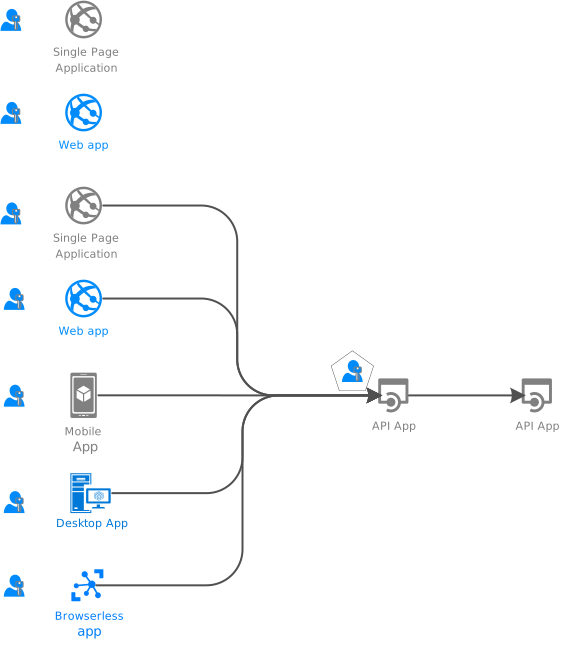 * There are also daemon apps, who acquire tokens representing themselves, not a user.
.. raw:: html
* There are also daemon apps, who acquire tokens representing themselves, not a user.
.. raw:: html
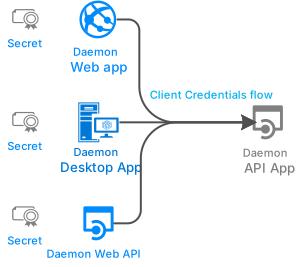 * There are other less common samples, such for ADAL-to-MSAL migration,
`available inside the project code base
* There are other less common samples, such for ADAL-to-MSAL migration,
`available inside the project code base